cnBNG Installation and Configuration

Feature Summary and Revision History

Summary Data

Table 1. Summary Data

Applicable Product(s) or Functional Area

cnBNG

Applicable Platform(s)

SMI

Feature Default Setting

Disabled - Configuration Required

Related Changes in this Release

Not Applicable

Related Documentation

Not Applicable

Revision History

Table 2. Revision History
Revision Details Release

First introduced.

2021.01.0

Feature Description

This chapter describes cnBNG installation and configuration using the Ultra Cloud Core Subscriber Microservices Infrastructure (SMI) Cluster Manager and the BNG Operations (Ops) Center. The BNG Ops Center is based on the ConfD command line interface (CLI).

To install the SMI Cluster Manager, refer to the "Deploying the SMI Cluster Manager on VMware vCenter" section in the Ultra Cloud Core Subscriber Microservices Infrastructure - Deployment Guide.

The SMI Ops Center is the platform to install the cnBNG cluster with the offline or online repository. It is mandatory to install the SMI Ops Center to set up and access the BNG Ops Center.


Note

To access the offline or online repository, contact your Cisco Account Manager or representative to get access to the offline or online repository.

BNG Ops Center

The BNG Ops Center is a system-level infrastructure that provides the following functionality:

  • A user interface to trigger a deployment of microservices with the flexibility of providing variable helm chart parameters to control the scale and properties of Kubernetes objects (deployment, pod, services, and so on) associated with the deployment.

  • A user interface to push application-specific configuration to one or more microservices through Kubernetes configuration maps.

  • A user interface to issue application-specific execution commands (such as show and clear commands). These commands:

    • Invoke some APIs in application-specific pods

    • Display the information returned on the user interface application

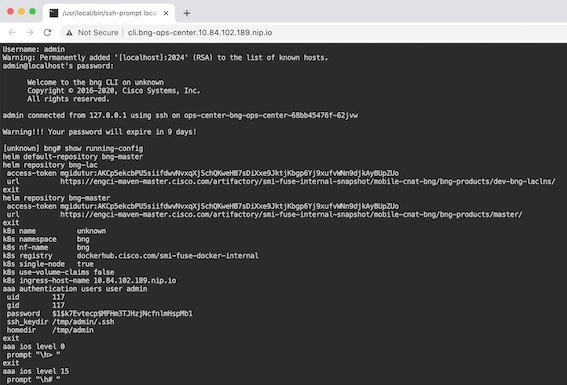
The following figure shows a sample of the web-based CLI presented to the user.


The BNG Ops Center allows you to configure features such as licensing, REST endpoint, and CDL.

Installing cnBNG and Accessing BNG Ops Center

This section describes how to install cnBNG and access the BNG Ops Center.

The Ultra Cloud Core SMI platform is responsible for setting up and managing the Cloud Native Broadband Network Gateway application.


Note

The cnBNG installation is tested and qualified on the VMware vCenter 6.7 environment.

Prerequisites

Before installing cnBNG on the SMI layer in an offline environment:

  • Ensure that the SMI Cluster Manager all-in-one (AIO) is installed. This helps orchestrate the K8s Cluster and load the image.

  • Ensure that all SMI K8s cluster nodes are in Ready state.

  • Run the SMI synchronization operation for the BNG Ops Center and Cloud Native Common Execution Environment (CN-CEE).

    For CEE installation, refer to the Ultra Cloud Core Common Execution Environment- Configuration and Administration Guide.

  • Ensure that the local repositories, which host the product offline TAR ball version, is installed.

System Requirements

Feature

Description

Disk Space

2 x 800 GB SSD (RAID 1) or equivalent input/output operations per second (IOPS) and redundancy.

Hardware

  • High-performance x86 64-bit chipset

  • CPU performance Passmark benchmark of 13K rating per chip and 1,365 rating per thread, or better

  • VMware ESXi-compatible

Note 

The following is recommended:

  • Cisco UCSM5 series blade servers to achieve the best performance.

  • All the host servers should be UCSC-C240-M5SX or UCSC-C220-M5SX.

  • All the UCS systems should have SSD storge type.

  • UCS C240M5 servers for better performance and to avoid infrastructure issues.

Platform

VMware ESXi and VMware vCenter versions 6.5 and 6.7

Note 
SMI Cluster Manger support is qualified on the preceding platforms.

Memory

  • At least DDR3-1600 or better than 1600 MT/s

  • ECC

Deployment Requirement

Hardware oversubscription, network saturation, or CPU oversubscription reduces application performance and productivity. The Cisco Ultra Cloud Core Subscriber Microservices Infrastructure detects and takes action when infrastructure requirements are not met.

Installing cnBNG in an Offline Environment

Using the SMI Cluster Manager, download the offline TAR ball of the cnBNG, the host and its charts, and corresponding images in the local registries. The SMI Cluster Manager supports the deployment of the BNG Ops Center and all the applications and services associated with it. This section describes the procedures involved in installing cnBNG in an offline environment using the SMI Cluster Manager.

To install cnBNG, complete the following steps:

  1. Download the TAR ball from the URL.

    software-packages download URL 

    Example:

    SMI Cluster Manager# software-packages download http://<ipv4address>:<port_number>/packages/bng-2021-02-1.tar 
    
  2. Verify whether the TAR balls are loaded.

    software-packages list 

    Example:

    BNG Cluster Manager# software-packages list 
    [ bng-2021-02-1 ] 
    [ sample ] 
    
  3. Configure the necessary SMI Ops Center parameters in the cluster to install cnBNG.

    config 
       cluster cluster_name 
          ops-centers app_name instance_name 
             repository url 
             netconf-ip ipv4_address 
             netconf-port port 
             ssh-ip ipv4_address 
             ssh-port port 
             ingress-hostname  <ipv4_address>.<customer_specific_domain_name> 
             initial-boot-parameters use-volume-claims true/false 
             initial-boot-parameters first-boot-password password 
             initial-boot-parameters auto-deploy true/false 
             initial-boot-parameters single-node true/false 
             initial-boot-parameters image-pull-secrets 
             exit 
       exit 
    

    Example:

    SMI Cluster Manager# config 
    Entering configuration mode terminal
    SMI Cluster Manager(config)# clusters cnbng-smi-cluster-01
    SMI Cluster Manager(config-clusters-cnbng-smi-cluster-01)# ops-centers bng bng
    SMI Cluster Manager(config-ops-centers-bng/bng)# repository https://charts.10.10.105.50.nip.io/bng-2021.02.1
    SMI Cluster Manager(config-ops-centers-bng/bng)# ingress-hostname 10.10.105.34.nip.io
    SMI Cluster Manager(config-ops-centers-bng/bng)# initial-boot-parameters use-volume-claims true
    SMI Cluster Manager(config-ops-centers-bng/bng)# initial-boot-parameters first-boot-password test123
    SMI Cluster Manager(config-ops-centers-bng/bng)# initial-boot-parameters auto-deploy false
    SMI Cluster Manager(config-ops-centers-bng/bng)# initial-boot-parameters single-node false
    SMI Cluster Manager(config-ops-centers-bng/bng)# exit
    SMI Cluster Manager(config-clusters-cnbng-smi-cluster-01)# exit
    SMI Cluster Manager(config)#
    
  4. Configure the secrets, if your local registry contains secrets.

    config 
       cluster cluster_name 
          secrets docker-registry secret_name 
             docker-server server_name 
             docker-username username 
             docker-password password 
             docker-email email 
             namespace k8s namespace 
             commit 
             exit 
          exit 
    

    Example:

    SMI Cluster Manager# config
    SMI Cluster Manager(config)# clusters test2
    SMI Cluster Manager(config-clusters-test2)# secrets docker-registry sec1
    SMI Cluster Manager(config-docker-registry-sec1)# docker-server serv1
    SMI Cluster Manager(config-docker-registry-sec1)# docker-username user1
    SMI Cluster Manager(config-docker-registry-sec1)# docker-password Cisco@123
    SMI Cluster Manager(config-docker-registry-sec1)# docker-email reg@cisco.com
    SMI Cluster Manager(config-docker-registry-sec1)# bng bng
    SMI Cluster Manager(config-docker-registry-sec1)# exit
    SMI Cluster Manager(config-clusters-test2)# exit
    SMI Cluster Manager(config)#
  5. Run the cluster synchronization.

    clusters cluster_name actions sync run 
    

    Example:

    SMI Cluster Manager# clusters cnbng-smi-cluster-01 actions sync run 
    

Notes:

  • software-packages download url –Specifies the software packages to be downloaded through HTTP/HTTPS.

  • software-packages list –Specifies the list of available software packages.

  • ops-centers app_name instance_name –Specifies the BNG Ops Center and instance. app_name is the application name. instance_name is the name of the instance.

  • repository url -Specifies the local registry URL for downloading the charts.

  • netconf-ip ipv4_address –Specifies the BNG Ops Center netconf IPv4 address.

  • netconf-port port –Specifies the BNG Ops Center netconf port number.

  • ssh-ip ipv4_address –Specifies the SSH IPv4 address for the BNG Ops Center.

  • ssh-port port –Specifies the SSH port number for the BNG Ops Center.

  • ingress-hostname <ipv4_address>.<customer_specific_domain_name> –Specifies the ingress hostname to be set to the BNG Ops Center. <customer_specific_domain_name> specifies the domain name of the customer.

  • initial-boot-parameters –Specifies the initial boot parameters for deploying the helm charts.

    • use-volume-claims true/false –Specifies the usage of persistent volumes. Set this option to True to use persistent volumes. The default value is true.

    • first-boot-password password –Specifies the first boot password for the product's Ops Center.

    • auto-deploy true/false –Auto deploys all the services of the product. Set this option to false to deploy only the product's Ops Center.

    • single-node true/false – Specifies the product deployment on a single node. Set this option to false for multi node deployments.

    • image-pull-secrets –Specifies the docker registry secret name to be used.

  • secrets docker-registry secret_name –Specifies the secret name for your docker registry.

    • docker-server server_name –Specifies the docker server name.

    • docker-username username –Specifies the docker registry user name.

    • docker-password password –Specifies the docker registry password.

    • docker-email email –Specifies the docker registry email.

    • namespace namespace –Specifies the docker registry namespace.

Verifying the cnBNG Installation

Verify the status of the cnBNG installation deployment through the cnBNG CLI. To verify, use the following commands:

  1. Log in to the cnBNG product CLI.

  2. Verify whether the charts are loaded in the specific instance (verify the namespace).

    show helm charts 
    

    Example:

    bng# show helm charts 
    CHART    INSTANCE  STATUS    VERSION  REVISION  RELEASE   NAMESPACE 
    -------------------------------------------------------------------------- 
    infra-charts - DEPLOYED 0.0.6-rel-2021-01-0073-210208130850-fac5207 1 bng-bng-infra-charts bng-bng 
    oam-pod - DEPLOYED 0.1.2-rel-2021-01-0144-210122165946-fcb74ed 1 bng-bng-oam-pod bng-bng 
    bng-dashboard - DEPLOYED 0.0.1-rel-2021-01-0039-210122165311-0d542be 1 bng-bng-bng-dashboard bng-bng 
    etcd-cluster - DEPLOYED 0.7.0-0-7-0060-210203074532-f118407 1 bng-bng-etcd-cluster bng-bng 
    ngn-datastore - DEPLOYED 1.3.0-1-3-0782-210125161812-f50a892 1 bng-bng-ngn-datastore bng-bng 
  3. Verify the status of the system.

    show system status 
    

    Example:

    bng# show system status
    system status deployed true
    system status percent-ready 100.0
    

Notes:

  • show helm charts –Displays the helm release details.

  • show system status –Displays the status of the system.

Accessing BNG Ops Center

You can connect to the BNG Ops Center through SSH or the web-based CLI console.

  1. SSH:

    ssh admin@ops_center_pod_ip -p 2024 
  2. Web-based console:

    1. Log in to the Kubernetes master node.

    2. Run the following command:

      kubectl get ingress <namespace> 

      The available ingress connections get listed.

    3. Select the appropriate ingress and access the BNG Ops Center.

    4. Access the following URL from your web browser:

      cli.<namespace>-ops-center.<ip_address>.nip.io 

      By default, the Day 0 configuration is loaded into the cnBNG.

Day 0 Configuration

To view the Day 0 configuration, run the following command.

show running-config 

The following is a sample Day 0 configuration:

luser@cnbng-smi-cluster-master1:~$ kubectl get svc -n bng-bng | grep ops-center-bng-bng-ops-center
NAME                                  TYPE        CLUSTER-IP       EXTERNAL-IP   PORT(S)                                        AGE
ops-center-bng-bng-ops-center         ClusterIP   10.96.151.115    <none>        8008/TCP,8080/TCP,2024/TCP,2022/TCP,7681/TCP   7m37s
luser@cnbng-smi-cluster-master1:~$ ssh admin@10.96.151.115 -p 2024
Warning: Permanently added '[10.96.151.115]:2024' (RSA) to the list of known hosts.
admin@10.96.151.115's password:
 
      Welcome to the bng CLI on cnbng-smi-cluster/bng
      Copyright © 2016-2020, Cisco Systems, Inc.
      All rights reserved.
   
admin connected from 192.202.0.1 using ssh on ops-center-bng-bng-ops-center-7bddd4cc48-fmb6l
[cnbng-smi-cluster/bng] bng# show running-config
system mode running
helm default-repository base-repos
helm repository base-repos
url      https://engci-maven-master.cisco.com/artifactory/smi-fuse-internal-snapshot/mobile-cnat-bng/bng-products/master/
username <username>
password <password>
exit
k8s name          cnbng-smi-cluster
k8s namespace     bng-bng
k8s nf-name       bng
k8s registry      dockerhub.cisco.com/smi-fuse-docker-internal
k8s single-node   false
k8s use-volume-claims true
k8s ingress-host-name 192.0.2.2.nip.io
aaa authentication users user admin
uid        1117
gid        1117
password   $1$EmkQjvc0$o8K5tXmUzN1.drQgCL0A2/
ssh_keydir /tmp/admin/.ssh
homedir    /tmp/admin
exit
aaa ios level 0
prompt "\h> "
exit
aaa ios level 15
prompt "\h# "
exit
aaa ios privilege exec
level 0
  command action
  exit
  command autowizard
  exit
  command enable
  exit
  command exit
  exit
  command help
  exit
  command startup
  exit
exit
level 15
  command configure
  exit
exit
exit
nacm write-default deny
nacm groups group admin
user-name [ admin ]
exit
nacm rule-list admin
group [ admin ]
rule any-access
  action permit
exit
exit
nacm rule-list confd-api-manager
group [ confd-api-manager ]
rule any-access
  action permit
exit
exit
nacm rule-list ops-center-security
group [ * ]
rule change-self-password
  module-name       ops-center-security
  path              /smiuser/change-self-password
  access-operations exec
  action            permit
exit
rule smiuser
  module-name       ops-center-security
  path              /smiuser
  access-operations exec
  action            deny
exit
exit 
deployment
 app-name     BNG
 cluster-name Local
 dc-name      DC
exit
k8 bng
 etcd-endpoint      etcd:2379
 datastore-endpoint datastore-ep-session:8882
 tracing
  enable
  enable-trace-percent 30
  append-messages      true
  endpoint             jaeger-collector:9411
 exit
exit
k8 label protocol-layer key smi.cisco.com/node-type value protocol
exit
k8 label service-layer key smi.cisco.com/node-type value service
exit
k8 label cdl-layer key smi.cisco.com/node-type value session
exit
k8 label oam-layer key smi.cisco.com/node-type value oam
exit
instances instance 1
 system-id  DC
 cluster-id Local
 slice-name 1
exit
local-instance instance 1
system mode shutdown
helm default-repository base-repos
helm repository base-repos
 url      https://engci-maven-master.cisco.com/artifactory/smi-fuse-internal-snapshot/mobile-cnat-bng/bng-products/master/
 username smf-deployer.gen
 password ***
exit
k8s name          svi-cn-bng-tb3
k8s namespace     bng-bng
k8s nf-name       bng
k8s registry      dockerhub.cisco.com/smi-fuse-docker-internal
k8s single-node   false
k8s use-volume-claims true
k8s ingress-host-name 10.81.103.86.nip.io
aaa authentication users user admin
 uid        1117
 gid        1117
 password   $1$vDWeJvJm$v46wiBWqdOj7eWgoPoZZE/
 ssh_keydir /tmp/admin/.ssh
 homedir    /tmp/admin
exit
aaa ios level 0
 prompt "\h> "
exit
aaa ios level 15
 prompt "\h# "
exit
aaa ios privilege exec
 level 0
  command action
  exit
  command autowizard
  exit
  command enable
  exit
  command exit
  exit
  command help
  exit
  command startup
  exit
 exit
 level 15
  command configure
  exit
 exit
exit
nacm write-default deny
nacm groups group admin
 user-name [ admin ]
exit
nacm rule-list admin
 group [ admin ]
 rule any-access
  action permit
 exit
exit
nacm rule-list confd-api-manager
 group [ confd-api-manager ]
 rule any-access
  action permit
 exit
exit
nacm rule-list ops-center-security
 group [ * ]
 rule change-self-password
  module-name       ops-center-security
  path              /smiuser/change-self-password
  access-operations exec
  action            permit
 exit
 rule smiuser
  module-name       ops-center-security
  path              /smiuser
  access-operations exec
  action            deny
 exit
exit 

CP and UP Service Configuration

The CP service requires the basic configuration to process the API calls.


Note

For information about the User Plane service configuration, refer to the Cloud Native BNG User Plane Configuration Guide for Cisco ASR 9000 Series Routers, IOS XR Release 7.3.x

Configuring the CP

The CP configuration is provided using the Ops Center infrastructure.

The following is a sample CP configuration:

ipam
 source local
 address-pool Default-Pool
  address-quarantine-timer 60
  vrf-name                 default
  ipv4
   split-size
    per-cache 131072
    per-dp    131072
   exit
   address-range 13.0.0.1 13.1.255.255
  exit
  ipv6
   address-ranges
    split-size
     per-cache 65536
     per-dp    65536
    exit
    address-range 1:4::1 1:4::ffff
    address-range 1:5::1 1:5::ffff
    address-range 1:6::1 1:6::ffff
    address-range 1:7::1 1:7::ffff
   exit
   prefix-ranges
    split-size
     per-cache 65536
     per-dp    65536
    exit
    prefix-range 2003:db0:: length 48
    prefix-range 2003:db1:: length 48
    prefix-range 2003:db2:: length 48
    prefix-range 2003:db3:: length 48
   exit
  exit
 exit
 address-pool VRF-Pool
  address-quarantine-timer 60
  vrf-name                 it_vrf
  ipv4
   split-size
    per-cache 131072
    per-dp    131072
   exit
   address-range 14.0.0.1 14.1.255.255
  exit
  ipv6
   address-ranges
    split-size
     per-cache 65536
     per-dp    65536
    exit
    address-range 2:4::1 2:4::ffff
    address-range 2:5::1 2:5::ffff
    address-range 2:6::1 2:6::ffff
    address-range 2:7::1 2:7::ffff
   exit
   prefix-ranges
    split-size
     per-cache 65536
     per-dp    65536
    exit
    prefix-range 2004:db0:: length 48
    prefix-range 2004:db1:: length 48
    prefix-range 2004:db2:: length 48
    prefix-range 2004:db3:: length 48
   exit
  exit
 exit
 address-pool pool-ISP
  address-quarantine-timer 60
  vrf-name                 default
  ipv4
   split-size
    per-cache 131072
    per-dp    131072
   exit
   address-range 11.0.0.1 11.1.255.255
  exit
  ipv6
   address-ranges
    split-size
     per-cache 65536
     per-dp    65536
    exit
    address-range 4:2::1 4:2::ffff
    address-range 4:3::1 4:3::ffff
    address-range 4:4::1 4:4::ffff
    address-range 4:5::1 4:5::ffff
   exit
   prefix-ranges
    split-size
     per-cache 65536
     per-dp    65536
    exit
    prefix-range 2001:db0:: length 48
    prefix-range 2001:db1:: length 48
    prefix-range 2001:db2:: length 48
    prefix-range 2001:db3:: length 48
   exit
  exit
 exit
 address-pool pool-st
  vrf-name default
  static enable user-plane asr9k-2
  ipv4
   split-size
    per-cache 262144
    per-dp    262144
   exit
   address-range 12.0.0.1 12.3.255.254 default-gateway 12.0.0.1
  exit
  ipv6
   address-ranges
    split-size
     per-cache 8192
     per-dp    8192
    exit
    address-range 2:2::1 2:2::ff00
   exit
   prefix-ranges
    split-size
     per-cache 8192
     per-dp    8192
    exit
    prefix-range 3001:db0:: length 48
   exit
  exit
 exit
 address-pool static-pool
  vrf-name access-vrf-1
  static enable user-plane asr9k-1
  ipv4
   split-size
    no-split
   exit
   address-range 20.20.0.0 20.20.0.255 default-gateway 20.20.0.1
  exit
 exit
exit
cdl node-type session
cdl logging default-log-level error
cdl datastore session
 endpoint replica 2
 endpoint settings slot-timeout-ms 750
 index replica 2
 index map 1
 slot replica 2
 slot map 2
 slot notification limit 300
exit
cdl kafka replica 2
profile dhcp dhcp-server1
 ipv4
  mode server
  server
   pool-name   pool-ISP
   dns-servers [ 8.8.8.8 ]
   lease hours 6
   lease minutes 40
  exit
 exit
 ipv6
  mode server
  server
   iana-pool-name pool-ISP
   iapd-pool-name pool-ISP
   lease days 0
   lease hours 4
   lease minutes 2
  exit
 exit
exit
profile dhcp dhcp-server3
 ipv4
  mode server
  server
   pool-name   Default-Pool
   dns-servers [ 8.8.8.8 ]
   lease days 1
   lease hours 6
   lease minutes 3
  exit
 exit
 ipv6
  mode server
  server
   iana-pool-name Default-Pool
   iapd-pool-name Default-Pool
   lease days 1
   lease hours 6
   lease minutes 3
  exit
 exit
exit
profile dhcp dhcp-server4
 ipv4
  mode server
  server
   pool-name   VRF-Pool
   dns-servers [ 8.8.8.8 ]
   lease hours 6
   lease minutes 40
  exit
 exit
 ipv6
  mode server
  server
   iana-pool-name VRF-Pool
   iapd-pool-name VRF-Pool
   lease hours 6
  exit
 exit
exit
profile pppoe bng
 ctrl-pkt-priority 7
 max-payload deny
 service-name      [ value]
 ac-name           123@acname
 ac-cookie         123@accookie
exit
profile aaa aaa-prof1
 authorization
  type subscriber method-order [ local ]
  username value <username>
  password <password>
 exit
 accounting
  method-order [ local ]
 exit
exit
profile server-group local
 radius-group local
exit
profile subscriber subs-default
 dhcp-profile               dhcp-server3
 session-type               ipv4v6
 activate-feature-templates [ svc1 QOS_HSI QOS_IPTV QOS_VOICE ]
 aaa authorize aaa-prof1
exit
profile subscriber subs-prof1
 dhcp-profile               dhcp-server1
 session-type               ipv4v6
 activate-feature-templates [ svc1 ]
 aaa authorize aaa-prof1
exit
profile subscriber subs-prof1-pppoe
 dhcp-profile  dhcp-server1
 pppoe-profile bng
 session-type  ipv4v6
 class ppp_cls_map
  activate-feature-templates [ bng_ft_start ]
  matches
   match-type all
   match protocol [ ppp ]
  exit
 exit
 event session-activate
  class ppp_cls_map
   activate-feature-templates [ bng_ft_activate ]
   matches
    match-type all
    match protocol [ ppp ]
   exit
   aaa authenticate aaa-prof1
  exit
 exit
exit
profile subscriber subs-vrf
 dhcp-profile               dhcp-server4
 session-type               ipv4v6
 activate-feature-templates [ svc3 QOS_VOICE QOS_IPTV QOS_HSI ]
 aaa authorize aaa-prof1
exit
profile subscriber test-ppp-subscriber
 dhcp-profile               dhcp-server3
 pppoe-profile              test-ppp-pppoeprofile
 session-type               ipv4v6
 activate-feature-templates [ svc1 test-ppp-featuretemplate QOS_VOICE QOS_IPTV QOS_HSI ]
 aaa authorize aaa-prof1
exit
profile feature-template ACL-V4
 ipv4
  ingress-acl iACL_BNG_IPv4_IN
  egress-acl  iACL_BNG_IPv4_OUT
 exit
exit
profile feature-template ACL-V6
 ipv6
  ingress-acl v6-IN
  egress-acl  v6-out
 exit
exit
profile feature-template QOS_HSI
 qos
  in-policy   QOS_HSI_100B_IN
  out-policy  QOS_HSI_100B_OUT
  merge-level 30
 exit
 service-accounting
  enable
  aaa-profile       aaa-prof1
  periodic-interval 1800
 exit
exit
profile feature-template QOS_VOICE
 qos
  in-policy   QOS_VOICE_INGRESS
  out-policy  QOS_VOICE_EGRESS
  merge-level 40
 exit
exit
profile feature-template QOS_IPTV
 qos
  in-policy   QOS_IPTV_INGRESS
  out-policy  QOS_IPTV_EGRESS
  merge-level 50
exit
exit
profile feature-template QOS
 qos
  in-policy   QOS-IN
  out-policy  QOS-OUT
  merge-level 10
 exit
 service-accounting
  enable
  aaa-profile aaa-prof1
 exit
exit
profile feature-template bng_ft_activate
 ipv4
  mtu                  1492
  ingress-acl          in4acl3
  disable-unreachables
  verify-unicast-source reachable-via-rx
 exit
 ipv6
  mtu                  1492
  ingress-acl          match-ipv6-acl
  disable-unreachables
  verify-unicast-source reachable-via-rx
 exit
 session-accounting
  enable
  aaa-profile       aaa-prof1
  periodic-interval 1200
 exit
 ppp
  ipcp dns 8.8.8.8 1.2.3.4
  ipcp peer-address-pool pool-ISP
  ipcp renegotiation ignore
  ipv6cp renegotiation ignore
 exit
exit
profile feature-template bng_ft_start
 vrf-name default
 session-accounting
  enable
  aaa-profile       aaa-prof1
  periodic-interval 1200
 exit
 ppp
  authentication [ pap ]
  lcp delay seconds 1 milliseconds 0
  lcp renegotiation ignore
 exit
exit
profile feature-template svc1
 vrf-name default
 ipv4
  mtu                  1492
  ingress-acl          iACL_BNG_IPv4_IN_1
  egress-acl           iACL_BNG_IPv4_OUT_1
  disable-unreachables
  verify-unicast-source reachable-via-rx
 exit
 ipv6
  mtu                  1492
  ingress-acl          ipv6-acl-in-1
  egress-acl           ipv6-acl-out-1
  disable-unreachables
  verify-unicast-source reachable-via-rx
 exit
 session-accounting
  enable
  aaa-profile       aaa-prof1
  periodic-interval 1800
 exit
exit
profile feature-template svc2
 ppp
  ipcp peer-address-pool poolv4
  ipcp renegotiation ignore
  lcp renegotiation ignore
 exit
exit
profile feature-template svc3
 vrf-name it_vrf
 ipv4
  mtu                  1492
  ingress-acl          iACL_BNG_IPv4_IN_1
  egress-acl           iACL_BNG_IPv4_OUT_1
  disable-unreachables
  verify-unicast-source reachable-via-rx
 exit
 ipv6
  mtu                  1492
  ingress-acl          ipv6-acl-in-1
  egress-acl           ipv6-acl-out-1
  disable-unreachables
  verify-unicast-source reachable-via-rx
 exit
 session-accounting
  enable
  aaa-profile       aaa-prof1
  periodic-interval 1800
 exit
exit
profile feature-template svc4
 vrf-name default
 session-accounting
  enable
  aaa-profile       aaa-prof1
  periodic-interval 1800
 exit
exit
profile feature-template test-ppp-featuretemplate
 vrf-name default
 ipv4
  mtu 1400
 exit
 ppp
  ipcp peer-address-pool Default-Pool
  ipcp renegotiation ignore
  ipv6cp renegotiation ignore
  lcp renegotiation ignore
 exit
exit
profile feature-template uRPF
 ipv4
  verify-unicast-source reachable-via-rx
 exit
 ipv6
  verify-unicast-source reachable-via-rx
 exit
exit
profile radius
 algorithm round-robin
 deadtime  3
 detect-dead-server response-timeout 60
 max-retry 1
 timeout   5
 server 172.16.254.55 1812
  type   auth
  secret <secret_value>
 exit
 server 172.16.254.55 1813
  type   acct
  secret <secret_value>
 exit
 server 172.16.254.56 1812
  type   auth
  secret <secret_value>
 exit
 server 172.16.254.56 1813
  type   acct
  secret <secret_value>
 exit
 attribute
  nas-identifier < any identifier>
  nas-ip         172.16.254.86
  nas-port-id < add_unique_id>
 exit
 server-group local
  server auth 172.16.254.55 1812
  exit
  server auth 172.16.254.56 1812
  exit
  server acct 172.16.254.55 1813
  exit
  server acct 172.16.254.56 1813
  exit
 exit
exit
profile coa
 client 172.16.254.55
  server-key < key >
 exit
 client 172.16.254.56
  server-key < key >
 exit
exit
user-plane <add UP name like asr9k-11>
 peer-address ipv4 172.16.247.72
 subscriber-profile subs-default
exit
endpoint sm
exit
endpoint nodemgr
exit
endpoint n4-protocol
exit
endpoint dhcp
exit
endpoint radius
 replicas 1
 vip-ip 172.16.254.86
 interface coa-nas
  sla response 140000
  vip-ip 172.16.254.86 vip-port 2000
 exit
exit
endpoint udp-proxy
 replicas 1
 nodes    2
 vip-ip 172.16.254.86 vip-port 3799
 interface n4
  sla response 150000
 exit
 interface gtpu
  sla response 150000
 exit
exit
endpoint charging
exit
logging transaction duplicate enable
logging name bng-dhcp0.bngfsol.collision level application info
logging name bng-dhcp0.bngfsol.collision level transaction info
logging name infra.application.core level application warn
logging name infra.config.core level application error
logging name infra.config.core level transaction error
k8 bng
 etcd-endpoint      etcd:2379
 datastore-endpoint datastore-ep-session:8882
 tracing
  enable
  enable-trace-percent 30
  append-messages      true
  endpoint             jaeger-collector:9411
 exit
exit
k8 label protocol-layer key smi.cisco.com/vm-type value protocol
exit
k8 label service-layer key smi.cisco.com/vm-type value service
exit
k8 label cdl-layer key smi.cisco.com/vm-type value session
exit
k8 label oam-layer key smi.cisco.com/vm-type value oam
exit
system mode running
exit 
ipam
 instance 1
  source local
  address-pool POOL_1
   address-quarantine-timer 60
   vrf-name                 default
   ipv4
    split-size
     per-cache 32768
     per-dp    32768
    exit
    threshold
     upper-threshold 80
    exit
    address-range 11.0.0.2 11.10.255.254
   exit
   ipv6
    address-ranges
     split-size
      per-cache 32768
      per-dp    32768
     exit
     address-range 2405:1::2 2405:1::ffff
     address-range 2405:2::2 2405:2::ffff
     address-range 2405:3::2 2405:3::ffff
     address-range 2405:4::2 2405:4::ffff
    exit
    prefix-ranges
     split-size
      per-cache 32768
      per-dp    32768
     exit
     prefix-range 3405:1:: length 46
     prefix-range 3405:2:: length 46
     prefix-range 3405:3:: length 46
     prefix-range 3405:4:: length 46
    exit
   exit
  exit
  address-pool POOL_2
   address-quarantine-timer 60
   vrf-name                 VRF-GOLD
   ipv4
    split-size
     per-cache 32768
     per-dp    32768
    exit
    threshold
     upper-threshold 80
    exit
    address-range 12.0.0.2 12.10.255.254
   exit
   ipv6
    address-ranges
     split-size
      per-cache 32768
      per-dp    32768
     exit
     address-range 2406:1::2 2406:1::ffff
     address-range 2406:2::2 2406:2::ffff
     address-range 2406:3::2 2406:3::ffff
     address-range 2406:4::2 2406:4::ffff
    exit
    prefix-ranges
     split-size
      per-cache 32768
      per-dp    32768
     exit
     prefix-range 3406:1:: length 46
     prefix-range 3406:2:: length 46
     prefix-range 3406:3:: length 46
     prefix-range 3406:4:: length 46
    exit
   exit
  exit
  address-pool POOL_3
   address-quarantine-timer 60
   vrf-name                 vrf_lps_asr9k
   ipv4
    split-size
     per-cache 32768
     per-dp    32768
    exit
    threshold
     upper-threshold 80
    exit
    address-range 13.0.0.1 13.255.255.255
   exit
   ipv6
    address-ranges
     split-size
      per-cache 16384
      per-dp    16384
     exit
     address-range 2404:1::1 2404:1::ffff
     address-range 2404:2::1 2404:2::ffff
     address-range 2404:3::1 2404:3::ffff
     address-range 2404:4::1 2404:4::ffff
     address-range 2404:5::1 2404:5::ffff
     address-range 2404:6::1 2404:6::ffff
     address-range 2404:7::1 2404:7::ffff
     address-range 2404:8::1 2404:8::ffff
     address-range 2404:9::1 2404:9::ffff
     address-range 2404:10::1 2404:10::ffff
     address-range 2404:11::1 2404:11::ffff
     address-range 2404:12::1 2404:12::ffff
     address-range 2404:13::1 2404:13::ffff
     address-range 2404:14::1 2404:14::ffff
     address-range 2404:15::1 2404:15::ffff
     address-range 2404:16::1 2404:16::ffff
     address-range 2404:17::1 2404:17::ffff
     address-range 2404:18::1 2404:18::ffff
     address-range 2404:19::1 2404:19::ffff
     address-range 2404:20::1 2404:20::ffff
     address-range 2404:21::1 2404:21::ffff
     address-range 2404:22::1 2404:22::ffff
     address-range 2404:23::1 2404:23::ffff
     address-range 2404:24::1 2404:24::ffff
     address-range 2404:25::1 2404:25::ffff
     address-range 2404:26::1 2404:26::ffff
     address-range 2404:27::1 2404:27::ffff
     address-range 2404:28::1 2404:28::ffff
     address-range 2404:29::1 2404:29::ffff
     address-range 2404:30::1 2404:30::ffff
     address-range 2404:31::1 2404:31::ffff
     address-range 2404:32::1 2404:32::ffff
     address-range 2404:33::1 2404:33::ffff
     address-range 2404:34::1 2404:34::ffff
     address-range 2404:35::1 2404:35::ffff
     address-range 2404:36::1 2404:36::ffff
     address-range 2404:37::1 2404:37::ffff
     address-range 2404:38::1 2404:38::ffff
     address-range 2404:39::1 2404:39::ffff
     address-range 2404:40::1 2404:40::ffff
    exit
    prefix-ranges
     split-size
      per-cache 32768
      per-dp    32768
     exit
     prefix-range 2404:db0:: length 42
     prefix-range 2404:db1:: length 42
     prefix-range 2404:db2:: length 42
     prefix-range 2404:db3:: length 42
     prefix-range 2404:db4:: length 42
     prefix-range 2404:db5:: length 42
     prefix-range 2404:db6:: length 42
     prefix-range 2404:db7:: length 42
     prefix-range 2404:db8:: length 42
     prefix-range 2404:db9:: length 42
    exit
   exit
  exit
 exit
exit
cdl node-type session
cdl logging default-log-level error
cdl datastore session
 slice-names [ 1 ]
 endpoint replica 2
 endpoint settings slot-timeout-ms 750
 index replica 2
 index map 1
 slot replica 2
 slot map 2
 slot notification limit 300
exit
cdl kafka replica 1
profile dhcp DHCP_SERVER_1
 ipv4
  mode server
  server
   pool-name           POOL_1
   dns-servers         [ 8.8.8.8 8.8.8.88 8.8.88.88 ]
   netbios-name-server [ 9.9.9.9 9.9.9.99 9.9.99.99 ]
   domain-name         cisco.com
   boot-filename       cisco.cfg
   next-server         7.7.7.7
   netbios-node-type broadcast-node
   lease days 1
   lease hours 4
   lease minutes 2
  exit
 exit
 ipv6
  mode server
  server
   iana-pool-name POOL_1
   iapd-pool-name POOL_1
   dns-servers    [ 2002::1 2002::2 ]
   domain-name    cisco.com
   preference     255
   aftr-name      aftr.cisco.com
   lease days 1
   lease hours 4
   lease minutes 2
  exit
 exit
exit
profile dhcp DHCP_SERVER_2
 ipv4
  mode server
  server
   pool-name           POOL_1
   dns-servers         [ 8.8.8.8 8.8.8.88 8.8.88.88 ]
   netbios-name-server [ 9.9.9.9 9.9.9.99 9.9.99.99 ]
   domain-name         cisco.com
   boot-filename       cisco.cfg
   next-server         7.7.7.7
   netbios-node-type broadcast-node
   lease days 1
   lease hours 4
   lease minutes 2
  exit
 exit
 ipv6
  mode server
  server
   iana-pool-name POOL_1
   iapd-pool-name POOL_1
   lease days 1
   lease hours 4
   lease minutes 2
  exit
 exit
exit
profile dhcp DHCP_SERVER_3
 ipv4
  mode server
  server
   pool-name   POOL_3
   dns-servers [ 8.8.8.8 ]
   lease hours 6
   lease minutes 1
  exit
 exit
 ipv6
  mode server
  server
   iana-pool-name POOL_3
   iapd-pool-name POOL_3
   lease days 1
   lease hours 4
   lease minutes 2
  exit
 exit
exit
profile dhcp DHCP_SERVER_4
 ipv4
  mode server
  server
   pool-name   POOL_2
   dns-servers [ 8.8.8.8 ]
   lease hours 6
   lease minutes 1
  exit
 exit
 ipv6
  mode server
  server
   iana-pool-name POOL_2
   iapd-pool-name POOL_2
   lease days 1
   lease hours 4
   lease minutes 2
  exit
 exit
exit
profile pppoe PPPOE_PROFILE_1
 ctrl-pkt-priority 7
 service-name      [ cisco ]
 ac-name           123@acname
 ac-cookie         123@accookie
exit
profile aaa AAA_PROF_1
 authentication
  method-order [ SERVER_GROUP_PROF_1 ]
 exit
 authorization
  type subscriber method-order [ SERVER_GROUP_PROF_1 ]
  username identifier client-mac-address
  password cisco
 exit
 accounting
  method-order [ SERVER_GROUP_PROF_1 ]
 exit
exit
profile aaa AAA_PROF_2
 authentication
  method-order [ SERVER_GROUP_PROF_2 ]
 exit
 authorization
  type subscriber method-order [ SERVER_GROUP_PROF_2 ]
  username identifier client-mac-address
  password cisco
 exit
 accounting
  method-order [ SERVER_GROUP_PROF_2 ]
 exit
exit
profile server-group SERVER_GROUP_PROF_1
 radius-group SERVER_GROUP_1
exit
profile server-group SERVER_GROUP_PROF_2
 radius-group SERVER_GROUP_2
exit
profile subscriber SUBS_IPoE_1
 dhcp-profile               DHCP_SERVER_1
 session-type               ipv4v6
 activate-feature-templates [ BASE_TPL_1 ]
 aaa authorize AAA_PROF_1
exit
profile subscriber SUBS_IPoE_2
 dhcp-profile               DHCP_SERVER_3
 session-type               ipv4v6
 activate-feature-templates [ BASE_TPL_2 ]
 aaa authorize AAA_PROF_2
exit
profile subscriber SUBS_IPoE_3
 dhcp-profile               DHCP_SERVER_4
 session-type               ipv4v6
 activate-feature-templates [ BASE_TPL_3 ]
 aaa authorize AAA_PROF_2
exit
profile subscriber SUBS_PPPoE_1
 dhcp-profile  DHCP_SERVER_2
 pppoe-profile PPPOE_PROFILE_1
 session-type  ipv4v6
 class ppp_cls_map
  activate-feature-templates [ FT_START_1 ]
  matches
   match-type all
   match protocol [ ppp ]
  exit
 exit
 event session-activate
  class ppp_cls_map
   activate-feature-templates [ FT_ACTIVATE_1 ]
   matches
    match-type all
    match protocol [ ppp ]
   exit
   aaa authenticate AAA_PROF_1
  exit
 exit
exit
profile subscriber SUBS_PPPoE_2
 dhcp-profile  DHCP_SERVER_3
 pppoe-profile PPPOE_PROFILE_1
 session-type  ipv4v6
 class ppp_cls_map
  activate-feature-templates [ FT_START_1 ]
  matches
   match-type all
   match protocol [ ppp ]
  exit
 exit
 event session-activate
  class ppp_cls_map
   activate-feature-templates [ FT_ACTIVATE_2 HSI_100MB ]
   matches
    match-type all
    match protocol [ ppp ]
   exit
   aaa authenticate AAA_PROF_1
  exit
 exit
exit
profile subscriber SUBS_PPPoE_3
 dhcp-profile  DHCP_SERVER_4
 pppoe-profile PPPOE_PROFILE_1
 session-type  ipv4v6
 class ppp_cls_map
  activate-feature-templates [ FT_START_2 ]
  matches
   match-type all
   match protocol [ ppp ]
  exit
 exit
 event session-activate
  class ppp_cls_map
   activate-feature-templates [ FT_ACTIVATE_3 ]
   matches
    match-type all
    match protocol [ ppp ]
   exit
   aaa authenticate AAA_PROF_1
  exit
 exit
exit
profile feature-template BASE_TPL_1
 vrf-name default
 ipv4
  mtu                  1492
  disable-unreachables
  verify-unicast-source reachable-via-rx
 exit
 ipv6
  mtu                  1492
  disable-unreachables
  verify-unicast-source reachable-via-rx
 exit
 session-accounting
  enable
  aaa-profile AAA_PROF_1
 exit
exit
profile feature-template BASE_TPL_2
 vrf-name vrf_lps_asr9k
 ipv4
  mtu                  1492
  disable-unreachables
  verify-unicast-source reachable-via-rx
 exit
 ipv6
  mtu                  1492
  disable-unreachables
  verify-unicast-source reachable-via-rx
 exit
 qos
  in-policy  qos_svc1_in
  out-policy qos_svc1_out
 exit
 session-accounting
  enable
  aaa-profile AAA_PROF_2
 exit
exit
profile feature-template BASE_TPL_3
 vrf-name VRF-GOLD
 ipv4
  mtu                  1492
  disable-unreachables
  verify-unicast-source reachable-via-rx
 exit
 ipv6
  mtu                  1492
  disable-unreachables
  verify-unicast-source reachable-via-rx
 exit
 session-accounting
  enable
  aaa-profile AAA_PROF_2
 exit
exit
profile feature-template FT_ACTIVATE_1
 vrf-name default
 ipv4
  mtu                  1492
  disable-unreachables
  verify-unicast-source reachable-via-rx
 exit
 ipv6
  mtu                  1492
  disable-unreachables
  verify-unicast-source reachable-via-rx
 exit
 ppp
  ipcp dns 8.8.8.8 1.2.3.4
  ipcp peer-address-pool POOL_1
  ipcp renegotiation ignore
  ipcp wins 4.4.4.4 3.3.3.3
  ipv6cp renegotiation ignore
 exit
exit
profile feature-template FT_ACTIVATE_2
 vrf-name vrf_lps_asr9k
 ipv4
  mtu                  1492
  disable-unreachables
  verify-unicast-source reachable-via-rx
 exit
 ipv6
  mtu                  1492
  disable-unreachables
  verify-unicast-source reachable-via-rx
 exit
 ppp
  ipcp dns 8.8.8.8 1.2.3.4
  ipcp peer-address-pool POOL_3
  ipcp renegotiation ignore
  ipcp wins 4.4.4.4 3.3.3.3
  ipv6cp renegotiation ignore
 exit
exit
profile feature-template FT_ACTIVATE_3
 vrf-name VRF-GOLD
 ipv4
  mtu                  1492
  disable-unreachables
  verify-unicast-source reachable-via-rx
 exit
 ipv6
  mtu                  1492
  disable-unreachables
  verify-unicast-source reachable-via-rx
 exit
 ppp
  ipcp dns 8.8.8.8 1.2.3.4
  ipcp peer-address-pool POOL_2
  ipcp renegotiation ignore
  ipcp wins 4.4.4.4 3.3.3.3
  ipv6cp renegotiation ignore
 exit
exit
profile feature-template FT_START_1
 session-accounting
  enable
  aaa-profile AAA_PROF_1
 exit
 ppp
  authentication [ pap chap ]
  lcp delay seconds 1 milliseconds 0
  lcp renegotiation ignore
  max-bad-auth   4
  max-failure    5
  timeout retry 3
  keepalive interval 60 retry 5
 exit
exit
profile feature-template FT_START_2
 session-accounting
  enable
  aaa-profile AAA_PROF_2
 exit
 ppp
  authentication [ pap chap ]
  lcp delay seconds 1 milliseconds 0
  lcp renegotiation ignore
  max-bad-auth   4
  max-failure    5
  timeout retry 3
  keepalive interval 60 retry 5
 exit
exit
profile feature-template HSI_100MB
 qos
  in-policy  HSI_UPLOAD_RATE_100MB_IN
  out-policy HSI_DOWNLOAD_RATE_100MB_OUT
 exit
exit
profile feature-template HSI_100MB_NO_Merge
 qos
  in-policy  HSI_UPLOAD_RATE_100MB_IN_V4
  out-policy HSI_DOWNLOAD_RATE_100MB_OUT_V4
 exit
exit
profile feature-template HSI_100MB_V4
 qos
  in-policy   HSI_UPLOAD_RATE_100MB_IN_V4
  out-policy  HSI_DOWNLOAD_RATE_100MB_OUT_V4
  merge-level 40
 exit
 service-accounting
  enable
  aaa-profile       AAA_PROF_1
  periodic-interval 1200
 exit
exit
profile radius
 algorithm round-robin
 deadtime  1
 detect-dead-server response-timeout 60
 max-retry 1
 timeout   5
 server 203.203.203.12 1812
  type   auth
  secret $8$uCC1/DzxkoOTeUFsUIUQoqF1Gbrzt6bo2HWRmUH9SCk=
 exit
 server 203.203.203.12 1813
  type   acct
  secret $8$lnsqnr3OZYu6j0+DRGgvic5mOa/wmNw6sAnH4G7BYms=
 exit
 server 203.203.203.13 1812
  type   auth
  secret $8$sI2jG0E3TLnPZ6+EpaSKxIYNayfX6pOo3nV8Y6w2R8I=
 exit
 server 203.203.203.13 1813
  type   acct
  secret $8$49TVXKEXstB7DyK/r/QuxbzGcQ6avGlA4wrgSukSp9s=
 exit
 server 203.203.203.14 1812
  type   auth
  secret $8$qdAzfoAmxVBIX04Xjw//Xywsire0AuNYC8EbKy1lkiQ=
 exit
 server 203.203.203.14 1813
  type   acct
  secret $8$Fxs0QXKUmz93ULLuQo6yH6pjR0mB3CgTx7TRYL2U1Ao=
 exit
 server 203.203.203.15 1812
  type   auth
  secret $8$j6PMUylUXz9Uggo42Zm2z6xfLOicZ8R5ry7tBP60BYo=
 exit
 server 203.203.203.15 1813
  type   acct
  secret $8$oAbeghiPAJ88qqtjZqYihS39Vmyc1iU85WUo6pHpaAw=
 exit
 attribute
  nas-identifier CISCO-BNG
  nas-ip         203.203.203.51
 exit
 server-group SERVER_GROUP_1
  server auth 203.203.203.12 1812
  exit
  server auth 203.203.203.13 1812
  exit
  server acct 203.203.203.12 1813
  exit
  server acct 203.203.203.13 1813
  exit
 exit
 server-group SERVER_GROUP_2
  server auth 203.203.203.12 1812
  exit
  server auth 203.203.203.13 1812
  exit
  server acct 203.203.203.12 1813
  exit
  server acct 203.203.203.13 1813
  exit
 exit
exit
profile coa
 client 203.203.203.11
  server-key $8$l0ZSTRkSki7VIU9Ld31kIFALUH4VipxvUKS0lOskSho=
 exit
 client 203.203.203.13
  server-key $8$ViHTNL8bYPDcrTYXO24AJ1TnsnUJRXP6DBfWF/FX1/8=
 exit
exit
user-plane ASR9k-UP-1
 peer-address ipv4 101.101.101.52
 subscriber-profile SUBS_IPoE_1
 port-id Bundle-Ether5011.1
  subscriber-profile SUBS_IPoE_1
 exit
 port-id Bundle-Ether5011.1011015
  subscriber-profile SUBS_PPPoE_1
 exit
 port-id Bundle-Ether5011.1021015
  subscriber-profile SUBS_PPPoE_1
 exit
 port-id Bundle-Ether5011.1031015
  subscriber-profile SUBS_PPPoE_1
 exit
 port-id Bundle-Ether5011.1041015
  subscriber-profile SUBS_PPPoE_1
 exit
 port-id Bundle-Ether5011.2
  subscriber-profile SUBS_IPoE_1
 exit
 port-id Bundle-Ether5011.3
  subscriber-profile SUBS_IPoE_1
 exit
 port-id Bundle-Ether5011.4
  subscriber-profile SUBS_IPoE_1
 exit
 port-id Bundle-Ether5012.1
  subscriber-profile SUBS_IPoE_3
 exit
 port-id Bundle-Ether5012.1011015
  subscriber-profile SUBS_PPPoE_3
 exit
 port-id Bundle-Ether5012.1021015
  subscriber-profile SUBS_PPPoE_3
 exit
 port-id Bundle-Ether5012.1031015
  subscriber-profile SUBS_PPPoE_3
 exit
 port-id Bundle-Ether5012.1041015
  subscriber-profile SUBS_PPPoE_3
 exit
 port-id Bundle-Ether5012.2
  subscriber-profile SUBS_IPoE_3
 exit
 port-id Bundle-Ether5012.3
  subscriber-profile SUBS_IPoE_3
 exit
 port-id Bundle-Ether5012.4
  subscriber-profile SUBS_IPoE_3
 exit
exit
user-plane ASR9k-UP-2
 peer-address ipv4 101.101.101.51
 subscriber-profile SUBS_IPoE_1
 port-id Bundle-Ether1.1011015
  subscriber-profile SUBS_PPPoE_1
 exit
 port-id Bundle-Ether1.1021015
  subscriber-profile SUBS_PPPoE_1
 exit
 port-id Bundle-Ether1.1031015
  subscriber-profile SUBS_PPPoE_1
 exit
 port-id Bundle-Ether1.1041015
  subscriber-profile SUBS_PPPoE_1
 exit
exit
user-plane lps_asr9k-1
 peer-address ipv4 192.69.1.1
 port-id 8805
  subscriber-profile SUBS_IPoE_2
 exit
 port-id Bundle-Ether1.1
  subscriber-profile SUBS_IPoE_2
 exit
 port-id Bundle-Ether1.2
  subscriber-profile SUBS_PPPoE_2
 exit
exit
user-plane lps_asr9k-10
 peer-address ipv4 192.69.1.10
 port-id 8805
  subscriber-profile SUBS_IPoE_2
 exit
 port-id Bundle-Ether1.1
  subscriber-profile SUBS_IPoE_2
 exit
 port-id Bundle-Ether1.2
  subscriber-profile SUBS_PPPoE_2
 exit
exit
user-plane lps_asr9k-11
 peer-address ipv4 192.69.1.11
 port-id 8805
  subscriber-profile SUBS_IPoE_2
 exit
 port-id Bundle-Ether1.1
  subscriber-profile SUBS_IPoE_2
 exit
 port-id Bundle-Ether1.2
  subscriber-profile SUBS_PPPoE_2
 exit
exit
user-plane lps_asr9k-12
 peer-address ipv4 192.69.1.12
 port-id 8805
  subscriber-profile SUBS_IPoE_2
 exit
 port-id Bundle-Ether1.1
  subscriber-profile SUBS_IPoE_2
 exit
 port-id Bundle-Ether1.2
  subscriber-profile SUBS_PPPoE_2
 exit
exit
user-plane lps_asr9k-13
 peer-address ipv4 192.69.1.13
 port-id 8805
  subscriber-profile SUBS_IPoE_2
 exit
 port-id Bundle-Ether1.1
  subscriber-profile SUBS_IPoE_2
 exit
 port-id Bundle-Ether1.2
  subscriber-profile SUBS_PPPoE_2
 exit
exit
user-plane lps_asr9k-14
 peer-address ipv4 192.69.1.14
 port-id 8805
  subscriber-profile SUBS_IPoE_2
 exit
 port-id Bundle-Ether1.1
  subscriber-profile SUBS_IPoE_2
 exit
 port-id Bundle-Ether1.2
  subscriber-profile SUBS_PPPoE_2
 exit
exit
user-plane lps_asr9k-15
 peer-address ipv4 192.69.1.15
 port-id 8805
  subscriber-profile SUBS_IPoE_2
 exit
 port-id Bundle-Ether1.1
  subscriber-profile SUBS_IPoE_2
 exit
 port-id Bundle-Ether1.2
  subscriber-profile SUBS_PPPoE_2
 exit
exit
user-plane lps_asr9k-16
 peer-address ipv4 192.69.1.16
 port-id 8805
  subscriber-profile SUBS_IPoE_2
 exit
 port-id Bundle-Ether1.1
  subscriber-profile SUBS_IPoE_2
 exit
 port-id Bundle-Ether1.2
  subscriber-profile SUBS_PPPoE_2
 exit
exit
user-plane lps_asr9k-17
 peer-address ipv4 192.69.1.17
 port-id 8805
  subscriber-profile SUBS_IPoE_2
 exit
 port-id Bundle-Ether1.1
  subscriber-profile SUBS_IPoE_2
 exit
 port-id Bundle-Ether1.2
  subscriber-profile SUBS_PPPoE_2
 exit
exit
user-plane lps_asr9k-18
 peer-address ipv4 192.69.1.18
 port-id 8805
  subscriber-profile SUBS_IPoE_2
 exit
 port-id Bundle-Ether1.1
  subscriber-profile SUBS_IPoE_2
 exit
 port-id Bundle-Ether1.2
  subscriber-profile SUBS_PPPoE_2
 exit
exit
user-plane lps_asr9k-19
 peer-address ipv4 192.69.1.19
 port-id 8805
  subscriber-profile SUBS_IPoE_2
 exit
 port-id Bundle-Ether1.1
  subscriber-profile SUBS_IPoE_2
 exit
 port-id Bundle-Ether1.2
  subscriber-profile SUBS_PPPoE_2
 exit
exit
user-plane lps_asr9k-2
 peer-address ipv4 192.69.1.2
 port-id 8805
  subscriber-profile SUBS_IPoE_2
 exit
 port-id Bundle-Ether1.1
  subscriber-profile SUBS_IPoE_2
 exit
 port-id Bundle-Ether1.2
  subscriber-profile SUBS_PPPoE_2
 exit
exit
user-plane lps_asr9k-20
 peer-address ipv4 192.69.1.20
 port-id 8805
  subscriber-profile SUBS_IPoE_2
 exit
 port-id Bundle-Ether1.1
  subscriber-profile SUBS_IPoE_2
 exit
 port-id Bundle-Ether1.2
  subscriber-profile SUBS_PPPoE_2
 exit
exit
user-plane lps_asr9k-21
 peer-address ipv4 192.69.1.21
 port-id 8805
  subscriber-profile SUBS_IPoE_2
 exit
 port-id Bundle-Ether1.1
  subscriber-profile SUBS_IPoE_2
 exit
 port-id Bundle-Ether1.2
  subscriber-profile SUBS_PPPoE_2
 exit
exit
user-plane lps_asr9k-22
 peer-address ipv4 192.69.1.22
 port-id 8805
  subscriber-profile SUBS_IPoE_2
 exit
 port-id Bundle-Ether1.1
  subscriber-profile SUBS_IPoE_2
 exit
 port-id Bundle-Ether1.2
  subscriber-profile SUBS_PPPoE_2
 exit
exit
user-plane lps_asr9k-23
 peer-address ipv4 192.69.1.23
 port-id 8805
  subscriber-profile SUBS_IPoE_2
 exit
 port-id Bundle-Ether1.1
  subscriber-profile SUBS_IPoE_2
 exit
 port-id Bundle-Ether1.2
  subscriber-profile SUBS_PPPoE_2
 exit
exit
user-plane lps_asr9k-24
 peer-address ipv4 192.69.1.24
 port-id 8805
  subscriber-profile SUBS_IPoE_2
 exit
 port-id Bundle-Ether1.1
  subscriber-profile SUBS_IPoE_2
 exit
 port-id Bundle-Ether1.2
  subscriber-profile SUBS_PPPoE_2
 exit
exit
user-plane lps_asr9k-25
 peer-address ipv4 192.69.1.25
 port-id 8805
  subscriber-profile SUBS_IPoE_2
 exit
 port-id Bundle-Ether1.1
  subscriber-profile SUBS_IPoE_2
 exit
 port-id Bundle-Ether1.2
  subscriber-profile SUBS_PPPoE_2
 exit
exit
user-plane lps_asr9k-26
 peer-address ipv4 192.69.1.26
 port-id 8805
  subscriber-profile SUBS_IPoE_2
 exit
 port-id Bundle-Ether1.1
  subscriber-profile SUBS_IPoE_2
 exit
 port-id Bundle-Ether1.2
  subscriber-profile SUBS_PPPoE_2
 exit
exit
user-plane lps_asr9k-27
 peer-address ipv4 192.69.1.27
 port-id 8805
  subscriber-profile SUBS_IPoE_2
 exit
 port-id Bundle-Ether1.1
  subscriber-profile SUBS_IPoE_2
 exit
exit
user-plane lps_asr9k-28
 peer-address ipv4 192.69.1.28
 port-id 8805
  subscriber-profile SUBS_IPoE_2
 exit
 port-id Bundle-Ether1.1
  subscriber-profile SUBS_IPoE_2
 exit
exit
user-plane lps_asr9k-29
 peer-address ipv4 192.69.1.29
 port-id 8805
  subscriber-profile SUBS_IPoE_2
 exit
 port-id Bundle-Ether1.1
  subscriber-profile SUBS_IPoE_2
 exit
exit
user-plane lps_asr9k-3
 peer-address ipv4 192.69.1.3
 port-id 8805
  subscriber-profile SUBS_IPoE_2
 exit
 port-id Bundle-Ether1.1
  subscriber-profile SUBS_IPoE_2
 exit
 port-id Bundle-Ether1.2
  subscriber-profile SUBS_PPPoE_2
 exit
exit
user-plane lps_asr9k-30
 peer-address ipv4 192.69.1.30
 port-id 8805
  subscriber-profile SUBS_IPoE_2
 exit
 port-id Bundle-Ether1.1
  subscriber-profile SUBS_IPoE_2
 exit
exit
user-plane lps_asr9k-31
 peer-address ipv4 192.69.1.31
 port-id 8805
  subscriber-profile SUBS_IPoE_2
 exit
 port-id Bundle-Ether1.1
  subscriber-profile SUBS_IPoE_2
 exit
exit
user-plane lps_asr9k-32
 peer-address ipv4 192.69.1.32
 port-id 8805
  subscriber-profile SUBS_IPoE_2
 exit
 port-id Bundle-Ether1.1
  subscriber-profile SUBS_IPoE_2
 exit
exit
user-plane lps_asr9k-33
 peer-address ipv4 192.69.1.33
 port-id 8805
  subscriber-profile SUBS_IPoE_2
 exit
 port-id Bundle-Ether1.1
  subscriber-profile SUBS_IPoE_2
 exit
exit
user-plane lps_asr9k-34
 peer-address ipv4 192.69.1.34
 port-id 8805
  subscriber-profile SUBS_IPoE_2
 exit
 port-id Bundle-Ether1.1
  subscriber-profile SUBS_IPoE_2
 exit
exit
user-plane lps_asr9k-35
 peer-address ipv4 192.69.1.35
 port-id 8805
  subscriber-profile SUBS_IPoE_2
 exit
 port-id Bundle-Ether1.1
  subscriber-profile SUBS_IPoE_2
 exit
exit
user-plane lps_asr9k-36
 peer-address ipv4 192.69.1.36
 port-id 8805
  subscriber-profile SUBS_IPoE_2
 exit
 port-id Bundle-Ether1.1
  subscriber-profile SUBS_IPoE_2
 exit
exit
user-plane lps_asr9k-37
 peer-address ipv4 192.69.1.37
 port-id 8805
  subscriber-profile SUBS_IPoE_2
 exit
 port-id Bundle-Ether1.1
  subscriber-profile SUBS_IPoE_2
 exit
exit
user-plane lps_asr9k-38
 peer-address ipv4 192.69.1.38
 port-id 8805
  subscriber-profile SUBS_IPoE_2
 exit
 port-id Bundle-Ether1.1
  subscriber-profile SUBS_IPoE_2
 exit
exit
user-plane lps_asr9k-39
 peer-address ipv4 192.69.1.39
 port-id 8805
  subscriber-profile SUBS_IPoE_2
 exit
 port-id Bundle-Ether1.1
  subscriber-profile SUBS_IPoE_2
 exit
exit
user-plane lps_asr9k-4
 peer-address ipv4 192.69.1.4
 port-id 8805
  subscriber-profile SUBS_IPoE_2
 exit
 port-id Bundle-Ether1.1
  subscriber-profile SUBS_IPoE_2
 exit
 port-id Bundle-Ether1.2
  subscriber-profile SUBS_PPPoE_2
 exit
exit
user-plane lps_asr9k-40
 peer-address ipv4 192.69.1.40
 port-id 8805
  subscriber-profile SUBS_IPoE_2
 exit
 port-id Bundle-Ether1.1
  subscriber-profile SUBS_IPoE_2
 exit
exit
user-plane lps_asr9k-41
 peer-address ipv4 192.69.1.41
 port-id 8805
  subscriber-profile SUBS_IPoE_2
 exit
 port-id Bundle-Ether1.1
  subscriber-profile SUBS_IPoE_2
 exit
exit
user-plane lps_asr9k-42
 peer-address ipv4 192.69.1.42
 port-id 8805
  subscriber-profile SUBS_IPoE_2
 exit
 port-id Bundle-Ether1.1
  subscriber-profile SUBS_IPoE_2
 exit
exit
user-plane lps_asr9k-43
 peer-address ipv4 192.69.1.43
 port-id 8805
  subscriber-profile SUBS_IPoE_2
 exit
 port-id Bundle-Ether1.1
  subscriber-profile SUBS_IPoE_2
 exit
exit
user-plane lps_asr9k-44
 peer-address ipv4 192.69.1.44
 port-id 8805
  subscriber-profile SUBS_IPoE_2
 exit
 port-id Bundle-Ether1.1
  subscriber-profile SUBS_IPoE_2
 exit
exit
user-plane lps_asr9k-45
 peer-address ipv4 192.69.1.45
 port-id 8805
  subscriber-profile SUBS_IPoE_2
 exit
 port-id Bundle-Ether1.1
  subscriber-profile SUBS_IPoE_2
 exit
exit
user-plane lps_asr9k-46
 peer-address ipv4 192.69.1.46
 port-id 8805
  subscriber-profile SUBS_IPoE_2
 exit
 port-id Bundle-Ether1.1
  subscriber-profile SUBS_IPoE_2
 exit
exit
user-plane lps_asr9k-47
 peer-address ipv4 192.69.1.47
 port-id 8805
  subscriber-profile SUBS_IPoE_2
 exit
 port-id Bundle-Ether1.1
  subscriber-profile SUBS_IPoE_2
 exit
exit
user-plane lps_asr9k-48
 peer-address ipv4 192.69.1.48
 port-id 8805
  subscriber-profile SUBS_IPoE_2
 exit
 port-id Bundle-Ether1.1
  subscriber-profile SUBS_IPoE_2
 exit
exit
user-plane lps_asr9k-49
 peer-address ipv4 192.69.1.49
 port-id 8805
  subscriber-profile SUBS_IPoE_2
 exit
 port-id Bundle-Ether1.1
  subscriber-profile SUBS_IPoE_2
 exit
exit
user-plane lps_asr9k-5
 peer-address ipv4 192.69.1.5
 port-id 8805
  subscriber-profile SUBS_IPoE_2
 exit
 port-id Bundle-Ether1.1
  subscriber-profile SUBS_IPoE_2
 exit
 port-id Bundle-Ether1.2
  subscriber-profile SUBS_PPPoE_2
 exit
exit
user-plane lps_asr9k-50
 peer-address ipv4 192.69.1.50
 port-id 8805
  subscriber-profile SUBS_IPoE_2
 exit
 port-id Bundle-Ether1.1
  subscriber-profile SUBS_IPoE_2
 exit
exit
user-plane lps_asr9k-6
 peer-address ipv4 192.69.1.6
 port-id 8805
  subscriber-profile SUBS_IPoE_2
 exit
 port-id Bundle-Ether1.1
  subscriber-profile SUBS_IPoE_2
 exit
 port-id Bundle-Ether1.2
  subscriber-profile SUBS_PPPoE_2
 exit
exit
user-plane lps_asr9k-7
 peer-address ipv4 192.69.1.7
 port-id 8805
  subscriber-profile SUBS_IPoE_2
 exit
 port-id Bundle-Ether1.1
  subscriber-profile SUBS_IPoE_2
 exit
 port-id Bundle-Ether1.2
  subscriber-profile SUBS_PPPoE_2
 exit
exit
user-plane lps_asr9k-8
 peer-address ipv4 192.69.1.8
 port-id 8805
  subscriber-profile SUBS_IPoE_2
 exit
 port-id Bundle-Ether1.1
  subscriber-profile SUBS_IPoE_2
 exit
 port-id Bundle-Ether1.2
  subscriber-profile SUBS_PPPoE_2
 exit
exit
user-plane lps_asr9k-9
 peer-address ipv4 192.69.1.9
 port-id 8805
  subscriber-profile SUBS_IPoE_2
 exit
 port-id Bundle-Ether1.1
  subscriber-profile SUBS_IPoE_2
 exit
 port-id Bundle-Ether1.2
  subscriber-profile SUBS_PPPoE_2
 exit
exit
instance instance-id 1
 endpoint sm
 exit
 endpoint nodemgr
 exit
 endpoint n4-protocol
  retransmission timeout 0 max-retry 1
 exit
 endpoint dhcp
 exit
 endpoint pppoe
 exit
 endpoint radius
  replicas 1
  vip-ip 203.203.203.51
  interface coa-nas
   sla response 165000
   vip-ip 203.203.203.51 vip-port 3799
  exit
 exit
 endpoint udp-proxy
  replicas 1
  nodes    2
  vip-ip 203.203.203.51 vip-port 2000
  interface n4
   sla response 165000
  exit
  interface gtpu
   sla response 165000
  exit
 exit
exit
logging transaction duplicate disable
logging level application error
logging level transaction error
logging level tracing error
system mode running
exit 

Configuring the UP

The following is a sample UP configuration:

user-plane asr9k-11
peer-address ipv4 10.105.247.124
subscriber-profile subs-default                 
port-id Bundle-Ether2.10
  subscriber-profile subs-vrf
exit
port-id Bundle-Ether2.20
  subscriber-profile subs-vrf                    
port-id Bundle-Ether2.10
exit
port-id Bundle-Ether2.30
  subscriber-profile subs-vrf             
port-id Bundle-Ether2.10
exit
port-id Bundle-Ether2.40
  subscriber-profile subs-vrf        
port-id Bundle-Ether2.10
exit
exit 

Loading Day1 Configuration

To load the Day 1 configuration for cnBNG, run the following command:

ssh admin@ops_center_pod_ip -p 2024  < Day1config.cli 

Note

The day1config.cli file contains the necessary parameters required for the Day 1 configuration.


Alternatively, you can copy the configuration and paste it in the BNG Ops Center CLI to load the Day 1 configuration.

config
  <Paste the Day 1 configuration here>
  commit
  exit 
Day1config.cli

The day1config.cli file file contains the Day 1 configuration for cnBNG. For a sample day1 configuration, see Configuring the CP.