Configuring SONET on 1-Port OC192/STM-64 or 8-Port OC3/12/48/STM-1/-4/-16 Module

This module describes how to configure Synchronous Optical NETwork (SONET) on 1-Port OC192/STM-64 or 8-Port OC3/12/48/STM-1/-4/-16 Module. SONET defines optical signals and a synchronous frame structure for multiplexed digital traffic. SONET equipment is generally used in North America.

The transport network using SONET provides much more powerful networking capabilities than existing asynchronous systems.

Overview of SONET

SONET is a set of standards that define the rates and formats for optical networks specified in GR–253–CORE. SONET is based on a structure that has a basic frame format and speed. The frame format used by SONET is the Synchronous Transport Signal (STS), with STS-1 as the base-level signal at 51.84 Mbps. An STS-1 frame can be carried in an OC-1 signal.

SONET has a hierarchy of signaling speeds.

Restrictions for SONET

  • Rate combinations on 1-Port OC192/STM-64 or 8-Port OC3/12/48/STM-1/-4/-16 Module are 0-1, 2-3, 4-5, 6-7 and 8. A maximum rate of 4XOC-48 is supported on ports 0-7.

    4XOC-48 can be configured in any one port of a port-group and other port is not used.

  • Only 16 BERT Patterns can be configured at a time on 1-Port OC192/STM-64 or 8-Port OC3/12/48/STM-1/-4/-16 Module.

  • VT1.5 VT cannot be configured if VT1.5 T1/DS1 is configured with the same KLM value.

  • PMON fields are not supported for VT1.5 VT and DS3 or T3.

  • PMON Far-end parameters are not supported.

Restrictions on Bandwidth
  • Total available bandwidth for 1-Port OC192/STM-64 or 8-Port OC3/12/48/STM-1/-4/-16 Module is 10G.

    The following configuration is blocked and an error message is displayed after the maximum bandwidth is utilized:
    rate OC3| OC12| OC48| OC192
    The bandwidth of adjacent ports should not exceed OC-48.

    The following table shows the bandwidth used by different rates:

    Table 1. Bandwidth Used by Different Rates

    Rate

    Bandwidth

    OC-3

    155.52 Mbps

    OC-12

    622.08 Mbps

    OC-48

    2.4 Gbps

    OC-192

    9.6 Gbps

Restrictions for Clock Source Configuration

  • Only 4 ports can be configured in SONET line for clock source configuration per chassis.
  • You should configure the clock source line and network-clock sync together to receive the clock from a remote port that is connected to the SONET port.

SONET Switching

SONET Switching is achieved on optical interface modules by circuit emulation. Circuit Emulation (CEM) is a way to carry TDM circuits over packet switched network. CEM embeds TDM bits into packets, encapsulates them into an appropriate header and then sends that through Packet Switched Network (PSN). The receiver side of CEM restores the TDM bit stream from packets.

Modes of CEM:

  • Structure Agnostic TDM over Packet (SAToP) (RFC 4553) – Structure-Agnostic TDM over Packet (SAToP) mode is used to encapsulate T1/E1 or T3/E3 unstructured (unchannelized) services over packet switched networks. In SAToP mode, the bytes are sent out as they arrive on the TDM line. Bytes do not have to be aligned with any framing.

    In this mode, the interface is considered as a continuous framed bit stream. The packetization of the stream is done according to IETF RFC 4553. All signaling is carried transparently as a part of a bit stream.

  • Circuit Emulation Service over Packet (CEP) (RFC 4842) - CEP mode is used to encapsulate SONET payload envelopes (SPEs) like VT1.5 or VT2 or STS-1 or STS-Nc over packet switched networks. In this mode, the bytes from the corresponding SPE are sent out as they arrive on the TDM line. The interface is considered as a continuous framed bit stream. The packetization of the stream is done according to IETF RFC 4842.

Table 2. Modes of CEM

Mode

CEM

Ports

STS-48C

CEP

OC-48, OC-192

STS-12C

CEP

OC-12, OC-48, OC-192

STS-3C

CEP

OC-12, OC-48, OC-192

STS-1

CEP

OC-3, OC-12, OC-48, OC-192

DS3

SAToP

OC-3, OC-12, OC-48, OC-192

DS3-T1

SAToP

OC-3, OC-12, OC-48, OC-192

VT 1.5

CEP

OC-3, OC-12, OC-48, OC-192

VT DS1

SAToP

OC-3, OC-12, OC-48, OC-192

SONET Hierarchy

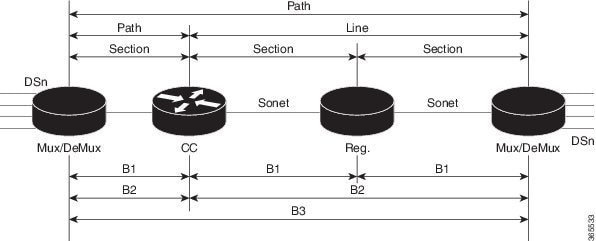
Figure 1. A SONET Link


Each level of the SONET hierarchy terminates its corresponding fields in the SONET payload, as follows:

Section

A section is a single fiber run that can be terminated by a network element (Line or Path) or an optical regenerator.

The main function of the section layer is to properly format the SONET frames, and to convert the electrical signals to optical signals. Section Terminating Equipment (STE) can originate, access, modify, or terminate the section header overhead.

Line

Line-Terminating Equipment (LTE) originates or terminates one or more sections of a line signal. The LTE does the synchronization and multiplexing of information on SONET frames. Multiple lower-level SONET signals can be mixed together to form higher-level SONET signals. An Add/Drop Multiplexer (ADM) is an example of LTE.

Path

Path-Terminating Equipment (PTE) interfaces non-SONET equipment to the SONET network. At this layer, the payload is mapped and demapped into the SONET frame. For example, an STS PTE can assemble 25 1.544 Mbps DS1 signals and insert path overhead to form an STS-1 signal.

This layer is concerned with end-to-end transport of data.

STS-1 and STS-3 Frames

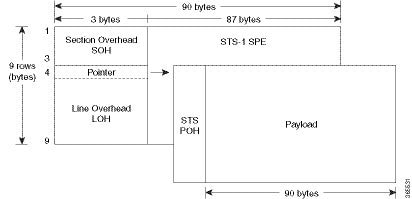
A standard STS-1 frame is nine rows by 90 bytes. The first three bytes of each row represent the Section and Line overhead. These overhead bits comprise framing bits and pointers to different parts of the SONET frame.

Figure 2. STS-1 Frame Structure

There is one column of bytes in the payload that represents the STS path overhead. This column frequently "floats" throughout the frame. Its location in the frame is determined by a pointer in the Section and Line overhead.

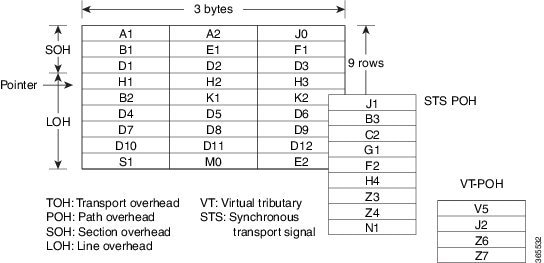
The combination of the Section and Line overhead comprises the transport overhead, and the remainder is the SPE.

Figure 3. STS-1 SONET Overhead

For STS-1, a single SONET frame is transmitted in 125 microseconds, or 8000 frames per second. 8000 fps * 810 B/frame = 51.84 Mbs, of which the payload is roughly 49.5 Mbs, enough to encapsulate 28 DS-1s, a full DS-3, or 21 CEPT-1s.

An STS-3 frame is nine rows by 270 bytes. The first nine columns contain the transport overhead section, and the rest is SPE. For both STS-3 and STS-3c, the transport overhead (Line and Section) is the same.

For an STS-3 frame, the SPE contains three separate payloads and three separate path overhead fields. In essence, it is the SPE of three separate STS-1s packed together, one after another.

For more information on Section Overhead, Line Overhead, and Path Overhead, refer the following:

SONET Line and Section Configuration Parameters

The following parameters affect SONET configuration at the line and section levels:

  • Overhead — Sets the SONET overhead bytes in the frame header to a specific standards requirement, or to ensure interoperability with equipment from another vendors.
    • J0 — Sets the J0 or C1 byte value in the SONET section overhead.

      Note

      1 byte, 16 bytes, and 64 bytes are the supported values for J0.


    • S1S0 — Sets the SS bits value of the H1 byte in the SONET line overhead.

  • Loopback — Sets a loopback to test the SONET port.

  • AIS-Shut — Configures the SONET port to send the Alarm Indication Signal (AIS) at shutdown.

  • Shut — Disables an interface.

  • Alarm Reporting — Enables reporting for all or selected alarms.
    • lias —Enables line alarm indication signal.

    • lrdi — Enables line remote defect indication signal.

    • pais — Enables path alarm indication signal.

    • plop — Enables loss of pointer failure signal for a path.

    • pplm — Enables path payload mismatch indication.

    • prdi — Enables path remote defect indication signal.

    • sd-ber — Sets Signal Degrade BER threshold.

  • Clock — Specifies the clock source, where:
    • line —The link uses the recovered clock from the line.

    • internal — The link uses the internal clock source. This is the default setting.

BERT

Bit-Error Rate Testing (BERT) is used for analyzing quality and for problem resolution of digital transmission equipment. BERT tests the quality of an interface by directly comparing a pseudorandom or repetitive test pattern with an identical locally generated test pattern.

The BERT operation is data-intensive. Regular data cannot flow on the path while the test is in progress. The path is reported to be in alarm state when BERT is in progress and restored to a normal state after BERT has been terminated.

The supported BERT patterns are 2^15, 2^20, 2^23, all 0s and all 1s.

BERT is supported in the following two directions:
  • Line - Supports BERT in TDM direction.

  • System - Supports BERT in PSN direction.

Concatenated SONET Frames

Twenty-eight VTs make up one STS-1. Three STS-1s made up an STS-3 and so on. Any one byte within the STS frame has a direct relationship to a base VT that helps to make up the STS.

A lower-case "c" in the STS rate stands for "concatenated", and indicates that the interface hardware is not channelized. Examples of concatenated interfaces are STS-3c and STS-12c.

The STS-1s may be concatenated into sets of 3 or 12 or 24 or 48 or 192 to form STS-3c, STS-12c, and so on. The STS-1s may be combined only at specific STS-n boundaries within an OC port.

SONET Path Level Configuration Parameters

The following parameters affect SONET configuration at the path level:

  • BERT — Starts the BERT test.

  • Clock — Specifies the clock source for a path.

  • Exit — Exits from SONET path configuration mode.

  • Loopback — Sets the entire path in the loopback mode.

  • Mode — Specifies the path operation mode.

  • No — Negates a command or sets its defaults.

  • Overhead — Configures SONET path overhead flags.

  • Shutdown — Disables the SONET path.

  • Threshold — Sets the path BER threshold values.

  • vtg — Sets the VT-15 configuration.

Channelized SONET Frames

A channelized SONET interface is a composite of lower-speed STS streams. However, a channelized SONET interface maintains the streams as independent frames with unique payload pointers. The frames are simply multiplexed before transmission to increase the carrying capacity of the physical fiber. This process is similar to multiplexing 24 digital signal level 0 channels into a DS1 or multiplexing 28 DS1 streams into a DS3.

SONET T1 Configuration Parameters

The following parameters affect SONET T1 configuration:

  • BERT — Starts the BERT test.

  • Clock — Specifies the clock source for T1 interface.

  • Description — Specifies the description of the controller.

  • Framing — Specifies the type of a framing on T1 interface.

  • Loopback — Sets the T1 interface in the loopback mode.

  • Shutdown — Disables the T1 interface.

SONET T3 Configuration Parameters

The following parameters affect SONET T3 configuration:

  • Clock — Specifies the clock source for T3 link.

  • Description — Specifies the description of the controller.

  • Framing — Specifies the type of a framing on T3 interface.

  • Loopback — Sets the T3 link in the loopback mode.

  • Shutdown — Disables the T3 interface.

SONET VT Configuration Parameters

The following parameters affect SONET VT configuration:

  • BERT — Starts the BERT test.

    CEM Group — Specifies the time slots for CEM group mapping.

  • Clock — Specifies the clock source for VT.

  • Description — Specifies the description of the controller.

  • Loopback — Sets the VT in the loopback mode.

  • Overhead — Configures VT line path overhead flags.

  • Shutdown — Disables the VT interface.

  • Threshold — Configures the VT threshold values.

SONET Protection Switching

Automatic protection switching (APS) is a protection mechanism for SONET networks that enables SONET connections to switch to another SONET circuit when a circuit failure occurs. A protection interface serves as the backup interface for the working interface. When the working interface fails, the protection interface quickly assumes its traffic load.

The SONET protection schemes comply with GR-253 and ITU-T G.783. It allows Optical Interface Module to work seamlessly as SONET Add or Drop Multiplexers (ADMs). The implementation of the above protection schemes allows a pair of SONET lines or paths to be configured for line or path redundancy. In the event of a fiber cut, the active line or path switches automatically to the standby line or path up to 60 milliseconds (2/5/10 millisecond for holdover and 50 millisecond switchovers).

Optical Interface Module supports the following SONET protection switching schemes:

  • Linear Bidirectional 1+1 APS

  • Linear Unidirectional 1+1 APS

1+1 APS

In the 1+1 architecture, there is one working interface (circuit) and one protection interface, and the same payload from the transmitting end is sent to both the receiving ends. The receiving end decides which interface to use. The line overhead (LOH) bytes (K1 and K2) in the SONET frame indicate both status and action.

The protection interfaces need to be configured with an IP address of the chassis that has the working interface, using APS commands. The APS Protect Group Protocol, which runs on top of UDP, provides communication between the process controlling the working interface and the process controlling the protection interface. Using this protocol, interfaces can be switched because of a chassis failure, degradation or loss of channel signal, or manual intervention. In bidirectional mode, the receive and transmit channels are switched as a pair.

Two SONET connections are required to support APS.

The following option is available for linear bidirectional 1+1 APS:
  • Revertive option — For any failure on working line, the software switches to protection line and when the working line recovers, it waits based on the revertive timer and reverts back to working line as active link.
  • Non-revertive option — When the signal fails, the software switches to the protection line and does not automatically revert back to the working line. This is the default option.

The following features are supported on 1+1 APS:
  • SONET PW (SAToP or CEP)

  • SONET local connect

Benefits of APS

The following lists the benefits of APS:

  • APS performs switchovers with minimal loss of data and time-consuming reroutes are avoided.
  • There is no visibility that a failure has occurred beyond the network element in which it is residing; other nodes are not affected by the failure.

  • Implementation of APS guards a network against complex restarts and resynchronizations since failures are isolated to a local device.

  • With APS, the effect of a failure is greatly minimized and a fast switchover guarantees minimal effect on the network.

APS 1+1 for SONET Layer 1 traffic

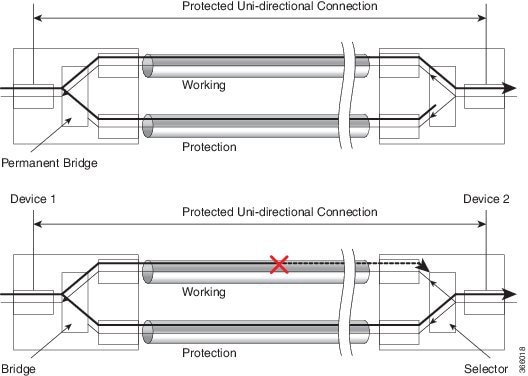
SONET linear APS 1+1 provides protection against both fiber cuts and front card or back card failures. APS 1+1 requires a redundant protection line for every working line. The traffic is simultaneously carried by the working and the protection lines. Hence, the receiver that terminates the APS 1+1 should select the traffic from one of the lines and continue to forward the traffic. APS 1+1 provides protection in unidirectional and bi-directional modes:

  • Uni-directional Protection: The receiving end can switch from working to protection line without any coordination at the transmit end since both lines transmit the same information.
  • Bi-directional Protection: The receiving end switches from working to protection line by coordinating at the transmit end.

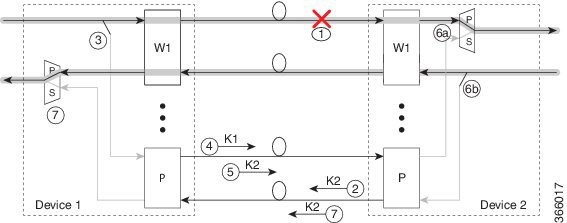
Scenario for Bidirectional APS 1+1
Figure 4. Bidirectional APS 1+1

In the above figure, two devices are connected to provide APS 1+1 bi-directional protection. The highlighted one is the working line and the other is the protection line. The traffic is transmitted on both working and protection lines and received only on one line.

In a scenario where you encounter a fiber cut,

  1. There is a cable cut in the working line. So, the device 2 receives a Loss of Signal (LOS) on working line.

  2. Device 2 starts generating K2 byte and sends it to the Device 1 over the protection line.

  3. Device 1 receives the K2 byte and reacts on the receiving K2 byte.

  4. Device 1 starts sending K1 byte to the Device 2 on the protection line.

  5. Device 1 starts sending K2 byte to Device 2 on the protection line.

  6. Device 2 receives the K1/K2 byte and starts receiving the data from protection line. The protection line now acts as the active line.

  7. Device 2 sends K2 byte over the new active line to Device 1 . Device 1 receives this signal and starts accepting the data from this new active line.

Scenario for Unidirectional APS 1+1
Figure 5. Unidirectional APS 1+1

In the above figure, two devices are connected to provide APS 1+1 unidirectional protection. The figure shows a working line and a protection line. The traffic is transmitted on both working and protection line and received only on one line.

In a scenario where you encounter a fiber cut,

  1. Device 1 receives a LOS on RX working line.

  2. Device 2 detects LOS and starts receiving the data from the protection line. The protection line now becomes the active line.

  3. Device 1 receives the K2 byte and knows about switching event on device 2.

UPSR Path Protection

A Unidirectional Path Switching Ring (UPSR) is a unidirectional network with two rings, one ring used as the working ring and the other as the protection ring. The same signal flows through both rings, one clockwise and the other counterclockwise. It is called UPSR because monitoring is done at the path layer. A node receives two copies of the electrical signals at the path layer, compares them, and chooses the one with the better quality. If part of a ring between two ADMs fails, the other ring still can guarantee the continuation of data flow. UPSR, like the one-plus-one scheme, has fast failure recovery.

UPSR Path Protection is supported at VT level and STS level.

Once a signal fail condition or a signal degrade condition is detected, the hardware initiates an interrupt to software that switches from the working path to the protection path. Non-revertive options are valid for UPSR path protection.


Note

1X OC-192 and 8X OC-48 interface modules only supports the non-revertive option. The non-revertive option is the default mode.

The below table gives the maximum number of path level circuits supported in each mode.

Modes

Supported Scale

VT 1.5

84

STS-1

48

STS 3c

16

STS 12c

4

STS 48c

1

The following feature is supported on UPSR Path Protection:
  • SONET local connect and xconnect are supported at VT15 CEP, STS-1c, STS-3c, STS-12c, and STS-48c levels. UPSR is also supported on TDM endpoints that are mapped to a pseudowire. T1 SAToP, T3 SAToP, and CT3 are not supported on an UPSR ring or in other words, local connect and xconnect of T1, T3, and CT3 circuits to UPSR are not supported.

Configuring UPSR

Protection Group Configuration:

enable
configure terminal
protection-group 401 type STS48c
controller protection-group 401
type STS48c
cem-group 19001 cep
end
Configuring UPSR Work and Protection Path Configuration

UPSR Work Path Configuration:

enable
configure terminal
controller MediaType 0/3/6
mode sonet
controller sonet 0/3/6
rate oc48
sts-1 1 - 48 mode sts-48c 
protection-group 401 working
end

UPSR Protect Path Configuration:

enable
configure terminal
controller MediaType 0/12/6
mode sonet
controller sonet 0/12/6
rate oc48
sts-1 1 - 48 mode sts-48c 
protection-group 401 protect
end
Verification of UPSR Configuration

Use the show protection-group command to verify UPSR configuration:

show protection-group
PGN   Type    Working I/f                Protect I/f              Active Status  
-------------------------------------------------------------------------------
401   STS48C  SONET0/3/6.1-48            SONET0/12/6.1-48           W         A
-------------------------------------------------------------------------------
Status legend:D=Deleted FO=Force SF=SignalFailure SD=SignalDegrade
                        FL=Fail M=Manual L=Lockout C=Clear A=Auto 
 (W)=working, (P)=protect

Alarms at SONET Layers

SONET equipment detects events and alarms at each of SONET's three layers — section, line and path. Typically, a SONET chassis sends alarms both upstream and downstream in order to notify other devices of the problem condition.

SONET Alarm Surveillance

SONET alarm surveillance uses two terms:

  • State—Condition that is reported or detected. A SONET chassis enters a state when the chassis detects the occurrence of an event. A SONET chassis exits that state when the chassis no longer detects the event.

  • Indication—Prompted by a change of state. This indicates the presence of a condition. This document discusses the Alarm Indication Signal (AIS), and Remote Defect Indicator (RDI).

The interface of active alarm or defect is maintained in a down/down state. The process used to troubleshoot down/down SONET interfaces is similar to that for digital interfaces, such as T1 and T3.

Section Alarms

The following section alarms are supported:

  • LOS — Loss of Signal

  • LOF — Loss of Frame

  • SEF — Severely Error Frame

Line Alarms

The following line alarms are supported:

  • AIS-L — Line AIS

  • REI-L — Line Remote Error Indication

  • RDI-L — Line Remote Defect Indication

  • B2 — Line BIP Error (SF/SD)

  • TCA for B2

Path Alarms

The following path alarms are supported:

  • AIS-P — STS Path AIS

  • LOP-P — STS Path Loss of Pointer

  • B3 (SF/SD) — STS Path BIP Error

  • UNEQ-P — STS Path unequipped

  • REI-P — STS Path Remote Error

  • RDI-P — STS Path Remote Defect Indication

  • PLM-P — STS path Payload Label Mismatch

  • LOM — Loss of MultiFrame

  • TCA for B3

VT Alarms

The following VT alarms are supported:

  • AIS-V — VT Path AIS

  • LOP-V — VT Loss of Pointer

  • V-BIP (SF/SD) — VT Path BIP error

  • UNEQ-V — VT Path Unequipped

  • REI-V — VT Path Remote Error

  • RDI-V — VT Path Remote Defect Indication

  • PLM-V — VT path Payload Label Mismatch

  • TCA for VT Level BIP

T1 Alarms

The following T1 alarms are supported:

  • LOS — DS1/E1 Line loss of Signal

  • AIS — DS1/E1 Path Alarm Indication Signal

  • AIS-CI — DS1/E1 Path Alarm Indication Signal Customer Installation

  • LOF — DS1/E1 Path Loss of Frame

  • RDI/RAI — Remote Defect Indication or Remote Alarm Indication

  • RAI-CI — Remote Alarm Indication Customer Installation

  • TCA for Line and Path DS1

T3 Alarms

The following T3 or path alarms are supported:

  • LOS — DS3/E3 Line Loss of Signal

  • OOF — DS3/E3 Path Loss of Frame

  • SEF — DS3/E3 Path Severely Errored Frame

  • AIS — DS3/E3 Path Alarm Indication Signal

  • SEF/AIS-FE — Far End SEF/AIS

  • TCA for Line and Path DS3

Alarm Indicators

Typically, a failure condition detected by a SONET chassis results in one or more error conditions sent both upstream and downstream on the network. An AIS is sent in order to alert downstream chassis of a problem and in order to prevent consequential downstream failures or alarms from being raised.

How to Configure SONET on 1-Port OC192/STM-64 or 8-Port OC3/12/48/STM-1/-4/-16 Interface Module

This section describes how to configure SONET on 1-Port OC192/STM-64 or 8-Port OC3/12/48/STM-1/-4/-16 Interface Module.
Each SFP port (0-7) can be configured as OC-3, OC-12, OC-48, or Gigabit Ethernet. SFP+ port (8) can be configured as OC-192 or 10 Gigabit Ethernet.

Note

To use the above features, you need to apply a valid license.


Prerequisites for Configuring SONET

You must select the MediaType controller to configure and enter the controller configuration mode.

You must configure the controller as a SONET port.

Configuring MediaType Controller

To configure MediaType Controller, use the following commands:

enable
configure terminal
controller MediaType 0/5/0
mode sonet
end

Configuring SONET Ports

To configure SONET ports, use the following commands:

enable
configure terminal
controller MediaType 0/5/0
mode sonet
controller sonet 0/5/0
rate OC12
end
The above example shows how to configure SONET ports in OC-12 mode.

Managing and Monitoring SONET Line

This section describes how to manage and monitor SONET.

Configuring Line and Section Overhead

To configure line and section overhead, use the following commands:

enable
configure terminal
controller MediaType 0/5/0
mode sonet
controller sonet 0/5/0
overhead s1s0 2
overhead j0 tx length 1-byte
end

Note

To restore the system to its default condition, use the no form of the command.


Configuring Line and Section Threshold

To configure line and section threshold, use the following commands:

enable
configure terminal
controller sonet 0/5/0
threshold b2-tca 3
end

Note

To restore the system to its default condition, use the no form of the command.


enable
configure terminal
controller sonet 0/5/0
threshold b2-tca 3
end

Note

To restore the system to its default condition, use the no form of the command.


Configuring Line Loopback

To configure loopback, use the following commands:

enable
configure terminal
controller sonet 0/5/0
loopback local
end

Note

To restore the system to its default condition, use the no form of the command.


Configuring AIS Shut

To configure AIS-Shut, use the following commands:

enable
configure terminal
controller sonet 0/5/0
ais-shut
end

Note

The no ais-shut command will not send AIS.


Configuring Shut

To configure Shut, use the following commands:

enable
configure terminal
controller sonet 0/5/0
shutdown
end

Note

Use the no shutdown command to disable the interface.


Configuring Alarm Reporting

To configure alarm reporting, use the following commands:

enable
configure terminal
controller sonet 0/5/0
alarm-report b2-tcs
end

Note

To restore the system to its default condition, use the no form of the command.


Configuring Clock

To configure clock, use the following commands:

enable
configure terminal
controller MediaType 0/5/0
mode sonet
controller sonet 0/5/0
clock source line
end

Note

The default mode is internal.


Note

To restore the system to its default condition, use the no form of the command.


Configuring Network-Clock SONET

To configure network-clock SONET, use the following commands:

enable
configure terminal
network-clock input-source 1 controller sonet 0/5/0
end

Configuring STS-1 Modes

To configure STS-1 modes, use the following commands:

enable
configure terminal
controller sonet 0/5/0
sts-1 1
mode vt-15
end

Note

There is no default mode. The following modes are supported:
  • mode vt-15

  • mode ct3

  • mode cte-e1

  • mode t3

  • mode unframed

  • mode vt-2


Note

To restore the system to its default condition, use the no form of the command.


Configuring DS1/T1 CT3 mode of STS-1

To configure DS1/T1 CT3 mode of STS-1, you can configure the T1 link using the following steps:

enable
configure terminal
controller sonet 0/5/0
sts-1 1
mode ct3
t1 1 clock source internal
t1 1 framing unframed 
end

Note

To restore the system to its default condition, use the no form of the command.


Configuring STS-Nc - Contiguous Concatenation

To configure STS-Nc - contiguous concatenation, use the following commands:

enable
configure terminal
controller sonet 0/5/0
sts-1 1-3 mode sts-3c
end

Note

To restore the system to its default condition, use the no form of the command.


Note

To configure STS-3c or STS-12c, use the numbers as multiples for 3 or 12, respectively.


Configuring APS

This section describes the configuration of APS.

Configuring Bi-directional ACR (SONET Framing)

To configure bi-directional ACR (SONET Framing), use the following commands:

enable
configure terminal
controller sonet 0/5/0
clock source internal
aps group acr 1
aps working 1
exit
controller sonet 0/4/0
aps group acr 1
aps protect 1 10.7.7.7
end

Note

To restore the system to its default condition, use the no form of the command.


Configuring Unidirectional APS for SAToP

Note

When the aps adm command is not used, the LOS is detected on active port and the L-AIS is transmitted to the remote-end to force APS switchover. This is similar to bi-directional APS mode.

'When the aps adm command is used, the ports are in strict unidirectional mode. When the LOS is detected on active port, the L-AIS is suppressed and behaves in a strict uni-directional mode.


To configure unidirectional ACR (SONET Framing), use the following commands:

enable
configure terminal
controller sonet 0/5/0
clock source internal
aps group acr 1
aps working 1
aps unidirectional
exit
controller sonet 0/4/0
aps group acr 1
aps protect 1 10.7.7.7
aps revert 3
aps adm
end

Note

To restore the system to its default condition, use the no form of the command.


Verifying ACR Configurations
This section includes show commands for ACR: The following example shows the ACR groups that have been configured or deleted:
Router# show acr group
 
ACR Group Working I/f Protect I/f Currently Active Status
 
--------------------------------------------------------------------------
 
1 SONET 4/1/0 SONET 3/1/0 SONET 4/1/0 
The following example shows the configured working and protect CEM interfaces under the ACR controller:
Router# show acr group 1 detail cem 
ACR Group      Working I/f     Protect I/f     Currently Active    Status
--------------------------------------------------------------------------
CE1            CEM0/3/0       CEM0/12/1      CEM0/3/0       

CEM CKT Details
Cktid  State on Working    State on Protect
1         Enable Success      Enable Success
 
The following example shows the configuration under the ACR controller:
Router##show running-config | sec ACR
controller SONET-ACR 1
framing sonet
!
sts-1 1
  mode vt-15
  vtg 1 vt 1 cem-group 1 cep
!
sts-1 2
 !
sts-1 3
interface CEM-ACR1
no ip address
cem 1
!
 
The following example shows the loopback IP address for the router:
Router# show ip interface brief | i Loopback
 
Loopback0 22.22.22.22 YES NVRAM up up 
The following example shows the CEM-ACR circuit status:
Router# show cem circuit
 
CEM Int. ID Ctrlr Admin Circuit AC
--------------------------------------------------------------
CEM-ACR1 1 UP UP Active UP
CEM-ACR1 2 UP UP Active UP
CEM-ACR1 3 UP UP Active UP
CEM-ACR1 4 UP UP Active UP
CEM-ACR1 5 UP UP Active UP
CEM-ACR1 6 UP UP Active UP
CEM-ACR1 7 UP UP Active UP
CEM-ACR1 8 UP UP Active UP 
The following example shows the CEM-ACR circuit details for CEM group 0 under the CEM-ACR interface:
Router# #show cem circuit interface cem-acr 1 1

CEM-ACR1, ID: 1, Line: UP, Admin: UP, Ckt: ACTIVE
Controller state: up, T1/E1 state: up
Idle Pattern: 0xFF, Idle CAS: 0x8
Dejitter: 6 (In use: 0)
Payload Size: 192
Framing: Unframed
CEM Defects Set
None

Signalling: No CAS
RTP: Configured, RTP-HDR Compression: Disabled

Ingress Pkts:    8186065              Dropped:             0                   
Egress Pkts:     8186065              Dropped:             0                   

CEM Counter Details
Input Errors:    0                    Output Errors:       0                   
Pkts Missing:    0                    Pkts Reordered:      0                   
Misorder Drops:  0                    JitterBuf Underrun:  0                   
Error Sec:       0                    Severly Errored Sec: 0                   
Unavailable Sec: 0                    Failure Counts:      0                   
Pkts Malformed:  0                    JitterBuf Overrun:   0                   
Generated Lbits: 0                    Received Lbits:      0                   
Generated Rbits: 0                    Received Rbits:      0               
 
The following example shows the MPLS L2 transport vc details for the specified vc. In this case it is the vc with vc-id = 1001:
Router# sh mpls l2 vc 1 det
Local interface: CE1 up, line protocol up, SATOP T1 1 up
  Destination address: 2.2.2.2, VC ID: 1, VC status: up
    Output interface: Te0/8/0, imposed label stack {100}
    Preferred path: not configured  
    Default path: active
    Next hop: 31.1.1.2
  Create time: 02:48:15, last status change time: 02:47:26
    Last label FSM state change time: 02:47:26
  Signaling protocol: LDP, peer 2.2.2.2:0 up
    Targeted Hello: 1.1.1.1(LDP Id) -> 2.2.2.2, LDP is UP
    Graceful restart: not configured and not enabled
    Non stop routing: configured and enabled
    Status TLV support (local/remote)   : enabled/supported
      LDP route watch                   : enabled
      Label/status state machine        : established, LruRru
      Last local dataplane   status rcvd: No fault
      Last BFD dataplane     status rcvd: Not sent
      Last BFD peer monitor  status rcvd: No fault
      Last local AC  circuit status rcvd: No fault
      Last local AC  circuit status sent: No fault
      Last local PW i/f circ status rcvd: No fault
      Last local LDP TLV     status sent: No status
      Last remote LDP TLV    status rcvd: No fault
      Last remote LDP ADJ    status rcvd: No fault
    MPLS VC labels: local 16, remote 100 
    Group ID: local 38, remote 36
    MTU: local 0, remote 0
    Remote interface description: 
  Sequencing: receive disabled, send disabled
  Control Word: On (configured: autosense)
  SSO Descriptor: 2.2.2.2/1, local label: 16
  Dataplane:
    SSM segment/switch IDs: 274581/4096 (used), PWID: 1
  VC statistics:
    transit packet totals: receive 0, send 0
    transit byte totals:   receive 0, send 0
    transit packet drops:  receive 0, seq error 0, send 0
 
The following example shows the currently configured APS groups on the router:
Router# show aps
 
SONET 0/5/2 APS Group 25: protect channel 0 (Inactive) (HA)
Working channel 1 at 1.1.1.1 (Enabled) (HA)
bidirectional, non-revertive
PGP timers (extended for HA): hello time=1; hold time=10
hello fail revert time=120
Received K1K2: 0x00 0x05
No Request (Null)
Transmitted K1K2: 0x00 0x00
No Request (Null)
Remote APS configuration: (null)
SONET 0/0/2 APS Group 25: working channel 1 (Active) (HA)
Protect at 1.1.1.1
PGP timers (from protect): hello time=1; hold time=10
Remote APS configuration: (null) 
Configuring VT 1.5-T1 Loopback

To configure VT 1.5-T1 loopback, use the following commands:

enable
configure terminal
controller sonet 0/5/0
rate oc3
no ais shut
alarm- report all
framing sonet
clock source internal
sts-1 1
clock source internal
mode vt-15
vtg 1 t1 1 loopback local 
end
Configuring VT 1.5-T1 BERT

To configure VT 1.5-T1 BERT, use the following commands:

enable
configure terminal
controller sonet 0/5/0
rate oc3
no ais shut
alarm- report all
framing sonet
clock source internal
sts-1 1
clock source internal
mode vt-15
vtg 1 t1 1 bert pattern 2^11 interval 10
end
Configuring Path Overhead

This section describes the configuration of path overhead.

C2 Flag

To configure the C2 flag, use the following commands:

enable
configure terminal
controller sonet 0/5/0
sts-1 1
overhead c2 10
end

J1 Flag

To configure the J1 flag, use the following commands:

enable
configure terminal
controller sonet 0/5/0
sts-1 1
overhead j1 expected length
end
Configuring Path Threshold

To configure path threshold, use the following commands:

enable
configure terminal
controller sonet 0/5/0
sts-1 1
threshold b3-tca 3
end

Verification of SONET Configuration

The following sample output shows the verification of SONET configuration:

Router#show controllers sonet 0/3/3
SONET 0/3/3 is up.                                  ======> this is the controller/port status.
  Hardware is asr900 

 Port configured rate: OC3                    =======> this is the rate the port is configured on it.
 Applique type is Channelized Sonet / SDH
 Clock Source is Line                            ===> the clocking config
Medium info:
  Type: Sonet, Line Coding: NRZ,
 SECTION:
  LOS = 0          LOF = 0                              =======> the section level alarm counter (from last clear counters)

SONET/SDH Section Tables
  INTERVAL       CV    ES   SES  SEFS
  05:50-05:58     0     0     0     0                                     ===> PMON for the port

LINE:
  AIS = 0          RDI = 0          REI = 0          BIP(B2) = 0    =======> the line level alarm counter (from last clear counters)
Active Defects: None
Detected Alarms: None                            
Asserted/Active Alarms: None                                       =========> present active alarms on the port.
Alarm reporting enabled for: SLOS SLOF SF B2-TCA
BER thresholds:  SF = 10e-3  SD = 10e-6                     ====> ber thresholds
TCA thresholds:   B2 = 10e-6
Rx: S1S0 = 00
    K1 = 00,   K2 = 00    							 ===> k1k2 values
    J0 = 00
    RX S1 = 00
Tx: S1S0 = 00
    K1 = 00,   K2 = 00
    J0 = 00


High Order Path:

PATH 1:
Clock Source is internal               ====> path level clock

  AIS = 0          RDI = 0          REI = 0          BIP(B3) = 0            ======>   path layer alarms counter
  LOP = 0          PSE = 0          NSE = 0          NEWPTR = 0
  LOM = 0          PLM = 0          UNEQ = 0

Active Defects: None
Detected Alarms: None
Asserted/Active Alarms: None                                          ======> present alarms on the path.
Alarm reporting enabled for: PLOP LOM B3-TCA

TCA threshold:  B3 = 10e-6
Rx: C2 = 00                                        =====> rx and tx C2 byte..
Tx: C2 = 02
PATH TRACE BUFFER : UNSTABLE
 
  00 00 00 00 00 00 00 00 00 00 00 00 00 00 00 00     …………….      ====> path trace of the path
  00 00 00 00 00 00 00 00 00 00 00 00 00 00 00 00     ................
  00 00 00 00 00 00 00 00 00 00 00 00 00 00 00 00     ................
  00 00 00 00 00 00 00 00 00 00 00 00 00 00 00 00     ................

SONET Path Tables
  INTERVAL       CV    ES   SES   UAS
  05:58-05:58     0     0     0     0

PATH 2:
Clock Source is internal

  AIS = 0          RDI = 0          REI = 0          BIP(B3) = 0
  LOP = 0          PSE = 0          NSE = 0          NEWPTR = 0
  LOM = 0          PLM = 0          UNEQ = 0

Active Defects: None
Detected Alarms: None
Asserted/Active Alarms: None
Alarm reporting enabled for: PLOP LOM B3-TCA

TCA threshold:  B3 = 10e-6
Rx: C2 = 00
Tx: C2 = 00

PATH TRACE BUFFER : UNSTABLE
  00 00 00 00 00 00 00 00 00 00 00 00 00 00 00 00     ................
  00 00 00 00 00 00 00 00 00 00 00 00 00 00 00 00     ................
  00 00 00 00 00 00 00 00 00 00 00 00 00 00 00 00     ................
  00 00 00 00 00 00 00 00 00 00 00 00 00 00 00 00     ................

SONET/SDH Path Tables
  INTERVAL       CV    ES   SES   UAS
  05:58-05:58     0     0     0     0


OC3.STS1 0/3/3.1 is up.    ======> present status of the path
  Hardware is asr 900 

 Applique type is VT1.5    =====> mode of the path

 STS-1 1, VTG 1, T1 1 (VT1.5 1/1/1) is down   ====> status of the SPE (t1)
 VT Receiver has no alarm. 
  Receiver is getting AIS.                                ===> alarm of the SPE (t1) 
  Framing is unframed, Clock Source is Internal     =====> framing of the T1, clock of the t1
  Data in current interval (0 seconds elapsed):
     0 Line Code Violations, 0 Path Code Violations
     0 Slip Secs, 0 Fr Loss Secs, 0 Line Err Secs, 0 Degraded Mins
     0 Errored Secs, 0 Bursty Err Secs, 0 Severely Err Secs
     0 Unavail Secs, 0 Stuffed Secs

 STS-1 1, VTG 1, T1 2 (VT1.5 1/1/2) is down
 VT Receiver has no alarm.
  Receiver is getting AIS.

The following table shows each field and its description.

Table 3. Field Description

Field

Description

SONET 0/3/3 is up

Shows that the SONET controller is operating. The controller's state can be up, down, or administratively down.

Port configured rate: OC3

Shows the rate configured on the port.

SECTION: LOS = 0 LOF = 0 BIP = 0

Shows the section level alarm counters.

SONET Section Tables:

INTERVAL CV ES SES SEFS

05:50-05:58 0 0 0 0

Shows the PMON for the port.

LINE:

AIS = 0 RDI = 0 REI = 0 BIP(B2) = 0

Shows the line level alarm counters.

Asserted/Active Alarms: None

Shows the active alarms on the port.

BER thresholds: SF = 10e-3 SD = 10e-6

Shows BER thresholds.

K1 = 00, K2 = 00

Shows the K1 and K2 values.

PATH 1:

Clock Source is internal

Shows the path level clock.

AIS = 0 RDI = 0 REI = 0 BIP(B3) = 0 LOP = 0 PSE = 0 NSE = 0 NEWPTR = 0 LOM = 0 PLM = 0 UNEQ = 0

Shows the path layer alarm counters.

Active Defects: None

Detected Alarms: None

Asserted/Active Alarms: None

Alarm reporting enabled for: PLOP LOM B3-TCA

Shows the alarms on the path.

TCA threshold: B3 = 10e-6

Rx: C2 = 00 =====> rx and tx C2 byte..

Tx: C2 = 02

PATH TRACE BUFFER : UNSTABLE

shows the Rx and Tx C2 bytes.

00 00 00 00 00 00 00 00 00 00 00 00 00 00 00 00 …………….

Shows the path trace.

OC3.STS1 0/3/3.1 is up.

Shows the status of the path.

Applique type is VT1.5

Shows the mode of the path.

STS-1 1, VTG 1, T1 1 (VT1.5 1/1/1) is down

Shows the status of SPE (T1).

Receiver is getting AIS.

Shows the alarm of SPE (T1).

Framing is unframed, Clock Source is Internal

Shows the framing of T1 and clock of the T1.

Performance Monitoring Use Cases or Deployment Scenarios

You can view the statistics or error count generated on the TDM lines for 1-Port OC192/STM-64 or 8-Port OC3/12/48/STM-1/-4/-16 Interface Module.

The performance monitoring result is displayed as output of the show controller sonet command.

SONET/SDH Section Tables
  INTERVAL       CV    ES   SES  SEFS
  09:52-09:52     0     0   388     0

SONET/SDH Section Tables
  INTERVAL       CV    ES   SES  SEFS
  09:52-09:52     0     0   388     0

SONET/SDH Path Tables
  INTERVAL       CV    ES   SES   UAS
  09:52-09:52     0     0     0   388

Data in current interval (360 seconds elapsed):
     0 Line Code Violations, 0 P-bit Coding Violation
     0 C-bit Coding Violation, 0 P-bit Err Secs
     0 P-bit Severely Err Secs, 0 Severely Err Framing Secs
     388 Unavailable Secs, 0 Line Errored Secs
     0 C-bit Errored Secs, 0 C-bit Severely Errored Secs

Data in current interval (360 seconds elapsed):
     0 Line Code Violations, 0 Path Code Violations
     0 Slip Secs, 0 Fr Loss Secs, 0 Line Err Secs, 0 Degraded Mins
     0 Errored Secs, 0 Bursty Err Secs, 0 Severely Err Secs
     361 Unavail Secs, 0 Stuffed Secs

  Data in current interval (360 seconds elapsed):
     0 Line Code Violations, 0 Path Code Violations
     0 Slip Secs, 0 Fr Loss Secs, 0 Line Err Secs, 0 Degraded Mins
     0 Errored Secs, 0 Bursty Err Secs, 0 Severely Err Secs
     360 Unavail Secs, 0 Stuffed Secs

The complete output for the show controller command is described as:

Router#show controllers sonet 0/4/0
SONET 0/4/0 is down.
  Hardware is asr 900  Port configured rate: OC3
 Applique type is Channelized Sonet / SDH
 Clock Source is Line
Medium info:
  Type: Sonet, Line Coding: NRZ, 
 SECTION:
  LOS = 1          LOF = 0                           BIP = 0

SONET/SDH Section Tables
  INTERVAL       CV    ES   SES  SEFS
  09:52-09:52     0     0   388     0

LINE:
  AIS = 0          RDI = 0          REI = 0          BIP(B2) = 0         
Active Defects: None
Detected Alarms: SLOS SLOF LAIS 
Asserted/Active Alarms: SLOS 
Alarm reporting enabled for: SLOS SLOF SF B2-TCA 
BER thresholds:  SF = 10e-3  SD = 10e-6
TCA thresholds:  B2 = 10e-6
Rx: S1S0 = 00
    K1 = 00,   K2 = 00
    J0 = 00 
    RX S1 = 00

Tx: S1S0 = 00
    K1 = 00,   K2 = 00
    J0 = 00

SONET/SDH Line Tables
  INTERVAL       CV    ES   SES   UAS
  09:52-09:52     0     0     0   388


High Order Path:

PATH 1:
Clock Source is internal

  AIS = 0          RDI = 0          REI = 0          BIP(B3) = 0         
  LOP = 0          PSE = 0          NSE = 0          NEWPTR = 0         
  LOM = 0          PLM = 0          UNEQ = 0         

Active Defects: None
Detected Alarms: PAIS 
Asserted/Active Alarms: None
Alarm reporting enabled for: PLOP LOM B3-TCA 

TCA threshold:  B3 = 10e-6
Rx: C2 = 00
Tx: C2 = 04

PATH TRACE BUFFER : UNSTABLE 

  00 00 00 00 00 00 00 00 00 00 00 00 00 00 00 00     ................
  00 00 00 00 00 00 00 00 00 00 00 00 00 00 00 00     ................
  00 00 00 00 00 00 00 00 00 00 00 00 00 00 00 00     ................
  00 00 00 00 00 00 00 00 00 00 00 00 00 00 00 00     ................
  
SONET/SDH Path Tables
  INTERVAL       CV    ES   SES   UAS
  09:52-09:52     0     0     0   388

PATH 2:
Clock Source is internal

  AIS = 0          RDI = 0          REI = 0          BIP(B3) = 0         
  LOP = 0          PSE = 0          NSE = 0          NEWPTR = 0         
  LOM = 0          PLM = 0          UNEQ = 0         

Active Defects: None
Detected Alarms: PAIS 
Asserted/Active Alarms: None
Alarm reporting enabled for: PLOP LOM B3-TCA 

TCA threshold:  B3 = 10e-6
Rx: C2 = 00
Tx: C2 = 04

PATH TRACE BUFFER : UNSTABLE 

  00 00 00 00 00 00 00 00 00 00 00 00 00 00 00 00     ................
  00 00 00 00 00 00 00 00 00 00 00 00 00 00 00 00     ................
  00 00 00 00 00 00 00 00 00 00 00 00 00 00 00 00     ................
  00 00 00 00 00 00 00 00 00 00 00 00 00 00 00 00     ................
  
SONET/SDH Path Tables
  INTERVAL       CV    ES   SES   UAS
  09:52-09:52     0     0     0   388
          
PATH 3:
Clock Source is internal

  AIS = 0          RDI = 0          REI = 0          BIP(B3) = 0         
  LOP = 0          PSE = 0          NSE = 0          NEWPTR = 0         
  LOM = 0          PLM = 0          UNEQ = 0         

Active Defects: None
Detected Alarms: PAIS 
Asserted/Active Alarms: None
Alarm reporting enabled for: PLOP LOM B3-TCA 

TCA threshold:  B3 = 10e-6
Rx: C2 = 00
Tx: C2 = 02

PATH TRACE BUFFER : UNSTABLE 

  00 00 00 00 00 00 00 00 00 00 00 00 00 00 00 00     ................
  00 00 00 00 00 00 00 00 00 00 00 00 00 00 00 00     ................
  00 00 00 00 00 00 00 00 00 00 00 00 00 00 00 00     ................
  00 00 00 00 00 00 00 00 00 00 00 00 00 00 00 00     ................
          
SONET/SDH Path Tables
  INTERVAL       CV    ES   SES   UAS
  09:52-09:52     0     0     0   388


OC3.STS1 0/4/0 Path 1 is down.
  Hardware is asr 900 

  Applique type is T3
  Receiver is getting AIS.
  Framing is C-BIT Parity
  Clock Source is internal
  Equipment customer loopback
  Data in current interval (360 seconds elapsed):
     0 Line Code Violations, 0 P-bit Coding Violation
     0 C-bit Coding Violation, 0 P-bit Err Secs
     0 P-bit Severely Err Secs, 0 Severely Err Framing Secs
     388 Unavailable Secs, 0 Line Errored Secs
     0 C-bit Errored Secs, 0 C-bit Severely Errored Secs
OC3.STS1 0/4/0.2 is down.
  Hardware is asr 900 

  Applique type is Channelized T3 to T1
  Receiver is getting AIS.
  Framing is Unknown
  Clock Source is internal
  Equipment customer loopback
  Data in current interval (360 seconds elapsed):
     0 Line Code Violations, 0 P-bit Coding Violation
     0 C-bit Coding Violation, 0 P-bit Err Secs
     0 P-bit Severely Err Secs, 0 Severely Err Framing Secs
     388 Unavailable Secs, 0 Line Errored Secs
     0 C-bit Errored Secs, 0 C-bit Severely Errored Secs

 STS-1 2, T1 1 (CT3 21) is down
  Receiver is getting AIS.
  Framing is unframed, Clock Source is Internal
  Data in current interval (360 seconds elapsed):
     0 Line Code Violations, 0 Path Code Violations
     0 Slip Secs, 0 Fr Loss Secs, 0 Line Err Secs, 0 Degraded Mins
     0 Errored Secs, 0 Bursty Err Secs, 0 Severely Err Secs
     361 Unavail Secs, 0 Stuffed Secs

 STS-1 2, T1 28 (CT3 228) is down
  Receiver is getting AIS.
  Framing is unframed, Clock Source is Internal
  Data in current interval (360 seconds elapsed):
     0 Line Code Violations, 0 Path Code Violations
     0 Slip Secs, 0 Fr Loss Secs, 0 Line Err Secs, 0 Degraded Mins
     0 Errored Secs, 0 Bursty Err Secs, 0 Severely Err Secs
     361 Unavail Secs, 0 Stuffed Secs

OC3.STS1 0/4/0.3 is down.
  Hardware is asr 900 

 Applique type is VT1.5

 STS-1 3, VTG 1, T1 1 (VT1.5 3/1/1)
    Not configured.
          
 STS-1 3, VTG 1, T1 2 (VT1.5 3/1/2) is down
 VT Receiver has no alarm.
  Receiver is getting AIS.
  Framing is unframed, Clock Source is Internal
  Data in current interval (360 seconds elapsed):
     0 Line Code Violations, 0 Path Code Violations
     0 Slip Secs, 0 Fr Loss Secs, 0 Line Err Secs, 0 Degraded Mins
     0 Errored Secs, 0 Bursty Err Secs, 0 Severely Err Secs
     360 Unavail Secs, 0 Stuffed Secs

ONS Pluggables

A comprehensive range of pluggable optical modules is available. .

Configuring ONS Pluggables

To configure ONS Pluggables, use the following commands:

enable
configure terminal
controller mediatype 0/12/0
mode sonet
exit
controller sonet 0/12/0
rate oc3

Verifying the Supported Pluggables

Before you configure the ONS pluggables, use the following commands to verify the supported plugables:

show hw-module subslot <slot/bay> transceiver <port> status:

The Transceiver in slot 0 subslot 7 port 4 is enabled.
  Module temperature                        = +46.636 C
  Transceiver Tx supply voltage             = 3291.5 mVolts
  Transceiver Tx bias current               = 17264 uAmps
  Transceiver Tx power                      = -2.9 dBm
  Transceiver Rx optical power              = -7.4 dBm

Note

The show hw-module subslot <slot/bay> transceiver <port> status displays as Enabled if the pluggables are supported and the command displays as Disabled if the pluggables are not supported.

show hw-module subslot <slot/bay> transceiver <port> idprom:

show hw-module subslot 0/7 transceiver 6 idprom detail 
IDPROM for transceiver SPA-1T8S-10CS_7/6:
  Description                               = SFP or SFP+ optics (type 3)
  Transceiver Type:                         = ONS SE Z1 (406)
  Product Identifier (PID)                  = ONS-SE-Z1           
  Vendor Revision                           = A   
  Serial Number (SN)                        = FNS19251NPM     
  Vendor Name                               = CISCO-FINISAR   
  Vendor OUI (IEEE company ID)              = 00.90.65 (36965)
  CLEI code                                 = WMOTCZPAAA
  Cisco part number                         = 10-1971-04
  Device State                              = Enabled.
  Date code (yy/mm/dd)                      = 15/06/19
  Connector type                            = LC.
  Encoding                                  = 8B10B
                                              NRZ
                                              Manchester
  Nominal bitrate                           = OC48/STM16 (2500 Mbits/s)
  Minimum bit rate as % of nominal bit rate = not specified
  Maximum bit rate as % of nominal bit rate = not specified
  The transceiver type is 406 
  Link reach for 9u fiber (km)              = IR-1(15km) (15)
  Link reach for 50u fiber (m)              = SR(2km) (0)
                                              IR-1(15km) (0)
                                              IR-2(40km) (0)
                                              LR-1(40km) (0)
                                              LR-2(80km) (0)
                                              LR-3(80km) (0)
                                              DX(40KM) (0)
                                              HX(40km) (0)
                                              ZX(80km) (0)
                                              VX(100km) (0)
                                              1xFC, 2xFC-SM(10km) (0)
                                              ESCON-SM(20km) (0)
  Link reach for 62.5u fiber (m)            = SR(2km) (0)
                                              IR-1(15km) (0)
                                              IR-2(40km) (0)
                                              LR-1(40km) (0)
                                              LR-2(80km) (0)
                                              LR-3(80km) (0)
                                              DX(40KM) (0)
                                              HX(40km) (0)
                                              ZX(80km) (0)
                                              VX(100km) (0)
                                              1xFC, 2xFC-SM(10km) (0)
                                              ESCON-SM(20km) (0)
  Nominal laser wavelength                  = 1310 nm.
  DWDM wavelength fraction                  = 1310.0  nm.
  Supported options                         = Tx disable
                                              Tx fault signal
                                              Loss of signal (standard implementation)
  Supported enhanced options                = Alarms for monitored parameters
                                              Software Rx LOS monitoring
  Diagnostic monitoring                     = Digital diagnostics supported
                                              Diagnostics are externally calibrated
                                              Rx power measured is "Average power"
  Transceiver temperature operating range   = -40 C to 85 C (industrial)
  Minimum operating temperature             = -40 C
  Maximum operating temperature             = 85 C
  High temperature alarm threshold          = +90.000 C
  High temperature warning threshold        = +85.000 C
  Low temperature warning threshold         =  -40.000 C
  Low temperature alarm threshold           =  -45.000 C
  High voltage alarm threshold              = 3630.0 mVolts
  High voltage warning threshold            = 3470.0 mVolts
  Low voltage warning threshold             = 3140.0 mVolts
  Low voltage alarm threshold               = 2971.2 mVolts
  High laser bias current alarm threshold   = 85.000 mAmps
  High laser bias current warning threshold = 65.000 mAmps
  Low laser bias current warning threshold  = 4.000 mAmps
  Low laser bias current alarm threshold    = 2.000 mAmps
  High transmit power alarm threshold       =  4.0 dBm
  High transmit power warning threshold     =  2.0 dBm
  Low transmit power warning threshold      = -7.0 dBm
  Low transmit power alarm threshold        = -9.0 dBm
  High receive power alarm threshold        =  1.0 dBm
  Low receive power alarm threshold        = -26.0 dBm
  High receive power warning threshold        = -1.0 dBm
  Low receive power warning threshold        = -24.9 dBm
  External Calibration: bias current slope  = 1.000
  External Calibration: bias current offset = 0

show hw-module subslot <slot/bay> transceiver <port> idprom brief:

sh hw-module subslot 0/7 transceiver 6 idprom brief 
IDPROM for transceiver SPA-1T8S-10CS_7/6:
  Description                               = SFP or SFP+ optics (type 3)
  Transceiver Type:                         = ONS SE Z1 (406)
  Product Identifier (PID)                  = ONS-SE-Z1           
  Vendor Revision                           = A   
  Serial Number (SN)                        = FNS19251NQ0     
  Vendor Name                               = CISCO-FINISAR   
  Vendor OUI (IEEE company ID)              = 00.90.65 (36965)
  CLEI code                                 = WMOTCZPAAA
  Cisco part number                         = 10-1971-04
  Device State                              = Enabled.
  Date code (yy/mm/dd)                      = 15/06/19
  Connector type                            = LC.
  Encoding                                  = 8B10B
                                              NRZ
                                              Manchester
  Nominal bitrate                           = OC48/STM16 (2500 Mbits/s)
  Minimum bit rate as % of nominal bit rate = not specified
  Maximum bit rate as % of nominal bit rate = not specified

Associated Commands

The following table shows the Associated Commands for SONET configuration:

Commands

Links

ais-shut

http://www.cisco.com/c/en/us/td/docs/ios-xml/ios/interface/command/ir-cr-book/ir-a1.html#wp7654966010

alarm-report

http://www.cisco.com/c/en/us/td/docs/ios-xml/ios/interface/command/ir-cr-book/ir-a1.html#wp2800999060

aps adm

http://www.cisco.com/c/en/us/td/docs/ios-xml/ios/interface/command/ir-cr-book/ir-a1.html#wp8015117230

aps group

http://www.cisco.com/c/en/us/td/docs/ios-xml/ios/interface/command/ir-cr-book/ir-a1.html#wp1674734739

aps protect

http://www.cisco.com/c/en/us/td/docs/ios-xml/ios/interface/command/ir-cr-book/ir-a1.html#wp2073867702

aps revert

http://www.cisco.com/c/en/us/td/docs/ios-xml/ios/interface/command/ir-cr-book/ir-a1.html#wp4063780600

aps unidirectional

http://www.cisco.com/c/en/us/td/docs/ios-xml/ios/interface/command/ir-cr-book/ir-a1.html#wp5340799170

aps working

http://www.cisco.com/c/en/us/td/docs/ios-xml/ios/interface/command/ir-cr-book/ir-a1.html#wp8949584630

cem-group cem-group-number cep

http://www.cisco.com/c/en/us/td/docs/ios-xml/ios/interface/command/ir-cr-book/ir-c1.html#wp2440628600

controller mediatype

http://www.cisco.com/c/en/us/td/docs/ios-xml/ios/interface/command/ir-cr-book/ir-c2.html#wp1201337639

controller protection-group

http://www.cisco.com/c/en/us/td/docs/ios-xml/ios/mcl/allreleasemcl/all-book/all-03.html

controller sonet

http://www.cisco.com/c/en/us/td/docs/ios-xml/ios/interface/command/ir-cr-book/ir-c2.html#wp2020468554

clock source

http://www.cisco.com/c/en/us/td/docs/ios-xml/ios/interface/command/ir-cr-book/ir-c2.html#wp3604380959

loopback

http://www.cisco.com/c/en/us/td/docs/ios-xml/ios/interface/command/ir-cr-book/ir-l2.html#wp2735045490

mode sonet

http://www.cisco.com/c/en/us/td/docs/ios-xml/ios/interface/command/ir-cr-book/ir-l2.html#wp2327088950

mode sts-nc

http://www.cisco.com/c/en/us/td/docs/ios-xml/ios/interface/command/ir-cr-book/ir-l2.html#wp1791424945

mode vt-15

http://www.cisco.com/c/en/us/td/docs/ios-xml/ios/interface/command/ir-cr-book/ir-l2.html#wp1137973905

overhead c2

http://www.cisco.com/c/en/us/td/docs/ios-xml/ios/interface/command/ir-cr-book/ir-o1.html#wp1973678817

overhead j0

http://www.cisco.com/c/en/us/td/docs/ios-xml/ios/interface/command/ir-cr-book/ir-o1.html#wp4338698890

overhead j1

http://www.cisco.com/c/en/us/td/docs/ios-xml/ios/interface/command/ir-cr-book/ir-o1.html#wp1987243836

overhead s1s0

http://www.cisco.com/c/en/us/td/docs/ios-xml/ios/interface/command/ir-cr-book/ir-o1.html#wp2779929239

protection-group

http://www.cisco.com/c/en/us/td/docs/ios-xml/ios/mcl/allreleasemcl/all-book/all-10.html

protection-group [working | protect ]

http://www.cisco.com/c/en/us/td/docs/ios-xml/ios/mcl/allreleasemcl/all-book/all-10.html

rate [OC3 | OC12 | OC48 | OC192 ]

http://www.cisco.com/c/en/us/td/docs/ios-xml/ios/interface/command/ir-cr-book/ir-o1.html#wp4442889730

shutdown

http://www.cisco.com/c/en/us/td/docs/ios-xml/ios/interface/command/ir-cr-book/ir-s6.html#wp3364503641

show controllers sonet

http://www.cisco.com/c/en/us/td/docs/ios-xml/ios/interface/command/ir-cr-book/ir-s3.html#wp1341372847

show hw-module subslot transceiver

http://www.cisco.com/c/en/us/td/docs/ios-xml/ios/interface/command/ir-cr-book/ir-s4.html#wp6553420000

show protection-group

http://www.cisco.com/c/en/us/td/docs/ios-xml/ios/mcl/allreleasemcl/all-book/all-14.html

sts-1

http://www.cisco.com/c/en/us/td/docs/ios-xml/ios/interface/command/ir-cr-book/ir-s6.html#wp2423232697

t1 t1-line-number framing

http://www.cisco.com/c/en/us/td/docs/ios-xml/ios/interface/command/ir-cr-book/ir-t1.html#wp2623191253

t1 t1-line-number clock source

http://www.cisco.com/c/en/us/td/docs/ios-xml/ios/interface/command/ir-cr-book/ir-t1.html#wp3480850667

threshold

http://www.cisco.com/c/en/us/td/docs/ios-xml/ios/interface/command/ir-cr-book/ir-t1.html#wp2311589330

type sts48c

http://www.cisco.com/c/en/us/td/docs/ios-xml/ios/mcl/allreleasemcl/all-book/all-15.html

vtg vtg-line-number t1 t1-line-number loopback

http://www.cisco.com/c/en/us/td/docs/ios-xml/ios/interface/command/ir-cr-book/ir-t2.html#wp3494199143

Additional References for Configuring SONET on 1-Port OC192/STM-64 or 8-Port OC3/12/48/STM-1/-4/-16 Interface Module

Related Documents

Related Topic

Document Title

Cisco IOS commands

http://www.cisco.com/en/US/docs/ios/mcl/allreleasemcl/all_book.html

Standards

Standards

Title

There are no standards for this feature.

MIBs

MIB

MIBs Link

To locate and download MIBs for selected platforms, Cisco IOS releases, and feature sets, use Cisco MIB Locator found at the following URL:

http://www.cisco.com/go/mibs

RFCs

RFCs

Title

There are no RFCs for this feature.

Technical Assistance

Description

Link

The Cisco Support website provides extensive online resources, including documentation and tools for troubleshooting and resolving technical issues with Cisco products and technologies.

To receive security and technical information about your products, you can subscribe to various services, such as the Product Alert Tool (accessed from Field Notices), the Cisco Technical Services Newsletter, and Really Simple Syndication (RSS) Feeds.

Access to most tools on the Cisco Support website requires a Cisco.com user ID and password.

http://www.cisco.com/cisco/web/support/index.html