Configuring Data Communication Channel

The Data Communication Channel (DCC) feature uses the SONET or SDH Operation Administration and Maintenance (OAM) channel to manage devices that support SONET or SDH interfaces. SONET or SDH standards support extensive operations, administration, management, and provisioning (OAM&P) capabilities.

The following overhead bytes are specified in the standards as the OAM channels that carry management information, alarms, and management commands:
  • D1 to D3 bytes of the Section overhead

  • D4 to D12 bytes of the Line overhead

These overhead bytes are referred to as the Data Communication Channel (DCC). The Line-level DCC is a 576 kbps OAM channel; the Section-level DCC is a 192 kbps OAM channel. DCC feature uses the data communications channel to access network devices that are connected through SONET/SDH interfaces for management access.

ITU-G.7712 has defined the following three DCC network domains:
  • OSI DCC network

  • IP DCC network

  • OSI+IP DCC network

Effective Cisco IOS XE Everest 16.6.1 release, only OSI DCC network and IP DCC network are supported, which implies that same type of network resides on either side of the router.
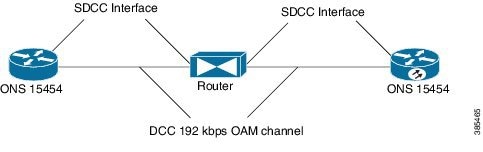
Figure 1. Implementation of DCC
As shown in the figure above, the logical interface for DCC channels is called a SONET Data Communications Channel (SDCC). Each SDCC interface is assigned an IP address. The Routing Information Protocol (RIP) is used as the routing protocol for the IP DCC network.
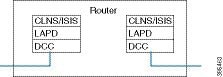
For OSI network, CLNS or ISIS protocol is used for routing and node discovery. The data layer encapsulation is LAPD.
Figure 2. DCC for OSI Network
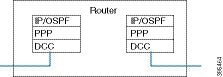
For IP netwok, IP or OSPF protocol is used for routing and node discovery. The data layer encapsulation is PPP.
Figure 3. DCC for IP Network
Static IP configuration and PPP authentication are also supported. DCC also works with APS 1+1 protection infrastructure.

Restrictions of DCC

  • Only routing IP and OSI domains are supported; layers 4–7 of OSI model is not supported.

  • Interworking of OSPI and IP domains is not supported.

  • CLNS MTU supported is 1489 on routers.

  • CLNS interoperability with ONS is not supported.

  • IS-IS packet bigger than LAPD MTU is not dropped.

  • 1+1 APS with CLNS mode is not supported.

  • During a CRC mismatch, the interface reaches Up state under the LAPD UITS mode after SSO.

  • Under LAPD encapsulation mode, the default LAPD role and modes are not displayed in the running configuration.

  • DCC termination on APS controllers is not supported.

Configuring PPP

To configure PPP:
enable
configure terminal
controller mediatype 0/3/4
mode sonet
controller sonet 0/3/4
rate oc48
dcc enable [section | line]
interface [sdcc | ldcc] 0/3/4
ip unnumbered loopback 1
encapsulation ppp
crc 16 | 32
exit
interface loopback 1
ip address 2.2.2.2 255.255.255.255
router ospf 1
network 2.2.2.0 0.0.0.255 area 0
end

Note

CRC 32 is for SDCC and CRC 16 is for LDCC.


Configuring CLNS or LAPD

To configure CLNS or LAPD:
enable
configure terminal
controller mediatype 0/3/4
mode sonet
controller sonet 0/3/4
rate oc48
dcc enable [section | line]
interface [sdcc | ldcc] 0/3/4
encapsulation lapd
clns mtu 1489
lapd role user
clns router isis R1_R2
router isis R1_R2
network 47.0039.3333.3333.3333.00
end

Note

When you configure LAPD role user on router, you should not configure the other router as LADP role user. It should be network and not user.


Verification of DCC Configiration

Use show clns neighbors , show ip ospf neighbor , show ip int br | I DCC , and show interface SDCC commands to verify DCC configuration.
#show clns neighbors
Tag R1_R2:

Tag null:
System Id       Interface     SNPA                State  Holdtime  Type Protocol
NCS4216_2       LD0/3/4       *LAPD*              Up     9         L1L2 IS-IS

Tag ethernet:
System Id       Interface     SNPA                State  Holdtime  Type Protocol
NCS4216_1       Te0/1/8       5006.ab62.6062      Up     54        L1   IS-IS
#show ip ospf neighbor
Neighbor ID     Pri   State           Dead Time   Address         Interface
3.3.3.4           1   FULL/BDR        00:00:35    3.3.3.4         TenGigabitEthernet0/1/8
6.6.6.2           0   FULL/  -        00:00:37    2.2.2.1         SDCC0/3/4
#show ip int br | i DCC
LDCC0/3/4              5.5.5.2         YES NVRAM  up                    up
SDCC0/3/6              2.2.2.1         YES TFTP   up                    down
SDCC0/3/7              2.2.2.1         YES TFTP   up                    up
SDCC0/4/7              8.8.8.8         YES TFTP   down                  down