- Preface
- Chapter 1 Overview
- Chapter 2 Using the aregcmd Commands
- Chapter 3 Using the Graphical User Interface
- Chapter 4 Cisco Prime Access Registrar Server Objects
- Chapter 5 Using the radclient Command
- Chapter 6 Configuring Local Authentication and Authorization
- Chapter 7 RADIUS Accounting
- Chapter 8 Diameter
- Chapter 9 Extensible Authentication Protocols
- Chapter 10 Using WiMAX in Cisco Prime Access Registrar
- Chapter 11 Using Extension Points
- Chapter 12 Using Replication
- Chapter 13 Using On-Demand Address Pools
- Chapter 14 Using Identity Caching
- Chapter 15 Using Trusted ID Authorization with SESM
- Chapter 16 Using Prepaid Billing
- Chapter 17 Using Cisco Prime Access Registrar Server Features
- Chapter 18 Directing RADIUS Requests
- Chapter 19 Wireless Support
- Chapter 20 Using LDAP
- Chapter 21 Using Open Database Connectivity
- Chapter 22 SIGTRAN-M3UA
- Chapter 23 Using SNMP
- Chapter 24 Enforcement of Licensing Models
- Chapter 25 Backing Up the Database
- Chapter 26 Using the REX Accounting Script
- Chapter 27 Logging Syslog Messages
- Chapter 28 Troubleshooting Cisco Prime Access Registrar
- Appendix A: Cisco Prime Access Registrar Tcl, REX and Java Dictionaries
- Appendix B: Environment Dictionary
- Appendix C: RADIUS Attributes
- Glossary
- Index
Overview
The chapter provides an overview of the RADIUS server, including connection steps, RADIUS message types, and using Cisco Prime Access Registrar (Cisco Prime AR) as a proxy server.
Cisco Prime AR is a RADIUS (Remote Authentication Dial-In User Service) server that enables multiple dial-in Network Access Server (NAS) devices to share a common authentication, authorization, and accounting database.
Cisco Prime AR handles the following tasks:
• Authentication—determines the identity of users and whether they can be allowed to access the network
•Authorization—determines the level of network services available to authenticated users after they are connected
•Accounting—keeps track of each user's network activity
•Session and resource management—tracks user sessions and allocates dynamic resources
Using a RADIUS server allows you to better manage the access to your network, as it allows you to store all security information in a single, centralized database instead of distributing the information around the network in many different devices. You can make changes to that single database instead of making changes to every network access server in your network.
Cisco Prime AR also allows you to manage the complex interconnections of the new network elements in order to:
•adequately manage the traffic
•perform appropriate load balancing for desired load distribution
•allow binding of different protocol interfaces corresponding to a subscriber/network element
Service providers transform their 3G and 4G wireless networks with complex services, tiered charging, converged billing, and more by introducing increasing numbers and types of Diameter-based network elements. LTE and IMS networks are the most likely to implement these new network elements—including Policy and Charging Rules Functions (PCRF), Home Subscriber Servers (HSS), Mobility Management Entities (MME), Online Charging Systems (OCS), and others. As a result, as the traffic levels grow, these wireless networks are becoming more difficult to manage and scale without the Cisco Prime AR infrastructure.
This chapter contains the following sections:
•Cisco Prime Access Registrar Hierarchy
•Cisco Prime Access Registrar Directory Structure
•Service and Ports Used in Cisco Prime AR
Cisco Prime Access Registrar Hierarchy
Cisco Prime AR's operation and configuration is based on a set of objects. These objects are arranged in a hierarchical structure much like the Windows 95 Registry or the UNIX directory structure. Cisco Prime AR's objects can themselves contain subobjects, just as directories can contain subdirectories. These objects include the following:
•Radius— the root of the configuration hierarchy
•UserLists—contains individual UserLists which in turn contain users
•UserGroups—contains individual UserGroups
•Clients—contains individual Clients
•Vendors—contains individual Vendors
•Scripts—contains individual Scripts
•Services—contains individual Services
•SessionManagers—contains individual Session Managers
•ResourceManagers—contains individual Resource Managers
•Profiles—contains individual Profiles
•RemoteServers—contains individual RemoteServers
•Advanced—contains Ports, Interfaces, Reply Messages, and the Attribute dictionary
This section contains the following topics:
•Session Management Using Resource Managers
UserLists and Groups
Cisco Prime AR lets you organize your user community through the configuration objects UserLists, users, and UserGroups.
•Use UserLists to group users by organization, such as Company A and Company B. Each list contains the actual names of the users.
•Use Users to store information about particular users, such as name, password, group membership, base profile, and so on.
•Use UserGroups to group users by function, such as PPP, Telnet, or multiprotocol users. Groups allow you to maintain common authentication and authorization requirements in one place, and have them referenced by many users.
For more information about UserLists and UserGroups, see UserLists and Groups in Chapter 4 "Cisco Prime Access Registrar Server Objects."
Profiles
Cisco Prime AR uses Profiles that allow you to group RADIUS attributes to be included in an Access-Accept packet. These attributes include values that are appropriate for a particular user class, such as PPP or Telnet user. The user's base profile defines the user's attributes, which are then added to the response as part of the authorization process.
Although you can use Group or Profile objects in a similar manner, choosing whether to use one rather than the other depends on your site. If you require some choice in determining how to authorize or authenticate a user session, then creating specific profiles, and specifying a group that uses a script to choose among the profiles is more flexible. In such a situation, you might create a default group and then write a script that selects the appropriate profile based on the specific request. The benefit to this technique is each user can have a single entry, and use the appropriate profile depending on the way they log in.
For more information about Profiles, see Profiles in Chapter 4 "Cisco Prime Access Registrar Server Objects."
Scripts
Cisco Prime AR allows you to create scripts you can execute at various points within the processing hierarchy.
•Incoming scripts—enable you to read and set the attributes of the request packet, and set or change the Environment dictionary variables. You can use the environment variables to control subsequent processing, such as specifying the use of a particular authentication service.
•Outgoing scripts—enable you to modify attributes returned in the response packet.
For more information about Scripts, see Scripts in the Chapter 4 "Cisco Prime Access Registrar Server Objects."
Services
Cisco Prime AR uses Services to let you determine how authentication, authorization, and/or accounting are performed.
For example, to use Services for authentication:
•When you want the authentication to be performed by the Cisco Prime AR RADIUS server, you can specify the local service. In this, case you must specify a specific UserList.
•When you want the authentication performed by another server, which might run an independent application on the same or different host than your RADIUS server, you can specify either a radius, ldap, or tacacs-udp service. In this case, you must list these servers by name.
When you have specified more than one authentication service, Cisco Prime AR determines which one to use for a particular Access-Request by checking the following:
•When an incoming script has set the Environment dictionary variable Authentication-Service with the name of a Service, Cisco Prime AR uses that service.
•Otherwise, Cisco Prime AR uses the default authentication service. The default authentication service is a property of the Radius object.
Cisco Prime AR chooses the authentication service based on the variable Authentication-Service, or the default. The properties of that Service, specify many of the details of that authentication service, such as, the specific user list to use or the specific application (possibly remote) to use in the authentication process.
For more information about Services, see Services in the Chapter 4 "Cisco Prime Access Registrar Server Objects."
Session Management Using Resource Managers
Cisco Prime AR lets you track user sessions, and/or allocate dynamic resources to users for the lifetime of their session. You can define one or more Session Managers, and have each one manage the sessions for a particular group or company.
Session Managers use Resource Managers, which in turn manage resources of a particular type as described below.
•IP-Dynamic—manages a pool of IP addresses and allows you to dynamically allocate IP addresses from that pool
•IP-Per-NAS-Port—allows you to associate ports to specific IP addresses, and thus ensure each NAS port always gets the same IP address
•IPX-Dynamic—manages a pool of IPX network addresses
•Group-Session-Limit—manages concurrent sessions for a group of users; that is, it keeps track of how many sessions are active and denies new sessions after the configured limit has been reached
•User-Session-Limit—manages per-user concurrent sessions; that is, it keeps track of how many sessions each user has and denies the user a new session after the configured limit has been reached
•USR-VPN—manages Virtual Private Networks (VPNs) that use USR NAS Clients.
For more information about Session Managers, see Session Managers in Chapter 4 "Cisco Prime Access Registrar Server Objects."
If necessary, you can create a complex relationship between the Session Managers and the Resource Managers.
When you need to share a resource among Session Managers, you can create multiple Session Managers that refer to the same Resource Manager. For example, if one pool of IP addresses is shared by two departments, but each department has a separate policy about how many users can be logged in concurrently, you might create two Session Managers and three Resource Managers. One dynamic IP Resource Manager that is referenced by both Session Managers, and two concurrent session Resource Managers, one for each Session Manager.
In addition, Cisco Prime AR lets you pose queries about sessions. For example, you can query Cisco Prime AR about which session (and thus which NAS-Identifier, NAS-Port and/or User-Name) owns a particular resource, as well as query Cisco Prime AR about how many resources are allocated or how many sessions are active.
Cisco Prime Access Registrar Directory Structure
The installation process populates the /opt/CSCOar directory with the subdirectories listed in Table 1-1.
Program Flow
When a NAS sends a request packet to Cisco Prime AR with a name and password, Cisco Prime AR performs the following actions. Table 1-2 describes the flow without regard to scripting points.
Scripting Points
Cisco Prime AR lets you invoke scripts you can use to affect the Request, Response, or Environment dictionaries. This section contains the following topics:
•Client or NAS Scripting Points
•Authentication and/or Authorization Scripting Points
Client Scripting
Though, Cisco Prime AR allows external code (Tcl/C/C++/Java) to be used by means of a script, custom service, policy engine, and so forth, while processing request, response, or while working with the environment dictionaries, it shall not be responsible for the scripts used and will not be liable for any direct, indirect, incidental, special, exemplary, or consequential damages (including, but not limited to, procurement of substitute goods or services; loss of use, data, or profits; or business interruption) however caused and on any theory of liability, whether in contract, strict liability, or tort (including negligence or otherwise) arising in any way out of the use of the script.
Client or NAS Scripting Points
Table 1-3 shows the location of the scripting points within the section that determines whether to accept the request from the client or NAS. Note, the scripting points are indicated with the asterisk (*) symbol.
Authentication and/or Authorization Scripting Points
Table 1-4 shows the location of the scripting points within the section that determines whether to perform authentication and/or authorization.
Session Management
The Session Management feature requires the client (NAS or proxy) to send all RADIUS accounting requests to the Cisco Prime AR server performing session management. (The only exception is if the clients are USR/3Com Network Access Servers configured to use the USR/3Com RADIUS resource management feature.) This information is used to keep track of user sessions, and the resources allocated to those sessions.
When another accounting RADIUS server needs this accounting information, the Cisco Prime AR server performing session management might proxy it to this second server.
The count-session lr all command helps to count the total sessions in Cisco Prime AR. The options are similar to the query-session command options. The query-session command displays cached attributes in addition to session details.
Table 1-5 describes how Cisco Prime AR handles session management.
This section contains the following topics:
•Failover by the NAS and Session Management
•Cross Server Session and Resource Management
Failover by the NAS and Session Management
When a Network Access Server's primary RADIUS server is performing session management, and the NAS determines the server is not responding and begins sending requests to its secondary RADIUS server, the following occurs:
•The secondary server will not know about the current active sessions that are maintained on the primary server. Any resources managed by the secondary server must be distinct from those managed by the primary server, otherwise it will be possible to have two sessions with the same resources (for example, two sessions with the same IP address).
•The primary server will miss important information that allows it to maintain a correct model of what sessions are currently active (because the authentication and accounting requests are being sent to the secondary server). This means when the primary server comes back online and the NAS begins using it, its knowledge of what sessions are active will be out-of-date and the resources for those sessions are allocated even if they are free to allocate to someone else.
For example, the user-session-limit resource might reject new sessions because the primary server does not know some of the users using the resource logged out while the primary server was offline. It might be necessary to release sessions manually using the aregcmd command release-session.

Note It might be possible to avoid this situation by having a disk drive shared between two systems with the second RADIUS server started up once the primary server has been determined to be offline. For more information on this setup, contact Technical Support.
Cross Server Session and Resource Management
Cisco Prime AR can manage sessions and resources across AAA Server boundaries. A session can be created by an Access-Request sent to Cisco Prime AR1, and it can be removed by an Accounting-Stop request sent to Cisco Prime AR2, as shown in Figure 1-1. This enables accurate tracking of User and Group session limits across multiple AAA Servers, and IP addresses allocated to sessions are managed in one place.
Figure 1-1 Multiple Cisco Prime AR Server
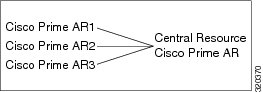
All resources that must be shared cross multiple front line Cisco Prime ARs are configured in the Central Resource Cisco Prime AR. Resources that are not shared can still be configured at each front line Cisco Prime AR.
When the front line Cisco Prime AR receives the access-request, it does the regular AA processing. If the packet is not rejected and a Central Resource Cisco Prime AR is also configured, the front line Cisco Prime AR will proxy the packet1 to the configured Central Resource Cisco Prime AR. If the Central Resource Cisco Prime AR returns the requested resources, the process continues to the local session management (if local session manager is configured) for allocating any local resources. If the Central Resource Cisco Prime AR cannot allocate the requested resource, the packet is rejected.
When the Accounting-Stop packet arrives at the frontline Cisco Prime AR, Cisco Prime AR does the regular accounting processing. Then, if the front line Cisco Prime AR is configured to use Central Resource Cisco Prime AR, a proxy packet will be sent to Central Resource Cisco Prime AR for it to release all the allocated resources for this session. After that, any locally allocated resources are released by the local session manager.
Session-Service Service Step and Radius-Session Service
A new Service step has been added in the processing of Access-Request and Accounting packets. This is an additional step after the AA processing for Access packet or Accounting processing for Accounting packet, but before the local session management processing. The Session-Service should have a service type of radius-session.
An environment variable Session-Service is introduced to determine the Session-Service dynamically. You can use a script or the rule engine to set the Session-Service environment variable.
Configure Front Line Cisco Prime Access Registrar
To use a Central Resource server, the DefaultSessionService property must be set or the Session-Service environment variable must be set through a script or the rule engine. The value in the Session-Service variable overrides the DefaultSessionService.
The configuration parameters for a Session-Service service type are the same as those for configuring a radius service type for proxy, except the service type is radius-session.
The configuration for a Session-Service Remote Server is the same as configuring a proxy server.
[ //localhost/Radius ]
Name = Radius
Description =
Version = 6.0
IncomingScript =
OutgoingScript =
DefaultAuthenticationService = local-users
DefaultAuthorizationService = local-users
DefaultAccountingService = local-file
DefaultSessionService = Remote-Session-Service
DefaultSessionManager = session-mgr-1
[ //localhost/Radius/Services ]
Remote-Session-Service/
Name = Remote-Session-Service
Description =
Type = radius-session
IncomingScript =
OutgoingScript =
OutagePolicy = RejectAll
OutageScript =
MultipleServersPolicy = Failover
RemoteServers/
1. central-server
[ //localhost/Radius/RemoteServers ]
central-server/
Name = central-server
Description =
Protocol = RADIUS
IPAddress = 209.165.200.224
Port = 1645
ReactivateTimerInterval = 300000
SharedSecret = secret
Vendor =
IncomingScript =
OutgoingScript =
MaxTries = 3
InitialTimeout = 2000
AccountingPort = 1646
Configure Central Cisco Prime AR
Resources at the Central Resource server are configured the same way as local resources are configured. These resources are local resources from the Central Resource server's point of view.
Script Processing Hierarchy
For request packets, the script processing order is from the most general to the most specific. For response packets, the processing order is from the most specific to the most general.
Table 1-6, Table 1-7, and Table 1-8 show the overall processing order and flow:
(1-6) Incoming Scripts, (7-11) Authentication/Authorization Scripts, and (12-17) Outgoing Scripts.
Note The client and the NAS can be the same entity, except when the immediate client is acting as a proxy for the actual NAS.
RADIUS Protocol
Cisco Prime AR is based on a client/server model, which supports AAA (authentication, authorization, and accounting). The client is the Network Access Server (NAS) and the server is Cisco Prime AR. The client passes user information on to the RADIUS server and acts on the response it receives. The server, on the other hand, is responsible for receiving user access requests, authenticating and authorizing users, and returning all of the necessary configuration information the client can then pass on to the user.
The protocol is a simple packet exchange in which the NAS sends a request packet to the Cisco Prime AR with a name and a password. Cisco Prime AR looks up the name and password to verify it is correct, determines for which dynamic resources the user is authorized, then returns an accept packet that contains configuration information for the user session (Figure 1-2).
Figure 1-2 Packet Exchange Between User, NAS, and RADIUS
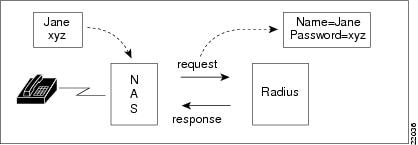
Cisco Prime AR can also reject the packet if it needs to deny network access to the user. Or, Cisco Prime AR can issue a challenge that the NAS sends to the user, who then creates the proper response and returns it to the NAS, which forwards the challenge response to Cisco Prime AR in a second request packet.
In order to ensure network security, the client and server use a shared secret, which is a string they both know, but which is never sent over the network. User passwords are also encrypted between the client and the server to protect the network from unauthorized access.
This section contains the following topics:
Steps to Connection
Three participants exist in this interaction: the user, the NAS, and the RADIUS server.
Setting up the connection
To describe the receipt of an access request through the sending of an access response:
Step 1 The user, at a remote location such as a branch office or at home, dials into the NAS, and supplies a name and password.
Step 2 The NAS picks up the call and begins negotiating the session.
a. The NAS receives the name and password.
b. The NAS formats this information into an Access-Request packet.
c. The NAS sends the packet on to the Cisco Prime AR server.
Step 3 The Cisco Prime AR server determines what hardware sent the request (NAS) and parses the packet.
a. It sets up the Request dictionary based on the packet information.
b. It runs any incoming scripts, which are user-written extensions to Cisco Prime AR. An incoming script can examine and change the attributes of the request packet or the environment variables, which can affect subsequent processing.
c. Based on the scripts or the defaults, it chooses a service to authenticate and/or authorize the user.
Step 4 Cisco Prime AR's authentication service verifies the username and password is in its database. Or, Cisco Prime AR delegates the authentication (as a proxy) to another RADIUS server, an LDAP, or TACACS server.
Step 5 Cisco Prime AR's authorization service creates the response with the appropriate attributes for the user's session and puts it in the Response dictionary.
Step 6 If you are using Cisco Prime AR session management at your site, the Session Manager calls the appropriate Resource Managers that allocate dynamic resources for this session.
Step 7 Cisco Prime AR runs any outgoing scripts to change the attributes of the response packet.
Step 8 Cisco Prime AR formats the response based on the Response dictionary and sends it back to the client (NAS).
Step 9 The NAS receives the response and communicates with the user, which might include sending the user an IP address to indicate the connection has been successfully established.
Types of RADIUS Messages
The client/server packet exchange consists primarily of the following types of RADIUS messages:
•Access-Request—sent by the client (NAS) requesting access
•Access-Reject—sent by the RADIUS server rejecting access
•Access-Accept—sent by the RADIUS server allowing access
•Access-Challenge—sent by the RADIUS server requesting more information in order to allow access. The NAS, after communicating with the user, responds with another Access-Request.
When you use RADIUS accounting, the client and server can also exchange the following two types of messages:
•Accounting-Request—sent by the client (NAS) requesting accounting
•Accounting-Response—sent by the RADIUS server acknowledging accounting
This section contains the following topics:
Packet Contents
The information in each RADIUS message is encapsulated in a UDP (User Datagram Protocol) data packet. A packet is a block of data in a standard format for transmission. It is accompanied by other information, such as the origin and destination of the data.
Table 1-9 lists a description of the five fields in each message packet.
The Attribute Dictionary
The Attribute dictionary contains a list of preconfigured authentication, authorization, and accounting attributes that can be part of a client's or user's configuration. The dictionary entries translate an attribute into a value Cisco Prime AR uses to parse incoming requests and generate responses. Attributes have a human-readable name and an enumerated equivalent from 1-255.
Sixty three standard attributes exist, which are defined in RFC 2138 and 2139. There also are additional vendor-specific attributes that depend on the particular NAS you are using.
Some sample attributes include:
•User-Name—the name of the user
•User-Password—the user's password
•NAS-IP-Address—the IP address of the NAS
•NAS-Port—the NAS port the user is dialed in to
•Framed Protocol—such as SLIP or PPP
•Framed-IP-Address—the IP address the client uses for the session
•Filter-ID—vendor-specific; identifies a set of filters configured in the NAS
•Callback-Number—the actual callback number.
Proxy Servers
Any one or all of the RADIUS server's three functions: authentication, authorization, or accounting can be subcontracted to another RADIUS server. Cisco Prime AR then becomes a proxy server. Proxying to other servers enables you to delegate some of the RADIUS server's functions to other servers.
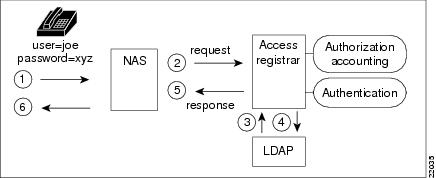
You could use Cisco Prime AR to "proxy" to an LDAP server for access to directory information about users in order to authenticate them. Figure 1-3 shows user joe initiating a request, the Cisco Prime AR server proxying the authentication to the LDAP server, and then performing the authorization and accounting processing in order to enable joe to log in.
Figure 1-3 Proxying to an LDAP Server for Authentication
Service and Ports Used in Cisco Prime AR
Secure Shell Service
SSH Daemon(SSHD) is the daemon program which is used for ssh(1). It provides secure shell encrypted communications between two hosts over network.
In case of Cisco Prime AR, SSH is used to connect to Cisco Prime AR server and configure Cisco Prime AR using CLI.
Ports
The following table lists out the port numbers that are used for various services in Cisco Prime AR for AAA:
|
|
|
|
|
|
|
|
|---|---|---|---|---|---|---|
AR AAA Service |
The RADIUS packet listener uses these ports by default. |
Solaris: 1645-udp Linux: 1812-udp |
RADIUS AA |
Network Access Server |
You can change the default or define new RADIUS port numbers under /Radius/Advanced/Ports in the CLI and Configuration > Advanced > Ports in the GUI. |
RADIUS AA (Authentication, and Authorization) service. |
Solaris: 1646-udp radacct Linux: 1813-udp radacct |
RADIUS Accounting |
Network Access Server |
You can change the default or define new RADIUS port numbers under /Radius/Advanced/Ports in the CLI and Configuration > Advanced > Ports in the GUI. |
RADIUS Accounting service. Refer to RFC 6733 for more information. |
||
3799/udp |
RADIUS Dynamic Authorization (CoA/PoD) |
Network Access Server |
N/A |
RADIUS Dynamic authorization which is used with (CoA/PoD) packet types. |
||
AR AAA Service |
The TACACS+ packet listener uses this port by default. |
49/tcp |
TACACS+ |
Network Access Server |
You can change the default or define new RADIUS port numbers under /Radius/Advanced/Ports in the CLI and Configuration > Advanced > Ports in the GUI. |
TACACS+ based on AAA service (Authentication, Authorization, and Accounting). Refer to RFC 1491 for more information. |
AR AAA Service |
The DIAMETER packet listener uses these ports by default. |
3868/tcp |
DIAMETER |
Network Access Server |
You can enable or disable this service in Radius/Advanced/Diameter/IsDiameterEnabled. |
DIAMETER AA Service (Authentication, and Authorization) by tcp protocol. Refer to RFC 4005 for more information. |
3868/sctp |
DIAMETER |
Network Access Server |
You can enable or disable this service in Radius/Advanced/Diameter/IsDiameterEnabled. |
DIAMETER AA Service (Authentication, and Authorization) by SCTP protocol. |
||
AR MCD Server |
MCD is used to store Cisco Prime AR configuration. |
2786/tcp |
MCD database Server |
This service can be accessed from local host by Cisco Prime AR radius and server agent process. |
N/A |
Proprietary IPC mechanism. |
AR Server Agent |
AR Server Agent is used to log all the activities of Cisco Prime AR processes. |
2785/tcp |
Internal IPC mechanism |
This service can be accessed from local host by Cisco Prime AR radius and server agent process. |
N/A |
Proprietary IPC mechanism. |
AR GUI Service |
Cisco Prime AR GUI processes use these ports by default. |
8080/tcp |
AR HTTP service |
This service is accessible from any end user desktop browser using http protocol. |
You can change the default port numbers in editing the server.xml file. |
Standard HTTP protocol |
8443/tcp |
AR HTTPS service |
This service is accessible from any end user desktop browser using https protocol. |
You can change the default port numbers in editing the server.xml file. |
Standard HTTPS protocol |
||
8005/tcp |
Internally used by Apache Tomcat container |
Local host |
You can change the default port numbers in editing the server.xml file.. |
To shutdown Tomcat JVM service instance. |
||
8009/tcp |
Apache Tomcat container AJP 1.3 Connector |
Local host |
You can change the default port numbers in editing the server.xml file. |
Apache JServ protocol. AJP 1.3 Connector. |
||
SNMP Master Agent |
SNMP Packet listener supports these ports by default. |
161/udp |
Simple Net Management Protocol |
This service is accessible from any network management host. |
Refer to net-snmp documentation for more information. |
SNMP MIBs server |
162/udp |
Traps for SNMP |
This service is accessible to any SNMP trap client when you want to use net-snmp snmptrap daemon as a SNMP trap server. |
Refer to Configuring Traps for more information. |
SNMP trap server |
||
CPAR SIGTRAN Stack (radius) |
Listen on these ports for internal configuration from stack manager events |
9041/TCP |
Stack Manager Configuration/Event Listener |
This service can be accessed from local host by Prime Access Registrar - Radius Process. |
N/A |
CPAR Specific IPC Protocol implementation |
9041/UDP |
Stack Manager Configuration/Event Listener |
This service can be accessed from local host by Prime Access Registrar - Radius Process. |
N/A |
CPAR Specific IPC Protocol implementation |
||
CPAR SIGTRAN stack manager(m3ua-stackmgr) |
Configure stack and receive configuration from m3ua-cliclient |
9100/TCP |
SIGTRAN Stack Manager |
This service can be accessed from local host by Prime Access Registrar - Radius Process and m3ua-cliclient Process. |
N/A |
CPAR Specific IPC Protocol implementation |
9100/UDP |
SIGTRAN Stack Manager |
This service can be accessed from local host by Prime Access Registrar - Radius Process and m3ua-cliclient Process. |
N/A |
CPAR Specific IPC Protocol implementation |
 Feedback