AVC Supported Platforms, Interfaces, and Networking Modes
AVC Supported Platforms
Cisco AVC is supported on the following platforms:
– Cisco 800 Series: C881-K9, C886VA-K9, C887VA-K9, C888-K9, C892FSP-K9, C896VA-K9, C897VA-K9, C897VAW-A-K9, C897VA-M-K9, C898EA-K9, C897VAW-E-K9, C897VAM-W-E-K9.
– Cisco 5915, 5921, 5930, 5940
– Cisco ASR1000 Series Aggregation Services Routers
– Cisco ISR4000 Series Integrated Services Routers
– Cisco CSR 1000V Cloud Services Routers
For information about licensing and features for supported platforms, see:
AVC Licensed Features (Legacy)
Logical Interface and VPN Support in AVC
Unsupported Logical Interfaces
Logical interfaces not supported by Cisco AVC in the current release:
Supported on Cisco IOS platforms. Support was added for Cisco IOS XE platforms beginning with Cisco IOS XE 3.16.3, 15.5(3)S3; not supported in prior releases.
- Multiprotocol Label Switching (MPLS)
- Overlay Transport Virtualization (OTV) overlay interfaces
- IPv6 tunnels that terminate on the device
Also see Pass-through Tunneled IPv6 Traffic: Classification and Reporting.
Partially Supported Logical Interfaces
Logical interfaces partially supported by Cisco AVC in the current release:
Only ezPM monitors can be configured on the virtual template. Static performance monitors (non-ezPM monitors) cannot be configured on the virtual template.
VPN Support
AVC support for VPN modes in the current release:
Supports spoke-to-spoke and hub-to-spoke topologies.
FLEXVPN does not support IPv6.
Only ezPM monitors can be configured for FLEXVPN. Static performance monitors (non-ezPM monitors) cannot be configured for FLEXVPN.
Only ezPM monitors can be configured for ezVPN. Static performance monitors (non-ezPM monitors) cannot be configured for EzVPN.
Support for Specific Networking Modes
AVC Compatibility with Layer 2 Transparent Mode
|
|
|
|---|---|
A router operating in layer 2 transparent mode (also called local switching) bridges two interfaces, transparently forwarding packets directly from one interface to the other. The device does not provide typical router functionality; it is sometimes referred to as operating as a “bump in the wire.”
For more information, see Layer 2 Local Switching.
AVC supports Layer 2 transparent mode scenarios, providing full AVC functionality.
Configuration
connect connection-name interface1 interface2
For detailed information, see the configuration guide for your device.
In the following example, an AVC performance monitor is configured on a device operating in Layer 2 transparent mode. The monitor operates on the bridged traffic.

Use Cases
Case 1: Evaluating AVC Before Full Deployment
Layer 2 transparent mode (local switching) can be used to bypass a router by bridging two interfaces in the network, diverting traffic through a device operating with Cisco AVC. This enables isolation and testing of AVC functionality in the network to evaluate before wider deployment.
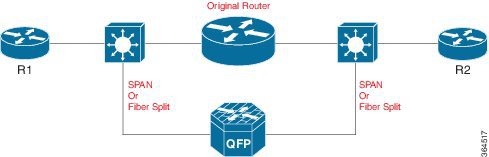
Case 2: Standalone AVC-Only Device
Layer 2 transparent mode (local switching) can be used to configure a router to act as a dedicated AVC device, used without routing. A router, such as the comparatively low-cost Cisco ASR1002-X, can serve as the platform for the standalone AVC-enabled device.
Limitations
When operating AVC on a device in Layer 2 transparent mode, the following limitations apply:
 Feedback