-
- IP Access List Features Roadmap
- IP Access List Overview
- Creating an IP Access List and Applying It to an Interface
- Creating an IP Access List to Filter IP Options TCP Flags Noncontiguous Ports or TTL Values
- Refining an IP Access List
- Displaying and Clearing IP Access List Data Using ACL Manageability
- Controlling Access to a Virtual Terminal Line
- Access List-Based RBSCP
- ACL IP Options Selective Drop
- ACL Authentication of Incoming rsh and rcp Requests
- Configuring Lock-and-Key Security for Dynamic Access Lists
- Configuring IP Session Filtering of Reflexive Access Lists
- Configuring TCP Intercept and Preventing Denial-of-Service Attacks
-
- Configuring Context-based Access Control
- Application Firewall - Instant Message Traffic Enforcement
- Cisco IOS Firewall MIB
- Cisco IOS Firewall Performance Improvements
- Cisco IOS Firewall Stateful Failover
- Cisco IOS Firewall Support for TRP
- Email Inspection Engine
- ESMTP Support for Cisco IOS Firewall
- Firewall ACL Bypass
- Firewall N2H2 Support
- Firewall Stateful Inspection of ICMP
- Firewall Support for SIP
- Firewall Support of Skinny Client Control Protocol
- Firewall Websense URL Filtering
- Granular Protocol Inspection
- HTTP Inspection Engine
- Inspection of Router-Generated Traffic
- TCP Out-of-Order Packet Support for Cisco IOS Firewall and Cisco IOS IPS
- Transparent Cisco IOS Firewall
- Virtual Fragmentation Reassembly
- VRF Aware Cisco IOS Firewall
- Configuring Port to Application Mapping
- Configuring Cisco IOS Intrusion Prevention System (IPS)
- Configuring IP Security Options
- Finding Feature Information
- Contents
- Prerequisites for Access List-Based RBSCP
- Restrictions for Access List-Based RBSCP
- Information About Access List-Based RBSCP
- How to Configure Access List-Based RBSCP
- Configuration Examples for Access List-Based RBSCP
- Additional References
- Feature Information for Access List-Based RBSCP
Access List-Based RBSCP
The Access List-Based Rate-Based Satellite Control Protocol (RBSCP) feature allows you to selectively apply the TCP ACK splitting feature of RBSCP to any outgoing interface. The result is reduced effect of long latencies over a satellite link. Access List-Based RBSCP has no tunneling or queueing overhead that is associated with RBSCP tunnels. Additional benefits include more interoperability with other Cisco IOS features (such as TCP/IP header compresssion, DMVPN, and QoS) because the TCP and Stream Control Transmission Protocol (SCTP) packets are no longer encapsulated with an RBSCP/IP header. This feature works on process switched forwarding, fast switching, or Cisco Express Forwarding (CEF).
Finding Feature Information
Your software release may not support all the features documented in this module. For the latest feature information and caveats, see the release notes for your platform and software release. To find information about the features documented in this module, and to see a list of the releases in which each feature is supported, see the "Feature Information for Access List-Based RBSCP" section.
Use Cisco Feature Navigator to find information about platform support and Cisco software image support. To access Cisco Feature Navigator, go to http://www.cisco.com/go/cfn. An account on Cisco.com is not required.
Contents
• Prerequisites for Access List-Based RBSCP
•Restrictions for Access List-Based RBSCP
•Information About Access List-Based RBSCP
•How to Configure Access List-Based RBSCP
•Configuration Examples for Access List-Based RBSCP
•Feature Information for Access List-Based RBSCP
Prerequisites for Access List-Based RBSCP
This document assumes that you already understand how to configure an IP access list and have one configured.
Restrictions for Access List-Based RBSCP
 Plan your network carefully so that no more than one Cisco IOS router in a given routing path has the Access List-Based RBSCP feature enabled. You do not want to recursively ACK split traffic.
•The Access List-Based RBSCP feature will process only IPv4 packets, not IPv6 packets.
•The feature will process only standalone TCP packets. Encapsulated (encrypted or tunneled) TCP packets will be left unprocessed.
•This feature is available only on non-distributed platforms.
Information About Access List-Based RBSCP
•Benefits of Access List-Based RBSCP
•Rate-Based Satellite Control Protocol
•Access List-Based RBSCP Functionality
Benefits of Access List-Based RBSCP
The Access List-Based Rate-Based Satellite Control Protocol (RBSCP) feature provides the following benefits:
•It allows you to selectively apply the TCP ACK splitting feature of RBSCP to any outgoing interface. TCP ACK splitting is a benefit because it reduces the effect of long latencies characteristic of satellite links. Applying this feature selectively by using an access list is a benefit because you control which packets are subject to TCP ACK splitting.
•It has no tunneling or queueing overhead that is associated with RBSCP tunnels.
•It provides more interoperability with other Cisco IOS features (such as TCP/IP header compresssion, DMVPN, and QoS) because the TCP and Stream Control Transmission Protocol (SCTP) packets are no longer encapsulated with an RBSCP/IP header.
•This feature works on process switched forwarding, fast switching, or CEF.
•It preserves the internet end-to-end principle.
Rate-Based Satellite Control Protocol
Rate-Based Satellite Control Protocol (RBSCP) was designed for wireless or long-distance delay links with high error rates, such as satellite links. RBSCP can improve the performance of certain IP protocols, such as TCP and IP Security (IPsec), over satellite links without breaking the end-to-end model. For instructions on how to implement RBSCP over a tunnel, see the "Implementing Tunnels" chapter of the Interface and Hardware Component Configuration Guide.
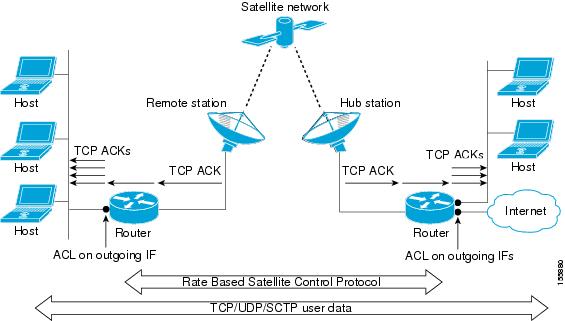
The TCP ACK splitting capability of RBSCP can be implemented without a tunnel, by using an IP access list, as shown in Figure 1. The TCP ACK splitting occurs at the outgoing interface between the router and the internal network or Internet. It does not occur over the link to the satellite.
Figure 1 ACL-Based RBSCP on Outgoing Interfaces
TCP ACK Splitting
TCP ACK splitting is a software technique to improve performance for clear-text TCP traffic using acknowledgment (ACK) splitting, in which a number of additional TCP ACKs are generated for each TCP ACK received. TCP ACK splitting causes TCP to open the congestion window more quickly than usual, thus decreasing the effect of long latencies. TCP will generally open the congestion window by one maximum transmission unit (MTU) for each TCP ACK received. Opening the congestion window results in increased bandwidth becoming available. Configure this feature only when the satellite link is not using all the available bandwidth. Encrypted traffic cannot use TCP ACK splitting.
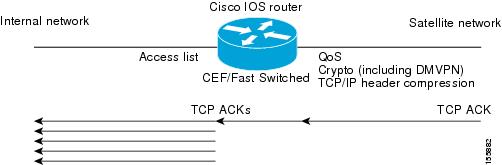
The size argument in the ip rbscp ack-split command determines how many TCP ACKs are generated from the incoming TCP ACK, as shown in Figure 2.
Figure 2 TCP ACK Splitting
If n ACKs are configured and M is the cumulative ACK point of the original TCP ACK, the resulting TCP ACKs exiting the router will have the following cumulative ACK points:
M-n+1, M-n+2, M-n+3,...M
For example, if the size argument is set to 5, and the access list permits a TCP ACK with a cumulative ACK acknowledging bytes to 1000, then the resulting TCP ACKs exiting the router will have the following cumulative ACK points:
TCP ACK (996) (1000-5+1)
TCP ACK (997) (1000-5+2)
TCP ACK (998) (1000-5+3)
TCP ACK (999) (1000-5+4)
TCP ACK (1000) (1000-5+5)
Access List-Based RBSCP Functionality
The Access List-Based RBSCP feature will accept a numbered or named, standard or extended IP access list. The access list controls which packets are subject to TCP ACK splitting. That is, the feature is applied to packets that a permit statement allows; the feature is not applied to packets that a deny statement filters.
An instance of this feature consists of an access list and an ACK split value. An ACK split value of 0 or 1 indicates that this feature is disabled (that is, no ACK split will be done). The ACK split value range is 0 through 32.
An interface can use only one instance of this feature at a time. Each instance of this feature can be used on multiple interfaces.
If you configure this feature but it refers to a nonexistent access list, this is interpreted as having an access list that denies all traffic from being processed by the access list-based RBSCP feature, so the feature is essentially disabled and the traffic goes through the normal switching path.
If both an RBSCP tunnel and an instance of the Access List-Based RBSCP feature are enabled along a routing or switching path, the TCP ACKs detunneled from the RBSCP tunnel will be ACK split according to the tunnel configuration and the Access List-Based RBSCP split parameters on the outgoing interface are effectively disabled.
How to Configure Access List-Based RBSCP
•Use RBSCP Selectively by Applying an Access List
Use RBSCP Selectively by Applying an Access List
This task illustrates how to apply the feature to an interface, and presumes that an access list is already configured. Perform this task by applying the access list on the router interface that is facing the internal network, not the satellite network.

Tip The feature will try to process all the TCP flows as filtered by the access list. Try to make the access list applied to RBSCP as precise as possible to avoid unnecessary processing.
Plan your network carefully so that no more than one Cisco IOS router in a given routing path has this feature enabled. You do not want to recursively ACK split traffic.
SUMMARY STEPS
1. enable
2. configure terminal
3. interface type number
4. ip rbscp ack-split size {access-list-name | access-list-number} out
5. Although it is not required, you should repeat this task on the router that is on the other side of the satellite, on the outgoing interface facing the network, not the satellite. Use a different access list.
DETAILED STEPS
|
|
|
|
|---|---|---|
Step 1 |
enable Router> enable |
Enables privileged EXEC mode. • |
Step 2 |
configure terminal Router# configure terminal |
Enters global configuration mode. |
Step 3 |
interface type number Router(config)# interface ethernet 1 |
Specifies an interface. • |
Step 4 |
ip rbscp ack-split size {access-list-name | access-list-number} out Router(config-if)# ip rbscp ack-split 6 101 out |
Configures RBSCP on the outgoing interface for packets that are permitted by the specified access list. • • |
Step 5 |
Although it is not required, you should repeat this task on the router that is on the other side of the satellite, on the outgoing interface facing the network, not the satellite. Use a different access list. |
— |
Configuration Examples for Access List-Based RBSCP
•Example: Access List-Based RBSCP
Example: Access List-Based RBSCP
In the following example, access list 101 performs TCP ACK splitting on packets going out FastEthernet interface 1/1 from a source at 1.1.1.1 to a destination at 3.3.3.1:
!
version 12.4
no service pad
service timestamps debug datetime msec
service timestamps log datetime msec
no service password-encryption
!
hostname IOSACL-72b
!
boot-start-marker
boot-end-marker
!
enable password lab
!
no aaa new-model
!
resource policy
!
ip cef
!
interface Ethernet0/0
no ip address
shutdown
duplex auto
no cdp enable
!
interface GigabitEthernet0/0
no ip address
shutdown
duplex full
speed 1000
media-type gbic
negotiation auto
no cdp enable
!
interface FastEthernet1/0
ip address 1.1.1.2 255.255.255.0
duplex half
no cdp enable
!
interface FastEthernet1/1
ip address 2.2.2.2 255.255.255.0
ip rbscp ack-split 4 101 out
duplex half
no cdp enable
!
interface FastEthernet2/0
no ip address
shutdown
duplex half
no cdp enable
!
interface Serial3/0
no ip address
shutdown
serial restart-delay 0
!
interface Serial3/1
no ip address
shutdown
serial restart-delay 0
no cdp enable
!
interface Serial3/2
no ip address
shutdown
serial restart-delay 0
no cdp enable
!
interface Serial3/3
no ip address
shutdown
serial restart-delay 0
no cdp enable
!
interface FastEthernet4/0
no ip address
shutdown
duplex auto
speed auto
no cdp enable
!
interface FastEthernet4/1
no ip address
shutdown
duplex auto
speed auto
no cdp enable
!
router eigrp 100
network 1.0.0.0
network 2.0.0.0
auto-summary
!
no ip http server
no ip http secure-server
!
logging alarm informational
access-list 101 permit tcp host 1.1.1.1 host 3.3.3.1
dialer-list 1 protocol ip permit
!
control-plane
!
gatekeeper
shutdown
!
!
line con 0
exec-timeout 0 0
stopbits 1
line aux 0
stopbits 1
line vty 0 4
login
!
!
end
Additional References
Related Documents
|
|
|
|---|---|
Cisco IOS commands |
|
IP access list commands: complete command syntax, command mode, command history, defaults, usage guidelines, and examples |
|
RBSCP commands: complete command syntax, command mode, command history, defaults, usage guidelines, and examples |
Cisco IOS Interface and Hardware Component Command Reference |
Configuring Rate-Based Satellite Control Protocol (RBSCP) |
"Implementing Tunnels" chapter in the Cisco IOS Interface and Hardware Component Configuration Guide |
Standards
|
|
|
|---|---|
None |
— |
MIBs
|
|
|
|---|---|
None |
To locate and download MIBs for selected platforms, Cisco IOS releases, and feature sets, use Cisco MIB Locator found at the following URL: |
RFCs
|
|
|
|---|---|
None |
— |
Technical Assistance
Feature Information for Access List-Based RBSCP
Table 1 lists the features in this module and provides links to specific configuration information.
Use Cisco Feature Navigator to find information about platform support and software image support. Cisco Feature Navigator enables you to determine which software images support a specific software release, feature set, or platform. To access Cisco Feature Navigator, go to http://www.cisco.com/go/cfn. An account on Cisco.com is not required.

Note Table 1 lists only the software release that introduced support for a given feature in a given software release train. Unless noted otherwise, subsequent releases of that software release train also support that feature.
 Feedback