- Overview of GPRS and UMTS
- Planning to Configure the GGSN
- Configuring GTP Services on the GGSN
- Configuring IPv6 Support on the GGSN
- Configuring GTP Session Redundancy on the GGSN
- Configuring Charging on the GGSN
- Configuring Enhanced Service-Aware Billing on the GGSN
- Configuring Network Access to the GGSN
- Configuring PPP Support on the GGSN
- Configuring QoS on the GGSN
- Configuring Security on the GGSN
- Configuring Dynamic Addressing on the GGSN
- Configuring Load Balancing on the GGSN
- Monitoring Notifications
Cisco GGSN Release 8.0 Configuration Guide, Cisco IOS Release 12.4(15)XQ
Bias-Free Language
The documentation set for this product strives to use bias-free language. For the purposes of this documentation set, bias-free is defined as language that does not imply discrimination based on age, disability, gender, racial identity, ethnic identity, sexual orientation, socioeconomic status, and intersectionality. Exceptions may be present in the documentation due to language that is hardcoded in the user interfaces of the product software, language used based on RFP documentation, or language that is used by a referenced third-party product. Learn more about how Cisco is using Inclusive Language.
- Updated:
- April 11, 2008
Chapter: Configuring Enhanced Service-Aware Billing on the GGSN
- Service-Aware GGSN Overview
- Configuring a Service-Aware GGSN
- Enabling Service-Aware Billing Support
- Enabling Enhanced G-CDRs
- Configuring the Quota Server Interface
- Monitoring and Maintaining
- Configuring Diameter/DCCA Interface Support
- Configuring the Enhanced Billing Parameters in Charging Profiles
- GTP-Session Redundancy for Service-Aware PDPs Overview
- Configuring OCS Address Selection Support
- Configuration Example
Configuring Enhanced Service-Aware Billing
This chapter describes how to implement the Cisco Gateway GPRS Support Node (GGSN) as a service-aware GGSN that is capable of real-time credit-control for prepaid users, as well as service-aware billing for postpaid and prepaid users.

Note  Service-aware GGSN functionality is supported for IPv4 PDP contexts only.
For a complete description of the GGSN commands in this chapter, refer to the Cisco GGSN Command Reference for the Cisco GGSN release you are using. To locate documentation of other commands that appear in this chapter, use the command reference master index or search online.
This chapter includes the following sections:
•Configuring a Service-Aware GGSN
Service-Aware GGSN Overview
The Cisco GGSN can be configured with the Cisco Content Services Gateway - 2nd Generation (CSG2) and Cisco IOS Diameter protocol/Diameter Credit Control Application (DCCA) to support real-time credit-control for prepaid users and service-aware billing for postpaid and prepaid users.
Note As an alternate online billing solution that does not include DCCA, the GGSN can be configured to support Online Charging Server (OCS) address selection. OCS address selection enables online credit control for prepaid users to be provided by an external OCS to which the Cisco CSG2 has a direct GTP' interface. When this support is configured, the GGSN functions as a quota server for postpaid subscribers only and does not generate enhanced G-CDRs (eG-CDRs) for prepaid users.
For more information about the OCS address selection support on the GGSN, see the "Configuring OCS Address Selection Support" section.
The GGSN and Cisco CSG together, function as a service-aware GGSN.
The Cisco CSG categorizes traffic, reports usage, and management quota. The GGSN provides a Diameter interface to the DCCA server via which the Cisco CSG can request quota and report usage. The GGSN also maintains all PDP contexts and determines if they are prepaid or postpaid.
If service-based charging is required (prepaid or postpaid), entries are created on the Cisco CSG. The Cisco CSG inspects the service categories and reports usage back to the GGSN. If the user is to be treated as a postpaid user (offline charging), the GGSN records usage information that is reported by the Cisco CSG in eG-CDRs. If the user is to be treated as a prepaid user (online charging), the GGSN records the reported usage information in eG-CDRs, and translates and sends the information to a DCCA server.
The GGSN also handles Gn-side triggers for quota reauthorization and server-initiated reauthorization or termination requests. The Cisco CSG sends the authorization requests, quota reports, and service stops to the GGSN, which in turn translates them into DCCA messages for transport over the Diameter interface. When the DCCA server responds with additional quota, the GGSN pushes it to the Cisco CSG.
Note If RADIUS is not being used, the Cisco CSG must be configured as a RADIUS proxy.
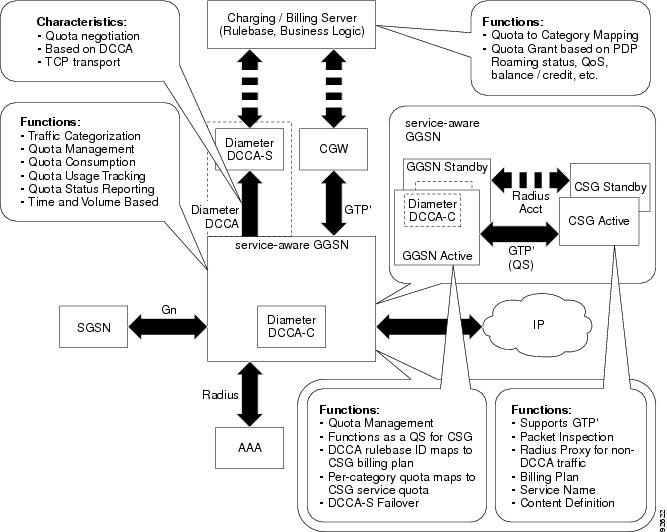
Figure 7-1 provides illustrates the functions and characteristics the service-aware GGSN with DCCA providing online charging support.
Figure 7-1 High-Level Overview of Service-Aware GGSN Functions with DCCA being used for Online Charging Suppor
t
Supported Features
The primary new features supported by the GGSN to enable the configuration of a service-aware GGSN, include the following:
•Diameter base protocol and DCCA client interface support for online/real-time credit control for prepaid users (IP PDP contexts only)
•Quota server functionality and interface to Cisco CSG for per-service billing
•Enhanced G-CDRs for service-based CDRs for prepaid and postpaid subscribers
Additionally, GGSN Release 5.2 and later provides enhancements to the following existing interfaces:
•AAA authentication interface—DCCA rulebase support and charging profile selection
•AAA accounting interface—Required for Cisco CSG Known User Table (KUT) population and Cisco CSG-based proxies
•Ga—Enhanced offline charging interface
Unsupported Features
The following features are not supported with the service aware feature in GGSN Release 5.2:
•Charging differentiation for secondary PDP contexts
•PPP PDP contexts
•PPP Regeneration
•Network Management
•Cell identity
•PDP contexts for both online DCCA exchange and offline service-based usage
•Dynamic configuration for blocking/forwarding traffic while waiting for quota reauthorization
•Diameter proxy, relay, or redirection
•Diameter transport layer security
•SCTP transport
•No Dual Quota Support (for receiving Volume and Time quota)
Service-Aware GGSN Data Flows
The following is a high-level overview of the flow of traffic during the creation of a PDP context for a prepaid subscriber in an enhanced service-aware billing implementation using the service-aware GGSN.
PDP Context Creation Data Flow for Prepaid Users
1. The SGSN sends a create PDP context request to the service-aware GGSN.
2. The GGSN sends an Access-Request message to the RADIUS server or Cisco CSG configured as a RADIUS proxy.
3. The RADIUS returns an Access-Accept response. From the Access-Accept response, the GGSN obtains a default rulebase ID, or if the response does not contain a default rulebase ID, the GGSN obtains the rulebase ID from a locally configured value in the charging profile selected for this create PDP context request.
4. The service-aware GGSN sends a Credit Control Request (CCR) to the DCCA server.
5. The DCCA server sends a Credit Control Answer (CCA) to the GGSN. This CCA may contain a rulebase and quota request.
6. If it contains a rulebase, the GGSN sends an Accounting-Start request with the selected rulebase to the RADIUS.
7. The RADIUS receives the Accounting-Start request and creates a KUT for the user.
8. The RAIDUS sends an Accounting Start response to the GGSN.
9. If the DCCA server sends a quota request is received in a CCA to the GGSN and the GGSN pushes the quota request to the Cisco CSG2.
10. When the GGSN receives a quota push response from the Cisco CSG2, it sends the create PDP context response to the SGSN and the context is established.
PDP Context Creation Data Flow for Postpaid Users
1. The SGSN sends a create PDP context request to the service-aware GGSN.
2. The GGSN sends an Accounting-Start request containing selected rulebase to the RADIUS endpoint (Cisco CSG2 configured as a RADIUS proxy).
3. The RADIUS proxy receives Accounting-Start request and creates a KUT for the user.
4. The RAIDUS sends an Accounting Start response to the GGSN.
5. The GGSN sends a create PDP context response to the SGSN and the context is established.
Prerequisites
Implementing a service-aware GGSN requires the following:
•A Cisco 7600 series router in which a Cisco Supervisor Engine 720, with a Multilayer Switch Feature Card (Cisco Product ID: SUP720-MSFC3-BXL), running Cisco IOS Release 12.2(33)SRB1 or later.
For details on upgrading the Cisco IOS release running on the supervisor engine, see the "Upgrading to a New Software Release" section in the Release Notes for Cisco IOS Release 12.2SR.
Note The Cisco IOS software required on the supervisor engine is dependent on the supervisor engine being used and the Cisco IOS software application running on the Cisco SAMI PCCs. For information on these hardware and software requirements, refer to the documentation of the Cisco IOS mobile wireless application that you are implementing on the Cisco SAMI.
•Cisco Service and Application Module for IP (Cisco Product Number: WS-SVC-SAMI-BB-K9), running Cisco IOS Release 12.4(15)XQ and later on the SAMI processors. (The image is automatically loaded onto each processor during an image upgrade.)
•IPSec VPN Services Module (for security)
•A Cisco SAMI running the Cisco Content Services Gateway - 2nd Generation (CSG2) software in each Cisco 7600 series router.
•On the SGSN, the values configured for the number GTP N3 requests and T3 retransmissions must be larger than the sum of all possible server timers (RADIUS, DCCA, and Cisco CSG).
Specifically the SGSN N3*T3 must be greater than:
2 x RADIUS timeout + N x DCCA timeout + Cisco CSG2 timeout
where:
–2 is for both authentication and accounting.
–N is for the number of diameter servers configured in the server group.
Limitations and Restrictions
Before implementing enhanced service-aware billing, note the following:
•If session redundancy is needed, the GGSN supports a maximum of 21 categories per user.
•RADIUS accounting is enabled between the Cisco CSG and GGSN to populate the KUT entries with the PDP context user information
•The Cisco CSG2 must be configured with the quota server addresses of all the GGSN instances.
•The service IDs on the Cisco CSG must be configured as numeric strings that match the category IDs on the DCCA server.
•If RADIUS is not being used, the Cisco CSG2 must be configured as a RADIUS proxy on the GGSN.
Configuring a Service-Aware GGSN
To configure a service-aware GGSN, complete the tasks in the following sections:
•Enabling Service-Aware Billing Support (Required)
•Configuring the Quota Server Interface (Required)
•Configuring Diameter/DCCA Interface Support (Required)
•Configuring the Enhanced Billing Parameters in Charging Profiles (Required)
•Configuring OCS Address Selection Support (Optional)
Enabling Service-Aware Billing Support
Enhanced service-aware billing must be enabled on the GGSN before you can configure a service-aware GGSN.
To enable service-aware billing support on the GGSN, complete the following task while in global configuration mode:
|
|
|
|---|---|
Router(config)# gprs service-aware |
Configures a service-aware GGSN. |
To enable service-aware billing support on a particular access-point, complete the following task while in access-point configuration mode.
|
|
|
|---|---|
Router(access-point-config)# service-aware |
Enables an APN to support service-aware billing. |
If service-aware billing is enabled on an APN, the GGSN must be configured to wait for a RADIUS accounting response before sending a create PDP context response to the SGSN.
To configure the GGSN to wait for a RADIUS accounting response before sending a create PDP context response to the SGSN, complete the following task while in global configuration mode:
|
|
|
|---|---|
Router(config)# gprs gtp response-message wait-accounting |
Configures the GGSN to wait for a RADIUS accounting response before sending a create PDP context response to the SGSN. |
Enabling Enhanced G-CDRs
G-CDRs contain information for the entire duration of, or part of, a PDP context. The G-CDR includes information such as the subscriber (MSISDN, IMSI), APN used, QoS applied, SGSN ID (as the mobile access location), a time stamp and duration, the data volume recorded separately for the upstream and downstream direction, and volume thresholds for intermediate CDR generation and tariff time switches.
In addition to the above, an eG-CDR contains a service-record part that contains the usage data of each service flow used by a PDP session (specified by category ID). For example, the upstream and downstream volume, and the duration is recorded per service flow.
By default, the GGSN does not include the service-record information in G-CDRs. To support a service-aware GGSN implementation, the GGSN must be configured to generate eG-CDRs.
To configure the GGSN to include the service-record information in G-CDRs, use the following command while in global configuration mode:
Configuring the Quota Server Interface
Together, the Cisco CSG2 and GGSN, configured as a service-aware GGSN, provide the following functions:
•The Cisco CSG2:
–Inspects packets and categorizes traffic
–Requests quota and reports usage
–Provides billing plans, service names, and content definitions
–Acts as a RADIUS proxy for non-DCCA traffic
–Functions in prepaid mode for each service-flow charge recording
For detailed information about configuring the Cisco CSG2, see Cisco Content Services Gateway - 2nd Generation Installation and Configuration Guide.
http://www.cisco.com/en/US/products/sw/wirelssw/ps779/products_configuration_guide_book09186a0080856678.html
•The GGSN:
–Functions as a quota server to the Cisco CSG2
–Provides the Diameter interface to the DCCA server for quota requests and returns
–Manages the quota requested by the Cisco CSG2 and received from the DCCA server
–Maps DCCA server rulebases to Cisco CSG2 billing plans
–Maps DCCA server category quota to Cisco CSG2 service quota
To configure the quota server interface on the GGSN, complete the tasks in the following sections:
•Configuring a Cisco CSG2 Server Group (Required)
•Configuring the Quota Server Process on the GGSN (Required)
•Configuring the GGSN to use the Cisco CSG2 as an Authentication and Accounting Proxy (Required if RADIUS is not being used)
Configuring a Cisco CSG2 Server Group
We recommend that two Cisco CSG2s (one Active, the other Standby) be configured to function as one when interacting with the quota server process on the GGSN. When configuring the Cisco CSG2 group that the quota server process will use to communicate with the Cisco CSG2, a virtual IP address must be specified along with the real IP addresses of each of the Cisco CSG2s that make up the redundant pair. The quota server process communicates with the virtual address and the active Cisco CSG2 listens to the virtual IP address.
To configure a Cisco CSG2 group on the GGSN, complete the following tasks, beginning in global configuration mode:
Configuring the Quota Server Process on the GGSN
The quota server process on the GGSN supports the following attributes in Accounting Start messages to the Cisco CSG2:
•Billing Plan ID—Corresponds with the rulebase ID received from the DCCA server. The quota server process on the GGSN maps the rulebase ID to the billing plan ID.
•Quota server address and port—IP address and port of the quota server the Cisco CSG2 should use for a user.
By default, this is the IP address of the GGSN unless OCS address selection support is configured on the GGSN. For more information about OCS address selection support on the GGSN, see "Configuring OCS Address Selection Support" section.
•Downlink nexthop address—Next hop address (user address) for downlink traffic (Cisco CSG2-to-GGSN).
In addition, the quota server process supports the following TLVs:
•Quota Consumption Timer (QCT). The QCT is assumed to be zero.
•Quota Holding Timer (QHT)
•Quota Threshold
For more information on enhancements to the quota server interface, billing plans, and the QCT and QHT, see the Cisco Content Services Gateway Installation and Configuration Guide.
Note One quota server process can be configured per GGSN. Configuring more than one quota server process will overwrite the existing process.
To configure the quota server process on the GGSN, complete the following tasks, beginning in global configuration mode:
Advertising the Next Hop Address For Downlink Traffic
To configure the next hop address (the user address) for downlink traffic (Cisco CSG2-to-GGSN) to be advertised in Accounting Start requests to the RADIUS endpoint, complete the following task while in access-point configuration mode:
Configuring the GGSN to use the Cisco CSG2 as an Authentication and Accounting Proxy
If RADIUS is not being used, the Cisco CSG2 must be configured as a RADIUS endpoint.
To configure the GGSN to use the Cisco CSG2 as a RADIUS proxy, you must complete the following tasks:
1. Define the RADIUS server globally.
2. Define a AAA RADIUS server group and include the Cisco CSG2 as a server in the server group.
3. Specify the type of services the server group will support using AAA method lists.
4. Reference the method list in APNs that will use the Cisco CSG2 as a RADIUS proxy.
To specify the RADIUS server globally, complete the following tasks while in global configuration mode:
To define a AAA RADIUS server group, and include the Cisco CSG2 as a server in the server group, complete the following tasks, beginning in global configuration mode:
To specify the types of services the group will support using AAA method lists, complete the following tasks, beginning in global configuration mode:
To reference the method list in APNs that will use the Cisco CSG2 as a RADIUS proxy, complete the following tasks while in access-point configuration mode:
Monitoring and Maintaining
Use the following privilege EXEC commands to monitor and maintain the quota server-to-Cisco CSG2 configuration.
Configuring Diameter/DCCA Interface Support
The GGSN functions as a DCCA client when communicating with a DCCA server to provide the following functions:
•Diameter interface to the DCCA server for online/real-time credit for prepaid subscribers
•Negotiates quota by sending quota requests from the Cisco CSG2 to the DCCA server and pushing quota returns from the DCCA server to the Cisco CSG2
•Maps DCCA server rulebases to Cisco CSG2 billing plans
•Maps DCCA server category quota to Cisco CSG2 service quota
Messaging
The GGSN DCCA client process and DCCA server exchange the following messages:
•Credit Control Request (CCR)—Initial, Update, and Final
•Credit Control Answer (CCA)—Initial, Update, and Final
The GGSN Diameter interface supports the following Diameter base messages:
•Capability Exchange Request (CER) and Capability Exchange Answer (CEA)—The GGSN advertises DCCA support in CER messages. In addition, the GGSN can be configured to advertise support for vendor-specific AVPs using the diameter vendor support global configuration command.
•Disconnect Peer Request (DPR) and Disconnect Peer Answer (DPA)—The GGSN sends a DPR message when the CER with a Diameter peer fails or there is no Diameter server configured.
•Device Watchdog Request (DWR) and Device Watchdog Answer (DWA)—The GGSN uses DWR and DWA messages to detect transport failures with a Diameter peer. A watchdog timer can be configured for each Diameter peer using the timer watchdog Diameter peer configuration command.
•Re-auth Request (RAR) and Re-auth Answer (RAA)
•Abort Session Request (ASR) / Abort Session Answer (ASA)—Note that no Failed-AVP is sent in an ASA when an incorrect ASR is sent from the DCCA server.
Additionally, as a DCCA client, the GGSN receives the following notifications from Cisco IOS AAA:
•Receipts of CCA messages
•Asynchronous session termination requests
•Server-initiated RARs
To configure Diameter/DCCA support, complete the tasks in the following sections:
•Configuring the Diameter Base
•Configuring the DCCA Client Process on the GGSN
•Enabling Support for Vendor-Specific AVPs in DCCA Messages
Configuring the Diameter Base
To configure the Diameter protocol base, complete the tasks in the following sections:
•Configuring Diameter Protocol Parameters Globally
•Monitoring and Maintaining the Diameter Base
Configuring a Diameter Peer
To configure a Diameter peer, use the following commands, beginning in global configuration mode:
.
Enabling Diameter AAA
To enable Diameter AAA, complete the tasks in the following sections:
•Defining the Diameter AAA Server Group
•Defining an Authorization Method List for Prepaid Subscribers
Defining the Diameter AAA Server Group
For redundancy, Diameter servers should be configured as Diameter AAA server groups that consist of a primary and secondary server.
To define a Diameter AAA server group, use the following commands, beginning in global configuration mode:.
Defining an Authorization Method List for Prepaid Subscribers
To apply parameters that restrict access to a network for prepaid subscribers, use the following command while in global configuration mode:
Configuring Diameter Protocol Parameters Globally
Global Diameter protocol parameters are used if Diameter parameters have not been defined at a Diameter peer level.
To configure global Diameter parameters, complete the following tasks while in global configuration mode:
|
|
|
|
|---|---|---|
Step 1 |
Router(config)# diameter timer {connection | transaction | watchdog} value |
Configures Diameter base protocol timers to use if none have been configured at the Diameter peer level. Valid range, in seconds, is 0 to 1000. The default is 30. • • • When the watchdog timer expires, a DWR is sent to the Diameter peer and the watchdog timer is reset. If a DWA is not received before the next expiration of the watchdog timer, a transport failure to the Diameter peer has occurred. When configuring timers, note that the value for the transaction timers, should be larger than the value for the TX timer, and, on the SGSN, the values configured for the number GTP N3 requests and T3 retransmissions must be larger than the sum of all possible server timers (RADIUS, DCCA, and Cisco CSG2). Specifically, the SGSN N3*T3 must be greater than 2 x RADIUS timeout + N x DCCA timeout + Cisco CSG2 timeout where: • • |
Step 2 |
Router(config)# diameter redundancy |
Enables the Diameter node to be a Cisco IOS Redundancy Facility (RF) client and track session states. The Diameter base does not initiate a connection to a Diameter peer that is in standby mode. Upon a standby-to-active mode transition, a connection to the newly active peer is established. Note |
Step 3 |
Router(config)# diameter origin realm string |
Configures the realm of origin (part of the domain "@realm") in which this Diameter node is located. Origin realm information is sent in requests to a Diameter peer. |
Step 4 |
Router(config)# diameter origin host string
|
Configures the Fully Qualified Domain Name (FQDN) of the host of this Diameter node. The origin host information is sent in requests to a Diameter peer. |
Step 5 |
Router(config)# diameter vendor support {Cisco | 3gpp | Vodafone}
|
Configures this Diameter node to advertise the vendor AVPs it supports in capability exchange messages with Diameter peers. Multiple instances of this command can be configured if the vendor IDs differ. |
Monitoring and Maintaining the Diameter Base
Use the following privilege EXEC command to monitor and maintain Diameter peer configurations.
|
|
|
|---|---|
Router# show diameter peer |
Displays Diameter peer-related information. |
Configuring the DCCA Client Process on the GGSN
The GGSN functions as a DCCA client when interacting with the DCCA server to obtain and request quota. As a DCCA client, the GGSN sends CCR messages to and receives CCAs from the DDCA server for credit control session (one credit control session per PDP session). In addition, the defaults configured in the DCCA client profile dictate how the GGSN handles credit control sessions if a server failover should occur and no instructions are sent by the server.
Failure Handling Defaults on the DCCA Client
Two AVPs determine how the CC sessions are handled if a failover occurs:
•CC-Session-Failover AVP—Indicates that a CC session should fail over to the alternate Diameter server (set using the session-failover DCCA client profile configuration command).
•Credit-Control-Failure-Handling (CCFH)—Determines how the GGSN behaves if a failure does occur (set using the ccfh DCCA client profile configuration command)
Defaults for these AVPs can be configured in the DCCA client profile for failure handling, however, values received from the DCCA server will override the defaults configured on the GGSN.
The CCFH AVP is determines the action the DCCA client takes on a session, when the following fault conditions occur:
•Tx timeout expires.
•CCA message containing protocol error (Result-Code 3xxx) is received.
•CCA fails (for example, a CCA with a permanent failure notification [Result-Code 5xxx]) is received).
•Failure-to-send condition exists (the DCCA client is not able to communicate with the desired destination).
•An invalid answer is received
To configure a DCCA client profile, in which the details of a DCCA client process are defined and is referenced from the charging profile, use the following commands, beginning in global configuration mode:
.
Enabling Support for Vendor-Specific AVPs in DCCA Messages
The GGSN can be configured to send Vodafone vendor-specific AVPs in DCCA messages to the DCCA server.
Table 7-1 lists and describes the Vodafone vendor-specific AVPs that the GGSN can be configured to send in DCCA messages.
To enable the GGSN to send Vodafone vendor-specific AVPs in DCCA messages to the DCCA server, complete the following task while in global configuration mode.
|
|
|
|---|---|
Router(config)# gprs dcca clci |
Configures the GGSN to send Vodafone vendor-specific AVPs in DCCA messages to the server. |
Configuring the Enhanced Billing Parameters in Charging Profiles
The GGSN supports up to 255 charging profiles (numbered 0 to 255). Charging profiles 1 through 255 are configurable, charging profile 0 is a box-level default configured while in global configuration mode. For information on how a charging profile is selecting and how to configure charging profiles, see the Configuring Charging chapter.
In addition to the previous charging profile support, with GGSN Release 5.2 and later, the charging profile can also be configured to:
•Allow eG-CDRs
•Specify a default charging type (to be used primarily for a prepaid or postpaid user)
•DCCA server to contact for quota requests (presence indicates online charging)
•Suppress G-CDRs for all or only online charging
•Default rulebase-ID to apply to a user
To configure service-aware billing characteristics in a charging profile, complete the tasks in the following sections:
•Specifying a Default Rulebase ID
•Specifying a DCCA Client Profile to Use for Online Billing
•Suppressing CDRs for Prepaid Users
•Configuring Trigger Conditions for Postpaid Users
Specifying a Default Rulebase ID
Rulebases contain the rules for defining categories of traffic; categories on which decisions such as whether to allow or disallow traffic, and how to measure the traffic, are based. The GGSN maps Diameter rulebase IDs to Cisco CSG2 billing plans.
To configure a default rulebase ID to apply to PDP contexts using a particular charging profile, use the following command while in charging profile configuration mode:
|
|
|
|---|---|
Router(ch-prof-conf)# content rulebase id |
Defines a default rulebase ID to apply to PDP contexts using this charging profile. |
Note The rulebase value presented in a RADIUS Access Accept message overrides the default rulebase ID configured in a charging profile. A rulebase ID received in a CCA initial message from a DCCA server overrides the rulebase ID received from the RADIUS server and the default rulebase ID configured in a charging profile.
Specifying a DCCA Client Profile to Use for Online Billing
The charging profile is selected when the primary PDP context is created. If a DCCA profile has been configured in the charging profile, online billing is indicated. Therefore, regardless of whether or not a subscriber is prepaid or postpaid, the GGSN will contact the DCCA server if the content dcca profile configuration is present. If the subscriber is to be treated as a postpaid user, the DCCA server will return a CAA with a result-code of CREDIT_CONTROL_NOT_APPLICABLE (4011) and the user will be treated as a postpaid user.
If a charging profile does not contain a DCCA profile configuration, users are treated as postpaid (offline billing).
To specify the DCCA client profile to use to communicate with a DCCA server, use the following command while in charging profile configuration mode:
|
|
|
|---|---|
Router(ch-prof-conf)# content dcca profile profile-name |
Specifies the profile to use to communicate with a DCCA server. |
Suppressing CDRs for Prepaid Users
Charging for prepaid users is handled by the DCCA client, therefore, G-CDRs do not need to be generated for prepaid users.
To configure the GGSN to suppress G-CDRs for users with an active connection to a DCCA server, use the following command while in charging profile configuration mode:
|
|
|
|---|---|
Router(ch-prof-conf)# cdr suppression prepaid |
Specifies that CDRs be suppressed for prepaid users |
Note When enabled, if a Diameter server error occurs while a session is active, the user is reverted to postpaid status, but CDRs for the PDP context are not generated.
Configuring Trigger Conditions for Postpaid Users
If a user is a prepaid user, all the credit control is controlled by the DCCA server. If the user is a postpaid user, and service-aware billing is enabled, default values configured in a charging profile define the conditions that control how often usages should be reported.
Note With this release of the Cisco GGSN, all triggers must be explicitly enabled for both prepaid and postpaid users.
To define the trigger conditions, in a charging profile for postpaid users, use the following commands while in charging profile configuration mode:
GTP-Session Redundancy for Service-Aware PDPs Overview
GTP-Session Redundancy (GTP-SR) support was introduced in GGSN Release 5.1. It ensures that when an Active GGSN fails, a Standby GGSN has all the necessary information about a PDP context to continue service without interruption. In an enhanced service-aware billing environment, this means service-related information must also be synchronized from the Active to Standby service-aware GGSN. Therefore, with GGSN Release 5.2 and later, service-aware data necessary to establish charging for service-aware PDP sessions is synchronized to the Standby GGSN.
This includes data for the following:
•Per-PDP context services—Rulebase ID and DCCA failure handling settings (CCSF and CCSH AVPs).
•Per-category information—Category ID, Cisco CSG2 session, and category state and event triggers. Many category states are intermediate states, therefore, they are not synchronized to the Standby service-aware GGSN. The following category states are synchronized: blacklist, idle, and authorized.
All event triggers are recorded. At the end of the processing of an event on the Active GGSN, the clearing of the event's trigger is synchronized to the Standby. If a switchover occurs, if an event trigger is found present on a category, the newly Active GGSN reinitiates the event.
•Path states—The quota server process on the Active GGSN synchronizes the state of the path to a Cisco CSG2 to the quota server process on the Standby GGSN. The path echo timer on the Standby quota server is not started unless the Standby quota server becomes Active. Path sequence numbers are not synchronized. After a switchover occurs, the newly-active quota server starts from 0.
Note Category usage data is not synchronized from an Active to the Standby GGSN. This prevents over-reporting of usage if a switchover occurs.
GTP-SR for Service-Aware PDP Sessions Guidelines
In addition to the prerequisites listed in Chapter 5 "Configuring GGSN GTP Session Redundancy," to achieve session redundancy for service-aware PDP sessions, ensure that the following configurations exist on the redundantly configured service-aware GGSNs:
•GTP-SR is enabled on the GGSN using the gprs redundancy global configuration command. Also, the GGSN, functioning as a Diameter node, is enabled it to track session states by using the diameter redundancy global configuration command. See the "Configuring the Diameter Base" section for information on configuring Diameter redundancy.
•The quota server process is configured the same on both the Active and Standby GGSNs. Specifically, on each Active/Standby pair, the quota server address is the same. To ensure that the Cisco CSG2 only talks to the active quota server process, it should be configured to always route messages for the quota server through the virtual HSRP address for the Gi interface. In reverse, the virtual Cisco CSG2 address is used by the GGSN to deliver messages to the Active Cisco CSG2 of a redundant pair. See "Configuring a Cisco CSG2 Server Group" section for more information about configuring a virtual Cisco CSG2 address.
•A DCCA client source address must be configured on both the Active and Standby GGSN. This is the local address used in the TCP connection to the DCCA server. We recommend that a logical interface be used, that is routable via a virtual HRSP address between the Active and Standby GGSN.
For information on configuring Cisco IOS HRSP, see Configuring the Hot Standby Router Protocol section of the Cisco IOS IP Configuration Guide, Release 12.3. For detailed information on GTP-SR, see Chapter 5 "Configuring GGSN GTP Session Redundancy."
For information about fault-tolerance on the Cisco CSG2, see Cisco Content Services Gateway - 2nd Generation Installation and Configuration Guide.
http://www.cisco.com/en/US/products/sw/wirelssw/ps779/products_configuration_guide_book09186a0080856678.html
Configuring OCS Address Selection Support
As an alternate to the GGSN with DCCA online charging solution, the GGSN can be configured to support OCS address selection. OCS address selection support enables the Cisco CSG2 to communicate with an OCS, to which it has a direct GTP interface, for online credit control for prepaid users.
By default, the GGSN sends its own IP address in Accounting-Start messages to the Cisco CSG2 (functioning as a RADIUS proxy) to establish itself as the quota server for postpaid and prepaid users. However, when OCS address selection support is configured, if the IP address of an OCS is returned in the "csg:quota_server" attribute in an Access-Accept message from the AAA server, the GGSN forwards that address in the same attribute in an Accounting-Start message to the Cisco CSG2. This informs the Cisco CSG2 that the external OCS is to be used as the quota server for this PDP context, and the GGSN will function as the quota server for only postpaid users.
The flow of traffic for the creation of a PDP context for a prepaid subscriber when OCS address selection is configured is as follows:
1. The GGSN receives a create PDP context request from the SGSN.
2. The GGSN sends an Access-Request message to the AAA server.
3. The AAA server determines if the user is prepaid, and if so, responds with an Access-Accept that includes the "csg:quota_server" attribute containing the IP address and port of the external OCS.
4. The GGSN receives this Access-Accept, and, because the csg_quota_server attribute is present, determines that the subscriber is a prepaid subscriber and sends an Accounting-Start request to the Cisco CSG2 that also includes the csg:quota_server attribute containing the OCS IP address and port.
(If an Access-Accept does not contain the csg:quota_server attribute, the GGSN forwards its own IP address in the csg:quota_server field of the Accounting-Start request.)
5. The AAA server sends an Accounting Start response.
6. The GGSN sends a create PDP context response to the SGSN and context is established.
When an external OCS is used as the quota server for prepaid subscribers, the GGSN will receive service-level usage reports from the Cisco CSG2 for postpaid users and will generate eG-CDRs accordingly. The GGSN will not generate eG-CDRs for prepaid subscribers.
OCS address selection support on the GGSN requires the following conditions are met:
•Service-awareness is enabled globally and at the APN level (see "Enabling Service-Aware Billing Support" section).
•Wait accounting is enabled for the APN (using the gtp response-message wait-accounting access-point configuration command).
•GGSN is configured to communicate with the Cisco CSG2 (see "Configuring the Quota Server Interface" section).
•The GGSN is configured to generate eG-CDRs (see "Enabling Enhanced G-CDRs" section).
•The correct configuration exists on the AAA server.
To enable support for OCS address selection on the GGSN, use the following command while in global configuration mode:
Configuration Example
The following is an example of enhanced service-aware billing support configured on the GGSN.
Current configuration :3537 bytes
!
! Last configuration change at 15:26:45 UTC Fri Jan 7 2005
!
version 12.4
service timestamps debug datetime msec
service timestamps log datetime msec
no service password-encryption
service gprs ggsn
!
hostname sup-samiA
!
boot-start-marker
boot-end-marker
!
enable password abc
!
aaa new-model
!
!
!Configures the CSG2 RADIUS server group
!
aaa group server radius CSG-group
server 10.10.65.100 auth-port 1812 acct-port 1813
!
!Configures the Diameter server group
!
aaa group server diameter DCCA
server name DCCA
!
!
!Assigns AAA services to the CSG2 RADIUS and Diameter server groups
!
aaa authentication ppp CSG-list group CSG-group
aaa authorization prepaid DCCA group DCCA
aaa authorization network CSG-list group CSG
aaa accounting network CSG-list start-stop group CSG-group
aaa session-id common
ip subnet-zero
!
!
ip cef
!
!
...
!
!
gprs access-point-list gprs
!
...
!
!
!Enables service-aware billing on the GGSN
!
gprs service-aware
!
gprs access-point-list gprs
access-point 10
access-point-name cisco.com
access-mode non-transparent
aaa-group authentication CSG-list
aaa-group accounting CSG-list
gtp response-message wait-accounting
charging profile any 1 override
service-aware
advertise downlink next-hop 10.10.150.2
!
access-point 20
access-point-name yahoo.com
access-mode non-transparent
aaa-group authentication CSG
aaa-group accounting CSG
gtp response-message wait-accounting
charging profile any 1 override
service-aware
!
!
!
!Configures a DCCA client profile
!
gprs dcca profile 1
ccfh continue
authorization CSG-list
destination-realm cisco.com
trigger sgsn-change
trigger qos-change
!
gprs charging profile 1
limit volume 64000
limit duration 64000
content rulebase PREPAID
content dcca profile 1
content postpaid volume 64000
content postpaid time 1200
content postpaid qos-change
content postpaid sgsn-change
!
!Congigures the quota server
!
ggsn quota-server qs
interface Loopback2
csg group csg_1
!
!
!Configures a CSG2 group
!
ggsn csg-group csg_1
virtual-address 10.10.65.10
port 4386
real-address 10.10.65.2
!
tftp-server abcbar
!
radius-server host 10.10.65.100 auth-port 1812 acct-port 1813
radius-server host 10.20.154.201 auth-port 1812 acct-port 1813
radius-server key abc
radius-server vsa send accounting
radius-server vsa send accounting 3gpp2
!
!configures Diameter global parameters
!
diameter origin realm corporationA.com
diameter origin host sup-sami42.corporationA.com
diameter vendor supported cisco
!
!configures Diameter peer
!
diameter peer DCCA
address ipv4 172.18.43.59
transport tcp port 4100
timer connection 20
timer watchdog 25
destination realm corporationA.com
!
!
...
!
end
 Feedback