- Overview of GPRS and UMTS
- Planning to Configure the GGSN
- Configuring GTP Services on the GGSN
- Configuring IPv6 Support on the GGSN
- Configuring GTP Session Redundancy on the GGSN
- Configuring Charging on the GGSN
- Configuring Enhanced Service-Aware Billing on the GGSN
- Configuring Network Access to the GGSN
- Configuring PPP Support on the GGSN
- Configuring QoS on the GGSN
- Configuring Security on the GGSN
- Configuring Dynamic Addressing on the GGSN
- Configuring Load Balancing on the GGSN
- Monitoring Notifications
Cisco GGSN Release 8.0 Configuration Guide, Cisco IOS Release 12.4(15)XQ
Bias-Free Language
The documentation set for this product strives to use bias-free language. For the purposes of this documentation set, bias-free is defined as language that does not imply discrimination based on age, disability, gender, racial identity, ethnic identity, sexual orientation, socioeconomic status, and intersectionality. Exceptions may be present in the documentation due to language that is hardcoded in the user interfaces of the product software, language used based on RFP documentation, or language that is used by a referenced third-party product. Learn more about how Cisco is using Inclusive Language.
- Updated:
- April 11, 2008
Chapter: Configuring IPv6 Support on the GGSN
- IPv6 PDPs on the GGSN Overview
- Implementing IPv6 PDP Support on the GGSN
- Enabling the Forwarding of IPv6 Traffic on the GGSN
- Configuring an IPv6 Base Virtual Template Interface
- Enabling IPv6 Support on the APN
- Configuring a Local IPv6 Prefix Pool
- Configuring an IPv6 Access Control List
- Configuring Additional IPv6 Support Options on the GGSN
- Monitoring and Maintaining IPv6 PDPs
- Configuration Example
Configuring IPv6 PDP Support on the GGSN
This chapter describes how to configure support for Internet Protocol Version 6 (IPv6) packet data protocol (PDP) contexts on a Cisco GGSN.
For a complete description of the GGSN commands in this chapter, refer to the Cisco GGSN Command Reference for the Cisco GGSN release you are using.
To locate documentation of other commands that appear in this chapter, use the command reference master index or search online. See the "Related Documents" section for a list of the other Cisco IOS software documentation that might be helpful while configuring the GGSN.
This chapter includes the following sections:
• IPv6 PDPs on the GGSN Overview
•Implementing IPv6 PDP Support on the GGSN
•Monitoring and Maintaining IPv6 PDPs
IPv6 PDPs on the GGSN Overview
This section provides a brief overview of IPv6 PDP support on the Cisco GGSN. For detailed information about the implementation of IPv6 in Cisco IOS software, including IPv6 address formats and addressing schemes, refer to the Cisco IOS IPv6 Configuration Guide.
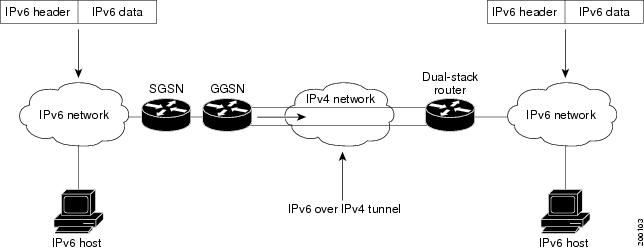
The Cisco GGSN supports IPv6 primary PDP context activation, and SGSN-initiated modification and deactivation procedures via IPv6 stateless autoconfiguration (as specified by RFC 2461 and RFC 2462). IPv6 over IPv4 tunnels configured on the Cisco 7600 series router supervisor engine module establish connectivity between isolated or remote IPv6 networks over an existing IPv4 infrastructure.

Note Tunnels must be configured from the supervisor engine. Tunneling from the GGSN is not supported.
Figure 4-1 illustrates the IPv6 over IPv4 tunnel configuration.
Figure 4-1 IPv6 over IPv4 Tunnel Configuration
IPv6 Stateless Autoconfiguration
All interfaces on an IPv6 node must have a link-local address, which is usually automatically configured from the identifier for an interface and the link-local prefix FE80::/10. A link-local address enables a node to communicate with other nodes on the link and can be used to further configure the node.
Nodes can connect to a network and automatically generate site-local and global IPv6 addresses without the need for manual configuration or help of a server, such as a RADIUS server. With IPv6, a router on the link, in this example, the Cisco GGSN, advertises any site-local and global prefixes, and its willingness to function as a default router for the link in router advertisements (RAs). RAs are sent periodically, and are sent in response to router solicitation messages, which are sent by hosts at system startup.
The Cisco GGSN assigns an interface ID to the IPv6 mobile station (MS) in the create PDP context response, or the MS can automatically configure a site-local and global IPv6 address by appending its interface identifier (64 bits) to the prefix (64 bits) included in the RAs.
The resulting 128-bit IPv6 address configured by the node is then subjected to duplicate address detection to ensure its uniqueness on the link. If the prefix advertised in the RA is globally unique, then the IPv6 address configured by the node is also guaranteed to be globally unique. Router solicitation messages, which have a value of 133 in the Type field of the ICMP packet header, are sent by hosts at system startup so that the host can immediately autoconfigure without needing to wait for the next scheduled RA.
Figure 4-2 illustrates the creation of an IPv6 PDP context via IPv6 stateless autoconfiguration.
Figure 4-2 IPv6 PDP Creation on the Cisco GGSN using IPv6 Stateless Autoconfiguration
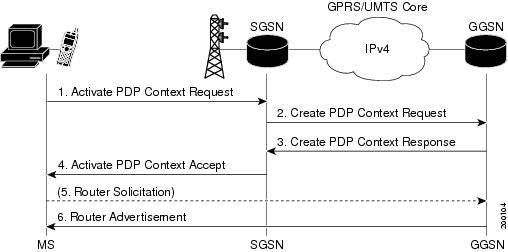
In the steps of the above call flow, the following occurs:
1. Activate PDP Context Request—The MS sends the SGSN an activate PDP context request.
2. Create PDP Context Request—The SGSN sends a create PDP context request to the GGSN.
Upon receiving the create PDP context request from the SGSN, the GGSN generates an IPv6 address composed of the prefix allocated to the PDP context and an interface identifier generated by the GGSN.
3. Create PDP Context Response—The GGSN returns address in its create PDP context response to the SGSN.
Since the MS is considered to be alone on its link towards the GGSN, the interface identifier does not need to be unique across all PDP contexts. The MS extracts and stores the interface identifier from the address received and shall use it to build its link-local address as well as its full IPv6 address.
4. Activate PDP Context Accept—The SGSN sends a activate PDP context accept to the MS and the context is established.
5. Router Solicitations—The MS may or may not send router solicitations to the GGSN.
6. Router Advertisements—The GGSN sends RAs periodically.
In the RAs, it sends a 64-bit prefix. It is the same prefix as the one it provided in Step 3. After the MS receives the RA, it constructs its full IPv6 address by concatenating the interface ID received in Step 3, or a locally generated interface ID, and the prefix provided in the RA. If the RA contains more than one prefix option, the MS only considers the first one, and discards the rest.
Because any prefix the GGSN advertises in a create PDP context response is unique within the scope of the prefix, the MS does not have to perform duplicate address detection. Therefore, the GGSN can discard the neighbor solicitations the MS might send to detect a duplicate address.
Supported Features
For IPv6 PDP contexts, the Cisco GGSN supports the following features:
•IPv6 GTPv0 and GTPv1 PDP establishment via IPv6 stateless autoconfiguration.
•IPv6 prefix allocation from a locally configured 64-bit prefix pool.
•The GGSN sends RAs and answers router solicitation messages from MSs.
•IPv6 G-CDR generation.
•Dual-stack APN (both IPv4 or IPv6 PDPs supported simultaneously).
•IPv6 DNS address configuration per APN for IPv6 DNS address allocation if requested.
•RADIUS authentication, accounting, and IPv6 address allocation from RADIUS server.
•Per-APN RA timers. These timers includes the RA interval and life time intervals, and the initial interval before sending the first RA.
•Standard and extended ACL support for IPv6 APNs
•GPRS-specific security features (address verification and mobile-to-mobile traffic redirection features).
•QoS (marking and call admission control).
•Proxy-CSCF support for IPv6 servers.
Restrictions
Before configuring IPv6 PDP context support on the GGSN, note the following limitations and restrictions:
•The following features are not supported for IPv6 PDP contexts:
–secondary PDP contexts
–per-PDP policing
–stateful address auto-configuration with DHCPv6
–DHCPv6 relay or proxy-client
–stateful IPv6 autoconfiguration
–GTP session redundancy (GTP-SR)
–enhanced service-aware billing
–PPP PDP and PPP regeneration
–VRF (If a dual-stack APN is configured, and VRF is enabled on the APN, IPv4 PDP contexts will go into the VRF, but IPv6 pdp contexts will stay in the global routing table.)
–route probe, routing behind the mobile, and single-pdp session, and configuring a primary and back NetBios Name Service.
Note Fro a complete list of APN configurations supported or not supported for IPv6 PDP contexts, see Chapter 8 "Configuring Network Access to the GGSN."
•IP CEF and IPv6 CEF must be enabled. (IPv6 CEF requires IP CEF to be enabled.)
•All infrastructure nodes in the PLMN (the SGSN, GGSN, and charging gateway) are assumed to be IPv4 nodes.
•IPv6 must be implemented on the supervisor engine module.
•IPv6 over IPv4 tunnels must be configured from the supervisor engine module. Tunneling from the GGSN is not supported.
•Ensure that RADIUS is implemented as an infrastructure node in the PLMN.
•Ensure that the no virtual-template snmp is configured.
•Ensure that the no virtual-template subinterface is not configured.
•Ensure that the following commands are not configured on the IPv6 base virtual template:
–snmp if-index persists
–ntp disable
Implementing IPv6 PDP Support on the GGSN
To configure IPv6 support on the GGSN, complete the tasks in the following sections:
•Enabling the Forwarding of IPv6 Traffic on the GGSN (Required)
•Configuring an IPv6 Base Virtual Template Interface (Required)
•Enabling IPv6 Support on the APN (Required)
•Configuring a Local IPv6 Prefix Pool (Required)
•Monitoring and Maintaining IPv6 PDPs (Optional)
Enabling the Forwarding of IPv6 Traffic on the GGSN
The forwarding of IPv6 traffic on the GGSN requires that Cisco Express Forwarding (CEF) and IPv6 CEF are enabled globally on the GGSN. Additionally, to forward IPv6 traffic using CEF, you must also configure the forwarding of IPv6 unicast datagrams globally on the GGSN by using the ipv6 unicast-routing command.
SUMMARY STEPS
1. enable
2. configure terminal
3. ip cef
4. ipv6 unicast-routing
5. ipv6 cef
DETAILED STEPS
Configuring an IPv6 Base Virtual Template Interface
A virtual-access subinterface is created for each IPv6 PDP context established on the GGSN. The configurations for the virtual-access, such as RA timers, etc., are cloned from an IPv6 base virtual template interface that has been assigned to the APN. The commands configured under the IPv6 base virtual template define the behavior of the IPv6 protocol.
You can configure multiple base virtual templates, each with a different configuration. A base virtual template can be shared by multiple APNs, however, only one base virtual template can be assigned to an APN (using the ipv6 base-vtemplate command) at a time.
When a create PDP context request is received, a virtual sub-interface is cloned from the base virtual template that is assigned to the APN, and an IPv6 address is allocated as configured under the APN after the IPv6 virtual-access sub-interface is created. The create PDP context response is returned after the virtual-access sub-interface is created, and authentication and address allocation are successfully completed.
 To avoid severe performance issues, ensure that the
no ipv6 nd ra suppress command
is configured and that the
no-virtual-template subinterface commands
is
not configured under the IPv6 base virtual template interface.
To avoid severe performance issues, ensure that the
no ipv6 nd ra suppress command
is configured and that the
no-virtual-template subinterface commands
is
not configured under the IPv6 base virtual template interface.
SUMMARY STEPS
1. enable
2. configure terminal
3. interface virtual-template number
4. ipv6 enable
5. no ipv6 nd ra suppress
6. ipv6 nd ra interval {maximum-secs [minimum-secs] | msec maximum-msecs [minimum-msecs]}
7. ipv6 nd ra lifetime seconds
8. ipv6 nd ra initial [exponential] InitialAdvertInterval InitialAdvertisements
9. ipv6 nd prefix default infinite infinite off-link
10. exit
DETAILED STEPS
Enabling IPv6 Support on the APN
The commands configured on an APN define the behavior of the IPv6 PDP contexts processed by that APN (such as the method of IPv6 address allocation to use), as well as define GTP IPv6 elements (such as the IPv6 addresses of the primary and backup DNS).
For a complete list of APN-configuration options that are supported for IPv6 PDP contexts, see Chapter 8 "Configuring Network Access to the GGSN."
To enable IPv6 support on an APN, complete the following steps.
SUMMARY STEPS
1. enable
2. configure terminal
3. access-point access-point-index
4. access-point-name apn-name
5. ipv6 dns primary ipv6-address [secondary ipv6-address]
6. ipv6 [enable | exclusive]
7. ipv6 ipv6-address-pool {local pool-name | radius-client}
8. ipv6 ipv6-access-group ACL-name [up | down]
9. ipv6 base-vtemplate number
10. exit
DETAILED STEPS
Configuring a Local IPv6 Prefix Pool
The function of prefix pools in IPv6 is similar to that of address pools in IPv4. The main difference is that IPv6 assigns prefixes rather than single addresses.
As for IPv4, an IP address can be obtained from a locally-configured pool, or it can be retrieved from an AAA server. The Cisco GGSN supports prefix allocation via local pools.
When configuring a local IPv6 prefix pool, note that overlapping membership between pools is not permitted. Once a pool is configured, it cannot be changed. If you change the pool configuration, the pool is removed and re-created and all prefixes previously allocated will be freed.
For detailed information on configuring local IPv6 prefix pools using the following commands, refer to the Cisco IOS IPv6 Configuration Guide.
SUMMARY STEPS
1. enable
2. configure terminal
3. ipv6 local pool poolname prefix/prefix-length assigned-length [shared] [cache-size size]
4. exit
DETAILED STEPS
Configuring an IPv6 Access Control List
IPv6 access control lists restrict IPv6-related traffic based on the configured IPv6 filters. A filter contains the rules to match an IP packet, and if the packet matches, the rule also stipulates if the packet should be permitted or denied.
An IPv6 access control filter is applied to a APN using the ipv6 ipv6-access-group access-point configuration command.
For detailed information on configuring IPv6 Access Control Lists using the following commands, refer to the Cisco IOS IPv6 Configuration Guide.
SUMMARY STEPS
1. enable
2. configure terminal
3. ipv6 access-list access-list-name
4. deny protocol {source-ipv6-prefix/prefix-length | any | host source-ipv6-address} [operator [port-number]] {destination-ipv6-prefix/prefix-length | any | host destination-ipv6-address} [operator [port-number]] [dest-option-type [doh-number | doh-type]] [dscp value] [flow-label value] [fragments] [log] [log-input] [mobility] [mobility-type [mh-number | mh-type]] [routing] [routing-type routing-number] [sequence value] [time-range name] [undetermined-transport]
5. permit protocol {source-ipv6-prefix/prefix-length | any | host source-ipv6-address} [operator [port-number]] {destination-ipv6-prefix/prefix-length | any | host destination-ipv6-address} [operator [port-number]] [dest-option-type [doh-number | doh-type]] [dscp value] [flow-label value] [fragments] [log] [log-input] [mobility] [mobility-type [mh-number | mh-type]] [reflect name [timeout value]] [routing] [routing-type routing-number] [sequence value] [time-range name]
6. exit
DETAILED STEPS
Configuring Additional IPv6 Support Options on the GGSN
This section summarizes some other IPv6-specific options that you can configure on an access-point.
Additional details about configuring several of these options are discussed in other chapters of this book. Note that these options apply to IPv6 PDP contexts only. A summary of all APN options that can be configured are described in Chapter 8 "Configuring Network Access to the GGSN."
To configure additional IPv6-specific options for a GGSN access point, use any of the following commands, beginning in access- point list configuration mode:
Monitoring and Maintaining IPv6 PDPs
The following privilege EXEC show commands can be used to monitor the IPv6 configuration and IPv6 PDPs on the GGSN.
Configuration Example
The following example shows IPv6 support configured on a GGSN. The IPv6 related configuration statements appear in bold text:
ip cef
!
ipv6 unicast-routing
ipv6 cef
!
interface Virtual-Template10
ipv6 enable
no ipv6 nd ra suppress
ipv6 nd ra interval 21600
ipv6 nd ra lifetime 21600
ipv6 nd ra initial 3 3
ipv6 nd prefix default infinite infinite off-link
!
access-point 2
access-point-name ipv6_test.com
ipv6 dns primary 2001:999::9
ipv6 enable
ipv6 ipv6-address-pool local localv6
ipv6 base-vtemplate 10
!
ipv6 local pool localv6 2001:234::/48 64
!
!
 Feedback