- Read Me First
- Configuring ERSPAN
- Configuring Routing Between VLANs with IEEE 802.1Q Encapsulation
- IEEE 802.1Q-in-Q VLAN Tag Termination
- VLAN Mapping to Gigabit EtherChannel Member Links
- Configuring Routing Between VLANs
- EtherChannel Flow-Based Limited 1 1 Redundancy
- Flow-Based per Port-Channel Load Balancing
- VLANs over IP Unnumbered SubInterfaces
- Spanning Tree Protocol
- Finding Feature Information
- Restrictions for REP Access Gateway Enhancements
- Information About REP Access Gateway Enhancements
- How to Configure REP Access Gateway Enhancements
- Configuration Examples For REP Access Gateway Enhancements
- Additional References for REP Access Gateway
- Feature Information for REP Access Gateway Enhancement
REP Access
Gateway
Resilient Ethernet Protocol (REP) is a Cisco proprietary protocol that provides an alternative to the Spanning Tree Protocol (STP). REP provides fast reconvergence and traffic recovery when a link in a ring fails. Fast reconvergence is achieved by notifying all nodes in the ring with a control message that activates the redundant path to the core network.
The REP Access Gateway Enhancements feature allows fast failure detection notifications between devices configured with REP access gateway (REP-AG), by enabling communication between Connectivity Fault Manager (CFM) and REP.
- Finding Feature Information
- Restrictions for REP Access Gateway Enhancements
- Information About REP Access Gateway Enhancements
- How to Configure REP Access Gateway Enhancements
- Configuration Examples For REP Access Gateway Enhancements
- Additional References for REP Access Gateway
- Feature Information for REP Access Gateway Enhancement
Finding Feature Information
Your software release may not support all the features documented in this module. For the latest caveats and feature information, see Bug Search Tool and the release notes for your platform and software release. To find information about the features documented in this module, and to see a list of the releases in which each feature is supported, see the feature information table.
Use Cisco Feature Navigator to find information about platform support and Cisco software image support. To access Cisco Feature Navigator, go to www.cisco.com/go/cfn. An account on Cisco.com is not required.
Restrictions for REP Access Gateway Enhancements
-
EFD is only supported on physical ports and services; it is not supported on VLAN sub interfaces.
-
The CCM interval for CMF service on which EFD is supported is limited by the platform capabilities.
-
The EFD feature is only supported on Down MEPs.
-
EFD is not supported on trunk services.
-
EFD is not supported for both G-8032 and REP at the same time.
-
Only one MEP on a given interface or EFP may be configured for EFD. You cannot have MEPs operating at multiple CFM levels on the same interface.
Information About REP Access Gateway Enhancements
REP Access Gateway Enhancements
In a network where a REP and non-REP devices are connected and when a link failure occurs, a Non-REP device network (access gateway) directly connected to REP network sends failure notification, so that REP network can reroute the traffic to an alternate route. But, access devices supporting REP Edge No-Neighbor (REP ENN) only support one interface configured as a REP Edge No-Neighbor port, resulting in an unsupported architecture with the REP Access Gateway (REP AG) device.
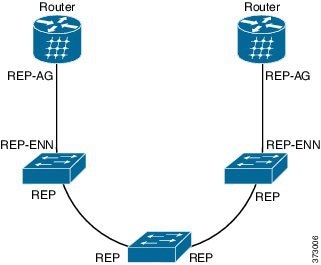
Fast failure detection in a REP-AG configured device can be achieved by enabling communication between Connectivity Fault Manager (CFM) and REP. CFM on the edge ports can notify REP if any failure is detected on the monitored links, allowing the appropriate re-convergence actions to be taken.
The mechanism for the communication is for REP to register as an Ethernet Fault Detection (EFD) client, so that any CFM defects above a configurable threshold triggers a notification to REP.
How to Configure REP Access Gateway Enhancements
Configuring REP Access Gateway Enhancements
Perform this task to configure EFD messages to REP devices.
1.
enable
2.
configure terminal
3.
ethernet cfm global
4.
link-protection enable
5.
link-protection
group
management
vlan
vlan-id
6.
link-protection
group
group-number
pccm
vlan
vlan-id
7.
ethernet
cfm
domain
domain-namelevel
level-id
[
direction
outward ]
8.
service
{
ma-name |
ma-number |vlan-id
vlan-id |vpn-id
vpn-id }
[port
|
vlan
vlan-id [direction
down ]
]
9.
continuity-check
10.
continuity-check
[
interval
time |
loss-threshold
threshold |
static
rmep ]
11.
efd
notify
rep
12.
end
DETAILED STEPS
Verifying REP Access Gateway Enhancements
Perform this optional task to verify the status of interface monitored for EFD.
1.
enable
2.
show
interface
number
rep detail
DETAILED STEPS
Configuration Examples For REP Access Gateway Enhancements
Example Configuring REP Access Gateway Enhancements
This example shows how to configure EFD messages for REP devices.
Device> enable
Device# configure terminal
Device(config)# ethernet cfm global
Device(config)# link-protection enable
Device(config)# link-protection group management vlan 51
Device(config)# link-protection group 2 pccm vlan 16
Device(config)# ethernet cfm domain REP_domain level 4
Device(config-ecfm)# service rep_service evc rep-evc vlan 1001 direction down
Device(config-ecfm-srv)# continuity-check
Device(config-ecfm-srv)# continuity-check interval 3.3ms
Device(config-ecfm-srv)# efd notify rep
Device(config-ecfm-srv)# end
Additional References for REP Access Gateway
Related Documents
Related Topic |
Document Title |
|---|---|
| Cisco IOS commands |
Standards and RFCs
| Standard/RFC |
Title |
|---|---|
| Standard |
Title |
MIBs
| MIB |
MIBs Link |
|---|---|
|
To locate and download MIBs for selected platforms, Cisco IOS releases, and feature sets, use Cisco MIB Locator found at the following URL: |
Technical Assistance
| Description |
Link |
|---|---|
| The Cisco Support website provides extensive online resources, including documentation and tools for troubleshooting and resolving technical issues with Cisco products and technologies. To receive security and technical information about your products, you can subscribe to various services, such as the Product Alert Tool (accessed from Field Notices), the Cisco Technical Services Newsletter, and Really Simple Syndication (RSS) Feeds. Access to most tools on the Cisco Support website requires a Cisco.com user ID and password. |
Feature Information for REP Access Gateway Enhancement
The following table provides release information about the feature or features described in this module. This table lists only the software release that introduced support for a given feature in a given software release train. Unless noted otherwise, subsequent releases of that software release train also support that feature.
Use Cisco Feature Navigator to find information about platform support and Cisco software image support. To access Cisco Feature Navigator, go to www.cisco.com/go/cfn. An account on Cisco.com is not required.|
Feature Name |
Releases |
Feature Information |
|---|---|---|
|
REP Access Gateway Enhancements |
Cisco IOS XE Release 3.13 |
The REP Access Gateway Enhancements feature allows fast failure detection notifications between devices configured with REP access gateway (REP-AG), by enabling communication between Connectivity Fault Manager (CFM) and REP. The following commands were introduced by this feature: efd notify rep . |
 Feedback