Contents

Configuring IP Multicast over ATM

This module describes how to configure IP multicast over ATM, including point-to-multipoint virtual circuits (VCs) and ATM bundle.

Finding Feature Information

Your software release may not support all the features documented in this module. For the latest caveats and feature information, see Bug Search Tool and the release notes for your platform and software release. To find information about the features documented in this module, and to see a list of the releases in which each feature is supported, see the feature information table at the end of this module.

Use Cisco Feature Navigator to find information about platform support and Cisco software image support. To access Cisco Feature Navigator, go to www.cisco.com/​go/​cfn. An account on Cisco.com is not required.

Prerequisites for IP Multicast over ATM Point-to-Multipoint VCs

  • You must have IP multicast routing and PIM sparse mode configured. This feature does not work with PIM dense mode.

  • You must have ATM configured for multipoint signaling.

  • You should understand the concepts in the “ IP Multicast Technology Overview ” module.

Information About IP Multicast over ATM

PIM Nonbroadcast Multiaccess

Protocol Independent Multicast (PIM) nonbroadcast multiaccess (NBMA) mode allows the software to replicate packets for each neighbor on the NBMA network. Traditionally, the software replicates multicast and broadcast packets to all broadcast configured neighbors. This action might be inefficient when not all neighbors want packets for certain multicast groups. NBMA mode enables you to reduce bandwidth on links leading into the NBMA network, and to reduce the number of CPU cycles in switches and attached neighbors.

It is appropriate to configure PIM NBMA mode on ATM, Frame Relay, Switched Multimegabit Data Service (SMDS), PRI ISDN, or X.25 networks only, especially when these media do not have native multicast available. Do not use PIM NBMA mode on multicast-capable LANs (such as Ethernet or FDDI).

You should use PIM sparse mode with this feature. Therefore, when each Join message is received from NBMA neighbors, PIM stores each neighbor IP address and interface in the outgoing interface list for the group. When a packet is destined for the group, the software replicates the packet and unicasts (data-link unicasts) it to each neighbor that has joined the group.

Consider the following two factors before enabling PIM NBMA mode:

  • If the number of neighbors grows, the outgoing interface list gets large, which costs memory and replication time.

  • If the network (Frame Relay, SMDS, or ATM) supports multicast natively, you should use it so that replication is performed at optimal points in the network.

IP Multicast over ATM Point-to-Multipoint VCs

IP Multicast over ATM Point-to-Multipoint VCs is a feature that dynamically creates ATM point-to-multipoint switched virtual circuits (SVCs) to handle IP multicast traffic more efficiently.

This feature can enhance router performance and link utilization because packets are not replicated and sent multiple times over the ATM interface.

Traditionally, over NBMA networks, Cisco routers would perform a pseudobroadcast to get broadcast or multicast packets to all neighbors on a multiaccess network. For example, assume in the figure that Routers A, B, C, D, and E were running the Open Shortest Path First (OSPF) protocol. Router A must deliver to Routers D and E. When Router A sends an OSPF Hello packet, the data link layer replicates the Hello packet and sends one to each neighbor (this procedure is known as pseudobroadcast), which results in four copies being sent over the link from Router A to the multiaccess WAN.
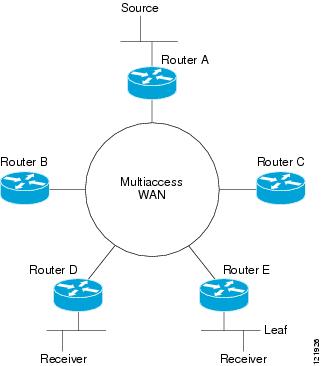
Figure 1. Environment for IP Multicast over ATM Point-to-Multipoint VCs

With the advent of IP multicast, where high-rate multicast traffic can occur, the pseudobroadcast approach does not scale. Furthermore, in the preceding example, Routers B and C would get data traffic they do not need. To handle this problem, PIM can be configured in NBMA mode using the ip pim nbma-mode command. PIM in NBMA mode works only for sparse mode groups. Configuring PIM in NBMA mode would allow only Routers D and E to get the traffic without distributing to Routers B and C. However, two copies are still delivered over the link from Router A to the multiaccess WAN.

If the underlying network supported multicast capability, the routers could handle this situation more efficiently. If the multiaccess WAN were an ATM network, IP multicast could use multipoint VCs.

To configure IP multicast using multipoint VCs, Routers A, B, C, D, and E in the figure must run PIM sparse mode. If the Receiver directly connected to Router D joins a group and Router A is the PIM RP, the following sequence of events occurs:

  1. Router D sends a PIM Join message to Router A.

  2. When Router A receives the PIM join, it sets up a multipoint VC for the multicast group.

  3. Later, when the Receiver directly connected to Router E joins the same group, Router E sends a PIM Join message to Router A.

  4. Router A will see there is a multipoint VC already associated with the group, and will add Router E to the existing multipoint VC.

  5. When the Source sends a data packet, Router A can send a single packet over its link that gets to both Router D and Router E. The replication occurs in the ATM switches at the topological diverging point from Router A to Router D and Router E.

If a host sends an IGMP report over an ATM interface to a router, the router adds the host to the multipoint VC for the group.

This feature can also be used over ATM subinterfaces.

Idling Policy for ATM VCs Created by PIM

An idling policy uses the ip pim vc-count command to limit the number of VCs created by PIM. When the router stays at or below the number configured, no idling policy is in effect. When the next VC to be opened will exceed the value, an idling policy is exercised. An idled VC does not mean that the multicast traffic is not forwarded; the traffic is switched to VC 0. VC 0 is the broadcast VC that is open to all neighbors listed in the map list. The name VC 0 is unique to PIM and the mroute table.

How the Idling Policy Works

The idling policy works as follows:

  • The only VCs eligible for idling are those with a current 1-second activity rate less than or equal to the value configured by the ip pim minimum-vc-rate interface configuration command on the ATM interface. Activity level is measured in packets per second (pps).

  • The VC with the least amount of activity below the configured ip pim minimum-vc-rate pps rate is idled.

  • If the ip pim minimum-vc-rate command is not configured, all VCs are eligible for idling.

  • If other VCs are at the same activity level, the VC with the highest fanout (number of leaf routers on the multipoint VC) is idled.

  • The activity level is rounded to three orders of magnitude (less than 10 pps, 10 to 100 pps, and 100 to 1000 pps). Therefore, a VC that has 40 pps activity and another that has 60 pps activity are considered to have the same rate, and the fanout count determines which one is idled. If the first VC has a fanout of 5 and the second has a fanout of 3, the first one is idled.

  • Idling a VC means releasing the multipoint VC that is dedicated for the multicast group. The traffic of the group continues to be sent; it is moved to the static map VC. Packets will flow over a shared multipoint VC that delivers packets to all PIM neighbors.

  • If all VCs have a 1-minute rate greater than the pps value, the new group (that exceeded the ip pim vc-count number) will use the shared multipoint VC.

Keeping VCs from Idling

By default, all VCs are eligible for idling. You can configure a minimum rate required to keep VCs from being idled.

How to Configure IP Multicast over ATM

Configuring IP Multicast over ATM Point-to-Multipoint VCs

Perform this task to configure IP multicast over ATM point-to-multipoint VCs. All of the steps in the task can be used in an ATM network. This feature can also be used over ATM subinterfaces. PIM NBMA mode could be used in an ATM, Frame Relay, SMDS, PRI ISDN, or X.25 network.

Before You Begin
  • IP multicast routing and PIM sparse mode must be configured. This feature does not work with PIM dense mode.

  • ATM must be configured for multipoint signaling.

SUMMARY STEPS

    1.    enable

    2.    configure terminal

    3.    interface atm number

    4.    ip pim nbma-mode

    5.    ip pim multipoint-signalling

    6.    atm multipoint-signalling

    7.    ip pim vc-count number

    8.    ip pim minimum-vc-rate pps

    9.    show ip pim vc


DETAILED STEPS
     Command or ActionPurpose
    Step 1 enable


    Example:
    Device> enable
     

    Enables privileged EXEC mode.

    • Enter your password if prompted.

     
    Step 2 configure terminal


    Example:
    Device# configure terminal
     

    Enters global configuration mode.

     
    Step 3 interface atm number


    Example:
    Device(config)# interface atm 0
     

    Configures an ATM interface.

     
    Step 4 ip pim nbma-mode


    Example:
    Device(config-if)# ip pim nbma-mode
     

    (Optional) Enables NBMA mode on a serial link.

     
    Step 5 ip pim multipoint-signalling


    Example:
    Device(config-if)# ip pim multipoint-signalling
     

    Enables IP multicast over ATM point-to-multipoint VCs.

    • This command enables PIM to open ATM point-to-multipoint VCs for each multicast group that a receiver joins.

     
    Step 6 atm multipoint-signalling


    Example:
    Device(config-if)# atm multipoint-signalling
     

    Enables point-to-multipoint signaling to the ATM switch.

    • This command is required so that static map multipoint VCs can be opened. The device uses existing static map entries that include the broadcast keyword to establish multipoint calls. The map list is needed because it acts like a static ARP table.

     
    Step 7 ip pim vc-count number


    Example:
    Device(config-if)# ip pim vc-count 300
     

    (Optional) Changes the maximum number of VCs that PIM can open.

    • By default, PIM can open a maximum of 200 VCs. When the device reaches this number, it deletes inactive VCs so it can open VCs for new groups that might have activity.

     
    Step 8 ip pim minimum-vc-rate pps


    Example:
    Device(config-if)# ip pim minimum-vc-rate 1500
     

    (Optional) Sets the minimum activity rate required to keep VCs from being idled.

    • By default, all VCs are eligible for idling.

     
    Step 9 show ip pim vc


    Example:
    Device# show ip pim vc
     

    (Optional) Displays ATM VC status information for multipoint VCs opened by PIM.


    Configuration Examples for IP Multicast over ATM

    Example: IP Multicast over ATM Point-to-Multipoint VCs

    The following example shows how to enable IP multicast over ATM point-to-multipoint VCs:

    interface ATM2/0
    ip address 171.69.214.43 255.255.255.248
     ip pim sparse-mode
     ip pim multipoint-signalling
     ip ospf network broadcast
     atm nsap-address 47.00918100000000410B0A1981.333333333333.00
     atm pvc 1 0 5 qsaal
     atm pvc 2 0 16 ilmi
     atm multipoint-signalling
     map-group mpvc
    router ospf 9
     network 171.69.214.0 0.0.0.255 area 0
    !
    ip classless
     ip pim rp-address 171.69.10.13 98
    !
    map-list mpvc
     ip 171.69.214.41 atm-nsap 47.00918100000000410B0A1981.111111111111.00 broadcast
     ip 171.69.214.42 atm-nsap 47.00918100000000410B0A1981.222222222222.00 broadcast
     ip 171.69.214.43 atm-nsap 47.00918100000000410B0A1981.333333333333.00 broadcast 

    Additional References

    Related Documents

    Related Topic

    Document Title

    Cisco IOS commands

    Cisco IOS Master Commands List, All Releases

    IP multicast commands

    Cisco IOS IP Multicast Command Reference

    MIBs

    MIB

    MIBs Link

    To locate and download MIBs for selected platforms, Cisco IOS XE software releases, and feature sets, use Cisco MIB Locator found at the following URL:

    http:/​/​www.cisco.com/​go/​mibs

    Technical Assistance

    Description

    Link

    The Cisco Support and Documentation website provides online resources to download documentation, software, and tools. Use these resources to install and configure the software and to troubleshoot and resolve technical issues with Cisco products and technologies. Access to most tools on the Cisco Support and Documentation website requires a Cisco.com user ID and password.

    http:/​/​www.cisco.com/​cisco/​web/​support/​index.html

    Feature Information for Configuring IP Multicast over ATM

    The following table provides release information about the feature or features described in this module. This table lists only the software release that introduced support for a given feature in a given software release train. Unless noted otherwise, subsequent releases of that software release train also support that feature.

    Use Cisco Feature Navigator to find information about platform support and Cisco software image support. To access Cisco Feature Navigator, go to www.cisco.com/​go/​cfn. An account on Cisco.com is not required.

    Table 1 Feature Information for IP Multicast over ATM

    Feature Name

    Releases

    Description

    P Multicast over ATM Point-to-Multipoint VCs

    This feature was added before Cisco IOS XE Release 2.1.

    This feature dynamically creates ATM point-to-multipoint switched virtual circuits (SVCs) to handle IP multicast traffic more efficiently. It can enhance router performance and link utilization because packets are not replicated and sent multiple times over the ATM interface.

    IP Multicast over ATM PVC Bundle

    Cisco IOS XE Release 3.7.1S

    IP multicast features supported on IP interfaces are also supported on ATM PVC Bundle and Layer3 ATM PVC interfaces.


    Configuring IP Multicast over ATM

    Configuring IP Multicast over ATM

    This module describes how to configure IP multicast over ATM, including point-to-multipoint virtual circuits (VCs) and ATM bundle.

    Finding Feature Information

    Your software release may not support all the features documented in this module. For the latest caveats and feature information, see Bug Search Tool and the release notes for your platform and software release. To find information about the features documented in this module, and to see a list of the releases in which each feature is supported, see the feature information table at the end of this module.

    Use Cisco Feature Navigator to find information about platform support and Cisco software image support. To access Cisco Feature Navigator, go to www.cisco.com/​go/​cfn. An account on Cisco.com is not required.

    Prerequisites for IP Multicast over ATM Point-to-Multipoint VCs

    • You must have IP multicast routing and PIM sparse mode configured. This feature does not work with PIM dense mode.

    • You must have ATM configured for multipoint signaling.

    • You should understand the concepts in the “ IP Multicast Technology Overview ” module.

    Information About IP Multicast over ATM

    PIM Nonbroadcast Multiaccess

    Protocol Independent Multicast (PIM) nonbroadcast multiaccess (NBMA) mode allows the software to replicate packets for each neighbor on the NBMA network. Traditionally, the software replicates multicast and broadcast packets to all broadcast configured neighbors. This action might be inefficient when not all neighbors want packets for certain multicast groups. NBMA mode enables you to reduce bandwidth on links leading into the NBMA network, and to reduce the number of CPU cycles in switches and attached neighbors.

    It is appropriate to configure PIM NBMA mode on ATM, Frame Relay, Switched Multimegabit Data Service (SMDS), PRI ISDN, or X.25 networks only, especially when these media do not have native multicast available. Do not use PIM NBMA mode on multicast-capable LANs (such as Ethernet or FDDI).

    You should use PIM sparse mode with this feature. Therefore, when each Join message is received from NBMA neighbors, PIM stores each neighbor IP address and interface in the outgoing interface list for the group. When a packet is destined for the group, the software replicates the packet and unicasts (data-link unicasts) it to each neighbor that has joined the group.

    Consider the following two factors before enabling PIM NBMA mode:

    • If the number of neighbors grows, the outgoing interface list gets large, which costs memory and replication time.

    • If the network (Frame Relay, SMDS, or ATM) supports multicast natively, you should use it so that replication is performed at optimal points in the network.

    IP Multicast over ATM Point-to-Multipoint VCs

    IP Multicast over ATM Point-to-Multipoint VCs is a feature that dynamically creates ATM point-to-multipoint switched virtual circuits (SVCs) to handle IP multicast traffic more efficiently.

    This feature can enhance router performance and link utilization because packets are not replicated and sent multiple times over the ATM interface.

    Traditionally, over NBMA networks, Cisco routers would perform a pseudobroadcast to get broadcast or multicast packets to all neighbors on a multiaccess network. For example, assume in the figure that Routers A, B, C, D, and E were running the Open Shortest Path First (OSPF) protocol. Router A must deliver to Routers D and E. When Router A sends an OSPF Hello packet, the data link layer replicates the Hello packet and sends one to each neighbor (this procedure is known as pseudobroadcast), which results in four copies being sent over the link from Router A to the multiaccess WAN.

    Figure 1. Environment for IP Multicast over ATM Point-to-Multipoint VCs

    With the advent of IP multicast, where high-rate multicast traffic can occur, the pseudobroadcast approach does not scale. Furthermore, in the preceding example, Routers B and C would get data traffic they do not need. To handle this problem, PIM can be configured in NBMA mode using the ip pim nbma-mode command. PIM in NBMA mode works only for sparse mode groups. Configuring PIM in NBMA mode would allow only Routers D and E to get the traffic without distributing to Routers B and C. However, two copies are still delivered over the link from Router A to the multiaccess WAN.

    If the underlying network supported multicast capability, the routers could handle this situation more efficiently. If the multiaccess WAN were an ATM network, IP multicast could use multipoint VCs.

    To configure IP multicast using multipoint VCs, Routers A, B, C, D, and E in the figure must run PIM sparse mode. If the Receiver directly connected to Router D joins a group and Router A is the PIM RP, the following sequence of events occurs:

    1. Router D sends a PIM Join message to Router A.

    2. When Router A receives the PIM join, it sets up a multipoint VC for the multicast group.

    3. Later, when the Receiver directly connected to Router E joins the same group, Router E sends a PIM Join message to Router A.

    4. Router A will see there is a multipoint VC already associated with the group, and will add Router E to the existing multipoint VC.

    5. When the Source sends a data packet, Router A can send a single packet over its link that gets to both Router D and Router E. The replication occurs in the ATM switches at the topological diverging point from Router A to Router D and Router E.

    If a host sends an IGMP report over an ATM interface to a router, the router adds the host to the multipoint VC for the group.

    This feature can also be used over ATM subinterfaces.

    Idling Policy for ATM VCs Created by PIM

    An idling policy uses the ip pim vc-count command to limit the number of VCs created by PIM. When the router stays at or below the number configured, no idling policy is in effect. When the next VC to be opened will exceed the value, an idling policy is exercised. An idled VC does not mean that the multicast traffic is not forwarded; the traffic is switched to VC 0. VC 0 is the broadcast VC that is open to all neighbors listed in the map list. The name VC 0 is unique to PIM and the mroute table.

    How the Idling Policy Works

    The idling policy works as follows:

    • The only VCs eligible for idling are those with a current 1-second activity rate less than or equal to the value configured by the ip pim minimum-vc-rate interface configuration command on the ATM interface. Activity level is measured in packets per second (pps).

    • The VC with the least amount of activity below the configured ip pim minimum-vc-rate pps rate is idled.

    • If the ip pim minimum-vc-rate command is not configured, all VCs are eligible for idling.

    • If other VCs are at the same activity level, the VC with the highest fanout (number of leaf routers on the multipoint VC) is idled.

    • The activity level is rounded to three orders of magnitude (less than 10 pps, 10 to 100 pps, and 100 to 1000 pps). Therefore, a VC that has 40 pps activity and another that has 60 pps activity are considered to have the same rate, and the fanout count determines which one is idled. If the first VC has a fanout of 5 and the second has a fanout of 3, the first one is idled.

    • Idling a VC means releasing the multipoint VC that is dedicated for the multicast group. The traffic of the group continues to be sent; it is moved to the static map VC. Packets will flow over a shared multipoint VC that delivers packets to all PIM neighbors.

    • If all VCs have a 1-minute rate greater than the pps value, the new group (that exceeded the ip pim vc-count number) will use the shared multipoint VC.

    Keeping VCs from Idling

    By default, all VCs are eligible for idling. You can configure a minimum rate required to keep VCs from being idled.

    How to Configure IP Multicast over ATM

    Configuring IP Multicast over ATM Point-to-Multipoint VCs

    Perform this task to configure IP multicast over ATM point-to-multipoint VCs. All of the steps in the task can be used in an ATM network. This feature can also be used over ATM subinterfaces. PIM NBMA mode could be used in an ATM, Frame Relay, SMDS, PRI ISDN, or X.25 network.

    Before You Begin
    • IP multicast routing and PIM sparse mode must be configured. This feature does not work with PIM dense mode.

    • ATM must be configured for multipoint signaling.

    SUMMARY STEPS

      1.    enable

      2.    configure terminal

      3.    interface atm number

      4.    ip pim nbma-mode

      5.    ip pim multipoint-signalling

      6.    atm multipoint-signalling

      7.    ip pim vc-count number

      8.    ip pim minimum-vc-rate pps

      9.    show ip pim vc


    DETAILED STEPS
       Command or ActionPurpose
      Step 1 enable


      Example:
      Device> enable
       

      Enables privileged EXEC mode.

      • Enter your password if prompted.

       
      Step 2 configure terminal


      Example:
      Device# configure terminal
       

      Enters global configuration mode.

       
      Step 3 interface atm number


      Example:
      Device(config)# interface atm 0
       

      Configures an ATM interface.

       
      Step 4 ip pim nbma-mode


      Example:
      Device(config-if)# ip pim nbma-mode
       

      (Optional) Enables NBMA mode on a serial link.

       
      Step 5 ip pim multipoint-signalling


      Example:
      Device(config-if)# ip pim multipoint-signalling
       

      Enables IP multicast over ATM point-to-multipoint VCs.

      • This command enables PIM to open ATM point-to-multipoint VCs for each multicast group that a receiver joins.

       
      Step 6 atm multipoint-signalling


      Example:
      Device(config-if)# atm multipoint-signalling
       

      Enables point-to-multipoint signaling to the ATM switch.

      • This command is required so that static map multipoint VCs can be opened. The device uses existing static map entries that include the broadcast keyword to establish multipoint calls. The map list is needed because it acts like a static ARP table.

       
      Step 7 ip pim vc-count number


      Example:
      Device(config-if)# ip pim vc-count 300
       

      (Optional) Changes the maximum number of VCs that PIM can open.

      • By default, PIM can open a maximum of 200 VCs. When the device reaches this number, it deletes inactive VCs so it can open VCs for new groups that might have activity.

       
      Step 8 ip pim minimum-vc-rate pps


      Example:
      Device(config-if)# ip pim minimum-vc-rate 1500
       

      (Optional) Sets the minimum activity rate required to keep VCs from being idled.

      • By default, all VCs are eligible for idling.

       
      Step 9 show ip pim vc


      Example:
      Device# show ip pim vc
       

      (Optional) Displays ATM VC status information for multipoint VCs opened by PIM.


      Configuration Examples for IP Multicast over ATM

      Example: IP Multicast over ATM Point-to-Multipoint VCs

      The following example shows how to enable IP multicast over ATM point-to-multipoint VCs:

      interface ATM2/0
      ip address 171.69.214.43 255.255.255.248
       ip pim sparse-mode
       ip pim multipoint-signalling
       ip ospf network broadcast
       atm nsap-address 47.00918100000000410B0A1981.333333333333.00
       atm pvc 1 0 5 qsaal
       atm pvc 2 0 16 ilmi
       atm multipoint-signalling
       map-group mpvc
      router ospf 9
       network 171.69.214.0 0.0.0.255 area 0
      !
      ip classless
       ip pim rp-address 171.69.10.13 98
      !
      map-list mpvc
       ip 171.69.214.41 atm-nsap 47.00918100000000410B0A1981.111111111111.00 broadcast
       ip 171.69.214.42 atm-nsap 47.00918100000000410B0A1981.222222222222.00 broadcast
       ip 171.69.214.43 atm-nsap 47.00918100000000410B0A1981.333333333333.00 broadcast 

      Additional References

      Related Documents

      Related Topic

      Document Title

      Cisco IOS commands

      Cisco IOS Master Commands List, All Releases

      IP multicast commands

      Cisco IOS IP Multicast Command Reference

      MIBs

      MIB

      MIBs Link

      To locate and download MIBs for selected platforms, Cisco IOS XE software releases, and feature sets, use Cisco MIB Locator found at the following URL:

      http:/​/​www.cisco.com/​go/​mibs

      Technical Assistance

      Description

      Link

      The Cisco Support and Documentation website provides online resources to download documentation, software, and tools. Use these resources to install and configure the software and to troubleshoot and resolve technical issues with Cisco products and technologies. Access to most tools on the Cisco Support and Documentation website requires a Cisco.com user ID and password.

      http:/​/​www.cisco.com/​cisco/​web/​support/​index.html

      Feature Information for Configuring IP Multicast over ATM

      The following table provides release information about the feature or features described in this module. This table lists only the software release that introduced support for a given feature in a given software release train. Unless noted otherwise, subsequent releases of that software release train also support that feature.

      Use Cisco Feature Navigator to find information about platform support and Cisco software image support. To access Cisco Feature Navigator, go to www.cisco.com/​go/​cfn. An account on Cisco.com is not required.

      Table 1 Feature Information for IP Multicast over ATM

      Feature Name

      Releases

      Description

      P Multicast over ATM Point-to-Multipoint VCs

      This feature was added before Cisco IOS XE Release 2.1.

      This feature dynamically creates ATM point-to-multipoint switched virtual circuits (SVCs) to handle IP multicast traffic more efficiently. It can enhance router performance and link utilization because packets are not replicated and sent multiple times over the ATM interface.

      IP Multicast over ATM PVC Bundle

      Cisco IOS XE Release 3.7.1S

      IP multicast features supported on IP interfaces are also supported on ATM PVC Bundle and Layer3 ATM PVC interfaces.