- Handling Port Adapters
- Online Insertion and Removal
- Warnings and Cautions
- Port Adapter Removal and Installation
- Cisco 7100 Series Routers—Removing and Installing a Port Adapter
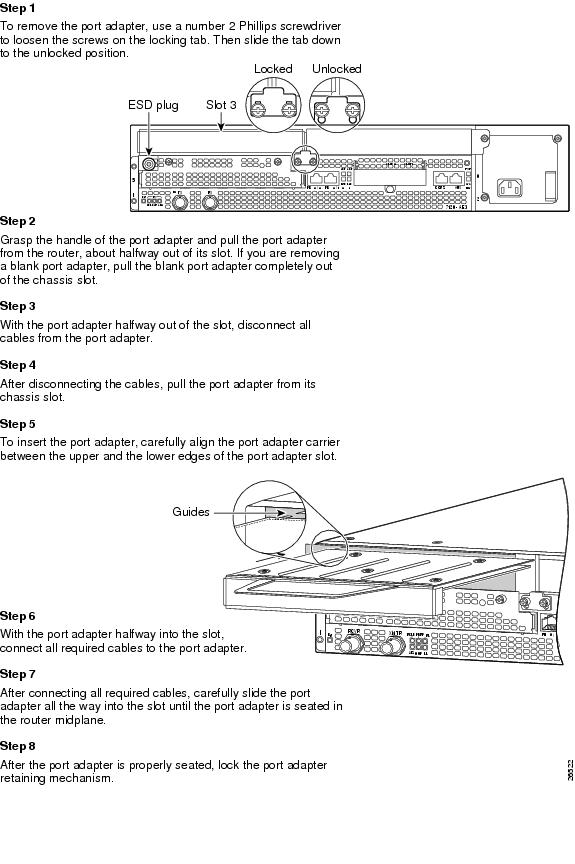
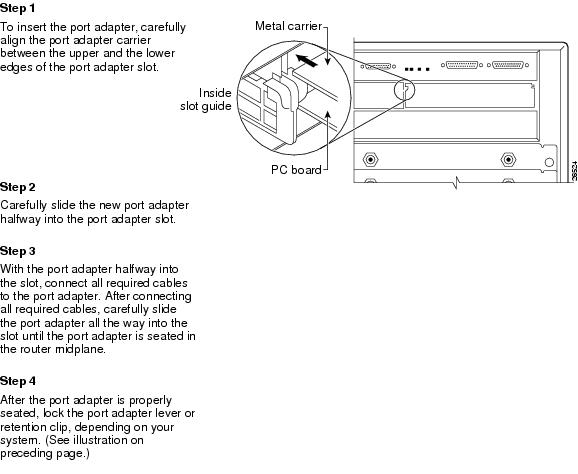
- Cisco 7200 VXR Routers—Removing and Installing a Port Adapter
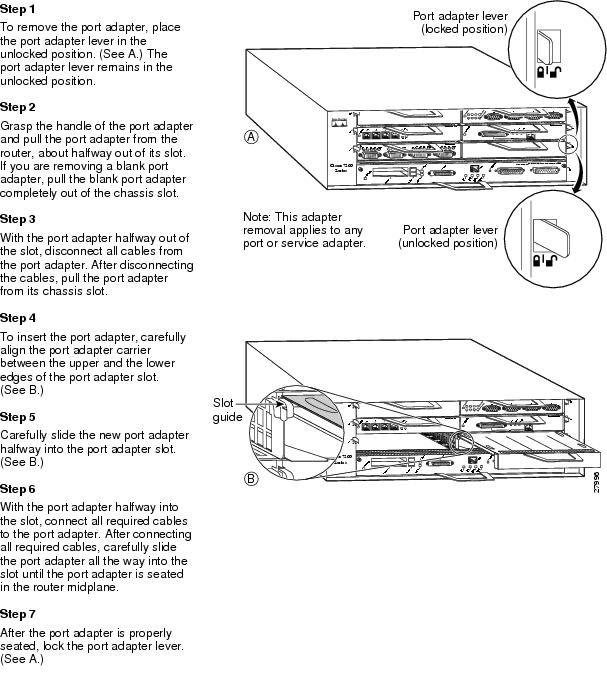
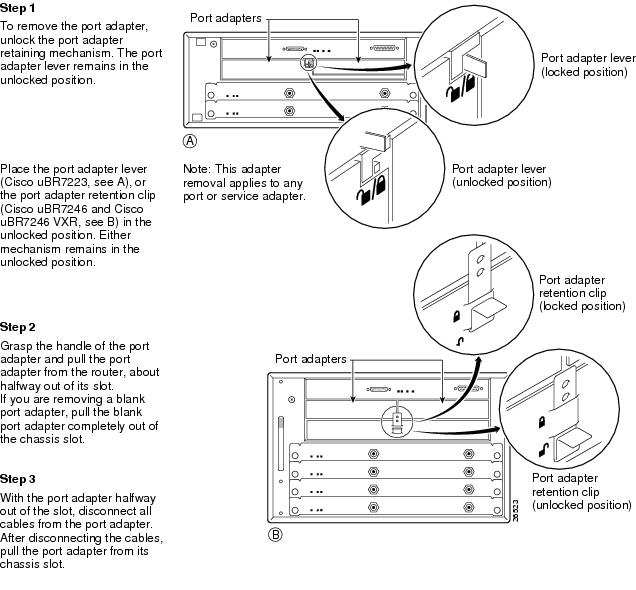
- Cisco uBR7200 Series Routers—Removing a Port Adapter
- Cisco uBR7200 Series Routers—Installing a Port Adapter
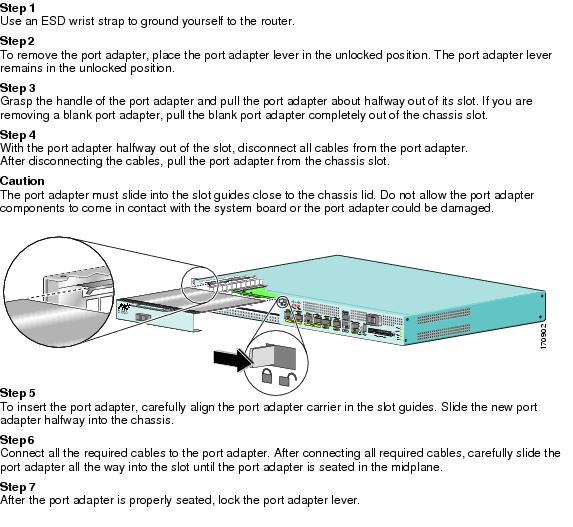
- Cisco 7201 Router—Removing and Installing a Port Adapter
- Cisco 7304 PCI Port Adapter Carrier Card—Removing and Installing a Port Adapter
Removing and Installing Port Adapters
This chapter describes how to remove the PA-GE port adapter from supported platforms and also how to install a new or replacement port adapter. This chapter contains the following sections:
• Port Adapter Removal and Installation
Handling Port Adapters
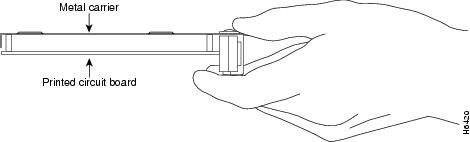
Each port adapter circuit board is mounted to a metal carrier and is sensitive to electrostatic discharge (ESD) damage.

Note When a port adapter slot is not in use, a blank port adapter must fill the empty slot to allow the chassis to conform to electromagnetic interference (EMI) emissions requirements and to allow proper airflow across the port adapters. If you plan to install a new port adapter in a slot that is not in use, you must first remove the blank port adapter.
 Always handle the port adapter by the carrier edges and handle; never touch the port adapter components or connector pins. (See
Figure 3-1.)
Always handle the port adapter by the carrier edges and handle; never touch the port adapter components or connector pins. (See
Figure 3-1.)
Figure 3-1 Handling a Port Adapter
Online Insertion and Removal
Several platforms support online insertion and removal (OIR) of port adapters; therefore, you do not have to power down routers when removing and replacing a PA-GE in the Cisco 7100 series routers, Cisco 7200 VXR routers, Cisco 7201 router, and Cisco uBR7246 VXR router.
Although the Cisco 7304 PCI port adapter carrier card supports OIR, individual port adapters do not. To remove or install port adapters on a Cisco 7304 PCI port adapter carrier card, you must first remove the Cisco 7304 PCI port adapter carrier card from the router and then remove or install the port adapter as required. If a blank port adapter is installed on the Cisco 7304 PCI port adapter carrier card on which you want to install a new port adapter, you must first remove the Cisco 7304 PCI port adapter carrier card from the router and then remove the blank port adapter.
To prevent system problems, do not remove port adapters from the Cisco 7304 PCI port adapter carrier card, and do not attempt to install other port adapters on the Cisco 7304 PCI port adapter carrier card when the system is operating. To install or replace port adapters, first remove the Cisco 7304 PCI port adapter carrier card from the router.
Note As you disengage the port adapter from the system, OIR administratively shuts down all active interfaces in the port adapter. For more information on OIR and the Cisco uBR7246 VXR, refer to the Cisco uBR7200 Series Universal Broadband Router Hardware Installation Guide.
Note Before you begin installation, read Chapter 2, "Preparing for Installation," for a list of parts and tools required for installation.
Warnings and Cautions
Observe the following warnings and cautions when installing or removing port adapters.
Do not slide a port adapter all the way into the slot until you have connected all required cables. Trying to do so disrupts normal operation of the system.
To prevent jamming the carrier between the upper and the lower edges of the port adapter slot, and to ensure that the edge connector at the rear of the port adapter mates with the connection at the rear of the port adapter slot, make certain that the carrier is positioned correctly, as shown in the cutaway illustrations in the
"Port Adapter Removal and Installation" section.

Warning During this procedure, wear grounding wrist straps to avoid ESD damage to the card. Do not directly touch the midplane with your hand or any metal tool, or you could shock yourself. Statement 181
Port Adapter Removal and Installation
In this section, the illustrations that follow give step-by-step instructions on how to remove and install port adapters. This section contains the following illustrations:
•Cisco 7100 Series Routers—Removing and Installing a Port Adapter
•Cisco 7200 VXR Routers—Removing and Installing a Port Adapter
•Cisco uBR7200 Series Routers—Removing a Port Adapter
•Cisco uBR7200 Series Routers—Installing a Port Adapter
•Cisco 7201 Router—Removing and Installing a Port Adapter
•Cisco 7304 PCI Port Adapter Carrier Card—Removing and Installing a Port Adapter
Note If a port adapter lever or other retaining mechanism does not move to the locked position, the port adapter is not completely seated in the midplane. Carefully pull the port adapter halfway out of the slot, reinsert it, and move the port adapter lever or other mechanism to the locked position.
Cisco 7100 Series Routers—Removing and Installing a Port Adapter
Cisco 7200 VXR Routers—Removing and Installing a Port Adapter
Cisco uBR7200 Series Routers—Removing a Port Adapter
Cisco uBR7200 Series Routers—Installing a Port Adapter
Cisco 7201 Router—Removing and Installing a Port Adapter
Cisco 7304 PCI Port Adapter Carrier Card—Removing and Installing a Port Adapter
You can install one single-width port adapter in a Cisco 7304 PCI Port Adapter Carrier Card. This section provides step-by-step instructions for removing and installing a port adapter in a Cisco 7304 PCI Port Adapter Carrier Card.
Warning During this procedure, wear grounding wrist straps to avoid ESD damage to the card. Do not directly touch the midplane with your hand or any metal tool, or you could shock yourself. Statement 181
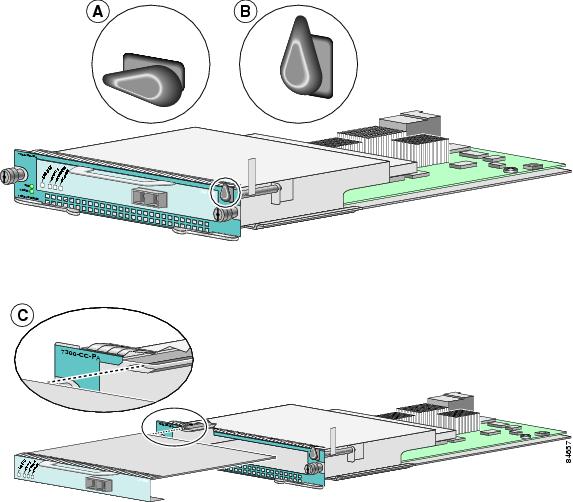
To remove and install a port adapter in a Cisco 7304 PCI Port Adapter Carrier Card, refer to Figure 3-2 and do the following:
Step 1 If the Cisco 7304 PCI Port Adapter Carrier Card is still in the router, you must remove the Cisco 7304 PCI Port Adapter Carrier Card before removing a port adapter.
Step 2 To remove the port adapter from the Cisco 7304 PCI Port Adapter Carrier Card, turn the port adapter lock from its locked and horizontal position shown in A of Figure 3-2 to its unlocked and vertical position shown in B of Figure 3-2.
Step 3 Grasp the handle of the port adapter and pull the port adapter from the Cisco 7304 PCI Port Adapter Carrier Card. (You have already disconnected the cables from the port adapter when removing the Cisco 7304 PCI Port Adapter Carrier Card).
Step 4 To insert the port adapter in the Cisco 7304 PCI Port Adapter Carrier Card, locate the guide rails inside the Cisco 7304 PCI Port Adapter Carrier Card that hold the port adapter in place. They are at the top left and top right of the port adapter slot and are recessed about an inch, as shown in C of Figure 3-2.
Step 5 Carefully slide the port adapter in the Cisco 7304 PCI Port Adapter Carrier Card until the port adapter makes contact with the port adapter interface connector. When fully seated, the port adapter front panel should be flush with the face of the Cisco 7304 PCI Port Adapter Carrier Card.
Step 6 After the port adapter is properly seated, turn the port adapter lock to its locked and horizontal position, as shown in A of Figure 3-2.
Figure 3-2 illustrates how to remove and install a port adapter in a Cisco 7304 PCI Port Adapter Carrier Card.
Figure 3-2 Cisco 7304 PCI Port Adapter Carrier Card—Port Adapter Removal and Installation
 Feedback