Overview

Preinstallation Checklist Overview

Introduction

Cisco HyperFlex Edge brings the simplicity of hyperconvergence to remote and branch office (ROBO) and edge environments.

Starting with Cisco HX Data Platform Release 4.0, HyperFlex Edge deployments can be based on 2-Node, 3-Node, or 4-Node Edge clusters. This preinstallation checklist describes the key requirements and supported topologies that must be understood and configured before starting a Cisco HyperFlex Edge deployment.
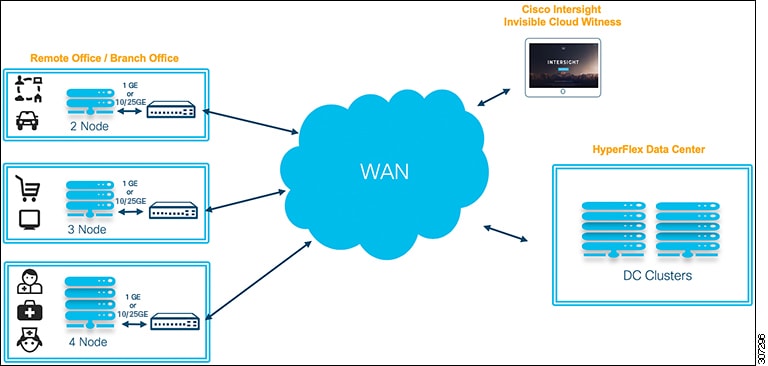
All cluster sizes (2-Node, 3-Node, or 4-Node) support the following networking topologies depending on availability requirements and the available switching hardware.

  • 1GE Top-of-Rack Configuration (Single or Dual Switch)

  • 10/25GE Top-of-Rack Configuration (Single or Dual Switch)

Limitations and Support Information

Limitation For

Available Support

Cluster Size and Supported Hardware Models: 2-Node clusters

  • HX220c M6 Hybrid/HXAF220c M6 All-Flash

  • HX225c M6 Hybrid/HXAF225c M6 All-Flash

  • HX220c M5 Hybrid/HXAF220c M5 All-Flash

  • HX240c M6 Hybrid/HXAF240c M6 All-Flash

  • HX245c M6 Hybrid/HXAF245c M6 All-Flash

  • HX240c M5 Hybrid/HXAF240c M5 All-Flash

  • HX240c M5SD Hybrid/HX240c M5SD All-Flash

Note


2-Node clusters require Intersight for initial deployment and ongoing management.

Cluster Size and Supported Hardware Models: 3-Node clusters:

  • HX220c M6 Hybrid/HXAF220c M6 All-Flash

  • HX225c M6 Hybrid/HXAF225c M6 All-Flash

  • HX220c M5 Hybrid/HXAF220c M5 All-Flash

  • HX220c M4 Hybrid/HXAF220c M4 All-Flash

  • HX240c M6 Hybrid/HXAF240c M6 All-Flash

  • HX245c M6 Hybrid/HXAF245c M6 All-Flash

  • HX240c M5 Hybrid/HXAF240c M5 All-Flash

  • HX240c M5SD Hybrid/HX240c M5SD All-Flash

Note


HX Edge clusters deployment with M6 or HX 240 Edge (short depth and full depth) nodes require Intersight for initial deployment and ongoing management

Cluster Size and Supported Hardware Models: 4-Node clusters

  • HX220c M6 Hybrid/HXAF220c M6 All-Flash

  • HX225c M6 Hybrid/HXAF225c M6 All-Flash

  • HX220c M5 Hybrid/HXAF220c M5 All-Flash

  • HX240c M6 Hybrid/HXAF240c M6 All-Flash

  • HX245c M6 Hybrid/HXAF245c M6 All-Flash

  • HX240c M5 Hybrid/HXAF240c M5 All-Flash

  • HX240c M5SD Hybrid/HX240c M5SD All-Flash

Note


HX 240 Edge (short depth and full depth) requires Intersight for initial deployment and ongoing management.

Replication Factor

  • 3- or 4-Node edge clusters: 3

  • 2-Node edge clusters: 2

Note

 
If RF2 is selected, a reliable backup strategy is strongly recommended to ensure that production data is adequately protected.

Networking

1GE or 10/25GE networking without Cisco UCS Fabric Interconnects.

HX Edge Systems do not implement QoS.

HX clusters per vCenter

Up to 100.

Fully read and complete only the chapter that corresponds to the size of the cluster you intend to deploy. Each chapter is self-contained and includes all relevant information required for a successful deployment.

Third-Party NIC Cards

Cisco HyperFlex Edge supports the addition of third-party network adapters for applications to use. For more information, see Cisco HyperFlex Systems—Networking Topologies. It is imperative that the NIC card be installed before cluster installation but remain uncabled or cabled with links shut down. After deployment is complete, you may enable the links and create additional vSwitches and port groups for any application or VM requirements.

Cisco HyperFlex Pre-Install Interactive Tool

Cisco recommends using the HyperFlex Pre-Install Tool https://hxpreinstall.cloudapps.cisco.com/ for pre-deployment planning. The tool enables a collection of HyperFlex cluster configuration parameters and enables a simple configuration transfer to either Intersight SaaS or the HyperFlex installer VM. The features and benefits of using the HyperFlex Pre-Install tool include:

  • Create and validate a cluster configuration before starting installation.

  • Multi-cluster import capability using a Microsoft Excel template.

  • Push the cluster configuration directly to Intersight SaaS, resulting in automatic cluster profile creation.

  • Download JSON configuration files for use with the HyperFlex OVA installer VM.

  • Creation of PDF reports with the configuration for record keeping.

  • Clone a cluster profile for easy scaling.