Overview

Overview

This guide covers all Cisco HX220c Hybrid, All-Flash, and All-NVMe models.

The following table lists the minimum levels of Cisco HyperFlex software required.


Note


The software requirements given below are for the base chassis. Certain configurable components might require later software levels, as noted in this guide.


Table 1. HX220c M5 System Minimum Software Requirements

System Version

Cisco HyperFlex Software Minimum Level

HX220c M5 Hybrid

(HX220C-M5SX)

2.6(1a) or later

HX220c M5 All-Flash

(HXAF220C-M5SX)

2.6(1a) or later

HX220c M5 All-NVMe

(HXAF220C-M5SN)

4.0(1) or later

Cisco HyperFlex Systems Related Documentation

Links for related Cisco HyperFlex Systems documentation such as the Getting Started Guide, Administration Guide, and Release Notes are listed in the Cisco HyperFlex Systems Documentation Roadmap.

External Features

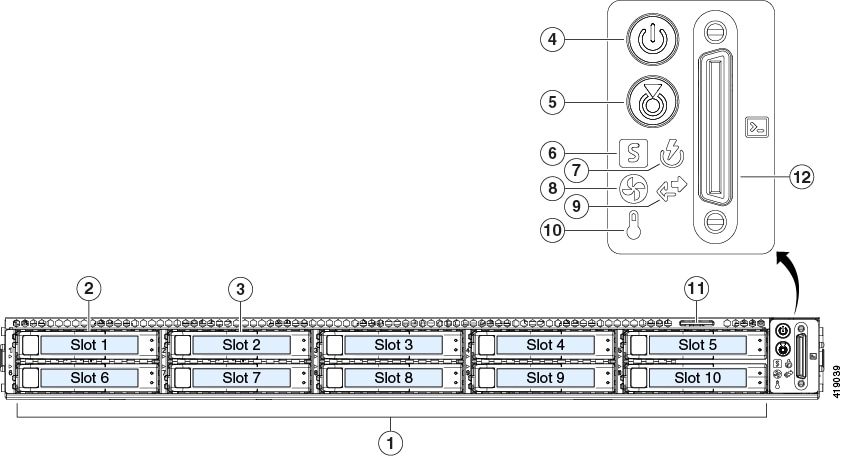
This topic shows the external features of the node.

Front Panel Features

For definitions of LED states, see Front-Panel LEDs.

Figure 1. Front Panel

1

Drive bays 3 – 10:

  • HX220c Hybrid: persistent data HDDs

  • HX220c All-Flash: persistent data SSDs

  • HX220c All-NVMe: persistent data NVMe SSDs

7

Power supply status LED

2

Drive bay 1: system SSD for logs

8

Fan status LED

3

Drive bay 2: caching SSD

9

Network link activity LED

4

Power button/LED

10

Temperature status LED

5

Unit identification LED

11

Pull-out asset tag

6

System status LED

12

KVM cable connector

(used with KVM cable that provides one DB-15 VGA, one DB-9 serial, and two USB connectors)

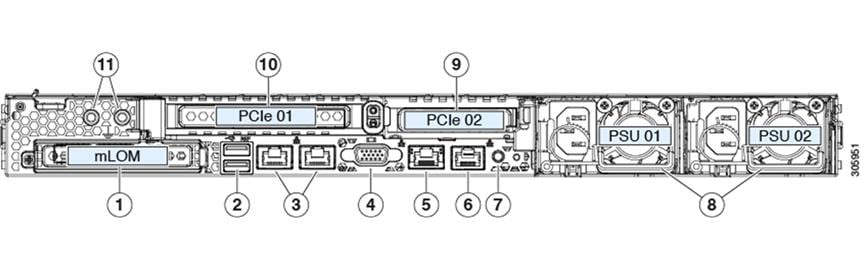
Rear Panel Features

For definitions of LED states, see Rear-Panel LEDs.

Figure 2. Cisco UCS C220 M5 Server Rear Panel

1

Modular LAN-on-motherboard (mLOM) card bay (x16 PCIe lane)

7

Rear unit identification button/LED

2

USB 3.0 ports (two)

8

Power supplies (one or two, redundant as 1+1 when two power supplies are present)

3

Dual 1-Gb/10-Gb Ethernet ports (LAN1 and LAN2)

The dual LAN ports can support 1 Gbps and 10 Gbps, depending on the link partner capability.

9

PCIe riser 2/slot 2 (x16 lane)

Includes PCIe cable connectors for front-loading NVMe SSD (x8 lane)

4

VGA video port (DB-15 connector)

10

PCIe riser 1/slot 1 (x16 lane)

5

1-Gb Ethernet dedicated management port

11

Threaded holes for dual-hole grounding lug

6

Serial port (RJ-45 connector)

-

Serviceable Component Locations

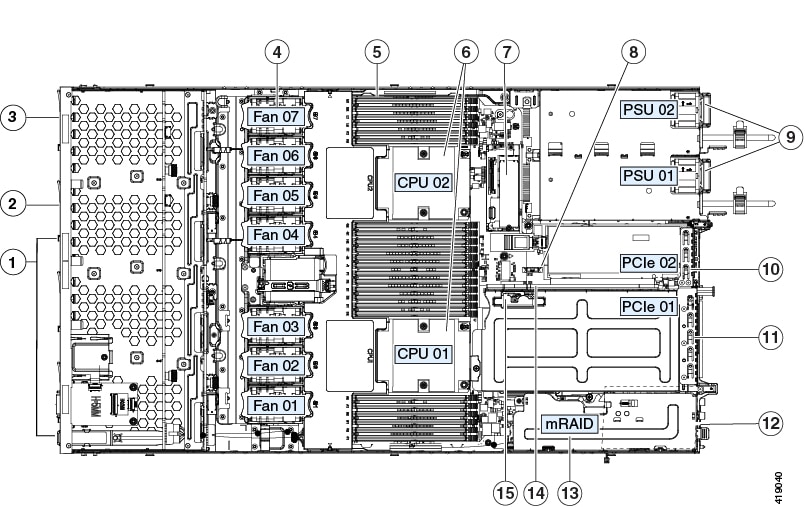
This topic shows the locations of the field-replaceable components and service-related items. The view in the following figure shows the node with the top cover removed.

Figure 3. Serviceable Component Locations

1

Drive bays 3 – 10:

  • HX220c Hybrid: persistent data HDDs

  • HX220c All-Flash: persistent data SSDs

  • HX220c All-NVMe: persistent data NVMe SSDs

9

Power supplies (one or two, hot-swappable when redundant as 1+1)

2

Drive bay 2: caching SSD

10

PCIe riser 2/slot 2 (half-height, x16 lane)

Includes PCIe cable connectors for front-loading NVMe SSDs (x8 lane)

3

Drive bay 1: system SSD for logs

11

PCIe riser 1/slot 1 (full-height, x16 lane)

Includes socket for Micro-SD card

4

Cooling fan modules (seven, hot-swappable)

12

Modular LOM (mLOM) card bay on chassis floor (x16 PCIe lane), not visible in this view

5

DIMM sockets on motherboard (12 per CPU)

13

Modular RAID (mRAID) riser, supports HBA storage controller

6

CPUs and heatsinks

14

PCIe cable connectors for front-loading NVMe SSDs on PCIe riser 2

7

Mini-storage module for SATA M.2 SSD Boot drive

15

Micro-SD card socket on PCIe riser 1

8

RTC battery, vertical socket

-

Summary of Node Features

The following table lists a summary of node features.

Feature

Description

Chassis

One rack-unit (1RU) chassis

Central Processor

One or two identical CPUs from the Intel Xeon Processor Scalable Family.

Memory

24 DDR4 DIMM sockets on the motherboard (12 each CPU)

The system uses a minimum of 256 GB memory.

Multi-bit error protection

Multi-bit error protection is supported.

Baseboard management

BMC, running Cisco Integrated Management Controller (Cisco IMC) firmware.

Depending on your Cisco IMC settings, Cisco IMC can be accessed through the 1-Gb dedicated management port, the 1-Gb/10-Gb Ethernet LAN ports, or a Cisco virtual interface card.

Network and management I/O

Rear panel:

  • One 1-Gb Ethernet dedicated management port (RJ-45 connector)

  • Two 1-Gb/10-Gb BASE-T Ethernet LAN ports (RJ-45 connectors)

    The dual LAN ports can support 1 Gbps and 10 Gbps, depending on the link partner capability.

  • One RS-232 serial port (RJ-45 connector)

  • One VGA video connector port (DB-15 connector)

  • Two USB 3.0 ports

Front panel:

  • One front-panel keyboard/video/mouse (KVM) connector that is used with the KVM cable, which provides two USB 2.0, one VGA, and one DB-9 serial connector.

Modular LOM

One dedicated socket (x16 PCIe lane) that can be used to add an mLOM card for additional rear-panel connectivity.

Power

One or two power supplies. Redundant as 1+1 when two power supplies are present.

ACPI

The advanced configuration and power interface (ACPI) 4.0 standard is supported.

Cooling

Seven hot-swappable fan modules for front-to-rear cooling.

PCIe I/O

Two horizontal PCIe expansion slots on a PCIe riser assembly.

InfiniBand

The PCIe bus slots in this node support the InfiniBand architecture.

Storage, front-panel

Drives are installed into front-panel drive bays.

Storage, internal

The node has these internal storage options:

  • One USB port on the motherboard.

  • Mini-storage module that supports a SATA M.2 SSD Boot drive.

  • One Micro-SD card socket on PCIe riser 1.

Storage management

The node has a dedicated internal mRAID riser that supports the HBA storage controller.

Integrated video

Integrated VGA video.