This section gives an overview of the use case. The complete use case configuration procedure is available in the Configuring L4-L7 Services in Infra Tenant for Cisco Cloud APIC document.
This document describes the workflow for Infra tenant configuration of multi-node service graphs with user defined routing
(UDR).
Additional information about service graphs in cloud sites, such as specific features and use cases, is available in the Cloud APIC Azure User Guide. The information and procedures provided below are specific to deploying service graphs from Multi-Site Orchestrator.
Service Graphs
A service graph is used to represent a set of Layer 4 to Layer 7 service devices inserted between two or more EPGs. EPGs can
represent your applications running within a cloud (e.g. Cloud EPG), or internet (e.g. Cloud External EPG), or in other sites
(e.g. on-premises or remote cloud sites).
A service graph in conjunction with contracts (and filters) is used to specify communication between two EPGs. The cloud APIC
automatically derives security rules, such as network security groups (NSG) and application security groups (ASG), and forwarding
routes (UDR) based on the policy specified in Contract and Service Graph.
By using a service graph, you can specify the policy once and deploy the service chain within regions or inter-regions. After
the graph is configured, the Cloud APIC automatically configures the services according to the service function requirements
that are specified in the service graph. The Cloud APIC also automatically configures the network according to the needs of
the service function that is specified in the service graph, which does not require any change in the service device. For
third-party firewalls, the configuration inside the device is not managed by cloud APIC.
Each time the graph is deployed, Cisco ACI takes care of changing the network configuration to enable the forwarding in the
new logical topology.
Service Graph Devices
Multiple service graphs can be specified to represent different traffic flows or topologies. A service graph represents the
network using the following elements:
-
Service Graph Nodes—A node represents a function that is applied to the traffic, such as a load balancer. A function within
the service graph may require one or more parameters and have one or more connectors.
-
Connectors—A connector enables input and output from a node.
Following combinations are possible with service graphs:
The following service graph devices are supported:
-
Azure Application Load Balancers (ALB)
-
Azure Network Load Balancers (NLB)
-
Unmanaged third-party firewall devices
Azure User Defined Routing (UDR)
Release 5.0(2) of Cloud APIC adds support for user-defined routing (UDR) for Azure Cloud APIC sites, similar to the policy-based
redirect (PBR) feature available for the on-premises sites. The UDR feature is configured using the Redirect option during Service Graph node configuration.
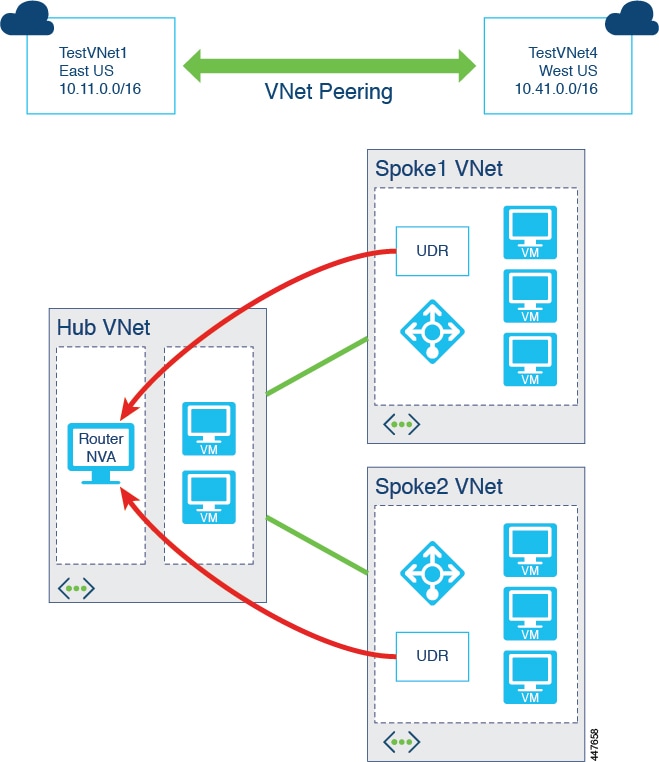
With redirect, policies are used to redirect traffic through specific service devices, where service devices can be deployed
as a Network Load Balancer or a third-party firewall. This traffic isn't necessarily destined for the service device as part
of the standard consumer-to-provider configuration; rather, you would configure the consumer-to-provider traffic as you normally
would, and you would then configure service graphs to redirect that consumer-to-provider traffic to a specific service device.
Support for redirect for Cisco Cloud APIC is only available in conjunction with the VNet peering feature, taking advantage of the hub-and-spoke topology used in VNet
peering. For more information on the VNet peering feature, see the Configuring VNet Peering for Cloud APIC for Azure document.
 Feedback