Install Hot Fix and Hot Patch on ISE
Available Languages
Introduction
This document describes Identity Service Engine (ISE) hot patch/hot fix installation.
Prerequisites
You must have the basic knowledge of the Cisco Identity Service Engine (ISE).
Background Information
When a known defect is hit and the fixed release is not yet available, you can make use of Hot Patch which is available in the Download Portal or you can receive it from Cisco TAC. Hot patches must be a last resort if no other possible workarounds are available.
Requirements
If a known defect is confirmed and it is impacting your environment, you can use a hot patch when there is no known workaround or fixed release.
Hot Patch Files
Typically, there are three hot patch files:
- Rollback
- Installation
- Readme File
Installation File
This file must contain the hot patch installation file.
Format:
- ise-apply-<bugid>_<version_applicable>_<patch_applicable>-SPA.tar.gz
- bugid: provides details of bug
- version_applicable: provides details to install if it is specific to a particular ISE version or common for all versions
- patch_applicable: provides details if it is specific to a particular patch or common for all patches
Examples:
- Suitable for all ISE versions and patches:
- ise-apply-CSCwk61938_Universal_patchall-SPA.tar.gz
- Suitable for ISE 3.3 version and all patches:
- ise-apply-CSCwk61938_3.3_patchall-SPA.tar.gz
- Suitable for 3.3 ISE version and only for patch 4:
- ise-apply-CSCwk61938_3.3_patch4-SPA.tar.gz
Rollback File
This file is useful for removing the installed hot patch.
Format:
ise-rollback-<bugid>_<version_applicable>_<customer>_<hotpatchversionnum>-SPA.tar.gz
Examples:
- Suitable for all ISE versions and patches:
- ise-rollback-CSCwk61938_Universal_patchall-SPA.tar.gz
- Suitable for ISE 3.3 version and all patches:
- ise-rollback-CSCwk61938_3.3_patchall-SPA.tar.gz
- Suitable for 3.3 ISE version and only for patch 4:
- ise-rollback-CSCwk61938_3.3_patch4-SPA.tar.gz
Readme File
This file contains the details, important notes, installation steps, and rollbacks steps specific to the hot patch defect.
Hot Patch Installation Steps
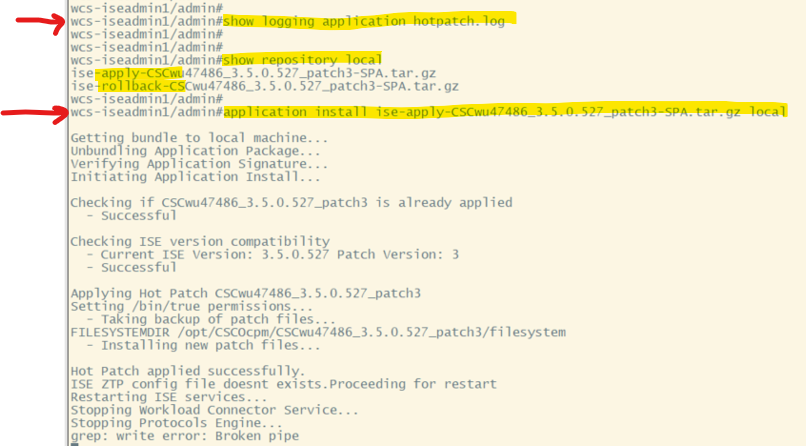
You cannot install hot patches from webGUI. To install hot patches, you must have CLI access.
- Download the installation file ise-apply-<bugid>_<version_applicable>_<patch_applicable>-SPA.tar.gz.
- Verify the hash of the downloaded file is correct.
- Copy the installation bundle to a repository [Repository Creation], which is available to ISE. If you do not have a working repository, you can use the local disk management of ISE from GUI to upload files on respective nodes.
- Run the #application install <filename> <repository name>
Example: #application install ise-apply-CSCwk61938_Universal_patchall-SPA.tar.gz local
Verify Hot Patch Installation
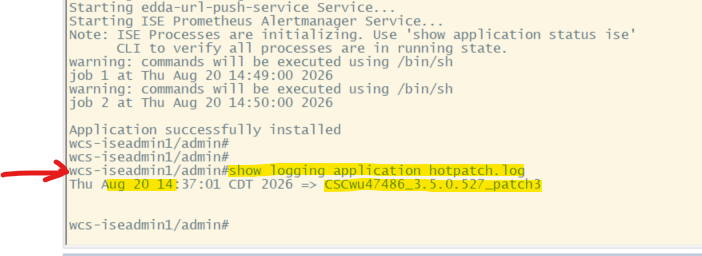
On the CLI, you can see which bundled hot patches are installed by running the #show logging application hotpatch.log command:
Hot Patch Rollback Steps
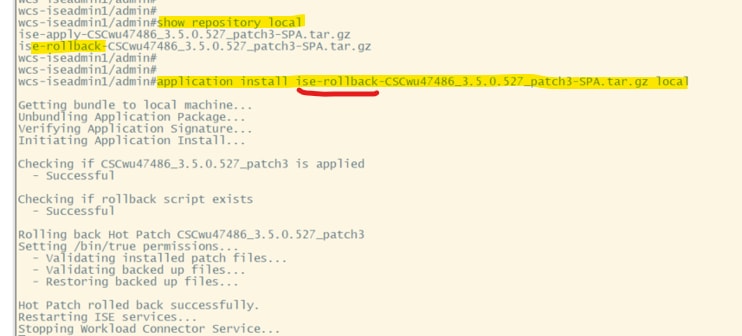
- Download the installation file ise-rollback-<bugid>_<version_applicable>_<patch_applicable>-SPA.tar.gz.
- Verify the hash of the downloaded file is correct.
- Copy the rollback bundle to a repository [Repository Creation], which is available to ISE. If you do not have a working repository, you can use the local disk management of ISE from GUI to upload files on respective nodes.
- Run the application install <filename> <repository name>
Example: application install ise-rollback-CSCwk61938_Universal_patchall-SPA.tar.gz local

Revision History
| Revision | Publish Date | Comments |
|---|---|---|
3.0 |
25-Aug-2026
|
Updated spelling, grammar, inserted horizontal lines to separate sections for readability, and updated alt text. |
2.0 |
30-Jul-2025
|
Initial Release, formatting and spelling. |
1.0 |
13-Mar-2025
|
Initial Release |

 Feedback
Contact Cisco
- Open a Support Case

- (Requires a Cisco Service Contract)