Troubleshoot Common Problems with SAML on ASA and FTD

Available Languages
Contents
Introduction
This document describes the most common problems encountered while troubleshooting SAML on Cisco ASA and FTD appliances.
Prerequisites
Requirements
Cisco recommends that you have knowledge of these topics:
- Cisco Secure Client AnyConnect VPN
- SAML Identity Provider (IdP) Configuration
- Cisco Secure ASA Firewall or Firepower Threat Defense (FTD) Single Sign-on Object Configuration
Components Used
The best practice guides are based on these hardware and software versions:
- Cisco ASA 9.x
- Firepower Threat Defense 7.x / FMC 7.x
The information in this document was created from the devices in a specific lab environment. All of the devices used in this document started with a cleared (default) configuration. If your network is live, ensure that you understand the potential impact of any command.
Background Information
SAML (Security Assertion Markup Language) is an XML-based framework for exchanging authentication and authorization data between security domains. It creates a circle of trust between the user, a service provider (SP) and an Identity Provider (IdP), which allows the user to sign-in a single time for multiple services. SAML can be used for Remote Access VPN authentication for Cisco Secure Client connections to ASA and FTD VPN headends, where the ASA or FTD is the SP entity in the trust circle.
Most SAML issues can be resolved by verifying the configuration on the IdP and ASA/FTD being used. In cases where the cause is not clear, debugs provide more clarity and the examples in this guide derive from the debug webvpn saml 255 command.
The purpose of this document is to be a quick reference for known SAML issues and possible solutions.
Common Problems
Problem 1: Entity ID Mismatch
This generally means the saml idp [entityID] command under the firewall webvpn configuration does not match the IdP Entity ID found in the IdP’s metadata as shown in the next example.
Example Debug:
Sep 05 23:54:02 [SAML] consume_assertion: The identifier of a provider is unknown to #LassoServer. To register a provider in a #LassoServer object, you must use the methods lasso_server_add_provider() or lasso_server_add_provider_from_buffer().
From IDP:
<EntityDescriptor ID="_7e53f3f3-7c79-444a-b42d-d60ae13f0948" entityID="https://sts.example.net/69c69fff-03f6-4c9c-be73-9ed4f5f894c/">
From ASA/FTD:
saml idp https://sts.example.net/69c69fff-03f6-4c9c-be73-9ed4f5f894 >>>> The entity ID is missing characters at the end
Solution:
Check the entity ID of the IdP’s metadata file and change the saml idp [entity id] command to match this exactly; including any backslash (/) characters.
Problem 2: Assertion not Valid
Explanation
The firewall cannot validate the assertion provided by the IdP as the clock of the firewall is outside of the validity of the assertion.
Example Debug:
[SAML] consume_assertion: assertion is expired or not valid
Example:
[SAML] NotBefore:2022-06-21T09:52:10.759Z NotOnOrAfter:2022-06-21T10:57:10.759Z timeout: 0    >>>>> Validity of the saml assertion provided by the IDP
Jun 21 15:20:46 [SAML] consume_assertion: assertion is expired or not valid
firepower# show clock
15:26:49.240 UTC Tue Jun 21 2022   >>>> Current time on the firewall
In the prior example, you can see the assertion is only valid between 09:52:10.759 UTC to 10:57:10.759 UTC, and the time on the firewall is outside of the validity window.

Note: The validity time seen in the assertion is in UTC. If the clock on firewall is configured in a different time-zone, it converts the time in UTC before validation.
Solution
Configure the correct time on the firewall either manually or using an NTP server and verify the current time of the firewall is within the validity of the assertion in UTC. If the firewall is configured in a different time zone than UTC, ensure the time is converted to UTC before checking the validity of the assertion.
Problem 3: Signature Does not Verify
Explanation
When the firewall fails to verify the signature of the SAML assertion received from the IdP due to incorrect IdP certificate configuration under the firewall webvpn with the trustpoint idp <trustpoint> command.
Example Debug:
[Lasso] func=xmlSecOpenSSLEvpSignatureVerify:file=evp_signatures.c:line=372:obj=rsa-sha256:subj=unknown:error=18:data do not match:details=EVP_VerifyFinal: signature does not verify
Solution
Download and install the certificate from the IdP on the firewall and assign the new trustpoint under the firewall webvpn configuration. The IdP signing certificate can usually be found in the IdP’s metadata or the decoded SAML response.
Problem 4: Incorrect URL for Assertion Consumer Service
Explanation
IdP is configured with the incorrect Reply URL (Assertion Consumer Service URL).
Examples
Example Debug: No debugs are shown after the initial authentication request is sent. User cannot enter credentials but after that connection fails and no debugs are printed.
From IDP:
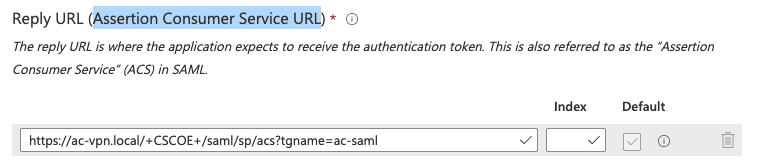
From FW or SP metadata:
<AssertionConsumerService index="0" isDefault="true" Binding="urn:oasis:names:tc:SAML:2.0:bindings:HTTP-POST" Location="https://ac-vpn.local/+CSCOE+/saml/sp/acs?tgname=acvpn" />
In this example, you can see the "Assertion Consumer Service URL" on IdP does not match the location on the metadata of SP.
Solution
Change the Assertion Consumer Service URL on the IdP as shown in the metadata of the SP. The metadata of the SP can be obtained using the show saml metadata <tunnel-group-name> command.
Problem 5: Assertion Audience is Invalid
Explanation
When the IdP sends incorrect destination in the SAML response, such as the wrong tunnel-group.
Example Debug:
[SAML] consume_assertion: assertion audience is invalid
From SAML trace:
<samlp:Response ID="_36585f72-f813-471b-b4fd-3663fd24ffe8"
Version="2.0"
IssueInstant="2022-06-21T11:36:26.664Z"
Destination="https://ac-vpn.local/+CSCOE+/saml/sp/acs?tgname=acvpn1"

Recipient="https://ac-vpn.local/+CSCOE+/saml/sp/acs?tgname=acvpn1"

<AudienceRestriction> <Audience>https://ac-vpn.local/saml/sp/metadata/acvpn</Audience> </AudienceRestriction>
From Firewall or SP metadata:
<AssertionConsumerService index="0" isDefault="true" Binding="urn:oasis:names:tc:SAML:2.0:bindings:HTTP-POST" Location="https://ac-vpn.local/+CSCOE+/saml/sp/acs?tgname=acvpn" />
Solution
Correct the configuration on the IdP as the Destination and Recipient. The SAML response must match the location as shown in the firewall/SP metadata in the show saml metadata <tunnel-group-name> output.
Problem 6: SAML Configuration Changes not Taking Effect
Explanation
After any modification with SAML configuration under webvpn, it is suggested to remove and re-add the saml identity-provider <IDP-Enttity-ID> command under the tunnel-group.
Solution
Remove and re-add the saml identity-provider <IDP-Enttity-ID> command under the tunnel-group.
Problem 7: How to Use the Same IDP under Multiple tunnel-group/connection Profiles
Explanation
To configure SAML authentication to use the same IdP SSO application for multiple tunnel groups, review the configuration steps below.
Solutions
Option 1 for ASA 9.16 and earlier, FDM managed FTD, or FMC/FTD 7.0 and earlier:
- Create separate SSO applications on the IdP, one for each tunnel-group/connection profile.
- Create a CSR using the default CN used by the IDP.
- Sign the CSR from an Internal/External CA.
- Install the same signed identity certificate on the applications to be used for separate tunnel-groups or connection profiles.
Option 2 for ASA 9.17.1 and later or FTD/FMC 7.1 and later:
- Create separate SSO applications on the IdP, one for each tunnel-group/connection profile.
- Download the certificates from each application and upload on the ASA or FTD.
- Assign the trustpoint that corresponds to the IdP application for each tunnel-group/connection profile.
Problem 8: Authentication Failed Due to Problem Retrieving the Single Sign-On Cookie
Explanation
This can be seen on the Secure Client software on the client device due to multiple reasons, including but not limited to:
- The validity of the assertion is outside the current time of the FW.
- The Entity ID or Assertion Consumer Service URL is incorrectly defined on the IDP.
Solution
- Run debugs on the FW and check for specific errors.
- Verify the Entity ID and Assertion Consumer Service URL configured on the IDP against the metadata obtained from the FW.
Problem 9: Relay-state Hash Mismatch
Explanations
- The RelayState parameter serves the purpose of having IdP redirect the user back to the original resource requested after successful SAML authentication. The RelayState information on the assertion must match the RelayState information at the end of the authentication request URL.
- This can be an indication of a MitM attack but can also be caused by changes to the RelayState on the IdP side.
Example Debug:
[SAML] relay-state hash mismatch.
Solution
- Move to a fixed release as detailed in Cisco bug ID CSCwf85757
- Verify the IdP is not changing the RelayState information.
Further Troubleshooting
While most SAML troubleshooting can be preformed with the output from the webvpn SAML debug, there are times where additional debugs can be helpful in pinpointing the cause of an issue.
firepower# debug webvpn saml 255
firepower# debug webvpn 255
firepower# debug webvpn session 255
firepower# debug webvpn request 255
Related Information
Revision History
| Revision | Publish Date | Comments |
|---|---|---|
2.0 |
12-Oct-2026
|
Updated spelling, grammar, spacing, inserted horizontal lines to separate sections, fixed CCW alerts. |
1.0 |
01-Aug-2025
|
Initial Release |
 Feedback