Guest

Cisco Jabber for Mac
Cisco Jabber for Mac Data Sheet

Product Overview

Cisco Jabber is a unified communications application that lets you be more productive from anywhere on any device. Find the right people, see if and how they are available, and collaborate using your preferred method.
Cisco® Jabber for Mac streamlines communications and enhances productivity by unifying presence, instant messaging, voice, voice messaging, desktop sharing, and conferencing capabilities more securely into one client on your desktop. Cisco Jabber for Mac delivers highly secure, clear, and reliable communications. It offers flexible deployment models, is built on open standards, and integrates with commonly used desktop applications. Communicate and collaborate effectively from anywhere you have an Internet connection.

Features and Benefits

Communicate More Effectively

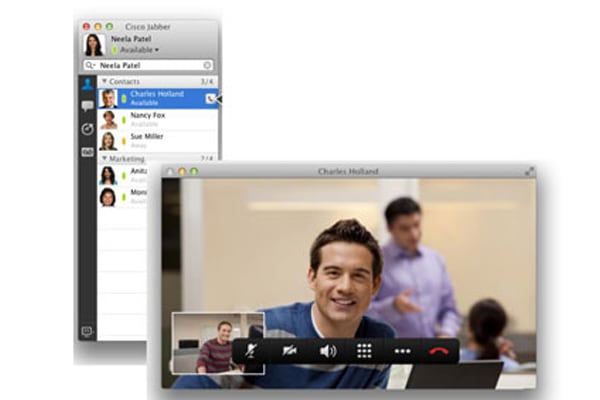
Today's global, distributed work environment has resulted in significant challenges for workers, making it harder to connect with the right people and significantly increasing the quantity and modes of communications. Organizations of all sizes are striving to improve communications in order to retain customers, compete for new business, control costs, and grow their business globally. Cisco Jabber brings together the different ways people communicate into a single, intuitive interface. Using the integrated directory and dynamic presence information, you can find and check the availability of business colleagues. Enterprise instant messaging capabilities empower employees to communicate in real time on time-sensitive business processes and avoid "phone tag." The integrated soft phone and web conferencing capabilities help enable you to place phone calls and collaborate on documents. You can also view and listen to voice messages quickly and easily. With Cisco Jabber, your communication and collaboration tools are always available from anywhere you work, helping to enable smarter, more effective communications.

Figure 1. Cisco Jabber for Mac

Reduce Communication Delays with Presence and Contact Information

Cisco Jabber helps enable you to see the availability of co-workers and colleagues within and outside your organization. You can immediately see who is offline, available, busy, on the phone, or in a do-not-disturb state. Customized availability states, such as "in a customer meeting" can be created to provide added context. Contact cards provide additional contact information and multiple options for initiating communications. These capabilities help reduce communication delays and result in faster decision-making and enhanced productivity.

Quickly Communicate with Borderless Enterprise-Class Instant Messaging

Instant messaging is an important communication option that lets you efficiently interact in today's multitasking business environment. Cisco Jabber delivers enterprise-class instant messaging capabilities that are based on the Extensible Messaging and Presence Protocol (XMPP). The solution provides personal and group chat so you can quickly connect with your business colleagues. Chat history and server-based logging capabilities allow you to view the content of prior chats and to store messages for convenience, compliance, and regulation purposes. Instant messaging is integrated with other communication capabilities so you can simply move between chats, audio conversations, and web conferences. You can even share presence and send instant messages to people outside your organization that may not be using Cisco Jabber. The enterprise-class instant messaging capabilities of Cisco Jabber provide more efficient, highly secure, flexible, and borderless collaboration.

Bring Business-Class IP Telephony to the Desktop

Cisco Jabber delivers business-quality voice to your desktop. Powered by the market-leading Cisco Unified Communications Manager call-control solution, Cisco Jabber is a soft phone with wideband and high-fidelity audio and desk phone control features. High-quality and High-availability voice telephony and visual voice mail are available at all locations and to users' desk phones, soft clients, and mobile devices. Cisco Jabber makes voice communications simple, clear, and reliable.

Figure 2. Integrated audio controls and visual voice mail with transcription

Accelerate Team Performance with Multiparty Conferencing and Collaboration

Cisco Jabber provides for smooth escalation to desktop sharing or Cisco conferencing and collaboration solutions, such as Cisco WebEx® and Cisco Unified MeetingPlace® solutions, so you can instantly share documents and expand chats and conversations to multiparty voice and web conferencing.

Figure 3. Escalate 1:1 chat sessions to group chat, desktop sharing, web conferencing and audio conferencing with the click of a button

Accelerate Adoption with an Intuitive User Experience Built for the Mac

Cisco Jabber delivers unified communications to the desktop through an engaging user interface. The intuitive visual design promotes adoption of basic as well as advanced capabilities and integrates communications into the natural workflow to deliver the efficiency and productivity promised by unified communications. Availability information and communication options are available throughout the application - such as in the visual voicemail and chat interfaces - helping to enable more efficient real-time collaboration. Cisco Jabber for Mac has been built specifically for Mac users, with a familiar Mac look and feel as well as integrations into Mac OS X services.

Choose from Flexible Deployment Options

Cisco Jabber can be deployed as an on-premises service powered by Cisco Unified Presence Server or as a hosted service powered by the Cisco Collaboration Cloud. This offers IT professionals the flexibility to deploy a comprehensive set of unified communications services utilizing the architecture that makes the most sense for their business.
The following table outlines Cisco Jabber's features and benefits.

Table 1. Features and Benefits

Feature

Benefit

Communication integration

Use a single, intuitive interface for instant messaging with individuals and groups, IP telephony, visual voicemail, voice and web conferencing, desktop sharing1, communication history, and integrated directories.

Presence

View real-time availability of co-workers and colleagues within and outside the enterprise network.

• Exchange and display presence availability information and instant messages with other Cisco Jabber users, Cisco Unified Personal Communicator, Cisco WebEx Connect®, Microsoft Office Communicator and Lync, IBM Lotus Sametime, AOL, GoogleTalk, and many other XMPP-compatible clients.
• Exchange presence information with mobile handsets using Cisco Jabber or third-party XMPP-compatible clients.
• Display customized availability messages.
• Your status is updated automatically when you are in a Cisco WebEx meeting or sharing an application.
• Show your availability based on the free and busy status in your Microsoft Outlook Calendar or Exchange Server2.
• Use the do-not disturb (DND) availability state to easily block incoming communications. The DND status is automatically synchronized between Cisco Jabber and your Cisco Unified IP Phone to help ensure privacy for both instant messaging and phone communications.

Enterprise instant messaging

Chat in real time using instant messaging to save time and reduce phone tag. Several chat modes are supported, ranging from:

• Point-to-point chat with co-workers inside your network, or supported federated business and personal contacts.
• Group chat, which helps enable multiple colleagues to communicate and collaborate in a single discussion.
• Instant messages sent to offline contacts.2 They will receive them when they connect to the application.
• Personal instant messaging history for your reference.

Predictive search

Look up contacts quickly. Predictive search provides suggestions to you as you type in a search query and indexes your contact list, recent contacts, Mac Address Book and your company directory.

Media escalation

Choose the right communication tool for your situation. Escalate from a chat to an audio call, desktop share1, or web meeting. Media escalations are as easy as clicking a button.

Integrated voice telephony

Exchange ideas quickly by using Cisco Jabber as a soft phone or to control your Cisco IP desk phone.

• Make, receive, and control your phone calls whether you are in or out of the office. Click-to-call directly from your contact list without the need to look up phone numbers.
• A variety of call-control options are available, including mute, park and retrieve, call transfer, call forwarding, ad-hoc conferencing, and the capability to easily move an active call to a mobile device.
• The enterprise-class IP telephony reliability and failover features of Cisco Unified Communications Manager are supported.

Conferencing

Initiate multiparty voice and web meetings.

• Group chat and audio conference sessions are as simple as clicking a button, eliminating the need to use other applications and interfaces to schedule, invite, or join conferences.
• Initiate a web meeting session directly from the Cisco Jabber client, using either Cisco Unified MeetingPlace or Cisco WebEx meeting applications to share content, such as a presentation, document, or your desktop.

Visual voice message access

Access and manage your voice messages:

• View, play back, and delete voice messages from Cisco Unity® or Cisco Unity Connection applications.
• Secure messaging is provided, with support for private and encrypted voice messages.

Voice message transcripts

Powered by Cisco SpeechView, you can view your voicemail messages as text from within Cisco Jabber by simply hovering over the transcript icon.

Mac OS X integration

Built for Mac OS X, Cisco Jabber provides a host of integrations for an immersive experience on the Mac. These include:

• Mac Address Book: Place calls to your contacts from Address Book or search and call these contacts directly from Cisco Jabber.
• Support for Growl notifications.
• Cisco Jabber provides a status menu in the main menu bar that is always available whenever Cisco Jabber is running - even if it is not the foremost application. You can set presence; place, answer, and manage phone calls; and perform predictive searches all without leaving the active application and with a simple key combination.
• Services integration: Take full advantage of the Mac OS X services integration to make a call using Cisco Jabber directly from supported Mac OS X applications, including Safari, Firefox, Mail, iCal, Word 2011, and more.

Encryption

Instant messaging communications are encrypted, using up to 256-bit Advanced Encryption Standard (AES) encryption and TLS/SSL connections. Signaling and media are also encrypted.

Single Sign-On (SSO)1

SSO also allows companies to use their SSO system to simplify the management of Cisco Jabber. With SSO, users more securely log in using their corporate login credentials.

Enterprise policy management

Set granular policies to determine which features and capabilities can or cannot be accessed by your Cisco Jabber end users.

Flexible deployment models

Cisco Jabber for Mac can be deployed on-premises or on-demand, offering IT departments the flexibility to choose the model that best suits their business. When deployed on-demand, IT administrators can push client upgrades automatically to users.

Localization

Languages supported include English, French, Japanese, Spanish, German, Italian, Portuguese (Brazilian), Dutch, Swedish, Russian, Danish, Chinese (China), Chinese (Taiwan), Korean, Arabic, Polish, and Turkish.

1. Feature available in on-demand deployment only
2. Feature available in on-premises deployment only

System Requirements

The following table outlines Cisco Jabber desktop requirements.

Table 2. System Requirements

Disk Space

300 MB of Available Disk Space

Hardware

Intel Core 2 Duo or later

Memory

1 GB of RAM

Software

Mac OS X Snow Leopard, 10.6.8 or later 10.6.x releases

The following table outlines system requirements for Cisco Unified Communications.

Table 3. Cisco Unified Communications System Requirements

Cisco Unified Communications Manager (Standard and Business Edition)

• 8.6(1)
• 8.5(1) or later 8.5(x) releases
• 8.0(1) or later 8.0(x) releases
• 7.1(3) or later 7.1(x) releases
• 7.0(2) or later 7.0(x) releases

Cisco Unified Presence

• 8.6(1) or later 8.6(x) releases
• 8.5(1) or later 8.5(x) releases
• 8.0(2) or later 8.0(x) releases

Lightweight Directory Access Protocol (LDAP)

• Microsoft Active Directory 2008
• Microsoft Active Directory 2003
• Open LDAP 2.4.2

Cisco Unified IP Phones (CTI Enabled)

Cisco Unified IP Phones 9900 Series
Cisco Unified IP Phones 8900 Series
Cisco Unified IP Phones 7900 Series
Cisco Unified IP Phones 6900 Series

Cisco Conferencing

• Cisco Unified MeetingPlace
• 6.x (MeetingPlace scheduling)
• 7.x (MeetingPlace scheduling)
• 8.0 (MeetingPlace and WebEx scheduling)
• 8.5 (WebEx scheduling)
• Cisco WebEx Meeting Center
• T27SP21
• XML API5.8

Voicemail playback

• Cisco Unity Connection 7.1(4) or later 7.1(x) releases, 8.0(1) or later 8.0(x) releases, 8.5(1)
• Cisco Unity 8.0 with Microsoft Exchange 2003 on the same server, on another server, or in a failover configuration
• Cisco Unity 8.0 with Microsoft Exchange 2007 on another server, or in a failover configuration

Cisco Unified Survivable Remote Site Telephony

• 8.0 with Cisco Unified Communications Manager Release 8.0
• 7.1 with IOS 12.4(24)T with Cisco Unified Communications Manager Release 7.1(2)
• 7.0 with IOS 12.4(20)T with Cisco Unified Communications Manager Release 7.0(1)
• 4.2 with IOS 12.4(11)XW5 with Cisco Unified Communications Manager Release 6.1(3)

VPN Client

• Cisco VPN Client 4.9.0.1 and later

Cisco ASA Adaptive Security Appliances

• (Recommended for SIP interdomain federation) Cisco ASA 5500 Series Adaptive Security Appliance Software Release 8.3(0)

For information on interdomain federation requirements, see the release notes for Cisco Unified Presence Release 8.0: http://www.cisco.com/en/US/products/ps6837/prod_release_notes_list.html.

Warranty Information

Find warranty information on Cisco.com at the Product Warranties page.

Ordering Information

Cisco Jabber for Mac is a single client that can connect to either the Cisco Collaboration Cloud or the Cisco Unified Presence server for IM and Presence. The ordering mechanism will vary based on the deployment model selected.
To order Cisco Jabber for Mac hosted in the Cisco Collaboration Cloud, please review the WebEx Global Price List. Cisco Jabber for Mac is currently listed as Cisco WebEx Connect. The service is in process of rebranding.
To order Cisco Jabber for Mac deployed on the Cisco Unified Presence server, please visit Cisco Ordering Home Page. For complete ordering information please see Table 4.
Cisco Jabber for Mac is a part of Cisco Unified Workspace licensing. Please visit http://www.cisco.com/go/workspace_licensing for more information and to determine whether Cisco Unified Workspace licensing is appropriate for your organization.
To download software, visit the Cisco Software Center.

Table 4. Cisco Jabber for Mac Ordering Information

Deployment Model

Configuration

Part Number

On-demand

IM-only

L-WBX-IM1-NH - minimum 25 seats

or

L-WBX-CON-IM - minimum 250 seats

IM and Unified Communications

L-WBX-CON-IM or L-WBX-CON-IM

and

UCICONNECT-7.1-K9

On-premises

IM-only

CUP86-USERMAC-LIC*

IM and Unified Communications

JAB8-MAC-K9

* Please refer to Cisco Unified Presence server ordering information at Cisco Ordering Home Page to get more details on the IM-only bundle option.

Note:

• With each order of Cisco Jabber for Mac (deployed on the Cisco Unified Presence server), you will receive a product authorization key (PAK) and a document confirming your purchase and notifying you of the location to download the software.

• All Cisco Unified IP Phones, including Cisco Jabber for Mac, require the purchase of a phone technology license.

• Cisco Jabber for Mac (deployed on the Cisco Unified Presence server) is available as part of the Cisco eDelivery application. With Cisco eDelivery, partners can assist customers in managing and downloading their software license entitlement documentation, including Right To Use, End User License Agreement, and License Claim Form, through the email channel rather than relying on paper delivery.

Cisco Unified Communications Services

Cisco and our certified partners can help you deploy a highly secure, resilient Cisco Unified Communications Solution so you can meet aggressive deployment schedules and accelerate your business advantage. The Cisco portfolio of services is based on proven methodologies for unifying voice, video, data, and mobile applications on fixed and mobile networks.
The unique Cisco lifecycle approach to services defines the requisite activities at each phase of the solution lifecycle. Customized planning and design services focus on creating a solution that meets your business needs. Award-winning technical support increases operational efficiency. Remote management services simplify day-to-day operations, and optimization services enhance solution performance as your business needs change.

For More Information

For more information about Cisco Jabber, visit http://www.cisco.com/go/jabber or contact your local Cisco account representative.