Cisco Nexus 7000 Series Switches Environment Data Sheet
Available Languages
Product Overview
The Cisco Nexus® 7000 Series Switches comprise a modular data center-class product line designed for highly scalable 10 Gigabit Ethernet networks with a fabric architecture that scales beyond 17 terabits per second (Tbps) and that supports high-density 40 and 100 Gigabit Ethernet deployments. Designed to meet the requirements of the most mission-critical data centers, it delivers continuous system operation and virtualized, pervasive services. The Cisco Nexus 7000 Series is based on a proven operating system, with enhanced features to deliver real-time system upgrades with exceptional manageability and serviceability.
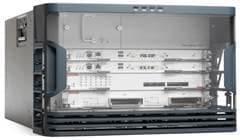
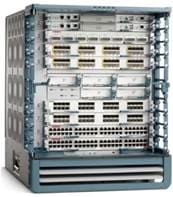
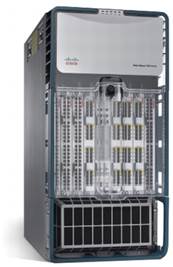
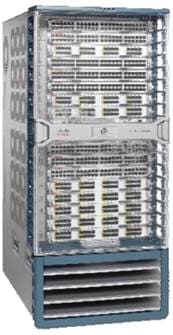
The Cisco Nexus 7000 Series chassis (Figures 1, 2, 3, and 4) incorporate significant enhancements in design, power, airflow, cooling, and cabling. The 10-slot chassis has front-to-back airflow, making it a good solution in hot-aisle and cold-aisle deployments. The 9- and 18-slot chassis use side-to-side airflow to deliver high density in a compact form factor. The 4-slot chassis has side-to-back airflow in the smallest form factor, making it a good solution in smaller operation locations. The power supplies, fan trays, and fabrics can be replaced from the back of the chassis without any obstruction from the I/O cables, thereby enabling operation efficiency. In addition, the Cisco Nexus 7000 Series has many power saving enhancements such as temperature sensors, variable-speed fans, and high-efficiency power supplies that reduce the total cost of ownership (TCO) for customers.
Physical Specifications
The Cisco Nexus 7000 4-Slot Switch chassis has two supervisor module slots, two I/O module slots, and purpose-built integrated cable management. The 4-slot chassis does not have fabric modules, and the backplane capacity is determined by the I/O modules. Power supplies and fan tray are accessible from the front.
The Cisco Nexus 7000 9-Slot Switch chassis has two supervisor module slots, seven I/O module slots, five fabric modules, dual-side integrated cable management, and a dual-hinged protective front door, allowing unobstructed access to the cables and modules. On the back are two power supply bays and one system fan tray.
The Cisco Nexus 7000 10-Slot Switch chassis has two supervisor slots, eight I/O module slots, a cable management door, and an optional air filter on the front of the chassis. On the back, it has five fabric slots, three power supply bays, two system fan trays, and two fabric fan trays.
The Cisco Nexus 7000 18-Slot Switch chassis has two supervisor module slots, 16 I/O module slots, dual-side integrated cable management, and a dual-hinged protective front door, allowing unobstructed access to the cables and modules. On the back are five fabric module slots, four power supply bays, and two system fan trays.
Table 1 summarizes the physical features of the chassis.
Table 1. Physical Specifications
| Item |
Description |
|||
|
|
Cisco Nexus 7000 4-Slot Chassis |
Cisco Nexus 7000 9-Slot Chassis |
Cisco Nexus 7000 10-Slot Chassis |
Cisco Nexus 7000 18-Slot Chassis |
| Dimensions (H x W x D) |
● 12.2 x 17.3 x 24 in. (30.9 x 43.9 x 61 cm)
|
● 24.5 x 17.3 x 24 in. (62.2 x 43.9 x 61 cm)
|
● 36.5 x 17.3 x 33.1 in. (92.7 x 43.9 x 84.1 cm)
|
● 43.5 x 17.3 x 33.1 in. (110.5 x 43.9 x 84.1 cm)
|
| Chassis depth with cable management and doors |
29.6 in. (75.2 cm) |
29 in. (73.7 cm) |
38 in. (96.5 cm) |
38 in. (96.5 cm) |
| Rack units (RUs) |
7RU; can fit six 4-slot chassis in a 42RU rack |
14RU; can fit three 9-slot chassis in a 42RU rack |
21RU; can fit two 10-slot chassis in a 42RU rack |
25RU; can support up to 17RU of cabling patch panels in the same 42RU rack |
| Weight (Chassis only) |
45 lb (20 kg) |
100 lb (45 kg) |
200 lb (90 kg) |
187 lb (85 kg) |
| Module orientation |
● Supervisor and I/O modules: Horizontal
● No fabric cards
|
● Supervisor and I/O modules: Horizontal
● Fabric cards (at the front): Horizontal
|
● Supervisor and I/O modules: Vertical
● Fabric cards (at the back): Horizontal
|
● Supervisor and I/O modules: Horizontal
● Fabric cards (at the back): Vertical
|
| Airflow |
● Side to rear
● Designed for end-of-row deployments
|
● Side to side
● Designed for end-of-row deployments
|
● Front to back
● Designed for hot-aisle and cold-aisle deployments
|
● Side to side
● Designed for end-of-row deployments
|
| Cable management |
Purpose-built integrated cable management |
Integrated dual side for flexible cabling deployments |
On the front of the chassis above the I/O modules |
Integrated dual side for flexible cabling deployments |
| Air filter |
(Optional) |
- |
(Optional) On the front of the chassis below the I/O modules |
- |
| Doors |
Lockable front module door |
(Optional) 1 dual-hinged door that opens to either side for access to cabling and modules, covering the I/O modules |
● Door, hinged on the top for the cable management system
● (Optional) 2 doors, each hinged on the side, covering the I/O modules
|
(Optional) 1 dual-hinged door that opens to either side for access to cabling and modules, covering the I/O modules |
| System LEDs |
● 5 system LEDs that summarize the device status:
◦ LED 1: Power supplies
◦ LED 2: Fans
◦ LED 3: Supervisors
◦ LED 4: Fabric modules
◦ LED 5: I/O modules
◦ Each LED is green if the status is normal, and amber otherwise
|
|||
Power
The Cisco Nexus 7000 4-Slot chassis has four power supply bays that can hold 3.0-kilowatt (kW) AC, 3.0-kWDC or 3.5-kilowatt HVAC/HVDC power supplies. Each 3000-watt (W) power supply has one universal (100 to 240 volt [V]) input that can be connected to one AC source using an AC power cord with a C19 connector. Two versions are available: one for International markets, with an IEC 60309 AC plug; and one for U.S markets, with a NEMA L6-30 AC plug. The 3500W power supply uses an Anderson 2006G Saf-D-Grid connector capable of accepting up to 400V AC or 400V DC input.
Table 2 shows the power output provided by one Cisco Nexus 7000 3.0-kW AC Power Supply Module.
Table 2. Power Supply Output
| Power Supply Input |
Output |
|
| Single input |
220V |
3000W |
| 110V |
1500W |
|
Table 3 shows the power output provided by one Cisco Nexus 7000 3.0-kW DC Power Supply Module.
Table 3. Power Supply Output
| Power Supply Input |
Input |
Output |
| Single input |
-48V |
1500W |
| Dual Input |
-48V |
3000W |
Table 4 shows the power output provided by one Cisco Nexus 7000 3.5-kW HVAC/HVDC Power Supply Module.
Table 4. Power Supply Output
| Input Type |
Input Voltage |
Output |
| AC input |
100 to 120 VAC |
1500W |
| 200 to 210 VAC |
3100W |
|
| 215 to 240 VAC and 277 VAC |
3500W |
|
| DC input |
200 to 215 VDC |
3100W |
| 220 to 380 VDC |
3500W |
The Cisco Nexus 7000 9-Slot chassis has two power supply bays, the Cisco Nexus 7000 10-Slot chassis has three power supply bays, and the Cisco Nexus 7000 18-Slot chassis has four power supply bays that can hold either 6.0 kW AC or DC power supplies or 7.5-kW AC power supplies. Each 6000W power supply has two universal (100 to 240V) inputs that can be connected to two AC sources using AC power cords with C19 connectors. The 7500W power supply has two input power cords that are hard wired directly to the power supply. Two versions are available: one for International markets, with an IEC 60309 AC plug; and one for the U.S. market, with a NEMA L6 30 AC plug.
Table 5 shows the power output provided by one Cisco Nexus 7000 6.0-kW AC Power Supply Module for combinations of input voltage and the number of connected inputs.
Table 5. Power Supply Output
| Power Supply Input |
Output |
|
| Single input |
220V |
3000W |
| 110V |
1200W |
|
| Dual input |
220V |
6000W |
| 110V |
2400W |
|
| Dual input |
110 and 220V |
4200W |
Table 6 shows the output power provided by one Cisco Nexus 7000 7.5-kW AC Power Supply Module.
Table 6. Available Output Based on Input Power: 7.5-kW AC Power Supply Module
| Number of Inputs |
Input Power |
Output Power |
| Single input |
220V |
3750W |
| Dual input |
220V |
7500W |
Table 7 shows the output power provided by one Cisco Nexus 7000 6.0-kW DC Power Supply Module.
Table 7. Available Output Based on Input Power: 6.0-kW DC Power Supply Module
| Number of Inputs |
Input Power |
Output Power |
| Single input |
-48V |
3000W |
| Dual input |
-48V |
6000W |
The power supplies are hot swappable, enabling continuous system operation. Mixed combinations of 6.0-kW and 7.5-kW as well AC and DC power supplies are supported. The power supplies also incorporate advanced features such as internal fault monitoring, temperature sensing, real-time power draw statistics, and variable-speed fans.
Cisco Nexus 7000 Series power supplies are more than 90 percent efficient, so less power is wasted as heat, and more power is available for the system to use than with typical power supplies. The Cisco Nexus 7000 Series systems can operate in four user-configurable power redundancy modes, listed in Table 8. The power redundancy modes are designed to determine the optimum power for the combination of power supplies installed, helping ensure system availability.
Table 8. Power Redundancy Modes
| Redundancy Mode |
Description |
| Combined |
This mode does not provide redundancy. The power available to the system is the sum of power outputs of all power supplies in the chassis. |
| Power supply redundancy (N+1 redundancy) |
This mode guards against the failure of one of the power supplies. The redundant power available to the system is the sum of all power outputs less one of the maximum-rated power supplies. |
| Input source redundancy (grid redundancy) |
This mode guards against the failure of one power supply or input circuit (grid), with at least half the power supplies connected to a different independent AC or DC feed. The power available to the system is the minimum power from both the grids. If one of the power supplies fails, the operational power redundancy mode changes to Combined mode. (Only supported with 220V). |
| Power supply and input source (full) redundancy |
This mode guards against the failure of one power supply or one grid. The power available is the minimum power from the input source and power supply redundancy. If one of the power supplies fails, the operational power redundancy mode changes to Power Supply Redundancy (N+1) mode. |
The platform software requires a minimum of 860W of power to run the 4-slot system, 1557W of power to run the 9-slot system, 2400W to run the 10-slot system, and 2193W to run the 18-slot system. If the power available from the power supplies is more than the minimum, the additional power is used to activate the I/O modules. If there is not enough power to activate the line cards, the line cards are kept in a power-denied state. After more power is provisioned, the user must turn on power to the line cards manually to activate them.
Under typical operating conditions, the system consumes significantly less power than the maximum values. The platform software uses the maximum values to reserve sufficient power for the modules. The typical power rating is the value that is commonly seen in a temperature-controlled environment.
Table 9 shows the maximum and typical power ratings for the system and modules.
Table 9. Maximum and Typical Power Requirements
| Component |
Part Number |
Maximum Power |
Typical Power |
| Supervisor 1 module |
N7K-SUP1 |
210W |
190W |
| Supervisor 2 module |
N7K-SUP2 |
210W |
175W |
| Supervisor 2E module |
N7K-SUP2E |
265W |
170W |
| 8-port 10 Gigabit Ethernet module (XL) |
N7K-M108X2-12L |
650W |
520W |
| 48-port 10/100/1000 module |
N7K-M148GT-11 |
400W |
358W |
| 48-port Gigabit Ethernet module (XL) |
N7K-M148GS-11L |
400W |
358W |
| 32-port 10 Gigabit Ethernet module |
N7K-M132XP-12 |
750W |
611W |
| 32-port 10 Gigabit Ethernet module (XL) |
N7K-M132XP-12L |
750W |
611W |
| 24-port 10 Gigabit Ethernet module (XL) |
N7K-M224XP-23L |
795W |
720W |
| 6-port 40 Gigabit Ethernet module (XL) |
N7K-M206FQ-23L |
795W |
720W |
| 2-port 100 Gigabit Ethernet module (XL) |
N7K-M202CF-22L |
795W |
690W |
| 32-port 1/10 Gigabit Ethernet module |
N7K-F132XP-15 |
385W |
283W |
| 48-port 10 Gigabit Ethernet module |
N7K-F248XP-25 |
450W |
350W |
| 48-port 1/10 Gigabit Ethernet (SFP+) Enhanced module |
N7K-F248XP-25E |
450W |
350W |
| 48-port 1/10 Gigabit Ethernet (RJ-45) Enhanced module |
N7K-F248XT-25E |
550W |
420W |
| 10-slot chassis: Fabric 1 module |
N7K-C7010-FAB-1 |
60W |
55W |
| 18-slot chassis: Fabric 1 module |
N7K-C7010-FAB-2 |
100W |
90W |
| 9-slot chassis: Fabric 2 module |
N7K-C7009-FAB-2 |
75W |
55W |
| 10-slot chassis: Fabric 2 module |
N7K-C7010-FAB-2 |
80W |
55W |
| 18-slot chassis: Fabric 2 module |
N7K-C7018-FAB-2 |
150W |
90W |
| 4-slot system fan |
N7K-C7004-FAN |
450W |
185W |
| 9-slot system fan |
N7K-C7009-FAN |
650W |
185W |
| 10-slot system fan |
N7K-C7010-FAN-S |
720W |
100W |
| 10-slot fabric fan |
N7K-C7010-FAN-F |
120W |
50W |
| 18-slot system fan |
N7K-C7018-FAN |
636.50W |
284.5W |
Climatic Environment
Table 10 summarizes the climatic environment for the Cisco Nexus 7000 4-, 9-, 10-, and 18-Slot chassis.
Table 10. Climatic Environment
| Item |
Description |
|||
|
|
Cisco Nexus 7000 4-Slot Chassis |
Cisco Nexus 7000 9-Slot Chassis |
Cisco Nexus 7000 10-Slot Chassis |
Cisco Nexus 7000 18-Slot Chassis |
| Temperature |
● Operating: 32 to 104°F (0 to 40°C)
● Short term: 23 to 131°F (-5 to 55°C)*
● Nonoperating: -40 to 158°F (-40 to 70°C)*
Note:
● Chassis external thermal requirements are defined in the GR-63-CORE Network Equipment Building Standards (NEBS) specification published by Telcordia Technologies in Section 4.1.2, Operating Temperature and Humidity Criteria.
● Short term refers to a period of not more than 96 consecutive hours and a total of not more than 15 days in 1 year (a total of 360 hours in any given year, but no more than 15 occurrences during that 1-year period).
* 131°F (55°C) and 25% relative humidity for equipment shelves that fill less than half the frame (length) |
|||
| Humidity |
● Relative humidity (nonoperating): 5 to 95%, noncondensing
● Relative humidity (operating): 5 to 90%, noncondensing
Note: An ambient relative humidity between 45 and 50% is suggested to reduce corrosive problems, to provide an operating time buffer in the event of failures, and to reduce interference from static discharges. |
|||
| Altitude |
● -500 to 13,123 ft; agency certified 0 to 6500 ft
● Storage altitude: -1000 ft to 30,000 ft
|
|||
| Operational vibrations |
● GR63 Section 5.4.2
● ETS 300 019-1-3 Class 3.1 Section 5.5
|
|||
| Floor loading |
42 lb. per sq ft |
104 lb per sq ft |
160 lb per sq ft |
223 lb per sq ft |
| Seismic |
Zone 4 per GR63 |
|||
| Heat dissipation |
3500W per chassis (maximum) |
7500W per chassis (maximum) |
12000W per chassis (maximum) |
18000W per chassis (maximum) |
Airflow and Cooling
The 4-slot chassis cooling system consists of one system fan tray with built-in fan and controller redundancy to help ensure the reliability of the system and support hot swapping of fan trays. Table 11 summarizes the airflow and cooling features of the Cisco Nexus 7000 4-Slot chassis.
Table 11. Cisco Nexus 7000 4-Slot Chassis Airflow and Cooling Features
| Feature |
Description |
| Airflow |
● Air flows from side to rear.
● Air enters through the inlet located on the right side of the chassis and exits on the back side of the chassis.
|
| Fan module |
1 system fan module incorporating I/O and fabric fans |
| Fan module removable from the rear |
The fan module is on the top left on the front and is removable from the front and does not interfere with the I/O cabling. This arrangement enables continuous system operation during maintenance. |
| Variable fan speeds |
● The fan speed changes based on the I/O module type (and supervisor) and the inlet temperature reading on the supervisor.
● Power consumption and noise emission by fans is optimized.
|
| Self-healing mechanism |
The software tracks the temperature of the most critical components of the I/O modules and the supervisors. If the recorded temperature is higher than a system-defined threshold, the fan speed automatically increases and stays at that speed until the temperature falls below the threshold. |
| Fan redundancy |
● The fan module incorporates fan and controller redundancy.
● The system fan is required for normal operation. If the software detects fan module removal, it warns the user with a syslog message and will shut down the system in 3 minutes unless the removed fan module is replaced. Failure of an individual fan does not result in system shutdown.
|
The 9-slot chassis cooling system consists of one system fan module that delivers cooling for the I/O and supervisor modules as well as for the fabric modules. The fan module is composed of multiple independent fans. The fan tray is designed with independent zone cooling to optimize power use and cooling. Each row of fans is designed to cool a set of slots and can be turned off if the slots are not occupied. Also, each fan has an independent power bus connection and software control. The fans can be removed from the rear of the chassis, allowing continuous system operation during maintenance. Table 12 summarizes the airflow and cooling features of the Cisco Nexus 7000 9-Slot chassis.
Table 12. Cisco Nexus 7000 9-Slot Chassis Airflow and Cooling Features
| Feature |
Description |
| Airflow |
● Air flows from side to side.
● Air enters through the inlet located at the right side of the chassis and exits at the left side the chassis.
|
| Fan module |
1 system fan module incorporating I/O and fabric fans. |
| Fan module removable from the rear |
Fan module is removable from the rear, and hence there is no obstruction from the I/O cabling on the front. This arrangement enables continuous system operation during maintenance. |
| Variable fan speeds |
● Fans have 256 speed levels controlled by software.
● The fan speed changes based on the I/O module type (and supervisor) and the inlet temperature reading on the supervisor.
● Power consumption and noise emission by fans is optimized.
|
| Self-healing mechanism |
The software tracks the temperature of the most critical components of the I/O modules and the supervisors. If the recorded temperature is higher than a system-defined threshold, the fan speed automatically increases and stays at that speed until the temperature falls below the threshold. |
| Fan redundancy |
● The fan module incorporates fan and controller redundancy.
● The system fan is required for normal operation. If the software detects fan module removal, it warns the user with a syslog message and will shut down the system in 3 minutes unless the removed fan module is replaced. Failure of an individual fan does not result in system shutdown.
|
The 10-slot chassis cooling system consists of two system fan trays that deliver cooling for the I/O and supervisor modules, and two fabric fan trays that cool the fabric modules. Each system fan tray is composed of multiple independent fans. All fan trays are removable from the rear of the chassis, allowing continuous system operation during maintenance. Table 13 summarizes the airflow and cooling features of the Cisco Nexus 7000 10-Slot chassis.
Table 13. Cisco Nexus 7000 10-Slot Chassis Airflow and Cooling Features
| Feature |
Description |
| Air flow |
● Air flows front to back.
● Air enters through the inlet located at the bottom front of the chassis and exits at the rear of the chassis, making the Cisco Nexus 7000 10-Slot chassis excellent for hot-aisle and cold-aisle designs.
|
| Fan trays |
● 2 system fan trays.
● 2 fabric fan trays.
|
| Fan trays removable from the rear |
All fan trays are removable from the rear, and hence there is no obstruction from the I/O cabling on the front. This arrangement enables continuous system operation during maintenance. |
| Variable fan speeds |
● Current fans have 256 speed levels.
● The fan speed changes based on the type of I/O module (and supervisor), the inlet temperature reading on the supervisor, and the presence or absence of an air filter.
● Power consumption and noise emission by fans is optimized.
|
| Self-healing mechanism |
The software tracks the temperature of the most critical components on the I/O modules and the supervisors. If the recorded temperature is higher than a certain system-defined threshold, the fan speed automatically increases and stays at that speed until the temperature falls below the threshold. |
| Fan redundancy |
● Both system and fabric fan trays are redundant and hot swappable.
● If either a system or fabric fan tray is removed, the speed of the other fan increases to provide the required cooling.
|
| Air filter |
● The air filter filters dust and keeps the chassis interior clean.
● Use of an air filter increases the fan speed; higher fan speeds result in higher levels of noise.
|
The 18-slot chassis cooling system consists of two identical system fan modules that deliver cooling for the I/O and supervisor modules as well as for the fabric modules. Each system fan tray cools half of the chassis: The top fan tray cools slots 1 to 9 and the fabric modules, and the bottom fan tray cools slots 10 to 18. The fan modules are interchangeable. Each fan module is composed of multiple independent fans. Both fan trays are removable from the rear of the chassis, allowing continuous system operation during maintenance. Each fan module incorporates fan redundancy and fan controller redundancy that delivers resilience to either a fan or controller failure. Table 14 summarizes the airflow and cooling features of the Cisco Nexus 7000 18-Slot chassis.
Table 14. Cisco Nexus 7000 18-Slot Chassis Airflow and Cooling Features
| Feature |
Description |
| Air flow |
● Air flows side to side.
● Air enters through the inlet located at the right side of the chassis and exits at the left side the chassis.
|
| Fan modules |
2 system fan modules incorporating I/O and fabric fans. |
| Fan modules removable from the rear |
Both fan modules are removable from the rear, and hence there is no obstruction from the I/O cabling on the front. This arrangement enables continuous system operation during maintenance. |
| Variable fan speeds |
● Fans have 256 speed levels controlled by software.
● The fan speed changes based on the I/O module type (and supervisor) and the inlet temperature reading on the supervisor.
● Power consumption and noise emission by fans is optimized.
|
| Self-healing mechanism |
The software tracks the temperature of the most critical components of the I/O modules and the supervisors. If the recorded temperature is higher than a system-defined threshold, the fan speed automatically increases and stays at that speed until the temperature falls below the threshold. |
| Fan redundancy |
● Both fan modules incorporate fan and controller redundancy and are hot swappable.
● All the fans are required for normal operation. If the software detects any fan module removal, it warns the user with a syslog message and will shut down the system in 3 minutes unless the removed fan module is replaced. Failure of an individual fan does not result in system shutdown.
|
Acoustics
The fan speed detection and control mechanism reduces noise and maintains reliability while maintaining the system temperature within operating parameters (Table 15).
Table 15. Cisco Nexus 7000 Series Chassis Acoustics
| Feature |
Cisco Nexus 7000 9-Slot Chassis |
Cisco Nexus 7000 10-Slot Chassis** |
Cisco Nexus 7000 18-Slot Chassis |
| Measured |
74.7 dBA |
74.3 dBA |
74.2 dBA |
| Declared |
77.7 dBA* |
77.3 dBA* |
77.2 dBA* |
| Sound pressure level |
64.4 dBA |
67.2 dBA |
65.0 dBA |
Note: As required by NEBS, 3 dBA is added to the measured sound power levels to approximate statistical upper-limit values
Cabling and Cabinet
The cable management system for the Cisco Nexus 7000 9- or 18-Slot chassis is located on both sides of the chassis aligned with the module slots. The cable management is designed for high-density Cat6A cabling groomed to either side or both sides.
The cable management system for the Cisco Nexus 7000 10-Slot chassis is located on the front of the chassis above the modules. In the largest configuration, the chassis can support 384 Cat6A copper cables plus 8 management port cables. All cables can be groomed either to one side of the chassis or to the left and right. A top-hinged door covers the cable management system. The cable management system can be removed to support alternative ways of managing the cables.
The Cisco Nexus 7000 9- and 18-Slot chassis should be installed in either a four-post rack or a four-post cabinet that meets the depth, total equipment weight, and network cabling requirements. Sufficient space must be provided for cabling and for airflow on both sides. Multiple third-party vendor solutions are available to meet the system cabling and airflow requirements and support the installation of external ducts to deflect air into the inlets and return the warm air to the hot aisle in a hot-aisle and cold-aisle design. Use of ducting is recommended for environments in which a cold-aisle and hot-aisle environment is required. Use of other four-post solutions that meet the minimum requirements is supported.
The Cisco Nexus 7000 9-Slot chassis can also be installed in a two-post rack along with a four-post rack or a four-post cabinet that meets the depth, total equipment weight, and network cabling requirements.
The Cisco Nexus 7000 10-Slot chassis should be installed in either a standard four-post rack or a four-post cabinet that meets the depth, total equipment weight, and network cabling requirements. Multiple third-party vendor cabinet solutions that meet the specifications for the 10-slot chassis are currently available.
Regulatory Compliance
The Cisco Nexus 7000 4-, 9-, 10-, and 18-Slot chassis are designed to meet regulator emissions and immunity requirements when tested with existing and future cards and power supplies, as summarized in Table 15.
Table 16. Emissions and Immunity Specifications
| Specification |
Description |
| Regulatory compliance |
● EMC compliance
● FCC Part 15 (CFR 47) (USA) Class A
● ICES-003 (Canada) Class A
● EN55022 (Europe) Class A
● CISPR22 (International) Class A
● AS/NZS CISPR22 (Australia and New Zealand) Class A
● VCCI (Japan) Class A
● KN22 (Korea) Class A
● CNS13438 (Taiwan) Class A
● CISPR24
● EN55024
● EN50082-1
● EN61000-3-2
● EN61000-3-3
● EN61000-6-1
● EN300 386
|
The Cisco Nexus 7000 Series is designed to meet GR-1089 issue 4 and service providers' acoustic specifications. The sound level is within the NEBS criteria when operated without a filter (10-slot chassis only). Table 16 summarizes NEBS compliance.
Table 17. NEBS Specifications
| Specification |
Description |
| Environmental standards |
● NEBS criteria levels
● SR-3580 NEBS Level 3 (GR-63-CORE, issue 3, and GR-1089-CORE, issue 4)
● Verizon NEBS compliance
● Telecommunications Carrier Group (TCG) Checklist
● Qwest NEBS requirements
● Telecommunications Carrier Group (TCG) Checklist
● ATT NEBS requirements
● ATT TP76200 level 3 and TCG Checklist
● ETSI
● ETSI 300 019-1-1, Class 1.2 Storage
● ETSI 300 019-1-2, Class 2.3 Transportation
● ETSI 300 019-1-3, Class 3.2 Stationary Use
● Reduction of Hazardous Substances (ROHS) 5
|
The Cisco Nexus 7000 Series is designed to meet regulator safety requirements when tested with existing and future cards and power supplies, as summarized in Table 17.
Table 18. Safety Specifications
| Specification |
Description |
| Safety |
● UL/CSA/IEC/EN 60950-1
● AS/NZS 60950
|
Service and Support
Cisco offers a wide range of services to help accelerate your success deploying and optimizing Cisco Nexus 7000 Series Switches in your data center. Our innovative services are delivered through a unique combination of people, processes, tools, and partners, and are focused on helping you increase operating efficiency and improve your data center network. Cisco® Advanced Services uses an architecture-led approach to help you align your data center infrastructure with your business goals and provide long-term value. Cisco SMARTnet® Service helps you resolve mission-critical problems with direct access at any time to Cisco network experts and award-winning resources. With this service, you can take advantage of the Cisco Smart Call Home service capability that offers proactive diagnostics and real-time alerts for your Cisco Nexus 7000 Series Switches. Spanning the entire network lifecycle, Cisco Services help increase investment protection, optimize network operations, provide migration support, and strengthen your IT expertise. For more information about Cisco Data Center Services, visit http://www.cisco.com/go/dcservices.
Cisco Capital
Financing to Help You Achieve Your Objectives
Cisco Capital can help you acquire the technology you need to achieve your objectives and stay competitive. We can help you reduce CapEx. Accelerate your growth. Optimize your investment dollars and ROI. Cisco Capital financing gives you flexibility in acquiring hardware, software, services, and complementary third-party equipment. And there’s just one predictable payment. Cisco Capital is available in more than 100 countries. Learn more.
For More Information
For more information about the Cisco Nexus 7000 Series Switches, visit the product homepage at http://www.cisco.com/go/nexus7000 or contact your local account representative.
 Feedback