Cisco Catalyst 6900 Series 40 Gigabit Ethernet Interface Module for Cisco Catalyst 6500 Series Switches Data Sheet
Available Languages
Product Overview
Cisco® Catalyst® 6500 Series Switches offer a variety of Ethernet modules to serve different needs in the campus and data center for enterprise, commercial, and service provider customers. The Cisco Catalyst 6904 4-Port 40 Gigabit Ethernet Fiber Module (Figure 1), fully compliant with the IEEE 802.3ba standard, complements this product portfolio.
The module is designed to meet the increasing demand for aggregation of 10 Gigabit Ethernet on campus and data center, as well as for high-density 10 Gigabit Ethernet and 40 Gigabit Ethernet transport in the core.
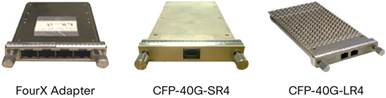
Each port can accept a 40 Gigabit Ethernet C Form-Factor Pluggable (CFP) optics module or be converted to four ports of 10 Gigabit Ethernet with a FourX adapter, enabling customers to deploy 10 Gigabit Ethernet to meet current needs and be ready to transition to 40 Gigabit Ethernet without any disruption. The module can also be used in mixed mode, where one side of the card uses two CFP modules for 2 times 40 Gigabit Ethernet ports and the other side uses two FourX adapters for 8 times 10 Gigabit Ethernet ports.
The Cisco Catalyst 6900 Series 4-Port 40 Gigabit Ethernet Fiber Module is compatible only with Cisco Catalyst 6500 Supervisor Engine 2T.
Cisco Catalyst 6900 Series 4-port 40 Gigabit Ethernet Fiber Module can operate in a number of modes. Performance mode enables 80 Gigabit Ethernet performance by using two ports without oversubscription. In Oversubscribed mode, the module uses four ports with 2:1 oversubscription. Details are as follows:
● 40 Gigabit Ethernet Oversubscribed mode (default)
◦ Four 40 Gigabit Ethernet ports using CFP transceivers.
◦ Ports are numbered as interface FortyGigabitEthernetslot#/1-4 (Figure 1).
◦ The interface range command is allowed.
● 10 Gigabit Ethernet Oversubscribed mode
◦ 16 10 Gigabit Ethernet ports using FourX adapters.
◦ Each FourX adapter has 4 SFP+ transceivers.
◦ Ports will be numbered as interface TenGigabitEthernetslot#/5-20 (Figure 2).
◦ The interface range command is allowed.
● Mixed 10/40 Gigabit Ethernet mode
◦ One-half of the module uses two CFP transceivers for 2 x 40 Gigabit Ethernet ports, while the other half uses two FourX adapters for 8 x 10 Gigabit Ethernet ports.
◦ Depending on which side has the 40 Gigabit Ethernet ports, port numbering is as follows:
● 40 Gigabit Ethernet ports on left: Interface FortyGigabitEthernet slot#/1-2 and interface TenGigabitEthernetslot#/13-20.
● 40 Gigabit Ethernet ports on right: InterfaceTenGigabitEthernetslot#/5-12 and interface FortyGigabitEthernetslot#/3-4.
● Performance mode (Figure 3)
◦ Note that Oversubscribed mode is the default setting.
◦ In 40 Gigabit Ethernet Performance mode, ports 1 and 3 will be active.
◦ In 10 Gigabit Ethernet Performance mode, ports 5-8 and 13-16 will be active.
◦ The command-line interface (CLI) is required to change modes. Check release notes for details.
◦ The mode can be changed per port group.
The 4-Port 40 Gigabit Ethernet Fiber Module provides up to 44 x 40 Gigabit Ethernet Fiber ports in a single Cisco Catalyst 6513-E chassis and 88 x 40 Gigabit Ethernet ports in a Cisco Catalyst 6500 Virtual Switching System (VSS) 4T. The module has two 40-Gbps connections (for a total of 80 Gbps) to the 2-Tbps switch fabric of the Cisco Catalyst Supervisor Engine 2T, providing 2:1 oversubscription when all four ports of 40 Gigabit Ethernet or 16 ports of 10 Gigabit Ethernet ports are active.
Cisco Catalyst 6904 modules support two types of CFP optics: CFP-40G-LR4 and CFP-40G-SR4, providing operational distances of up to 10-km over single-mode fiber and 100m over OM3 multimode fiber, respectively. FourX adapters support a variety of Small Form-Factor Pluggable Plus (SFP+) optics, as listed in Table 2.
Each of the 40/10 Gigabit Ethernet ports supports Cisco TrustSec™ technology and IEEE 802.1ae (MACsec) encryption. The 40/10 Gigabit Ethernet ports also support Security Group Access Control Lists (SGACL), also known as Role-Based Access Control Lists (RBACL), and both Layer 2 and Layer 3 Security Group Tagging (SGT) functionality. The module also supports Virtual Switch Link (VSL) on all ports in both Oversubscribed mode and Performance mode.
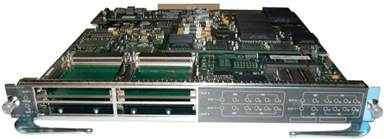
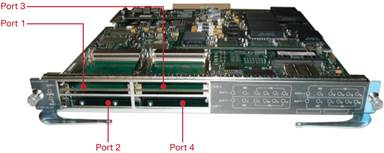
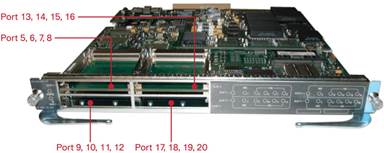
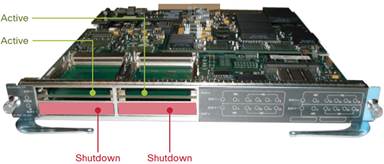
Figure 4 shows the 40 Gigabit Ethernet CFP Transceiver and FourX 10 Gigabit Ethernet SFP+ Converter.
Features and Benefits
Table 1 summarizes the primary features and benefits of the Cisco Catalyst 6900 Series 4-Port 40 Gigabit Ethernet Fiber Module.
Table 1. Cisco Catalyst 6900 Series 4-Port 40 Gigabit Ethernet Fiber Module Primary Features
| Feature |
Description |
| Ports |
|
| Optics |
FourX converter for 10 Gigabit Ethernet SFP+ |
| Switch fabric connection |
|
| Oversubscription |
|
| Forwarding engine |
● WS-X6904-40G-2T: Comes equipped with DFC4-E for distributed forwarding, supporting 256K forwarding entries, increased ACL entries to 64 K, increased Cisco IOS® NetFlow entries to 512K, and increased IPv4 forwarding speed to 60 mpps
● WS-X6904-40G-2TXL: Equipped with DFC4-EXL for distributed forwarding, supporting 1 million forwarding entries, increased ACL entries to 256K, increased NetFlow entries to 1 million, and increased IPv4 forwarding speed to 60 mpps
● In addition to the increased NetFlow entries, supports in hardware Flexible NetFlow, Sampled NetFlow, and Egress NetFlow
● Increased performance of up to 60 mpps for Layer 2, IPv4 and Multiprotocol Label Switching (MPLS) forwarding, and up to 30 mpps for Generic Routing Encapsulation (GRE), IPv6, and VPLS forwarding
● Increased multicast routes to 256K (128K IPv4 + 128K IPv6)
● Support for 16K bridge domains, allowing the standard 4K VLANs to be reused across these bridge domains, effectively increasing the number of VLANs available in the system
● Increased MAC address table to 128K
● IPv4 Internet Group Management Protocol Version 3 (IGMPv3) snooping in hardware
● IPv6 Multicast Listener Discovery Version 2 (MLDv2) snooping in hardware
● Protocol Independent Multicast (PIM) registers in hardware
● IPV4 and IPv6 in IPv6 tunneling
● IPv6 in IPv4 tunneling (Intra-Site Automatic Tunnel Addressing Protocol [ISATAP], 6to4, GRE)
● Quality-of-service (QoS) support for uniform, short pipe, and pipe mode tunnel
● Terminate the tunnel in the same loopback
|
| Security |
● Layer 2 and Layer 3 Cisco TrustSec (Security Group Tagging & Security Group Access Control List) and IEEE 802.1ae (MACsec) Layer 2 encryption in hardware
|
| Queues |
● Transmit: 1p7q4t/2p6q4t
|
| Queuing mechanisms |
● Differentiated Service Code Point (DSCP)-based queue mapping
|
| Scheduler |
● Weighted Random Early Detection (WRED)
|
| Port buffers |
● Port Group 1 & 2 has combined Egress packet buffer of 176 MB same as Port Group 3 & 4
● Distribution of packet buffers among the ports in Performance or Oversubscribed mode is explained in more detail below
● Ingress buffer for Port Group (1&2) or Port Group (3&4):
◦ In Performance mode 1ms of storage = 10 MB or 10 MB/4 for each of the 4 x 10 Gigabit Ethernet
◦ In Oversubscribed mode = 10MB/2 for each of the 2 x 40GE ports and/or (10MB/4)/2) for each of the 8 x 10GE
● Egress buffer for Port Group (1&2) or Port Group (3&4):
◦ In Performance mode, 10 ms of storage equals 176 MB or 176 MB/4 for each of the 4 x 10 Gigabit Ethernet
◦ In Oversubscribed mode equals 176 MB/2 for each of 2 x 40 Gigabit Ethernet ports and/or (176/4)/2) for each of 8 x 10 Gigabit Ethernet
|
| Hardware-based multicast replication |
● Approximately 20 Gbps per replication engine
● Four replication engines per module delivering total throughput of 80 Gbps
|
| Jumbo frame support for bridged and routed packets |
|
| + LED |
New Blue Beacon LED added on front panel for slot-level and port-level service flashing indicator |
| EtherChannel Capacity |
40 Gigabit Ethernet mode
● A maximum of 4 x 40 Gigabit Ethernet links, whether on one module or spread across multiple modules, is allowed in a single EtherChannel.
● This does not affect other modules in the system.
● 10 Gigabit Ethernet mode
● Up to eight 10 Gigabit Ethernet ports can be used in an EtherChannel, whether on one module or spread across multiple modules.
Best Practices
● EtherChannel should be two or four ports (or eight, with 10 Gigabit Ethernet ports)
|
| Maximum port density per chassis |
32 x 40 Gigabit Ethernet ports or 128 (+2 Supervisor Uplink) 10 Gigabit Ethernet ports (6509-E chassis) 44 x 40 Gigabit Ethernet ports or 176 (+2 Supervisor Uplink) 10 Gigabit Ethernet ports (6513-E chassis) |
| Maximum port density per VSS |
64 x 40 Gigabit Ethernet ports or 256 10 Gigabit Ethernet ports (6509-E chassis) 88 x 40 Gigabit Ethernet ports or 352 10 Gigabit Ethernet ports (6513-E chassis) |
| Can be used to form virtual switch link |
Yes (on all ports). Maximum of 4 x 40 G ports (refer to EtherChannel capacity section above) |
| Supervisor engines supported |
|
| Can you upgrade WS-x6904-40G-2T to XL version with DFC4XL? |
Yes. WS-6904-40G-2T can be upgraded to a XL version by swapping out the DFC4 with DFC4XL |
| Chassis supported |
● Any Cisco Catalyst 6500 E-Series chassis, including 6503-E, 6504-E, 6506-E, 6509-E, 6509-V-E, 6513-E (NEBS compliant: operating temperature up to 55°C)
● Not supported in non-E Series chassis
|
| Slot requirements |
● Can occupy slots 1-6 and 9-13 in a Cisco Catalyst 6513-E chassis
|
| Onboard memory |
Table 2 summarizes pluggable optics supported on the Cisco Catalyst 6900 Series 4-Port 40 Gigabit Ethernet Fiber Module.
Table 2. Pluggable Optics for Cisco Catalyst 6900 Series 4-Port 40 Gigabit Ethernet Fiber Module
| CFP Part Number |
Transceiver Type |
Wavelength |
IEEE Standard |
Maximum Distance and Cable Type[1] |
| CFP-40G-SR4 |
||||
| CFP-40G-LR4 |
||||
| CVR-CFP-4SFP10G |
FourX coverter to convert each 40GE port into 4 10GE SFP+ ports |
|
|
|
For up-to-date information about the end-of-life and end-of-sale status of Cisco Catalyst 6500 Series Switch compatible transceivers, visit: http://www.cisco.com/en/US/products/hw/modules/ps5455/prod_eol_notices_list.html.
Product Specifications
Table 3 lists product specifications of the Cisco Catalyst 6900 Series 4-Port 40 Gigabit Ethernet Fiber Module.
Table 3. Product Specifications
Ordering Information
Table 4 gives ordering information.
Table 4. Part Numbers for Ordering
| Part Numbers |
Description |
| 40 Gigabit Ethernet Fiber Modules |
|
| WS-X6904-40G-2T |
Cisco Catalyst 6900 Series 4-Port 40 Gigabit Ethernet Fiber Module with DFC4 |
| WS-X6904-40G-2TXL |
Cisco Catalyst 6900 Series 4-Port 40 Gigabit Ethernet Fiber Module with DFC4XL |
| WS-X6904-40G-2T= |
Cisco Catalyst 6900 Series 4-Port 40 Gigabit Ethernet Fiber Module with DFC4 Spare |
| WS-X6904-40G-2TXL= |
Cisco Catalyst 6900 Series 4-Port 40 Gigabit Ethernet Fiber Module with DFC4XL Spare |
| CFP Optics |
|
| CFP-40G-SR4 |
|
| CFP-40G-LR4 |
|
| CVR-CFP-4SFP10G |
FourX SFP+ converter for CFP ports |
| SFP+ 10G Optics |
|
| SFP-10G-SR |
10GBASE-SR SFP+ transceiver module for use with FourX converter |
| SFP-10G-LR |
10GBASE-LR SFP+ transceiver module for use with FourX converter |
| SFP-10G-LRM |
10GBASE-LRM SFP+ transceiver module for use with FourX converter |
| SFP-10G-ER |
10GBASE-ER SFP+ transceiver module for use with FourX converter |
| SFP-H10GB-CU1M |
1-m 10G SFP+ Twinax cable assembly, passive with FourX converter |
| SFP-H10GB-CU3M |
3-m 10G SFP+ Twinax cable assembly, passive with FourX converter |
| SFP-H10GB-CU5M |
5-m 10G SFP+ Twinax cable assembly, passive with FourX converter |
| SFP 1G Optics |
|
| GLC-SX-MMD |
1000BASE-SX SFP transceiver module for use with FourX converter |
| GLC-LH-SMD |
1000BASE-LH SFP transceiver module for use with FourX converter |
| GLC-T |
1000BASE-T SFP transceiver module for use with FourX converter |
● 4-port 40 Gigabit Ethernet Fiber Module:
◦ WS-X6904-40G-2T ships with WS-X6904-40GE and WS-F6K-DFC4-E.
◦ WS-X6904-40G-2TXL ships with WS-X6904-40GE and WS-F6K-DFC4-EXL.
◦ The front panel of these modules is labeled:
● WS-X6904-40GE-2T or
● WS-X6904-40GE-2TXL if it is XL version
◦ Cisco IOS Software commands will display WS-X6904-40GE with either WS-F6K-DFC4-E or WS-F6K-DFC4-EXL for XL version.
Cisco and Partner Services for Expanding Borderless Networks
Drive borderless network innovation, optimize operational efficiencies, establish business flexibility, and gain competitive advantage using intelligent, personalized services from Cisco and our partners. Through a discovery process that begins with understanding your business objectives, we help you integrate end-to-end solutions into your architecture and incorporate network services onto that platform. Sharing knowledge and leading practices, we support your success every step of the way as you deploy, absorb, manage, and scale new technology. Choose from a flexible suite of support services designed to meet your business needs and help you maintain high-quality network performance while controlling operational costs. For more information about services, visit: http://www.cisco.com/go/services.
For More Information
For more information about Cisco Catalyst 6500 Series Switches, visit http://www.cisco.com/en/US/products/hw/switches/ps708/index.html or contact your local account representative.
 Feedback