Cisco TelePresence Management Suite Extension for Microsoft Exchange Data Sheet
Available Languages
Product Overview
When you’re setting up a meeting, coordinating calendars is crucial. But how do you do it if people you want to attend the meeting are using different calendar software?
You can have Cisco TelePresence® Management Suite Extension for Microsoft Exchange (Cisco TMSXE) tackle the problem. Cisco TMSXE is an extension of Cisco TelePresence Management Suite (Cisco TMS) that enables Cisco TelePresence scheduling through Microsoft Outlook (Figure 1). It does this by replicating scheduled meetings between Cisco TMS and Microsoft Exchange room calendars. Cisco TMSXE integrates with Microsoft Exchange Server 2013, 2010, 2007, and Online (Office 365), without the need to install special software or add-ins to a Microsoft Outlook client.
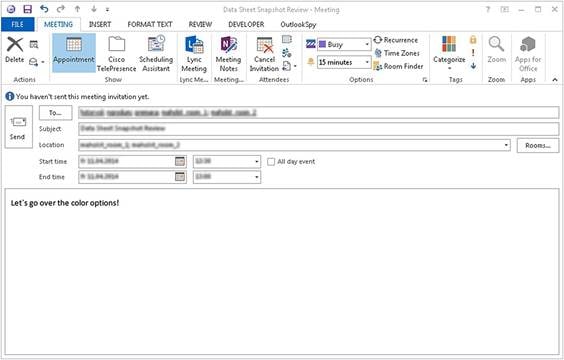
Cisco TMSXE makes scheduling a Cisco TelePresence meeting as easy as scheduling any other meeting. This ease of use helps ensure increased adoption of video meetings and improved collaboration among employees, customers, and partners.
On the basis of your permissions, you can view availability of colleagues and Cisco TelePresence rooms and easily select the most appropriate time to schedule a meeting. Cisco TMS then automatically handles routing logic and other meeting resources, such as Cisco TelePresence Servers based on default settings that the Cisco TMS administrator configures.
In addition to the invitations sent to attendees, Cisco TMSXE sends the meeting organizer a booking confirmation with all of the meeting details, and provides notification if any of the required resources could not be booked.
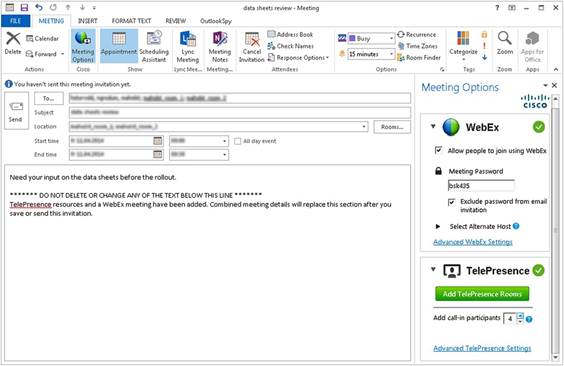
Cisco TMSXE also allows you to include WebEx® users in your meetings using the optional WebEx Productivity Tools with Cisco TelePresence for Microsoft Outlook (Figure 2). To schedule a meeting, an organizer selects the participants, adds Cisco TelePresence endpoints and WebEx information, and sends the invitation to the participants. The invitation includes the details to join the meeting using Cisco TelePresence, WebEx, or audio only.
with a Managed Endpoint
Features and Benefits
The benefits of Cisco TMSXE include:
● Easy to use: The familiar Microsoft Outlook interface allows you to quickly and intuitively schedule individual and recurring meetings, reducing administrative overhead and encouraging adoption.
● Visually informative: Viewing availability of colleagues and Cisco TelePresence rooms in real time allows you to easily find a time to schedule your meeting.
● Extended reach: Cisco TMSXE widens access to scheduling any system (Cisco or third-party) bookable by Cisco TMS, allows call-in and call-out Cisco TelePresence users, and supports inviting other participants to join using WebEx meeting applications.
● Synchronized scheduling: Up-to-date information about scheduled meetings is available in both Microsoft Outlook and the Cisco TMS user interfaces. Cisco TMSXE synchronizes meeting information between Microsoft Exchange and Cisco TMS through the Microsoft Exchange Web Services (EWS) API.
● Flexible: Administrators can allow advanced users to modify default Cisco TelePresence conference settings through an optional Cisco TelePresence custom form for Microsoft Outlook.
● Simple deployment: For users without WebEx Productivity Tool for Microsoft Outlook, administrators can allow users to invite a special WebEx Scheduling Mailbox to their Cisco TelePresence meetings.
● Simple administration: With installation through an intuitive configuration wizard and easy addition, you can remove and modify systems while Cisco TMSXE is running.
● Resilient: Cisco TMSXE can now be installed into an active/passive redundant setup.
System Requirements
Table 1 lists system requirements for Cisco TMSXE.
Table 1. System Requirements for Cisco TMSXE
| System Requirements |
|
| Hardware and application server requirements |
● Minimum 2-GHz or higher (64 bit) compatible CPU
● Minimum 2 GB of RAM (minimum 4 GB)
● Minimum 4 GB of disk space for application installation
|
| Software requirements |
● Microsoft Windows Server 2012 up to build 6.3
● Microsoft Windows Server 2008 Service Pack 2 (64-bit)
● Microsoft Windows Server 2008 R2 Service Pack 1
● Microsoft .NET Framework v4.0 or later; full (extended) version is required
● VMWare EXSI can be used
|
| Network requirements |
● Secure HTTP (HTTPS) connectivity is required from the Cisco TMSXE server to Cisco TMS
|
| Microsoft Exchange requirements |
● Microsoft Office 365 Enterprise (Exchange Online)
● Microsoft Exchange 2013 Service Pack 1
● Microsoft Exchange 2010 Service Pack 3
● Microsoft Exchange 2007 Service Pack 3
● Microsoft Exchange Web Services (EWS) must be enabled on the Microsoft Exchange server
|
| Microsoft Outlook tested clients |
● Microsoft Office 365
● Microsoft Outlook 2013
● Microsoft Outlook 2011 for Mac
● Microsoft Outlook Web App (2010 and 2013)
|
| Scheduling Cisco TelePresence and WebEx meetings together |
In order to use Cisco TMSXE to book Cisco TelePresence meetings that include WebEx users, you will need:
● Cisco TMS
● Cisco TMSXE
● WebEx Meeting Center with CMR Hybrid enabled and a supported audio plan.
● For guidance on scheduling Cisco TelePresence and WebEx meetings together, refer to the “WebEx Enabled TelePresence 2.0 Configuration Guide for Cisco TelePresence Management Suite”
|
| CMR Cloud OBTP Requirements |
● CMR Cloud WebEx site and WebEx Productivity Tool for scheduling
● TMS and TMSXE configured as if using on-prem conferencing resources
● Calendar Connector with Expressway for Personal Meeting Room invites
|
| Cisco TMS Booking Service requirements |
● Installing the Cisco TMS Booking Service is required for customers who intend to use WebEx Productivity Tools with Cisco TelePresence for Microsoft Outlook
● The Cisco TMS Booking Service requires HTTPS to be configured for DefaultSite in Microsoft Internet Information Service (IIS)
|
Ordering Information
To order Cisco TMSXE, refer to the Cisco Ordering homepage and Table 2.
There are two purchasing options:
● Option 1: Purchase per Microsoft Exchange organization, for most deployments with more than 100 systems being scheduled through Microsoft Exchange (LIC-TMS-APPINT or L-TMS-APPINT)
● Option 2: Purchase of 25 systems for deployments with 100 systems or fewer being scheduled through Microsoft Exchange (LIC-TMS-MSEX-25 or L-TMS-MSEX-25)
Table 2. Ordering Information
| Product Name |
Part Number |
| Cisco TelePresence Management Suite |
|
| Initial Ordering Options |
CTI-TMS-SW-K9 |
| Cisco TMS Application Integration License - Per Exchange Organization Integrated |
LIC-TMS-APPINT |
| Cisco TMSXE - Extension for Microsoft Exchange - Per 25 Systems Registered |
LIC-TMS-MSEX-25 |
| Upgrade Options |
L-TMS-SW-PAK |
| Cisco TMS Application Integration License - Per Exchange Organization Integrated |
L-TMS-APPINT |
| Cisco TMSXE - Extension for Microsoft Exchange - Per 25 Systems Being Booked |
L-TMS-MSEX-25 |
Cisco Services and Support
Cisco offers a wide range of services programs to accelerate customer success. These innovative services programs are delivered through a unique combination of people, processes, tools, and partners, resulting in high levels of customer satisfaction. Cisco® Services can help you protect your network investment, optimize network operations, and prepare your network for new applications to extend network intelligence and the power of your business. For more information about Cisco Services, visit Cisco Technical Support Services or Cisco TelePresence Services online.
For More Information
For more information about the Cisco TelePresence Management Suite, please visit Cisco TelePresence Management Suite or contact your local Cisco account manager.
 Feedback