- Catalyst 4900M Switch Chassis
- Catalyst 4900M Switch Chassis Features
- Catalyst4900M Switch Chassis Physical and Environmental Specifications
- Catalyst 4900M Switch Chassis Rear Panel Connections and Features
- Front Panel LEDs
- Chassis Cooling
- Power Supplies
- Environmental Monitoring of the Power Supplies
- Power Management for the Catalyst 4900M Switch
Product Overview
This chapter describes the Catalyst 4900M switch and the supported half-card Ethernet modules. The chapter contains these sections:
Catalyst 4900M Switch Chassis
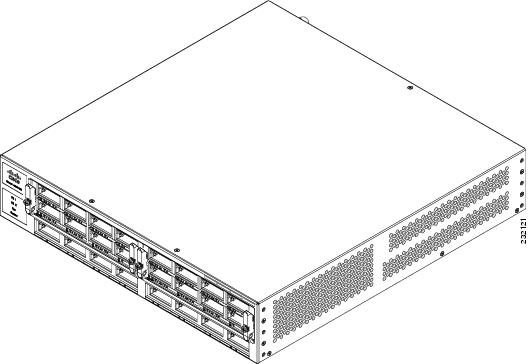
The Catalyst 4900M switch is a 2 RU horizontal high-performance dedicated Ethernet switch. The chassis has 8 fixed 1-GB or 10-GB ports and two half-card Ethernet module slots that can accommodate a several different styles of half-card Ethernet modules. The switch has one removable variable-speed fan tray and supports redundant power supplies. Figure 1-1 shows the front of the chassis.
Figure 1-1 Catalyst 4900M Switch Chassis
Catalyst 4900M Switch Chassis Features
Table 1-1 lists the features of the Catalyst 4900M switch chassis.
|
|
|
|---|---|
8 10-Gigabit ports that support X2 transceivers. By using the Cisco OneX converter, the 8-ports also support SFP+ transceivers. |
|
2 half-card module slots are available allowing you to configure the chassis to your specific needs. |
|
512-MB SDRAM, 128-MB Flash (onboard and fixed), 256 bytes serial EEROM |
|
A console serial port (RJ-45) provides for switch management using standard console equipment. (See Figure 1-2Figure 1-2.) Note A console cable is not provided in the accessory kit. It can be ordered as an option. |
|
The management port on the rear panel offers the same TCP/IP based management services available via inband access (telnet SNMP etc.). IP address configuration via BOOTP is supported on the Management port; it also supports image download to the switch. |
|
The Reset button is used to restart the switch. Use a paper clip or other small, pointed object to press the Reset button. |
|
1000 W AC-input and 1000 W DC-input power supplies are supported. |

Note A console cable is not provided as part of the accessory kit. It is available as an option.
Catalyst 4900M Switch Chassis Physical and Environmental Specifications
Table 1-2 lists the Catalyst 4900M switch chassis environmental and physical specifications.
|
|
|
|---|---|
Certified for operation: 32° to 104°F (0° to 40°C) Designed and tested for operation: 32° to 131°F (0° to 55°C) Note Each module on a Catalyst 4900M switch is equipped with internal inlet and outlet air temperature sensors. When a sensor detects that temperature reaches the first threshold, a minor alarm is generated; second threshold, a major alarm is generated; third threshold, the system shuts down. Use the show environment temperature command to check the threshold values. |
|
|
|
|
|
Catalyst 4900M Switch Chassis Rear Panel Connections and Features
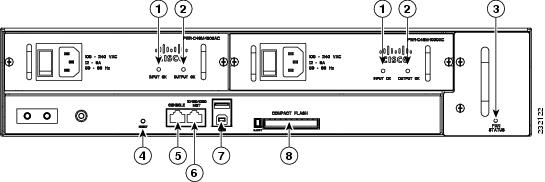
Figure 1-2 shows the chassis rear panel with the major features identified.
Figure 1-2 View of the Rear Panel
|
|
|
||
|
|
|
||
|
|
|
||
|
|
|
The chassis rear panel features include:
- Reset button—The Reset button is used to restart the switch. Use a paper clip or other small, pointed object to press the Reset button.
- Console port—A console serial port (RJ-45) provides for switch management using standard console equipment. (See Figure 1-2Figure 1-2.) A connector pinout table is provided in Appendix 1, “Specifications,” for the console and management ports.
- Management port—The Management port on the rear panel offers the same TCP/IP based management services available via inband access (telnet SNMP etc.). IP address configuration via BOOTP is supported on the Management port; it also supports image download to the switch.
- USB connector—A USB connector is provided for future expansion.
- Compact Flash slot—The Compact Flash slot accepts both 64-MB and 128-MB Type 1 compact Flash cards. You can use it for file transfer tasks such as loading a new software image. The Flash card is optional and can be obtained from third-party suppliers.
For more information, refer to Using the Compact Flash on the Catalyst 4500 Series Supervisor Engines at the following URL:
http://www.cisco.com/en/US/docs/switches/lan/catalyst4500/hardware/configuration/notes/OL_2788.html
Front Panel LEDs
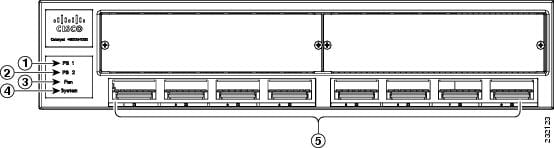
A set of LEDS on the chassis front panel (see Figure 1-3) provide visual status for the switch. Table 1-3 lists the front panel LEDS and their meanings.
Figure 1-3 Chassis Front Panel LEDs
|
|
|
||
|
|
|
||
|
|
|
|
|
|
|---|---|
The system LED indicates the operating state of the Catalyst 4900M switch. At startup, the Catalyst 4900M performs a series of diagnostic tests: |
|
Note There are no blinking, red, or yellow states for this port |
|
Note There are no blinking, red, or yellow states for this port. |
|
PS1 and the PS2 LEDs indicates the internal power supply status.
|
|
Chassis Cooling
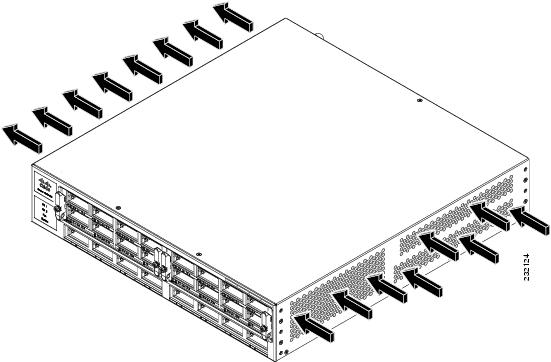
The hot-swappable chassis fan tray (WS-X4992) provides cooling air for the internal chassis components. The fans draw air in from the right side of the chassis and exhaust the heated air through perforations on the right side of the chassis.
 When the fan tray is removed, internal circuitry is exposed that should not be touched by tools or fingers. The system should not operate without a fan tray for longer than is necessary to replace a faulty fan tray with a new fan tray.
Figure 1-4 shows the direction of airflow through the switch.
Figure 1-4 Catalyst 4900M Chassis Airflow
There are five fans in the fan tray. If an individual fan fails, the other fans continue to run. Sensors monitor the internal air temperatures. The number of fans in operation and their speed varies according to the internal temperature for the quietest operation possible. If the air temperature exceeds a desired threshold, the environmental monitor displays warning messages.
Note Individual fans in the fan tray cannot be replaced; the entire fan tray must be replaced.
Power Supplies
Note For complete power specifications for the Catalyst 4900M switch, see , “Specifications.”
The Catalyst 4900M switch has two redundant internal 1000 W AC-input or 1000 W DC-input power supplies.
The internal power supplies have individual power cords and status LEDs (PS1 and PS2 on the front panel). There are also LEDs on the power supplies that show status for the input (Input OK) and output (Output OK) currents. A power cord is used to connect the power supplies to the site AC source. There is a power switch on the AC-input power supplies; AC power is present when a power cord is plugged into a power supply and the switch is set to the On position. DC-input power supplies attach to source DC using customer-supplied cables.
The switch starts with only one power supply plugged in, but redundant failover and load sharing is not available in this configuration. Cisco recommends that you always connect both power supplies to separate AC or DC circuits for optimal power reliability.
For safety reasons, the AC power supply must be switched off and unplugged before it is removed from a chassis or inserted into a chassis. DC supplies should have power shut off from the source before they are removed.
If only one power supply is used, you must use the supplied blank faceplate to cover the empty power bay. The blank power supply cover maintains EMI shielding and proper air flow through the chassis.
Environmental Monitoring of the Power Supplies
Using the environmental monitoring and reporting functions, you can maintain normal system operation by resolving adverse environmental conditions prior to loss of operation.
Each power supply monitors its own temperature and output voltages. The Catalyst 4900M switch senses the operating condition of the power supply and reports status through software.
Power Management for the Catalyst 4900M Switch
You can select either AC-input or DC-input power supplies for your switch. The Catalyst 4900M switch supports the following power supplies:
A redundant power supply can be identified and diagnosed by a running system regardless of its input status. The AC-input and DC-input supplies are interchangeable.
Power Management Modes
The Catalyst 4900M switch supports the redundant power management mode. In this mode, if both power supplies are operating normally, each provides from 20/80 to 45/55 percent of the total system power requirements at all times. If one power supply fails, the other unit increases power to 100 percent of the total power requirement.
Catalyst 4900M Half-Card Modules
The Catalyst 4900M switch chassis has two half-card slots available allowing two half-card modules to be installed. The following half-card modules are available:
- WS-X4920-GB-RJ45 Half-Card Ethernet Module
- WS-X4904-10GE Half-Card Ethernet Module
- WS-X4908-10GE Half-Card Ethernet Module
- WS-X4908-10G-RJ45 Half-Card Ethernet Module
The half-card modules can be mixed in a chassis.
WS-X4920-GB-RJ45 Half-Card Ethernet Module
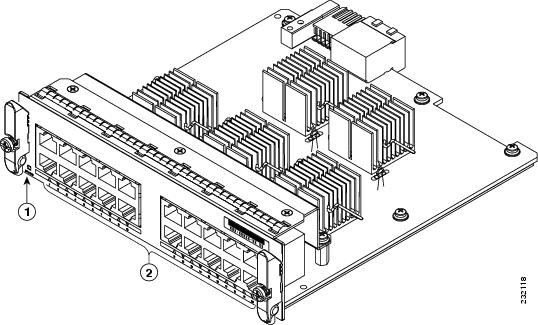
The WS-X4920-GB-RJ45 half-card Ethernet module provides 20 10/100/1000-Mbps full-or half-duplex ports. Figure 1-5 shows the module with the major features identified.
Figure 1-5 WS-X4920-GB-RJ45 Half-Card Ethernet Module
|
|
|
Table 1-4 lists the specifications for the WS-X4920-GB-RJ45 half-card Ethernet Module.
|
|
|
|---|---|
WS-X4904-10GE Half-Card Ethernet Module
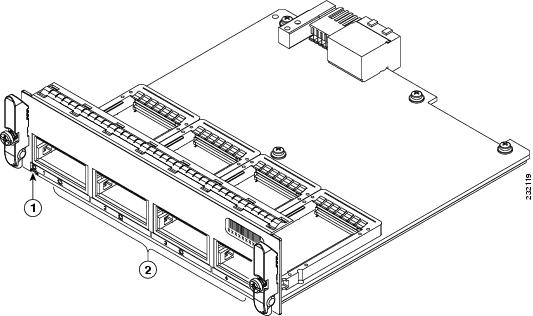
The WS-X4904-10GE half-card Ethernet module provides 4 10-Gigabit Ethernet ports. Figure 1-6 shows the module.
Figure 1-6 WS-X4904-10GE Half-Card Ethernet Module
|
|
|
Table 1-5 list the specifications for the WS-X4904-10GE half-card Ethernet module.
|
|
|
|---|---|
WS-X4908-10GE Half-Card Ethernet Module
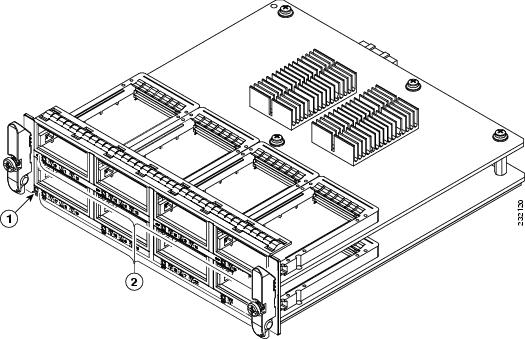
The WS-X4908-10GE module (Figure 1-7) is an 8-port 10-Gigabit Ethernet module that has the ability to operate as a 16 port 1-Gigabit module by installing a Cisco TwinGig converter module in the X2 transceiver socket and then installing two 1-Gigabit SFP transceivers in the TwinGig converter.
Figure 1-7 8-Port 10-Gigabit Ethernet Module (WS-X4908-10GE)
|
|
|
Table 1-6 list the specifications for the WS-X4908-10GE half-card Ethernet module.
Note TwinGig converter modules may be installed in place of X2 transceiver modules if you need 1-GB SFP transceiver connections. When you insert the TwinGig into one port, its neighbor port automatically converts to 1 GE interfaces whether it has a TwinGig installed or not, so you must position your TwinGig converters next to each other. The neighboring port to a TwinGig port cannot support an X2. Installation documentation for Cisco TwinGig converter modules can be found at: http://www.cisco.com/en/US/docs/switches/lan/catalyst3750e_3560e/hardware/install/notes/1757202.html
Note When using TwinGig converters and X2 transceivers on this module, keep them grouped in pairs as follows: ports 1–2, ports 3–4, ports 5–6 and ports 7–8. Inserting a TwinGig converter or X2 transceiver in any port will affect the capability of its neighbor port, and both will be set to handle the same type automatically. Mixing within a port group does not work. As an example, you would not be able to have an X2 transceiver in port 1 and a TwinGig converter in port 2.
WS-X4908-10G-RJ45 Half-Card Ethernet Module
The WS-X4908-10G-RJ45 half-card Ethernet module provides 8 10Gbps full-or half-duplex ports. Figure 1-8 shows the module with major features identified.
Figure 1-8 WS-X4908-10G-RJ45 Half-Card Ethernet Module
|
|
|
||
|
|
|
Table 1-7 lists the specifications for the WS-X4908-G-RJ45 half-card Ethernet module.
|
|
|
|---|---|
Category 6—Up to 180.5 ft (55 m) at 10-Gbps. Up to 328 ft (100 m) at 1-Gbps. Category 6a and Category 7—Up to 328 ft (100 m) at both 10-Gbps and 1-Gbps. |
|
Serial Number Location
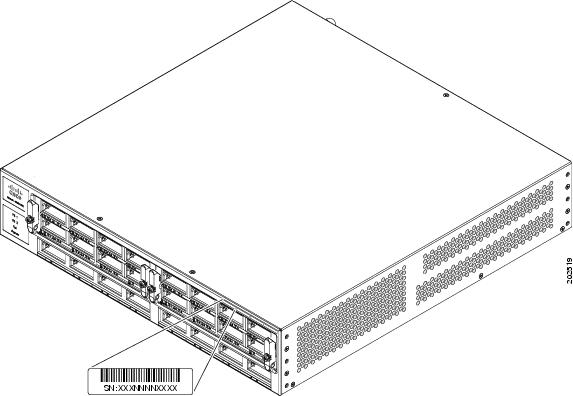
Figure 1-9 shows the location of the serial number for your switch. You will need this information when contacting Cisco for support.
Figure 1-9 Catalyst 4900M Chassis Serial Number
 Feedback