Table Of Contents
Configuring ERSPAN
Information About ERSPAN
ERSPAN Sources
ERSPAN Destinations
ERSPAN Sessions
Multiple ERSPAN Sessions
High Availability
Virtualization Support
Licensing Requirements for ERSPAN
Prerequisites for ERSPAN
Guidelines and Limitations
Default Settings
Configuring ERSPAN
Configuring an ERSPAN Source Session
Configuring an ERSPAN Destination Session
Shutting Down or Activating an ERSPAN Session
Configuring the Multicast Best Effort Mode for an ERSPAN Session
Verifying the ERSPAN Configuration
Configuration Examples for ERSPAN
Configuration Example for an ERSPAN Source Session
Configuration Example for an ERSPAN Destination Session
Configuration Example for an ERSPAN ACL
Configuration Example for ERSPAN Using the Multicast Best Effort Mode
Additional References
Related Documents
Standards
Feature History for ERSPAN
Configuring ERSPAN
This chapter describes how to configure an encapsulated remote switched port analyzer (ERSPAN) to transport mirrored traffic in an IP network on Cisco NX-OS devices.
This chapter includes the following sections:
•
Information About ERSPAN
•
Licensing Requirements for ERSPAN
•
Prerequisites for ERSPAN
•
Guidelines and Limitations
•
Default Settings
•
Configuring ERSPAN
•
Verifying the ERSPAN Configuration
•
Configuration Examples for ERSPAN
•
Additional References
•
Feature History for ERSPAN
Information About ERSPAN
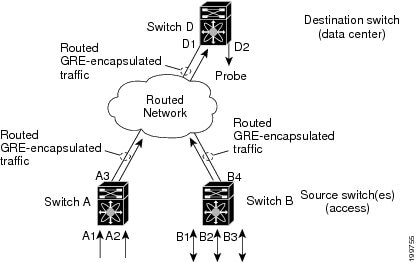
ERSPAN transports mirrored traffic over an IP network. The traffic is encapsulated at the source router and is transferred across the network. The packet is decapsulated at the destination router and then sent to the destination interface.
ERSPAN consists of an ERSPAN source session, routable ERSPAN generic routing encapsulation (GRE)-encapsulated traffic, and an ERSPAN destination session. You separately configure ERSPAN source sessions and destination sessions on different switches.
This section includes the following topics:
•
ERSPAN Sources
•
ERSPAN Destinations
•
ERSPAN Sessions
•
Multiple ERSPAN Sessions
•
High Availability
•
Virtualization Support
ERSPAN Sources
The interfaces from which traffic can be monitored are called ERSPAN sources. Sources designate the traffic to monitor and whether to copy ingress, egress, or both directions of traffic. ERSPAN sources include the following:
•
Ethernet ports and port channels
•
The inband interface to the control plane CPU—You can monitor the inband interface only from the default VDC. Inband traffic from all VDCs is monitored.
•
VLANs—When a VLAN is specified as an ERSPAN source, all supported interfaces in the VLAN are ERSPAN sources.
•
Fabric port channels connected to the Cisco Nexus 2000 Series Fabric Extender
•
Satellite ports and host interface port channels on the Cisco Nexus 2000 Series Fabric Extender—
These interfaces are supported in Layer 2 access mode, Layer 2 trunk mode, and Layer 3 mode.
Note
Layer 3 subinterfaces are not supported.
Note
A single ERSPAN session can include mixed sources in any combination of the above.
ERSPAN source ports have the following characteristics:
•
A port configured as a source port cannot also be configured as a destination port.
•
ERSPAN does not monitor any packets that are generated by the supervisor, regardless of their source.
ERSPAN Destinations
Destination ports receive the copied traffic from ERSPAN sources.
ERSPAN destination ports have the following characteristics:
•
Destinations for an ERSPAN session include Ethernet ports or port-channel interfaces in either access or trunk mode.
•
A port configured as a destination port cannot also be configured as a source port.
•
A destination port can be configured in only one ERSPAN session at a time.
•
Destination ports do not participate in any spanning tree instance or any Layer 3 protocols.
•
Ingress and ingress learning options are not supported on monitor destination ports.
•
F1 Series module core ports, Fabric Extender HIF ports, HIF port channels, and Fabric PO ports are not supported as SPAN destination ports.
ERSPAN Sessions
You can create ERSPAN sessions that designate sources and destinations to monitor.
Note
Only two ERSPAN or SPAN source sessions can run simultaneously across all VDCs. Only 23 ERSPAN destination sessions can run simultaneously across all VDCs.
Figure 17-1 shows an ERSPAN configuration.
Figure 17-1 ERSPAN Configuration
.
Multiple ERSPAN Sessions
Although you can define up to 48 ERSPAN sessions, only two ERSPAN or SPAN sessions can be running simultaneously. You can shut down an unused ERSPAN session.
For information about shutting down ERSPAN sessions, see the "Shutting Down or Activating an ERSPAN Session" section.
High Availability
The ERSPAN feature supports stateless and stateful restarts. After a reboot or supervisor switchover, the running configuration is applied.
For more information on high availability, see the Cisco Nexus 7000 Series NX-OS High Availability and Redundancy Guide, Release 5.x.
Virtualization Support
A virtual device context (VDC) is a logical representation of a set of system resources. ERSPAN applies only to the VDC where the commands are entered.
Note
You can monitor the inband interface only from the default VDC. Inband traffic from all VDCs is monitored.
For information about configuring VDCs, see the Cisco Nexus 7000 Series NX-OS Virtual Device Context Configuration Guide, Release 5.x.
Licensing Requirements for ERSPAN
The following table shows the licensing requirements for this feature:
Product
|
License Requirement
|
Cisco NX-OS
|
ERSPAN requires no license. Any feature not included in a license package is bundled with the Cisco NX-OS system images and is provided at no extra charge to you. For a complete explanation of the Cisco NX-OS licensing scheme, see the Cisco NX-OS Licensing Guide.
|
Prerequisites for ERSPAN
ERSPAN has the following prerequisite:
•
You must first configure the ports on each device to support the desired ERSPAN configuration. For more information, see the Cisco Nexus 7000 Series NX-OS Interfaces Configuration Guide, Release 5.x.
Guidelines and Limitations
ERSPAN has the following configuration guidelines and limitations:
•
For ERSPAN session limits, see the Cisco Nexus 7000 Series NX-OS Verified Scalability Guide.
•
All ERSPAN replication is performed in the hardware. The supervisor CPU is not involved.
•
ERSPAN and ERSPAN ACLs are not supported on F1 Series modules.
•
The encapsulation or decapsulation of generic routing encapsulation (GRE) or ERSPAN packets received on an F1 Series module is not supported.
•
ERSPAN and ERSPAN ACLs are not supported for packets generated by the supervisor.
•
ERSPAN and ERSPAN ACL sessions are terminated identically at the destination router.
•
ERSPAN is not supported for management ports.
•
A destination port can be configured in only one ERSPAN session at a time.
•
You cannot configure a port as both a source and destination port.
•
A single ERSPAN session can include mixed sources in any combination of the following:
–
Ethernet ports or port channels but not subinterfaces
–
VLANs or port channels, which can be assigned to port channel subinterfaces
–
The inband interface or port channels to the control plane CPU
Note
ERSPAN does not monitor any packets that are generated by the supervisor, regardless of their source.
•
Destination ports do not participate in any spanning tree instance or Layer 3 protocols.
•
When an ERSPAN session contains source ports that are monitored in the transmit or transmit and receive direction, packets that these ports receive may be replicated to the ERSPAN destination port even though the packets are not actually transmitted on the source ports. Some examples of this behavior on source ports include:
–
Traffic that results from flooding
–
Broadcast and multicast traffic
•
For VLAN ERSPAN sessions with both ingress and egress configured, two packets (one from ingress and one from egress) are forwarded from the destination port if the packets get switched on the same VLAN.
•
VLAN ERSPAN monitors only the traffic that leaves or enters Layer 2 ports in the VLAN.
•
You can monitor the inband interface only from the default VDC. Inband traffic from all VDCs is monitored.
•
Beginning with Cisco NX-OS Release 5.2, the Cisco Nexus 2000 Series Fabric Extender interfaces and the fabric port channels connected to the Cisco Nexus 2000 Series Fabric Extender can be configured as ERSPAN sources. However, they cannot be configured as ERSPAN destinations.
Note
ERSPAN on Fabric Extender interfaces and fabric port channels is supported on the 32-port, 10-Gigabit M1 and M1 XL modules (N7K-M132XP-12 and N7K-M132XP-12L). ERSPAN runs on the Cisco Nexus 7000 Series device, not on the Fabric Extender.
•
ERSPAN is supported on Fabric Extender interfaces in Layer 2 access mode, Layer 2 trunk mode, and Layer 3 mode. Layer 3 subinterfaces are not supported.
•
Multicast best effort mode applies only to M1 Series modules.
•
If ERSPAN is enabled on a vPC and ERSPAN packets need to be routed to the destination through the vPC, packets coming through the vPC peer-link cannot be captured.
Default Settings
Table 17-1 lists the default settings for ERSPAN parameters.
Table 17-1 Default ERSPAN Parameters
Parameters
|
Default
|
ERSPAN sessions
|
Created in the shut state
|
Multicast best effort mode
|
Disabled
|
Configuring ERSPAN
This section includes the following topics:
•
Configuring an ERSPAN Source Session
•
Configuring an ERSPAN Destination Session
•
Shutting Down or Activating an ERSPAN Session
•
Configuring the Multicast Best Effort Mode for an ERSPAN Session
Configuring an ERSPAN Source Session
You can configure an ERSPAN session on the local device only. By default, ERSPAN sessions are created in the shut state.
For sources, you can specify Ethernet ports, port channels, the supervisor inband interface, and VLANs. A single ERSPAN session can include mixed sources in any combination of Ethernet ports, VLANs, or the inband interface to the control plane CPU.
Note
ERSPAN does not monitor any packets that are generated by the supervisor, regardless of their source.
BEFORE YOU BEGIN
Ensure that you are in the correct VDC. To switch VDCs, use the switchto vdc command. For more information, see the Cisco Nexus 7000 Series NX-OS Virtual Device Context Configuration Guide, Release 5.x.
SUMMARY STEPS
1.
config t
2.
monitor erspan origin ip-address ip-address global
3.
no monitor session {session-number | all}
4.
monitor session {session-number | all} type erspan-source
5.
description description
6.
source {[interface [type slot/port[-port][, type slot/port[-port]]] [port-channel channel-number] | [vlan {number | range}]} [rx | tx | both]
7.
(Optional) Repeat Step 6 to configure all ERSPAN sources.
8.
(Optional) filter vlan {number | range}
9.
(Optional) Repeat Step 8 to configure all source VLANs to filter.
10.
(Optional) filter access-group acl-filter
11.
destination ip ip-address
12.
erspan-id erspan-id
13.
vrf vrf-name
14.
(Optional) ip ttl ttl-number
15.
(Optional) ip dscp dscp-number
16.
no shut
17.
(Optional) show monitor session {all | session-number | range session-range}
18.
(Optional) show running-config monitor
19.
(Optional) show startup-config monitor
20.
(Optional) copy running-config startup-config
DETAILED STEPS
| |
Command
|
Purpose
|
Step 1
|
config t
Example:
switch# config t
switch(config)#
|
Enters global configuration mode.
|
Step 2
|
monitor erspan origin ip-address
ip-address global
Example:
switch(config)# monitor erspan origin
ip-address 10.0.0.1 global
|
Configures the ERSPAN global origin IP address.
Note The global origin IP address can be configured only in the default VDC. The value that is configured in the default VDC is valid across all VDCs. Any change made in the default VDC is applied across all nondefault VDCs.
|
Step 3
|
no monitor session {session-number | all}
Example:
switch(config)# no monitor session 3
|
Clears the configuration of the specified ERSPAN session. The new session configuration is added to the existing session configuration.
|
Step 4
|
monitor session {session-number | all}
type erspan-source
Example:
switch(config)# monitor session 3 type
erspan-source
switch(config-erspan-src)#
|
Configures an ERSPAN source session.
|
Step 5
|
description description
Example:
switch(config-erspan-src)# description
erspan_src_session_3
|
Configures a description for the session. By default, no description is defined. The description can be up to 32 alphanumeric characters.
|
Step 6
|
source {[interface [type
slot/port[-port][, type slot/port[-port]]]
[port-channel channel-number]] | [vlan
{number | range}]} [rx | tx | both]
Example 1:
switch(config-erspan-src)# source
interface ethernet 2/1-3, ethernet 3/1 rx
Example 2:
switch(config-erspan-src)# source
interface port-channel 2
Example 3:
switch(config-erspan-src)# source
interface sup-eth 0 both
Example 4:
switch(config-erspan-src)# source vlan 3,
6-8 tx
Example 5:
switch(config-monitor)# source interface
ethernet 101/1/1-3
|
Configures the sources and traffic direction in which to copy packets. You can enter a range of Ethernet ports, a port channel, an inband interface, a range of VLANs, a Cisco Nexus 2000 Series Fabric Extender interface, or a fabric port channel connected to a Cisco Nexus 2000 Series Fabric Extender.
You can configure one or more sources, as either a series of comma-separated entries or a range of numbers. You can specify up to 128 interfaces. For information on the VLAN range, see the Cisco Nexus 7000 Series NX-OS Layer 2 Switching Configuration Guide, Release 5.x.
You can specify the traffic direction to copy as ingress, egress, or both. The default direction is both.
Note You can monitor the inband interface only from the default VDC. The inband traffic from all VDCs is monitored.
|
Step 7
|
(Optional) Repeat Step 6 to configure all ERSPAN sources.
|
—
|
Step 8
|
filter vlan {number | range}
Example:
switch(config-erspan-src)# filter vlan
3-5, 7
|
(Optional) Configures which VLANs to select from the configured sources. You can configure one or more VLANs, as either a series of comma-separated entries or a range of numbers. For information on the VLAN range, see the Cisco Nexus 7000 Series NX-OS Layer 2 Switching Configuration Guide, Release 5.x.
|
Step 9
|
(Optional) Repeat Step 8 to configure all source VLANs to filter.
|
—
|
Step 10
|
filter access-group acl-filter
Example:
switch(config-erspan-src)# filter
access-group ACL1
|
(Optional) Associates an ACL with the ERSPAN session.
Note You can create an ACL using the standard ACL configuration process. For more information, see the Cisco Nexus 7000 Series NX-OS Security Configuration Guide, Release 5.x.
|
Step 11
|
destination ip ip-address
Example:
switch(config-erspan-src)# destination ip
10.1.1.1
|
Configures the destination IP address in the ERSPAN session. Only one destination IP address is supported per ERSPAN source session.
Note The Cisco Nexus 2000 Series Fabric Extender interfaces and the fabric port channels connected to the Cisco Nexus 2000 Series Fabric Extender cannot be configured as SPAN destinations.
|
Step 12
|
erspan-id erspan-id
Example:
switch(config-erspan-src)# erspan-id 5
|
Configures the ERSPAN ID for the ERSPAN session. The ERSPAN range is from 1 to 1023.
|
Step 13
|
vrf vrf-name
Example:
switch(config-erspan-src)# vrf default
|
Configures the VRF that the ERSPAN source session uses for traffic forwarding.
|
Step 14
|
ip ttl ttl-number
Example:
switch(config-erspan-src)# ip ttl 25
|
(Optional) Configures the IP time-to-live (TTL) value for the ERSPAN traffic. The range is from 1 to 255.
|
Step 15
|
ip dscp dscp-number
Example:
switch(config-erspan-src)# ip dscp 42
|
(Optional) Configures the differentiated services code point (DSCP) value of the packets in the ERSPAN traffic. The range is from 0 to 63.
|
Step 16
|
no shut
Example:
switch(config-erspan-src)# no shut
|
Enables the ERSPAN source session. By default, the session is created in the shut state.
Note Only two ERSPAN source sessions can be running simultaneously.
|
Step 17
|
show monitor session {all | session-number
| range session-range}
Example:
switch(config-erspan-src)# show monitor
session 3
|
(Optional) Displays the ERSPAN session configuration.
|
Step 18
|
show running-config monitor
Example:
switch(config-erspan-src)# show
running-config monitor
|
(Optional) Displays the running ERSPAN configuration.
|
Step 19
|
show startup-config monitor
Example:
switch(config-erspan-src)# show
startup-config monitor
|
(Optional) Displays the ERSPAN startup configuration.
|
Step 20
|
copy running-config startup-config
Example:
switch(config-erspan-src)# copy
running-config startup-config
|
(Optional) Copies the running configuration to the startup configuration.
|
Configuring an ERSPAN Destination Session
You can configure an ERSPAN destination session to copy packets from a source IP address to destination ports on the local device. By default, ERSPAN destination sessions are created in the shut state.
BEFORE YOU BEGIN
Ensure that you are in the correct VDC (or use the switchto vdc command).
Ensure that you have already configured the destination ports in monitor mode. For more information, see the Cisco Nexus 7000 Series NX-OS Interfaces Configuration Guide, Release 5.x.
SUMMARY STEPS
1.
config t
2.
interface ethernet slot/port[-port]
3.
switchport
4.
switchport mode [access | trunk]
5.
switchport monitor
6.
(Optional) Repeat Steps 2 to 5 to configure monitoring on additional ERSPAN destinations.
7.
no monitor session {session-number | all}
8.
monitor session {session-number | all} type erspan-destination
9.
description description
10.
source ip ip-address
11.
destination {[interface [type slot/port[-port][, type slot/port[-port]]] | [port-channel channel-number]]}
12.
(Optional) Repeat Step 11 to configure all ERSPAN destination ports.
13.
erspan-id erspan-id
14.
vrf vrf-name
15.
no shut
16.
(Optional) show monitor session {all | session-number | range session-range}
17.
(Optional) show running-config monitor
18.
(Optional) show startup-config monitor
19.
(Optional) copy running-config startup-config
DETAILED STEPS
| |
Command
|
Purpose
|
Step 1
|
config t
Example:
switch# config t
switch(config)#
|
Enters global configuration mode.
|
Step 2
|
interface ethernet slot/port[-port]
Example:
switch(config)# interface ethernet 2/5
switch(config-if)#
|
Enters interface configuration mode on the selected slot and port or range of ports.
|
Step 3
|
switchport
Example:
switch(config-if)# switchport
|
Configures switchport parameters for the selected slot and port or range of ports.
|
Step 4
|
switchport mode [access | trunk]
Example:
switch(config-if)# switchport mode trunk
|
Configures the following switchport modes for the selected slot and port or range of ports:
• access
• trunk
|
Step 5
|
switchport monitor
Example:
switch(config-if)# switchport monitor
|
Configures the switchport interface as an ERSPAN destination.
|
Step 6
|
(Optional) Repeat Steps 2 to 5 to configure monitoring on additional ERSPAN destinations.
|
—
|
Step 7
|
no monitor session {session-number | all}
Example:
switch(config-if)# no monitor session 3
|
Clears the configuration of the specified ERSPAN session. The new session configuration is added to the existing session configuration.
|
Step 8
|
monitor session {session-number | all}
type erspan-destination
Example:
switch(config-if)# monitor session 3 type
erspan-destination
switch(config-erspan-dst)#
|
Configures an ERSPAN destination session.
|
Step 9
|
description description
Example:
switch(config-erspan-dst)# description
erspan_dst_session_3
|
Configures a description for the session. By default, no description is defined. The description can be up to 32 alphanumeric characters.
|
Step 10
|
source ip ip-address
Example:
switch(config-erspan-dst)# source ip
10.1.1.1
|
Configures the source IP address in the ERSPAN session. Only one source IP address is supported per ERSPAN destination session.
|
Step 11
|
destination {[interface [type
slot/port[-port][, type slot/port[-port]]]
[port-channel channel-number]]}
Example:
switch(config-erspan-dst)# destination
interface ethernet 2/5, ethernet 3/7
|
Configures a destination for copied source packets. You can configure one or more interfaces as a series of comma-separated entries.
Note You can configure destination ports as trunk ports. For more information, see the Cisco Nexus 7000 Series NX-OS Interfaces Configuration Guide, Release 5.x.
|
Step 12
|
(Optional) Repeat Step 11 to configure all ERSPAN destinations.
|
—
|
Step 13
|
erspan-id erspan-id
Example:
switch(config-erspan-dst)# erspan-id 5
|
Configures the ERSPAN ID for the ERSPAN session. The range is from 1 to 1023.
|
Step 14
|
vrf vrf-name
Example:
switch(config-erspan-dst)# vrf default
|
Configures the VRF that the ERSPAN destination session uses for traffic forwarding.
|
Step 15
|
no shut
Example:
switch(config)# no shut
|
Enables the ERSPAN destination session. By default, the session is created in the shut state.
Note Only 23 ERSPAN destination sessions across VDCs can be running simultaneously.
|
Step 16
|
show monitor session {all | session-number
| range session-range}
Example:
switch(config)# show monitor session 3
|
(Optional) Displays the ERSPAN session configuration.
|
Step 17
|
show running-config monitor
Example:
switch(config)# show running-config
monitor
|
(Optional) Displays the running ERSPAN configuration.
|
Step 18
|
show startup-config monitor
Example:
switch(config)# show startup-config
monitor
|
(Optional) Displays the ERSPAN startup configuration.
|
Step 19
|
copy running-config startup-config
Example:
switch(config)# copy running-config
startup-config
|
(Optional) Copies the running configuration to the startup configuration.
|
Shutting Down or Activating an ERSPAN Session
You can shut down ERSPAN sessions to discontinue the copying of packets from sources to destinations. Because only two ERSPAN sessions can be running simultaneously, you can shut down one session in order to free hardware resources to enable another session. By default, ERSPAN sessions are created in the shut state.
You can enable ERSPAN sessions to activate the copying of packets from sources to destinations. To enable an ERSPAN session that is already enabled but operationally down, you must first shut it down and then enable it. You can shut down and enable the ERSPAN session states with either a global or monitor configuration mode command.
BEFORE YOU BEGIN
Ensure that you are in the correct VDC (or use the switchto vdc command).
SUMMARY STEPS
1.
config t
2.
monitor session {session-range | all} shut
3.
no monitor session {session-range | all} shut
4.
monitor session session-number type erspan-source
5.
monitor session session-number type erspan-destination
6.
shut
7.
no shut
8.
(Optional) show monitor session all
9.
(Optional) show running-config monitor
10.
(Optional) show startup-config monitor
11.
(Optional) copy running-config startup-config
DETAILED STEPS
| |
Command
|
Purpose
|
Step 1
|
config t
Example:
switch# config t
switch(config)#
|
Enters global configuration mode.
|
Step 2
|
monitor session {session-range | all} shut
Example:
switch(config)# monitor session 3 shut
|
Shuts down the specified ERSPAN sessions. The session range is from 1 to 48. By default, sessions are created in the shut state. Only two sessions can be running at a time.
|
Step 3
|
no monitor session {session-range | all}
shut
Example:
switch(config)# no monitor session 3 shut
|
Resumes (enables) the specified ERSPAN sessions. The session range is from 1 to 48. By default, sessions are created in the shut state. Only two sessions can be running at a time.
Note If a monitor session is enabled but its operational status is down, then to enable the session, you must first specify the monitor session shut command followed by the no monitor session shut command.
|
Step 4
|
monitor session session-number type
erspan-source
Example:
switch(config)# monitor session 3 type
erspan-source
switch(config-erspan-src)#
|
Enters the monitor configuration mode for the ERSPAN source type. The new session configuration is added to the existing session configuration.
|
Step 5
|
monitor session session-number type
erspan-destination
Example:
switch(config-erspan-src)# monitor session
3 type erspan-destination
|
Enters the monitor configuration mode for the ERSPAN destination type.
|
Step 6
|
shut
Example:
switch(config-erspan-src)# shut
|
Shuts down the ERSPAN session. By default, the session is created in the shut state.
|
Step 7
|
no shut
Example:
switch(config-erspan-src)# no shut
|
Enables the ERSPAN session. By default, the session is created in the shut state.
Note Only two ERSPAN sessions can be running simultaneously.
|
Step 8
|
show monitor session all
Example:
switch(config-erspan-src)# show monitor
session all
|
(Optional) Displays the status of ERSPAN sessions.
|
Step 9
|
show running-config monitor
Example:
switch(config-erspan-src)# show
running-config monitor
|
(Optional) Displays the ERSPAN running configuration.
|
Step 10
|
show startup-config monitor
Example:
switch(config-erspan-src)# show
startup-config monitor
|
(Optional) Displays the ERSPAN startup configuration.
|
Step 11
|
copy running-config startup-config
Example:
switch(config-erspan-src)# copy
running-config startup-config
|
(Optional) Copies the running configuration to the startup configuration.
|
Configuring the Multicast Best Effort Mode for an ERSPAN Session
You can configure the multicast best effort mode for any ERSPAN session. By default, ERSPAN replication occurs on both the ingress and egress line card. When you enable the multicast best effort mode, ERSPAN replication occurs only on the ingress line card for multicast traffic or on the egress line card for packets egressing out of Layer 3 interfaces (that is, on the egress line card, packets egressing out of Layer 2 interfaces are not replicated for ERSPAN).
BEFORE YOU BEGIN
Ensure that you are in the correct VDC (or use the switchto vdc command).
SUMMARY STEPS
1.
config t
2.
monitor session session-number
3.
[no] multicast best-effort
4.
(Optional) show monitor session-number
5.
(Optional) copy running-config startup-config
DETAILED STEPS
| |
Command
|
Purpose
|
Step 1
|
config t
Example:
switch# config t
switch(config)#
|
Enters global configuration mode.
|
Step 2
|
monitor session session-number
Example:
switch(config)# monitor session 3
switch(config-monitor)#
|
Enters the monitor configuration mode and specifies the ERSPAN session for which the multicast best effort mode is to be configured.
|
Step 3
|
[no] multicast best-effort
Example:
switch(config-monitor)# multicast
best-effort
|
Configures the multicast best effort mode for the specified ERSPAN session.
|
Step 4
|
show monitor session session-number
Example:
switch(config-monitor)# show monitor
session 3
|
(Optional) Displays the status of ERSPAN sessions, including the configuration status of the multicast best effort mode and the modules on which the best effort mode is and is not supported.
|
Step 5
|
copy running-config startup-config
Example:
switch(config-monitor)# copy
running-config startup-config
|
(Optional) Copies the running configuration to the startup configuration.
|
Verifying the ERSPAN Configuration
To display the ERSPAN configuration, perform one of the following tasks:
Command
|
Purpose
|
show monitor session {all | session-number | range session-range}
|
Displays the ERSPAN session configuration.
|
show running-config monitor
|
Displays the running ERSPAN configuration.
|
show startup-config monitor
|
Displays the ERSPAN startup configuration.
|
For detailed information about the fields in the output from these commands, see the Cisco Nexus 7000 Series NX-OS System Management Command Reference.
Configuration Examples for ERSPAN
This section includes the following topics:
•
Configuration Example for an ERSPAN Source Session
•
Configuration Example for an ERSPAN Destination Session
•
Configuration Example for an ERSPAN ACL
•
Configuration Example for ERSPAN Using the Multicast Best Effort Mode
Configuration Example for an ERSPAN Source Session
This example shows how to configure an ERSPAN source session:
switch(config)# interface e14/30
switch(config-if)# no shut
switch(config)# monitor erspan origin ip-address 3.3.3.3 global
switch(config)# monitor session 1 type erspan-source
switch(config-erspan-src)# source interface e14/30
switch(config-erspan-src)# erspan-id 1
switch(config-erspan-src)# ip ttl 16
switch(config-erspan-src)# ip dscp 5
switch(config-erspan-src)# vrf default
switch(config-erspan-src)# destination ip 9.1.1.2
switch(config-erspan-src)# no shut
switch(config-erspan-src)# exit
switch(config)# show monitor session 1
Configuration Example for an ERSPAN Destination Session
This example shows how to configure an ERSPAN destination session:
switch(config)# interface e14/29
switch(config-if)# no shut
switch(config-if)# switchport
switch(config-if)# switchport monitor
switch(config)# monitor session 2 type erspan-destination
switch(config-erspan-dst)# source ip 9.1.1.2
switch(config-erspan-dst)# destination interface e14/29
switch(config-erspan-dst)# erspan-id 1
switch(config-erspan-dst)# vrf default
switch(config-erspan-dst)# no shut
switch(config-erspan-dst)# exit
switch(config)# show monitor session 2
Configuration Example for an ERSPAN ACL
This example shows how to configure an ERSPAN ACL:
switch(config)# ip access-list match_11_pkts
switch(config-acl)# permit ip 11.0.0.0 0.255.255.255 any
switch(config)# ip access-list match_12_pkts
switch(config-acl)# permit ip 12.0.0.0 0.255.255.255 any
switch(config)# vlan access-map erspan_filter 5
switch(config-access-map)# match ip address match_11_pkts
switch(config-access-map)# action forward
switch(config-access-map)# exit
switch(config)# vlan access-map erspan_filter 10
switch(config-access-map)# match ip address match_12_pkts
switch(config-access-map)# action forward
switch(config-access-map)# exit
switch(config)# monitor session 1 type erspan-source
switch(config-erspan-src)# filter access_group erspan_filter
Configuration Example for ERSPAN Using the Multicast Best Effort Mode
This example shows how to configure the multicast best effort mode for an ERSPAN session:
switch(config)# monitor session 1
switch(config-monitor)# multicast best-effort
switch(config-monitor)# show monitor session 1
Additional References
For additional information related to implementing ERSPAN, see the following sections:
•
Related Documents
•
Standards
Related Documents
Related Topic
|
Document Title
|
VDCs
|
Cisco Nexus 7000 Series NX-OS Virtual Device Context Configuration Guide, Release 5.x
|
Fabric Extender
|
Configuring the Cisco Nexus 2000 Series Fabric Extender
|
ERSPAN commands: complete command syntax, command modes, command history, defaults, usage guidelines, and examples
|
Cisco Nexus 7000 Series NX-OS System Management Command Reference
|
Standards
Standards
|
Title
|
No new or modified standards are supported by this feature, and support for existing standards has not been modified by this feature.
|
—
|
Feature History for ERSPAN
Table 17-2 lists the release history for this feature.
Table 17-2 Feature History for ERSPAN
Feature Name
|
Releases
|
Feature Information
|
ERSPAN
|
5.2(1)
|
Added ERSPAN source support for Cisco Nexus 2000 Series Fabric Extender interfaces.
|
ERSPAN
|
5.2(1)
|
Added the ability to configure the multicast best effort mode for an ERSPAN session.
|
ERSPAN and ERSPAN ACLs
|
5.1(1)
|
This feature was introduced.
|