- Information About the Unicast RIB and FIB
- Licensing Requirements for the Unicast RIB and FIB
- Guidelines and Limitations
- Managing the Unicast RIB and FIB
- Displaying Module FIB Information
- Configuring Load Sharing in the Unicast FIB
- Configuring Per-Packet Load Sharing
- Displaying Routing and Adjacency Information
- Triggering the Layer 3 Consistency Checker
- Clearing Forwarding Information in the FIB
- Enabling Dynamic TCAM Allocation
- Disabling Dynamic TCAM Allocation
- Returning the TCAM to Default Settings
- Estimating Memory Requirements for Routes
- Clearing Routes in the Unicast RIB
- Verifying the Unicast RIB and FIB
- Additional References
- Feature History for Unicast RIB and FIB
Managing the Unicast RIB and FIB
This chapter describes how to manage routes in the unicast Routing Information Base (RIB) and the Forwarding Information Base (FIB) on the Cisco NX-OS device.
This chapter includes the following sections:
• Information About the Unicast RIB and FIB
•Licensing Requirements for the Unicast RIB and FIB
•Managing the Unicast RIB and FIB
•Verifying the Unicast RIB and FIB
•Feature History for Unicast RIB and FIB
Information About the Unicast RIB and FIB
The unicast RIB (IPv4 RIB and IPv6 RIB) and FIB are part of the Cisco NX-OS forwarding architecture, as shown in Figure 15-1.
Figure 15-1 Cisco NX-OS Forwarding Architecture
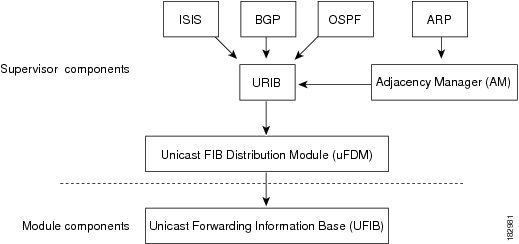
The unicast RIB exists on the active supervisor. It maintains the routing table with directly connected routes, static routes, and routes learned from dynamic unicast routing protocols. The unicast RIB also collects adjacency information from sources such as the Address Resolution Protocol (ARP). The unicast RIB determines the best next hop for a given route and populates the unicast forwarding information bases (FIBs) on the modules by using the services of the unicast FIB distribution module (FDM).
Each dynamic routing protocol must update the unicast RIB for any route that has timed out. The unicast RIB then deletes that route and recalculates the best next hop for that route (if an alternate path is available).
This section includes the following topics:
Layer 3 Consistency Checker
In rare instances, an inconsistency can occur between the unicast RIB and the FIB on each module. In Cisco NX-OS Release 4.0(3) and later releases, Cisco NX-OS supports the Layer 3 consistency checker. This feature detects inconsistencies between the unicast IPv4 RIB on the supervisor module and the FIB on each interface module. Inconsistencies include the following:
•Missing prefix
•Extra prefix
•Wrong next-hop address
•Incorrect Layer 2 rewrite string in the ARP or neighbor discovery (ND) cache
The Layer 3 consistency checker compares the FIB entries to the latest adjacency information from the Adjacency Manager (AM) and logs any inconsistencies. The consistency checker then compares the unicast RIB prefixes to the module FIB and logs any inconsistencies. See the "Triggering the Layer 3 Consistency Checker" section.
You can then manually clear any inconsistencies. See the "Clearing Forwarding Information in the FIB" section.
Dynamic TCAM Allocation
Cisco NX-OS divides the FIB to support multiple address families. The FIB TCAM has 128K physical entries.
Table 15-1 describes the default FIB TCAM allocation.

Note Full IPv4 Internet route tables have more than 256K routes, which is more than the maximum number of Cisco NX-OS FIB entries.
Dynamic TCAM allocation can reallocate unused TCAM blocks to an adjacent region when all existing blocks in that region are full. Dynamic TCAM allocation allows more flexibility in the number of routes that the FIB can allocate for a route type.
Note You may need to disable dynamic TCAM allocation if you downgrade to a release earlier than Cisco NX-OS Release 4.2(1).
Virtualization Support
The Unicast RIB and FIB support Virtual Routing and Forwarding instances (VRFs). VRFs exist within virtual device contexts (VDCs). By default, Cisco NX-OS places you in the default VDC and default VRF unless you specifically configure another VDC and VRF. For more information, see the Cisco Cisco Nexus 7000 Series NX-OS Virtual Device Context Configuration Guide, Release 4.x and see Chapter 14 "Configuring Layer 3 Virtualization."
Licensing Requirements for the Unicast RIB and FIB
The following table shows the licensing requirements for this feature:
Guidelines and Limitations
Unicast RIB and FIB have the following guidelines and limitations and restrictions:
•The FIB TCAM has 128K physical entries, which is divided into the following sections by default:
–56K IPv4 unicast routes (56K physical entries)
–32K IPv4 multicast routes or IPv6 unicast routes (64K physical entries)
–2K IPv6 multicast routes (8K physical entries)
•Dynamic TCAM allocation is enabled by default.
•You must be in the default VDC to disable dynamic TCAM allocation.
Managing the Unicast RIB and FIB
This section includes the following topics:
•Displaying Module FIB Information
•Configuring Load Sharing in the Unicast FIB
•Configuring Per-Packet Load Sharing
•Displaying Routing and Adjacency Information
•Triggering the Layer 3 Consistency Checker
•Clearing Forwarding Information in the FIB
•Enabling Dynamic TCAM Allocation
•Disabling Dynamic TCAM Allocation
•Returning the TCAM to Default Settings
•Estimating Memory Requirements for Routes
•Clearing Routes in the Unicast RIB
Note If you are familiar with the Cisco IOS CLI, be aware that the Cisco NX-OS commands for this feature might differ from the Cisco IOS commands that you would use.
Displaying Module FIB Information
You can display the FIB information on a module.
DETAILED STEPS
To display the FIB information on a module, use the following commands in any mode:
This example shows the FIB contents on a module:
switch# show ip fib route module 2
IPv4 routes for table default/base
------------------+------------------+---------------------
Prefix | Next-hop | Interface
------------------+------------------+---------------------
0.0.0.0/32 Drop Null0
255.255.255.255/32 Receive sup-eth1
Configuring Load Sharing in the Unicast FIB
Dynamic routing protocols, such as Open Shortest Path First (OSPF), support load balancing with equal-cost multipath (ECMP). The routing protocol determines its best routes based on the metrics configured for the protocol and installs up to the protocol-configured maximum paths in the unicast RIB. The unicast RIB compares the administrative distances of all routing protocol paths in the RIB and selects a best path set from all of the path sets installed by the routing protocols. The unicast RIB installs this best path set into the FIB for use by the forwarding plane.
The forwarding plane uses a load-sharing algorithm to select one of the installed paths in the FIB to use for a given data packet.
You can globally configure the following load-sharing settings:
•load-share mode—Selects the best path based on the destination address and port or the source and the destination address and port.
•Universal ID—Sets the random seed for the hash algorithm. You do not need to configure the Universal ID. Cisco NX-OS chooses the Universal ID if you do not configure it.
Note Load sharing uses the same path for all packets in a given flow. A flow is defined by the load-sharing method that you configure. For example, if you configure source-destination load sharing, then all packets with the same source IP address and destination IP address pair follow the same path.
To configure the unicast FIB load-sharing algorithm, use the following command in global configuration mode:
To display the unicast FIB load-sharing algorithm, use the following command in any mode:
|
|
|
|---|---|
show ip load-sharing Example: switch(config)# show ip load-sharing address source-destination |
Displays the unicast FIB load-sharing algorithm for data traffic. |
To display the route that the unicast RIB and FIB use for a particular source address and destination address, use the following command in any mode:
This example shows the route selected for a source/destination pair:
switch# show routing hash 10.0.0.5 30.0.0.2
Load-share parameters used for software forwarding:
load-share mode: address source-destination port source-destination
Universal-id seed: 0xe05e2e85
Hash for VRF "default"
Hashing to path *20.0.0.2 (hash: 0x0e), for route:
Configuring Per-Packet Load Sharing
You can use per-packet load sharing to evenly distribute data traffic in an IP network over multiple equal-cost connections. Per-packet load sharing allows the router to send successive data packets over paths on a packet-by-packet basis rather than on a per-flow basis.
Note Using per-packet load sharing can result in out-of-order packets. Packets for a given pair of source-destination hosts might take different paths and arrive at the destination out of order. Make sure you understand the implications of out-of-order packets to your network and applications. Per-packet load sharing is not appropriate for all networks. Per-flow load sharing ensures packets always arrive in the order that they were sent.
Per-packet load sharing uses the round-robin method to determine which path each packet takes to the destination. With per-packet load sharing enabled on interfaces, the router sends one packet for destination1 over the first path, the second packet for (the same) destination1 over the second path, and so on. Per-packet load sharing ensures balancing over multiple links.
Use per-packet load sharing to ensure that a path for a single source-destination pair does not get overloaded. If most of the traffic passing through parallel links is for a single pair, per-destination load sharing will overload a single link while other links will have very little traffic. Enabling per-packet load sharing allows you to use alternate paths to the same busy destination.
Note Per-packet load sharing on an interface overrides the global load-sharing configuration.
You configure per-packet load sharing on the input interface. This configuration determines the output interface that Cisco NX-OS chooses for the packet.
For example, if you have ECMP paths on two output interfaces, Cisco NX-OS uses the following load-sharing methods for input packets on Ethernet 1/1:
•Per-packet load sharing if you configure per-packet load sharing on Ethernet 1/1.
•Per-flow load sharing.
The configuration for the other interfaces have no effect on the load-sharing method used for Ethernet 1/1 in this example.
To configure per-packet load sharing, use the following command in interface configuration mode:
|
|
|
|---|---|
ip load-sharing per-packet Example: switch(config-if)# ip load-sharing per-packet |
Configures per-packet load sharing on an interface. |
Displaying Routing and Adjacency Information
You can display the routing and adjacency information.
To display the routing and adjacency information, use the following commands in any mode:
This example displays the unicast route table:
switch# show ip route
IP Route Table for Context "default"
'*' denotes best ucast next-hop '**' denotes best mcast next-hop
'[x/y]' denotes [preference/metric]
0.0.0.0/0, 1 ucast next-hops, 0 mcast next-hops
*via 10.1.1.1, mgmt0, [1/0], 5d21h, static
0.0.0.0/32, 1 ucast next-hops, 0 mcast next-hops
*via Null0, [220/0], 1w6d, local, discard
10.1.0.0/22, 1 ucast next-hops, 0 mcast next-hops, attached
*via 10.1.1.55, mgmt0, [0/0], 5d21h, direct
10.1.0.0/32, 1 ucast next-hops, 0 mcast next-hops, attached
*via 10.1.0.0, Null0, [0/0], 5d21h, local
10.1.1.1/32, 1 ucast next-hops, 0 mcast next-hops, attached
*via 10.1.1.1, mgmt0, [2/0], 5d16h, am
10.1.1.55/32, 1 ucast next-hops, 0 mcast next-hops, attached
*via 10.1.1.55, mgmt0, [0/0], 5d21h, local
10.1.1.253/32, 1 ucast next-hops, 0 mcast next-hops, attached
*via 10.1.1.253, mgmt0, [2/0], 5d20h, am
10.1.3.255/32, 1 ucast next-hops, 0 mcast next-hops, attached
*via 10.1.3.255, mgmt0, [0/0], 5d21h, local
255.255.255.255/32, 1 ucast next-hops, 0 mcast next-hops
*via Eth Inband Port, [0/0], 1w6d, local
This example shows the adjacency information:
switch# show ip adjacency
IP Adjacency Table for context default
Total number of entries: 2
Address Age MAC Address Pref Source Interface Best
10.1.1.1 02:20:54 00e0.b06a.71eb 50 arp mgmt0 Yes
10.1.1.253 00:06:27 0014.5e0b.81d1 50 arp mgmt0 Yes
Triggering the Layer 3 Consistency Checker
You can manually trigger the Layer 3 consistency checker.
To manually trigger the Layer 3 consistency checker, use the following commands in global configuration mode:
To stop the Layer 3 consistency checker, use the following commands in global configuration mode:
To display the Layer 3 inconsistencies, use the following commands in any mode:
Clearing Forwarding Information in the FIB
You can clear one or more entries in the FIB. Clearing a FIB entry does not affect the unicast RIB.
 The
clear forwarding command disrupts forwarding on the device.
The
clear forwarding command disrupts forwarding on the device.
To clear an entry in the FIB, including a Layer 3 inconsistency, use the following command in any mode:
Enabling Dynamic TCAM Allocation
You can enable dynamic TCAM allocation.
Note You must be in the default VDC to configure dynamic TCAM allocation.
To enable dynamic TCAM allocation, use the following command in any mode:
|
|
|
|---|---|
hardware forwarding
dynamic-allocation enable
Example: switch# hardware forwarding dynamic-allocation enable |
Enables dynamic TCAM allocation. The default is enabled. |
Disabling Dynamic TCAM Allocation
You can disable dynamic TCAM allocation.
Note You can disable dynamic TCAM allocation only if the current TCAM usage is below the default allocation. See the "Returning the TCAM to Default Settings" section for more information.
Note You must be in the default VDC to configure dynamic TCAM allocation.
To disable dynamic TCAM allocation, use the following command in any mode:
If Cisco NX-OS sucessfully disables dynamic TCAM allocation, you should see the following message:
switch# re-alloc is underway: TCAM re-allocation is underway. Check status for completion.
If Cisco NX-OS cannot disable dynamic TCAM allocation, you should see the following message:
switch# static is not possible: Current usage exceeds static allocation limits.
See the "Returning the TCAM to Default Settings" section for guidelins on how to lower TCAM usage below the default allocation limits.
Returning the TCAM to Default Settings
You must return the TCAM to default settings before you can start a nondisruptive downgrade to Cisco NX-OS release earlier than Cisco NX-OS 4.2(1).
If you attempt a nondisruptive downgrade, the downgrade may fail with the following error:
TCAM allocation has changed.
You need to return the TCAM to default settings to continue the nondisruptive downgrade.
Note Use these steps as a guideline. You must plan for reducing the route updates to the TCAM from neighbor routers.
BEFORE YOU BEGIN
Ensure that you are in the default VDC (or use the switchto vdc command).
SUMMARY STEPS
1. show hardware forwarding dynamic-allocation status
2. show hardware capacity | begin TCAM
3. Reduce route updates from neighbor routers until TCAM usage is below the default allocation.
4. hardware forwarding dynamic-allocation disable
DETAILED STEPS
Estimating Memory Requirements for Routes
You can estimate the memory that a number of routes and next-hop addresses will use.
To estimate the memory requirements for routes, use the following command in any mode:
Clearing Routes in the Unicast RIB
You can clear one or more routes from the unicast RIB.
The
* keyword is severely disruptive to routing.
To clear one or more entries in the unicast RIB, use the following commands in any mode:
Verifying the Unicast RIB and FIB
To verify the unicast RIB and FIB information, use the following commands:
Additional References
For additional information related to managing unicast RIB and FIB, see the following sections:
•Feature History for Unicast RIB and FIB
Related Documents
|
|
|
|---|---|
Unicast RIB and FIB CLI commands |
Cisco Nexus 7000 Series NX-OS Unicast Routing Command Reference |
Feature History for Unicast RIB and FIB
Table 15-1 lists the release history for this feature.
 Feedback