簡介
本文說明如何使用裝置分類器動態XML支援功能更新Catalyst 9800 WLC上的裝置分類器。
必要條件
需求
Cisco 9800 WLC基礎知識和裝置分類。
採用元件
本文中的資訊係根據以下軟體和硬體版本:
- C9800-CL v17.12.4、v17.15.4ES和v17.18.2ES
本文中的資訊是根據特定實驗室環境內的裝置所建立。文中使用到的所有裝置皆從已清除(預設)的組態來啟動。如果您的網路運作中,請確保您瞭解任何指令可能造成的影響。
設定
組態
在WLC上的dc_profile_dir資料夾下可以找到.xml檔案的示例:
C9800#dir bootflash:dc_profile_dir
Directory of bootflash:/dc_profile_dir/

393224 -rw- 443023 Dec 23 2025 07:14:35 +00:00 dc_embedded_profiles.txt.bkp
393233 -rw- 303835 Dec 23 2025 07:14:35 +00:00 dc_default_profiles.txt
393222 -rw- 443023 Dec 23 2025 07:14:35 +00:00 dc_embedded_profiles.txt
393223 -rw- 1367 Dec 23 2025 07:14:35 +00:00 dc_user_profiles.xml
393221 -rw- 303835 Dec 18 2025 07:13:57 +00:00 dc_default_profiles.txt.bkp
例如,在進行任何更改之前,需要先提供以下客戶端詳細資訊:
C9800#show wireless client mac-address 74da.38eb.c01f detail

Client MAC Address : 74da.38eb.c01f
Client MAC Type : Universally Administered Address
Client DUID: NA
Client IPv4 Address : 10.14.42.101
...
Device Classification Information:
Device Type : Microsoft-Workstation
Device Name : DESKTOP-R2CH8G5
Protocol Map : 0x000009 (OUI, DHCP)
Device Vendor : MSFT 5.0
Device Protocol : DHCP
Type : 12 19
Data : 13
00000000 00 0c 00 0f 44 45 53 4b 54 4f 50 2d 52 32 43 48 |....DESKTOP-R2CH|
00000010 38 47 35 |8G5 |
Type : 60 12
Data : 0c
00000000 00 3c 00 08 4d 53 46 54 20 35 2e 30 |.<..MSFT 5.0 |
Type : 55 18
Data : 12
00000000 00 37 00 0e 01 03 06 0f 1f 21 2b 2c 2e 2f 77 79 |.7.......!+,./wy|
00000010 f9 fc |.. |
...
C9800#show device classifier mac-address 74da.38eb.c01f detail
Client Mac: 74da.38eb.c01f
Device Type: Microsoft-Workstation
Confidence Level: 10
Device Name: DESKTOP-R2CH8G5
Device Vendor: MSFT 5.0
可以根據不同的協定對客戶端進行分類。
根據DHCP對客戶端分類
編輯.xml檔案,在此示例中,將應用以下規則:
<?xml version="1.0" encoding="UTF-8"?>
<裝置清單>
<CopyRight>版權所有(c)2021-2022 by Cisco Systems, Inc.保留所有權利。</CopyRight>
<Version>1.0</Version>
<裝置>
<DeviceType>Sample_Profile_2</DeviceType>
<RuleName>Sample_Rule_1</RuleName>
<RuleOperator>OR</RuleOperator>
<RuleDetailabilityMetric>20</RuleDetailabilityMetric>
<檢查>
<Protocol>DHCP</Protocol>
<TLV-Type>60</TLV-Type>
<TLV-Value-Type>String</TLV-Value-Type>
<TLV-Value>MSFT</TLV-Value>
</Check>
</Device>
</DeviceList>
此處使用的值與從上一個show wireless client mac-address [mac] detail輸出中擷取的值相同。
選擇粗體部分是為了避免出現空格,因為它們可能會導致解析錯誤。但它可能是產出的開始、中間或最後部分。
對於度量:選擇20為其提供更高的度量,因此它優先。度量越高,首選項就越高。
將檔案直接複製到bootflash。
在CLI上:
複製{ftp: | tftp:} {flash:}
或在GUI上:
管理>管理>檔案管理器
bootflash:
上傳
之後,檔案必須在WLC上可用:
C9800#more bootflash:dc_user_profiles.xml
<?xml version="1.0" encoding="UTF-8"?>
<DeviceList>
<CopyRight>Copyright (c) 2021-2022 by Cisco Systems, Inc. All rights reserved.</CopyRight>
<Version>1.0</Version>
<Device>
<DeviceType>Sample_Profile_2</DeviceType>
<RuleName>Sample_Rule_1</RuleName>
<RuleOperator>OR</RuleOperator>
<RuleCertaintyMetric>20</RuleCertaintyMetric>
<Check>
<Protocol>DHCP</Protocol>
<TLV-Type>60</TLV-Type>
<TLV-Value-Type>String</TLV-Value-Type>
<TLV-Value>MSFT</TLV-Value>
</Check>
</Device>
</DeviceList>
啟用裝置分類器:
C9800#config t
C9800(config)#device classifier
現在,建立的配置檔案將顯示在此輸出下:
C9800#show device classifier profile type custom
Valid Type Profile Name mCon ID
----------------------------------------------------------------------------
Valid Custom Sample_Profile_2 1 0
之後,客戶分類必須改變:
如果客戶端已連線,請斷開連線,然後重新連線客戶端。
C9800#clear wireless client device cache
!--- To clear any classification cache
C9800#show wireless client mac-address 74da.38eb.c01f detail

Client MAC Address : 74da.38eb.c01f
Client MAC Type : Universally Administered Address
Client DUID: NA
Client IPv4 Address : 10.14.42.101
...
Device Classification Information:
Device Type : Sample_Profile_2
Device Name : DESKTOP-R2CH8G5
Protocol Map : 0x000009 (OUI, DHCP)
Device Vendor : MSFT 5.0
Device Protocol : DHCP
Type : 12 19
Data : 13
00000000 00 0c 00 0f 44 45 53 4b 54 4f 50 2d 52 32 43 48 |....DESKTOP-R2CH|
00000010 38 47 35 |8G5 |
Type : 60 12
Data : 0c
00000000 00 3c 00 08 4d 53 46 54 20 35 2e 30 |.<..MSFT 5.0 |
Type : 55 18
Data : 12
00000000 00 37 00 0e 01 03 06 0f 1f 21 2b 2c 2e 2f 77 79 |.7.......!+,./wy|
00000010 f9 fc |.. |
...
C9800#show device classifier mac-address 74da.38eb.c01f detail
Client Mac: 74da.38eb.c01f
Device Type: Sample_Profile_2
Confidence Level: 20
Device Name: DESKTOP-R2CH8G5
Device Vendor: MSFT 5.0
根據17.18之前的OUI對客戶端進行分類

警告:此問題目前在Cisco錯誤ID CSCws中修正66837  .追蹤錯誤以修正錯誤。
編輯.xml檔案,在此示例中,將應用以下規則:
<?xml version="1.0" encoding="UTF-8"?>
<裝置清單>
<CopyRight>版權所有(c)2021-2022 by Cisco Systems, Inc.保留所有權利。</CopyRight>
<Version>4.3</Version>
<裝置>
<DeviceType>Test-3</DeviceType>
<RuleName>Cisco-Rule</RuleName>
<RuleOperator>AND</RuleOperator>
<RuleDetailabilityMetric>20</RuleDetailabilityMetric>
<檢查>
<Protocol>MAC</Protocol>
<TLV-Value-Type>String</TLV-Value-Type>
<TLV-Value>Edimax</TLV-Value>
</Check>
</Device>
</DeviceList>
此處的字串是基於MAC地址的字首選擇的。可從IEEE定義的標準OUI檢查此問題。
將檔案直接複製到bootflash。
在CLI上:
複製{ftp: | tftp:} {flash:}
或在GUI上:
管理>管理>檔案管理器
bootflash:
上傳
之後,檔案必須在WLC上可用:
C9800#more bootflash:dc_user_profiles.xml
<?xml version="1.0" encoding="UTF-8"?>
<DeviceList>
<CopyRight>Copyright (c) 2021-2022 by Cisco Systems, Inc. All rights reserved.</CopyRight>
<Version>4.3</Version>
<Device>
<DeviceType>Test-3</DeviceType>
<RuleName>Cisco-Rule</RuleName>
<RuleOperator>AND</RuleOperator>
<RuleCertaintyMetric>20</RuleCertaintyMetric>
<Check>
<Protocol>MAC</Protocol>
<TLV-Value-Type>String</TLV-Value-Type>
<TLV-Value>Edimax</TLV-Value>
</Check>
</Device>
</DeviceList>
啟用裝置分類器:
C9800#config t
C9800(config)#device classifier
現在,建立的配置檔案將顯示在此輸出下:
C9800#show device classifier profile type custom
Valid Type Profile Name mCon ID
----------------------------------------------------------------------------
Valid Custom Test-3 1 0
之後,客戶分類必須改變:
如果客戶端已連線,請斷開連線,然後重新連線客戶端。
C9800#clear wireless client device cache
!--- To clear any classification cach

C9800#show wireless client mac-address 74da.38eb.c01f detail

Client MAC Address : 74da.38eb.c01f
Client MAC Type : Universally Administered Address
Client DUID: NA
Client IPv4 Address : 10.14.42.101
...
Device Classification Information:
Device Type : Test-3
Device Name : EDIMAX TECHNOLOGY CO. LTD.
Protocol Map : 0x000001 (OUI)
Day Zero Classification : EDIMAX TECHNOLOGY CO. LTD.
...
C9800#show device classifier mac-address 74da.38eb.c01f detail
Client Mac: 74da.38eb.c01f
Device Type: Sample_Profile_2
Confidence Level: 20
Device Name: DESKTOP-R2CH8G5
Device Vendor: MSFT 5.0
根據OUI對客戶端進行分類(從17.18開始)
警告:此問題目前正在Cisco錯誤 IDCSCws66837中修復。請追蹤該錯誤以便進行修復。
編輯.xml檔案,在此示例中,將應用以下規則:
<?xml version="1.0" encoding="UTF-8"?>
<裝置清單>
<CopyRight>版權所有(c)2021-2022 by Cisco Systems, Inc.保留所有權利。</CopyRight>
<Version>4.3</Version>
<裝置>
<DeviceType>Test-1</DeviceType>
<RuleName>Cisco-Rule</RuleName>
<RuleOperator>AND</RuleOperator>
<RuleDetailabilityMetric>20</RuleDetailabilityMetric>
<檢查>
<Protocol>MAC</Protocol>
<TLV-Value-Type>Regex</TLV-Value-Type>
<TLV-Value>74da.38*</TLV-Value>
</Check>
</Device>
</DeviceList>
從17.18開始,您可以使用MAC地址的字首分類。
此處的星號(*符號)表示在本示例中以74da.38開頭的所有MAC地址將根據此規則進行分類。
另一個選項:完整的MAC地址可放在此處,這樣便有機會單獨對MAC地址進行分類。
將檔案直接複製到bootflash。
在CLI上:
複製{ftp: | tftp:} {flash:}
或在GUI上:
管理>管理>檔案管理器
bootflash:
上傳
之後,檔案必須在WLC上可用:
C9800#more bootflash:dc_user_profiles.xml
<?xml version="1.0" encoding="UTF-8"?>
<DeviceList>
<CopyRight>Copyright (c) 2021-2022 by Cisco Systems, Inc. All rights reserved.</CopyRight>
<Version>4.3</Version>
<Device>
<DeviceType>Test-1</DeviceType>
<RuleName>Cisco-Rule</RuleName>
<RuleOperator>AND</RuleOperator>
<RuleCertaintyMetric>20</RuleCertaintyMetric>
<Check>
<Protocol>MAC</Protocol>
<TLV-Value-Type>Regex</TLV-Value-Type>
<TLV-Value>74da.38*</TLV-Value>
</Check>
</Device>
</DeviceList>
啟用裝置分類器:
C9800#config t
C9800(config)#device classifier
現在,建立的配置檔案將顯示在此輸出下:
C9800#show device classifier profile type custom
Valid Type Profile Name mCon ID
----------------------------------------------------------------------------
Valid Custom Test-1 1 0
之後,客戶分類必須改變:
如果客戶端已連線,請斷開連線,然後重新連線客戶端。
C9800#clear wireless client device cache
!--- To clear any classification cache
C9800#show wireless client mac-address 74da.38eb.c01f detail

Client MAC Address : 74da.38eb.c01f
Client MAC Type : Universally Administered Address
Client DUID: NA
Client IPv4 Address : 10.14.42.101
...
Device Classification Information:
Device Type : Test-1
Device Name : EDIMAX TECHNOLOGY CO. LTD.
Protocol Map : 0x000001 (OUI)
Day Zero Classification : EDIMAX TECHNOLOGY CO. LTD.
...
C9800#show device classifier mac-address 74da.38eb.c01f detail
Client Mac: 74da.38eb.c01f
Device Type: Test-1
Confidence Level: 20
Day Zero Classification: EDIMAX TECHNOLOGY CO. LTD.
Device Name: EDIMAX TECHNOLOGY CO. LTD.
驗證
在 CLI 上:
more bootflash:dc_user_profiles.xml
show device classifier profile type custom
show wireless client mac-address [mac] detail
show device classifier mac-address [mac] detail
在 GUI 上:
1.定位至監控>無線>客戶端。
2. Device Type可以視為列。
 「監控」頁下的裝置型別
按一下客戶端,Client 360 View下也顯示Device Type。
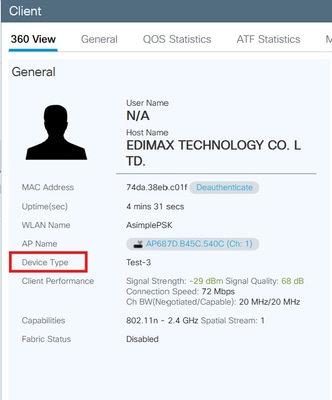 客戶端360下的裝置型別
疑難排解
確保客戶端正在傳送您用於分類客戶端的協定。
對於DHCP分類,客戶端必須傳送一個唯一的TLV,該TLV可作為WLC區分客戶端型別的字串。
在OUI分類方面,請瞭解MAC隨機化。
在客戶端啟動第一個連線時收集其放射性跟蹤。
https://www.cisco.com/c/en/us/support/docs/wireless/catalyst-9800-series-wireless-controllers/213949-wireless-debugging-and-log-collection-on.html#toc-hId-2010809796
為了進一步調查,可以收集以下跟蹤:
request platform soft trace rotate all
delete /force bootflash:tracelogs/*

set platform software trace smd chassis active R0 dc-profile noise
set platform software trace smd chassis active R0 dc-sub noise
set platform software trace smd chassis active R0 dc-sm noise
set platform software trace smd chassis active R0 dc-mem noise
set platform software trace smd chassis active R0 dc noise
重現問題,然後使用以下命令收集輸出:
show logging process smd internal start last 20 minutes to-file flash:cls_logging.log

附註:如果已在使用此功能,而.xml自定義檔案已存在於bootflash下,但您希望編輯該檔案,則無論何時編輯該檔案,如果配置檔案未更新,請應用以下步驟:
1)從快閃記憶體中刪除現有的dc_user_profiles.xml
2)禁用裝置分類器(無裝置分類器)
3)再次啟用裝置分類器(裝置分類器)
4)將新的dc_user_profiles.xml檔案複製到快閃記憶體
參考資料
https://www.cisco.com/c/en/us/td/docs/wireless/controller/9800/17-18/config-guide/b_wl_17_18_cg/m_device_classifier_dynamic_xml_support.html

 意見
意見