Cisco Secure Firewall 200 Threat Defense 入门:位于中心总部的防火墙管理中心

PDF

执行初始配置(手动调配)

Want to summarize with AI?

Log in

如何完成手动配置的初始 Secure Firewall 200 设置,以便设备具有基本网络设置并准备好注册到 。


对于手动调配,请使用 Cisco Secure Firewall 设备管理器 或 CLI 来执行行初始配置。


初始配置:防火墙设备管理器

使用这种方法,在注册防火墙后,除管理接口外还将预先配置以下接口:

  • 以太网 1/1 - outside,IP 地址来自 DHCP、IPv6 自动配置

  • - inside,192.168.95.1/24

  • 默认路由 - 通过外部接口上的 DHCP 获取

  • 其他接口 - 保留 防火墙设备管理器 中的任何接口配置。

不会保留其他设置,如内部的 DHCP 服务器、访问控制策略或安全区域。

过程

1.

将计算机连接到内部接口。

2.

登录防火墙设备管理器

  1. 转至https://192.168.95.1

  2. 使用用户名 admin 和默认密码 Admin123 登录。

  3. 系统会提示您阅读并接受“一般条款”并更改管理员密码。

3.

使用设置向导。

Note

具体的端口配置取决于您的型号。

  1. 配置外部接口和管理接口。

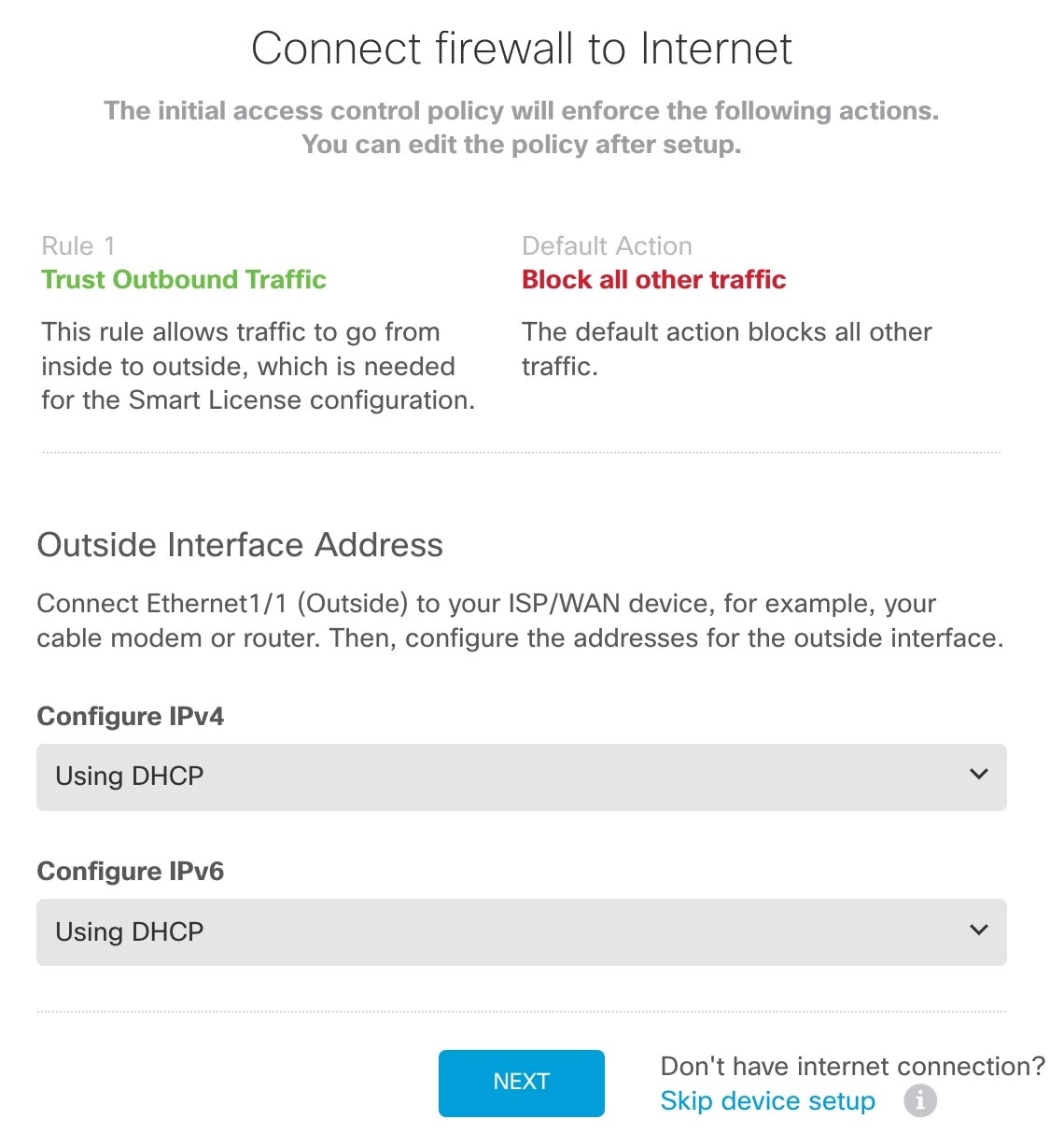
    Figure 1. 将防火墙连接到互联网
    将防火墙连接到互联网
    1. 外部接口地址 - 如果您计划实现高可用性,请使用静态 IP 地址。您不能使用设置向导配置 PPPoE;您可以在完成向导后配置 PPPoE。

    2. 管理接口 - 即使在外部接口上使用管理器访问,也会使用管理接口设置。例如,通过外部接口在背板上路由的管理流量将使用这些管理接口 DNS 服务器,而不是外部接口 DNS 服务器解析 FQDN。

      DNS 服务器 - 系统管理地址的 DNS 服务器。默认值为 OpenDNS 公共 DNS 服务器。这些服务器很可能与您稍后设置的外部接口 DNS 服务器一致,因为它们都是从外部接口访问的。

      防火墙主机名

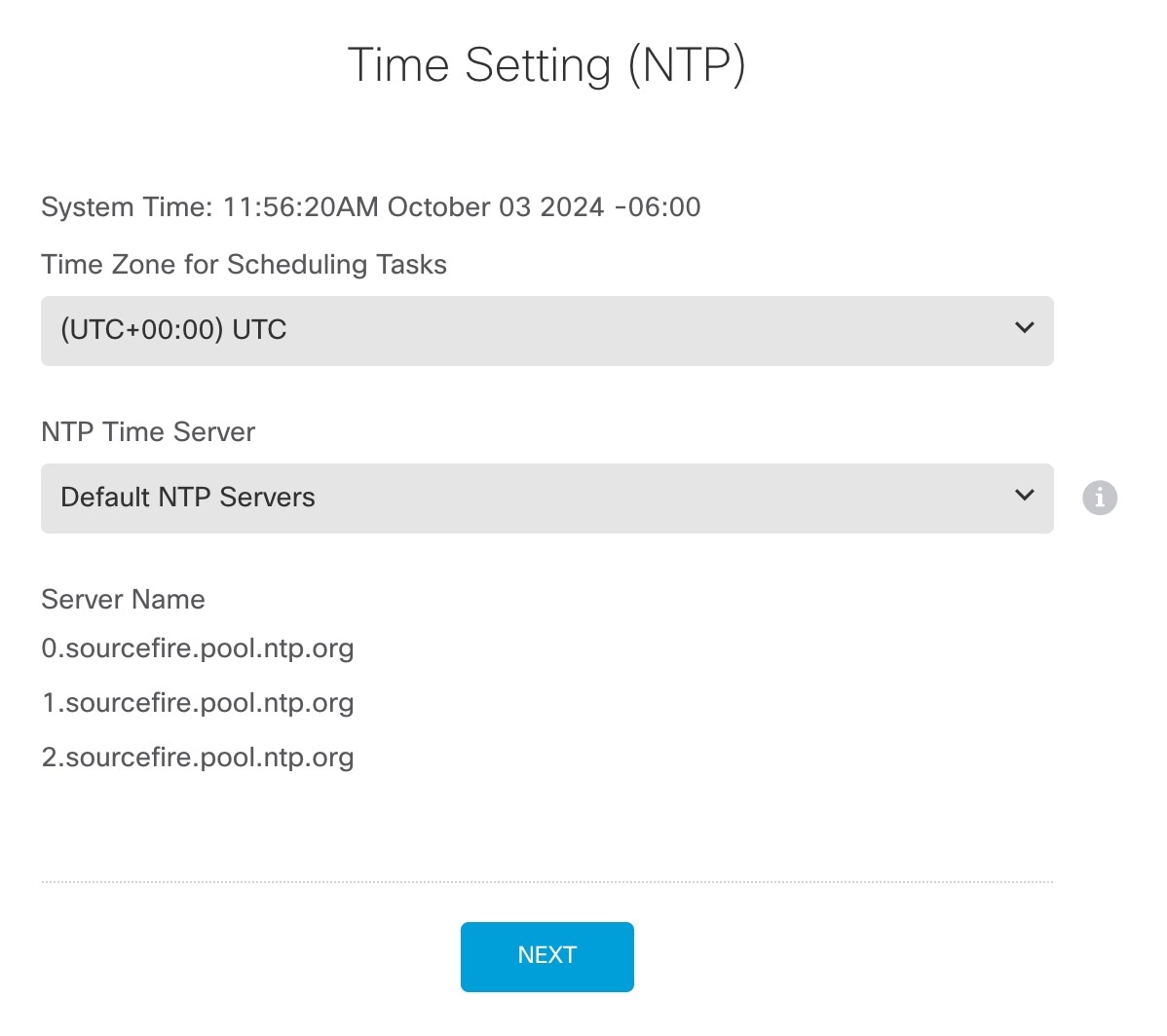
  2. 配置时间设置 (NTP) (Time Setting [NTP]) 并点击下一步 (Next)

    Figure 2. 时间设置 (NTP)
    将防火墙连接到互联网
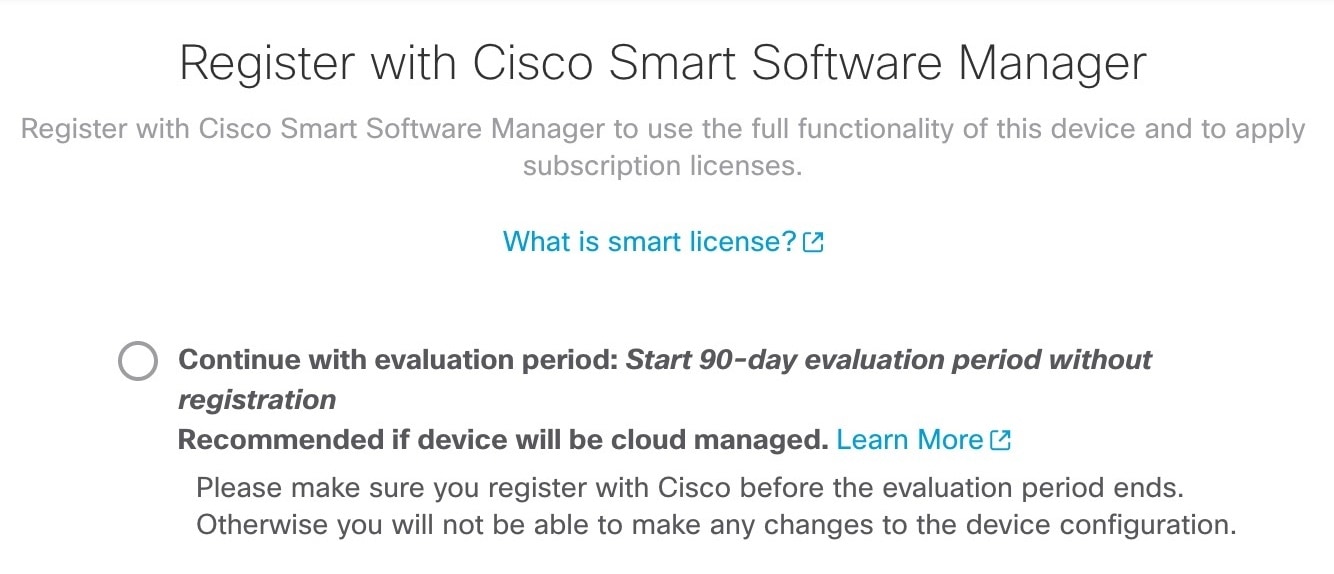
  3. 选择启动 90 日评估期而不注册

    将防火墙连接到互联网

    不要向智能软件管理器注册 Firewall Threat Defense;所有许可均在 Security Cloud Control 上执行。

  4. 点击完成

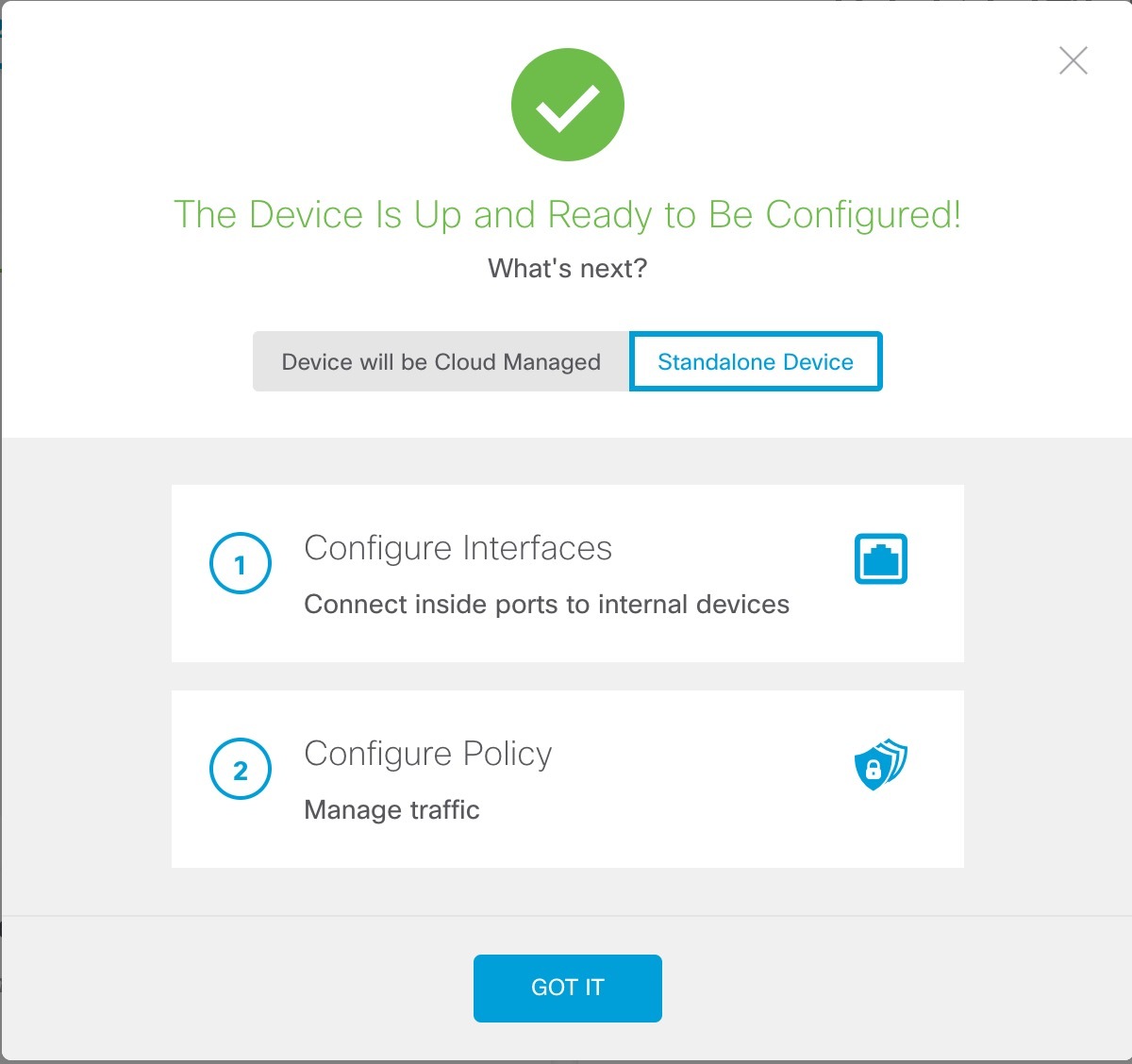
    Figure 3. 后续操作
    将防火墙连接到互联网
  5. 依次选择独立设备 (Standalone Device)明白 (Got It)

4.

如果要配置其他接口,请选择设备 (Device),然后点击接口 (Interfaces) 摘要中的链接。

5.

通过选择设备 > 系统设置 > 集中管理并点击继续,向 Security Cloud Control 注册。

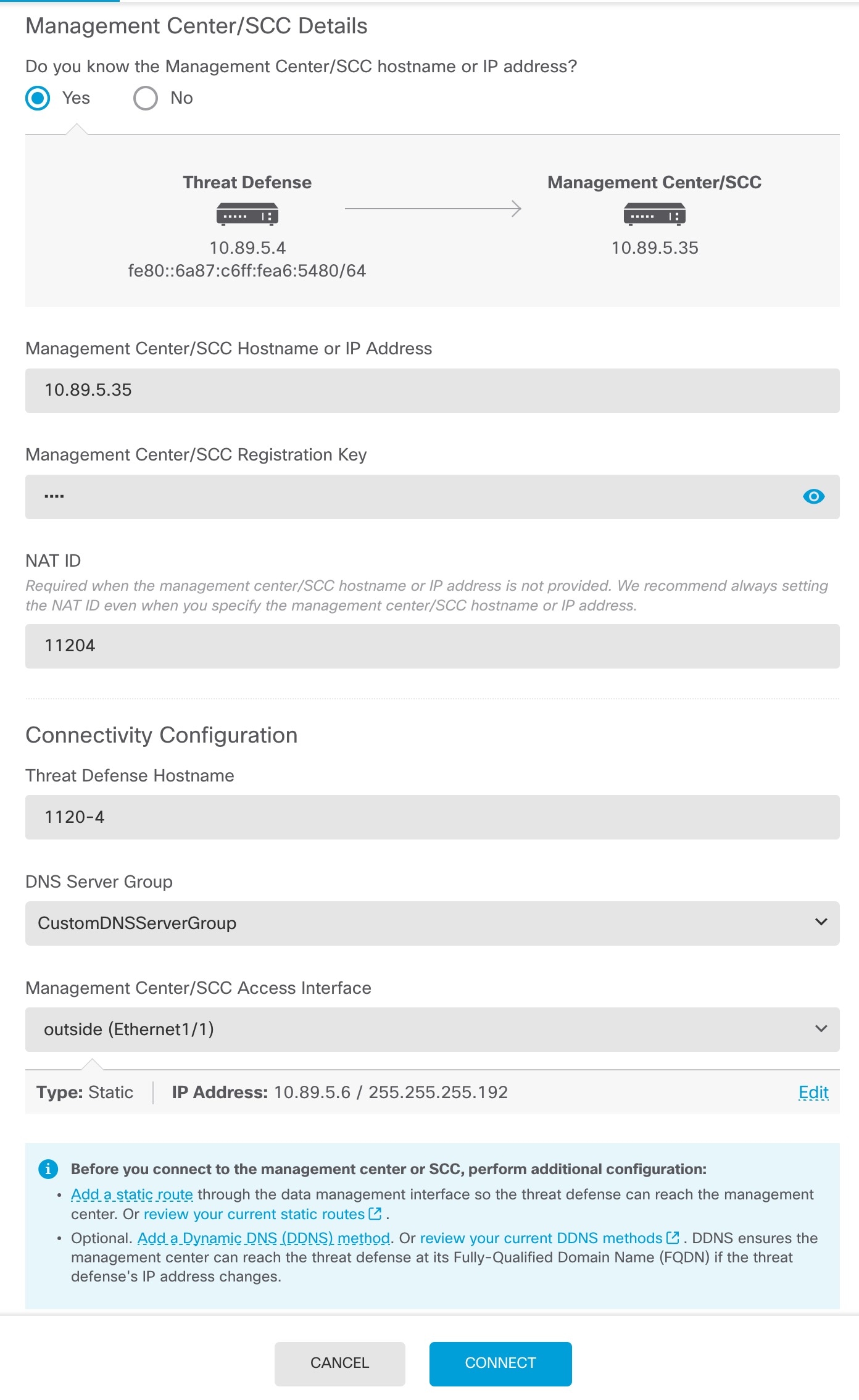
配置 管理中心/SCC/详细信息 (Management Center/SCC/Details)

Note

较早的版本可能会显示“CDO”而不是“SCC”。

Figure 4. 管理中心/SCC 详细信息
  1. 对于 是否知道管理中心/SCC 主机名或 IP 地址,如果您可以使用 IP 地址或主机名访问 ,请点击是 (Yes) ,如果 位于 NAT 之后或没有公共 IP 地址或主机名,请点击否 (No)

  2. 如果选择,则输入 管理中心/SCC 主机名/IP 地址

  3. 指定 管理中心/SCC 注册密钥

    此密钥是您选择的一次性注册密钥,注册 防火墙时也要在 上指定它。注册密钥必须为 2 到 36 个字符。有效字符包括字母数字(A–Z、a–z、0–9)和连字符 (-)。此 ID 可用于将多个防火墙注册到

  4. 指定 NAT ID

    此 ID 是您选择的唯一一次性字符串,您还需要在 上指定它。即使您知道两台设备的 IP 地址,我们仍建议您指定 NAT ID。NAT ID 必须介于 2 到 36 个字符之间。有效字符包括字母数字(A–Z、a–z、0–9)和连字符 (-)。此 ID 不能用于将任何其他防火墙注册到 。NAT ID 与 IP 地址结合使用,用于验证连接是否来自正确的设备;只有在对 IP 地址/NAT ID 进行身份验证后,才会检查注册密钥。

6.

配置连接配置

  1. 指定威胁防御主机名

    此 FQDN 将用于外部接口。

  2. 指定 DNS 服务器组

    选择一个现有组,或创建一个新组。默认 DNS 组名为 CiscoUmbrellaDNSServerGroup,其中包括 OpenDNS 服务器。

    要在注册后保留外部 DNS 服务器设置,您需要在 中重新配置 DNS 平台设置。

  3. 对于 管理中心/SCC 访问接口,点击 数据接口,然后选择 外部

7.

(可选) 点击添加动态 DNS (DDNS) 方法 (Add a Dynamic DNS [DDNS] method)

如果 Firewall Threat Defense 的 IP 地址发生变化,DDNS 将确保 可访问其 FQDN 内的 Firewall Threat Defense

8.

点击连接 (Connect)

注册状态 (Registration Status) 对话框将显示 Security Cloud Control 注册的当前状态。
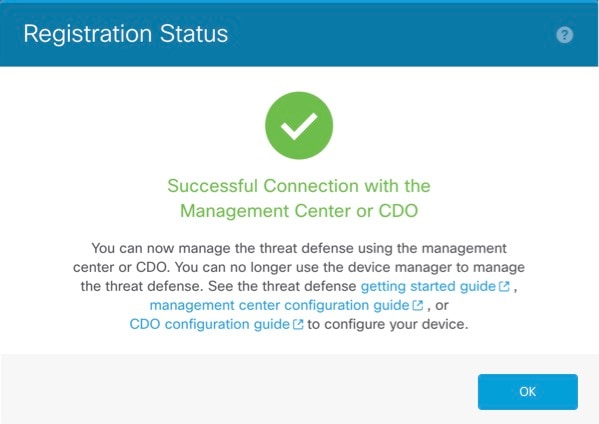
Figure 5. 成功连接
成功连接
9.

在状态屏幕上完成 保存管理中心/SCC 注册设置 步骤之后,转到 Security Cloud Control ,然后添加防火墙。请参阅使用手动调配添加防火墙


初始配置:CLI

使用 CLI 设置脚本设置专用管理 IP 地址、网关和其他基本网络设置。

过程

1.

连接控制台端口并访问 Firewall Threat Defense CLI。请参阅访问Firewall Threat Defense CLI

2.

完成管理界面设置的 CLI 设置脚本。

Note

除非清除配置,否则无法重复 CLI 设置脚本(例如,通过重新建立映像)。但是,可以稍后在 CLI 中使用 configure network 命令更改所有这些设置。请参阅 Cisco Secure Firewall Threat Defense 命令参考


You must accept the EULA to continue.
Press <ENTER> to display the EULA:                 
Cisco General Terms
[...]

Please enter 'YES' or press <ENTER> to AGREE to the EULA:

System initialization in progress.  Please stand by.
You must configure the network to continue.
Configure at least one of IPv4 or IPv6 unless managing via data interfaces.
Do you want to configure IPv4? (y/n) [y]:
Do you want to configure IPv6? (y/n) [y]: n

指南:为至少其中一种地址类型输入 y虽然您不打算使用管理接口,但必须设置 IP 地址,例如专用地址。

Configure IPv4 via DHCP or manually? (dhcp/manual) [manual]:

指南:选择手动。使用外部接口访问管理器时,不支持 DHCP。确保此接口与管理器访问接口位于不同的子网上,以防止出现路由问题。

Enter an IPv4 address for the management interface [192.168.45.61]: 10.89.5.17
Enter an IPv4 netmask for the management interface [255.255.255.0]: 255.255.255.192
Enter the IPv4 default gateway for the management interface [data-interfaces]:

指南:将网关设置为 data-interfaces。此设置可将管理流量转发到背板上,以便通过外部接口进行路由。

Enter a fully qualified hostname for this system [firepower]: 1010-3
Enter a comma-separated list of DNS servers or 'none' [208.67.222.222,208.67.220.220,2620:119:35::35]:
Enter a comma-separated list of search domains or 'none' []: cisco.com
If your networking information has changed, you will need to reconnect.
Disabling IPv6 configuration: management0
Setting DNS servers: 208.67.222.222,208.67.220.220,2620:119:35::35
Setting DNS domains:cisco.com

指南:设置管理接口 DNS 服务器。这些服务器很可能与您稍后设置的外部接口 DNS 服务器一致,因为它们都是从外部接口访问的。

Setting hostname as 1010-3
Setting static IPv4: 10.89.5.17 netmask: 255.255.255.192 gateway: data on management0
Updating routing tables, please wait...
All configurations applied to the system. Took 3 Seconds.
Saving a copy of running network configuration to local disk.
For HTTP Proxy configuration, run 'configure network http-proxy'

Manage the device locally? (yes/no) [yes]: no

指南:输入 no 以使用

Setting hostname as 1010-3
Setting static IPv4: 10.89.5.17 netmask: 255.255.255.192 gateway: data on management0
Updating routing tables, please wait...
All configurations applied to the system. Took 3 Seconds.
Saving a copy of running network configuration to local disk.
For HTTP Proxy configuration, run 'configure network http-proxy'

指南:输入 routed。只有路由防火墙模式支持外部管理器访问。

Configuring firewall mode ...


Device is in OffBox mode - disabling/removing port 443 from iptables.
Update policy deployment information
    - add device configuration
    - add network discovery
    - add system policy

You can register the sensor to a Firepower Management Center and use the
Firepower Management Center to manage it. Note that registering the sensor
to a Firepower Management Center disables on-sensor Firepower Services
management capabilities.

When registering the sensor to a Firepower Management Center, a unique
alphanumeric registration key is always required.  In most cases, to register
a sensor to a Firepower Management Center, you must provide the hostname or
the IP address along with the registration key.
'configure manager add [hostname | ip address ] [registration key ]'

However, if the sensor and the Firepower Management Center are separated by a
NAT device, you must enter a unique NAT ID, along with the unique registration
key.
'configure manager add DONTRESOLVE [registration key ] [ NAT ID ]'

Later, using the web interface on the Firepower Management Center, you must
use the same registration key and, if necessary, the same NAT ID when you add
this sensor to the Firepower Management Center.
>
3.

配置用于管理器访问的外部接口。

configure network management-data-interface

按下 Enter 键后,系统会提示您为外部接口配置基本网络设置。

手动 IP 地址


> configure network management-data-interface
Data interface to use for management: ethernet1/1
Specify a name for the interface [outside]: internet
IP address (manual / dhcp) [dhcp]: manual
IPv4/IPv6 address: 10.10.6.7
Netmask/IPv6 Prefix: 255.255.255.0
Default Gateway: 10.10.6.1
Comma-separated list of DNS servers [none]: 208.67.222.222,208.67.220.220

指南:要在注册后保留外部 DNS 服务器,您需要在 中重新配置 DNS 平台设置。


DDNS server update URL [none]:
Do you wish to clear all the device configuration before applying ? (y/n) [n]:

Configuration done with option to allow manager access from any network, if you wish to change the manager access network
use the 'client' option in the command 'configure network management-data-interface'.

Setting IPv4 network configuration.
Network settings changed.

>

DHCP 的 IP 地址


> configure network management-data-interface
Data interface to use for management: ethernet1/1
Specify a name for the interface [outside]:
IP address (manual / dhcp) [dhcp]:  
DDNS server update URL [none]: https://dwinchester:pa$$w0rd17@domains.example.com/nic/update?hostname=<h>&myip=<a>
Do you wish to clear all the device configuration before applying ? (y/n) [n]:

Configuration done with option to allow manager access from any network, if you wish to change the manager access network 
use the 'client' option in the command 'configure network management-data-interface'.

Setting IPv4 network configuration.
Network settings changed.

> 
4.

识别

configure manager add {主机名 | IPv4_address | IPv6_address | DONTRESOLVE} reg_key nat_id

  • {hostname | IPv4_address | IPv6_address | DONTRESOLVE} - 指定 的 FQDN 或 IP 地址。如果 无法直接寻址,请使用 DONTRESOLVE,在这种情况下,防火墙必须具有可访问的 IP 地址或主机名。

  • reg_key - 指定您选择的一次性注册密钥,注册Firewall Threat Defense时也要在上指定它。注册密钥必须为 2 到 36 个字符。有效字符包括字母数字(A–Z、a–z、0–9)和连字符 (-)。

  • nat_id - 指定了您选择的唯一一次性字符串,您还需要在 上指定它。NAT ID 必须介于 2 到 36 个字符之间。有效字符包括字母数字(A–Z、a–z、0–9)和连字符 (-)。此 ID 不能用于将任何其他设备注册到

示例:


> configure manager add fmc-1.example.com regk3y78 natid56
Manager successfully configured.
5.

关闭 Firewall Threat Defense,以便将设备发送到远程分支机构。

正确关闭系统非常重要。仅拔掉电源或按下电源开关可能会导致文件系统严重损坏。请记住,有许多进程一直在后台运行,拔掉或关闭电源不能正常关闭系统。

  1. 输入 shutdown 命令。

  2. 观察电源 LED 和状态 LED 以验证机箱是否已断电(不亮)。

  3. 在机箱成功关闭电源后,您可以在必要时拔下电源插头以物理方式断开机箱的电源。