방화벽 Threat Defense Modular Policy Framework 구성

소개
이 문서에서는 방화벽 위협 방어(FTD) MPF(Modular Policy Framework)에 대해 설명합니다
사전 요구 사항
요구 사항
이 문서에 대한 특정 요구 사항은 없습니다.
사용되는 구성 요소
이 문서의 정보는 다음 소프트웨어 및 하드웨어 버전을 기반으로 합니다.
- Cisco Secure Firewall 3130 Threat Defense 버전 10.0.0(빌드 140)
- FMC(Firewall Management Center) 버전 10.0.0(빌드 140)
이 문서의 정보는 특정 랩 환경의 디바이스를 토대로 작성되었습니다. 이 문서에 사용된 모든 디바이스는 초기화된(기본) 컨피그레이션으로 시작되었습니다. 현재 네트워크가 작동 중인 경우 모든 명령의 잠재적인 영향을 미리 숙지하시기 바랍니다.
배경 정보
FTD 데이터 플레인 개요
FTD는 2개의 주 엔진으로 구성된 통합 소프트웨어 이미지입니다.
- Datapath(LINA라고도 함)
- Snort 엔진
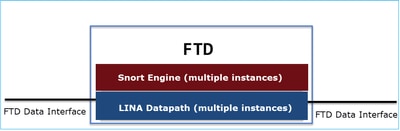
LINA Datapath 및 Snort Engine은 FTD 데이터 플레인의 주요 부분입니다.
MPF 구성 요소
MPF는 다음 구성 요소를 사용합니다.
- class-map은 흥미로운 트래픽과 일치합니다.
- policy-map은 class-map과 일치하는 흥미로운 트래픽에 작업을 적용합니다.
- service-policy는 정책 맵을 전역적으로(모든 인터페이스에서) 적용하거나 특정 인터페이스에 적용합니다.
기능 방향성
기능 방향성에 대해서는 ASA 컨피그레이션 가이드를 참조하십시오.
FTD와 관련된 기능이 강조 표시됩니다.

구성
토폴로지

기본 MPF 구성(10.0.0):
firewall# show run policy-map
!
!
policy-map type inspect dns preset_dns_map
 parameters
  message-length maximum client auto
  message-length maximum 512
  no tcp-inspection
policy-map type inspect ip-options UM_STATIC_IP_OPTIONS_MAP
 parameters
  eool action allow
  nop action allow
  router-alert action allow
policy-map global_policy
 class inspection_default
  inspect dns preset_dns_map
  inspect ftp
  inspect h323 h225
  inspect h323 ras
  inspect rsh
  inspect rtsp
  inspect sqlnet
  inspect skinny
  inspect sunrpc
  inspect sip
  inspect netbios
  inspect tftp
  inspect icmp
  inspect icmp error
  inspect ip-options UM_STATIC_IP_OPTIONS_MAP
 class class_snmp
  inspect snmp
 class class-default
  set connection advanced-options UM_STATIC_TCP_MAP

firewall# show run class-map
!
class-map inspection_default
 match default-inspection-traffic
class-map class_snmp
 match port udp eq 4161
!
firewall# show run service-policy
service-policy global_policy global
작업 1. FTD에서 전역적으로 SIP 검사 사용 안 함
이 작업의 요구 사항은 FTD LINA 엔진에서 SIP 검사를 비활성화하는 것입니다. 한 가지 이유는 통과 트래픽에 영향을 주는 SIP와 관련된 정책 요구 사항 또는 소프트웨어 결함일 수 있습니다.
솔루션
SIP 검사를 비활성화하기 전에 먼저 통과 트래픽에 적용되는지 확인합니다.
firewall# packet-tracer input INSIDE udp 172.16.1.1 5060 172.16.3.1 5060
...
Phase: 8
Type: INSPECT
Subtype: inspect-sip
Result: ALLOW
Elapsed time: 34788 ns
Config:
class-map inspection_default
 match default-inspection-traffic
policy-map global_policy
 class inspection_default
  inspect sip
service-policy global_policy global
Additional Information:
...
Result:
input-interface: INSIDE(vrfid:0)
input-status: up
input-line-status: up
output-interface: OUTSIDE1(vrfid:0)
output-status: up
output-line-status: up
Action: allow
Time Taken: 326018 ns
SIP 검사를 전역적으로 비활성화하는 방법에는 2가지가 있습니다.
해결 방법 1: FTD CLI에서 SIP 비활성화
> configure inspection sip disable
Building configuration...
Cryptochecksum: ef7528dc 7338986d 6714a3a2 4770528e

7818 bytes copied in 0.250 secs
[OK]
확인
> show running-config policy-map | include sip

>
해결 방법 2: FlexConfig를 사용하여 SIP 비활성화
FMC에서 Devices(디바이스) > FlexConfig로 이동하여 FlexConfig 객체를 생성합니다.

policy-map global_policy
 class inspection_default
  no inspect sip
적용 FlexConfig 정책을 선택하고 Preview Config를 선택하여 미리 봅니다.

마지막으로, 정책을 구축합니다.
확인
firewall# show run policy-map | include sip
firewall#
참고 - LINA 연결 테이블에서 기존 SIP 연결을 지워야 SIP 검사 없이 연결이 다시 설정됩니다. 기존 SIP 연결을 확인하려면 다음 명령을 사용할 수 있습니다.
firewall# show conn port 5060
작업 2. 특정 호스트에 대해 SIP 검사 사용 안 함
이 작업에서는 이러한 네트워크 간의 트래픽에 대해 SIP 검사를 비활성화해야 합니다.
- 소스: 172.16.1.0/24
- DST: 172.16.3.0/24
이를 수행하는 한 가지 이유는 전송 트래픽에 영향을 주는 SIP와 관련된 소프트웨어 결함일 수 있습니다
솔루션
FlexConfig를 사용합니다.
1단계
Objects(개체) > Access List(액세스 목록) > Extended(확장)로 이동하여 원하는 트래픽과 일치하는 확장 액세스 목록을 생성합니다. 특정 트래픽을 제외하는 것이 목표이므로 Block(차단) 작업을 사용해야 합니다. 또한 나머지 트래픽과 매칭할 Allow(허용) 규칙을 추가합니다.
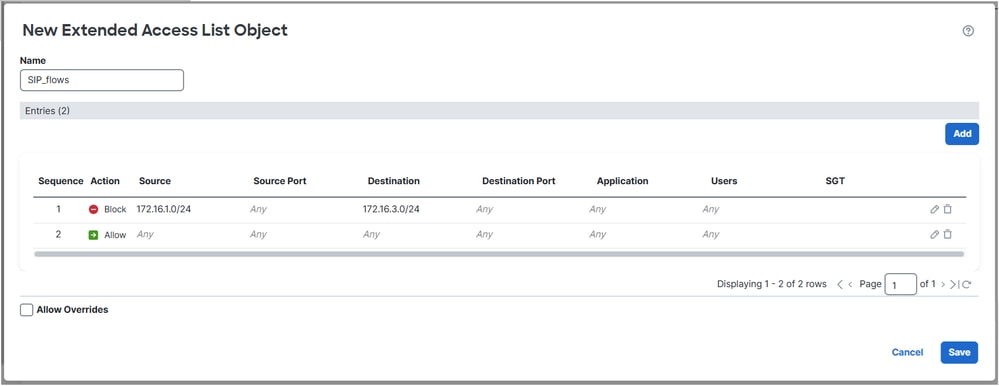

2단계
SIP ACL(Access Control List)과 일치하는 클래스 맵으로 FlexConfig 개체를 만들고 global_policy에 적용합니다.
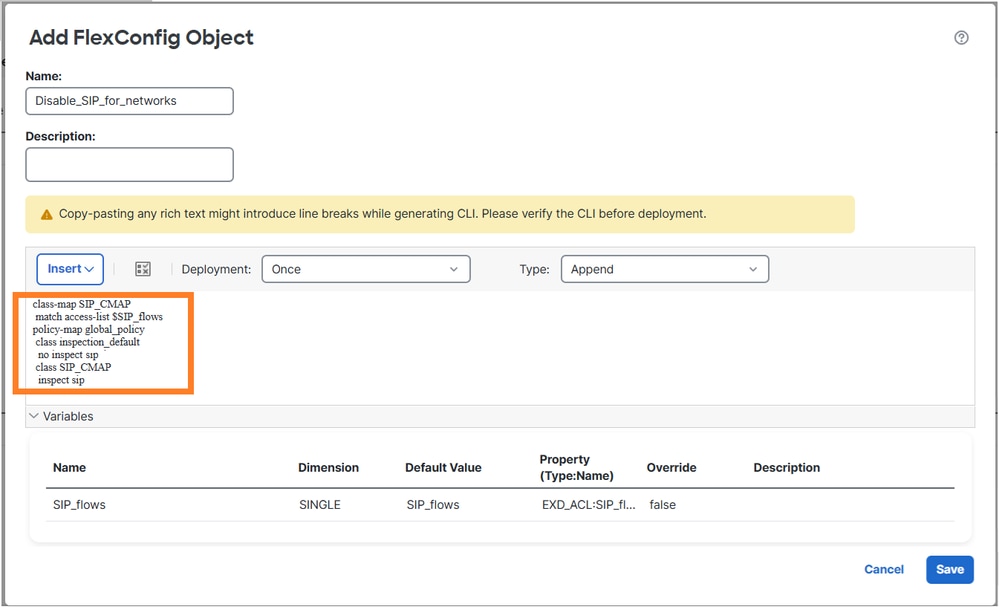
구성된 FlexConfig 개체:
class-map SIP_CMAP
 match access-list $SIP_flows
policy-map global_policy
 class inspection_default
  no inspect sip
 class SIP_CMAP
  inspect sip
메모
permit ACL을 구성할 때 CPU에 미칠 수 있는 영향을 방지하기 위해 가능한 한 구체적인 ACL(예: Put 프로토콜 포트)을 시도합니다. 이 작업의 예에서는 프로토콜 포트를 지정하지 않으며 프로덕션에서 피할 수 있습니다.
확인 1
firewall# show run policy-map | begin global
policy-map global_policy
 class inspection_default
  inspect dns preset_dns_map
  inspect ftp
  inspect h323 h225
  inspect h323 ras
  inspect rsh
  inspect rtsp
  inspect sqlnet
  inspect skinny
  inspect sunrpc
  inspect netbios
  inspect tftp
  inspect icmp
  inspect icmp error
  inspect ip-options UM_STATIC_IP_OPTIONS_MAP
 class class_snmp
  inspect snmp
 class SIP_CMAP
  inspect sip
 class class-default
  set connection advanced-options UM_STATIC_TCP_MAP

firewall# show run class-map
!
class-map SIP_CMAP
 match access-list SIP_flows
class-map inspection_default
 match default-inspection-traffic
class-map class_snmp
 match port udp eq 4161

firepower# show run access-list SIP_flows
access-list SIP_flows extended deny object-group ProxySG_ExtendedACL_150323855735 172.16.1.0 255.255.255.0 172.16.3.0 255.255.255.0
access-list SIP_flows extended permit object-group ProxySG_ExtendedACL_150323855739 any any

firepower# show access-list SIP_flows
access-list SIP_flows; 4 elements; name hash: 0xb2b7de4d
access-list SIP_flows line 1 extended deny object-group ProxySG_ExtendedACL_150323855735 172.16.1.0 255.255.255.0 172.16.3.0 255.255.255.0 (hitcnt=0) 0x7202f94c
access-list SIP_flows line 1 extended deny tcp 172.16.1.0 255.255.255.0 172.16.3.0 255.255.255.0 eq sip (hitcnt=0) 0xbe390e61
access-list SIP_flows line 1 extended deny udp 172.16.1.0 255.255.255.0 172.16.3.0 255.255.255.0 eq sip (hitcnt=0) 0x107eddd0
access-list SIP_flows line 2 extended permit object-group ProxySG_ExtendedACL_150323855739 any any (hitcnt=0) 0x2075af04
access-list SIP_flows line 2 extended permit tcp any any eq sip (hitcnt=0) 0x60e34fab
access-list SIP_flows line 2 extended permit udp any any eq sip (hitcnt=0) 0xdae62994
확인 2
SIP 검사에서 검사되지 않은 트래픽에는 deny=true가 있습니다.
firewall# packet-tracer input INSIDE udp 172.16.1.1 5060 172.16.3.1 5060 detail | begin INSPECT
Type: INSPECT
Subtype: inspect-sip
Result: ALLOW
Elapsed time: 37910 ns
Config:
class-map SIP_CMAP
 match access-list SIP_flows
policy-map global_policy
 class SIP_CMAP
  inspect sip
service-policy global_policy global
Additional Information:
 Forward Flow based lookup yields rule:
 in id=0x14af42cfa810, priority=70, domain=inspect-sip, deny=true
       hits=1, user_data=0x000014af4570bea0, cs_id=0x0, use_real_addr, flags=0x0, protocol=0
       src ip/id=172.16.1.0, mask=255.255.255.0, port=0, tag=any
       dst ip/id=172.16.3.0, mask=255.255.255.0, port=5060, tag=any,
       dscp=0x0, input_ifc=INSIDE(vrfid:0), output_ifc=any
...
SIP 검사에 의해 검사되는 트래픽에 deny=false가 있습니다.
firewall# packet-tracer input INSIDE udp 172.16.2.1 5060 172.16.3.1 5060 detail | begin INSPECT
Type: INSPECT
Subtype: inspect-sip
Result: ALLOW
Elapsed time: 34788 ns
Config:
class-map SIP_CMAP
 match access-list SIP_flows
policy-map global_policy
 class SIP_CMAP
  inspect sip
service-policy global_policy global
Additional Information:
 Forward Flow based lookup yields rule:
 in id=0x14af459099d0, priority=70, domain=inspect-sip, deny=false
       hits=1, user_data=0x000014af4570bea0, cs_id=0x0, use_real_addr, flags=0x0, protocol=0
       src ip/id=0.0.0.0, mask=0.0.0.0, port=0, tag=any
       dst ip/id=0.0.0.0, mask=0.0.0.0, port=5060, tag=any,
...
확인 3
"sip" inspect 카운터는 패킷이 방화벽에 의해 검사될 때 증가합니다.
firewall# show service-policy inspect sip

Global policy:
  Service-policy: global_policy
    Class-map: inspection_default
    Class-map: class_snmp
    Class-map: SIP_CMAP
      Inspect: sip , packet 2, lock fail 0, drop 0, reset-drop 0, 5-min-pkt-rate 0 pkts/sec, v6-fail-close 0 sctp-drop-override 0
               tcp-proxy: bytes in buffer 0, bytes dropped 0
...
firewall# packet-tracer input INSIDE udp 172.16.2.1 5060 172.16.3.1 5060

firewall#show service-policy inspect sip

Global policy:
  Service-policy: global_policy
    Class-map: inspection_default
    Class-map: class_snmp
    Class-map: SIP_CMAP
      Inspect: sip , packet 3, lock fail 0, drop 0, reset-drop 0, 5-min-pkt-rate 0 pkts/sec, v6-fail-close 0 sctp-drop-override 0
               tcp-proxy: bytes in buffer 0, bytes dropped 0
...
작업 3. 특정 호스트에 대해 TCP 상태 우회 구성
이 작업에서는 이러한 네트워크 간의 트래픽에 대해 TCP 상태 우회를 활성화해야 합니다.
- 소스: 172.16.2.0/24
- DST: 172.16.3.0/24
일반적으로 TCP 상태 우회를 사용하는 것은 권장되지 않지만 비대칭 플로우를 처리하기 위한 임시 해결 방법으로 사용될 수 있습니다.
해결 방법 1
1단계
관심 트래픽과 일치하는 확장 ACL을 생성합니다.

2단계
FTD에 할당된 ACP(액세스 제어 정책)를 편집하고, Advanced Settings(고급 설정) 탭을 선택하고, Threat Defense 서비스 정책을 편집합니다. 규칙 추가 및 다음을 선택합니다.
3단계
확장 ACL 선택:

4단계
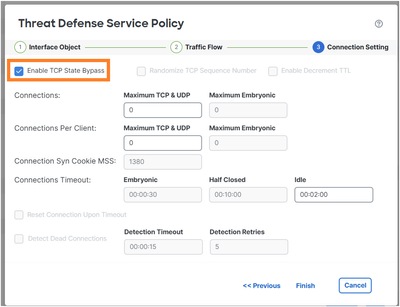
5단계
Finish(마침), OK(확인), Save and Deploy(저장 및 배포)를 선택합니다.
결과:
firewall# show run policy-map global_policy
!
policy-map global_policy
 class inspection_default
  inspect dns preset_dns_map
  inspect ftp
  inspect h323 h225
  inspect h323 ras
  inspect rsh
  inspect rtsp
  inspect sqlnet
  inspect skinny
  inspect sunrpc
  inspect netbios
  inspect tftp
  inspect icmp
  inspect icmp error
  inspect ip-options UM_STATIC_IP_OPTIONS_MAP
 class class_map_TCP_Bypass
  set connection random-sequence-number disable
  set connection advanced-options tcp-state-bypass
 class class_snmp
  inspect snmp
 class class-default
  set connection advanced-options UM_STATIC_TCP_MAP
참고: 6.x와 같은 이전 FMC 릴리스에서는 FlexConfig를 사용하여 TCP 상태 우회를 구성할 수 있습니다. 최신 버전에서는 이 기능이 지원되지 않습니다.

확인
firewall# packet-tracer input INSIDE tcp 172.16.2.1 1111 172.16.3.1 80 detail | begin CONN
Type: CONN-SETTINGS
Subtype:
Result: ALLOW
Elapsed time: 334 ns
Config:
class-map class_map_TCP_Bypass
 match access-list TCP_Bypass
policy-map global_policy
 class class_map_TCP_Bypass
  set connection conn-max 0 embryonic-conn-max 0 random-sequence-number disable syn-cookie-mss 1380
  set connection advanced-options tcp-state-bypass
service-policy global_policy global
Additional Information:
 Forward Flow based lookup yields rule:
 in id=0x14af45906b70, priority=7, domain=conn-set, deny=false
       hits=1, user_data=0x000014af45906df0, cs_id=0x0, use_real_addr, flags=0x0, protocol=0
       src ip/id=172.16.2.0, mask=255.255.255.0, port=0, tag=any
       dst ip/id=172.16.3.0, mask=255.255.255.0, port=0, tag=any,
       dscp=0x0, input_ifc=INSIDE(vrfid:0), output_ifc=any
...
과제 4. Traceroute 출력 수정
사전 요구 사항
INSIDE 인터페이스 뒤에 있는 IP 172.16.1.1이 OUTSIDE1 호스트에서 198.51.100.200으로 나타나도록 FTD에서 고정 NAT를 구성합니다.
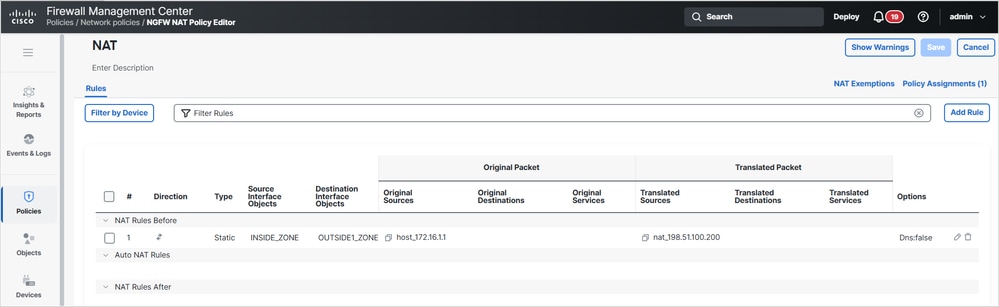
그런 다음 ISP1에서 198.51.100.200(호스트 172.16.1.1)으로 traceroute를 실행합니다.
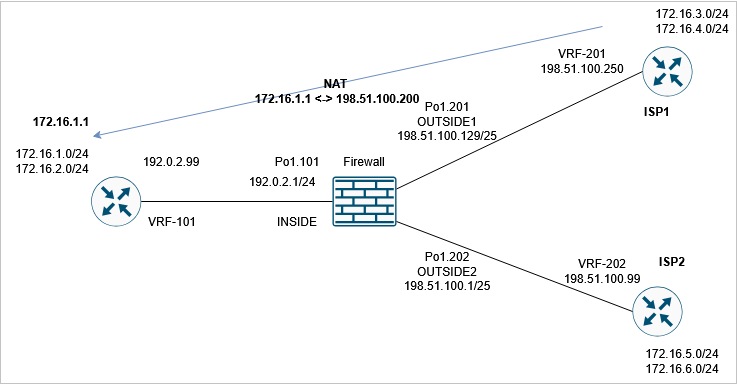
router1# traceroute vrf VRF-201 198.51.100.200
Type escape sequence to abort.
Tracing the route to 198.51.100.200
VRF info: (vrf in name/id, vrf out name/id)
  1 192.0.2.99 1 msec 1 msec *
요건
traceroute가 이 출력과 일치하도록 FTD 컨피그레이션을 수정합니다.
router1# traceroute vrf VRF-201 198.51.100.200
Type escape sequence to abort.
Tracing the route to 198.51.100.200
VRF info: (vrf in name/id, vrf out name/id)
  1 198.51.100.129 1 msec 1 msec *
  2 198.51.100.200 1 msec 2 msec *
솔루션
이 솔루션에는 2가지 컨피그레이션 단계가 포함됩니다.
1. TTL을 줄입니다.
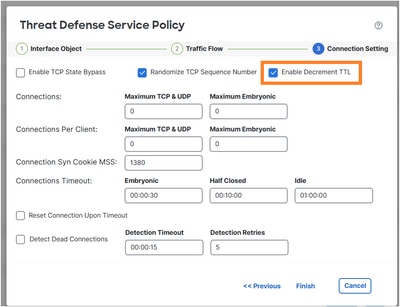
변경 후 traceroute는 방화벽 홉을 표시합니다.
router1# traceroute vrf VRF-201 198.51.100.200
Type escape sequence to abort.
Tracing the route to 198.51.100.200
VRF info: (vrf in name/id, vrf out name/id)
 1 198.51.100.129 1 msec 1 msec *
  2 192.0.2.99 1 msec 1 msec *
2. ICMP 오류 검사를 비활성화합니다.

policy-map global_policy
 class inspection_default
   no inspect icmp error
확인
traceroute에는 원격 호스트의 변환된 NAT IP 주소와 FTD 인터페이스 IP 주소가 표시됩니다.
router1# traceroute vrf VRF-201 198.51.100.200
Type escape sequence to abort.
Tracing the route to 198.51.100.200
VRF info: (vrf in name/id, vrf out name/id)
  1 198.51.100.129 1 msec 1 msec *
  2 198.51.100.200 1 msec 2 msec *
작업 5. 연결 시간 제한 설정
요건
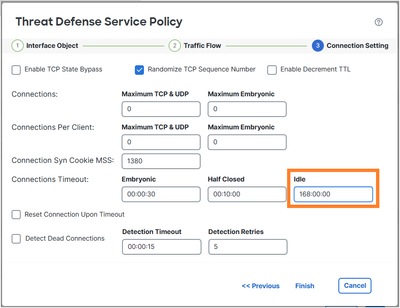
이 흐름에 대한 시간 제한을 1주로 변경합니다.
- 프로토콜: TCP
- 소스: 172.16.1.1
- DST: 172.16.5.1
솔루션
플로우당 시간 제한을 설정하려면 서비스 정책을 사용해야 합니다.
1단계
Objects(개체) > Access List(액세스 목록)로 이동하여 원하는 트래픽과 일치하는 확장 ACL을 생성합니다.
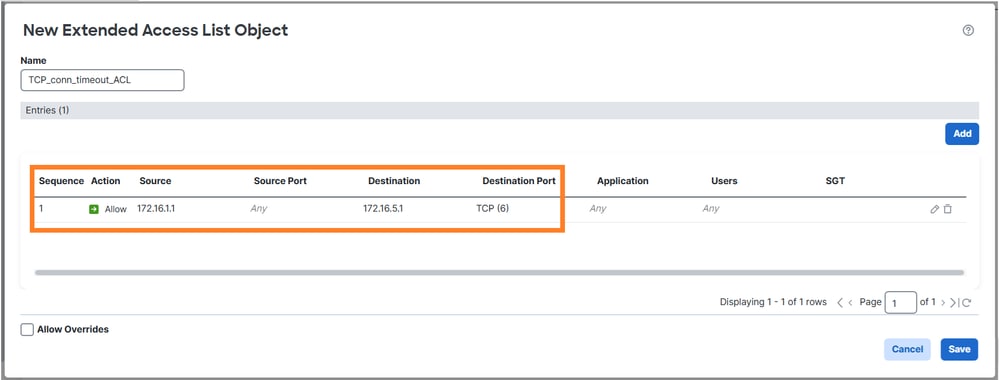
2단계
1단계에서 생성한 ACL을 사용하는 MPF 정책을 구성합니다.
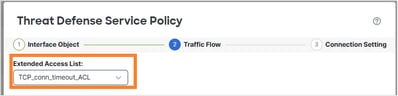
연결 유휴 시간 제한을 설정합니다.
새 요구 사항과 겹치므로 이전 작업에서 규칙을 제거합니다.
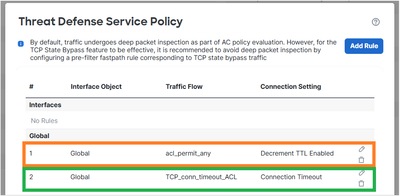
확인
구축된 policy-map 컨피그레이션:
policy-map global_policy
 class inspection_default
  inspect dns preset_dns_map
  inspect ftp
  inspect h323 h225
  inspect h323 ras
  inspect rsh
  inspect rtsp
  inspect sqlnet
  inspect skinny
  inspect sunrpc
  inspect netbios
  inspect tftp
  inspect icmp
  inspect ip-options UM_STATIC_IP_OPTIONS_MAP
  inspect sip
 class class_map_TCP_conn_timeout_ACL
  set connection timeout idle 168:00:00
 class class_snmp
  inspect snmp
 class class-default
  set connection advanced-options UM_STATIC_TCP_MAP
172.16.1.1에서 172.16.5.1로의 새 TCP 연결을 시작하고 FTD의 연결 테이블을 확인합니다.
firewall# show conn long address 172.16.5.1
...
TCP OUTSIDE2: 172.16.5.1/23 (172.16.5.1/23) INSIDE: 172.16.1.1/29389 (172.16.1.1/29389), flags UIoN1N7, idle 5s, uptime 7s, timeout 7D0h, bytes 349, flow id 72, Snort id 6, rule id 268439559, Rx-RingNum 27, Internal-Data0/1
Initiator: 172.16.1.1, Responder: 172.16.5.1
Connection lookup keyid: 890
작업 6. FTD를 통한 BGP 인증
사전 요구 사항
FTD를 통해 BGP 세션을 구성합니다. BGP 세션에서 인증을 사용해야 합니다.
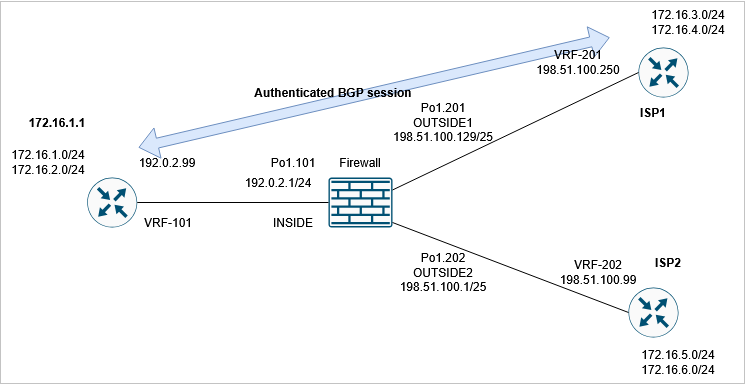
확인
기본 FTD 컨피그레이션에서는 BGP 세션이 설정되지 않습니다. 라우터에서 다음을 볼 수 있습니다.
router1#
*May 21 07:51:23.595: %TCP-6-BADAUTH: Invalid MD5 digest from 192.0.2.99(24591) to 198.51.100.250(179) tableid - 3
*May 21 07:51:25.595: %TCP-6-BADAUTH: Invalid MD5 digest from 192.0.2.99(24591) to 198.51.100.250(179) tableid - 3
*May 21 07:51:29.595: %TCP-6-BADAUTH: Invalid MD5 digest from 192.0.2.99(24591) to 198.51.100.250(179) tableid - 3
FTD에서 양쪽이 BGP TCP 연결을 설정하지 못하는 것을 확인할 수 있습니다(연결 플래그는 TCP SYN 패킷만 수신됨을 나타냄).
firewall# show conn port 179
3 in use, 16 most used
Inspect Snort:
        preserve-connection: 2 enabled, 0 in effect, 15 most enabled, 0 most in effect

TCP OUTSIDE1 198.51.100.250:41090 INSIDE 192.0.2.99:179, idle 0:00:00, bytes 0, flags aA N1
TCP OUTSIDE1 198.51.100.250:179 INSIDE 192.0.2.99:53629, idle 0:00:02, bytes 0, flags aA N1
솔루션
FTD를 통해 인증된 BGP 세션을 허용하려면 다음 2가지 조건을 충족해야 합니다.
- TCP MD5(옵션 19)는 FTD를 통해 허용되어야 합니다.
- TCP 시퀀스 번호 임의 설정은 비활성화해야 합니다.
TCP MD5 옵션은 기본적으로 허용됩니다.

firewall# show run all tcp-map
!
tcp-map UM_STATIC_TCP_MAP
  no check-retransmission
  no checksum-verification
  exceed-mss allow
  queue-limit 0 timeout 4
  reserved-bits allow
  syn-data allow
  synack-data drop
  invalid-ack drop
  seq-past-window drop
  tcp-options range 6 7 allow
  tcp-options range 9 18 allow
  tcp-options range 20 255 allow
  tcp-options selective-ack allow
  tcp-options timestamp allow
  tcp-options window-scale allow
  tcp-options mss allow
  tcp-options md5 allow
  ttl-evasion-protection
  urgent-flag allow
  window-variation allow-connection
TCP ISN(Initial Sequence Number) 임의 지정을 전역적으로 비활성화합니다.
> configure tcp-randomization disable
Building configuration...
Cryptochecksum: f8ac5587 7ccc635e bff886a1 bcab820c

8284 bytes copied in 0.260 secs
[OK]
>
또는 (선호하는 방법) BGP 연결과 일치하는 확장 액세스 목록을 생성합니다.
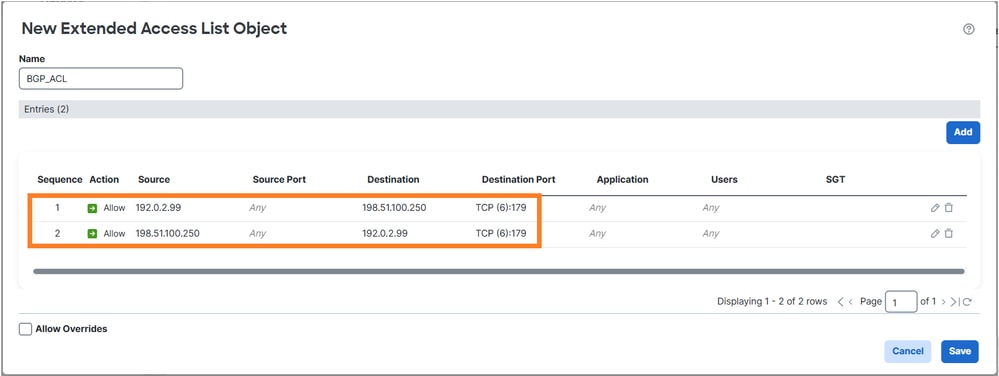
Threat Defense 서비스 정책을 사용하여 TCP 시퀀스 번호 임의 설정을 비활성화합니다.

확인
구축된 policy-map 컨피그레이션:
policy-map global_policy
 class inspection_default
  inspect dns preset_dns_map
  inspect ftp
  inspect h323 h225
  inspect h323 ras
  inspect rsh
  inspect rtsp
  inspect sqlnet
  inspect skinny
  inspect sunrpc
  inspect netbios
  inspect tftp
  inspect icmp
  inspect ip-options UM_STATIC_IP_OPTIONS_MAP
  inspect sip
 class class_map_BGP_ACL
  set connection random-sequence-number disable
 class class_snmp
  inspect snmp
 class class-default
  set connection advanced-options UM_STATIC_TCP_MAP
BGP 세션은 FTD를 통해 설정됩니다.
firewall# show conn long port 179
...
TCP OUTSIDE1: 198.51.100.250/49863 (198.51.100.250/49863) INSIDE: 192.0.2.99/179 (192.0.2.99/179), flags UIO N1N7, idle 44s, uptime 1m40s, timeout 1h0m, bytes 274, flow id 111, Snort id 3, rule id 268439559, Rx-RingNum 29, Internal-Data0/1
  Initiator: 198.51.100.250, Responder: 192.0.2.99
  Connection lookup keyid: 83487134
작업 7. DCD(Dead Connection Detection)
요건
호스트 172.16.3.1로 향하는 TCP 트래픽에 대해 FTD에서 DCD를 구성합니다.
솔루션
DCD에 대한 설명은 다음 사이트에서 확인할 수 있습니다.
1. Objects(개체) > Access-List(액세스 목록)로 이동하여 원하는 트래픽과 일치하는 액세스 목록을 만듭니다.
2. 방화벽에 할당된 ACP를 편집하고 고급 옵션으로 이동한 다음 Threat Defense 서비스 정책을 선택하여 DCD를 사용하도록 설정합니다.
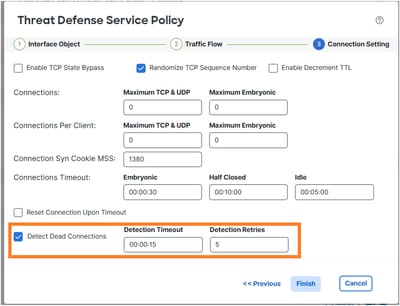
구축된 컨피그레이션:
access-list DCD_ACL extended permit object-group ProxySG_ExtendedACL_81604390279 any host 172.16.3.1
!
class-map class_map_DCD_ACL
 match access-list DCD_ACL
policy-map global_policy
 class class_map_DCD_ACL
  set connection timeout dcd
운영 방식
백엔드 작업을 보려면 FTD 캡처를 구성합니다.
firewall# capture CAPI interface INSIDE match tcp host 172.16.3.1 any
firewall# capture CAPO interface OUTSIDE1 match tcp host 172.16.3.1 any
방화벽을 통해 TCP 연결을 설정합니다.
firewall# show conn long address 172.16.3.1 | begin 172.16.3.1
TCP OUTSIDE1: 172.16.3.1/23 (172.16.3.1/23) INSIDE: 192.0.2.99/23241 (192.0.2.99/23241), flags UIO N1N7, idle 1m18s, uptime 1m22s, timeout 5m0s, bytes 129, flow id 127, Snort id 4, rule id 268439559, Rx-RingNum 13, Internal-Data0/1
  Initiator: 192.0.2.99, Responder: 172.16.3.1
  DCD probes sent: Initiator 0, Responder 0 Connection lookup keyid: 76292550
처음에는 방화벽에 표시된 DCD 패킷이 없습니다.
firewall# show capture
capture CAPI type raw-data interface INSIDE [Capturing - 0 bytes]
  match tcp host 172.16.3.1 any
capture CAPO type raw-data interface OUTSIDE1 [Capturing - 0 bytes]
  match tcp host 172.16.3.1 any
유휴 연결이 유휴 시간 초과에 도달하면 FTD는 스푸핑된 TCP ACK 메시지를 소스 및 대상으로 전송합니다.
firewall# show conn long address 172.16.3.1 | begin 172.16.3.1
TCP OUTSIDE1: 172.16.3.1/23 (172.16.3.1/23) INSIDE: 192.0.2.99/23241 (192.0.2.99/23241), flags UIO N1N7, idle 4m59s, uptime 5m3s, timeout 5m0s, bytes 129, flow id 127, Snort id 4, rule id 268439559, Rx-RingNum 13, Internal-Data0/1
  Initiator: 192.0.2.99, Responder: 172.16.3.1
  DCD probes sent: Initiator 0, Responder 0 Connection lookup keyid: 76292550

firewall# show conn long address 172.16.3.1 | begin 172.16.3.1
TCP OUTSIDE1: 172.16.3.1/23 (172.16.3.1/23) INSIDE: 192.0.2.99/23241 (192.0.2.99/23241), flags UIO N1N7, idle 0s, uptime 5m3s, timeout 15s, bytes 129, flow id 127, Snort id 4, rule id 268439559, Rx-RingNum 13, Internal-Data0/1
  Initiator: 192.0.2.99, Responder: 172.16.3.1
  DCD probes sent: Initiator 1, Responder 0 Connection lookup keyid: 76292550

firewall# show conn long address 172.16.3.1 | begin 172.16.3.1
TCP OUTSIDE1: 172.16.3.1/23 (172.16.3.1/23) INSIDE: 192.0.2.99/23241 (192.0.2.99/23241), flags UIO N1N7, idle 0s, uptime 5m4s, timeout 5m0s, bytes 129, flow id 127, Snort id 4, rule id 268439559, Rx-RingNum 13, Internal-Data0/1
  Initiator: 192.0.2.99, Responder: 172.16.3.1
  DCD probes sent: Initiator 1, Responder 1 Connection lookup keyid: 76292550
두 응답이 모두 응답하면 유휴 타이머를 재설정합니다.
firewall# show capture CAPI

3 packets captured

1: 09:01:30.433952 802.1Q vlan#101 P0 172.16.3.1.23 > 192.0.2.99.23241: . ack 3271882019 win 32757
2: 09:01:30.434334 802.1Q vlan#101 P0 192.0.2.99.23241 > 172.16.3.1.23: . ack 1746306341 win 32746
3: 09:01:30.955654 802.1Q vlan#101 P0 172.16.3.1.23 > 192.0.2.99.23241: . ack 3271882019 win 32757
3 packets shown
firewall# show capture CAPO

3 packets captured

1: 09:01:30.434364 802.1Q vlan#201 P0 192.0.2.99.23241 > 172.16.3.1.23: . ack 111661490 win 32746
2: 09:01:30.955288 802.1Q vlan#201 P0 192.0.2.99.23241 > 172.16.3.1.23: . ack 111661490 win 32746
3: 09:01:30.955639 802.1Q vlan#201 P0 172.16.3.1.23 > 192.0.2.99.23241: . ack 3875469573 win 32757
3 packets shown

firewall# show conn long address 172.16.3.1 | begin 172.16.3.1
TCP OUTSIDE1: 172.16.3.1/23 (172.16.3.1/23) INSIDE: 192.0.2.99/23241 (192.0.2.99/23241), flags UIO N1N7, idle 1m29s, uptime 6m33s, timeout 5m0s, bytes 129, flow id 127, Snort id 4, rule id 268439559, Rx-RingNum 13, Internal-Data0/1
  Initiator: 192.0.2.99, Responder: 172.16.3.1
  DCD probes sent: Initiator 1, Responder 1 Connection lookup keyid: 76292550

참고: DCD는 오프로드된 연결('o' 플래그)에서 작동하지 않습니다.
관련 정보
개정 이력
| 개정 | 게시 날짜 | 의견 |
|---|---|---|
1.0 |
22-May-2026
|
최초 릴리스 |
 피드백
피드백