|
ステップ 1
|
configure terminal
switch# configure terminal
|
|
|
ステップ 2
|
feature sla sender
switch(config)# feature sla sender
|
|
|
ステップ 3
|
ip sla operation-number
switch(config)# ip sla 10
|
IP SLA 動作の設定を開始し、IP SLA コンフィギュレーション モードに移行します。
|
|
ステップ 4
|
dns {destination-ip-address | destination-hostname } name-server ip-address [source-ip {ip-address | hostname } source-port port-number ]
switch(config-ip-sla)# dns host1 name-server 172.20.2.132
|
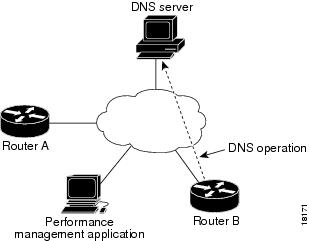
DNS 動作を定義し、IP SLA DNS コンフィギュレーション モードを開始します。
|
|
ステップ 5
|
history buckets-kept size
switch(config-ip-sla-dns)# history buckets-kept 25
|
(任意)IP SLA 動作のライフタイム中に保持する履歴バケット数を設定します。
|
|
ステップ 6
|
history distributions-of-statistics-kept size
switch(config-ip-sla-dns)# history distributions-of-statistics-kept 5
|
(任意)IP SLA 動作中にホップ単位で保持する統計情報の配信数を設定します。
|
|
ステップ 7
|
history filter {none | all | overThreshold | failures }
switch(config-ip-sla-dns)# history filter failures
|
(任意)IP SLA 動作の履歴テーブルに格納する情報のタイプを定義します。
|
|
ステップ 8
|
frequency seconds
switch(config-ip-sla-dns)# frequency 30
|
(任意)指定した IP SLA 動作を繰り返す間隔を設定します。
|
|
ステップ 9
|
history hours-of-statistics-kept hours
switch(config-ip-sla-dns)# history hours-of-statistics-kept 4
|
(任意)IP SLA 動作の統計情報を保持する時間数を設定します。
|
|
ステップ 10
|
history lives-kept lives
switch(config-ip-sla-dns)# history lives-kept 2
|
(任意)IP SLA 動作の履歴テーブルに格納するライフ数を設定します。
|
|
ステップ 11
|
owner owner-id
switch(config-ip-sla-dns)# owner admin
|
(任意)IP SLA 動作の簡易ネットワーク管理プロトコル(SNMP)所有者を設定します。
|
|
ステップ 12
|
history statistics-distribution-interval milliseconds
switch(config-ip-sla-dns)# history statistics-distribution-interval 10
|
(任意)IP SLA 動作で維持する各統計情報の配信間隔を設定します。
|
|
ステップ 13
|
tag text
switch(config-ip-sla-dns)# tag TelnetPollServer1
|
(任意)IP SLA 動作のユーザー指定 ID を作成します。
|
|
ステップ 14
|
threshold milliseconds
switch(config-ip-sla-dns)# threshold 9000
|
(任意)IP SLA 動作によって作成されるネットワーク モニタリング統計情報を計算するための上限しきい値を設定します。
|
|
ステップ 15
|
timeout milliseconds
switch(config-ip-sla-dns)# timeout 10000
|
(任意)IP SLA 動作がその要求パケットからの応答を待機する時間を設定します。
|
|
ステップ 16
|
end
switch(config-ip-sla-dns)# end
|
|

 フィードバック