Configuring and Validating Fluidmax (point to multipoint) Topology
Concerning fixed infrastructure, any wireless interface can be configured to operate in Fluidmax mode to implement point-to-multipoint connections. Each interface uses an independent set of Fluidmax parameters, allowing for great flexibility in the network topologies that can be implemented. As an example, the picture below illustrated explains two cascaded point to multipoint clusters where the ME (Mesh End) node uses both radios in Fluidmax Primary mode to serve several Secondary clients (MP1 (Mesh Point), MP2 and MP3) on two different frequencies. Concerning MP2, the first radio operates in Fluidmax Secondary mode to connect to the ME, while the second interface is configured as Fluidmax Primary to serve more downstream clients (MP4 and MP5).
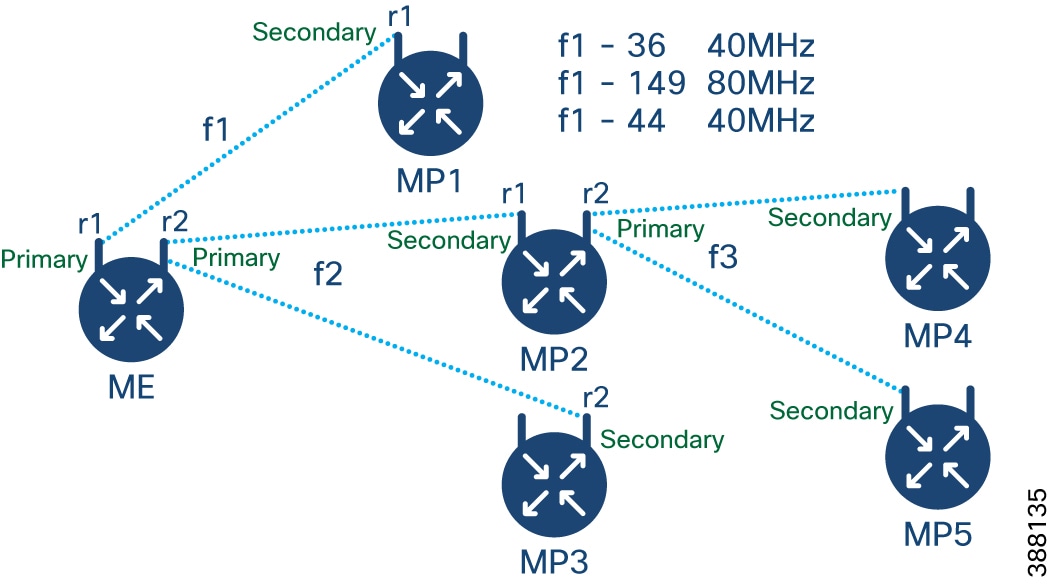
Configuring Point to Multipoint Topology from CLI
To configure a Fluidmax (point to multipoint) Topology use the following commands.
Device# configure dot11Radio <interface>Interface - <0-3> Dot11Radio interface number.
Device# configure dot11Radio <interface> {enable | disable}Enable or disable - Set wireless interface admin state to enable or disable at runtime
Device# configure dot11Radio <interface> mode {fluidity | fixed | fluidmax } { primary | secondary }Mode - operating mode for the specified interface (Fluidity or fixed or Fluidmax)
Primary | secondary - Fluidmax role for the unit, either primary or secondary.
Device# configure dot11Radio <interface> channel <channel id>Channel - Set the operating channel id <1 – 256>.
Device# configure dot11Radio <interface> band-width <channel bandwidth>Bandwidth - channel bandwidth in MHz and currently supported values are 20, 40, 80, 160.
Device#wrExample of point to multipoint (Fluidmax ) topology configuration
ME (Mesh End) Configuration
Device# Configure dot11Radio 1 enable
Device# Configure dot11Radio 1 mode fluidmax primary
Device# Configure dot11Radio 1 channel 36
Device# Configure dot11Radio 1 band-width 40
Device# Configure dot11Radio 2 enable
Device# Configure dot11Radio 2 mode fluidmax primary
Device# Configure dot11Radio 2 channel 149
Device# Configure dot11Radio 2 band-width 80
MP1 (Mesh point) Configuration
Device# Configure dot11Radio 1 enable
Device# Configure dot11Radio 1 mode fluidmax secondary
Device# Configure dot11Radio 1 channel 36
Device# Configure dot11Radio 1 band-width 40
MP2 Configuration
Device# Configure dot11Radio 1 enable
Device# Configure dot11Radio 1 mode fluidmax secondary
Device# Configure dot11Radio 1 channel 149
Device# Configure dot11Radio 1 band-width 80
Device# Configure dot11Radio 2 enable
Device# Configure dot11Radio 2 mode fluidmax primary
Device# Configure dot11Radio 2 channel 44
Device# Configure dot11Radio 2 band-width 40
MP3 Configuration
Device# Configure dot11Radio 1 enable
Device# Configure dot11Radio 1 mode fluidmax secondary
Device# Configure dot11Radio 1 channel 149
Device# Configure dot11Radio 1 band-width 80
MP4 Configuration
Device# Configure dot11Radio 1 enable
Device# Configure dot11Radio 1 mode fluidmax secondary
Device# Configure dot11Radio 1 channel 44
Device# Configure dot11Radio 1 band-width 40
MP5 Configuration
Device# Configure dot11Radio 1 enable
Device# Configure dot11Radio 1 mode fluidmax secondary
Device# Configure dot11Radio 1 channel 44
Device# Configure dot11Radio 1 band-width 40
Validating Point to Multipoint Topology from CLI
To validate the point to multipoint (Fluidmax) topology configuration use the following show command.
Device# show dot11Radio <interface> configExample:
Device# show dot11Radio 2 config
Interface : enabled
Mode : fluidmax primary
Frequency : 5745 MHz
Channel : 149
…….
Fluidmax Configuration
Tower ID : disabled
Cluster ID : fluidmesh
Automatic scan : enabled
Automatic scan threshold : disabledDevice# show dot11Radio 1 config
Interface : enabled
Mode : fluidmax secondary
Frequency : 5745 MHz
Channel : 149
…….
Fluidmax Configuration
Tower ID : disabled
Cluster ID : fluidmesh
Automatic scan : enabled
Automatic scan threshold : disabled
Device# show dot11Radio 2 config
Interface : enabled
Mode : fluidmax primary
Frequency : 5220 MHz
Channel : 44
Channel width : 40
…….
Fluidmax Configuration
Tower ID : 100
Cluster ID : fluidmesh
Automatic scan : enabled
Automatic scan threshold : disabledDevice# show dot11Radio 1 config
Interface : enabled
Mode : fluidmax secondary
Frequency : 5220 MHz
Channel : 44
Fluidmax Configuration
Tower ID : disabled
Cluster ID : fluidmesh
Automatic scan : enabled
Automatic scan threshold : disabled Feedback