-
null
Overview
Connected Mobile Experiences Overview
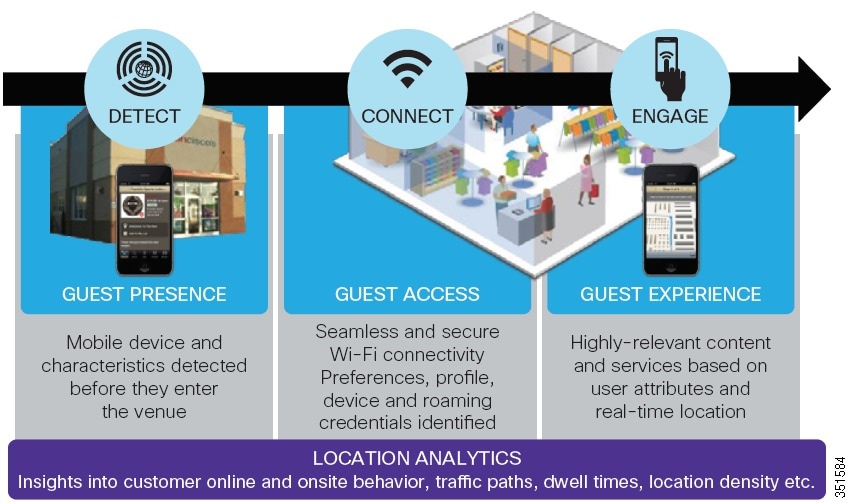
The Cisco Connected Mobile Experiences (CMX) is a suite of mobile software solutions to detect, connect, and engage the mobile devices within a venue. The CMX solution helps you to create personalized mobile experiences for mobile end users and gain operational efficiency with location-based services. Figure 1-1summarizes this process.
The CMX solution provides the following features:
- Detect—The wireless signal from the mobile device is detected as soon as the device approaches your location.
- Connect—The visitor receives notification of the available Wi-Fi that they can securely connect to.
- Engage—Once the visitors have access to your Wi-Fi, you can engage them with the advertisement or personalized content. With this you can build a real-time, value added relationship with your customers.
The CMX solution provides the following benefits:
- Increases customer engagement by offering personalized and relevant content.
- Increases venue efficiency by using traffic flows to better position products or services.
Figure 1-1 Detect, Connect, and Engage
CMX Connect and Engage for Mobile Application SDK Overview
The mobile SDK (Software Development Kit) provides indoor location and navigation of a device on the map. The location is updated as device moves through a venue and helps navigate to certain defined location for the users. The SDK connects with the CMX Mobile Application Server to determine the users location. The CMX Mobile Application SDK consists of the following components:
- Prime Infrastructure—Administers and configures the network infrastructure and manages floor and zone maps.
- Mobility Services Engine—Sends location updates to Mobile Application Server directly.
- CMX Connect and Engage—Configures routes, point of interests, and messages for zone based notifications. It can be used to configure Apple iOS and Android notification server.
- CMX Mobile Application Server—Receives location updates, setup, and configuration information from the Connect and Engage system. It serves the requests from Software Development Kit (SDK) clients for location information, point of interests, zones, and floors.
- CMX Mobile Application SDK—Includes tools to create a wide variety of CMX powered location based application.
CMX Mobile Application SDK features
- Indoor location based services—Updates application about the current location of the device. The location is calculated by the Mobility Services Engine (MSE) and notifies the CMX Mobile Application Server about the device location. It assists users to find points of interest and routes to points of interest on a floor. It manages push notifications and banners for zone based services and offers.
- Indoor Map view—Allows the application to embed a map view into the application.
- Wi-Fi onboarding—Assists the user to join a desired Wi-Fi network. A mobile push notification is sent from the CMX Mobile Application Server when a device is detected or enters a specified zone.
- Automatic—Enables and changes the current Wi-Fi settings of the mobile device to the desired Wi-Fi. This is done automatically when the application is started. This option is available only for Android devices.
- Prompt—Displays a dialog asking the users permission to join the desired Wi-Fi. If the user accepts, then the Wi-Fi is enabled and joined automatically. This option is the same as automatic but the user is asked permission for attempting to join the Wi-Fi. This option is available only for Android devices.
- Manual—Displays a dialog with instructions on how to join a desired Wi-Fi. The user will have to join the Wi-Fi manually. This option is available for iOS and Android devices.
Different Modules of CMX Mobile Application SDK
The CMX mobile application SDK provides indoor location and navigation and can join a specified Wi-Fi connection using the mobile push notification. The SDK is composed of the following modules to allow different types of application integration.
- CMXClient—It is the core module for getting the client and venue information. This module has no user interface and can be embedded into an application to determine the current location information for the application to take action upon.
- CMX Map module—It allows a map view to be integrated into an application. The map view renders a map with points of interest. A users current location is displayed on the map and the user has the ability to select the points of interest that they want to navigate to.
 Feedback