Preparing Your Site for Installation

This section describes how to prepare your site for installation:

Installation Guidelines and Safety Warnings

This section includes the basic installation guidelines and safety warning statements. Read this section before you start the installation procedure. Translations of the warning statements appear in the RCSI guide on Cisco.com.

  • The operating environment must be within the ranges listed in the "Environmental Specifications" section.

  • Cabling is away from sources of electrical noise, such as radios, power lines, and fluorescent lighting fixtures. Make sure that the cabling is safely away from other devices that might damage the cables.

  • Airflow around the device and through the vents is unrestricted

  • Humidity around the device does not exceed 95 percent.

  • Altitude at the installation site is not greater than 10,000 feet.

  • Do not place any items on the top of the device.

  • For 10/100/1000 fixed ports, the cable length from a switch to a connected device cannot exceed 328 feet (100 meters).

  • Clearance to the front and rear panel meets these conditions:

    • Front-panel LEDs can be easily read.

    • Access to ports is sufficient for unrestricted cabling.


Warning


To prevent the system from overheating, do not operate it in an area that exceeds the maximum recommended ambient temperature of: 40° C (104° F). The maximum temperature is derated by 1.0° C for every 1000 ft (305 m) of altitude above sea level. Statement 1047


Warning


To prevent airflow restriction, allow clearance around the ventilation openings to be at least 50 mm (5 cm). Statement 1076


Warning


Read the installation instructions before connecting the system to the power source. Statement 1004.


Warning


Ultimate disposal of this product should be handled according to all national laws and regulations. Statement 1040.


Warning


No user-serviceable parts inside. Do not open. Statement 1073.


Warning


Installation of the equipment must comply with local and national electrical codes. Statement 1074.


Warning


Hot surface. Statement 1079.


Warning


Connect the unit only to DC power source that complies with the Safety Extra-Low Voltage (SELV) requirements in IEC 60950 based safety standards. Statement 1033.


Warning


Class 1 laser product. Statement 1008


Warning


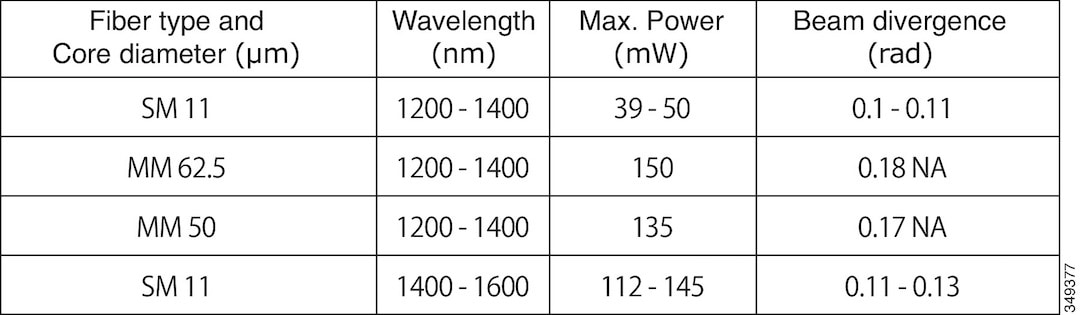
Invisible laser radiation may be emitted from the end of the unterminated fiber cable or connector. Do not view directly with optical instruments. Viewing the laser output with certain optical instruments (for example, eye loupes, magnifiers, and microscopes) within a distance of 100 mm may pose an eye hazard. Statement 1056


Warning


Pluggable optical modules comply with IEC 60825-1 Ed. 3 and 21 CFR 1040.10 and 1040.11 with or without exception for conformance with IEC 60825-1 Ed. 3 as described in Laser Notice No. 56, dated May 8, 2019. Statement 1255.


Unpacking and Inspecting the Controller

Follow these steps to unpack the Cisco Catalyst 9800-L Wireless Controller and prepare it for operation:

Procedure


Step 1

Remove the controller from its container and save all the packaging material.

Step 2

Compare the shipment to the equipment list provided by your Cisco customer service representative. Verify that you have all the items.

Step 3

Check for damage and report discrepancies or damage, if any, to your Cisco customer service representative. Before speaking to the representative, have the following information ready:

  • Invoice number of shipper (see the packing slip)

  • Model and serial number of the damaged unit

  • Description of damage

  • Effect of damage on the installation


Package Contents

Each Cisco Catalyst 9800-L Wireless Controller package contains the following items:

  • One Cisco Catalyst 9800-L Wireless Controller

  • One Power supply and power cord (power cord option configurable)

  • Optional licenses will be pre-installed on controller at factory, if selected

  • Cisco Catalyst 9800-L Wireless Controller software pre-loaded on the controller (software option configurable)

  • Four adhesive rubber feet pieces

Requirements Tools and Information

You will need the following tools and information before you can install the controller:

  • Wireless controller hardware

    • Controller with factory-supplied power cord and mounting hardware

    • Network, operating system service network, access point cables, and adapter are required

  • Command-line interface (CLI) console

    • Serial terminal emulator on CLI console (PC or laptop)

    • Use either RJ-45 console cable or Micro USB Type-B cable to connect CLI console and controller

Choosing a Physical Location

You can install the controller almost anywhere, but it is more secure and reliable if you install it in a secure equipment room or wiring closet. For maximum reliability, mount the controller while following these guidelines:

  • Make sure you can reach the controller and all cables attached to it.

  • Make sure that water or excessive moisture cannot get into the controller.

  • To prevent airflow restriction, allow clearance around the ventilation openings to be at least 50 mm (5 cm).

  • Verify that the ambient temperature remains between 32° F to 104° F (0° C to 40° C).

  • Make sure that the controller is within 328 ft. (100 m) of equipment connected to the 10/100/1000 Mbps Ethernet ports.

  • Make sure that the power supply adapter and the power cord can reach a 100 to 240 VAC grounded electrical outlet.

  • Make sure that at least two rack-units space is available for rack tray kit, if you are installing the controller in a rack.


Warning


This equipment must be grounded. Never defeat the ground conductor or operate the equipment in the absence of a suitably installed ground conductor. Contact the appropriate electrical inspection authority or an electrician if you are uncertain that suitable grounding is available. Statement 1024.


Warning


This product relies on the building’s installation for short-circuit (overcurrent) protection. Ensure that the protective device is rated not greater than 20A. Statement 1005.