Shared Cisco Meeting Server Configuration
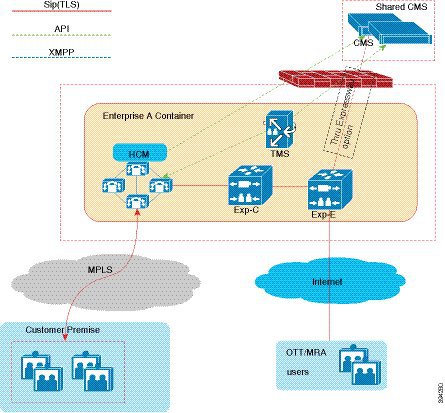
Cisco Unified Communications Manager supports ad-hoc conferencing in a shared Cisco Meeting Server (CMS) environment. Ad-hoc Conferencing allows the conference controller, or a participant of the conference to add participants to the conference on the go. In other words, Ad-hoc Conferencing is an unscheduled escalation of a point-to-point call to a multi-party conference. For example, in a call between two participants, a participant in the call can use the Conference button to include a third participant in the conversation to create a three-party conference.
 Note |
The steps followed to start an ad-hoc conference may vary depending on the CUCM endpoint. For example, Cisco Jabber or a physical phone. |
The CMS is configured in the service provider network, while the Cisco TelePresence Management Suite (TMS) Server is hosted in each customer network. Cisco Unified Communications Manager provides CMS-based video and audio conferencing capability, and ad-hoc conferencing.
The Cisco Unified Communications Manager configuration of an ad-hoc call varies significantly when compared to a scheduled conference call. In an ad-hoc conference call, when the conference initiator presses the Conference button to include all the participants in the conference, the Cisco Unified Communications Manager starts an API call to the CMS to create a conference immediately, to which all the calls of the participants are transferred. To support Ad-hoc conferencing, the Cisco Unified Communications Manager must have the following:
-
API credentials
-
Web Administrator address or port configured
-
SIP trunk that is configured directly to the CMS server.
Note
The Cisco Unified Communications Manager clusters must be configured with direct SIP trunks to each CMS node. During conference calls, the Cisco Unified Communications Manager dynamically creates a space on CMS, and then matches the calls that are extended to CMS against an incoming call rule for spaces.
 Feedback