IM and P Federation with Microsoft-Based Organizations
Unlike the federations described elsewhere in this guide, these federations with Microsoft are SIP-based and not XMPP-based.
This section applies if you want to deploy an IM&P federation with an organization that uses Microsoft as its collaboration services solution. It enables users registered to Cisco Unified Communications Manager IM and Presence Service to exchange chat messages with Microsoft users in an external organization, via the Expressway. We illustrate an example deployment, the signaling connections, and some sample dial plan rules. For completeness, the diagrams illustrate multiple elements together, but in reality, most deployments will not have all the elements.
Fundamentals of IMP Federation with Microsoft-Based Organizations
Supported Systems IM and P through Microsoft
Expressway-E supports IM&P Federation with Microsoft, with the following products:
-
Expressway X8.9 or later. X8.11.x or later is recommended.
-
Cisco Unified Communications Manager IM and Presence Service 11.5(1)SU3 or later. 11.5(1)SU4 or later is recommended.
-
Lync 2013 Server, Skype for Business Server, or Office 365. (We do not interoperate with "consumer" versions of Skype.)
Signaling and Dial Plan
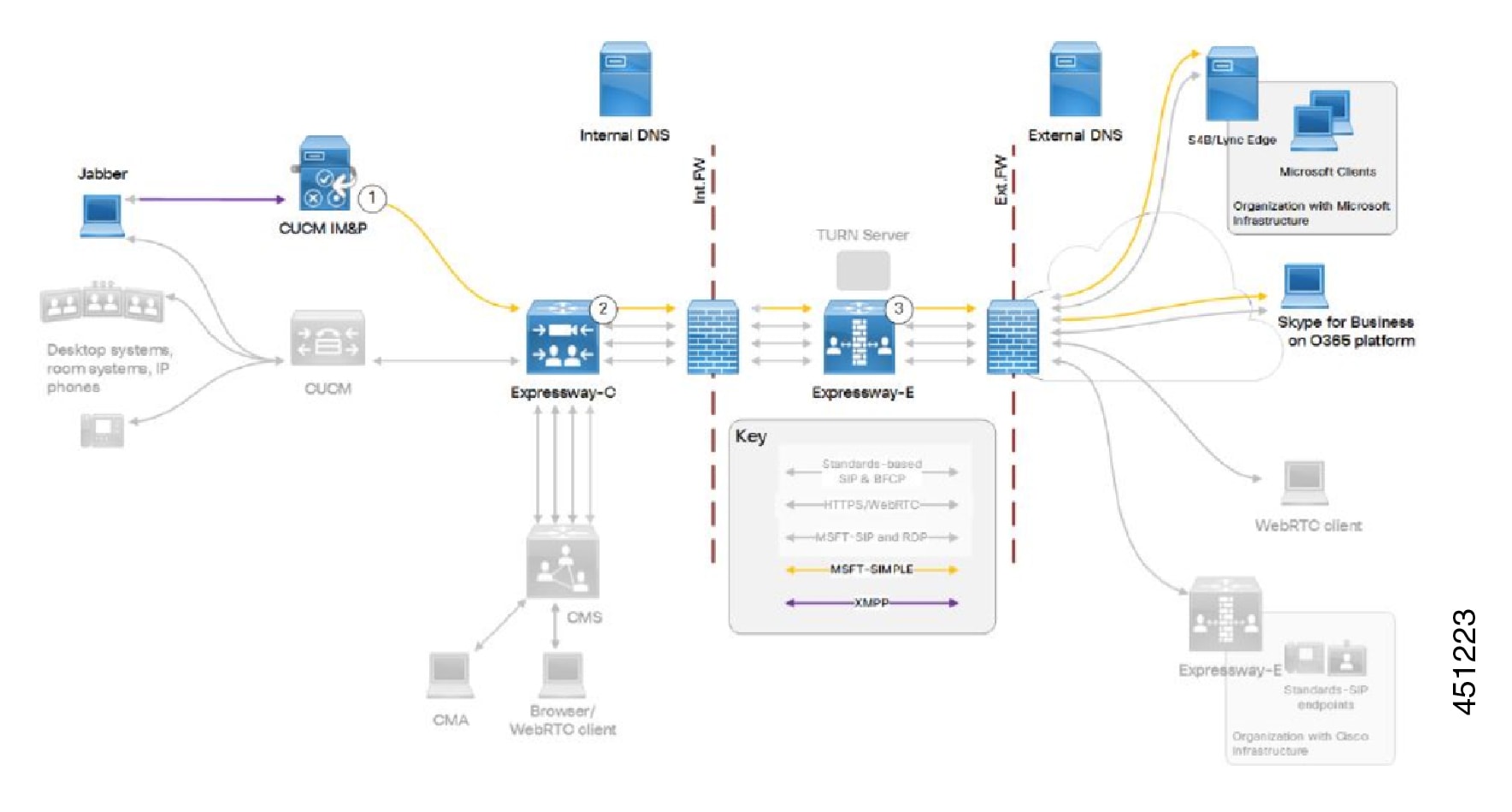
The table details the rules in a sample outbound dial plan.
|
Arrow # |
Rule Hosted On |
Rule Order/Priority |
From |
Pattern and Logic |
To |
|---|---|---|---|---|---|
|
1 |
Cisco Unified Communications Manager IM and Presence Service |
Jabber |
*@msexample.com |
Static route to Expressway-C |
|
|
2 |
Expressway-C |
IM&P neighbor zone |
MicrosoftSIP IM&P for .*@msexample\.com On successful match Stop |
Traversal client zone |
|
|
3 |
Expressway-E |
Lowest priority rule = highest priority number |
Traversal server zone |
Microsoft SIP IM&P for Any alias On successful match Stop This rule is required due to the way we handle NOTIFY messages. |
DNS zone |
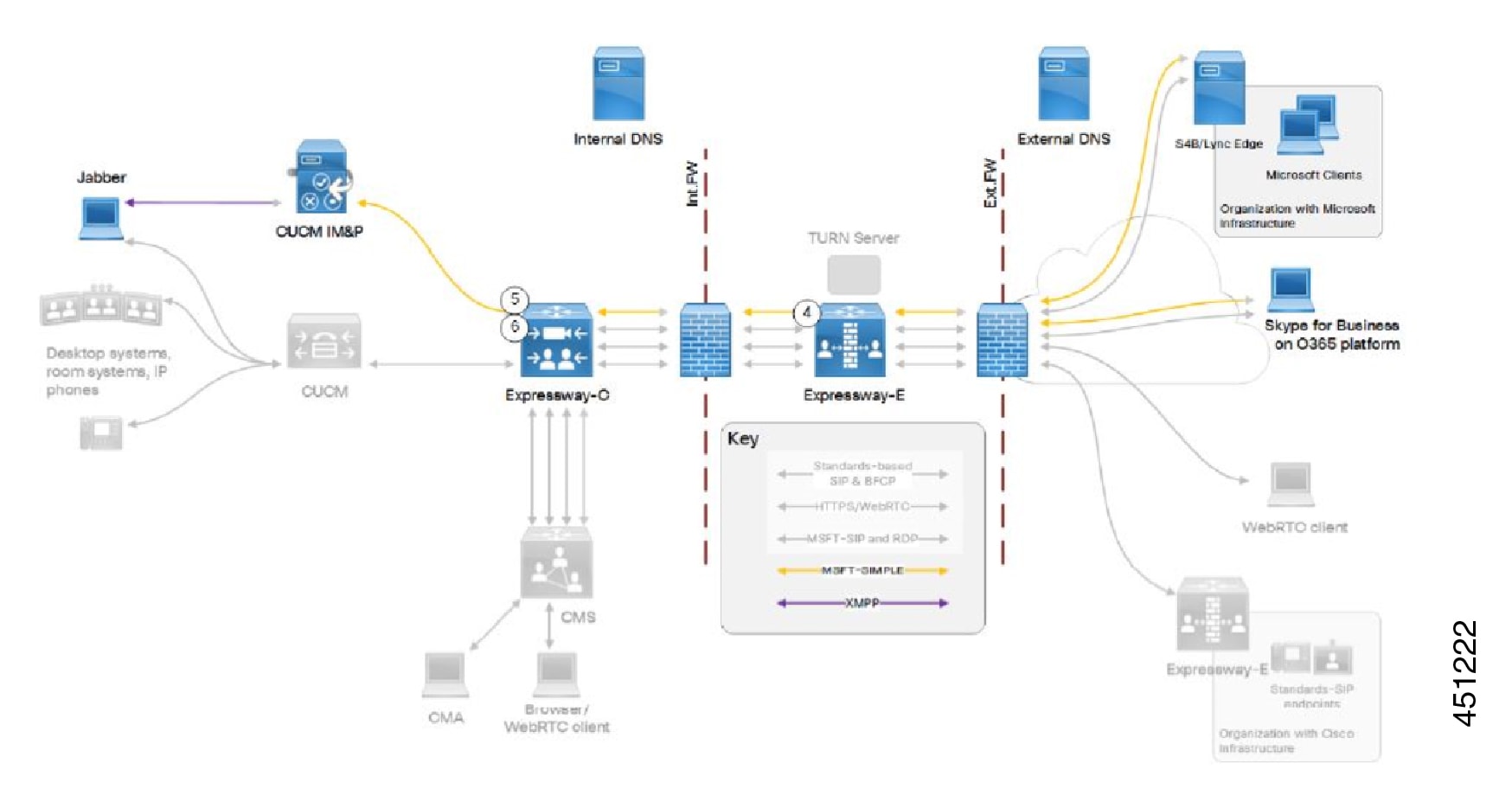
The figure illustrates Inbound Signaling.
The table details the rules in a sample inbound dial plan.
|
Arrow # |
Rule Owner |
Rule Order/Priority |
From |
Pattern and Logic |
To |
|---|---|---|---|---|---|
|
4 |
On Expressway- E |
Default zone |
Microsoft SIP IM&P for .*@ciscoexample\.com On successful match Stop |
Traversal server zone |
|
|
5 |
On Expressway- C |
Traversal client zone |
Microsoft SIP IM&P for .*@ciscoexample\.com On successful match Stop |
IM&P neighbor zone |
|
|
6 |
On Expressway- C |
Traversal client zone |
Microsoft SIP IM&P for .*IMP1- public\.ciscoexample\.com.* On successful match Stop This rule is required due to the way we handle NOTIFY messages. |
IM&P neighbor zone |
Configuration Summary
This federation is based on TLS throughout.
Process Summary for Microsoft Federation
-
On the IM and Presence Service:
-
As request messages for SIP federation are routed based on the FQDN, the FQDN of the routing IM and Presence Service node (publisher) must be publicly resolvable.
-
Turn on SIP Federation services for each IM and Presence cluster node (enable Cisco XCP SIP Federation Connection Manager).
-
Assign a DNS SRV record for IM and Presence, so that Microsoft entities can route traffic to the IM and Presence service through Expressway.
-
Add a Federated domain entry for each Microsoft domain that you want to federate with (use the OCS/Lync/S4B integration type).
-
Create a static route that points to the Expressway-C for all traffic matching each federated domain.
For example, to route all traffic for msexample.com, use the format .com.msexample.*.
Define TLS as the protocol, the next hop as the FQDN or IP address of the Expressway-C, the next hop port as 5061, and the route type as Domain.
-
Add Expressway as a TLS peer subject, and then configure a TLS Context to include the new peer subject.
-
Add inbound access control list (ACL) entries for each Expressway-C server IP address, so that the IM and Presence Service accepts unsolicited traffic from those IP addresses without authentication. For multicluster deployments, do this on each IM and Presence cluster.
-
Restart the Cisco XCP Router.
For detailed information about this process, see the Interdomain Federation Guide for the IM and Presence Service, Release 12.5(1) on Cisco.com - or the relevant guide for your software version if you are running an earlier version.
-
-
Configure Expressway for federation with Microsoft:
-
On Expressway-C, configure a neighbor zone to the IM and Presence Service cluster. The Expressway-C zone configuration must point to the IM and Presence Service port for TLS Peer Authentication. By default, port 5062. (To confirm the relevant port - on Cisco Unified CM IM and Presence Administration, go to System > Application Listeners and navigate to Default Cisco SIP Proxy TLS Listener - Peer Auth.)
-
Configure search rules to route NOTIFY messages (see below).
-
Disable the Presence Server. Go to Applications > Presence and set SIP SIMPLE Presence Server to Off. In multicluster Expressway deployments, you need a neighbor zone and search rules for each cluster.
-
-
Exchange certificates between the various servers in your federation deployment. For details, see the "Exchange Certificates" section of the Interdomain Federation Guide for the IM and Presence Service.
More About Configuring Search Rules on Expressway
Usually NOTIFY messages do not need special routing consideration because they're in the same dialog as SUBSCRIBE messages sent between clients to request presence status and should follow the same route. However, Expressway does not hold information about SUBSCRIBE dialogs, so you need specific search rules to route the NOTIFY messages.
Process Summary
To create search rules, go to Configuration > Dial Plan > Search Rules and select New.
-
Outbound rule: From X8.11.x, outbound NOTIFY messages are handled like any other SIP message. So, the outbound rule on Expressway-E needs to match the following (of course broader rules may be implemented, such as Traffic type = All Sip Variants):
-
Traffic type = Microsoft IM and Presence
-
Mode = Any Alias
-
Target = DNS Zone (Expressway-E)
-
-
Inbound rule: You need an inbound search rule (on Cisco Expressway-C) to match on the Federation Routing IM/P FQDN of the IM and Presence Service cluster. This cluster-wide SIP proxy parameter is configured on the IM and Presence Service publisher at System > Service Parameters > SelectPublisher > Cisco SIP Proxy > Federation Routing Parameters. Here we use the example value IMP1-public.ciscoexample.com for the Federation Routing IM/P FQDN of the cluster.
Also create a DNS A record so that Expressway-C can resolve the Federation Routing IM/P FQDN. This DNS A record must not have a pointer record (PTR) associated with it.
Dial Plan Summary
On the Expressway-E:
-
Search rule to route Microsoft SIP IM&P for .*@msexample\.com from traversal server zone to DNS zone.
-
Search rule to route Microsoft SIP IM&P for .*@ciscoexample\.com from default zone to traversal server zone.
On the Expressway-C:
-
Search rule to route Microsoft SIP IM&P for the named federation domain .*@msexample\.com from IM&P neighbor zone to traversal client zone.
-
Search rule to route Microsoft SIP IM&P for local domain .*@ciscoexample\.com from traversal client zone to IM&P neighbor zone.
-
Our architecture requires this rule for presence: search rule to route Microsoft SIP IM&P from traversal client zone to IM&P neighbor zone. The rule must match a regular expression that includes the SIP Proxy service parameter Federation Routing IM/P FQDN, configured in the target IM and Presence Service cluster.
For example, use .*IMP1-public\.ciscoexample\.com.* to match presence traffic for the FQDN given above.
Detailed Examples of Search Rules
|
Name |
Py |
Pcl |
SIP variant |
Source |
RMBA?1 1 |
Mode |
Pattern type |
Pattern string |
Behavior |
On match |
Target |
|---|---|---|---|---|---|---|---|---|---|---|---|
|
IMP Public to IMP |
20 |
SIP |
MS IM&P |
Any |
No |
Alias pattern match |
Regex |
.*imp1-public\.uc\.local.* |
Leave |
Stop |
IMP |
|
uc. local MSIMP to IMP |
20 |
SIP |
MS IM&P |
Any |
No |
Alias pattern match |
Regex |
.*@uc\.local.* |
Leave |
Stop |
IMP |
RMBA? = Request must be authenticated?
DNS Summary
This section provides summary information and examples about DNS records for this federation.
External DNS Records
The external DNS needs to be configured with the records required for your deployment. This table contains some example records that may apply:
|
Purpose |
Record type |
Example entry |
Port |
Resolves to target |
|---|---|---|---|---|
|
Resolve Expressway-E cluster FQDN to peer IP addresses. |
A/AAAA |
expe.example.com |
NA |
Public IP address of one Expressway-E cluster peer. Create one record for each peer in the Expressway-E cluster (Up to 6 records). |
|
Discover destination for calls to third party Microsoft infrastructure domain(outside of your control, but needs to be there for federation to succeed). |
SRV |
_ sipfederationtls._ tcp. msb2bexample.com. |
5061 |
Public address of Microsoft Skype for Business Edge server / cluster |
|
Discover user destination for calls from third party Microsoft infrastructure domain. |
SRV |
_ sipfederationtls._ tcp.example.com. |
5061 |
FQDN of Skype for Business Edge. For example,s4be.example.com |
Limitations Related to DNS
DNS Load Balancing by Microsoft Skype for Business (also applies to Microsoft Lync Server)
Microsoft Skype for Business does not attempt to use DNS SRV load balancing when routing calls or messages to federated domains. The Microsoft Skype for Business Edge servers always choose the DNS SRV record with the lowest priority and highest weight and ignore all others. When the priorities and weights are equal, they choose one and ignore all others.
Microsoft best practices recommend that you configure round-robin A/AAAA record load balancing, using the A record sip.domain.com. That is, the DNS SRV record for SIP federation should have only one entry that targets a single round-robin A/AAAA record that includes all of your Expressway-E cluster peers.
For example,
-
Create the SRV record _sipfederationtls._tcp.ciscoexample.com. with a single entry targeting
sip.ciscoexample.com
-
Create an A/AAAA record for sip.ciscoexample.com that targets either the public IP address of the Expressway-E, or multiple A/AAAA records for round-robin service of all the Expressway-E peers in the cluster.
Domain Namespace Compatibility for Microsoft Skype for Business (also applies to Microsoft Lync Server)
Microsoft Skype for Business requires the federated edge servers to be in the same DNS namespace (domain/subdomain) as the federated SIP domain. Otherwise federation will fail without additional configuration on the Skype for Business servers. We recommend that the DNS SRV records for SIP federation resolve to a target in the same DNS namespace, so that open SIP federation will work from the Microsoft side without additional configuration.
For example, if you intend to federate Microsoft infrastructure with the domain exp.ciscoexample.com, you will create the SRV record _sipfederationtls._tcp.exp.ciscoexample.com. The target of that DNS SRV must be an A/AAAA record in the subdomain exp.ciscoexample.com (such as sip.exp.ciscoexample.com). If the DNS SRV target is outside that namespace, such as sip.ciscoexample.com, the Microsoft side will not allow the connection.
Internal DNS Records
If you can split your DNS to give different results internally, then we recommend that you create different records for the following purposes. These records must be resolvable by Expressway-C.
|
Purpose |
Record type |
Example entry |
Resolves to |
|---|---|---|---|
|
For Expressway-C to resolve the Federation Routing IM/P FQDN of the IM and Presence Service cluster. |
A |
IMP1-public.ciscoexample.com |
IP address of the IM and Presence Service publisher |
 Feedback