Contents
Wrapup Data
Wrapup Data Requirements
In the Unified CCE environment, an administrator can set wrapup data settings for agents on the Agent Desk Settings screen in Configuration Manager. These settings determine if an agent must enter, can optionally enter, or cannot enter wrapup data on completion of incoming or outgoing calls.
 Note | See the Administration Guide for Cisco Unified Contact Center Enterprise & Hosted for instructions on using agent wrapup data settings. |
The Configuration Manager Work Mode on Incoming setting determines the agent parameters for incoming calls. The valid values are the following:
- REQUIRED—The agent automatically enters Wrapup state on completion of a call.
- REQUIRED_WITH_DATA—The agent automatically enters Wrapup state on completion of a call. The agent must enter wrapup data in the Wrapup dialog box.
- OPTIONAL—The agent can optionally click Wrapup during a call to enter a Wrapup state on completion of the call. The agent can instead click Ready or NotReady during a call to enter that state on completion of the call. When the call ends, if the agent did not click one of these buttons, the agent state returns to the state that was in effect before the call.
- NOT_ALLOWED—The agent cannot enter wrapup data. The agent can click Ready or NotReady during a call to enter that state on completion of the call. When the call ends, if the agent did not click one of these buttons, the agent state returns to the state that was in effect before the call.
The Configuration Manager Work Mode on Outgoing setting determines the agent parameters for outgoing calls. Valid values are REQUIRED, OPTIONAL, and NOT_ALLOWED. REQUIRED_WITH_DATA is not valid for the outgoing wrapup mode because the Unified ICM does not permit wrapup data to be set in an outgoing call. If the outgoing wrapup mode is set to REQUIRED, the agent enters wrapup state when the call ends, but the Wrapup dialog box does not appear.
Wrapup Dialog
The Wrapup dialog appears when an agent enters a Wrapup state:
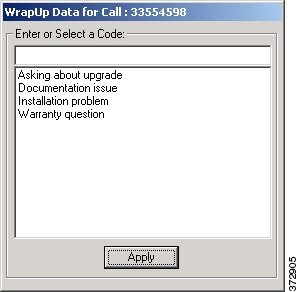
You can select a reason from the list box or enter wrap-up text in the text box, then click Apply to proceed.
Note | You cannot enter wrap-up data for the consult call following a completed transfer or a conference call. The consult call not only clears, but also completely ends. To enter wrap-up data for a call that you transfer, do so while the call is in progress. Double-click the Wrapup column for the call in the Call Information section. However, a wrap-up data window is available when the agent leaves a conference call after the call completes. |
After you click Apply on the Wrapup dialog, you can click Ready or NotReady to go to one of those states. If you do not click one of these buttons after a configurable period, you eventually return to the state that was in effect before the previous call:
- For incoming ACD calls, the agent state returns to Ready.
- For outgoing calls, the agent state returns to NotReady.
- For incoming internal calls, the agent state returns to either Ready or NotReady depending on the state that was in effect before the call.
The configurable period is set in Configuration Manager on the Agent Desk Settings screen.