Cisco IP Phone Hardware
Overview of the Cisco IP Phone 6800 Series Multiplatform Phones
The Cisco IP Phone 6800 Series Multiplatform Phones comprises a set of full-featured VoIP (Voice-over-Internet Protocol) phones that provide voice communication over an IP network. The phones provide all the features of traditional business phones, such as call forwarding, redialing, speed dialing, transferring calls, and conference calling. The Cisco IP Phone 6800 Series Multiplatform Phones is targeted for solutions that are centered on Third-Party SIP-based IP PBX.
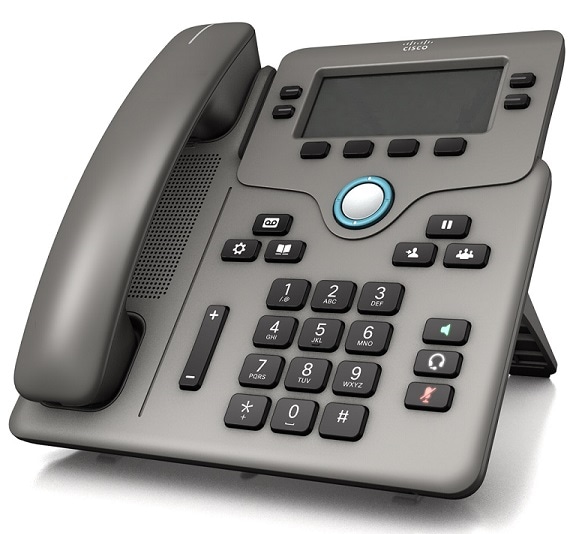
 Note | In this document, the terms Cisco IP Phone, phone, or device mean Cisco IP Phone 6800 Series Multiplatform Phones. |
Cisco IP Phone 6841 Multiplatform Phones Connections
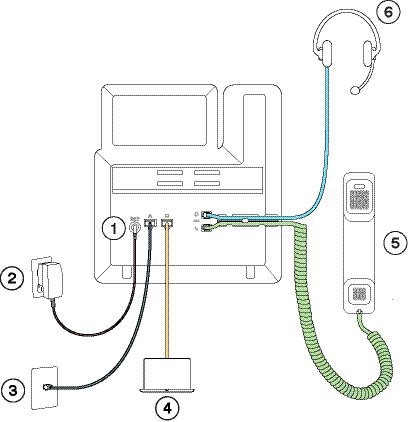
Connect your phone to your LAN with an Ethernet cable to enable full functionality of your phone. You need to use a power adapter to power the phone. Do not extend the LAN Ethernet cable outside the building. For your phone to work, it must be connected to the IP telephony network.
|
1 |
DC adaptor port |
4 |
Access port (10/100/1000 PC) connection (optional) |
|
2 |
Power adapter |
5 |
Handset connection |
|
3 |
Network port (10/100/1000 SW) connection |
6 |
Analog headset connection (optional) |
Cisco IP Phone 6851 Multiplatform Phones Connections
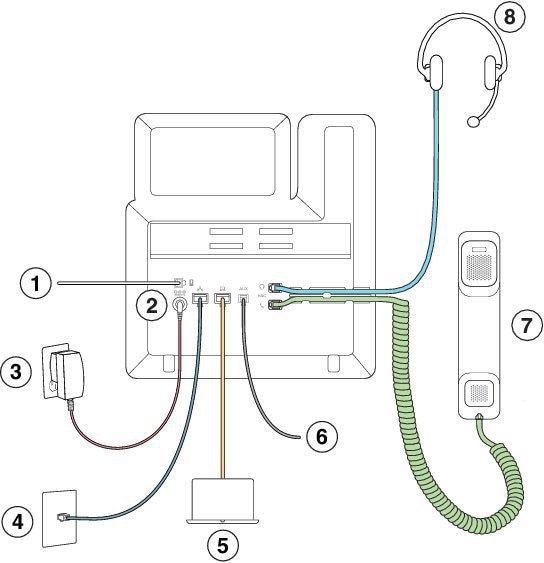
Connect your phone to your LAN with an Ethernet cable to enable full functionality of your phone. If your Ethernet port is equipped with Power over Ethernet (PoE), you can power the phone through the LAN port. If you don't have PoE available, then you need to use a power adapter to power the phone. Do not extend the LAN Ethernet cable outside the building. For your phone to work, it must be connected to the IP telephony network.
|
1 |
For future use |
5 |
Access port (10/100/1000 PC) connection (optional) |
|
2 |
DC adaptor port (optional) |
6 |
Auxiliary port (optional) |
|
3 |
Power adapter (optional) |
7 |
Handset connection |
|
4 |
Network port (10/100/1000 SW) connection; IEEE 802.3af power enabled |
8 |
Analog headset connection (optional) |
Buttons and Hardware
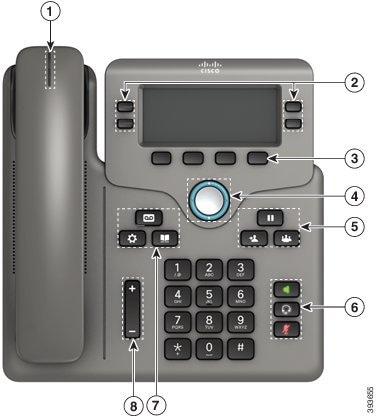
The following figure shows the Cisco IP Phone 6841.
|
1 |
Handset and Handset light strip |
Indicates whether you have an incoming call (flashing red) or a new voice message (steady red). |
|
2 |
Programmable feature buttons and line buttons |
For more information, see Softkey, Line, and Feature Buttons. |
|
3 |
Softkey buttons |
For more information, see Softkey, Line, and Feature Buttons. |
|
4 |
Navigation cluster |
Navigation ring and Select
|
|
5 |
Hold/Resume, Conference, and Transfer |
Hold/Resume |
|
6 |
Speakerphone, Mute, and Headset |
Speakerphone Mute Headset |
|
7 |
Contacts, Applications, and Messages |
Contacts Applications |
|
8 |
Volume button |
Adjust the handset, headset, and speakerphone volume (off hook) and the ringer volume (on hook). |
 Access your phone lines, features, and call sessions.
  Access functions and services.
  button. Scroll through menus, highlight items, and select the highlighted item.




Softkey, Line, and Feature Buttons
You can interact with the features on your phone in several ways:
-
Softkeys, located below the screen, give you access to the function displayed on the screen above the softkey. The softkeys change depending on what you are doing at the time. The More ... softkey shows you that more functions are available.
-
Feature and line buttons, located on either side of the screen, give you access to phone features and phone lines.
-
Feature buttons—Used for features such as Speed dial or Call pickup, and to view your status on another line.
Line buttons—Used to initiate or answer a call or resume a held call. You can also use a line key to open and close the call session window, and to navigate through the call session window. Open the call session window to see the calls on the line.
-
Feature and line buttons illuminate to indicate status:
 Green—Line is idle.
 Red, steady—Line is active or in use.
- Red, flashing—Line is on hold or there is an inbound call.
 Amber, steady—Line is unregistered (cannot be used).
Your administrator can set up some functions as softkeys or as feature buttons. You can also access some functions with softkeys or the associated hard button.
Terminology Differences
The following table highlights some of the terminology differences in the Cisco IP Phone 6800 Series Multiplatform Phones User Guide and the Cisco IP Phone 6800 Series Multiplatform Phones Administration Guide
|
User Guide |
Administration Guide |
|---|---|
|
Message Indicators |
Message Waiting Indicator (MWI) or Message Waiting Lamp |
|
Voicemail System |
Voice Messaging System |
 Feedback