Globalization of Local Service Profiles

About Globalizing a Local Service Profile

You can globalize Local Service Profiles (LSP) from Cisco UCS Manager into Cisco UCS Central so you can deploy and use Cisco UCS Central in a legacy (brownfield) software environment. You can globalize a standalone service profile created from updating a template, or an initial template. This feature is supported from Cisco UCS Manager, release 2.2(8) and higher.

To globalize an LSP, select a domain and then a local service profile to globalize, evaluate, remove blockers, and resolve conflicts. There could be policy conflicts, advance policy conflicts, and identifier conflicts. If there are blockers, resolve the blocking issues, and restart globalization. If there are no blockers, resolve other conflicts if any, and then globalize the LSP. These blockers must be fixed outside of the globalization operation and re-evaluated once complete. For more information about how to globalize an LSP, see Globalizing Local Service Profiles.

You can fix policy or advanced policy conflicts by cloning the policy with a new name, by referencing an existing policy from Cisco UCS Central, or by selecting an existing pool from Cisco UCS Central. A global-default is used instead of default policies after globalization, and a default policy is never globalized.


Note


You have to first create a new pool outside the globalization operation.


A globalization operation comprises the following stages and potential outcomes:

  • Not Evaluated - The globalization request is created and operation is not started.

  • Fetching Data from Domain - When the local service profile and other data is retrieved from the domain.

  • Evaluating - Evaluating the local service profile and related policies or identifiers against the Cisco UCS Central definition.

  • Evaluated with Blocking Issues - One or more blocking issues are found during globalization.

  • Evaluated with Conflicts - One or more conflicts are found during evaluation.

  • Evaluated with Success - No blocking issues or conflicts found during evaluation.

  • Globalizing - When in Evaluated with success status, you can start to globalize the service profile, which may globalize some local policies, and move the local service profile to Cisco UCS Central.

  • Globalized With Error - The system experiences an error during the globalization process.

  • Globalized with Success- The system succeeds in globalizing the local service profile.


Important


  • Cisco recommends that you initiate a globalization operation during a maintenance window in order to avoid any impact on existing configuration settings. You cannot make any configuration changes in Cisco UCS Central and the Cisco UCS domains during a globalization operation.

  • You can globalize only one service profile at a given time.

  • If you have to change any configuration settings in Cisco UCS Central or any Cisco UCS domain, restart the globalization operation after the changes.

  • If an LSP references one or more VLANs or VSANs, globalize the VLANs and VSANs before you globalize the service profile.

  • After globalization, a service profile is not bound to any service profile template in Cisco UCS Central.

  • Org permissions are created automatically for VLANs (except primary VLANs) used by a service profile, if the permissions are not already created.


The Globalization workflow is illustrated below:
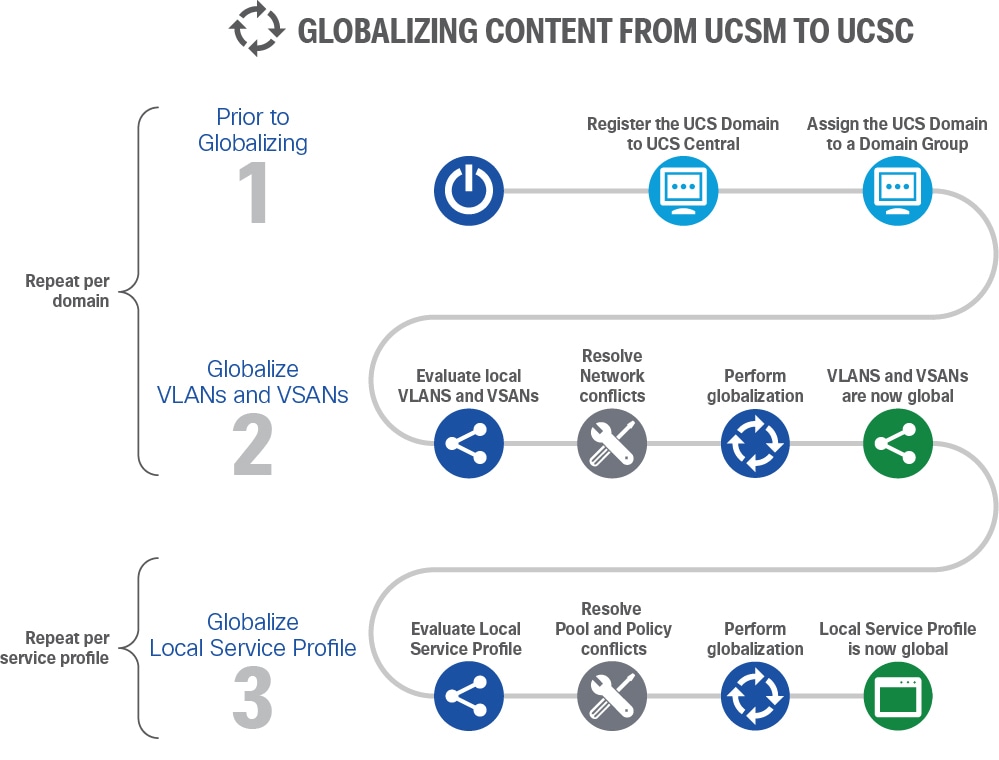
Figure 1. Globalization Workflow

Globalize Local Service Profiles View

The status of a globalization request is displayed in the Globalize Local Service Profile view. When a Local Service Profile (LSP) is evaluated prior to being globalized, this view displays the following details:

  • Globalization Status—Shows the status of an LSP in the globalization operation. Status includes Evaluating, Evaluated with Success, Evaluated with Conflicts, Globalized with Success.

  • Number of Blockers—Displays the number of issues, or blockers, that cannot be resolved through the globalization process. A description of the issue and a recommendation for resolving the issue are also displayed. A description of the blocker Issue and a Recommendation to resolve that issue are also displayed in the Globalize Local Service Profile view.

For more information about blocking issues, see Blocker Issues in Globalization.

When there are no blockers, the Globalize Local Service Profile view displays the following details about a local service profile being evaluated for globalization.

  • Pools tab—Displays the server pool or identifier conflicts, and details such as name, pool ID, status of the globalization request. For more information about pool conflicts and how to resolve them, see Resolving Pool Conflicts.

  • Policies tab—Displays the number of simple policy conflicts and details such as same policy name, or an empty policy name, or references to a global policy. For more information about policy conflicts and how to resolve them, see Resolving Policy Conflicts.

  • Advanced Policies tab—Displays the number of advanced policy conflicts. For more information about Advanced Policy Conflicts, and how to resolve a conflict, see Resolving Policy Conflicts.

Click the Pools tab to view these details about the globalization operation.

  • Name—Name of the pool associated with the LSP

  • Assigned ID—The assigned pool ID

  • Pool Type—The type of pools associated with the LSP (MAC pool, server pools, IPv4 pools)

  • Assigned Pool—The new pool of the globalized LSP.

  • Status—Result of the evaluation and if it is successful or not, and a recommendation to resolve a conflict if there is one. Cisco UCS Central also displays details of the conflict and an option to Change Resolution or Edit Resolution.


    Note


    • If the globalization request is inactive, the option to Change or Edit Resolution is not available. You can Edit Resolution if the evaluation is successful or Change Resolution if evaluation results in a conflict.

    • A service profile cannot be globalized if there is a conflict. Resolve the conflict first and then globalize the service profile.

    • After you resolve a pool or policy conflict, you can choose to Re-evaluate or Start Globalization from the Tools menu.

    • After evaluating an LSP, you cannot change any configuration settings in Cisco UCS Manager before the globalization is complete.


Click the Policies tab to view these details about the globalization operation.

  • Name—Name of the policy associated with the LSP.

  • Type—Type of the policy referenced by the LSP.

  • Assigned Policy—The new policy used for globalizing an LSP. This policy can be cloned, or referenced from another global policy.

  • Status—Result of the evaluation and if it is successful or not, and a recommendation to resolve a conflict if there is one. Cisco UCS Central also displays details of the conflict and an option to Change Resolution or Edit Resolution.

  • (Available only in the Advanced Policies tab) Referenced Pools and Policies—A table listing the pools and other policies referenced by a policy.

Globalizing Local Service Profiles

You can move or globalize Local Service Profiles (LSP) from Cisco UCS Manager into Cisco UCS Central so you can deploy and use Cisco UCS Central in a legacy (brownfield) software environment. You can globalize a standalone service profile that is bound to a service profile template, or a service profile created from updating a template, or an initial template.

Before you begin

  • Your Cisco UCS Manager domain must be registered and exist under a domain group.

  • Ensure that the service profiles are associated.

  • All VLANs and VSANs referenced by the Service Profile must be global.

  • Maintenance Policy must be user acknowledgment enabled.

Procedure


Step 1

In the Actions bar, type Globalize Local Service Profile and press Enter.

Step 2

In the Globalize Local Service Profile dialog box, in the Domain drop-down list, select the Cisco UCS Central domain you want to globalize.

The following details are displayed:

  • Profile—Displays the name of the local service profile, the organization it is present in, the status, and the Cisco UCS Domain ID it is present in.

  • Template—The name of the template based on which the service template has been created.

  • Server—The server associated with the service profile.

  • Status—The status of the profile. Also displays whether faults are cleared.

Step 3

Choose a profile.

Step 4

Click Evaluate. If you want to prioritize a globalization request over another, Delete the request from the Globalize Local Service Profile view.

The Globalize Local Service Profile view displays. This view shows the status of the globalization and the conflicts if any. For more information, see Globalize Local Service Profiles View.


Blocker Issues in Globalization

Issues that cannot be resolved through the globalization operation are considered Blocker issues. You have to resolve them either in the Cisco UCS domain (for example, by unbinding an initial Vnic template) or in Cisco UCS Central (for example, by globalizing the Cisco UCS Domain VLANs). After you resolve the blockers, you must restart the globalization operation by re-evaluating the globalization operation. The following is a list of all blockers you can encounter during the globalization process:

  • The Cisco UCS domain is in suspended state. To resolve this issue, acknowledge the Cisco UCS domain to move out of the suspended state before you attempt to globalize again.

  • A global service profile (GSP) with the same name exists in the same org. To resolve this issue, rename the local service profile (LSP) in Cisco UCS Manager before you attempt to globalize the service profile.
  • The Cisco UCS Manager domain is not under any domain group.

  • When a local service profile is not in assigned state.

  • A local service profile is not in config-applied state.

  • A local service profile is not in associated state.

  • A local service profile does not have a Maintenance policy or the Maintenance policy is not User-Acknowledged.

  • A local service profile has a pending-reboot request.

  • A local service profile references storage profile policy.

  • A local service profile has vMedia defined inline. Cisco UCS Central does not support this configuration.

  • A local service profile has inline storage profile configured. Cisco UCS Central does not support this configuration.

  • A local service profile has inline boot policy configured. Cisco UCS Central does not support this configuration.

  • A local service profile resolves to an initial vNIC template. To resolve this issue, unbind the LSP from the initial vNIC template from Cisco UCS Manager.

  • A local service profile resolves to an initial vHBA template. To resolve this issue, unbind the LSP from the initial vHBA template from Cisco UCS Manager.

  • The local service profile has a vNIC template pairing configured.

  • Cisco UCS Central does not support the Storage Connection feature for the specified Cisco UCS Manager domain software version.

  • Any ID referenced by a local service profile has already been assigned to another object. To resolve this issue, change the service profile ID, or un-assign the ID from the other object.

  • The VLAN/VSAN referenced by a local service profile is not global. To resolve this issue, try to globalize the VLAN/VSAN. If globalization fails, define a new VLAN/VSAN with the same definition in Cisco UCS Manager, and change the service profile to reference the newly created VLAN/VSAN. Globalize the new VLAN/VSAN and then globalize the service profile again.

Globalization Tasks View

The Globalization Tasks view displays a list of the globalization tasks in progress. The following details are displayed in this view:

  • Name—Name of the service profile in the globalization workflow.

  • Globalization Type—The service profile type.

  • Status—Evaluation or globalization status of the service profile. Select a service profile from this list to view details about globalization.


Note


If you want to cancel a globalization request, you can select request from the table and Delete.


Resolving Pool Conflicts

A globalization request evaluates a local service profile (LSP) to determine the impact of globalization. A pool conflict is created when either a local service profile has a local server pool assigned to it, or when the local service profile references a local domain ID pool. In such cases, one server pool/ID pool conflict is created for each ID pool reference, or when the LSP references a local domain ID pool.

To resolve a Pool conflict, click Change Resolution from Status in the Globalize Local Service Profile view and follow these steps:

Procedure


Step 1

Click Change Resolution in the Status column. The Resolve Conflict window opens.

Step 2

From the Pool drop down (for a MAC, UUID, IPv4, or server pool), select one of the following options as required:

  • Select and assign a global server pool that contains the same server that is assigned to the LSP.
  • Select and assign a non-qualified global server pool that does not include the server in the pool. This server is automatically added to the global server pool during the globalization process.
  • Reference a global ID pool that contains the ID acquired by the local service profile.
  • Reference a global non-qualified ID pool that does not contain the ID acquired by the LSP. The ID is added to the global ID pool during the globalization process.

    Note


    UUID and IQN pool IDs must have the same prefix as that in the global ID pool. A conflict results if the prefixes are different.

Step 3

Click Resolve Conflict.

When a local service profile references a global pool, no pool ID conflict is created. If the service profile uses a global pool already, the same pools are used. You can change the pool in all cases except IQN pools.


Resolving Policy Conflicts

A globalization request evaluates a local service profile (LSP) to determine if a referenced local policy can be globalized. A policy conflict results in the following scenarios:
  • If a policy has the same name as a global policy but with different definitions under the same org.

  • If a policy has a potential to affect other global service profiles after globalization.

A policy conflict could be for a Simple or an Advanced policy:

  • A simple policy does not contain any reference to a policy or ID pool.

  • An Advanced policy contains one or more references to another policy, or ID pool. For example, a vNIC template object may contain references to a MAC pool, QoS policy, Network Control policy, Pin Group policy, Stats Threshold policy, etc. To resolve an advanced policy conflict, resolve the underlying pool and policy conflicts and then resolve the top-level policy conflict.

  • IPMI, vMedia, and iSCSI Authentication profile policies require that you enter the password after globalizing the service profile or cloning a policy.

  • Any change in the iSCSI Authentication profile triggers Pending Reboots.

  • usNIC Connection Policy and Adapter Policy appear in different orgs in the hierarchy.

Procedure


Step 1

Click Change Resolution in the Status column.

Step 2

On the Resolve Conflict window, select Clone with new name or Reference existing policy. To reference an existing policy, select the appropriate policy from the Policy drop-down list.

Step 3

Click Resolve Conflict.

Step 4

To resolve Advanced Policies conflict, click on the policy Type in the Advanced Policies tab. The Referenced Pools and Policies table displays the list of policies referenced by the Advanced Policy. If there is a conflict in the referenced pool or policies, resolve them before you globalize.

Important


If you want to resolve a local advanced policy (For example, Lan Connectivity Policy) conflict by referencing an advanced global policy (For example, vNIC template) in Cisco UCS Central, you must ensure that the policy name referenced by the local advanced policy matches the policy name referenced by the global policy. You can reference an existing policy while resolving the policy conflict for the local advanced policy (Lan Connectivity Policy here, as stated in example above). While resolving conflicts, Cisco UCS Central makes sure that the original advanced policy and its referenced policies match the definitions of those global policies you choose when you resolve the conflict. If there is any difference between the policy definitions, the advanced local policy still shows conflict.


About Globalizing a VLAN/VSAN

Starting Cisco UCS Central release 2.0, you can move or globalize a VLAN/VSAN created in a Cisco UCS Domain. Globalization of VLAN/VSAN is supported on Cisco UCS Manager, release 2.2(8) and higher.When you initiate a globalization request, an evaluation of the VLANs/VSANs and the Multicast Policy is set off by default. The evaluation operation determines if the VLANs/VSANs and the Multicast policy getting globalized from a specific Cisco UCS domain are in conflict with the exsting VLANs/VSANs, and Multicast Policy in Cisco UCS Central.

If there is a conflict on the Multicast policy, the associated VLAN appears in conflict. On the contrary, if there is a conflict on the VLAN, the Multicast policy does not appear in conflict. You can choose to set a desired domain group at the domain level, or set it per VLAN/VSAN after evaluation. This desired domain group is used to globalize a VLAN/VSAN and Multicast policy if there are no conflicts on any of them.

After evaluation, you can see the list of VLANs/VSANs and the Multicast policy with their globalization status as Conflict, or No Conflict, or Not-Evaluated in the Globalization of VLANs/VSANs view. If there is a conflict, an error message with the corresponding conflicting VLAN/VSAN information along with the suggestion to resolve the conflict is displayed in the Status column. Select or change the desired domain group for the conflicting VLAN/VSAN in the Edit Resolution window. In such cases, the suggested domain name is set to that domain group and Status shows Conflict Resolved. You can either change a desired domain group and/or re-evaluate again.

During re-evaluation, Cisco UCS Central fetches the Cisco UCS VLANs/VSANs, and any VLANs/VSANs created in the Cisco UCS domain after the first evaluation are also evaluated. If Cisco UCS Central does not find a domain group to globalize a VLAN/VSAN without any impact, the suggested domain name remains empty. After the initial evaluation, you can choose to globalize a VLAN/VSAN from that domain. If you do not want to globalize a particular VLAN/VSAN, you can delete it from the list of VLANs/VSANs before proceeding to globalize others.

Cisco UCS Central does not block the globalization operation if there is a conflict. If you attempt to globalize VLANs/VSANs without resolving a conflict, only those VLANs/VSANs without a conflict will be globalized. For more information about conflicts in globalizing a VLAN/VSAN, see Conflicts in Globalizing a VLAN/VSAN.

Globalization of VLANs/VSANs in Cisco UCS Central has the following limitations:

  • A globalization operation supports only one domain in a single request.

  • A VLAN/VSAN not supported by Cisco UCS Central will not be considered for globalization. For example, Fabric specific VLANs created in Fabric A or Fabric B, common VSANs and default VLANs/VSANs are excluded from globalization operations.

  • Only such VLANs/VSANs without conflict, and with an actual or suggested domain group placement are considered for globalization.

  • During globalization, you cannot migrate a domain that has an in progress globalization, or any other domain registered with Cisco UCS Central.

Globalization of VLANs/VLANs View

Cisco UCS Central 2.0 lets you globalize VSANs, and VLANs from a domain and place them in a desired domain group location. During the evaluation step, you can view the status of the evaluation in the Configuration Settings window. The Globalization of VLANs/VSANs view displays these details: number of VLAN Conflicts, VSAN Conflicts, Policy Conflicts, the Desired Domain Group, and Permitted Org for VLANs.

The VLANS and VSANS tabs contain information gathered by the evaluation operation that may help in troubleshooting a particular conflict. The Policies tab contains information regarding the policies that are evaluated for globalization impact.

The following details are displayed for each of these tabs:

  • Name—Name of the VSAN/VLAN associated with the conflict.

  • VnetID—The Vnet ID associated with the VLAN/VSAN.

  • Only in the Policies tab ,Type—The Multicast policy associated with the VLAN/VSAN.

  • Domain Group Placement—The domain group to which the VLAN/VSAN is assigned.

  • Status—Status of the VLAN/VSAN. If there is a conflict, a description of the conflict and options to Change or Edit Resolution are also displayed.

Click Start Globalization after all conflicts are resolved.


Note


When you select a VLAN Org permit, it is set at the domain level and you cannot modify it later. To reset the Org permit, delete the globalization request and recreate another one.


Conflicts in Globalizing a VLAN/VSAN

A VLAN/VSAN in a Cisco UCS domain cannot be globalized if the evaluation reports a conflict. Before you globalize, resolve the conflicts by completing the suggested actions in the Status column in the Globalizing VLAN/VSAN view. If there are no suggested actions, the conflicting VLAN cannot be globalized. A VLAN/VSAN conflict occurs in the following cases:

  • When any configurable property of a VLAN/VSAN being globalized is different from an existing VLAN/VSAN with the same name in path in the current domain group where the domain is located.

  • While globalizing the VLAN/VSAN from a domain makes any other domain re-resolve to this VLAN/VSAN.

  • When a VLAN refers to a Multicast policy, Cisco UCS Central also evaluates the policy for conflict. If there is no conflict, the Multicast policy is globalized as well. A Multicast policy conflict occurs in the following cases:

    • When a Multicast policy is different from an existing Multicast policy with same name in path from the current domain group where the domain is located.

    • When any other VLAN in a search from the context of a domain, has the same Multicast policy name reference.

    • If a Multicast policy in Cisco UCS Central is referenced by any VLAN in Cisco UCS Central which is in turn consumed by other domains, then the Multicast policy will be in conflict.

  • A global Multicast policy is supported from Cisco UCS Manager 3.1(3) and higher. A Multicast policy is based on the context domain name of a domain. If a Multicast policy is in unresolved conflict state, all VLANs that refer to that Multicast policy will also be in conflict, and will not be globalized.


    Note


    Cisco UCS Central does not support globalization if you try to globalize VLANs or PVLANs from a domain that run versions prior to Cisco UCS Manager 3.1(3). Cisco UCS Central globalizes PVLANs from a domain only if a global PVLAN is supported on that domain. If a primary VLAN in a PVLAN is in unresolved conflict state, all the secondary VLANs will also be in conflict and will not be globalized.


  • If a Cisco UCS Manager 3.1(3) domain refers to a Multicast policy, and another domain uses the same name for a Multicat policy locally, that policy cannot be globalized.

Globalizing VSANs and VLANs

Cisco UCS Central lets you globalize VSANs and VLANs from a domain group and place them in a desired group location after they are globalized, and if there are no conflicts encountered. If there is a conflict, Cisco UCS Central automatically places them in a different domain group in the hierarchy to resolve any conflict.


Note


Cisco UCS Central can globalize only common VLANs and fabric-specific VSANs.


Before you begin

Your Cisco UCS Manager domain must be registered and exist under a domain group.

Procedure


Step 1

In the Actions bar, type Globalize VLANs and VSANs and press Enter.

Step 2

In the Globalize VLANs and VSANs window, select the Cisco UCS Central domain you want to globalize.

Step 3

In the Desired Domain Group Location drop-down list, select the domain group in the hierarchy that you want to move the VLANs and VSANs into.

Cisco UCS Central places the VLANs and VSANs at this location after they are globalized, and if there are no conflicts. To resolve any conflict, Cisco UCS Central automatically places them in the domain group of any of the parent domain groups in the direct hierarchy.

Step 4

In the Permitted Org for VLAN drop-down list, select the appropriate permission for the VLANs.

Step 5

Click Evaluate.

Step 6

If the evaluation results in no conflicts, the VLAN/VSANs get globalized successfully and the results are displayed in the Globalization of VLANs/VSANs view. For more information, see Globalization of VLANs/VLANs View.

All VSAN/VLAN conflicts have to be resolved before beginning globalization.

Step 7

After the conflicts are resolved, click Start Globalization.


Resolving VLAN Conflicts

When you find a VLAN in conflict after evaluation in a globalization operation, you must resolve the conflict before proceeding to globalize or re-evaluate. For more information on VLAN conflicts, see Conflicts in Globalizing a VLAN/VSAN.

Procedure


Step 1

From Status in the Globalization of VLANs/VSANs window, click Change Resolution.

Step 2

In the Resolve Conflict window, select the Desired Domain Group Location from the drop down list.

This domain group location is where the VLAN is placed after conflict resolution. The desired domain name must be either of a domain group or an ancestor in the same org. You can Edit your resolution after you re-evaluate. However, you cannot edit a resolution after a VLAN/VSAN is globalized..

Step 3

Click Resolve Conflict.

A conflict resolution success or error message appears.


Resolving VSAN Conflicts

When you find a VSAN in conflict after evaluation in a globalization operation, resolve the conflict before proceeding to globalize or reevaluate. For more information on VSAN conflicts, see Conflicts in Globalizing a VLAN/VSAN.

Procedure


Step 1

From Status in the Globalization of VLANs/VSANs window, click Change Resolution.

Step 2

In the Resolve Conflict window, select the Desired Domain Group Location from the drop-down list.

This domain group location is where you want to place the VSAN after conflict resolution. The desired domain name must be either of a domain group or an ancestor in the same org. You can Edit your resolution after you reevaluate. However, you cannot edit a resolution after a VLAN/VSAN is globalized.

Step 3

Click Resolve Conflict.

A conflict resolution success or error message appears.


Resolving Multicast Policy Conflicts

When you find a Multicast policy in conflict after evaluation in a globalization operation, resolve the conflict before proceeding to globalize or reevaluate. For more information on Multicast policy conflicts, see Conflicts in Globalizing a VLAN/VSAN.

Procedure


Step 1

From Status in the Globalization of VLANs/VSANs window, click Change Resolution.

Step 2

In the Resolve Conflict window, select the Desired Domain Group Location from the drop-down list.

This domain group location is where you want to place the Multicast policy after conflict resolution. The desired domain name must be either of a domain group or an ancestor in the same org. You can Edit your resolution after you reevaluate. However, you cannot edit a resolution after a VLAN/VSAN is globalized.

Step 3

Click Resolve Conflict.

A conflict resolution success or error message appears.