-
null
- Information About VRRP
- Information About VRRPv3 and VRRS
- High Availability
- Virtualization Support
- Licensing Requirements for VRRP
- Guidelines and Limitations for VRRP
- Guidelines and Limitations for VRRPv3
- Default Settings for VRRP Parameters
- Default Settings for VRRPv3 Parameters
- Configuring VRRP
- Configuring VRRPv3
- Verifying the VRRP Configuration
- Verifying the VRRPv3 Configuration
- Monitoring and Clearing VRRP Statistics
- Monitoring and Clearing VRRPv3 Statistics
- Configuration Examples for VRRP
- Configuration Examples for VRRPv3
- Additional References
Configuring VRRP
This chapter describes how to configure the Virtual Router Redundancy Protocol (VRRP) on the Cisco NX-OS device.
This chapter includes the following sections:
- Information About VRRP
- Information About VRRPv3 and VRRS
- High Availability
- Virtualization Support
- Licensing Requirements for VRRP
- Guidelines and Limitations for VRRP
- Guidelines and Limitations for VRRPv3
- Default Settings for VRRP Parameters
- Default Settings for VRRPv3 Parameters
- Configuring VRRP
- Configuring VRRP Object Tracking
- Verifying the VRRP Configuration
- Verifying the VRRPv3 Configuration
- Monitoring and Clearing VRRP Statistics
- Monitoring and Clearing VRRPv3 Statistics
- Configuration Examples for VRRP
- Configuration Examples for VRRPv3
- Additional References
Information About VRRP
VRRP allows for transparent failover at the first-hop IP router by configuring a group of routers to share a virtual IP address. VRRP selects a master router in that group to handle all packets for the virtual IP address. The remaining routers are in standby and take over if the master router fails.
This section includes the following topics:
- VRRP Operation
- VRRP Benefits
- Multiple VRRP Groups
- VRRP Router Priority and Preemption
- vPC and VRRP
- VRRP Advertisements
- VRRP Authentication
- VRRP Tracking
- BFD
VRRP Operation
A LAN client can determine which router should be the first hop to a particular remote destination by using a dynamic process or static configuration. Examples of dynamic router discovery are as follows:
- Proxy ARP—The client uses the Address Resolution Protocol (ARP) to get the destination it wants to reach, and a router responds to the ARP request with its own MAC address.
- Routing protocol—The client listens to dynamic routing protocol updates (for example, from Routing Information Protocol [RIP]) and forms its own routing table.
- ICMP Router Discovery Protocol (IRDP) client—The client runs an Internet Control Message Protocol (ICMP) router discovery client.
The disadvantage to dynamic discovery protocols is that they incur some configuration and processing overhead on the LAN client. Also, if a router fails, the process of switching to another router can be slow.
An alternative to dynamic discovery protocols is to statically configure a default router on the client. Although, this approach simplifies client configuration and processing, it creates a single point of failure. If the default gateway fails, the LAN client is limited to communicating only on the local IP network segment and is cut off from the rest of the network.
VRRP can solve the static configuration problem by enabling a group of routers (a VRRP group) to share a single virtual IP address. You can then configure the LAN clients with the virtual IP address as their default gateway.
Figure 18-1 shows a basic VLAN topology. In this example, Routers A, B, and C form a VRRP group. The IP address of the group is the same address that was configured for the Ethernet interface of Router A (10.0.0.1).
Figure 18-1 Basic VRRP Topology
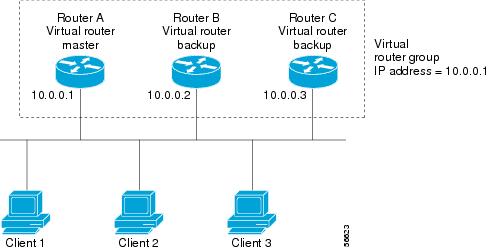
Because the virtual IP address uses the IP address of the physical Ethernet interface of Router A, Router A is the master (also known as the IP address owner). As the master, Router A owns the virtual IP address of the VRRP group and forwards packets sent to this IP address. Clients 1 through 3 are configured with the default gateway IP address of 10.0.0.1.
Routers B and C function as backups. If the master fails, the backup router with the highest priority becomes the master and takes over the virtual IP address to provide uninterrupted service for the LAN hosts. When router A recovers, it becomes the master again. For more information, see the “VRRP Router Priority and Preemption” section.

Note Packets received on a routed port destined for the VRRP virtual IP address terminate on the local router, regardless of whether that router is the master VRRP router or a backup VRRP router. These packets include ping and Telnet traffic. Packets received on a Layer 2 (VLAN) interface destined for the VRRP virtual IP address terminate on the master router.
VRRP Benefits
The benefits of VRRP are as follows:
- Redundancy—Enables you to configure multiple routers as the default gateway router, which reduces the possibility of a single point of failure in a network.
- Load sharing—Allows traffic to and from LAN clients to be shared by multiple routers. The traffic load is shared more equitably among available routers.
- Multiple VRRP groups—Supports multiple VRRP groups on a router physical interface if the platform supports multiple MAC addresses. Multiple VRRP groups enable you to implement redundancy and load sharing in your LAN topology.
- Multiple IP addresses—Allows you to manage multiple IP addresses, including secondary IP addresses. If you have multiple subnets configured on an Ethernet interface, you can configure VRRP on each subnet.
- Preemption—Enables you to preempt a backup router that has taken over for a failing master with a higher priority backup router that has become available.
- Advertisement protocol—Uses a dedicated Internet Assigned Numbers Authority (IANA) standard multicast address (224.0.0.18) for VRRP advertisements. This addressing scheme minimizes the number of routers that must service the multicasts and allows test equipment to accurately identify VRRP packets on a segment. IANA has assigned the IP protocol number 112 to VRRP.
- VRRP tracking—Ensures that the best VRRP router is the master for the group by altering VRRP priorities based on interface states.
Multiple VRRP Groups
You can configure multiple VRRP groups on a physical interface. For the number of supported VRRP groups, see the Cisco Nexus 9000 Series NX-OS Verified Scalability Guide.
The number of VRRP groups that a router interface can support depends on the following factors:
In a topology where multiple VRRP groups are configured on a router interface, the interface can act as a master for one VRRP group and as a backup for one or more other VRRP groups.
Figure 18-2 shows a LAN topology in which VRRP is configured so that Routers A and B share the traffic to and from clients 1 through 4. Routers A and B act as backups to each other if either router fails.
Figure 18-2 Load Sharing and Redundancy VRRP Topology
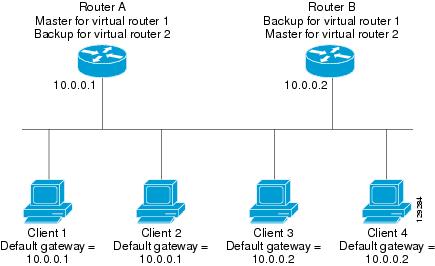
This topology contains two virtual IP addresses for two VRRP groups that overlap. For VRRP group 1, Router A is the owner of IP address 10.0.0.1 and is the master. Router B is the backup to Router A. Clients 1 and 2 are configured with the default gateway IP address of 10.0.0.1.
For VRRP group 2, Router B is the owner of IP address 10.0.0.2 and is the master. Router A is the backup to router B. Clients 3 and 4 are configured with the default gateway IP address of 10.0.0.2.
VRRP Router Priority and Preemption
An important aspect of the VRRP redundancy scheme is the VRRP router priority because the priority determines the role that each VRRP router plays and what happens if the master router fails.
If a VRRP router owns the virtual IP address and the IP address of the physical interface, this router functions as the master. The priority of the master is 255.
The priority also determines if a VRRP router functions as a backup router and the order of ascendancy to becoming a master if the master fails.
For example, if Router A, the master in a LAN topology, fails, VRRP must determine if backups B or C should take over. If you configure Router B with priority 101 and Router C with the default priority of 100, VRRP selects Router B to become the master because it has the higher priority. If you configure Routers B and C with the default priority of 100, VRRP selects the backup with the higher IP address to become the master.
VRRP uses preemption to determine what happens after a VRRP backup router becomes the master. With preemption enabled by default, VRRP switches to a backup if that backup comes online with a priority higher than the new master. For example, if Router A is the master and fails, VRRP selects Router B (next in order of priority). If Router C comes online with a higher priority than Router B, VRRP selects Router C as the new master, even though Router B has not failed.
If you disable preemption, VRRP switches only if the original master recovers or the new master fails.
vPC and VRRP
VRRP interoperates with virtual port channels (vPCs). vPCs allow links that are physically connected to two different Cisco Nexus 9000 Series devices to appear as a single port channel by a third device. See the Cisco Nexus 9000 Series NX-OS Layer 2 Switching Configuration Guide for more information on vPCs.
vPC forwards traffic through both the master VRRP router as well as the backup VRRP router. See the “Configuring VRRP Priority” section.
Note You should configure VRRP on the primary vPC peer device as active and VRRP on the vPC secondary device as standby.
VRRP Advertisements
The VRRP master sends VRRP advertisements to other VRRP routers in the same group. The advertisements communicate the priority and state of the master. Cisco NX-OS encapsulates the VRRP advertisements in IP packets and sends them to the IP multicast address assigned to the VRRP group. Cisco NX-OS sends the advertisements once every second by default, but you can configure a different advertisement interval.
VRRP Authentication
VRRP Tracking
VRRP supports the following options for tracking:
- Native interface tracking— Tracks the state of an interface and uses that state to determine the priority of the VRRP router in a VRRP group. The tracked state is down if the interface is down or if the interface does not have a primary IP address.
- Object tracking—Tracks the state of a configured object and uses that state to determine the priority of the VRRP router in a VRRP group. See Chapter 19, “Configuring Object Tracking” for more information on object tracking.
If the tracked state (interface or object) goes down, VRRP updates the priority based on what you configure the new priority to be for the tracked state. When the tracked state comes up, VRRP restores the original priority for the virtual router group.
For example, you might want to lower the priority of a VRRP group member if its uplink to the network goes down so another group member can take over as master for the VRRP group. See the “Configuring VRRP Interface State Tracking” section for more information.
Note VRRP does not support Layer 2 interface tracking.
BFD
This feature supports bidirectional forwarding detection (BFD) for IPv4. BFD is a detection protocol that provides fast-forwarding and path-failure detection times. BFD provides subsecond failure detection between two adjacent devices and can be less CPU-intensive than protocol hello messages because some of the BFD load can be distributed onto the data plane on supported modules. See the Cisco Nexus 9000 Series NX-OS Interfaces Configuration Guide for more information.
Information About VRRPv3 and VRRS
VRRP version 3 (VRRPv3) enables a group of switches to form a single virtual switch in order to provide redundancy and reduce the possibility of a single point of failure in a network. The LAN clients can then be configured with the virtual switch as their default gateway. The virtual switch, representing a group of switches, is also known as a VRRPv3 group.
Virtual router redundancy service (VRRS) improves the scalability of VRRPv3 by providing a stateless redundancy service to VRRS pathways and VRRS clients by monitoring VRRPv3. VRRPv3 acts as a VRRS server that pushes VRRPv3 status information (such as current and previous redundancy states, active and inactive Layer 2 and Layer 3 addresses, and so on) to VRRS pathways and all registered VRRS clients.
VRRS clients are other Cisco processes or applications that use VRRPv3 to provide or withhold a service or resource dependent upon the state of the group. VRRS pathways are special VRRS clients that use the VRRS database information to provide scaled first-hop gateway redundancy across scaled interface environments.
VRRS by itself is limited to maintaining its own state. Linking a VRRS client to a VRRPv3 group provides a mechanism that allows VRRS to provide a service to client applications so that they can implement stateless or stateful failovers. A stateful failover requires communication with a nominated backup before the failure so that operational data is not lost when the failover occurs.
VRRS pathways operate in a similar way to clients but are integrated with the VRRS architecture. They provide a means to scale first-hop gateway redundancy by allowing you to configure a virtual address across hundreds of interfaces. The virtual gateway state of a VRRS pathway follows the state of a First-Hop Redundancy Protocol (FHRP) VRRS server.
VRRPv3 notifies VRRS of its current state (master, backup, or nonoperational initial state [INIT]) and passes that information to pathways or clients. The VRRPv3 group name activates VRRS and associates the VRRPv3 group with any clients or pathways that are configured as part of VRRS with the same name.
Pathways and clients act on the VRRPv3 server state. When a VRRPv3 group changes states, VRRS pathways and clients alter their behavior (performing tasks such as shutting down interfaces or appending accounting logs) depending on the state received from VRRS.
VRRPv3 Benefits
VRRPv3 Object Tracking
Beginning with Cisco NX-OS Release 9.2(2), VRRPv3 supports object tracking, which tracks the state of a configured object and uses that state to determine the priority of the VRRPv3 router in a VRRPv3 group. See Chapter 19, “Configuring Object Tracking” for more information on object tracking.
If the tracked object goes down, VRRPv3 decrements the priority by the configured value. The default value is 10. If the same tracked object goes down again, no action is taken. When the tracked object comes up, VRRPv3 increments the priority by the configured value.
Note VRRPv3 does not support Layer 2 interface tracking or native interface tracking.
High Availability
VRRP supports high availability through stateful restarts and stateful switchovers. A stateful restart occurs when the VRRP process fails and is restarted. A stateful switchover occurs when the active supervisor switches to the standby supervisor. Cisco NX-OS applies the run-time configuration after the switchover.
Virtualization Support
VRRP supports virtual routing and forwarding (VRF) instances.
Licensing Requirements for VRRP
The following table shows the licensing requirements for this feature:
Guidelines and Limitations for VRRP
VRRP has the following configuration guidelines and limitations:
- You cannot configure VRRP on the management interface.
- When VRRP is enabled, you should replicate the VRRP configuration across devices in your network.
- We recommend that you do not configure more than one first-hop redundancy protocol on the same interface.
- You must configure an IP address for the interface that you configure VRRP on and enable that interface before VRRP becomes active.
- Cisco NX-OS removes all Layer 3 configurations on an interface when you change the interface VRF membership, port channel membership, or when you change the port mode to Layer 2.
- When you configure VRRP to track a Layer 2 interface, you must shut down the Layer 2 interface and reenable the interface to update the VRRP priority to reflect the state of the Layer 2 interface.
- BFD for VRRP can only be configured between two routers.
Guidelines and Limitations for VRRPv3
VRRPv3 has the following configuration guidelines and limitations:
- VRRPv3 is not intended as a replacement for existing dynamic protocols. VRRPv3 is designed for use over multi-access, multicast, or broadcast-capable Ethernet LANs.
- VRRPv3 is supported only on Ethernet and Fast Ethernet interfaces, bridge group virtual interfaces (BVIs), Gigabit Ethernet interfaces, and VLANs.
- When VRRPv3 is in use, VRRPv2 is unavailable. To configure VRRPv3, you must disable any VRRPv2configuration.
- VRRS is currently available only for use with VRRPv3.
- Use VRRPv3 millisecond timers only where absolutely necessary and with careful consideration andtesting. Millisecond values work only under favorable circumstances. The millisecond timer values are compatible with third-party vendors as long as they also support VRRPv3.
- Full network redundancy can be achieved only if VRRPv3 operates over the same network path as the VRRS pathway redundant interfaces. For full redundancy, the following restrictions apply:
– VRRS pathways should use the same physical interface as the parent VRRPv3 group or be configured on a subinterface with the same physical interface as the parent VRRPv3 group.
– VRRS pathways can be configured on switch virtual interfaces (SVIs) only if the associated VLAN shares the same trunk as the VLAN on which the parent VRRPv3 group is configured.
- Unlike VRRPv2, VRRPv3 does not support bidirectional forwarding for faster failure detection.
- Unlike VRRPv2, VRRPv3 does not support native interface tracking.
- You must create the object before configuring object tracking.
- The following guidelines and limitations apply to VRRPv3 object tracking:
– Beginning with Cisco NX-OS Release 9.2(2), all Cisco Nexus 9000 Series switches and line cards support VRRPv3 object tracking.
– We recommend that you do not use VRRPv3 object tracking in a vPC domain.
Default Settings for VRRP Parameters
Table 18-1 lists the default settings for VRRP parameters.
|
|
|
|---|---|
Default Settings for VRRPv3 Parameters
Table 18-1 lists the default settings for VRRPv3 parameters.
|
|
|
|---|---|
Configuring VRRP
This section includes the following topics:
- Enabling the VRRP Feature
- Configuring VRRP Groups
- Configuring VRRP Priority
- Configuring VRRP Authentication
- Configuring Time Intervals for Advertisement Packets
- Disabling Preemption
- Configuring VRRP Interface State Tracking
- Configuring VRRP Object Tracking
Note If you are familiar with the Cisco IOS CLI, be aware that the Cisco NX-OS commands for this feature might differ from the Cisco IOS commands that you would use.
Enabling the VRRP Feature
You must globally enable the VRRP feature before you can configure and enable any VRRP groups.
To enable the VRRP feature, use the following command in global configuration mode:
|
|
|
|---|---|
To disable the VRRP feature and remove all associated configurations, use the following command in global configuration mode:
|
|
|
|---|---|
Configuring VRRP Groups
You can create a VRRP group, assign the virtual IP address, and enable the group.
You can configure one virtual IPv4 address for a VRRP group. By default, the master VRRP router drops the packets addressed directly to the virtual IP address because the VRRP master is only intended as a next-hop router to forward packets. Some applications require that Cisco NX-OS accept packets addressed to the virtual router IP. Use the secondary option to the virtual IP address to accept these packets when the local router is the VRRP master.
Once you have configured the VRRP group, you must explicitly enable the group before it becomes active.
BEFORE YOU BEGIN
Ensure that you configure an IP address on the interface (see the “Configuring IPv4 Addressing” section).
SUMMARY STEPS
2. interface interface-type slot/port
DETAILED STEPS
Configuring VRRP Priority
The valid priority range for a virtual router is from 1 to 254 (1 is the lowest priority and 254 is the highest). The default priority value for backups is 100. For devices whose interface IP address is the same as the primary virtual IP address (the master), the default value is 255.
If you configure VRRP on a vPC-enabled interface, you can optionally configure the upper and lower threshold values to control when to fail over to the vPC trunk. If the backup router priority falls below the lower threshold, VRRP sends all backup router traffic across the vPC trunk to forward through the master VRRP router. VRRP maintains this scenario until the backup VRRP router priority increases above the upper threshold.
BEFORE YOU BEGIN
You must enable VRRP (see the “Configuring VRRP” section).
Ensure that you have configured an IP address on the interface (see the “Configuring IPv4 Addressing” section).
SUMMARY STEPS
2. interface interface-type slot/port
5. priority leve l [ forwarding-threshold lower lower-value upper upper-value ]
DETAILED STEPS
Configuring VRRP Authentication
You can configure simple text authentication for a VRRP group.
BEFORE YOU BEGIN
Ensure that the authentication configuration is identical for all VRRP devices in the network.
Ensure that you have enabled VRRP (see the “Configuring VRRP” section).
Ensure that you have configured an IP address on the interface (see the “Configuring IPv4 Addressing” section).
SUMMARY STEPS
2. interface interface-type slot/port
DETAILED STEPS
Configuring Time Intervals for Advertisement Packets
You can configure the time intervals for advertisement packets.
BEFORE YOU BEGIN
You must enable VRRP (see the “Configuring VRRP” section).
Ensure that you have configured an IP address on the interface (see the “Configuring IPv4 Addressing” section).
SUMMARY STEPS
2. interface interface-type slot/port
DETAILED STEPS
|
|
|
|
|---|---|---|
interface interface-type slot/port |
||
Sets the interval time in seconds between sending advertisement frames. The range is from 1 to 255. The default is 1 second. |
||
Disabling Preemption
You can disable preemption for a VRRP group member. If you disable preemption, a higher-priority backup router does not take over for a lower-priority master router. Preemption is enabled by default.
BEFORE YOU BEGIN
You must enable VRRP (see the “Configuring VRRP” section).
Ensure that you have configured an IP address on the interface (see the “Configuring IPv4 Addressing” section).
SUMMARY STEPS
DETAILED STEPS
|
|
|
|
|---|---|---|
interface interface-type slot/port |
||
Disables the preempt option and allows the master to remain when a higher-priority backup appears. |
||
Configuring VRRP Interface State Tracking
Interface state tracking changes the priority of the virtual router based on the state of another interface in the device. When the tracked interface goes down or the IP address is removed, Cisco NX-OS assigns the tracking priority value to the virtual router. When the tracked interface comes up and an IP address is configured on this interface, Cisco NX-OS restores the configured priority to the virtual router (see the“Configuring VRRP Priority” section).
Note For interface state tracking to function, you must enable preemption on the interface.
Note VRRP does not support Layer 2 interface tracking.
BEFORE YOU BEGIN
You must enable VRRP (see the “Configuring VRRP” section).
Ensure that you have configured an IP address on the interface (see the “Configuring IPv4 Addressing” section).
Ensure that you have enabled the virtual router (see the “Configuring VRRP Groups” section).
SUMMARY STEPS
2. interface interface-type slot/port
DETAILED STEPS
Configuring VRRP Object Tracking
BEFORE YOU BEGIN
Make sure that VRRP is enabled.
Configure object tracking using the commands in “Configuring Object Tracking” section.
SUMMARY STEPS
2. interface interface-type number
3. vrrp number address-family ipv4
4. track object-number decrement number
DETAILED STEPS
Configuring VRRPv3
This section includes the following topics:
- Enabling VRRPv3 and VRRS
- Creating VRRPv3 Groups
- Configuring VRRPv3 Control Groups
- Configuring VRRPv3 Object Tracking
- Configuring VRRS Pathways
Enabling VRRPv3 and VRRS
You must globally enable VRRPv3 before you can configure and enable any VRRPv3 groups.
SUMMARY STEPS
DETAILED STEPS
Creating VRRPv3 Groups
You can create a VRRPv3 group, assign the virtual IP address, and enable the group.
BEFORE YOU BEGIN
Make sure that VRRPv3 is enabled.
Make sure that you have configured an IP address on the interface.
SUMMARY STEPS
2. interface ethernet slot/port
3. vrrpv3 number address-family [ipv4 | ipv6]
4. (Optional) address ip-address [primary | secondary]
5. (Optional) description description
7. (Optional) preempt [delay minimum seconds]
9. (Optional) timers advertise interval
11. (Optional) vrrs leader vrrs-leader-name
13. (Optional) show fhrp [interface-type interface-number] [verbose]
DETAILED STEPS
Configuring VRRPv3 Control Groups
BEFORE YOU BEGIN
Make sure that VRRPv3 is enabled.
Make sure that you have configured an IP address on the interface.
SUMMARY STEPS
2. interface ethernet slot/port
3. ip address ip-address mask [secondary]
4. vrrpv3 number address-family [ipv4 | ipv6]
5. (Optional) address ip-address [primary | secondary]
7. (Optional) show fhrp [interface-type interface-number] [verbose]
DETAILED STEPS
Configuring VRRPv3 Object Tracking
BEFORE YOU BEGIN
Make sure that VRRPv3 is enabled.
Configure object tracking using the commands in “Configuring Object Tracking” section.
SUMMARY STEPS
2. interface interface-type number
3. vrrpv3 number address-family [ipv4 | ipv6]
4. object-track object-number decrement number
DETAILED STEPS
Configuring VRRS Pathways
You can configure a Virtual Router Redundancy Service (VRRS) pathway. In scaled environments, VRRS pathways should be used in combination with VRRPv3 control groups.
BEFORE YOU BEGIN
Make sure that VRRPv3 is enabled.
Make sure that you have configured an IP address on the interface.
SUMMARY STEPS
2. interface ethernet slot/port
3. ip address ip-address mask [secondary]
5. mac address {mac-address | inherit}
7. (Optional) show vrrs pathway interface-type interface-number
DETAILED STEPS
Verifying the VRRP Configuration
To display VRRP configuration information, perform one of the following tasks:
|
|
|
|---|---|
Verifying the VRRPv3 Configuration
To display VRRPv3 configuration information, perform one of the following tasks:
|
|
|
|---|---|
Displays the VRRPv3 configuration information for a specific interface. |
|
Displays the VRRS pathway information for different pathway states, such as active, inactive, and not ready. |
|
Monitoring and Clearing VRRP Statistics
To display VRRP statistics, use the following commands:
|
|
|
|---|---|
Use the clear vrrp statistics command to clear all the VRRP statistics for all interfaces on the device.
Monitoring and Clearing VRRPv3 Statistics
To display VRRPv3 statistics, use the following commands:
|
|
|
|---|---|
Use the clear vrrpv3 statistics command to clear the VRRPv3 statistics for all interfaces on the device.
Configuration Examples for VRRP
In this example, Router A and Router B each belong to three VRRP groups. In the configuration, each group has the following properties:
– Virtual IP address is 10.1.0.10.
– Router A will become the master for this group with priority 120.
– Advertising interval is 3 seconds.
– Router B will become the master for this group with priority 200.
– Advertising interval is 30 seconds.
– Router A will become the master for this group first because it has a higher IP address (10.1.0.2).
– Advertising interval is the default of 1 second.
Configuration Examples for VRRPv3
This example shows how to enable VRRPv3 and create and customize a VRRPv3 group:
This example shows how to configure a VRRPv3 control group:
This example shows how to configure object tracking for VRRPv3:
This example shows how to configure VRRS pathways:
Additional References
Related Documents
|
|
|
|---|---|
Cisco Nexus 9000 Series NX-OS High Availability and Redundancy Guide |
 Feedback