- Preface
- New and Changed Information
- Overview
- Platform Support for Label Switching Features
- Configuring Static MPLS
- Configuring MPLS Label Imposition
- Configuring MPLS Layer 3 VPNs
- Configuring MPLS Layer 3 VPN Label Allocation
- Configuring MPLS Layer 3 VPN Load Balancing
- Configuring Segment Routing
- Configuring MPLS QoS
- Configuring MPLS Segment Routing OAM
- InterAS Option B
- IETF RFCs Supported for Label Switching
- Index
- About Segment Routing
- Licensing Requirements for Segment Routing
- Guidelines and Limitations for Segment Routing
- Overview of BGP Egress Peer Engineering With Segment Routing
- Guidelines and Limitations for BGP Egress Peer Engineering
- Configuring Segment Routing
- Configuring Segment Routing Using Segment Routing Application Module
- Enabling MPLS Segment Routing
- Enabling MPLS on an Interface
- Configuring MPLS Label Allocation
- Configuring the Segment Routing Global Block
- Configuring the Label Index
- Configuring Neighbor Egress Peer Engineering Using BGP
- Configuration Example for Egress Peer Engineering
- Configuring the BGP Link State Address Family
- Configuring Layer 3 EVPN over Segment Routing MPLS
- Configuring BGP EVPN and Label Allocation Mode
- Configuring Segment Routing with IS-IS Protocol
- Verifying the Segment Routing Configuration
- Configuration Examples for Segment Routing
- Additional References
Configuring Segment
Routing
This chapter contains information on how to configure segment routing.
- About Segment Routing
- Licensing Requirements for Segment Routing
- Guidelines and Limitations for Segment Routing
- Overview of BGP Egress Peer Engineering With Segment Routing
- Guidelines and Limitations for BGP Egress Peer Engineering
- Configuring Segment Routing
- Configuring Layer 3 EVPN over Segment Routing MPLS
- Configuring BGP EVPN and Label Allocation Mode
- Configuring Segment Routing with IS-IS Protocol
- Verifying the Segment Routing Configuration
- Configuration Examples for Segment Routing
- Additional References
About Segment Routing
Segment routing is a technique by which the path followed by a packet is encoded in the packet itself, similar to source routing. A node steers a packet through a controlled set of instructions, called segments, by prepending the packet with a segment routing header. Each segment is identified by a segment ID (SID) consisting of a flat unsigned 32-bit integer.
Border Gateway Protocol (BGP) segments, a subclass of segments, identify a BGP forwarding instruction. Prefix segments steer packets along the shortest path to the destination, using all available equal-cost multi-path (ECMP) paths.
The segment routing architecture is applied directly to the MPLS data plane.
- BGP Prefix SID
- Segment Routing Global Block
- High Availability for Segment Routing
- BGP Prefix SID Deployment Example
BGP Prefix SID
In order to support segment routing, BGP requires the ability to advertise a segment identifier (SID) for a BGP prefix. A BGP prefix SID is always global within the segment routing BGP domain and identifies an instruction to forward the packet over the ECMP-aware best path computed by BGP to the related prefix. The BGP prefix SID identifies the BGP prefix segment.
Segment Routing Global Block
The segment routing global block (SRGB) is the range of local labels reserved for MPLS segment routing. The default label range is from 16000 to 23999.
SRGB is the local property of a segment routing node. Each node can be configured with a different SRGB value, and hence the absolute SID value associated to a BGP prefix segment can change from node to node.
The SRGB must be a proper subset of the dynamic label range and must not overlap the optional MPLS static label range. If dynamic labels in the configured or defaulted SRGB range already have been allocated, the configuration is accepted, and the existing dynamic labels that fall in the SRGB range will remain allocated to the original client. If the BGP router attempts to allocate one of these labels, the SRGB mapping fails, and the BGP router reverts to dynamic label allocation. A change to the SRGB range results in the clients deallocating their labels independent of whether the new range can be allocated.
High Availability for Segment Routing
In-service software upgrades (ISSUs) are minimally supported with BGP graceful restart. All states (including the segment routing state) must be relearned from the BGP router's peers. During the graceful restart period, the previously learned route and label state are retained.
BGP Prefix SID Deployment Example
In the simple example below, all three routers are running iBGP and advertising Network Layer Reachability Information (NRLI) to one another. The routers are also advertising their loopback interface as the next hop, which provides the ECMP between routers 2.2.2.2 and 3.3.3.3.
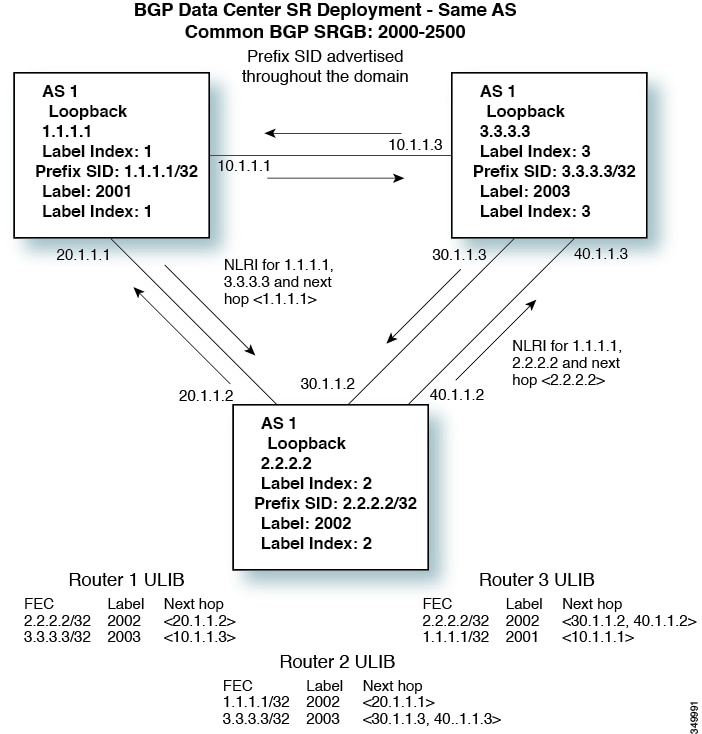
Licensing Requirements for Segment Routing
The following table shows the licensing requirements for this feature:
|
Layer 3 EVPN over segment routing MPLS requires a VPN Fabric license. Other supported segment routing features do not require a license. Any feature not included in a license package is bundled with the nx-os image and is provided at no extra charge to you. Border Gateway Protocol (BGP) requires an Enterprise Services license. For a complete explanation of the Cisco NX-OS licensing scheme and how to obtain and apply licenses, see the Cisco NX-OS Licensing Guide. |
Guidelines and Limitations for Segment Routing
Segment routing has the following guidelines and limitations:
-
Beginning with Cisco NX-OS Release 7.0(3)I7(3), Segment Routing Application (SR-APP) module is used to configure the segment routing functionality. Segment Routing Application (SR-APP) is a separate internal process that handles all the CLIs related to segment routing. It is responsible for reserving the SRGB range and for notifying the clients about it. It is also responsible for maintaining the prefix to SID mappings. See Configuring Segment Routing Using Segment Routing Application Module for more information.
-
Beginning with the Cisco NX-OS Release 7.0(3)I7(1), support for the Cisco Nexus 9300-FX platform switches has been added.
-
Beginning with Cisco NX-OS Release 7.0(3)I7(3), Segment Routing is also supported on Cisco Nexus N9K-X9736C-FX line cards.
-
Beginning with Cisco NX-OS Release 7.0(3)I5(1), BGP allocates a SRGB label for iBGP route-reflector clients only when next-hop-self is in effect (for example, the prefix is advertised with the next hop being one of the local IP/IPv6 addresses on RR). When you have configured next-hop-self on a RR, the next hop is changed for the routes that are being affected (subject to route-map filtering).
-
A non-disruptive ISSU is not supported with MPLS features for Cisco Nexus 9300-EX and 9300-FX platform switches.
-
Static MPLS, MPLS segment routing, and MPLS stripping cannot be enabled at the same time.
-
Because static MPLS, MPLS segment routing, and MPLS stripping are mutually exclusive, the only segment routing underlay for multi-hop BGP is single-hop BGP. iBGP multi-hop topologies with eBGP running as an overlay are not supported.
-
MPLS pop followed by a forward to a specific interface is not supported. The penultimate hop pop (PHP) is avoided by installing the Explicit NULL label as the out-label in the label FIB (LFIB) even when the control plane installs an IPv4 Implicit NULL label.
-
BGP labeled unicast and BGP segment routing are not supported for IPv6 prefixes.
-
BGP labeled unicast and BGP segment routing are not supported over tunnel interfaces (including GRE and VXLAN) or with vPC access interfaces.
-
MTU path discovery (RFC 2923) is not supported over MPLS label switched paths (LSPs) or segment routed paths.
-
For the Cisco Nexus 9200 Series switches, adjacency statistics are not maintained for Layer 3 or MPLS adjacencies.
-
For the Cisco Nexus 9500 Series switches, MPLS LSPs and segment routed paths are not supported on subinterfaces (either port channels or normal Layer 3 ports).
-
For the Cisco Nexus 9500 Series switches, segment routing is supported only in the default hierarchical routing mode.
-
The BGP configuration commands neighbor-down fib-accelerate and suppress-fib-pending are not supported for MPLS prefixes.
-
The uniform model as defined in RFC 2973 and RFC 3270 is not supported. Consequently, the IP DSCP bits are not copied into the imposed MPLS header.
-
Reconfiguration of the segment routing global block (SRGB) results in an automatic restart of the BGP process to update the existing URIB and ULIB entries. Traffic loss will occur for a few seconds, so you should not reconfigure the SRGB in production.
-
If the segment routing global block (SRGB) is set to a range but the route-map label-index delta value is outside of the configured range, the allocated label is dynamically generated. For example, if the SRGB is set to a range of 16000-23999 but a route-map label-index is set to 9000, the label is dynamically allocated.
-
For network scalability, Cisco recommends using a hierarchical routing design with multi-hop BGP for advertising the attached prefixes from a top-of-rack (TOR) or border leaf switch.
-
BGP sessions are not supported over MPLS LSPs or segment routed paths.
-
The Layer 3 forwarding consistency checker is not supported for MPLS routes.
-
Starting with Cisco NX-OS Release 7.0(3)I7(1), Segment routing and SR-EVPN is supported on Cisco Nexus C31108PC-V, Cisco Nexus C31108TC-V and Cisco Nexus C3132Q-V switches.
Overview of BGP Egress Peer Engineering With Segment Routing
Cisco Nexus 9000 Series switches are often deployed in massive scale data centers (MSDCs). In such environments, there is a requirement to support BGP Egress Peer Engineering (EPE) with Segment Routing (SR).
Segment Routing (SR) leverages source routing. A node steers a packet through a controlled set of instructions, known as segments, by prepending the packet with an SR header. A segment can represent any topological or service-based instruction. SR allows steering a flow through any topological path or any service chain while maintaining per-flow state only at the ingress node of the SR domain. For this feature, the Segment Routing architecture is applied directly to the MPLS data plane.
In order to support Segment Routing, BGP requires the ability to advertise a Segment Identifier (SID) for a BGP prefix. A BGP prefix is always global within the SR or BGP domain and it identifies an instruction to forward the packet over the ECMP-aware best-path that is computed by BGP to the related prefix. The BGP prefix is the identifier of the BGP prefix segment.
The SR-based Egress Peer Engineering (EPE) solution allows a centralized (SDN) controller to program any egress peer policy at ingress border routers or at hosts within the domain.
In the following example, all three routers run iBGP and they advertise NRLI to one another. The routers also advertise their loopback as the next-hop and it is recursively resolved. This provides an ECMP between the routers as displayed in the illustration.
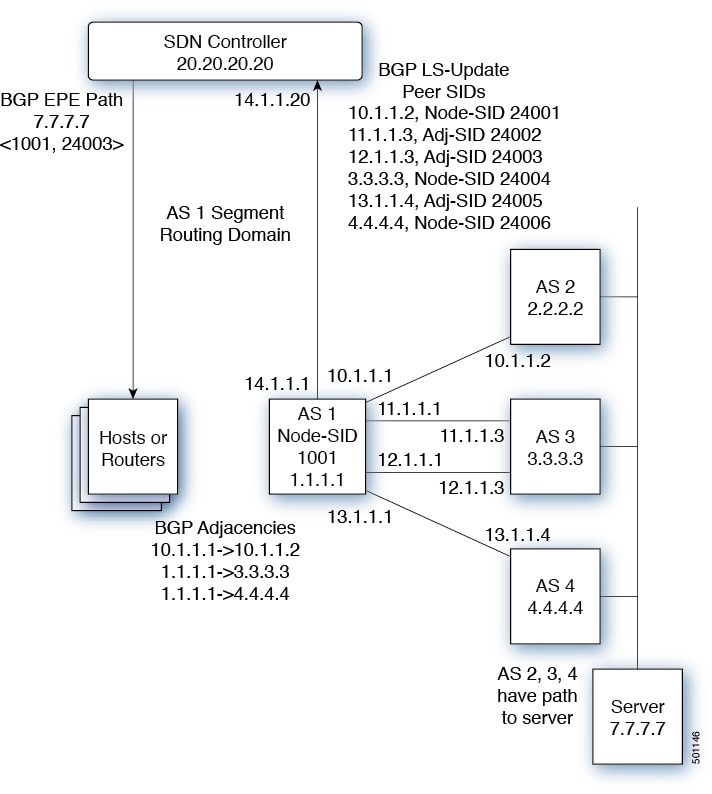
The SDN controller receiveS the Segment IDs from the egress router 1.1.1.1 for each of its peers and adjacencies. It can then intelligently advertise the exit points to the other routers and the hosts within the controller’s routing domain. As displayed in the illustration, the BGP Network Layer Reachability Information (NLRI) contains both the Node-SID to Router 1.1.1.1 and the Peer-Adjacency-SID 24003 indicating that the traffic to 7.7.7.7 should egress over the link 12.1.1.1->12.1.1.3.
Guidelines and Limitations for BGP Egress Peer Engineering
See the following guidelines and limitations for BGP Egress Peer Engineering:
-
Beginning with the Cisco NX-OS Release 7.0(3)I7(1), support for the Cisco Nexus 9300-FX platform switches has been added.
BGP Egress Peer Engineering is only supported for IPv4 BGP peers. IPv6 BGP peers are not supported.
-
BGP Egress Peer Engineering is only supported in the default VPN Routing and Forwarding (VRF) instance.
-
Any number of Egress Peer Engineering (EPE) peers may be added to an EPE peer set. However, the installed resilient per-CE FEC is limited to 32 peers.
-
A given BGP neighbor can only be a member of a single peer-set. Peer-sets are configured. Multiple peer-sets are not supported. An optional peer-set name may be specified to add neighbor to a peer-set. The corresponding RPC FEC load-balances the traffic across all the peers in the peer-set. The peer-set name is a string that is a maximum length of 63 characters (64 NULL terminated). This length is consistent with the NX-OS policy name lengths. A peer can only be a member of a single peer-set.
-
Adjacencies for a given peer are not separately assignable to different peer-sets.
-
If a downgrade is performed from Release 7.0(3)I5(1) to Release 7.0(3)I3(1) or from Release 7.0(3)I5(1) to Release 7.0(3)I4(1) and Egress Peer Engineering (EPE) is configured, the EPE configuration is not removed even though it is not supported in Release 7.0(3)I3(1) and Release 7.0(3)I4(1) .
Configuring Segment Routing
- Configuring Segment Routing Using Segment Routing Application Module
- Enabling MPLS Segment Routing
- Enabling MPLS on an Interface
- Configuring MPLS Label Allocation
- Configuring the Segment Routing Global Block
- Configuring the Label Index
- Configuring Neighbor Egress Peer Engineering Using BGP
- Configuration Example for Egress Peer Engineering
- Configuring the BGP Link State Address Family
Configuring Segment Routing Using Segment Routing Application Module
Beginning with Cisco NX-OS Release 7.0(3)I7(3), Segment Routing Application (SR-APP) module is used to configure the segment routing functionality. Segment Routing Application (SR-APP) is a separate internal process that handles all the CLIs related to segment routing. It is responsible for reserving the SRGB range and for notifying the clients about it. It is also responsible for maintaining the prefix to SID mappings. Beginning with Cisco NX-OS Release 7.0(3)I7(3), the SR-APP support is added for the BGP and IS-IS protocols.
Complete the following steps to configure segment routing:
Confirm that the following conditions are met before configuring Segment Routing using the Segment Routing Application (SR-APP) module.
The feature-set mpls and feature mpls segment-routing commands should be present for configuring the segment-routing mpls command.
-
The feature mpls segment-routing command starts the SR-APP process.
-
If the global block is configured, the specified range is used. Otherwise, the default 16000 – 23999 range is used.
-
With the introduction of SR-APP, all configuration is done under segment-routing mpls and the prefix SID configuration is handled by SR-APP.
-
BGP now uses both set label-index <value> configuration and the new connected-prefix-sid-map CLI. In case of a conflict, the configuration in SR-APP is preferred.
| Command or Action | Purpose | |
|---|---|---|
| Step 1 | configure terminal
|
Enters global configuration mode. |
| Step 2 | segment-routing mpls |
Activates the Segment Routing functionality |
| Step 3 | global-block <min> <max> Example:global-block 201000 280000 |
Reserves the non-default SRGB range. |
| Step 4 | connected-prefix-sid-map |
Provides the SID label for the interface IP covered by the prefix-SID map. |
| Step 5 | address-family ipv4 |
Enters global address family configuration mode for the IPv4 address family. |
| Step 6 | <prefix>/<masklen>[index|absolute] <label> Example:2.1.1.5/32 absolute 201101 2.10.1.5/32 index 10001 |
The optional keywords index or absolute indicate whether the label value entered should be interpreted as an index into the SRGB or as an absolute value. |
See the following configuration examples of the show commands:
The SRGB allocation needs to be confirmed by an internal process that requires the clients to confirm their cleanup. The amount of time SR-APP waits for the clients to clean their labels, is determined by the cleanup interval. The default value for the cleanup interval is 60 seconds. It can be modified using the timers srgb cleanup <interval> CLI command.
Retry interval is amount of time for which SR-APP retries the allocation of the SRGB from the internal process if it fails. The default value for the retry interval is 180 and it can be modified using the timers srgb retry <interval> CLI command. The SR-APP module retries the SRGB allocation 10 times within the configured retry timer value, at equal intervals. See the show segment-routing CLI output as displayed in the following example:
switch# show segment-routing
Segment-Routing Global info

Service Name: segment-routing

State: Enabled

Process Id: 29123

Configured SRGB: 17000 – 24999

SRGB Allocation status: Alloc-Successful

Current SRGB: 17000 – 24999

Cleanup Interval: 60

Retry Interval: 180
The following CLI displays the clients that are registered with SR-APP. It lists the VRFs, for which the clients have registered interest.
switch# show segment-routing clients
            Segment-Routing Client Info

Client: isis-1
    PIB index: 1    UUID: 0x41000118    PID: 29463    MTS SAP: 412
    TIBs registered:
        VRF: default Table: base

Client: bgp-1
    PIB index: 2    UUID: 0x11b    PID: 18546    MTS SAP: 62252
    TIBs registered:
        VRF: default Table: base

Total Clients: 2
In the show segment-routing ipv4 connected-prefix-sid-map CLI command example, SRGB indicates whether the prefix SID is within the configured SRGB. The Indx field indicates that the configured label is an index into the global block. The Abs field indicates that the configured label is an absolute value.
If the SRGB field displays N, it means that the configured prefix SID is not within the SRGB range and it is not provided to the SR-APP clients. Only the prefix SIDs that fall into the SRGB range are given to the SR-APP clients.
switch# show segment-routing ipv4 connected-prefix-sid-map
            Segment-Routing Prefix-SID Mappings
Prefix-SID mappings for VRF default Table base
Prefix             SID   Type Range SRGB
13.11.2.0/24       713   Indx 1     Y
30.7.7.7/32        730   Indx 1     Y
59.3.24.0/30       759   Indx 1     Y
150.101.1.0/24     801   Indx 1     Y
150.101.1.1/32     802   Indx 1     Y
150.101.2.0/24     803   Indx 1     Y
1.1.1.1/32         16013 Abs  1     Y
The following CLI displays the show running-config segment-routing output.
switch# show running-config segment-routing

!Command: show running-config segment-routing
!Time: Thu Jan 25 10:13:53 2018

version 7.0(3)I7(3)
segment-routing mpls
  global-block 22000 35000
  connected-prefix-sid-map
    address-family ipv4
      42.11.11.0/24 index 251
      42.11.12.0/24 index 252
      42.11.13.0/24 index 253
      42.11.14.0/24 index 254
      42.11.15.0/24 index 255
      42.11.16.0/24 index 256
      42.11.17.0/24 index 257
      42.11.18.0/24 index 258
      42.11.19.0/24 index 259
      42.11.20.0/24 index 260
      132.10.54.0/24 absolute 22101
      2.2.2.9/32 index 202
      2.2.2.10/32 index 203
      2.2.2.11/32 index 204
Enabling MPLS Segment Routing
You can enable MPLS segment routing as long as mutually-exclusive MPLS features such as static MPLS are not enabled.
You must install and enable the MPLS feature set using the install feature-set mpls and feature-set mpls commands.
Enabling MPLS on an Interface
You can enable MPLS on an interface for use with segment routing.
You must install and enable the MPLS feature set using the install feature-set mpls and feature-set mpls commands.
Configuring MPLS Label Allocation
You can configure MPLS label allocation for the IPv4 unicast address family.
You must install and enable the MPLS feature set using the install feature-set mpls and feature-set mpls commands.
You must enable the MPLS segment routing feature. See Enabling MPLS Segment Routing.
Configuring the Segment Routing Global Block
You can configure the beginning and ending MPLS labels in the segment routing global block (SRGB).
You must install and enable the MPLS feature set using the install feature-set mpls and feature-set mpls commands.
You must enable the MPLS segment routing feature. See Enabling MPLS Segment Routing.
Configuring the Label Index
You can set the label index for routes that match the network command. Doing so causes the BGP prefix SID to be advertised for local prefixes that are configured with a route map that includes the set label-index command, provided the route map is specified in the network command that specifies the local prefix. (For more information on the network command, see the "Configuring Basic BGP" chapter in the Cisco Nexus 9000 Series NX-OS Unicast Routing Configuration Guide.)
 Note | Beginning with Cisco NX-OS Release, Segment Routing Application (SR-APP) module is used to configure the segment routing functionality. BGP now uses both set label-index <value> configuration under route-map and the new connected-prefix-sid-map CLI for prefix SID configuration. In case of a conflict, the configuration in SR-APP is preferred. |
Note | Route-map label indexes are ignored when the route map is specified in a context other than the network command. Also, labels are allocated for prefixes with a route-map label index independent of whether the prefix has been configured by the allocate-label route-map route-map-name command. |
| Command or Action | Purpose | |
|---|---|---|
| Step 1 | configure terminal
Example: switch# configure terminal switch(config)# | |
| Step 2 | route-map
map-name
Example: switch(config)# route-map SRmap switch(config-route-map)# |
Creates a route map or enters route-map configuration mode for an existing route map. |
| Step 3 | [no]
set
label-index
index
Example: switch(config-route-map)# set label-index 10 |
Sets the label index for routes that match the network command. The range is from 0 to 471788. By default, a label index is not added to the route. |
| Step 4 | exit
Example: switch(config-route-map)# exit switch(config)# |
Exits route-map configuration mode. |
| Step 5 | router bgp
autonomous-system-number
Example: switch(config)# router bgp 64496 switch(config-router)# |
Enables BGP and assigns the AS number to the local BGP speaker. The AS number can be a 16-bit integer or a 32-bit integer in the form of a higher 16-bit decimal number and a lower 16-bit decimal number in xx.xx format. |
| Step 6 | address-family ipv4 unicast
Example: switch(config-router)# address-family ipv4 unicast switch(config-router-af)# |
Enters global address family configuration mode for the IPv4 address family. |
| Step 7 | network
ip-prefix [route-map
map-name]
Example: switch(config-router-af)# network 10.10.10.10/32 route-map SRmap |
Specifies a network as local to this autonomous system and adds it to the BGP routing table. |
| Step 8 | show
route-map [map-name]
Example: switch(config-router-af)# show route-map | (Optional)
Displays information about route maps, including the label index. |
| Step 9 | copy running-config startup-config
Example: switch(config-router-af)# copy running-config startup-config | (Optional)
Copies the running configuration to the startup configuration. |
Configuring Neighbor Egress Peer Engineering Using BGP
With the introduction of RFC 7752 and draft-ietf-idr-bgpls-segment-routing-epe in Cisco NX-OS Release 7.0(3)I5(1), you can configure Egress Engineering. The feature is valid only for external BGP neighbors and it is not configured by default. Egress Engineering uses RFC 7752 encoding.
-
You must enable BGP.
-
After an upgrade from Release 7.0(3)I3(1) or Release 7.0(3)I4(1) to Release 7.0(3)I5(1), configure the TCAM region before configuring Egress Peer Engineering (EPE) on Cisco Nexus 9000 Series switches using the following commands:
-
switch# hardware access-list tcam region vpc-convergence 0
-
switch# hardware access-list tcam region racl 0
-
switch# hardware access-list tcam region mpls 256 double-wide
-
-
With Release 7.0(3)I5(1), save the configuration and reload the switch.
For more information, see the Using Templates to Configure ACL TCAM Region Sizes and Configuring ACL TCAM Region Sizes sections in the Cisco Nexus 9000 Series NX-OS Security Configuration Guide.
| Command or Action | Purpose | |
|---|---|---|
| Step 1 | configure terminal
Example: switch# configure terminal switch(config)# | |
| Step 2 | router bgp <bgp autonomous number> |
Specifies the autonomous router BGP number. |
| Step 3 | neighbor <IP address> |
Configures the IP address for the neighbor. |
| Step 4 | [no|default] egress-engineering [peer-set peer-set-name]
Example: switch(config)# router bgp 1 switch(config-router)# neighbor 4.4.4.4 switch(config-router)# egress-engineering peer-set NewPeer |
Specifies whether a Peer-Node-SID is allocated for the neighbor and it is advertised in an instance of a BGP Link-State (BGP-LS) address family Link NLRI. If the neighbor is a multi-hop neighbor, a BGP-LS Link NLRI instance is also advertised for each Equal-Cost-MultiPath (ECMP) path to the neighbor and it includes a unique Peer-Adj-SID. Optionally, you can add the neighbor to a peer-set. The Peer-Set-SID is also advertised in the BGP-LS Link NLRI in the same instance as the Peer-Node-SID. BGP Link-State NLRI is advertised to all neighbors with the link-state address family configured. See RFC 7752 and draft-ietf-idr-bgpls-segment-routing-epe-05 for more information on EPE. |
Configuration Example for Egress Peer Engineering
See the Egress Peer Engineering sample configuration for the BGP speaker 1.1.1.1. Note that the neighbor 20.20.20.20 is the SDN controller.
 hostname epe-as-1
install feature-set mpls
feature-set mpls

feature telnet
feature bash-shell
feature scp-server
feature bgp
feature mpls segment-routing

segment-routing mpls
vlan 1

vrf context management
  ip route 0.0.0.0/0 10.30.97.1
  ip route 0.0.0.0/0 10.30.108.1

interface Ethernet1/1
  no switchport
  ip address 10.1.1.1/24
  no shutdown

interface Ethernet1/2
  no switchport
  ip address 11.1.1.1/24
  no shutdown

interface Ethernet1/3
  no switchport
  ip address 12.1.1.1/24
  no shutdown

interface Ethernet1/4
  no switchport
  ip address 13.1.1.1/24
  no shutdown

interface Ethernet1/5
  no switchport
  ip address 14.1.1.1/24
  no shutdown

interface mgmt0
  ip address dhcp
  vrf member management


interface loopback1
  ip address 1.1.1.1/32
line console

line vty
ip route 2.2.2.2/32 10.1.1.2
ip route 3.3.3.3/32 11.1.1.3
ip route 3.3.3.3/32  12.1.1.3
ip route 4.4.4.4/32  13.1.1.4
ip route 20.20.20.20/32 14.1.1.20

router bgp 1
  address-family ipv4 unicast
  address-family link-state
 neighbor 10.1.1.2
    remote-as 2
    address-family ipv4
    egress-engineering
 neighbor 3.3.3.3
   remote-as 3
   address-family ipv4
   update-source loopback1
   ebgp-multihop 2
   egress-engineering
 neighbor 4.4.4.4
   remote-as 4
   address-family ipv4
   update-source loopback1
   ebgp-multihop 2
   egress-engineering
neighbor 20.20.20.20
   remote-as 1
   address-family link-state
   update-source loopback1
   ebgp-multihop 2
neighbor 124.11.50.5
    bfs
    remote-as 6
    update-source port-channel50.11
    egress-engineering peer-set pset2 <<<<<<<
    address-family ipv4 unicast
neighbor 124.11.101.2
    bfd
    remote-as 6
    update-source Vlan2401
    egress-engineering
    address-family ipv4 unicast
This example shows sample output for the show bgp internal epe command.
switch# show bgp internal epe
BGP Egress Peer Engineering (EPE) Information:
Link-State Server: Inactive
Link-State Client: Active
Configured EPE Peers: 26
Active EPE Peers: 3
EPE SID State:
RPC SID Peer or Set Assigned
ID Type Set Name ID Label Adj-Info, iod
1 Node 124.1.50.5 1 1600
2 Set pset1 2 1601
3 Node 6.6.6.6 3 1602
4 Node 124.11.50.5 4 1603
5 Set pset2 5 1604
6 Adj 6.6.6.6 6 1605 124.11.50.4->124.11.50.5/0x1600b031, 80
7 Adj 6.6.6.6 7 1606 124.1.50.4->124.1.50.5/0x16000031, 78
EPE Peer-Sets:
IPv4 Peer-Set: pset1, RPC-Set 2, Count 7, SID 1601
Peers: 124.11.116.2 124.11.111.2 124.11.106.2 124.11.101.2
124.11.49.5 124.1.50.5 124.1.49.5
IPv4 Peer-Set: pset2, RPC-Set 5, Count 5, SID 1604
Peers: 124.11.117.2 124.11.112.2 124.11.107.2 124.11.102.2
124.11.50.5
IPv4 Peer-Set: pset3, RPC-Set 0, Count 4, SID unspecified
Peers: 124.11.118.2 124.11.113.2 124.11.108.2 124.11.103.2
IPv4 Peer-Set: pset4, RPC-Set 0, Count 4, SID unspecified
Peers: 124.11.119.2 124.11.114.2 124.11.109.2 124.11.104.2
IPv4 Peer-Set: pset5, RPC-Set 0, Count 4, SID unspecified
Peers: 124.11.120.2 124.11.115.2 124.11.110.2 124.11.105.2
switch#
Configuring the BGP Link State Address Family
With the introduction of RFC 7752 in Cisco NX-OS Release 7.0(3)I5(1), you can configure the BGP link state address family for a neighbor session with a controller to advertise the corresponding SIDs. You can configure this feature in global configuration mode and neighbor address family configuration mode.
You must enable BGP.
| Command or Action | Purpose | |||
|---|---|---|---|---|
| Step 1 | configure terminal
Example: switch# configure terminal switch(config)# | |||
| Step 2 | router bgp <bgp autonomous number> |
Specifies the autonomous router BGP number. | ||
| Step 3 | [no] address-family link-state
Example: switch(config)# router bgp 64497 switch (config-router af)# address-family link-state |
Enters address-family interface configuration mode.
| ||
| Step 4 | neighbor <IP address> |
Configures the IP address for the neighbor. | ||
| Step 5 | [no] address-family link-state
Example: switch(config)#router bgp 1 switch(config-router)#address-family link-state switch(config-router)#neighbor 20.20.20.20 switch(config-router)#address-family link-state |
Enters address-family interface configuration mode.
|
Configuring Layer 3 EVPN over Segment Routing MPLS
Beginning with Cisco NX-OS Release 7.0(3)I6(1), you can configure EVPN over segment routing MPLS.
Beginning with Cisco NX-OS Release 7.0(3)I7(1), Layer 3 EVPN over segment routing MPLS is supported on the Cisco Nexus 9300-FX platform switches. Layer 3 EVPN over segment routing MPLS is not yet supported on 9300-FX2 platform switches.
Install the VPN Fabric license.
Make sure that the feature interface-vlan command is enabled.
| Command or Action | Purpose | |
|---|---|---|
| Step 1 |
feature bgp |
Enables BGP feature and configurations. |
| Step 2 |
install feature-set mpls |
Enables MPLS configuration commands. |
| Step 3 |
feature-set mpls |
Enables MPLS configuration commands. |
| Step 4 |
feature mpls segment-routing |
Enables segment routing configuration commands. |
| Step 5 |
feature mpls evpn |
Enables EVPN over MPLS configuration commands. This command is mutually exclusive with the feature-nv CLI command. |
See the following example for VRF configuration:
vrf context customer1
    rd auto
    address-family ipv4 unicast
        route-target import
        route-target export
        route-target import evpn
        route-target export evpn
See the following example for BGP segment routing configuration:
mpls label range 1000 25000
 segment-routing mpls
  global-block 11000 20000
!
int lo1
  ip address 200.0.0.1/32
!
interface e1/13
  description “MPLS interface towards Core”
  ip address 192.168.5.1/24
  mpls ip forwarding
  no shut
route-map label_index_pol_100 permit 10
  set label-index 100
route-map label_index_pol_101 permit 10
  set label-index 101
route-map label_index_pol_102 permit 10
  set label-index 102
route-map label_index_pol_103 permit 10
  set label-index 103

router bgp 65000
 address-family ipv4 unicast
   network 200.0.0.1/32 route-map label_index_pol_100
    network 192.168.5.1/32 route-map label_index_pol_101
    network 101.0.0.0/24 route-map label_index_pol_103
    allocate-label all
  neighbor 192.168.5.6 remote-as 65000
      address-family ipv4 labeled-unicast
         send-community extended
Configuring BGP EVPN and Label Allocation Mode
Beginning with Cisco NX-OS Release 7.0(3)I6(1), you can use MPLS tunnel encapsulation using the new CLI encapsulation mpls command. You can configure the label allocation mode for the EVPN address family. The default tunnel encapsulation in EVPN for IP Route type in NX-OS is VXLAN.
Beginning with Cisco NX-OS Release 7.0(3)I7(1), Layer 3 EVPN support added for the Cisco Nexus 9300-FX platform switches.
Advertisement of (IP or Label) bindings from a Cisco Nexus 9000 Series switch via BGP EVPN enables a remote switch to send the routed traffic to that IP using the label for that IP to the switch that advertised the IP over MPLS.
The IP prefix route (Type-5) is:
-
Type-5 route with MPLS encapsulation
RT-5 Route – IP Prefix

RD:	 L3 RD
IP Length: 	prefix length
IP address: 	IP (4 bytes)
Label1: 	BGP MPLS Label
Route Target
RT for IP-VRF
The default label allocation mode is per-VRF for Layer 3 EVPN over MPLS.
Complete the following steps to configure BGP EVPN and label allocation mode:
You must install and enable the MPLS feature set using the install feature-set mpls and feature-set mpls commands.
You must enable the MPLS segment routing feature. See Enabling MPLS Segment Routing.
| Command or Action | Purpose | |||
|---|---|---|---|---|
| Step 1 | configure terminal
| |||
| Step 2 | [no] router bgp
autonomous-system-number
Example: switch(config)# router bgp 64496 switch(config-router)# |
Enables BGP and assigns the AS number to the local BGP speaker. The AS number can be a 16-bit integer or a 32-bit integer in the form of a higher 16-bit decimal number and a lower 16-bit decimal number in xx.xx format. Use the no option with this command to remove the BGP process and the associated configuration. | ||
| Step 3 | address-family l2vpn evpn
Example: switch(config-router)# address-family l2vpn evpn switch(config-router-af)# |
Enters global address family configuration mode for the Layer 2 VPN EVPN. | ||
| Step 4 | exit
Example: switch(config-router-af)# exit switch(config-router)# |
Exits global address family configuration mode. | ||
| Step 5 | neighbor
ipv4-address
remote-as
autonomous-system-number
Example: switch(config-router)# neighbor 10.1.1.1 remote-as 64497 switch(config-router-neighbor)# |
Configures the IPv4 address and AS number for a remote BGP peer. | ||
| Step 6 |
address-family l2vpn evpn
Example: switch(config-router-neighbor)# address-family l2vpn evpn switch(config-router-neighbor-af)# |
Advertises the labeled Layer 2 VPN EVPN. | ||
| Step 7 | encapsulation mpls
Example:
router bgp 100
  address-family l2vpn evpn
neighbor NVE2 remote-as 100
    address-family l2vpn evpn
      send-community extended
      encapsulation mpls
  vrf foo
    address-family ipv4 unicast
      advertise l2vpn evpn
BGP segment routing configuration:
router bgp 100
 address-family ipv4 unicast
   network 200.0.0.1/32 route-map label_index_pol_100
    network 192.168.5.1/32 route-map label_index_pol_101
    network 101.0.0.0/24 route-map label_index_pol_103
    allocate-label all
  neighbor 192.168.5.6 remote-as 20
      address-family ipv4 labeled-unicast
         send-community extended
|
Enables BGP EVPN address family and sends EVPN type-5 route update to the neighbors.
| ||
| Step 8 | vrf <customer_name>
|
Configures the VRF. | ||
| Step 9 |
address-family ipv4 unicast
|
Enters global address family configuration mode for the IPv4 address family. | ||
| Step 10 |
advertise l2vpn evpn
|
Advertises Layer 2 VPN EVPN. | ||
| Step 11 | redistribute direct route-map DIRECT_TO_BGP |
Redistributes the directly connected routes into BGP-EVPN. | ||
| Step 12 | label-allocation-mode per-vrf |
Sets the label allocation mode to per-VRF. If you want to configure the per-prefix label mode, use the no label-allocation-mode per-vrf CLI command. For the EVPN address family, the default label allocation is per-vrf, compared to per-prefix mode for the other address-families where the label allocation CLI is supported. No form of CLI is displayed in the running configuration. |
See the following example for configuring per-prefix label allocation:
router bgp 65000
    [address-family l2vpn evpn]
    neighbor 10.1.1.1
        remote-as 100
        address-family l2vpn evpn
        send-community extended
    neighbor 20.1.1.1
        remote-as 65000
        address-family l2vpn evpn
        encapsulation mpls
        send-community extended
    vrf customer1
        address-family ipv4 unicast
            advertise l2vpn evpn
            redistribute direct route-map DIRECT_TO_BGP
            no label-allocation-mode per-vrf
Configuring Segment Routing with IS-IS Protocol
Beginning with Cisco NX-OS Release 7.0(3)I7(3), you can configure segment routing with IS-IS protocol.
IS-IS segment routing is fully enabled when the following conditions are met:
The mpls segment-routing feature is enabled.
-
The IS-IS feature is enabled.
-
Segment routing is enabled for at least one address family under IS-IS.
| Command or Action | Purpose | |||
|---|---|---|---|---|
| Step 1 |
configure terminal |
Enters global configuration mode. | ||
| Step 2 | router isis
instance-tag |
Creates a new IS-IS instance with the configured instance tag. | ||
| Step 3 | net
network-entity-title
|
Configures the NET for this IS-IS instance. | ||
| Step 4 | is-type {level-1 | level-2 | level-1-2}
| (Optional)
Configures the area level for this IS-IS instance. The default is level-1-2. | ||
| Step 5 | log-adjacency-changes
|
Sends a system message whenever an IS-IS neighbor changes the state. | ||
| Step 6 | address-family
ipv4
unicast
|
Enters address family configuration mode. | ||
| Step 7 | segment-routing mpls
|
Configures segment routing with IS-IS protocol.
| ||
| Step 8 | show running-config segment-routing
| (Optional)
Displays the status of the segment routing. |
See the following configuration example for configuring segment routing with IS-IS protocol.
switch# config t
router isis SR-ISIS-1
  bfd
  net 31.0000.0000.0000.000e.00
  is-type level-1-2
  log-adjacency-changes
  address-family ipv4 unicast
    segment-routing mpls         >>> # New command added for ISIS.
    address-family ipv6 unicast
    bfd

switch# show running-config segment-routing

!Command: show running-config segment-routing
!Time: Fri Dec 22 12:51:59 2017

version 7.0(3)I7(3)
segment-routing mpls
  global-block 201000 280000
  connected-prefix-sid-map
    address-family ipv4
      2.1.1.5/32 absolute 201101
      2.10.1.5/32 index 10001

switch# show running-config isis

!Command: show running-config isis
!Time: Thu Jan 25 10:18:19 2018

version 7.0(3)I7(3)
feature isis

router isis 10
  bfd
  net 56.0000.0000.0003.00
  is-type level-1-2
  maximum-paths 64
  log-adjacency-changes
  address-family ipv4 unicast
    segment-routing mpls

interface Vlan12
  ip router isis 10

interface Vlan13
  ip router isis 10
Verifying the Segment Routing Configuration
To display the segment routing configuration, perform one of the following tasks:
| Command | Purpose |
|---|---|
|
show bgp ipv4 labeled-unicast prefix |
Displays the advertised label index and the selected local label for the specified IPv4 prefix. |
|
show bgp paths |
Displays the BGP path information, including the advertised label index. |
|
show mpls label range |
Displays the configured SRGB range of labels. |
|
show route-map [map-name] |
Displays information about a route map, including the label index. |
|
show running-config | inc 'feature mpls segment-routing' |
Displays the status of the MPLS segment routing feature. |
|
show running-config segment-routing |
Displays the status of the segment routing feature. |
This example shows how the show bgp ipv4 labeled-unicast command can be used with a prefix specification to display the advertised label index and the selected local label:
switch# show bgp ipv4 labeled-unicast 19.19.19.19/32
BGP routing table information for VRF default, address family IPv4 Label Unicast
BGP routing table entry for 19.19.19.19/32, version 2
Paths: (1 available, best #1)
Flags: (0x20c0012) on xmit-list, is in urib, is backup urib route, has label
  label af: version 2, (0x100002) on xmit-list
  local label: 16010

  Advertised path-id 1, Label AF advertised path-id 1
  Path type: external, path is valid, is best path
  AS-Path: 19 , path sourced external to AS
60.1.1.19 (metric 0) from 60.1.1.19 (100.100.100.100)
      Origin IGP, MED not set, localpref 100, weight 0
      Received label 3
      Prefix-SID Attribute: Length: 10
        Label Index TLV: Length 7, Flags 0x0 Label Index 10

  Path-id 1 not advertised to any peer

  Label AF advertisement
  Path-id 1 not advertised to any peer
Configuration Examples for Segment Routing
The examples in this section show a common BGP prefix SID configuration between two routers.
This example shows how to advertise a BGP speaker configuration of 10.10.10.10/32 and 20.20.20.20/32 with a label index of 10 and 20, respectively. It uses the default segment routing global block (SRGB) range of 16000 to 23999.
hostname s1
install feature-set mpls
feature-set mpls

feature telnet
feature bash-shell
feature scp-server
feature bgp
feature mpls segment-routing

segment-routing mpls
vlan 1

route-map label-index-10 permit 10
  set label-index 10
route-map label-index-20 permit 10
  set label-index 20

vrf context management
  ip route 0.0.0.0/0 10.30.108.1

interface Ethernet1/1
  no switchport
  ip address 10.1.1.1/24
  no shutdown

interface mgmt0
  ip address dhcp
  vrf member management

interface loopback1
  ip address 10.10.10.10/32

interface loopback2
  ip address 20.20.20.20/32

line console
line vty

router bgp 1
  address-family ipv4 unicast
    network 10.10.10.10/32 route-map label-index-10
    network 20.20.20.20/32 route-map label-index-20
    allocate-label all
  neighbor 10.1.1.2 remote-as 2
    address-family ipv4 labeled-unicast
This example shows how to receive the configuration from a BGP speaker.
hostname s2
install feature-set mpls
feature-set mpls

feature telnet
feature bash-shell
feature scp-server
feature bgp
feature mpls segment-routing

segment-routing mpls
vlan 1

vrf context management
  ip route 0.0.0.0/0 10.30.97.1
  ip route 0.0.0.0/0 10.30.108.1

interface Ethernet1/1
  no switchport
  ip address 10.1.1.2/24
  ipv6 address 10:1:1::2/64
  no shutdown

interface mgmt0
  ip address dhcp
  vrf member management

interface loopback1
  ip address 2.2.2.2/32
line console

line vty

router bgp 2
  address-family ipv4 unicast
    allocate-label all
  neighbor 10.1.1.1 remote-as 1
    address-family ipv4 labeled-unicast
This example shows how to display the configuration from a BGP speaker. The show command in this example displays the prefix 10.10.10.10 with label index 10 mapping to label 16010 in the SRGB range of 16000 to 23999.
switch# show bgp ipv4 labeled-unicast 10.10.10.10/32

BGP routing table information for VRF default, address family IPv4 Label Unicast
BGP routing table entry for 10.10.10.10/32, version 7
Paths: (1 available, best #1)
Flags: (0x20c001a) on xmit-list, is in urib, is best urib route, is in HW, , has label
  label af: version 8, (0x100002) on xmit-list
  local label: 16010

  Advertised path-id 1, Label AF advertised path-id 1
  Path type: external, path is valid, is best path, no labeled nexthop, in rib
  AS-Path: 1 , path sourced external to AS
    10.1.1.1 (metric 0) from 10.1.1.1 (10.10.10.10)
      Origin IGP, MED not set, localpref 100, weight 0
      Received label 0
      Prefix-SID Attribute: Length: 10
        Label Index TLV: Length 7, Flags 0x0 Label Index 10

  Path-id 1 not advertised to any peer
  Label AF advertisement
  Path-id 1 not advertised to any peer
This example shows how to configure egress peer engineering on a BGP speaker.
hostname epe-as-1
install feature-set mpls
feature-set mpls

feature telnet
feature bash-shell
feature scp-server
feature bgp
feature mpls segment-routing

segment-routing mpls
vlan 1

vrf context management
  ip route 0.0.0.0/0 10.30.97.1
  ip route 0.0.0.0/0 10.30.108.1

interface Ethernet1/1
  no switchport
  ip address 10.1.1.1/24
  no shutdown

interface Ethernet1/2
  no switchport
  ip address 11.1.1.1/24
  no shutdown

interface Ethernet1/3
  no switchport
  ip address 12.1.1.1/24
  no shutdown

interface Ethernet1/4
  no switchport
  ip address 13.1.1.1/24
  no shutdown

interface Ethernet1/5
  no switchport
  ip address 14.1.1.1/24
  no shutdown
The following is an example of show ip route vrf 2 command.
show ip route vrf 2
IP Route Table for VRF "2"
'*' denotes best ucast next-hop
'**' denotes best mcast next-hop
'[x/y]' denotes [preference/metric]
'%<string>' in via output denotes VRF <string>

41.11.2.0/24, ubest/mbest: 1/0
    *via 1.1.1.9%default, [20/0], 13:26:48, bgp-2, external, tag 11 (mpls-vpn)
42.11.2.0/24, ubest/mbest: 1/0, attached
    *via 42.11.2.1, Vlan2, [0/0], 13:40:52, direct
42.11.2.1/32, ubest/mbest: 1/0, attached
    *via 42.11.2.1, Vlan2, [0/0], 13:40:52, local
The following is an example of show forwarding route vrf 2 command.
slot  1
=======

IPv4 routes for table 2/base

------------------+-----------------------------------------+----------------------+-----------------+-----------------
Prefix            | Next-hop                                | Interface            | Labels          | Partial Install
------------------+-----------------------------------------+----------------------+-----------------+-----------------
0.0.0.0/32           Drop                                      Null0
127.0.0.0/8          Drop                                      Null0
255.255.255.255/32   Receive                                   sup-eth1
*41.11.2.0/24        27.1.31.4                                 Ethernet1/3            PUSH  30002 492529
                     27.1.32.4                                 Ethernet1/21           PUSH  30002 492529
                     27.1.33.4                                 port-channel23         PUSH  30002 492529
                     27.11.31.4                                Ethernet1/3.11         PUSH  30002 492529
                     27.11.33.4                                port-channel23.11      PUSH  30002 492529
                     37.1.53.4                                 Ethernet1/53/1         PUSH  29002 492529
                     37.1.54.4                                 Ethernet1/54/1         PUSH  29002 492529
                     37.2.53.4                                 Ethernet1/53/2         PUSH  29002 492529
                     37.2.54.4                                 Ethernet1/54/2         PUSH  29002 492529
                     80.211.11.1                               Vlan801                PUSH  30002 492529
The following is an example of show bgp l2vpn evpn summary command.
show bgp l2vpn evpn summary
BGP summary information for VRF default, address family L2VPN EVPN
BGP router identifier 2.2.2.3, local AS number 2
BGP table version is 17370542, L2VPN EVPN config peers 4, capable peers 1
1428 network entries and 1428 paths using 268464 bytes of memory
BGP attribute entries [476/76160], BGP AS path entries [1/6]
BGP community entries [0/0], BGP clusterlist entries [0/0]
476 received paths for inbound soft reconfiguration
476 identical, 0 modified, 0 filtered received paths using 0 bytes

Neighbor        V    AS MsgRcvd MsgSent   TblVer  InQ OutQ Up/Down  State/PfxRcd
1.1.1.1         4    11       0       0        0    0    0 23:01:53 Shut (Admin)
1.1.1.9         4    11    4637    1836 17370542    0    0 23:01:40 476
1.1.1.10        4    11       0       0        0    0    0 23:01:53 Shut (Admin)
1.1.1.11        4    11       0       0        0    0    0 23:01:52 Shut (Admin)
The following is an example of show bgp l2vpn evpn command.
show bgp l2vpn evpn 41.11.2.0
BGP routing table information for VRF default, address family L2VPN EVPN
Route Distinguisher: 14.1.4.1:115
BGP routing table entry for [5]:[0]:[0]:[24]:[41.11.2.0]:[0.0.0.0]/224, version 17369591
Paths: (1 available, best #1)
Flags: (0x000002) on xmit-list, is not in l2rib/evpn, is not in HW

  Advertised path-id 1
  Path type: external, path is valid, received and used, is best path
             Imported to 2 destination(s)
  AS-Path: 11 , path sourced external to AS
    1.1.1.9 (metric 0) from 1.1.1.9 (14.1.4.1)
      Origin incomplete, MED 0, localpref 100, weight 0
      Received label 492529
      Extcommunity: RT:2:20

  Path-id 1 not advertised to any peer

Route Distinguisher: 2.2.2.3:113
BGP routing table entry for [5]:[0]:[0]:[24]:[41.11.2.0]:[0.0.0.0]/224, version 17369595
Paths: (1 available, best #1)
Flags: (0x000002) on xmit-list, is not in l2rib/evpn, is not in HW

  Advertised path-id 1
  Path type: external, path is valid, is best path
             Imported from 14.1.4.1:115:[5]:[0]:[0]:[24]:[41.11.2.0]:[0.0.0.0]/224
  AS-Path: 11 , path sourced external to AS
    1.1.1.9 (metric 0) from 1.1.1.9 (14.1.4.1)
Additional References
Related Documents
| Related Topic | Document Title |
|---|---|
|
BGP |
 Feedback