Cisco MDS 9250i Multiservice Fabric Switch Hardware Installation Guide
Bias-Free Language
The documentation set for this product strives to use bias-free language. For the purposes of this documentation set, bias-free is defined as language that does not imply discrimination based on age, disability, gender, racial identity, ethnic identity, sexual orientation, socioeconomic status, and intersectionality. Exceptions may be present in the documentation due to language that is hardcoded in the user interfaces of the product software, language used based on RFP documentation, or language that is used by a referenced third-party product. Learn more about how Cisco is using Inclusive Language.
- Updated:
- January 22, 2014
Chapter: Cable and Port Specifications
Cable and Port Specifications
This appendix provides the cable and port specifications, and includes the following sections:
Cables and Adapters Provided
The Cisco MDS 9250i switch accessory kit includes the following items:
- RJ-45 rollover cable
- RJ-45/DSUB F/F adapter—RJ-45 to DB-25 female DTE adapter (labeled “Terminal”)
- RJ-45/DSUB R/P adapter—RJ-45 to DB-25 male DCE adapter (labeled “Modem”)

Note Additional cables and adapters can be ordered from your customer service representative.
Note If you purchased Cisco support through a Cisco reseller, contact the reseller directly. If you purchased support directly from Cisco Systems, contact Cisco Technical Support at this URL: http://www.cisco.com/en/US/support/tsd_cisco_worldwide_contacts.html
Console Port
The console port is an asynchronous RS-232 serial port with an RJ-45 connector. You can use the RJ-45 rollover cable and the RJ-45/DSUB F/F adapter or the RJ-45F PC terminal adapter to connect the console port to a computer running terminal emulation software.
Console Port Pinouts
Table 1-1 lists the pinouts for the console port on the Cisco MDS 9250i switch.
|
|
|
|---|---|
11 |
|
|
|
Connecting the Console Port to a Computer Using the DB-25 Adapter
You can use the RJ-45 rollover cable and RJ-45/DSUB F/F adapter (labeled “Terminal”) to connect the console port to a computer running terminal emulation software. Table 1-2 lists the pinouts for the console port, the RJ-45 rollover cable, and the RJ-45/DSUB F/F adapter.
|
|
|
|
|
|
|---|---|---|---|---|
|
|
|
|
|
|
MGMT 10/100/1000 Ethernet Port
The MGMT 10/100/1000 Ethernet port is an Ethernet port with an RJ-45 connector. You can use a modular, RJ-45, straight-through UTP cable to connect the management port to an external hub, switch, or router (see Figure 1-1).
Figure 1-1 RJ-45 Interface Cable Connector

|
|
|
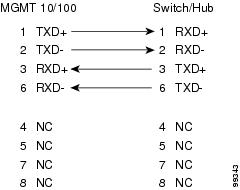
Table 1-3 lists the connector pinouts and signal names for a 10/100/1000BASE-T management port (MDI) cable.
Note The RJ-45 interface only uses pins 1, 2, 3, and 6.
|
|
|
|---|---|
Figure 1-2 shows a schematic of the 10/100/1000BASE-T cable required to connect the management port to a switch or hub (not provided with the switch).
Figure 1-2 Twisted-Pair 10/100/1000BASE-T Cable Schematic
Supported Power Cords and Plugs
Each power supply has a separate power cord. Standard power cords or jumper power cords are available for connection to a power distribution unit having IEC 60320 C19 outlet receptacles.
Power Cords
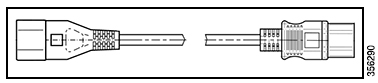
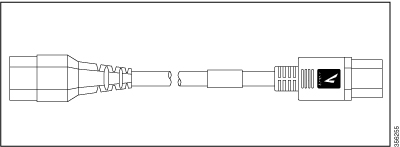
The standard power cords have an IEC C15 connector on the end that plugs into the switch. The optional jumper power cords have an IEC C15 connector on the end that plugs into the switch, and an IEC C14 connector on the end that plugs into an IEC C15 outlet receptacle.
Note Only the regular power cords or jumper power cords provided with the switch are supported.
Note If you do not order the optional power cord with the system, you are responsible for selecting the appropriate power cord for the product. Using a non-compatible power cord with this product may result in electrical safety hazard. Orders delivered to Argentina, Brazil, and Japan must have the appropriate power cord ordered with the system.
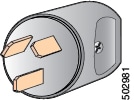
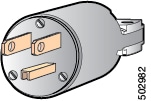
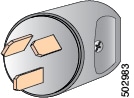
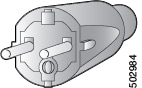
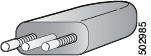
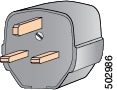
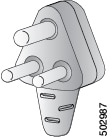
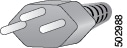
Table 1-4 shows the supported plugs for the Cisco MDS 9250i Switch power supplies.
|
|
|
|
|
|
|
|---|---|---|---|---|---|
|
|||||
|
|||||
|
|||||
|
|||||
|
|||||
|
|||||
|
|||||
|
|||||
|
|||||
|
 Feedback