Configuring QoS

QoS for L3Outs

L3Outs QoS

L3Out QoS can be configured using Contracts applied at the external EPG level. Starting with Release 4.0(1), L3Out QoS can also be configured directly on the L3Out interfaces.


Note


If you are running Cisco APIC Release 4.0(1) or later, we recommend using the custom QoS policies applied directly to the L3Out to configure QoS for L3Outs.


Packets are classified using the ingress DSCP or CoS value so it is possible to use custom QoS policies to classify the incoming traffic into Cisco ACI QoS queues. A custom QoS policy contains a table mapping the DSCP/CoS values to the user queue and to the new DSCP/CoS value (in case of marking). If there is no mapping for a specific DSCP/CoS value, the user queue is selected by the QoS priority setting of the ingress L3Out interface if configured.
Configuring QoS Directly on L3Out Using REST API

This section describes how to configure QoS directly on an L3Out. This is the preferred way of configuring L3Out QoS starting with Cisco APIC Release 4.0(1).

You can configure QoS for L3Out on one of the following objects:

  • Switch Virtual Interface (SVI)

  • Sub Interface

  • Routed Outside

Procedure


Step 1

Configure QoS priorities for a L3Out SVI.

Example:

<l3extLIfP descr="" dn="uni/tn-DT/out-L3_4_2_24_SVI17/lnodep-L3_4_E2_24/lifp-L3_4_E2_24_SVI_19"
           name="L3_4_E2_24_SVI_19" prio="level6" tag="yellow-green">
    <l3extRsPathL3OutAtt addr="0.0.0.0" autostate="disabled" descr="SVI19" encap="vlan-19"
                         encapScope="local" ifInstT="ext-svi" ipv6Dad="enabled" llAddr="::"
                         mac="00:22:BD:F8:19:FF" mode="regular" mtu="inherit"
                         tDn="topology/pod-1/protpaths-103-104/pathep-[V_L3_l4_2-24]"
                         targetDscp="unspecified">
        <l3extMember addr="107.2.1.253/24" ipv6Dad="enabled" llAddr="::" side="B"/>
        <l3extMember addr="107.2.1.252/24" ipv6Dad="enabled" llAddr="::" side="A"/>
    </l3extRsPathL3OutAtt>
    <l3extRsLIfPCustQosPol tnQosCustomPolName="VrfQos006"/>
</l3extLIfP>

Step 2

Configure QoS priorities for a sub-interface.

Example:

<l3extLIfP dn="uni/tn-DT/out-L4E48_inter_tenant/lnodep-L4E48_inter_tenant/lifp-L4E48"
           name="L4E48" prio="level4" tag="yellow-green">
    <l3extRsPathL3OutAtt addr="210.1.0.254/16" autostate="disabled" encap="vlan-20"
                         encapScope="local" ifInstT="sub-interface" ipv6Dad="enabled" llAddr="::"
                         mac="00:22:BD:F8:19:FF" mode="regular" mtu="inherit"
                         tDn="topology/pod-1/paths-104/pathep-[eth1/48]" targetDscp="unspecified"/>
    <l3extRsNdIfPol annotation="" tnNdIfPolName=""/>
    <l3extRsLIfPCustQosPol annotation="" tnQosCustomPolName=" vrfQos002"/>
</l3extLIfP>

Step 3

Configure QoS priorities for a routed outside.

Example:

<l3extLIfP dn="uni/tn-DT/out-L2E37/lnodep-L2E37/lifp-L2E37OUT"
           name="L2E37OUT" prio="level5" tag="yellow-green">
    <l3extRsPathL3OutAtt addr="30.1.1.1/24" autostate="disabled" encap="unknown"
                         encapScope="local" ifInstT="l3-port" ipv6Dad="enabled"
                         llAddr="::" mac="00:22:BD:F8:19:FF" mode="regular"
                         mtu="inherit" targetDscp="unspecified"
                         tDn="topology/pod-1/paths-102/pathep-[eth1/37]"/>
    <l3extRsNdIfPol annotation="" tnNdIfPolName=""/>
    <l3extRsLIfPCustQosPol tnQosCustomPolName="vrfQos002"/>
</l3extLIfP>

Configuring QoS Contract for L3Out Using REST API

This section describes how to configure QoS for L3Outs using Contracts.


Note


Starting with Release 4.0(1), we recommend using custom QoS policies for L3Out QoS as described in Configuring QoS Directly on L3Out Using REST API instead.


Procedure


Step 1

When configuring the tenant, VRF, and bridge domain, configure the VRF for egress mode (pcEnfDir="egress") with policy enforcement enabled (pcEnfPref="enforced"). Send a post with XML similar to the following example:

Example:

<fvTenant  name="t1">
    <fvCtx name="v1" pcEnfPref="enforced" pcEnfDir="egress"/>
    <fvBD name="bd1">
        <fvRsCtx tnFvCtxName="v1"/>
        <fvSubnet ip="44.44.44.1/24" scope="public"/>
        <fvRsBDToOut tnL3extOutName="l3out1"/>
    </fvBD>"/>
</fvTenant>

Step 2

When creating the filters and contracts to enable the EPGs participating in the L3Out to communicate, configure the QoS priority.

The contract in this example includes the QoS priority, level1, for traffic ingressing on the L3Out. Alternatively, it could define a target DSCP value. QoS policies are supported on either the contract or the subject.

The filter also has the matchDscp="EF" criteria, so that traffic with this specific TAG received by the L3out processes through the queue specified in the contract subject.

Note


VRF enforcement should be ingress, for QOS or custom QOS on L3out interface, VRF enforcement need be egress, only when the QOS classification is going to be done in the contract for traffic between EPG and L3out or L3out to L3out.

Note


If QOS classification is set in the contract and VRF enforcement is egress, then contract QOS classification would override the L3out interface QOS or Custom QOS classification, So either we need to configure this one or the new one.

Example:

<vzFilter name="http-filter">
    <vzEntry  name="http-e" etherT="ip" prot="tcp" matchDscp="EF"/>
</vzFilter>
<vzBrCP name="httpCtrct" prio="level1" scope="context">
    <vzSubj name="subj1">
        <vzRsSubjFiltAtt tnVzFilterName="http-filter"/>
    </vzSubj>
</vzBrCP>

CoS Preservation

Class of Service (CoS) Preservation for Ingress and Egress Traffic

When traffic enters the Cisco ACI fabric, each packet's priority is mapped to a Cisco ACI QoS level. These QoS levels are then stored in the CoS field and DE bit of the packet's outer header while the original headers are discarded.

If you want to preserve the original CoS values of the ingressing packets and restore it when the packet leaves the fabric, you can enable the 802.1p Class of Service (CoS) preservation using a global fabric QoS policy as described in this section.

The CoS preservation is supported in single pod and multipod topologies, however in multipod topologies, CoS preservation can be used only when you are not concerned with preserving the settings in the IPN between pods. To preserve the CoS values of the packets as they are transiting the IPN, use the DSCP translation policy as described in Multipod QoS and DSCP Translation Policy.

Enable Class Of Service (CoS) Preservation Using REST API

This section describes how to enable CoS preservation to ensure that QoS priority settings are handled the same for traffic entering and transiting a single-pod fabric as for traffic entering one pod and egressing another in a multipod fabric.


Note


Enabling CoS preservation applies a default CoS-to-DSCP mapping to the various traffic types.


Procedure


Enable CoS preservation.

POST https://<apic-ip>/api/node/mo/uni/infra/qosinst-default.xml

Example:

<qosInstPol name="default" dn="uni/infra/qosinst-default" ctrl="dot1p-preserve"/>

Disable CoS preservation.

Example:

<qosInstPol name="default" dn="uni/infra/qosinst-default" ctrl=""/>

Multipod QoS

Multipod QoS and DSCP Translation Policy

When traffic is sent and received within the Cisco ACI fabric, the QoS Level is determined based on the CoS value of the VXLAN packet's outer header. In multipod topologies, where devices that are not under Cisco APIC's management may modify the CoS values in the transiting packets, you can preserve the QoS Level setting by creating a mapping between the Cisco ACI and the DSCP value within the packet.

If you are not concerned with preserving the QoS settings in the IPN traffic between pods, but would like to preserve the original CoS values of the packets ingressing and egressing the fabric, see Class of Service (CoS) Preservation for Ingress and Egress Traffic instead.

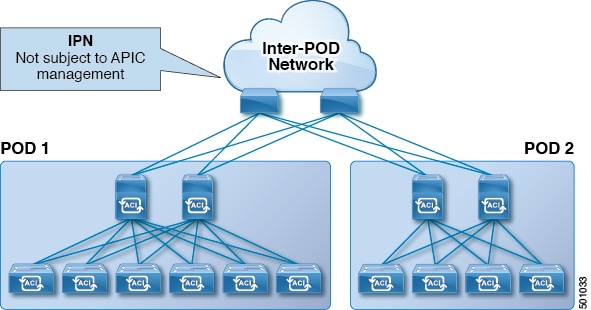
Figure 1. Multipod Topology

As illustrated in this figure, traffic between pods in a multipod topology passes through an IPN, which may contain devices that are not under Cisco APIC's management. When a network packet is sent from a spine or a leaf switch in POD1, the devices in the IPN may modify the 802.1p value in the packet. In this case, when the frame reaches a spine or a leaf switch in POD2, it would have an 802.1p value that was assigned by the IPN device, instead of the Cisco ACI QoS Level value assigned at the source in POD1.

In order to preserve the proper QoS Level of the packet and avoid high priority packets from being delayed or dropped, you can use a DSCP translation policy for traffic that goes between multiple PODs connected by an IPN. When a DSCP translation policy is enabled, Cisco APIC converts the QoS Level value (represented by the CoS value of the VXLAN packet) to a DSCP value according to the mapping rules you specify. When a packet sent from POD1 reaches POD2, the mapped DSCP value is translated back into the original CoS value for the appropriate QoS Level.

Creating DSCP Translation Policy Using REST API

This section describes how to create a DSCP translation policy to guarantee QoS Level settings across multiple PODs connected by an IPN.

Procedure


Step 1

Enable and configure a DSCP translation policy.

POST https://<apic-ip>/api/node/mo/uni/tn-infra/dscptranspol-default.xml

Example:

<qosDscpTransPol dn="uni/tn-infra/dscptranspol-default" adminSt="enabled"
                 traceroute="AF43" span="AF42" policy="AF22" level3="AF13"
                 level2="AF12" level1="AF11" control="AF21" />

Step 2

Disable the DSCP translation policy.

POST https://<apic-ip>/api/node/mo/uni/tn-infra/dscptranspol-default.xml

Example:

<qosDscpTransPol dn="uni/tn-infra/dscptranspol-default" adminSt="disabled"
                 traceroute="AF43" span="AF42" policy="AF22" level3="AF13"
                 level2="AF12" level1="AF11" control="AF21"/>

Translating QoS Ingress Markings to Egress Markings

Translating Ingress to Egress QoS Markings

Cisco APIC enables translating the DSCP and CoS values of the ingressing traffic to a QoS Level to be used inside the Cisco ACI fabric. Translation is supported only if the DSCP values are present in the IP packet and CoS values are present in the Ethernet frames.

For example, this functionality allows the Cisco ACI fabric to classify the traffic for devices that classify the traffic based only on the CoS value, such as Layer-2 packets, which do not have an IP header.

CoS Translation Guidelines and Limitations

You must enable the global fabric CoS preservation policy, as described in Class of Service (CoS) Preservation for Ingress and Egress Traffic.

CoS translation is not supported on external L3 interfaces.

CoS translation is supported only if the egress frame is 802.1Q encapsulated.

CoS translation is not supported when the following configuration options are enabled:

  • Contracts are configured that include QoS.

  • The outgoing interface is on a FEX.

  • Multipod QoS using a DSCP policy is enabled.

  • Dynamic packet prioritization is enabled.

  • If an EPG is configured with intra-EPG endpoint isolation enforced.

  • If an EPG is configured with allow-microsegmentation enabled.

Creating Custom QoS Policy Using REST API

This section describes how to create a custom QoS policy and associate it with an EPG using the REST API.

Before you begin

You must have created the tenant, application, and EPGs that will consume the custom QoS policy.

Procedure


Step 1

Create a custom QoS policy.

Example:

<qosCustomPol name="vrfQos001" dn="uni/tn-t001/qoscustom-vrfQos001">
    <qosDscpClass to="AF31" targetCos="6" target="unspecified"
                  prio="unspecified" from="AF23"/>
    <qosDot1PClass to="1" targetCos="6" target="unspecified"
                   prio="unspecified" from="0"/>
</qosCustomPol>

Step 2

Associate the policy with an EPG that will consume it.

Example:

<fvAEPg prio="unspecified" prefGrMemb="exclude" pcEnfPref="unenforced"
        name="ep2" matchT="AtleastOne" isAttrBasedEPg="no" fwdCtrl=""
        dn="uni/tn-t001/ap-ap2/epg-ep2">
    <fvRsDomAtt tDn="uni/vmmp-VMware/dom-vs1" resImedcy="lazy" 
                primaryEncap="unknown" netflowPref="disabled"
                instrImedcy="lazy" encapMode="auto" encap="unknown"
                delimiter="" classPref="encap"/>
    <fvRsCustQosPol tnQosCustomPolName="vrfQos001"/>
    <fvRsBd tnFvBDName="default"/>
</fvAEPg>

Troubleshooting Cisco APIC QoS Policies

The following table summarizes common troubleshooting scenarios for Cisco APIC QoS.

Problem

Solution

Unable to update a configured QoS policy.

  1. Invoke the following API to ensure that qospDscpRule is present on the leaf.

    GET https://192.0.20.123/api/node/class/qospDscpRule.xml
  2. Ensure that the QoS rules are accurately configured and associated to the EPG ID to which the policy is attached.

    Use the following NX-OS style CLI commands to verify the configuration.

    leaf1# 
    show vlan
      
    leaf1# 
    show system internal aclqos qos policy detail
     
    apic1# 
    show running-config tenant tenant-name policy-map type qos custom-qos-policy-name
     
    apic1# 
    show running-config tenant tenant-name application application-name epg epg-name


Show QoS interface statistics.

CLI displays statistics for eth1/1 for only QoS classes – level1, leve2, level3, level4, level5, level6, and policy-plane – if you don’t use “detail” option.

NXOS ibash cli:
tor-leaf1# show queuing interface ethernet 1/1 [detail]

If you want to display statistics for control-plane and span classes for an interface, you need to use CLI with the “detail” option.

Example: fabric 107 show queuing interface ethernet 1/1 detail

APIC CLI:
swtb123-ifc1# fabric node_id show queuing interface ethernet 1/1