Direct Connection
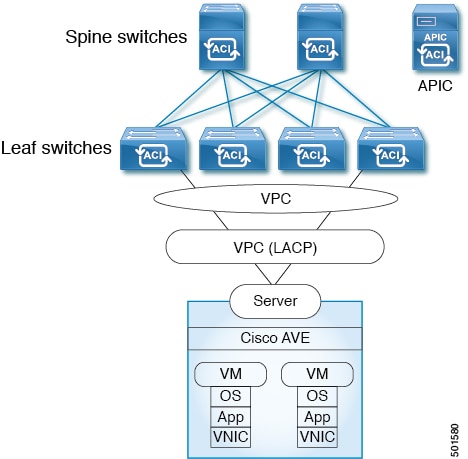
This topology connects the ESXi hypervisor to the Cisco APIC directly.
The documentation set for this product strives to use bias-free language. For the purposes of this documentation set, bias-free is defined as language that does not imply discrimination based on age, disability, gender, racial identity, ethnic identity, sexual orientation, socioeconomic status, and intersectionality. Exceptions may be present in the documentation due to language that is hardcoded in the user interfaces of the product software, language used based on RFP documentation, or language that is used by a referenced third-party product. Learn more about how Cisco is using Inclusive Language.
This appendix provides information about the topologies supported for the Cisco ACI Virtual Edge.
 Important |
Topologies not included in this appendix have not been tested and are not supported. |
Note |
For all topologies, we recommend using LACP wherever possible and supported by your hardware. We recommend using MAC pinning only when using LACP is not possible. |
This topology connects the ESXi hypervisor to the Cisco APIC directly.
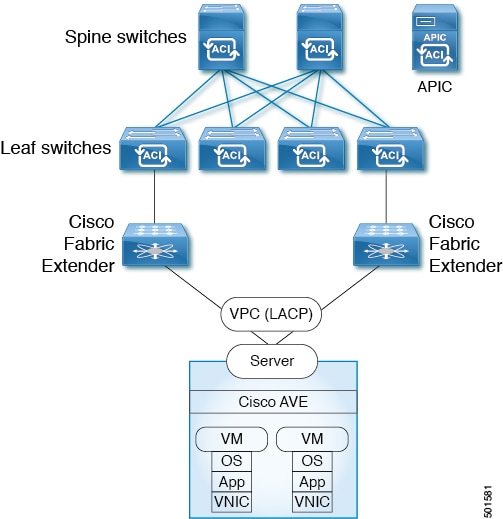
This topology connects the ESXi hypervisor to the Cisco APIC through a Fabric Extender (FEX). You can connect the ESXi to the following:
Multiple leaf switches using a virtual port channel (VPC)
A single leaf switch using a port channel (MAC pinning or LACP bundle)
In the following illustration, VPC is used as an example. You can use port channel instead.
This topology connects the ESXi hypervisor to the Cisco APIC using Cisco UCS Fabric Interconnects, VPCs, LACP, and MAC pinning.
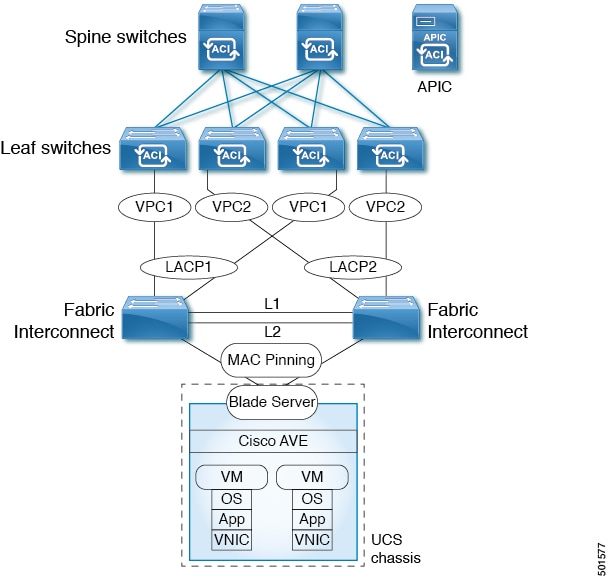
In this topology, the Cisco ACI Virtual Edge can be configured only with MAC pinning. That is because Cisco UCS Fabric Interconnects don't support LACP or vLACP on the southbound ports towards the blade server. Therefore, the illustration shows MAC pinning only on the Cisco ACI Virtual Edge side.
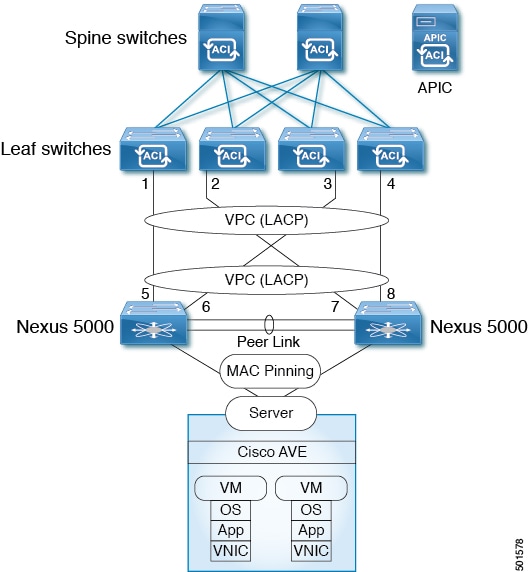
This topology connects the ESXi hypervisor to a Cisco APIC through the Cisco Nexus 5000 switch, virtual port channels, and MAC pinning.
Note |
You also can have leaf switches and Cisco Nexus 5000 switches connected in a single-side VPC topology. |
This topology connects the ESXi hypervisor to a Cisco APIC through the Cisco Nexus 5000 switch and virtual port channels.
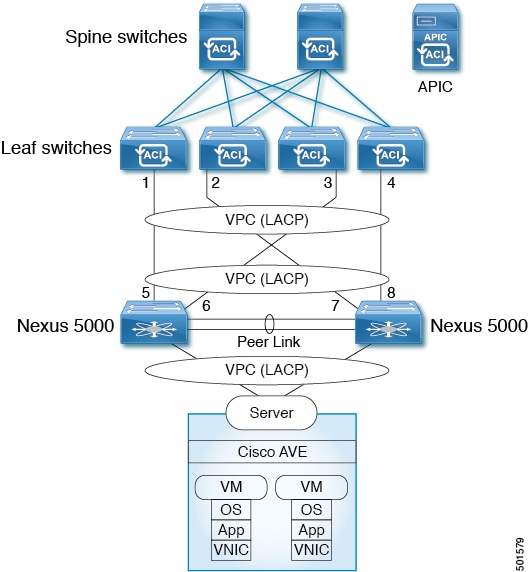
Note |
You also can have leaf switches and Cisco Nexus 5000 switches connected in a single-side VPC topology. |
This topology connects the ESXi hypervisor to the leaf switches using MAC pinning, directly or through Cisco Nexus 5000 switches and Cisco UCS Fabric Interconnects.
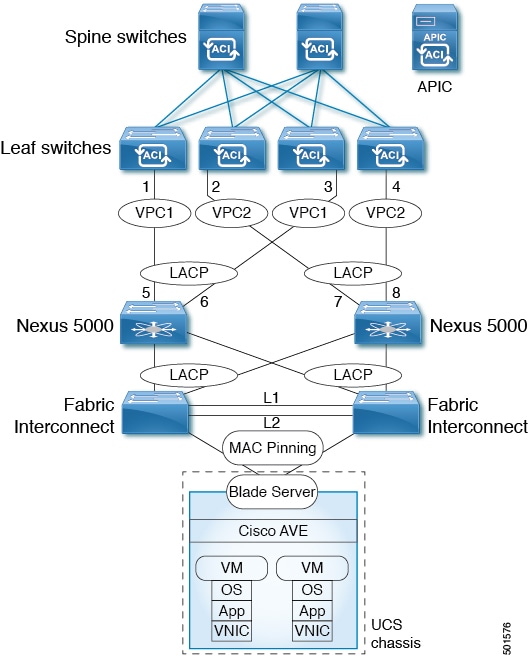
In this topology, the Cisco ACI Virtual Edge can be configured only with MAC pinning. That is because Cisco UCS Fabric Interconnects do not support LACP on the southbound ports toward the blade server. Therefore, the illustration shows MAC pinning only on the Cisco ACI Virtual Edge side.
This topology connects the ESX hypervisor to the leaf switches using MAC pinning, directly or through Cisco Nexus 5000 switches and Cisco UCS Fabric Interconnects.
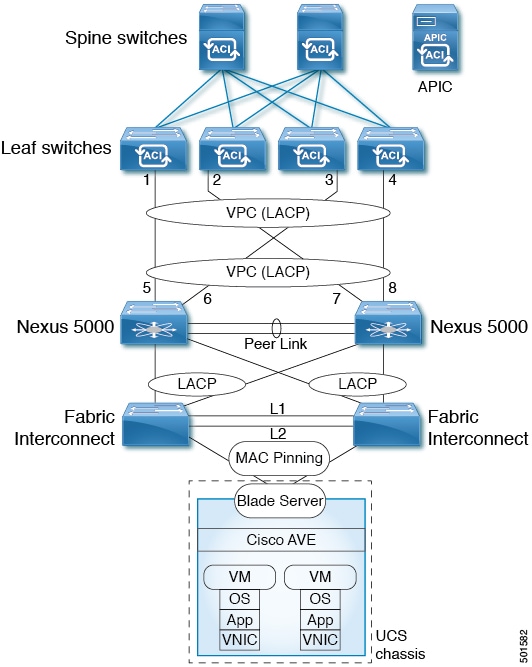
In this topology, the Cisco ACI Virtual Edge can be configured only with MAC pinning. That is because Cisco UCS Fabric Interconnects do not support LACP on the southbound ports toward the blade server. Therefore, the illustration shows MAC pinning only on the Cisco ACI Virtual Edge side.
 Feedback