About Cisco ACI Multi-Site
About Cisco ACI Multi-Site
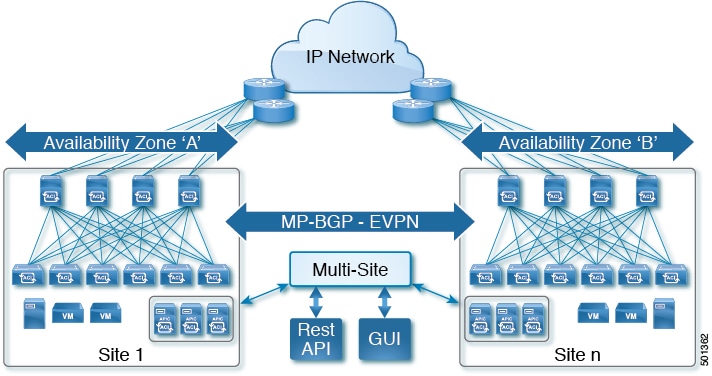
As the newest advance on the Cisco ACI methods to interconnect networks, Cisco ACI Multi-Site is an architectural approach for interconnecting and managing multiple sites, each serving as a single fabric and availability zone. As shown in the diagram, the Multi-Site architecture has three main functional components:
-
Two or more ACI fabrics built with Nexus 9000 switches deployed as leaf and spine nodes.
-
One APIC cluster domain in each fabric.
-
An inter-site policy manager, named Cisco ACI Multi-Site, which is used to manage the different fabrics and to define inter-site policies.
Multi-Site has the following benefits:
-
Complementary with Cisco APIC, in Multi-Site each site is an availability zone (APIC cluster domain), which can be configured to be a shared or isolated change-control zone.
-
MP-BGP EVPN is used as the control plane between sites, with data-plane VXLAN encapsulation across sites.
-
The Multi-Site solution enables extending the policy domain end-to-end across fabrics. You can create policies in the Multi-Site GUI and push them to all sites or selected sites. Alternatively, you can import tenants and their policies from a single site and deploy them on other sites.
-
Multi-Site enables a global view of site health.
-
From the GUI of the Multi-Site Policy Manager, you can launch site APICs.
-
Cross-site namespace normalization is performed by the connecting spine switches. This function requires Cisco Nexus 9000 Series switches with "EX" on the end of the name, or newer.
-
Disaster recovery scenarios offering IP mobility across sites is one of the typical Multi-Site use cases.
For the Cisco ACI Multi-Site documentation, see http://www.cisco.com/c/en/us/support/cloud-systems-management/application-policy-infrastructure-controller-apic/tsd-products-support-series-home.html.
Terminology
As a complementary product with Cisco ACI, much of the Cisco ACI Multi-Site terminology is shared with ACI and APIC (for example, they both use the terms fabric, tenant, contract, application profile, EPG, bridge domain, and L3Out). For definitions of ACI terminology, see Cisco Application Centric Infrastructure Fundamentals.
- Micro-services architecture
- In its first implementation, the Cisco ACI Multi-Site (inter-site policy manager) is represented by a cluster of three Virtual Machines (VMs) running on ESXi hosts. These ESXi hosts do not need to be connected to the ACI leaf nodes, because it is only required to establish IP connectivity between the VMs and the OOB IP addresses of the different APIC cluster nodes.
- Namespace
- Each fabric maintains separate data in its name space, including such objects as the TEP pools, Class-IDs (EPG identifiers) and VNIDs (identifying the different Bridge Domains and the defined VRFs). The site-connecting spine switches (EX or later) perform the necessary namespace translation (normalization) between sites.
- Schema
- Profile including the site-configuration objects that will be pushed to sites.
- Site
- APIC cluster domain or single fabric, treated as an ACI region and availability zone. It can be located in the same metro-area as other sites, or spaced world-wide.
- Stretched
- Objects (tenants, VRFs, EPGs, bridge-domains, subnets or contracts) are stretched when they are deployed to multiple sites.
- Template
- Child of a schema, a template contains configuration-objects that are shared between sites or site-specific.
- Template Conformity
- When templates are stretched across sites, their configuration details are shared and standardized across sites. To maintain template conformity, it is recommended to only make changes in the templates, using the Multi-Site GUI and not in a local site's APIC GUI.
User and Roles
The Cisco ACI Multi-Site provides access according to a user’s role through role-based access control (RBAC). The following user roles are available in Cisco ACI Multi-Site.
Power User—A power user can perform all the operations as an admin user.
-
Site and Tenant Manager—A site and tenant manager can manage sites, tenants, and associations.
-
Schema Manager—A schema manager can manage all schemas regardless of tenant associations.
-
Schema Manager - Restricted —A restricted schema manager can manage schemas that contain at least one tenant to which the user is explicitly associated.
-
User and Role Manager—A user and role manager can manage all the users, their roles, and passwords.
Admin User
In the initial configuration script, the admin account is configured and the admin is the only user when the system starts. The initial password for the admin user is set by the system. You must change the admin password during the first log in.
-
The admin user is assigned the role of a Power User.
-
The admin user should be used for creating other users and for all other Day-0 configurations.
-
The account status of the admin user cannot be set to Inactive.
Cisco ACI Multi-Site Schema and Templates
Cisco ACI Object Model
At the top level, the Cisco ACI object model is built on a group of one or more tenants, allowing the network infrastructure administration and data flows to be segregated.
Policy Types
See the following section on the terminology and conceptual information on different policy types:
-
Schemas: Schemas are the containers for single or multiple templates that are used for defining the policies. Templates are the framework for defining and deploying the policies to the sites.
-
Tenants: A tenant is a logical container for application policies that enable an administrator to exercise domain-based access control. A tenant represents a unit of isolation from a policy perspective, but it does not represent a private network. Tenants can represent a customer in a service provider setting, an organization or domain in an enterprise setting, or just a convenient grouping of policies.
Tenant is the parent policy to all the policies, for example, Application Profiles, EPG, Contract, Bridge Domains, VRFs, and Filters.
-
Application Profile: The application profile is a set of requirements that an application instance has on the virtualizable fabric. The policy regulates connectivity and visibility among endpoints within the scope of the policy.
-
EPG: An EPG is a managed object that is a named logical entity that contains a collection of endpoints. Endpoints are devices that are connected to the network directly or indirectly. They have an address (identity), a location, attributes (such as version or patch level), and can be physical or virtual. Knowing the address of an endpoint also enables access to all its other identity details. EPGs are fully decoupled from the physical and logical topology. Endpoint examples include servers, virtual machines, network-attached storage, or clients on the Internet. Endpoint membership in an EPG can be dynamic or static.
-
Contracts: Contracts define inbound and outbound permit, deny, and QoS rules and policies such as redirect. Contracts allow both simple and complex definition of the way that an EPG communicates with other EPGs, depending on the requirements of the environment. Although contracts are enforced between EPGs, they are connected to EPGs using provider-consumer relationships. Essentially, one EPG provides a contract, and other EPGs consume that contract.
-
Bridge Domains: A bridge domain (fvBD) represents a Layer 2 forwarding construct within the fabric. The following figure shows the location of bridge domains in the management information tree (MIT) and their relation to other objects in the tenant.
-
Virtual Routing and Forwarding (VRF): A Virtual Routing and Forwarding (VRF) object (fvCtx) or context is a tenant network (called a private network in the APIC GUI). A tenant can have multiple VRFs. A VRF is a unique Layer 3 forwarding and application policy domain. The following figure shows the location of VRFs in the management information tree (MIT) and their relation to other objects in the tenant.
-
Filters: Filters are specific rules for the policy between two EPGs. Filters consist of inbound and outbound rules: permit, deny, redirect, log, copy, and mark.
-
External EPGs: In Cisco ACI Multi-Site, Release 1.0(1), site L3Out connections were connected using Network Mappings. In release 1.0(2), use External EPGs to link the L3Outs for each site.
Model of Schemas and Templates
See the following illustration for simplifying the object model of Schemas and Templates:
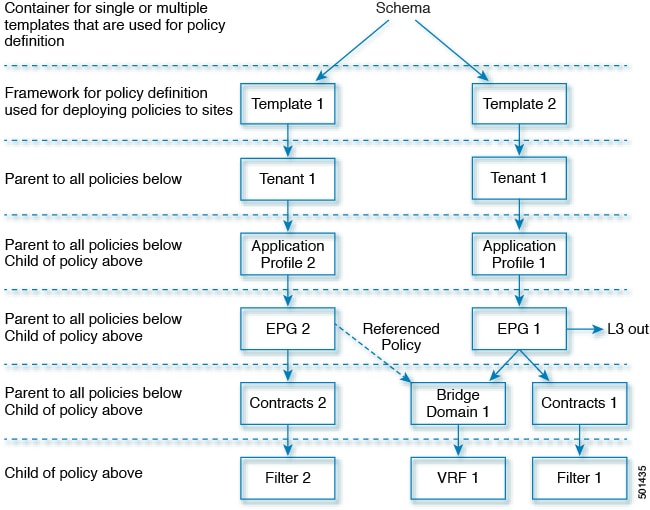
See the relation between different policy types:
-
Application Profiles is the parent policy for EPGs.
-
EPG is the parent policy for Contracts and Bridge Domains.
-
Contracts is the parent policy for Filters.
-
Bridge Domains is the parent policy for VRFs.
 Feedback