Overview

Features

A Cisco Threat Grid appliance provides safe and highly secure on-premises advanced malware analysis, with deep threat analytics and content. Threat Grid Appliances provide the complete Threat Grid malware analysis platform, installed on a single UCS server.

Many organizations that handle sensitive data, such as banks, health services, etc., must follow various regulatory rules and guidelines that will not allow certain types of files, such as malware artifacts, to be sent outside of the network for malware analysis. By maintaining a Cisco Threat Grid Appliance on-premises, organizations are able to send suspicious documents and files to it to be analyzed without leaving the network.

The Cisco Threat Grid M5 appliance supports Threat Grid Version 3.5.27 and later, and appliance version 2.7.2 and later.

See Product ID Numbers for a list of the field-replaceable product IDs (PIDs) associated with the Threat Grid M5 appliance. You can remove and replace drives and power supplies. For all other internal component failures, you must send your chassis for return material authorization (RMA).

The following table lists the features of the Threat Grid M5.

Table 1. Threat Grid M5 Features

Feature

Description

Form factor

1 RU

Rack mount

Standard 19-inch (48.3 cm) 4-post EIA rack

Airflow

Front to rear

Cold aisle to hot aisle

Pullout asset card

Displays the serial number

Grounding hole

Two threaded holes for dual-hole grounding lug

Use is optional; the supported AC power supplies have internal grounding, so no additional chassis grounding is required.

Unit identification button

Yes

Power button

On front panel

Processor

Before January 2021: Two Intel Xeon 6140

After January 2021: Two Intel Xeon 6262

Memory

16 x 32 GB RAM

Internal component only; not field-replaceable

RDIMMs

Before January 2021: Two 16-GB DDR4-2400-MHz RDIMMs

After January 2021: Two 16-GB DDR4-2933-MHz RDIMMs

Internal component only; not field-replaceable

Management ports

1 Gb built-in

Network ports

Two 1-Gb 1000Base-T

Two 10-Gb SFP+

USB ports

Two

Version 3.0 Type A

VGA port

One 3-row 15-pin DB-15 connector

Enabled by default

SFP ports

Four fixed SFP+ ports

The two left SFP+ ports are not supported.

Supported SFP+

SFP-10G-LR (10 Gb)

SFP-10G-SR (10 Gb)

Note 

Only these two SFPs have been qualified for use on the Threat Grid M5. Although other SFPs may work, we only support these two on the Threat Grid M5.

Serial console port

RJ45 serial port running RS-232 (RS-232D TIA-561)

System power

Two 770-W AC power supplies

Hot-swappable and redundant as 1+1

Power consumption

2626 BTU/hr

Fans

Six fans for front-to-rear cooling

Internal component only; not field-replaceable

Storage

Two 240-GB SATA SSDs in slots 1 and 2

Six 2.4-TB SAS HDDs in slots 3 though 8

RAID 1, hot-swappable

Package Contents

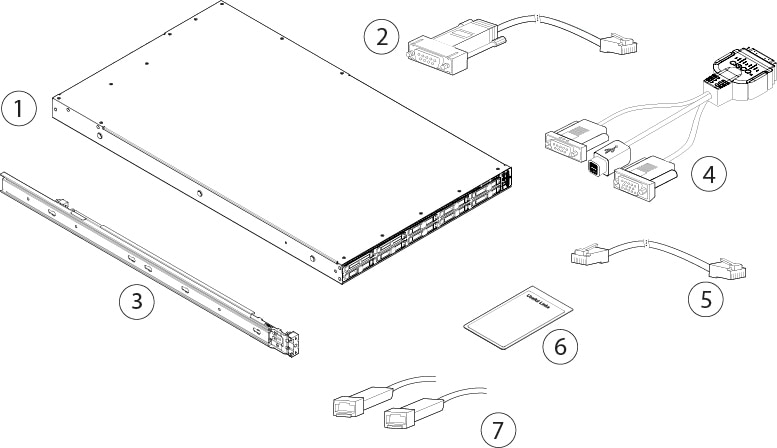
The following figure shows the package contents for the Threat Grid M5. Note that the contents are subject to change and your exact contents might contain additional or fewer items.

Figure 1. Threat Grid M5 Package Contents

1

Chassis

2

RJ-45 to DP9-RS232 console cable (Cisco part number 72-3383-XX)

3

Cisco 1-RU rail kit (Cisco part number 800-43376-02)

4

USB dongle cable (Cisco part number 37-1016-xx)

5

RJ-45 to RJ-45 Cat 5 Ethernet cable, yellow six feet long (Cisco part number 72-1482-XX)

6

Useful Links Cisco Threat Grid M5

The steps in the Useful Links document send you to the documentation you need to install, set up, and configure your Threat Grid M5.

7

Two 10-Gb transceivers with cables

Serial Number Location

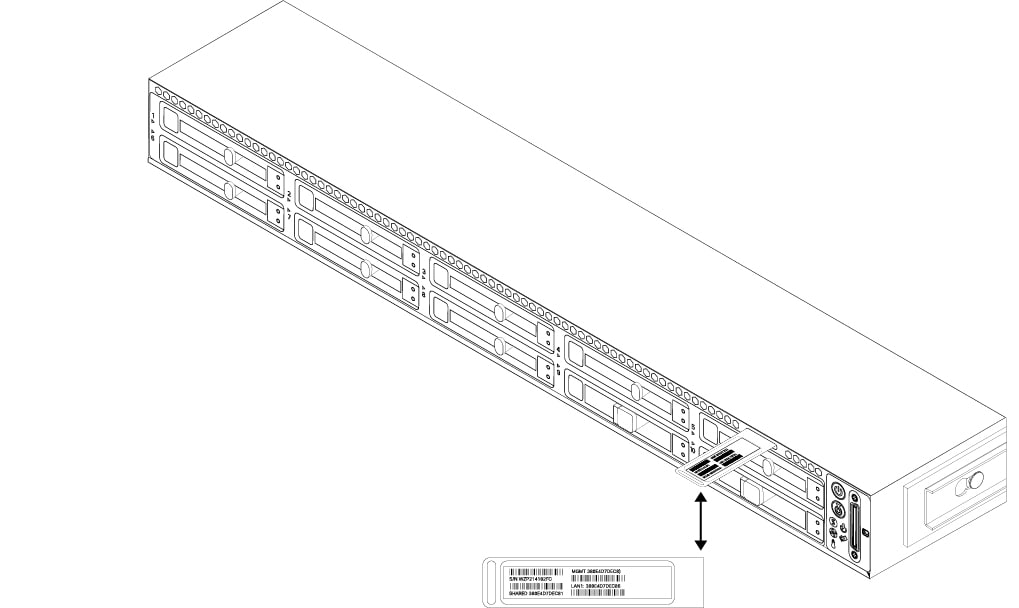
The serial number (SN) for the Threat Grid M5 is printed on the pullout asset card located on the front panel as shown in the following figure.

Figure 2. Serial Number on Pullout Asset Card

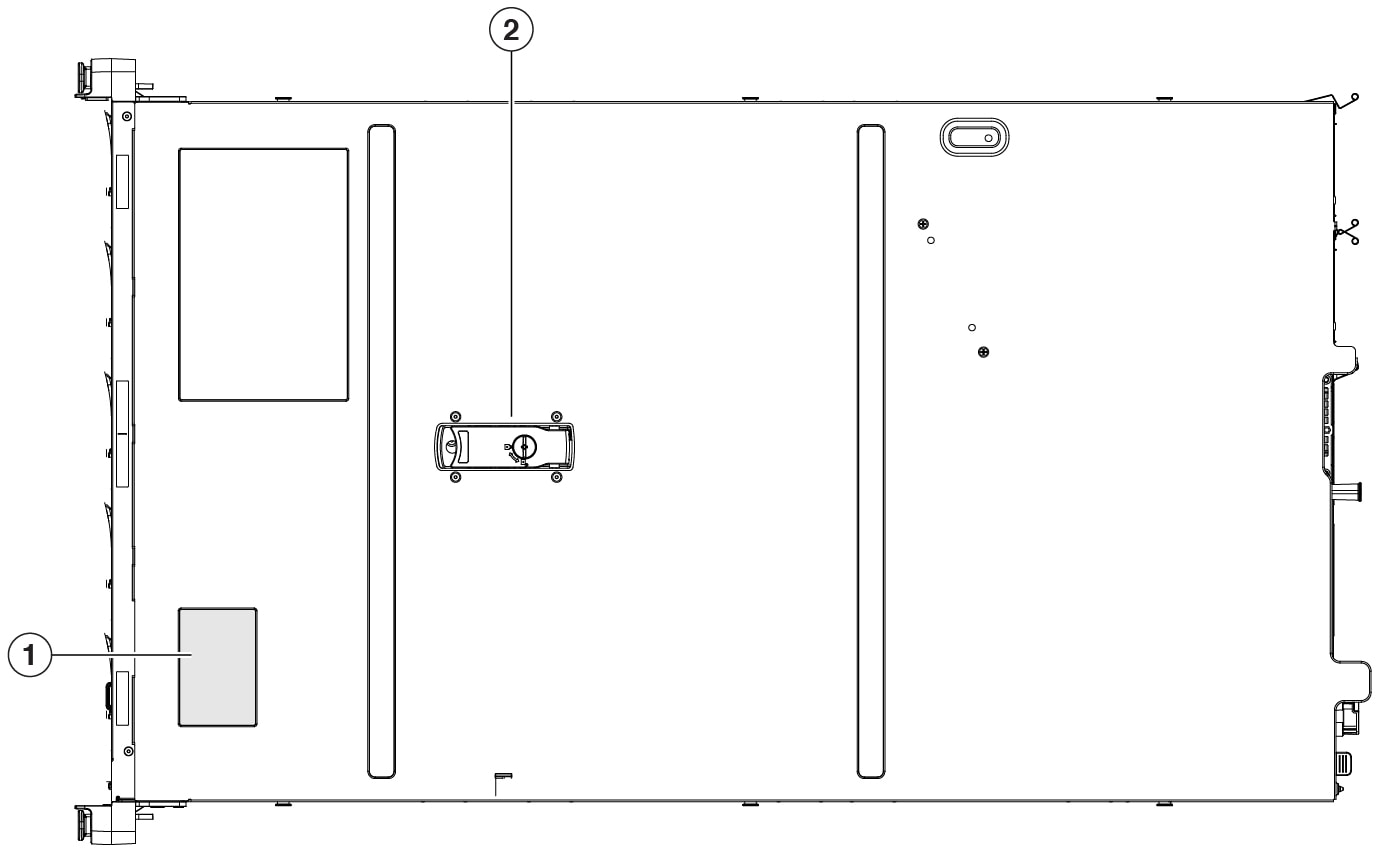
The serial number is also on the label on the cover of the chassis as shown in the following figure.


Caution

The cover latch on the top of the chassis cover is not supported. There are no internal field-replaceable parts in the Threat Grid M5.


Figure 3. Serial Number Location on Cover

1

Serial number label

2

Cover latch

Not supported

Front Panel

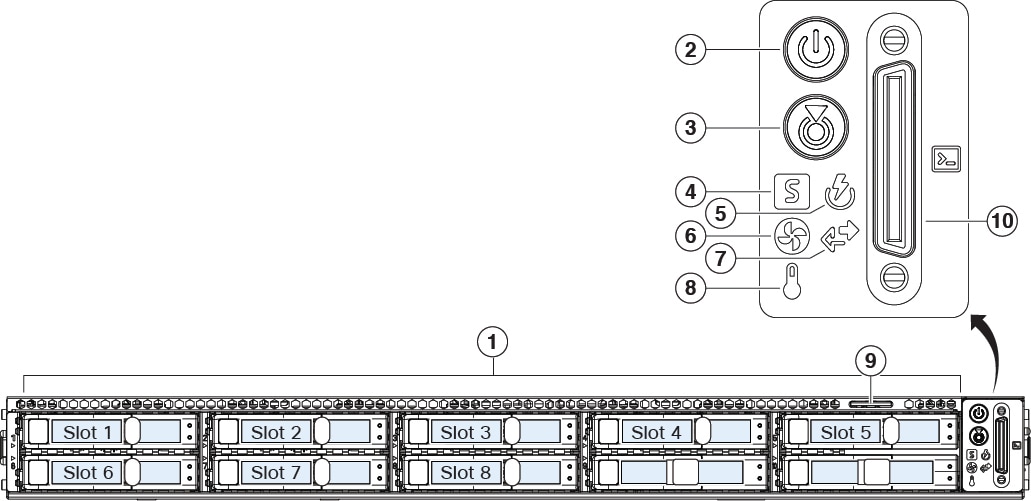
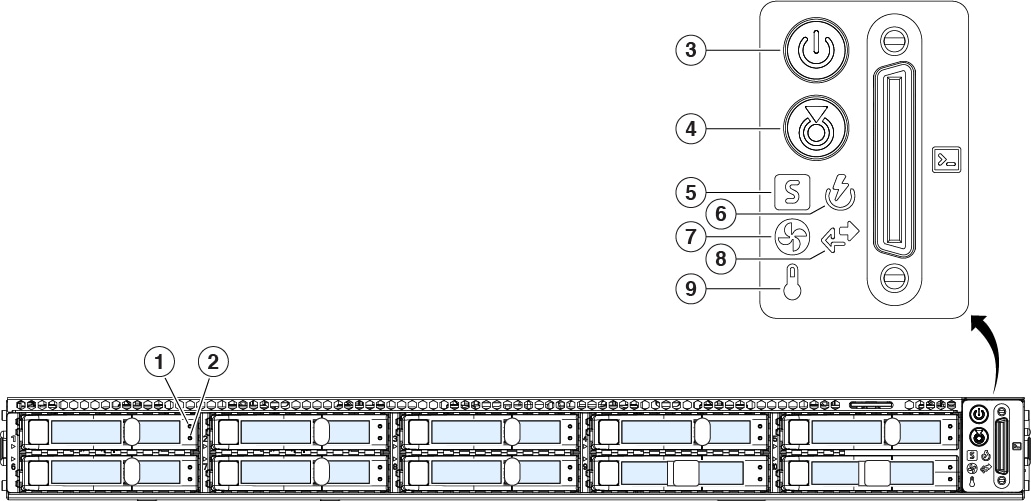
The following figure shows the front panel features and disk-drive configuration for the Threat Grid M5. See Front Panel LEDs for a description of the LEDs.

Figure 4. Threat Grid M5 Front Panel

1

Drive bays

Supports two SATA SSDs in slots 1 and 2

Supports six SAS HDDs in slots 3 through 8

2

Power button/power status LED

3

Unit identification button/LED

4

System status LED

5

Power supply status LED

6

Fan status LED

7

Network link activity LED

8

Temperature status LED

9

Pullout asset card

10

Keyboard, video, and mouse (KVM) port

Front Panel LEDs

The following figure shows the front panel LEDs and describes their states.

Figure 5. Front Panel LEDs and Their States

1

Drive fault LED:

  • Off—The drive is operating properly.

  • Amber—Drive fault detected.

  • Amber, flashing—The drive is rebuilding.

  • Amber, flashing with 1-second interval—Drive locate function activated in the software.

2

Drive activity LED:

  • Off—There is no drive in the drive tray (no access, no fault).

  • Green—The drive is ready.

  • Green, flashing—The drive is reading or writing data.

3

Power LED:

  • Off—There is no AC power to the chassis.

  • Amber—The chassis is in standby mode.

  • Green—The chassis is in main power mode. Power is supplied to all components.

4

Unit identification LED:

  • Off—The unit identification function is not in use.

  • Blue, flashing—The unit identification function is activated.

5

System status LED:

  • Green—The chassis is running in normal operating condition.

  • Green, flashing—The chassis is performing system initialization and memory check.

  • Amber—The chassis is in a degraded operational state (minor fault).

    • Power supply redundancy is lost.

    • CPUs are mismatched.

    • At least one CPU is faulty.

    • At least one DIMM is faulty.

    • At least one drive in a RAID configuration failed.

  • Amber, two flashes—There is a major fault with the system board.

  • Amber, three flashes—There is a major fault with the DIMMs.

  • Amber, four flashes—There is a major fault with the CPUs.

6

Power supply status LED:

  • Green—All power supplies are operating normally.

  • Amber—One or more power supplies are in a degraded operational state.

  • Amber, flashing—One or more power supplies are in a critical fault state.

7

Fan status LED:

  • Green—All fans are operating properly.

  • Amber, flashing—One or more fans breached the unrecoverable threshold.

8

Network link activity LED:

  • Off—The Ethernet port link is idle.

  • Green—One or more Ethernet ports are link-active, but there is no activity.

  • Green, flashing—One or more Ethernet ports are link-active with activity.

9

Temperature status LED:

  • Green—The chassis is operating at normal temperature.

  • Amber—One or more temperature sensors breached the critical threshold.

  • Amber, flashing—One or more temperature sensors breached the unrecoverable threshold.

Rear Panel

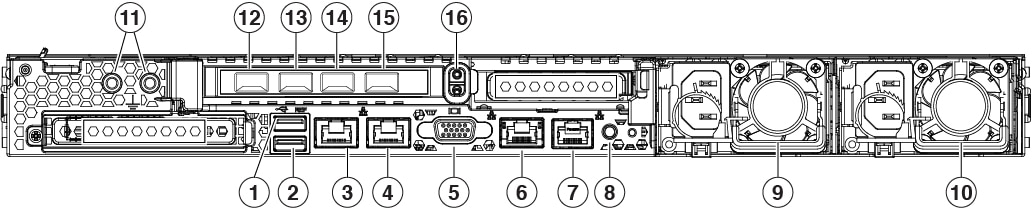
The following figure shows the rear panel of the Threat Grid M5.

Figure 6. Threat Grid M5 Rear Panel

1

USB 3.0 Type A (USB 1)

You can connect a keyboard, and along with a monitor on the VGA port, you can access the console.

2

USB 3.0 Type A (USB 2)

You can connect a keyboard, and along with a monitor on the VGA port, you can access the console.

3

Data interface (Clean)

Supports 100/1000/10000 Mbps depending on link partner capability.

4

Data interface (Dirty)

Gigabit Ethernet 100/1000/10000 Mbps interface, RJ-45, LAN2

5

VGA video port (DB-15 connector)

6

CIMC interface (disabled in the M5)

Note 

CIMC is not supported on any interfaces.

7

Serial console port (RJ-45 connector)

8

Unit identification button

9

770-W AC power supply (PSU 1)

Redundant as 1 + 1

10

770-W AC power supply (PSU 2)

Redundant as 1 + 1

11

Threaded holes for dual-hole grounding lug

12

SFP management interface

Used for administration and NFS server connectivity (Admin)

10-Gigabit Ethernet SFP+ support

SFP-10G-SR and SFP-10G-LR are qualified for use on the Threat Grid M5.

13

SFP interface

Used for cluster interconnect (Clust)

10-Gigabit Ethernet SFP+ support

SFP-10G-SR and SFP-10G-LR are qualified for use on the Threat Grid M5.

14

SFP interface

Not supported

15

SFP interface

Not supported

16

Riser handle

Not supported

Rear Panel LEDs

The following figure shows the rear panel LEDs and describes their states.

Figure 7. Rear Panel LEDs and Their States

1

100-Mbps/1-Gbps/10-Gbps Ethernet link (speed on both LAN 1 and LAN 2):

  • Off—Link speed is 100 Mbps.

  • Amber—Link speed is 1 Gbps.

  • Green—Link speed is 10 Gbps.

2

100-Mbps/1-Gbps/10-Gbps Ethernet link status (speed on both LAN 1 and LAN 2):

  • Off—No link is present.

  • Green—Link is active.

  • Green, flashing—Traffic is present on the active link.

3

1-Gbps Ethernet dedicated management link:

  • Off—Link speed is 10 Mbps.

  • Amber—Link speed is 100 Gbps.

  • Green—Link speed is 1 Gbps.

4

1-Gbps Ethernet dedicated management link:

  • Off—No link is present.

  • Amber—Link is active.

  • Green, flashing—Traffic is present on the active link.

5

Rear unit identification:

  • Off—The unit identification function is not in use.

  • Blue, flashing—The unit identification function is activated.

6

Power supply (one LED for each power supply):

  • Off—No AC input (12-V main power off; 12-V standby power off)

  • Green, flashing—12-V main power off; 12-V standby power on.

  • Green—12-V main power on; 12-V standby power on.

  • Amber, flashing—Warning threshold detected but 12-V main power on.

  • Amber—Critical error detected; 12-V main power off (for example, overcurrent, overvoltage, or overtemperature failure).

Power Supply

The following table lists the specifications for each 770-W AC power supply (Cisco part number FMC-PWR-AC-770W) used in the Threat Grid M5.

Table 2. Power Supply Specifications

Description

Specification

Power consumption

1313 BTU/hr

AC input voltage range

Nominal range: 100 to 120 V AC, 200 to 240 V AC

Range: 90–132 V AC, 180–264 V AC

AC input frequency

Nominal range: 50–60 Hz

Range: 47–63 Hz

Maximum AC input current

9.5 A peak at 100-V AC

4.5 A peak at 208 V AC

Maximum input volt amperes

950 VA at 100 V AC

Maximum output power for each power supply

770 W

Maximum inrush current

15 A (subcycle duration)

Maximum hold-up time

12 ms at 770 W

Power supply output voltage

12 V DC

Power supply standby voltage

12 V DC

Efficiency rating

Climate Savers Platinum Efficiency (80 Plus Platinum certified)

Form factor

RSP2

Input connector

IEC320 C13

Hardware Specifications

The following table contains hardware specifications for the Threat Grid M5 security appliance.

Table 3. Threat Grid M5 Hardware Specifications

Dimensions (H x W x D)

1.7 x 16.89 x 29.8 in (4.32 x 43.0 x 75.6 cm)

Weight

35.3 lb (16.01 kg)

Temperature

Operating: 50 to 95°F (10 to 35°C)

Maximum temperature is derated by 1°F/547 ft (1°C/300 m) of altitude above 3117 ft (950 m).

Nonoperating: –40 to 149°F (–40 to 65°C)

When the appliance is stored or transported.

Humidity

Operating: 8 to 90% noncondensing

Nonoperating: 5 to 95% noncondensing

Altitude

Operating: 0 to 10,000 ft

Nonoperating: 0 to 40,000 ft when the appliance is stored or transported

Sound power level

5.8 Bels (measure A-weighted per ISO7779 LWAd)

Operation at 73°F (23°C)

Sound pressure level

43 dBa (measure A-weighted per ISO7779 LpAM)

Operation at 73°F (23°C)

Product ID Numbers

The following table lists the field-replaceable PIDs associated with the Threat Grid M5. The spare components are ones that you can order and replace yourself. If any internal components fail, you must RMA the entire chassis including the SFPs and SFP cables. Remove the drives and power supplies before you send the chassis for RMA.

Table 4. Threat Grid M5 PIDs

PID

Description

TG-M5-PWR-AC-770W

AC power supply

TG-M5-PWR-AC-770W=

AC power supply (spare)

TG-M5-HDD-2.4TB

2.4-TB HDD

TG-M5-HDD-2.4TB=

2.4-TB HDD (spare)

TG-M5-SSD-240G

240-GB SSD

TG-M5-SSD-240G=

240-GB SSD (spare)

UCSC-RAILB-M4

Rail kit

Power Cord Specifications

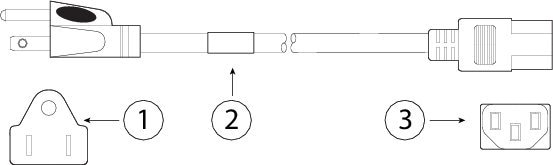
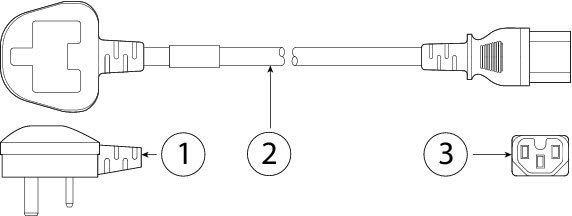
Each power supply has a separate power cord. Standard power cords or jumper power cords are available for connection to the Threat Grid M5. The jumper power cords for use in racks are available as an optional alternative to the standard power cords

If you do not order the optional power cord with the system, you are responsible for selecting the appropriate power cord for the product. Using a incompatible power cord with this product may result in electrical safety hazard. Orders delivered to Argentina, Brazil, and Japan must have the appropriate power cord ordered with the system.


Note

Only the approved power cords and jumper cords provided with the Threat Grid M5 are supported.


The following power cords and jumper cords are supported.

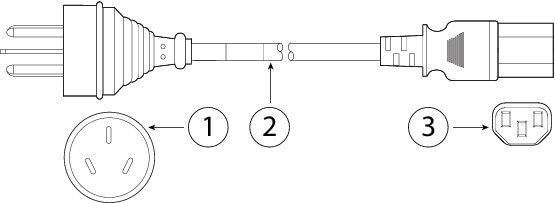
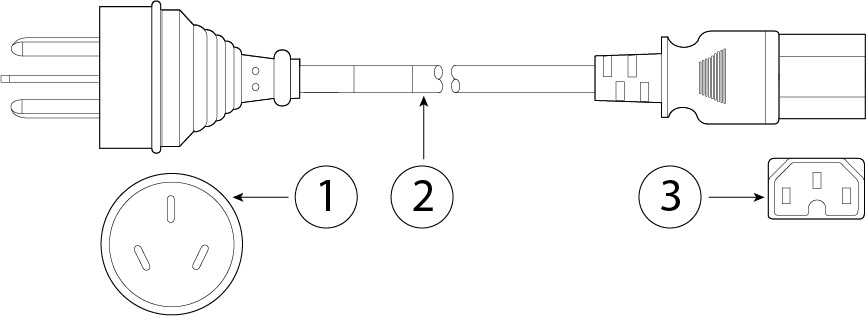
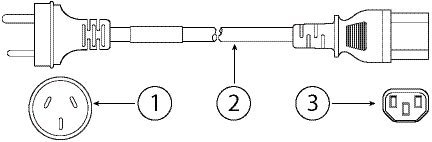
Figure 8. Argentina CAB-250V-10A-AR

1

Plug: IRAM 2073

2

Cord set rating: 10 A, 250 V

3

Connector: IEC 60320/C13

Figure 9. Australia CAB-9K10A-AU

1

Plug: A.S. 3112-2000

2

Cord set rating: 10 A, 250 V

3

Connector: IEC 60320/C15

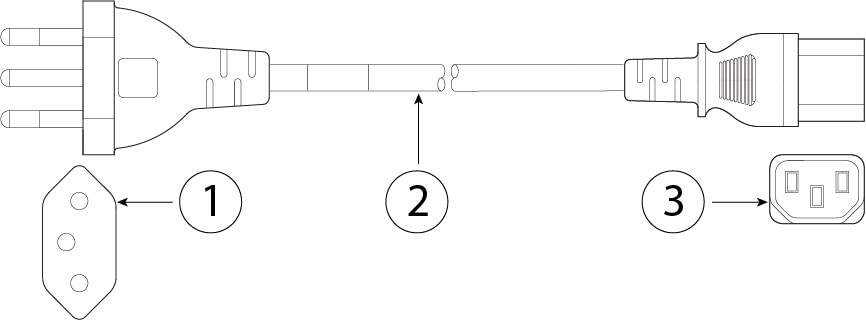
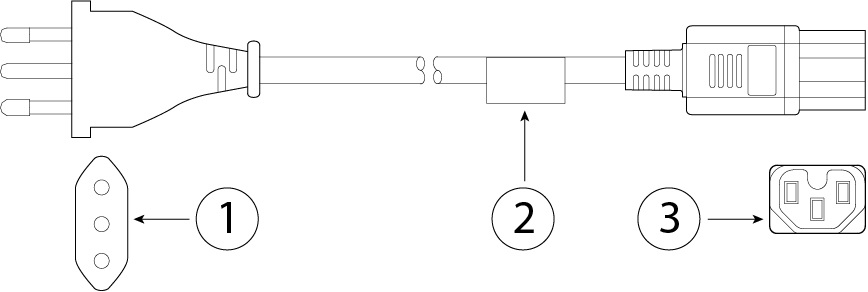
Figure 10. Brazil PWR-250V-10A-BZ

1

Plug: NBR 14136

2

Cord set rating: 10 A, 250 V

3

Connector: IEC 60320/C13

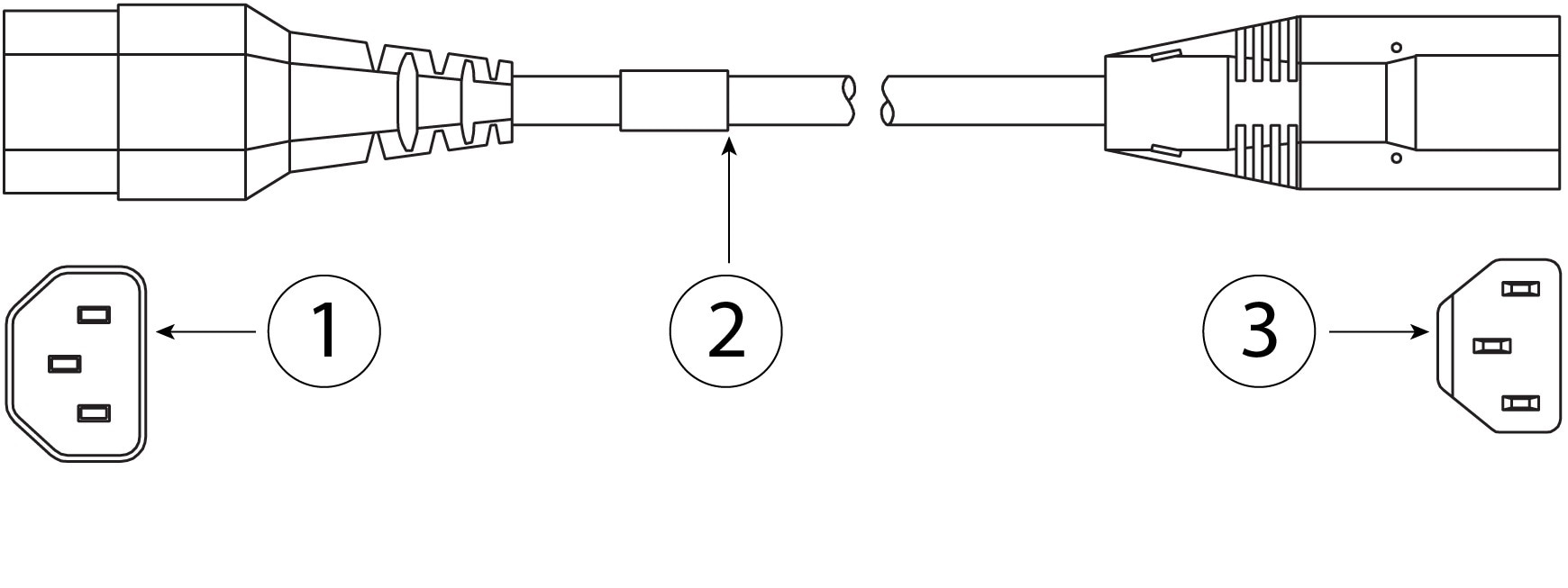
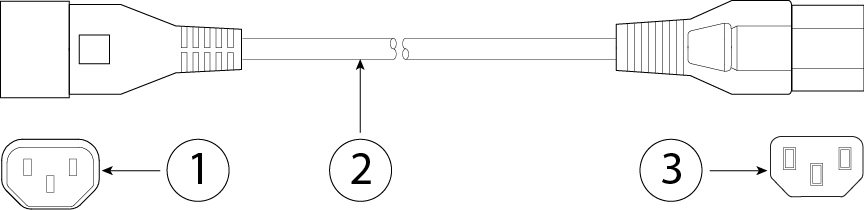
Figure 11. Cabinet Jumper CAB-C13-C14-2M

1

Plug: SS10A

2

Cord set rating: 10A, 250V

3

Connector: HS10S, C-13 to C-14

Figure 12. Cabinet Jumper CAB-C13-C14-AC

1

Plug: SS10A

2

Cord set rating: 10 A, 250 V

3

Connector: HS10S, C-13 to C-14 (recessed receptacle)

Figure 13. Cabinet Jumper CAB-C13-CBN

1

Plug: SS10A

2

Cord set rating: 10 A, 250 V

3

Connector: HS10S, C-13 to C-14

Figure 14. China CAB-250V-10A-CH

1

Plug: GB2099.1/2008

2

Cord set rating: 10 A, 250 V

3

Connector: IEC 60320/C13

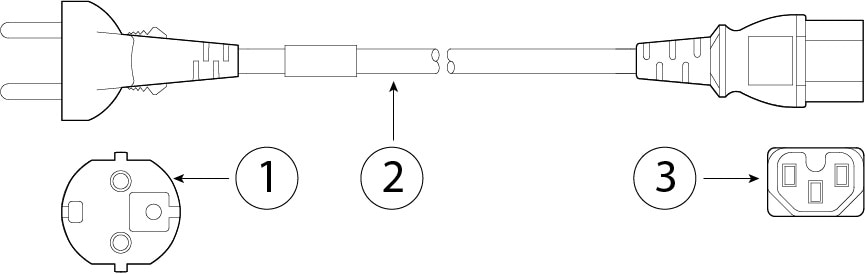
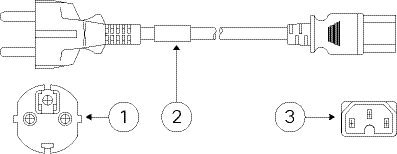
Figure 15. Europe CAB-9K10A-EU

1

Plug: CEE 7/7 (M2511)

2

Cord set rating: 10 A/16 A, 250 V

3

Connector: IEC 60320/C15 (VSCC 15)

Figure 16. India CAB-250V-10A-ID

1

Plug: IS 6538-1971

2

Cord set rating: 16 A, 250 V

3

Connector: IEC 60320-C13

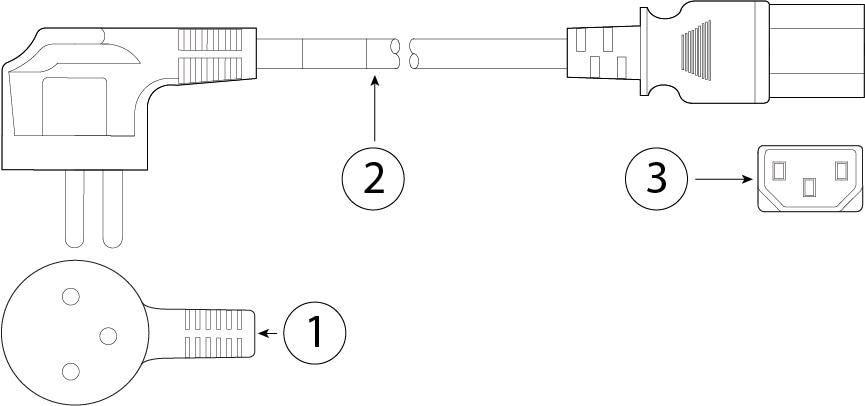
Figure 17. Israel CAB-250V-10A-IS

1

Plug: SI-32

2

Cord set rating: 10 A, 250 V

3

Connector: IEC 60320-C13

Figure 18. Italy CAB-9K10A-IT

1

Plug: CEI 23-16/VII (I/3G)

2

Cord set rating: 10 A, 250 V

3

Connector: IEC 60320/C15

(EN 60320/C15M)

Figure 19. Japan CAB-JPN-3PIN

1

Plug: JIS 8303

2

Cord set rating: 12 A, 125 V

3

Connector: IEC 60320/C13

Figure 20. Japan CAB-C13-C14-2M-JP

1

Plug: EN 60320-2-2/E

2

Cord set rating: 10 A, 250 V

3

Connector: EN 60320/C13 to C14

Figure 21. Korea CAB-9K10S-KOR

1

Plug: EL211 (KSC 8305)

2

Cord set rating: 10 A, 250 V

3

Connector: IEC 60320/C15

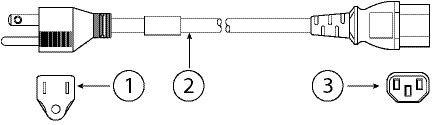
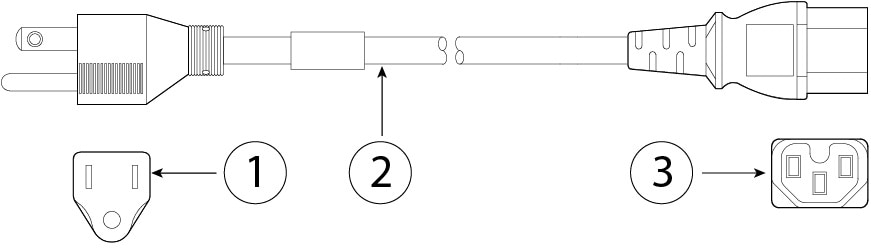
Figure 22. North America CAB-9K12A-NA

1

Plug: NEMA5-15P

2

Cord set rating: 13 A, 125 V

3

Connector: IEC 60320/C15

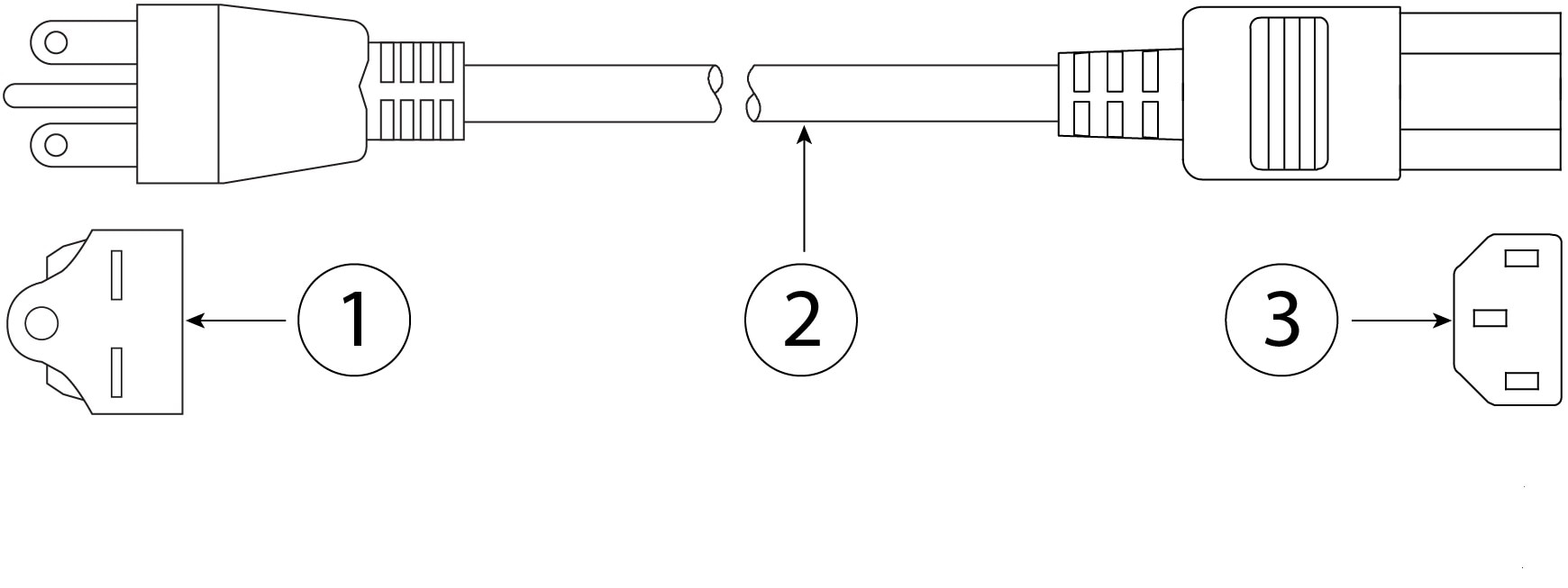
Figure 23. North America CAB-N5K6A-NA

1

Plug: NEMA6-15P

2

Cord set rating: 10 A, 125 V

3

Connector: IEC 60320/C13

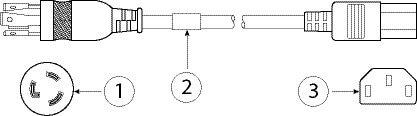
Figure 24. North America CAB-AC-L620-C13

1

Plug: NEMA L6-20 (molded twist lock)

2

Cord set rating: 13 A, 250 V

3

Connector: IEC 60320/C13

Figure 25. Switzerland CAB-9K10A-SW

1

Plug: SEV 1011 (MP232-R)

2

Cord set rating: 10 A, 250 V

3

Connector: IEC 60320/C15

Figure 26. Taiwan CAB-ACTW

1

Plug: EL 302 (CNS10917)

2

Cord set rating: 10 A, 125 V

3

Connector: IEC 60320/C13

Figure 27. United Kingdom CAB-9K10A-UK

1

Plug: BS1363A/SS145

2

Cord set rating: 10 A, 250 V

3

Connector: IEC 60320/C15