Getting Started with Cisco Security Analytics and Logging (On Premises): Firewall Event Integration


Note


If you want to store Firewall event data in the Cisco cloud, as opposed to on-premises, see the Cisco Security Analytics and Logging (SaaS) documentation for more information.


Concepts and Architecture

In a Security Analytics and Logging (OnPrem) deployment, you can use a Secure Network Analytics appliance to store data from another Cisco product deployment, such as a Firepower appliance deployment. In the case of the Firepower deployment, you can export your Firepower Security Events and data plane events from your Firepower Threat Defense devices managed by a Firepower Management Center to a Manager to store that information. In the Security Analytics and Logging (OnPrem) app v3.0.0, we added the ability to export events from your ASA devices via syslog to a Manager.

You have two options for Secure Network Analytics deployment:

  • Single-node - Deploy a standalone Manager to receive and store events, and from which you can review and query events

  • Multi-node - Deploy a Cisco Secure Network Analytics Flow Collector to receive events, a Cisco Secure Network Analytics Data Store (containing 3 Cisco Secure Network Analytics Data Nodes) to store events, and a Manager from which you can review and query events


Note


We support installing the app on an Manager as a standalone appliance (Single-node), or an Manager that manages a Flow Collector and 3 Data Nodes (Multi-node). You cannot install the app on an Manager if it manages one or more Flow Collectors without managing 3 Data Nodes. See Troubleshooting for more information.


See the following diagram for an example of a Single-node deployment with a Manager:
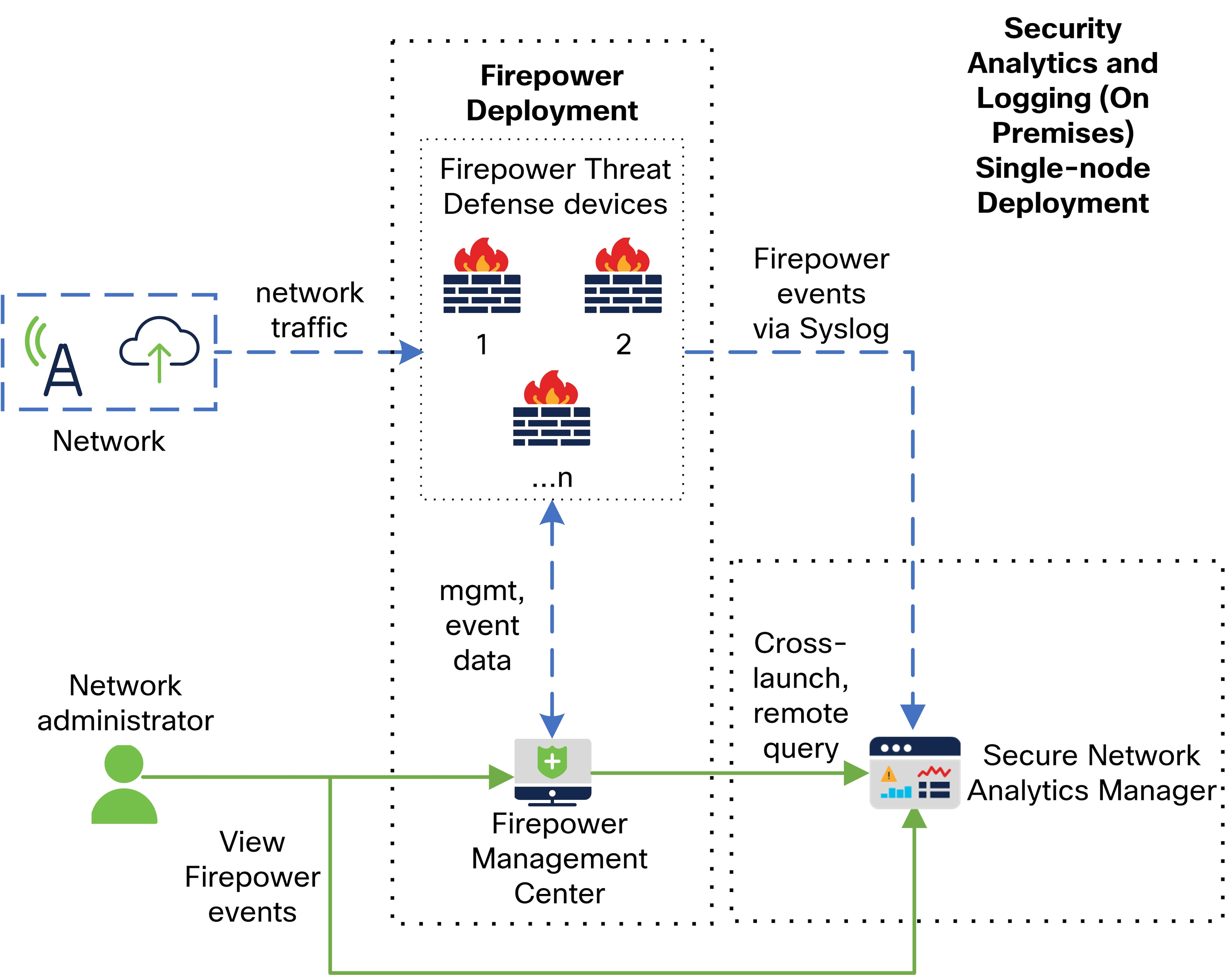
In this deployment, the Firepower Threat Defense devices send Firepower events to the Manager, and the Manager stores these events. From the Firepower Management Center UI, users can cross-launch to the Manager to view more information about the stored events. They can also query remotely the events from the Firepower Management Center.

See the following diagram for an example of a Multi-node deployment with a Manager, 3 Data Nodes, and a Flow Collector:
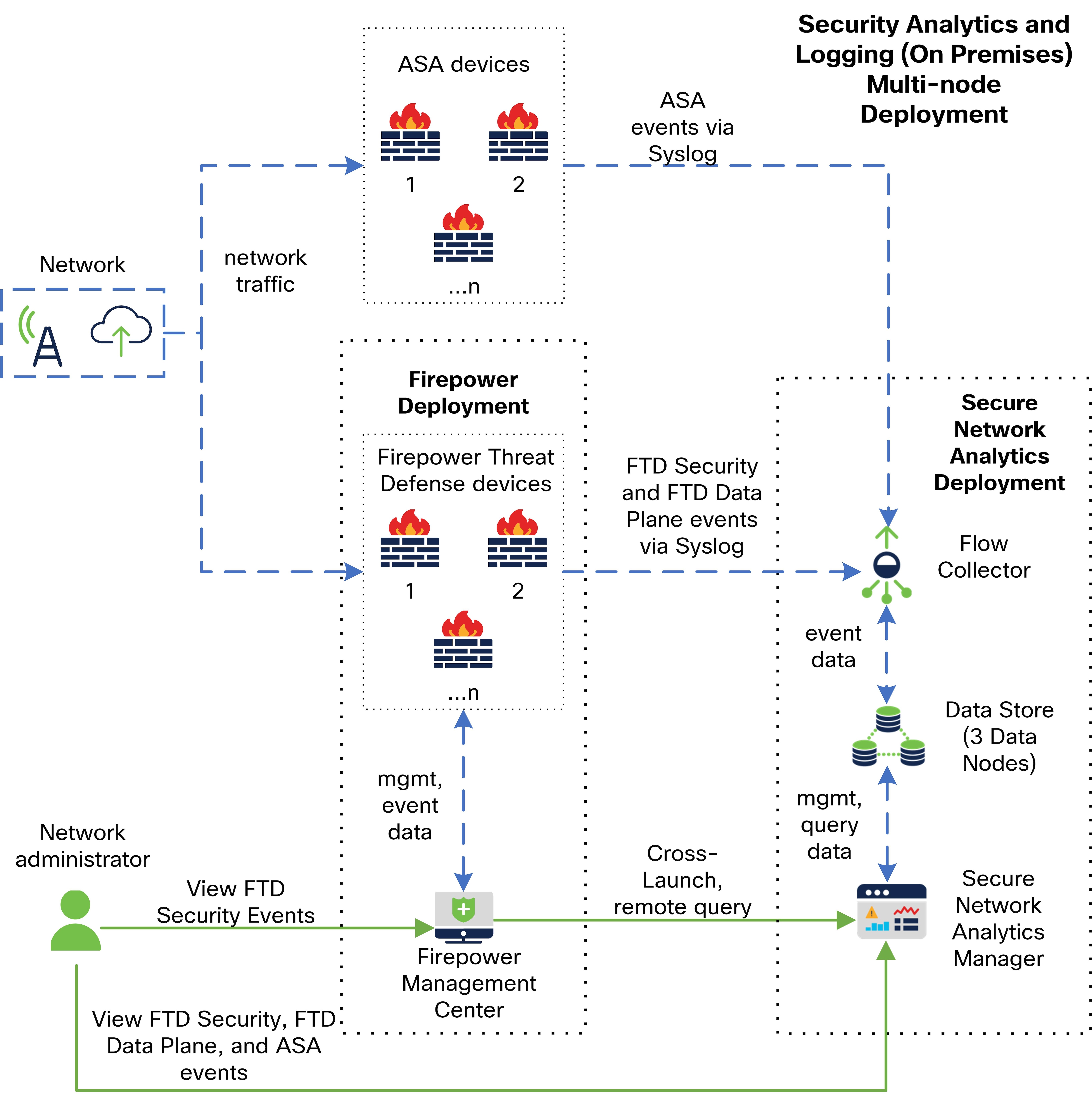
In this deployment, the Firepower Threat Defense and ASA devices send Firewall events to the Flow Collector. The Flow Collector sends the events to the Data Store (3 Data Nodes) for storage. From the Firepower Management Center UI, users can cross-launch to the Manager to view more information about the stored events. They can also query remotely the events from the Firepower Management Center.

Reference Documentation

The following table describes relevant reference documentation for Security Analytics and Logging (OnPrem) appliance compatibility, deployment, and use:

Table 1.

Document

Description

Firepower Release Notes

Review the Firepower Release Notes to understand the latest information about the current Firepower release, including last-minute information.

Secure Network Analytics Smart Licensing Guide

Review the Secure Network Analytics Smart Licensing Guide to understand how to register your Secure Network Analytics product instance and license your Secure Network Analytics appliances.

Secure Network Analytics Installation Guide

Review the Secure Network Analytics Installation Guide to understand how to deploy your Secure Network Analytics appliances for a Single-node deployment.

Secure Network Analytics Configuration Guide

Review the Secure Network Analytics Configuration Guide to understand how to configure your Secure Network Analytics appliances for a Single-node deployment.

Secure Network Analytics Data Store Deployment and Configuration Guide

Review the Secure Network Analytics Data Store Deployment and Configuration Guide to understand how to configure your Secure Network Analytics appliances for a Multi-node deployment.

Secure Network Analytics Release Notes

Review the Secure Network Analytics Release Notes to understand the latest information about the current Secure Network Analytics release, including last-minute information.

Security Analytics and Logging (OnPrem) Release Notes

Review the Security Analytics and Logging (OnPrem) Release Notes to understand the latest information about the current Security Analytics and Logging (OnPrem) release and Security Analytics and Logging (OnPrem) app, including last-minute information.

If you have not already deployed Firepower or configured your Firepower deployment to generate the expected connection, intrusion, file, and malware events, see the following:

Table 2.

Document

Description

Firepower Compatibility Guide

Review the Firepower Compatibility Guide to understand the version support for Firepower Management Center and Firepower Threat Defense device appliance models.

Firepower Installation and Configuration Guides

Review the Firepower Installation and Configuration Guides to understand how to install and configure your Firepower appliances.

Firepower Management Center Configuration Guide

Review the Firepower Management Center Configuration Guide to understand Firepower appliance licensing and configuration of your Firepower Threat Defense devices managed by your Firepower Management Center, access control policies, intrusion policies, and file policies.

Requirements and Best Practices

The following lists the requirements and best practices for deploying Security Analytics and Logging (OnPrem) to store your Firewall event data.

The following tables provide a high-level overview of the solution components required to use a Manager to store Firewall event data in a Security Analytics and Logging (OnPrem) deployment:

Firewall Appliances

You must deploy the following Firewall appliances:

Solution Component

Required Version

Licensing for Cisco Security Analytics and Logging (On Premises)

Notes

Firepower Management Center (hardware or virtual)

v7.0+

For Firepower Management Center running earlier versions, see https://cisco.com/go/sal-on-prem-docs.

none

  • can deploy one Manager per Firepower Management Center, and optionally one Flow Collector and one Data Store (3 Data Nodes)

Firepower managed devices

Firepower Threat Defense device (hardware or virtual) managed by FMC

v7.0+ using the wizard

Firepower Threat Defense v6.4 or later using syslog

NGIPS v6.4 using syslog

none

Multiple Firepower Threat Defense devices managed by one Firepower Management Center can export events to the same Secure Network Analytics deployment

ASA devices

v9.12+

none

  • supported on Security Analytics and Logging (OnPrem) app v3.0.0+ and Secure Network Analytics v7.4.0+ Multi-node deployment

Secure Network Analytics Appliances

You have the following options for deploying Secure Network Analytics:

  • Single-node - Deploy only a Manager to ingest and store events, and review and query events

  • Multi-node - Deploy a Flow Collector to ingest events, Data Store to store events, and Manager to review and query events


    Note


    You cannot deploy a mix of Secure Network Analytics hardware and Secure Network Analytics VE appliances.


Table 3. Single-node

Solution Component

Required Version

Licensing for Security Analytics and Logging (OnPrem)

Notes

Manager

Secure Network Analytics v7.3.1+

none

  • can deploy either an Manager 2210 hardware appliance or Manager Virtual Edition (VE) appliance

  • can receive events from multiple Firepower Threat Defense devices, all managed by one Firepower Management Center

  • must install the Security Analytics and Logging (OnPrem) app for event ingest, and for viewing Firewall events in the Manager Web App

Security Analytics and Logging (OnPrem) app

Security Analytics and Logging (OnPrem) app v2.0+

Logging and Troubleshooting Smart License, based on GB/day

Install this app on the Manager and configure to enable event ingest

Table 4. Multi-node

Solution Component

Required Version

Licensing for Security Analytics and Logging (OnPrem)

Notes

Manager

Secure Network Analytics v7.3.2+

none

  • can deploy either an Manager 2210 hardware appliance or Manager Virtual Edition (VE) appliance

  • must install theSecurity Analytics and Logging (OnPrem) app for event ingest, and for viewing Firewall events in the Manager Web App

Flow Collector

Secure Network Analytics v7.3.2+

none

  • can deploy either a Flow Collector 4210 hardware appliance or Flow Collector VE appliance

  • can receive events from multiple Firepower Threat Defense devices, all managed by one Firepower Management Center
  • can receive ASA events from multiple ASA devices (v7.4+)

Data Store (3 Data Nodes)

Secure Network Analytics v7.3.2+

none

  • can deploy either a Data Store 6200 (3 Data Nodes) hardware or Data Store VE (3 Data Nodes VE)

  • can store Firewall events received by the Flow Collector

Security Analytics and Logging (OnPrem) app

Security Analytics and Logging (OnPrem) app v2.0+

Logging and Troubleshooting Smart License, based on GB/day

Install this app on the Manager and configure to enable event ingest

In addition to these components, you must make sure that all of the appliances can synchronize time using NTP.

If you want to remotely access the Firepower or Secure Network Analytics appliances' consoles, you can enable access over SSH.

Secure Network Analytics Licensing

You can use Security Analytics and Logging (OnPrem) for 90 days without a license in Evaluation Mode. To continue using Security Analytics and Logging (OnPrem) after the 90 day period, you must obtain a Logging and Troubleshooting Smart License for Smart Licensing, based on the GB per day you anticipate sending in syslog data from your Firewall deployment to your Secure Network Analytics appliance.


Note


For license calculation purposes, the amount of data is reported to the nearest whole GB, truncated. For example, If you send 4.9 GB in a day, it is reported as 4 GB.


See the Secure Network Analytics Smart Software Licensing Guide for more information on licensing your Secure Network Analytics appliances.

Secure Network Analytics Resource Allocation

Secure Network Analytics offers the following ingest rates when deployed for Security Analytics and Logging (OnPrem):

  • a hardware or virtual edition (VE) Single-node deployment can ingest up to roughly 20k events per second (EPS) on average, with short bursts of up to 35k EPS

  • a virtual edition (VE) Multi-node deployment, with 3 Data Nodes, can ingest up to roughly 50k EPS on average, with short bursts of up to 175k EPS

  • a hardware Multi-node deployment, with 3 Data Nodes, can ingest up to roughly 100k EPS on average, with short bursts of up to 350k EPS

Based on the allocated hard drive storage, you can store the data for several weeks or months. These estimates are subject to various factors, including network load, traffic spikes, and information transmitted per event.


Note


At higher EPS ingest rates, the Security Analytics and Logging (OnPrem) app may drop data. In addition, if you send all event types, instead of only connection, intrusion, file, and malware events, Security Analytics and Logging (OnPrem)the app may drop data as your overall EPS rises. Review the log files in this case.


Firewall Event Logs for Network Detections

We have added network detections based on Cisco Security Analytics and Logging (On Premises) data. If you enable this configuration, you will have more insight into your traffic patterns, risks, and the scope of an attack.

You can enable or disable the ingest of Firewall event logs using the sal_to_flow_cache toggle in the advanced setttings in the Flow Collector Admin UI. This is used to enable or disable network detections when you already have Firewall logs ingest enabled.

For more information about editing advanced settings on the Flow Collector, refer to the Advanced Settings Help topic.


Note


The sal_to_flow_cache option is optional and only needed if you want Security Analytics and Logging (On Premises) data to be part of the flow cache for enhanced detections.


Single-node Recommendations

Manager VE Resources

For optimum performance, allocate the following resources if you deploy a Manager VE:

Resource

Recommendation

CPUs

12

RAM

64 GB

Hard drive storage

2 TB

Manager 2210 Specifications

For hardware specifications, see the Manager 2210 Specification Sheet.

Estimated Retention

Based on the storage space that you allocate for your Manager VE or if you have a Manager 2210, you can store your data for roughly the following time frames on a Single-node deployment:

Average EPS

Average Daily Events

Estimated Retention Period for 1 TB Storage

Estimated Retention Period for 2 TB Storage

Estimated Retention Period for 4 TB Storage (Hardware)

1,000

86.5 million

250 days

500 days

1000 days

5,000

430 million

50 days

100 days

200 days

10,000

865 million

25 days

50 days

100 days

20,000

1.73 billion

12.5 days

25 days

50 days

When the Manager reaches maximum storage capacity, it deletes the oldest data first to make room for incoming data.


Note


We have tested the Manager VE with these resource allocations for this estimated ingest and storage period. You may note unanticipated errors due to insufficient resource allocation if you do not assign enough CPUs or RAM to the virtual appliance. If you increase the storage allocation beyond 2 TB, you may note unanticipated errors due to insufficient resource allocation.


Multi-node Recommendations

For optimum performance, allocate the following resources if you deploy a Manager VE, Flow Collector VE, and Data Store VE:

Table 5. Manager VE

Resource

Recommendation

CPUs

8

RAM

64 GB

Hard drive storage

480 GB

Table 6. Flow Collector VE

Resource

Recommendation

CPUs

8

RAM

70 GB

Hard drive storage

480 GB

Table 7. Data Nodes VE (as part of a Data Store)

Resource

Recommendation

CPUs

12 per Data Node

RAM

32 GB per Data Node

Hard drive storage

5 TB per Data Node VE, or 15 TB total across 3 Data Nodes

Hardware Specifications

For hardware specifications, refer to the appliance specification sheets.

Estimated Retention (3 Data Nodes)

Based on the storage space that you allocate for your Data Store VE or if you have a hardware deployment, you can store your data for roughly the following time frames on your Multi-node deployment:

Average EPS

Average Daily Events

Virtual

Hardware

1,000

86.5 million

1,500 days

3,000 days

5,000

430 million

300 days

600 days

10,000

865 million

150 days

300 days

20,000

1.73 billion

75 days

150 days

25,000

2.16 billion

60 days

120 days

50,000

4.32 billion

30 days

60 days

75,000

6.48 billion

Not supported

40 days

100,000

8.64 billion

Not supported

30 days

When the Data Store reaches maximum storage capacity, it deletes the oldest data first to make room for incoming data.


Note


We have tested the virtual appliances with these resource allocations for this estimated ingest and storage period. You may note unanticipated errors due to insufficient resource allocation if you do not assign enough CPUs or RAM to the virtual appliance. If you increase the Data Node storage allocation beyond 5 TB, you may note unanticipated errors due to insufficient resource allocation.


Communication Ports

The following table lists the communication ports you must open for the Security Analytics and Logging (OnPrem) integration for a Single-node deployment.

Table 8. Single-node

From (Client)

To (Server)

Port

Protocol or Purpose

FMC, FTD devices, and Manager

External internet (NTP server)

123/UDP

NTP time synchronization, all to the same NTP server

User workstations

FMC and Manager

443/TCP

Logging into the appliances' web interfaces over HTTPS using a web browser

FTD devices managed by a FMC

Manager

8514/UDP

Syslog export from the Firepower Threat Defense devices, ingest to the Manager

FMC Manager

443/TCP

remote query from FMC to the Manager

The following table lists the communication ports you must open for the Security Analytics and Logging (OnPrem) integration for a Multi-node deployment. In addition, see the x2xx Series Hardware Appliance Installation Guide or the Virtual Edition Appliance Installation Guide for the ports you must open for your Secure Network Analytics deployment.

Table 9. Multi-node

From (Client)

To (Server)

Port

Protocol or Purpose

FMC, FTD devices, Manager, Flow Collector, and Data Store

External internet (NTP server)

123/UDP

NTP time synchronization, all to the same NTP server

user workstations

FMC and Manager

443/TCP

Logging into the appliances' web interfaces over HTTPS using a web browser

FTD devices managed by a FMC

Flow Collector

8514/UDP

Syslog export from the FTD devices, ingest to Flow Collector

ASA devices

Flow Collector

8514/UDP

Syslog export from ASA devices, ingest to Flow Collector

FMC Manager

443/TCP

Remote query from the FMC to the Manager

Configuration Overview

The following describes the high-level steps for configuring your deployment to store event data.

Review these tasks before starting your deployment.

Component and Task

Steps

Deploy Single-node

You have the following options:

Deploy Multi-node

You have the following options:

Download and install the Security Analytics and Logging (OnPrem) app on your Manager, and configure your Secure Network Analytics deployment to receive and store Firewall events.

Configure the Firepower Management Center to send events to Security Analytics and Logging (OnPrem)

You have the following options:

Configure ASA devices to send events to Security Analytics and Logging (OnPrem)

  • Configure your ASA devices to send events to your Secure Network Analytics appliance. See ASA Devices Configuration.

  • ASA events are supported on Security Analytics and Logging (OnPrem) app v3.0.0+ and Secure Network Analytics v7.4.0+ Multi-node deployment.

Review Next Steps

Review the Next Steps:

Next Steps

After you configure your Firewall devices to send event data to your Secure Network Analytics appliance as part of Security Analytics and Logging (OnPrem), you can take the following steps:

  • Review the FMC online help.

  • Review the Manager Web App online help to learn more about Secure Network Analytics.