- Introducing the IOS XE REST API
- Installing the Virtual Services Management Container
- Client Authentication
- Global Configuration Requirements
- Domain Name System (DNS) Server
- Network Time Protocol (NTP)
- IP Interface Configuration Requirements
- L2 Interfaces
- Bridge Domains
- Multicast
- VxLAN
- DHCP Server and Relay Agent
- Routing Protocol (OSPF, BGP, EIGRP) Requirements
- ACL Requirements for Subnets or IP Ranges
- Network Address Translation (NAT)
- Firewall Inspection Requirements
- License Requirements
- Memory and CPU Usage Report
- VRF
- Virtual Private Networks (SVTI and EzVPN)
- LISP
- QoS
- HSRP
Accessing and Initiating the REST API Interface Through an HTTPS Server
The Cisco CSR 1000V REST API interface in the csr_mgnt container is accessed and initiated through an HTTPS server session.

Note  The REST API in the CSR 1000V container runs by default when the CSR 1000V boots.
Enabling an HTTPS Server Session for the REST API
•Enabling the HTTPS Server During Cisco CSR 1000V OVA Deployment
Note The HTTPS session must have an identity certificate. For more information, see the "HTTPS--HTTP Server and Client with SSL 3.0" section of the HTTP Services Configuration Guide, Cisco IOS XE Release 3S.
Enabling the HTTPS Server During Cisco CSR 1000V OVA Deployment
Step 1 Install and use the free VMWare application called VSphere Client from VMware to enable the HTTPS server.
Note This method is supported for VMWare ESXi deployments in Cisco IOS XE Release 3.10S only.
Step 2 Enter the following Bootstrap Properties screen field parameters:
•Login Username
•Login Password
•Management IPv4 Address/Mask
•Management IPv4 Default Gateway
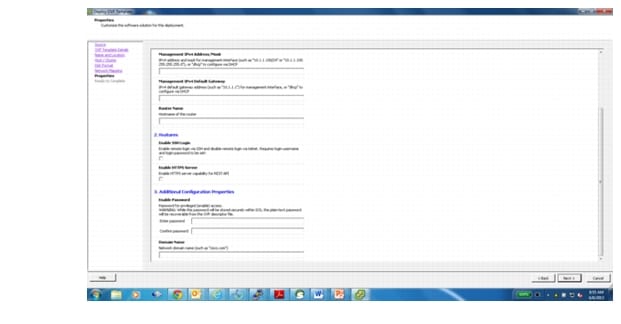
•Select check the Enable HTTPS server capability for REST API checkbox option.
Figure 1-1 shows the field on the Bootstrap Properties screen of the OVA Wizard where you select these options.
Figure 1-1 Properties Screen for Enabling the HTTPS Server Option
Step 3 Deploy the OVA template. See the "Deploying the Cisco CSR 1000V OVA Template to the VM" section in the Cisco CSR 1000V Series Cloud Services Router Software Configuration Guide for more information.
Configuring HTTPS
Perform this task to configure the HTTPS server if you did not deploy the OVA template when installing the Cisco CSR 1000V.
Step 1 Connect to your router and enter the configure terminal command to enter global configuration mode.
Step 2 Enable HTTPS on port 443, the default HTTPS port by entering the ip http secure-server command. A self-signed identity certificate is automatically genterated.
Step 3 Create and name a persistent web user interface transport map by entering the transport-map type persistent webui transport-map-name command.
Step 4 Enable the secure HTTPS server by entering the secure-server command.
Step 5 Enable the transport map by entering the transport type persistent webui input transport-map-name global configuration command.
Viewing REST API Container Status
The following example shows the enabled status of the REST API container:
Device# show virtual-service detail
Virtual service csr_mgmt detail
State : Activated
Package information
Name : containerjun7final.ova
Path : bootflash:/containerjun7final.ova
Application
Name : csrmgmt
Installed version : 1.0.0
Description : CSR-MGMT
Signing
Key type : Cisco development key
Method : SHA-1
Licensing
Name : CSR-MGMT
Version : 1.0
Detailed guest status
RESTful API Status: enabled
Network eth0 Status: up, RX packets:2878072, TX packets:591
FCGI interface Status: enabled, listenning on port: 8060
Onep Session: Count: 1, username: ly
Time Zone: Tue Aug 13 08:30:23 UTC 2013
Coredump: None
Activated profile name: None
Resource reservation
Disk : 240 MB
Memory : 512 MB
CPU : 30% system CPU
Attached devices
Type Name Alias
---------------------------------------------
Serial/Trace serial3
Serial/Syslog serial2
Serial/aux serial1
Serial/shell serial0
Disk /opt/var
Disk _rootfs
NIC ieobc_2 ieobc
Network interfaces
MAC address Attached to interface
------------------------------------------------------
54:0E:00:0B:0C:03 ieobc_2
Guest interface
---
Interface: eth0
ip address: 10.168.2.2/30
Initiating the Cisco CSR 1000V REST API Session
The first step for using the Cisco CSR 1000V REST API interface is to set up the token service authentication. This step creates the token ID that must appear in all subsequent API requests. The CSR bypasses the authentication phase if it recognizes the token. This step is required for using the REST API interface to configure the Cisco CSR 1000V.
You must enter the following REST API step:
Step 1 POST /api/v1/auth/token-services
See the "Client Authentication" section for more information.
 Feedback