Protocol Translation

This chapter provides details about configuring Protocol Translation on the Cisco IR807 Integrated Services Router for operation within a Supervisory Control and Data Acquisition (SCADA) system.

Protocol Translation

This chapter provides details about configuring Protocol Translation on the Cisco IR807 Integrated Services Router for operation within a Supervisory Control and Data Acquisition (SCADA) system.

This chapter includes the following sections:

Information About SCADA

SCADA refers to a control and management system employed in industries such as water management, electric power, and manufacturing. A SCADA system collects data from various types of equipment within the system and forwards that information back to a Control Center for analysis. Generally, individuals located at the Control Center monitor the activity on the SCADA system and intervene when necessary.

The Remote Terminal Unit (RTU) acts as the primary control system within a SCADA system. RTUs are configured to control specific functions within the SCADA system, which can be modified as necessary through a user interface.

Role of the IR807

In the network, the Control Center always serves as the master in the network when communicating with the IR807. The IR807 serves as a proxy master station for the Control Center when it communicates with the RTU.

The IR807 provides IEC 60870 T101 to IEC 60870 T104 protocol translation to serve as a SCADA gateway to do the following:

  • Receive data from RTUs (T101) and relay configuration commands from the Control Center (T104) to RTUs.
  • Receive configuration commands from the Control Center and relay RTU data to the Control Center
  • Terminate incoming T104 requests from the Control Center, when an RTU is offline.

Key Terms

The following terms are relevant when you configure the T101 and T104 protocol stacks on the IR807:

  • Channel – A channel is configured on each IR807 serial port interface to provide a connection to a single RTU for each IP connection to a remote Control Center. Each connection transports a single T101 (RTU) or T104 (Control Center) protocol stack.
  • Link Address – Refers to the device or station address.
  • Link Mode (Balanced and Unbalanced)–Refers to the modes of data transfer.
    • An Unbalanced setting refers to a data transfer initiated from the master.
    • A Balanced setting can refer to either a master or slave initiated data transfer.
  • Sector – Refers to a single RTU within a remote site.
  • Sessions – Represents a single connection to a remote site.

Protocol Translation Application

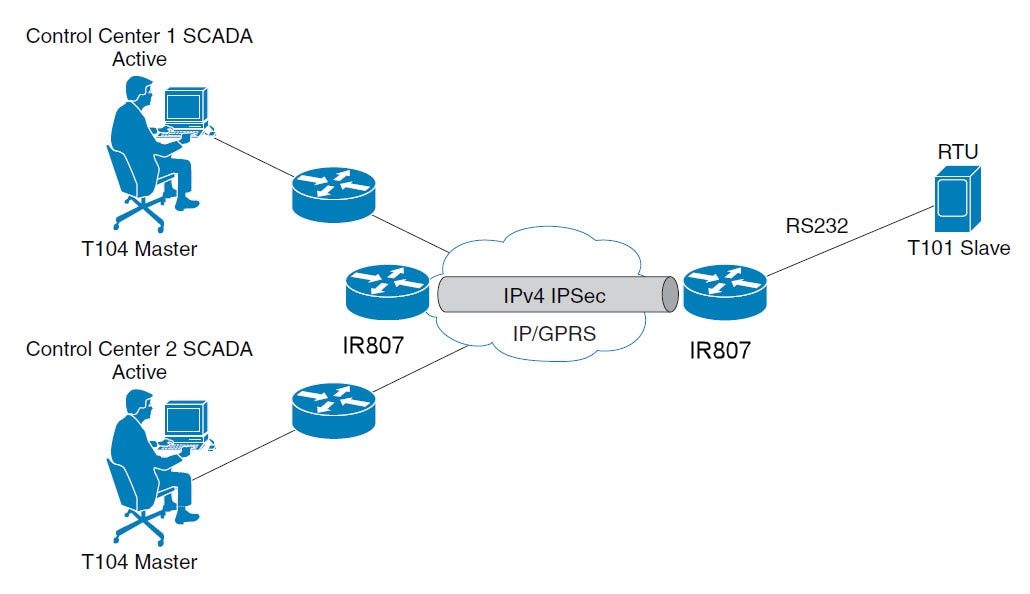
In IR807 Routers Providing Connectivity and Security within a SCADA System , the IR807 (installed within a secondary substation of the Utility Network) employs Protocol Translation to provide secure, end-to-end connectivity between Control Centers and RTUs within a SCADA System.

The IR807 connects to the RTU (slave) through a RS232 connection. The IR807 securely forwards SCADA data from the RTU to the Control Center in the SCADA system through an IPSec tunnel. You can terminate the IPSec tunnel on either a Cisco 2010 Connected Grid Router (IR807) or a head-end router (such as the Cisco ASR 1000). However, only the IR807 inspects the SCADA traffic before it forwards the traffic to the proper Control Center.

Figure 1. IR807 Routers Providing Connectivity and Security within a SCADA System

Configuring Protocol Translation

This section includes the following topics:

Enabling the IR807 Serial Port and T101 Encapsulation

Before you can enable and configure Protocol Translation on the IR807, you must first enable the serial port on the IR807 and enable SCADA encapsulation on that port (By default both the Async 0 and Async 1 in IR807 are encapsulated with SCADA only).

Command

Purpose

1

configure terminal

Enters the global configuration mode.

2

interface serial slot/port

Enters the interface command mode for the serial slot/port.

Note : The slot/port configuration for the serial port can be 0 or 1.

3

no shutdown

Brings up the port, administratively.

4

encapsulation t101

Enables encapsulation on the serial port for the T101 protocol.

EXAMPLE

This example shows how to enable Async port 0 and how to enable encapsulation on that port to support Scada communication.


IR807#
config terminal
IR807(config)#
interface Async 0
IR807(config-if)
#encapsulation scada
IR807(config-if)#
no shutdown
IR807(config-if)#
end

Configuring T101 and T104 Protocol Stacks

After enabling Protocol Translation feature on the IR807, you must configure the T101 and T104 protocol stacks, which allow end-to-end communication between Control Centers (T104) and RTUs (T101) within a SCADA system.

Configuring the T101 Protocol Stack

Configure the channel, session, and sector parameters for the T101 protocol stack.

Command

Purpose

1

configure terminal

Enters global configuration mode.

2

scada-gw protocol t101

Enters the configuration mode for the T101 protocol.

3

channel channel_name

Enters the channel configuration mode for the T101 protocol.

channel_name – Indentifies the channel on which the serial port of the IR807 communicates to the RTU.

When the entered channel name does not already exist, the router creates a new channel.

Entering the no form of this command deletes an existing channel. However, all sessions must be deleted before you can delete a channel.

4

link-mode {balanced | unbalanced}

Configures the link-mode as either balanced or unbalanced.

unbalanced – Refers to a data transfer initiated from the master.

balanced – Refers to either a master or slave data transfer.

5

link-addr-size {none | one | two}

Defines the link address size in octets.

6

bind-to-interface serial slot/port

Defines the IR807 serial interface on which the system sends its T101 protocol traffic.

port – Value of 0 or 1.

7

{no | } day-of-week enable

Include Day of week information in timestamp

8

exit

Ends configuration of the channel and exits the channel configuration mode. Saves all settings.

9

session session_name

Enters the session configuration mode and assigns a name to the session.

10

attach-to-channel channel_name

Attaches the session to the channel.

Enter the same channel name that you entered in Step 3 .

channel_name – Indentifies the channel.

11

common-addr-size {one | two}

Defines the common address size in octets.

12

cot size {one | two}

Defines the cause of transmission such as spontaneous or cyclic data schemes in octets.

13

info-obj-addr-size {one | two | three}

Defines the information object element address size in octets.

14

link-addr link_address

Refers to the link address of the RTU.

Note : The link address entered here must match the value set on the RTU to which the serial port connects.

link_address – Value of 1 or 2.

15

exit

Exits the session configuration mode.

16

sector sector_name

Enters the sector configuration mode and assigns a name to the sector for the RTU.

sector_name – Indentifies the sector.

17

attach-to-session session_name

Attaches the RTU sector to the session.

Enter the same session name that you entered in Step 9 .

session_name - Indentifies the session.

19

asdu-addr asdu_address

Refers to the ASDU structure address of the RTU.

20

exit

Exits the sector configuration mode.

21

exit

Exits the protocol configuration mode.

EXAMPLE

This example shows how to configure the parameters for the T101 protocol stack for RTU_10 .


IR807# configure terminal 
IR807(config)#scada-gw protocol t101
IR807(config-t101)#channel t101_serial_channel_1
IR807(config-t101-channel)#link-mode unbalanced
IR807(config-t101-channel)#link-addr-size one
IR807(config-t101-channel)#bind-to-interface Async0
IR807(config-t101-channel)#no day-of-week enable
IR807(config-t101-channel)#exit
IR807(config-t101-channel)#session t101_serial_session_1
IR807(config-t101-session)#attach-to-channel t101_serial_channel_1
IR807(config-t101-session)#common-addr-size two
IR807(config-t101-session)#cot-size one
IR807(config-t101-session)#info-obj-addr-size two
IR807(config-t101-session)#link-addr 3
IR807(config-t101-session)#exit
IR807(config-t101-session)#sector t101_serial_sector_1
IR807(config-t101-sector)#attach-to-session t101_serial_session_1
IR807(config-t101-sector)#asdu-addr 3
IR807(config-t101-sector)# exit
IR807(config-t101)# exit
IR807(config)#

Configuring the T104 Protocol Stack

Follow these steps below for each Control Center that you want to connect to over a T104 protocol.

Command

Purpose

1

configure terminal

Enters configuration mode.

2

scada-gw protocol t104

Enters the configuration mode for the T104 protocol.

3

channel channel_name

Enters the channel configuration mode for the T104 protocol.

channel_name – Indentifies the channel on which the router communicates with the Control Center.

Note : When the entered channel name does not already exist, the IR807 creates a new channel.

Entering the no form of this command deletes an existing channel. However, all sessions must be deleted before you can delete a channel.

4

k-value value

Sets the maximum number of outstanding Application Protocol Data Units (APDUs) for the channel.

Note: An APDU incorporates the ASDU and a control header.

value – Range of values from 1 to 32767. Default value is 12 APDUs.

5

w-value value

Sets the maximum number of APDUs for the channel.

value – Range of values from 1 to 32767. Default value is 8 APDUs.

6

t0-timeout value

Defines the t0-timeout value for connection establishment of the T104 channel.

7

t1-timeout value

Defines the t1-timeout value for send or test APDUs on the T104 channel.

8

t2-timeout value

Defines the t2-timeout value for acknowledgements when the router receives no data message.

Note : The t2 value must always be set to a lower value than the t1 value on the T104 channel.

9

t3-timeout value

Defines the t3-timeout value for sending s-frames in case of a long idle state on the T104 channel.

Note : The t3 value must always be set to a higher value than the t1 value on the T104 channel.

10

tcp-connection {0 | 1} local-port port_number

Sets the value for the Control Center as defined on the Control Center.

11

{no | } day-of-week enable

Include Day of week information in timestamp

12

{no | } send-ei enable

Send End of Initialization when T104 session re-established

13

exit

Exits the channel configuration mode.

14

session session_name

Enters the session configuration mode and assigns a name to the session.

session_name – Use the same name that you assigned to the channel previously.

15

attach-to-channel channel_name

Defines the name of the channel that transports the session traffic.

16

exit

Exits the session configuration mode.

17

sector sector_name

Enters the sector configuration mode and assigns a name to the sector for the Control Center.

18

attach-to-session session_name

Attaches the Control Center sector to the channel.

session_name – Use the same name that you assigned to the channel previously.

19

asdu-addr asdu_address

Refers to the ASDU structure address. Value entered here must match the ASDU value on the RTU.

asdu_address – asdu_address

20

map-to-sector sector_name

Maps the Control Center (T104) sector to the RTU (T101) sector.

21

Return to Step 1 .

Repeat all steps in this section for each Control Center active in the network.

EXAMPLE

This example shows how to configure the parameters for the T104 protocol stack on Control Center 1 and Control Center 2, both of which are configured as masters , and how to map the T104 sector to the T101 sector.

To configure Control Center 1 (cc_master1), enter the following commands.

IR807# configure terminal
IR807(config)#scada-gw protocol t104
IR807(config-t104)#channel t104_ip_channel_1
IR807(config-t104-channel)#k-value 12
IR807(config-t104-channel)#w-value 8
IR807(config-t104-channel)#t0-timeout 30
IR807(config-t104-channel)#t1-timeout 15
IR807(config-t104-channel)#t2-timeout 10
IR807(config-t104-channel)#t3-timeout 30
IR807(config-t104-channel)#tcp-connection 0 local-port default remote-ip any
IR807(config-t104-channel)#no day-of-week enable
IR807(config-t104-channel)#no send-ei enable
IR807(config-t104-channel)#exit
IR807(config-t104)#session t104_ip_session_1
IR807(config-t104-session)#attach-to-channel t104_ip_channel_1
IR807(config-t104-session)#exit
IR807(config-t104)#sector t104_ip_sector_1
IR807(config-t104-sector)#attach-to-session t104_ip_session_1
IR807(config-t104-sector)#asdu-addr 3
IR807(config-t104-sector)#map-to-sector t101_serial_sector_1
To configure Control Center 2 (cc_master2), enter the following commands.

IR807(config)#scada-gw protocol t104
IR807(config-t104)#channel t104_ip_channel_2
IR807(config-t104-channel)#k-value 12
IR807(config-t104-channel)#w-value 8
IR807(config-t104-channel)#t0-timeout 30
IR807(config-t104-channel)#t1-timeout 15
IR807(config-t104-channel)#t2-timeout 10
IR807(config-t104-channel)#t3-timeout 30
IR807(config-t104-channel)#tcp-connection 0 local-port 2400 remote-ip any
IR807(config-t104-channel)#no day-of-week enable
IR807(config-t104-channel)#no send-ei enable
IR807(config-t104-channel)#exit
IR807(config-t104)#session t104_ip_session_2
IR807(config-t104-session)#attach-to-channel t104_ip_channel_2
IR807(config-t104-session)#exit
IR807(config-t104)#sector t104_ip_sector_2
IR807(config-t104-sector)#attach-to-session t104_ip_session_2
IR807(config-t104-sector)#asdu-addr 3
IR807(config-t104-sector)#map-to-sector t101_serial_sector_2

Configuring the DNP3-Serial and DNP3-IP Protocol Stacks

After encapsulating the interface with SCADA protocol on the IR807, you must configure the DNP3-Serial and DNP3-IP protocol stacks, which allow end-to-end communication between Control Centers (DNP3-IP) and RTUs (DNP3-Serial) within a SCADA system.

Configuring the DNP3-Serial Protocol Stack

Configure the channel and session parameters for the DNP3-Serial protocol stack.

Command

Purpose

1

configure terminal

Enters global configuration mode.

2

scada-gw protocol dnp3-serial

Enters configuration mode for the DNP3 serial protocol.

3

channel channel_name

Enters channel configuration mode for the DNP3 serial protocol.

channel_name – Identifies the channel on which the IR807 serial port communicates to the RTU.

Note : When the entered channel name does not already exist, the router creates a new channel.

Entering the no form of this command deletes an existing channel. However, all sessions must be deleted before you can delete a channel.

4

link-addr source address

Configure scada-gw dnp3 serial source (Master) channel link-addr

address – source address

5

request-timeout timeout

Timeout for request

timeout - Timeout in second

6

link-timeout timeout

Timeout for link

timeout – Timeout in second

7

{no | } unsolicited-response enable

Unsolicitied Response

8

bind-to-interface async port

Defines the IR807 async interface on which the system sends its DNP3 protocol traffic.

port – Value of 0 or 1.

9

session session_name

Enters session configuration mode and assigns a name to the session.

10

attach-to-channel channel_name

Attaches the session to the channel.

Enter the same channel name that you entered in Step 3 .

channel_name – Identifies the channel.

11

link-addr dest address

Configure scada-gw dnp3 serial destination (Slave) channel link-addr

address - destination address

12

exit

Exits session configuration mode.

13

exit

Exits protocol configuration mode.

Example

This example shows how to configure the parameters for the DNP3-Serial protocol stack for RTU_10.


IR807# configure terminal
IR807(config)#scada-gw protocol dnp3-serial
IR807(config-dnp3s)#channel dnp3_serial_channel_1
IR807(config-dnp3s-channel)#link-addr source 3
IR807(config-dnp3s-channel)#request-timeout 8
IR807(config-dnp3s-channel)#link-timeout 6
IR807(config-dnp3s-channel)#unsolicited-response enable
IR807(config-dnp3s-channel)#bind-to-interface Async1
IR807(config-dnp3s-channel)#session dnp3_serial_session_1
IR807(config-dnp3s-session)#attach-to-channel dnp3_serial_channel_1
IR807(config-dnp3s-session)#link-addr dest 4
IR807(config-dnp3s-session)#exit
IR807(config-dnp3s)#exit

Configuring the DNP3-IP Protocol Stack

Configure the channel and session parameters for the DNP3-IP protocol stack.

Command

Purpose

1

configure terminal

Enters configuration mode.

2

scada-gw protocol dnp3-ip

Enters configuration mode for the DNP3-IP protocol.

3

channel channel_name

Enters channel configuration mode for the DNP3-IP protocol.

channel_name – Identifies the channel on which the IR807 communicates with the Control Center.

Note : When the entered channel name does not already exist, the IR807 creates a new channel.

Entering the no form of this command deletes an existing channel. However, all sessions must be deleted before you can delete a channel.

4

link-addr dest address

Configure scada-gw dnp3-ip destination(Master) channel link-addr

address - destination address

Note : The address should be same as mentioned during the dnp3-serial configuration under the channel

5

no send-unsolicited-msg enable

send unsolicited messages.

6

tcp-connection local-port port_number remote-ip ip

Sets the value for the Control Center as defined on the Control Center

7

exit

Exits channel configuration mode.

8

session session_name

Enters session configuration mode and assigns a name to the session.

session_name - Use the same name that you assigned to the channel in Step 3.

9

attach-to-channel channel_name

Defines the name of the channel that transports the session traffic.

10

link-addr source source_address

Configure scada-gw dnp3 ip source (Slave) channel link-addr

address - source address

Note : The address should be same as mentioned during the dnp3-serial configuration under the session

11

map-to-session session_name

Configure lower session mapping to dnp3 serial session

session_name – dnp3-serial session name

12

exit

Exits session configuration mode.

Starting the Protocol Translation Engine

Prerequisites

After configuring the T101 and T104 protocols on the IR807, you can start the Protocol Translation Engine.

Command

Purpose

1

configure terminal

Enters global configuration mode.

2

scada-gw enable

Starts the Protocol Translation Engine on the IR807.


IR807# configure terminal
IR807(config)# scada-gw enable

Verifying the Protocol Translation Configuration

After configuring the T101 and T104 or DNP3-Serial and DNP3-IP protocols on the IR807, you can verify the configuration. using the show running-config | sec scada-gw command:


IR807#sh run | sec scada-gw
scada-gw protocol t101
 channel t101_serial_channel_1
  bind-to-interface Async0
 session t101_serial_session_1
  attach-to-channel t101_serial_channel_1
 sector t101_serial_sector_1
  attach-to-session t101_serial_session_1
scada-gw protocol t104
 channel t104_ip_channel_1
  tcp-connection 0 local-port default remote-ip any
 session t104_ip_session_1
  attach-to-channel t104_ip_channel_1
 sector t104_ip_sector_1
  attach-to-session t104_ip_session_1
  map-to-sector t101_serial_sector_1
scada-gw protocol dnp3-serial
 channel dnp3_serial_channel_1
  unsolicited-response enable
  bind-to-interface Async1
 session dnp3_serial_session_1
  attach-to-channel dnp3_serial_channel_1
scada-gw protocol dnp3-ip
 channel dnp3_ip_channel_1
  tcp-connection local-port default remote-ip any
 session dnp3_ip_session_1
  attach-to-channel dnp3_ip_channel_1
  map-to-session dnp3_serial_session_1
scada-gw enable