- Basic Configurations
- Configuring the Channelized OC-12/T3 SONET/SDH Optical Services Modules
- Configuring the Channelized OC-12/T1 Optical Services Modules
- Configuring Destination Sensitive Services on the Optical Services Modules
- Configuring Multiprotocol Label Switching on the Optical Services Modules
- Understanding the Channelized OC-12/T1 Optical Services Modules
- Configuring the Channelized OC-12/T1 OSMs
- Configuring the SONET Controller
- Configuring STS-1 Path Attributes under SONET Framing
- Configuring the POS Interface
- Configuring T3 Links Under SONET Framing
- Configuring CT3 Links Under SONET Framing
- Configuring VT-15 Links Under SONET Framing
- Configuring Interfaces Using SDH Framing with AU-3 Mapping
- Configuring Interfaces Using SDH Framing with AU-4 Mapping
Configuring the Channelized OC-12/T1 Optical Services Modules
This chapter describes how to configure the channelized OSM-1CHOC12/T1-SI SONET/SDH Optical Services Modules (OSMs).
The chapter consists of these sections:
• Understanding the Channelized OC-12/T1 Optical Services Modules
•Configuring the Channelized OC-12/T1 OSMs
Understanding the Channelized OC-12/T1 Optical Services Modules
These sections describe the SONET/SDH mappings and multiplex hierachy and the features supported on the channelized OSMs:
•Channelized OC-12/T1 OSM Multiplexing and Mappings
•Channelized OC-12/T1 OSM Features
Channelized OC-12/T1 OSM Multiplexing and Mappings
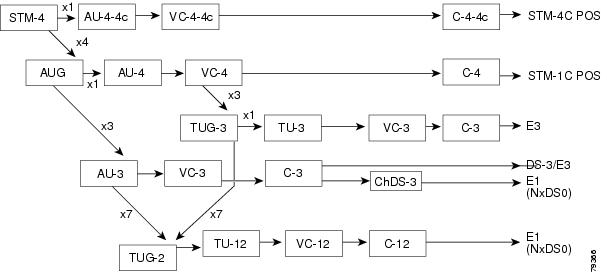
The 1-port OSM-CHOC12/T1-SI module supports provisioning of OC-12, OC-3, DS-3, subrate DS-3, E-3, E1, DS1 and DS0 links.
Figure 6-1 illustrates the SONET multiplexing hierarchy supported on the OSM-1CHOC12/T1-SI module.
Figure 6-2 illustrates the SDH multiplexing hierarchy supported on the OSM-1CHOC12/T1-SI module.
Figure 6-1 Supported SONET Multiplexing Hierarchy on the Channelized OC-12/T1 OSMs
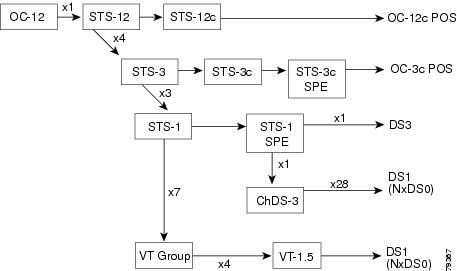
Figure 6-2 Supported SDH Multiplexing Hierarchy on the Channelized OC-12/T1 OSMs
Each OC-12/STM-4 port of OSM-CHOC12/T1 can support any allowed combination of OC-3c/STM-1/DS3/DS1/E3/E1/T1s up to 1023 channels.
For example, each port can support the following:
•4 OC-3c/STM-1 at 155.52 Mbps
•12 DS3 at 44.7 Mbps
•12 E3s at 34.368 Mbps
•252 E1s at 2.048Mbps
•336 DS1s at 1.5 Mbps
•1023 DS0s at 64 Kbps
Channelized OC-12/T1 OSM Features
The channelized 1-port OSM-CHOC12/T1-SI modules support the following standard Cisco IOS SONET/SDH features:
•Errors, Alarms, and Performance Monitoring
•SONET/SDH Failure Recovery Support
•OC-12 POS Interface Configuration
SONET Compliance
The OSM-CHOC12/T1 modules support 1+1 SONET Automatic Protection Switching (APS) and comply with ANSI T1.107DS1/DS-3 standards, ANSI T1.403 1998, G.703, G.704, AT&T 54014 (DS-3), 54016 (DS1).
Errors, Alarms, and Performance Monitoring
These sections lists the supported errors, alarms, and perfomance monitoring features:
•Regenerator Section Errors and Alarms
•Multiplex Section Errors and Alarms
•Administrative Unit Errors and Alarms
•Higher Order Path Errors and Alarms
•Lower-Order Path Errors and Alarms
Regenerator Section Errors and Alarms
•LOS
•LOF
•RS-TIM
•RS-BIP
Multiplex Section Errors and Alarms
•MS-AIS
•MS-REI
•MS-RDI,
•MS-BIP
Administrative Unit Errors and Alarms
•AU-AIS
•AU-LOP
•AU-BIP
Higher Order Path Errors and Alarms
•HP-UNEQ
•HP-TIM
•HP-BIP
•HP-REI
•HP-RDI
•HP-PLM
Lower-Order Path Errors and Alarms
•TU-LOP
•TU-NDP
•TU-AIS
•TU-LOM
•BIP-2/B3
•LP-UNEQ
•LP-RDI
•LP-REI
•LP-RFI
•LP-TIM
•LP-PLM
Section Errors and Alarms
•LOS
•LOF
•TIM-S
•BIP-S
Line Errors and Alarms
•AIS-L
•REI-L
•RDI-L
•BIP-L
STS Path Errors and Alarms
•AIS-P
•LOP-P
•UNEQ-P
•TIM-P
•REI-P
•RDI-P
•LOM
•BIP-P
•CV-P
•PLM-P
VT Path Errors and Alarms
•LOP-V
•NDF-V
•AIS-V
•CV-V
•UNEQ-V
•RDI-V
•REI-V
•RFI-V
•TIM-V
•PLM-V
Additional Errors and Alarms
•Signal Failure Bit Error Rate (SF-ber)
•Signal Degrade Bit Error Rate (SD-ber)
•Path Trace Byte (J1)
•Error Counts for B1
•Error Counts for B2
•Error Counts for B3
•Threshold Crossing Alarms (TCA) for B1
•Threshold Crossing Alarms (TCA) for B2
•Threshold Crossing Alarms (TCA) for B3
Performance Monitoring
The following SDH performance monitoring PMON data are collected for Regeneration Section, Multiplex Section, Path Section and Tributary Path Section:
•Errored Seconds (ES)
•Severely Errored Seconds (SES)
•Unavailable Seconds (UA)
•Code Violations
The following SONET PMON data are collected:
•Received path, section, and line BIP-8 error counts
•Received path remote error indication (REIs)
•Accumulated B2 errors and line remote errors (M1)
The following performance monitoring (PMON) data are collected for DS1/E1 Near End PMON:
•Line Errored Seconds (LES)
•Controlled Slip Seconds (CSS)
•Errored Seconds (ES)
•Bursty Errored Seconds (BES)
•Serverely Errored Seconds (SES)
•Severely Errored Framing Seconds (SEFS)
•Degraded Minutes (DM)
•Unavailable Seconds (UAS)
•Path Coding Violation (PCV)
•Controlled Slip (CS)
•Line Coding Violation (LCV) is not applicable
The following PMON data are collected for DS1/E1 Far End PMON:
•Line Errored Seconds (LES)
•Controlled Slip Seconds (CSS)
•Errored Seconds (ES)
•Bursty Errored Seconds (BES)
•Serverely Errored Seconds (SES)
•Severely Errored Framing Seconds (SEFS)
•Degraded Minutes (DM)
•Unavailable Seconds (UAS)
•Path Coding Violation (PCV)
•Controlled Slip (CS)
The following PMON data are collected for DS-3 Near End PMON:
•P-Bit Coding Violation (PCV)
•C-Bit Coding Violation (CCV)
•Line Errored Seconds (LES)
•P-Bit Errored Seconds (PES)
•P-Bit Severely Errored Seconds (PSES)
•C-Bit Errored Seconds (CES)
•C-Bit Severely Errored Seconds (CSES)
•Severely Errored Framing Seconds (SEFS)
•Unavailable Seconds (UAS)
The following PMON data are collected for E3 PMON:
•Line Errored Seconds (LES)
•Severely Errored Framing Seconds (SEFS)
•Unavailable Seconds (UAS)
WAN Protocols and Services
This section lists the supported WAN protocols and services:
•Point-to-Point Protocol (PPP) IETF RFC 1661
•Distributed Multilink PPP (dMLP)
The OSM-CHOC12/T1 modules support dMLP, which means that the MLP encapsulation is performed on the module rather than the route processor. The following dMLP features are supported:
–168 bundles per port
–A maximum of 12 DS1/E1 channels per bundle
–All links in a bundle should operate at the same speed (fractional E1 and T1 links are not supported)
–100 ms of differential delay
–Transmit fragment size can be 256 or 512 bytes
For dMLP overview and configuration information, see the "Configuring Distributed MLPPP" section in Chapter 7 "Configuring the Channelized 12-port CT3/T1 Optical Services Modules."
•HDLC (IETF RFC 1662)
•PPP over SONET with 1+x43 Self-Synchronous Payload Scrambling
•Frame Relay
–For information on Frame Relay support on the OSM-CHOC12/T1 modules modules , see the "Configuring Frame Relay and Frame Relay Traffic Shaping" section in Chapter 5 "Configuring the Channelized OC-12/T3 SONET/SDH Optical Services Modules."
•MPLS/VPN
For MPLS/VPN configuration information, see Chapter 11 "Configuring Multiprotocol Label Switching on the Optical Services Modules."
SONET/SDH Failure Recovery Support
•Cisco Protection Group Protocol over UDP/IP (Port 172) for APS and MSP
For APS overview and configuration information, see the "Configuring Automatic Protection Switching" section in Chapter 5 "Configuring the Channelized OC-12/T3 SONET/SDH Optical Services Modules."
MIB Support
This section lists the supported SNMP MIBs:
•Performance Statistics for Timed Intervals (RFC 1595)
•SONET/SDH MIB (RFC 1595)
•DS-3/E3 MIB (RFC 1407)
•DS1/E1 MIB (RFC1406)
•IF-MIB (RFC1573)
•OLD-CISCO-CHASSIS-MIB
•SNMP v2c (RFC1901-1907)
•SNMP v3
•Other standard MIBs are supported by the Cisco IOS software, including industry standard and Cisco proprietary MIBs.
OC-12 POS Interface Configuration
The OSM-CHOC12/T1 modules support the following features:
•Sonet or SDH framing mode
•Internal or line clock source
•APS 1:1 Protection Switching
•Network or local loopback
•Single Mode, Short/Intermediate Range (SM-IR) LC SFF (Small Form Factor) optics
E3 Lines
This section lists the supported E3 Ofeatures:
•Unchannelized E3
•G.751 E3 framing
•E3 transmit clock is synchronized to the internal Telcom Bus clock
•BERT pattern generation and detection (only two E3s can be tested simultaneously)
•Local and line loopback
•RFC 1407 MIB support

Note When you connect an E3 interface to a Digital Link DL3100E E3 access multiplexer DSU, you must use the "clear channel" mode on the Digital Link DSU. When you connect an E3 interface to a Cisco 12000 Series 12-Port packet over E3 line card, you must configure dsu mode kentrox on the Cisco 12000 Series 12-Port packet over E3 line card. When you connect an E3 interface to a Cisco C7500 or a Cisco C7200 E3 port adaptor (PA), you must configure dsu mode 1 on the E3 interface on the E3 PA.
DS-3 Lines
This section lists the supported DS-3 features:
•Framing control can be C-bit, M23, or auto-detect
•Channelized mode can be T1 or E1 depending on SONET or SDH framing.
•Local (internal) clocking mode
•Loopback modes can be network, local, or remote.
•Generation and termination of DS-3 maintenance data link (MDL) in C-bit framing.
•For supported errrors, alarms, and performance monitoring, see the "Errors, Alarms, and Performance Monitoring" section.
•DSU Mode
The following DSU modes are supported:
–Digital Link
–Verilink
–Adtran
–Larscom
–Kentrox
T1 Lines
The T1 lines support the following:
•Local, line, and remote loopback.
•DS-1 facilities data link (FDL) in Extended Super Frame (ESF) framing
•Bit error rate testing (BERT) is supported on each of the T1 lines. It can be done over a framed or unframed DS-1 signal. The OSM-CHOC12/T1 modules allow a maximum of 6 simultaneous T1 BER tests in each group of 84 T1 lines associated with three contiguous STS-1s. Thus there may be up to 6 active T1 BER tests in an OC-3 port or 24 active T1 BER tests in an OC-12 port.
Note BERT channel-groups and timeslots are also supported for both SDH and SONET.
•In the channelized mode of operation, an OC-12/T1 OSM port can be channelized into a maximum of 336 T1 lines. Each of the T1 lines contains 24 timeslots or 64 or 56 kbps each. The T1 lines can support one or more user data channels, which appear to the system as serial interfaces. You can group the timeslots into individual logical channel groups, each of which may carry data with different data link layer protocol encapsulations. You are limited to a total of 1024 logical channel groups per port.
•Each logical channel group can be composed of individual 64-kbps or 56-kbps timeslots and ranges of timeslots, for example, 1, 9, 12-14. Each logical channel group can contain from 1-24 timeslots maximum; the same timeslot cannot be used in more than one logical channel group. Any unused timeslots are filled with programmable idle-channel data.
Note If you assign only one channel group to an T1 line, it is a fractional T1 line. If you assign more than one channel group to an T1 line, it is a channelized T1 line.
E1 Lines
The E1 lines support the following:
•Local, line, and remote loopback.
•Any of the E1 lines can be configured as either E1 frames or E1 cyclic redundancy check (CRC) multiframes, as specified by CCITT/ITU G.704 and G.706.
•Bit error rate testing (BERT) is supported on each of the E1 lines. It can be done over a framed or unframed E1 signal. The OSM-CHOC12/T1 modules allow up to 6 simultaneous E1 BER tests in each group of 63 E1 lines associated with each STM-1 port and 24 simultaneous E1 tests per STM-4 port.
Note BERT channel-groups and timeslots are also supported for both SDH and SONET.
•Channelized E1—Any of the E1 lines can be configured as channelized E1 lines, but you are limited to a total of 1023 logical channels. You can group the time slots in these E1 lines into several individual logical channel groups, each of which carries data with different data link layer protocol encapsulations.
•Each logical channel group can be composed of individual 64-kbps or 56-kbps timeslots and ranges of timeslots, for example, 1, 9, 12-14. Each logical channel group can contain from 1-31 timeslots maximum; the same timeslot cannot be used in more than one logical channel group. Any unused timeslots are filled with programmable idle-channel data.
•Fractional E1— A fractional E1 line is a subset of the full E1 bandwidth, which uses n x 64 kbps; where n is a timeslot in the range of 1-31.
Fractional E1 lines contain only a single logical channel group that can be either a single 64-kbps timeslot or a range of timeslots; for example timeslot 1, or timeslots 15-23. Any unused timeslots are filled with programmable idle-channel data.
Note If you assign only one channel group to an E1 line, it is a fractional E1 line. If you assign more than one channel group to an E1 line, it is a channelized E1 line.
•Unframed E1—Any of the E1 lines can be configured as unframed E1 data lines. Each unframed E1 line contains no framing overhead and is not timeslot divided.
DS0 Lines
T1 and E1 lines can be channelized down to DS0/64kbps or DS0/56kbps. See the "Configuring the T1 Lines" section for configuration information.
Quality of Service Protocols
The following QoS features are supported on the Channelized OSMs:
•Hierarchical traffic shaping for Frame Relay, HDLC, and PPP encapsulations.
•PFC2 QoS on the LAN and WAN ports.
•Differentiated Services Control Point (DSCP)
•IP Precedence classification
Configure class-based marking as described in the Class-Based Marking Feature Module at this URL:
http://www.cisco.com/univercd/cc/td/doc/product/software/ios121/121newft/121t/121t5/cbpmark2.htm
•Classification and priority marking based on the following:
–Ethertype
–IP Source Address (SA)
–IP Destintation Address (DA)
–TCP port number
–UDP port number
–IP SA + TCP/UDP port number + IP DA + TCP/UDP port number
•Weighted Random Early Detection (WRED)
•Class-based weighted fair queuing (CBWFQ) on the WAN ports.
•Low latency queuing (LLQ) on the WAN ports.
For information on configuring QoS on the OSMs, refer to Chapter 9 "Configuring QoS on the Optical Services Modules."
For general information on classification, marking, and queuing in IOS, refer to the "Classificiation" chapter of the Cisco IOS Quality of Service Solutions Configuration Guide, Release 12.1 at this URL:
http://www.cisco.com/univercd/cc/td/doc/product/software/ios121/121cgcr/qos_c/index.htm
For information about platform-independent IOS QoS commands, refer to the Cisco IOS Quality of Service Solutions Command Reference, Release 12.1 at this URL:
http://www.cisco.com/univercd/cc/td/doc/product/software/ios121/121cgcr/qos_r/index.htm
Configuring the Channelized OC-12/T1 OSMs
This chapter includes these sections:
•Configuring the SONET Controller
•Configuring STS-1 Path Attributes under SONET Framing
•Configuring the POS Interface
•Configuring T3 Links Under SONET Framing
•Configuring CT3 Links Under SONET Framing
•Configuring VT-15 Links Under SONET Framing
•Configuring Interfaces Using SDH Framing with AU-3 Mapping
•Configuring Interfaces Using SDH Framing with AU-4 Mapping
Configuring the SONET Controller
To configure the SONET controller, peform this task:
Note The clock source [internal | line] commands set the OC-12 or OC-3 port's SONET transmit clock source to either a local on-board Stratum-3 oscillator or to the port's received line clock. The clock source common [internal | primary | secondary] commands set the clock source for a telcom bus that interconnects logic inside the board. The internal command option sets the bus clock to the local Stratum-3 oscillator. The primary and secondary command options set the bus clock to the port's received line clock. One port will be set to primary and the other port set to secondary. As long as the primary port does not experience a loss of signal (LOS), its received line clock will be the telcom bus clock source. If the primary port experiences a LOS, the telcom bus clock is switched to the secondary port. The clock source switches back to the primary port when it recovers from the LOS. If no s econdary port has been defined, or if both ports have a LOS, then the bus clock source iswitches to the local Stratum-3 oscillator until the LOS condition is cleared. To avoid pointer adjustments on a port, its transmit clock should be from the same source as the common clock, that is, clock source internal and clock source common internal or clock source line and clock source common primary.
Configuring STS-1 Path Attributes under SONET Framing
To enter STS-1 path configuration mode to configure an STS-1 path under SONET framing, perform the following task:
When you select ct3, the specified STS-1 will carry a DS3 signal divided into 28 T1s (multiplexed asynchronously). When you select t3, the specified STS-1 will carry an unchannelized T3 signal. When you select vt-15, the specified STS-1 is divided into seven virtual tributary groups (VTGs). Each of those VTGs is then divided into four VT1.5s, each carrying one T1. To configure the T1 lines, use the STS-1 path configuration commands described in the "Configuring the T1 Lines" section.
The example that follows selects vt-15 as the STS-1 mode of operation:
Router(config)# controller sonet 6/1
Router(config-controller)# framing sonet
Router(config-controller)# sts-1 3
Router(config-ctrlr-sts1)# mode vt-15
Configuring the POS Interface
After you have configured a POS link from the controller level, you can configure the POS interface. The configuration below is basic, and you may need to specify additional interface parameters depending on your network requirements.
To configure the POS interface, perform this task:
Configuring T3 Links Under SONET Framing
To select T3 as the STS-1 mode ofOSMs, Channelized OC-12/T1 configuration: operation before you can configure the T3 links, perform this task:
Router(config)# controller sonet 6/1
Router(config-controller)# framing sonet
Router(config-controller)# sts-1 3
Router(config-ctrlr-sts1)# mode t3
Router(config-ctrlr-sts1)# t3 framing auto-detect
Router(config-ctrlr-sts1)# t3 loopback network line
Configuring the Unchannelized and Subrate DS-3 Serial Interface
After you verify the controller configuration, you can configure the associated DS-3 interfaces on the controller.
To configure the unchannelized or subrate DS-3 serial interfaces, perform this task:
This is an exmple of an unchannelized DS-3 interface configuration:
Router# configure terminal
Enter configuration commands, one per line. End with CNTL/Z.
Router(config)# controller sonet 3/0
Router (config-controller)# exit
Router (config)# interface serial 1/0
Router (config-if)# dsu bandwidth 16000
Router (config-if)# encapsulation frame-relay
Router (config-if)# ip address 10.10.10.10.255.255.255.255
Router (config-if)# no shutdown
Router (config-if)# exit
Router(config)#
Configuring CT3 Links Under SONET Framing
To select ct3 as the STS-1 mode of operation before you can configure the DS-3 lin, perform this task:
Router(config)# controller sonet 6/1
Router(config-controller)# framing sonet
Router(config-controller)# sts-1 3
Router(config-ctrlr-sts1)# mode ct3
Router(config-ctrlr-sts1)# t3 framing auto-detect
Router(config-ctrlr-sts1)# t3 loopback network line
Configuring the T1 Lines
After you have selected ct3 as the STS-1 mode of operation, you can configure the T1 link using the following steps:
The following example configures 4 T1s for CT3 operation:
Router(config-crtlr-sts1)# t1 1 channel-group 0 timeslots 1-24
Router(config-crtlr-sts1)# t1 1 framing esf
Router(config-crtlr-sts1)# t1 1 clock source line
Router(config-crtlr-sts1)# exit
Configuring VT-15 Links Under SONET Framing
To select vt-15 as the STS-1 mode of operation before you can configure the T1 links, perform this
task:
This example shows BERT timeslots:
show controller t3 - t1 section
Shows the timeslots that the bert is running/finished
T1 1 is up
timeslots: 1-24
FDL per AT&T 54016 spec.
No alarms detected.
Framing is ESF, Clock Source is Internal
BERT done on timeslots 1,2,3,4,5,6,7,8,9,10<-----Timeslots shown.
BERT test result (done)
Test Pattern : 2^11, Status : Not Sync, Sync Detected : 1
Interval : 1 minute(s), Time Remain : 0 minute(s)
Bit Errors (since BERT started): 0 bits,
Bits Received (since BERT started): 85 Mbits
Bit Errors (since last sync): 0 bits
Bits Received (since last sync): 85 Mbits
Configuring the T1 Links in VT-1.5 Mapping
To configure the T1 links under VT-15 mapping, perform this task:
The following example configures 4 T1s for VT1.5 operation:
Router(config-crtlr-sts1)# vtg 1 t1 1 channel-group 0 timeslots 1-24
Router(config-crtlr-sts1)# vtg 1 t1 1 framing esf
Router(config-crtlr-sts1)# vtg 1 t1 1 clock source line
Router(config-crtlr-sts1)# exit
Configuring Interfaces Using SDH Framing with AU-3 Mapping
This section describes how to enable an interface under SDH framing with AU-3 mapping and specify IP routing on the channelized 1-port OSM-CHOC12/T1-SI modules. To configure interfaces using SDH framing with AU-3 mapping, peform this task:
In this example, a link is configured for 12 T3 channels:
Step 1 Enter the configure terminal EXEC command to enter global configuration mode as follows:
router# configure terminal
Enter configuration commands, one per line. End with CNTL/Z.
Step 2 Provisision T3 channels:
Router(config)# controller sonet 4/1
Router(config-controller)# framing sdh
Router(config-controller)# overhead s1s0 2
Router(config-controller)# aug mapping au-3
Router(config-controller)# au-3 1
Router(config-ctrlr-au3)# mode t3
Router(config-ctrlr-au3)# au-3 2
Router(config-ctrlr-au3)# mode t3
Router(config-ctrlr-au3)# au-3 3
Router(config-ctrlr-au3)# mode t3
Router(config-ctrlr-au3)# au-3 4
Router(config-ctrlr-au3)# mode t3
Router(config-ctrlr-au3)# au-3 5
Router(config-ctrlr-au3)# mode t3
Router(config-ctrlr-au3)# au-3 6
Router(config-ctrlr-au3)# mode t3
Router(config-ctrlr-au3)# au-3 7
Router(config-ctrlr-au3)# mode t3
Router(config-ctrlr-au3)# au-3 8
Router(config-ctrlr-au3)# mode t3
Router(config-ctrlr-au3)# au-3 9
Router(config-ctrlr-au3)# mode t3
Router(config-ctrlr-au3)# au-3 10
Router(config-ctrlr-au3)# mode t3
Router(config-ctrlr-au3)# au-3 11
Router(config-ctrlr-au3)# mode t3
Router(config-ctrlr-au3)# au-3 12
Router(config-ctrlr-au3)# mode t3
Configuring Interfaces Using SDH Framing with AU-4 Mapping
This section describes how to enable an interface under SDH framing with AU-4 mapping and specify IP routing on the channelized 1-port OSM-CHOC12/T1-SI modules. In this example, a port is configured as 12 DS-3 interfaces.
This example configures the first TUG-3 of the AU-4 in port 6/1:
Step 1 Enter the configure terminal EXEC command to enter global configuration mode as follows:
Router# configure terminal
Enter configuration commands, one per line. End with CNTL/Z.
Step 2 Configure the SONET controller:
Router(config)# controller sonet 5/1
Router(config-controller)# framing sdh
Step 3 Specify the AUG mapping:
Router(config-controller)# aug mapping au-4
Step 4 Select a TUG-3 for configuration:
Router(config-controller)# au-4 1 tug-3 1
Step 5 Speficy the channelization mode:
Router(config-ctrlr-tug3)# mode e3
 Feedback