Cisco Voice Services Provisioning Tool Overview
Cisco PGW 2200 Softswitch provides the framework for delivering voice services over packet-based data, voice, and video networks.
Cisco PGW 2200 Softswitch encompasses a broad range of hardware platforms and Cisco software, delivering a continuum of voice solutions from core infrastructure to enhanced services over circuit and packet networks. The Cisco PGW 2200 Softswitch is at the center of Cisco PGW 2200 Softswitch solutions.
Provisioning a Cisco PGW 2200 Softswitch is preparing it to communicate with an SS7 network, with Cisco media gateways, and with the other components of an Cisco PGW 2200 Softswitch solution. The Cisco Voice Services Provisioning Tool (Cisco VSPT) provides an easy-to-use graphical tool for provisioning Cisco PGW 2200 Softswitches.
Individual releases of the Cisco VSPT are designed to be used with specific releases of the Cisco PGW 2200 Softswitch software.
Cisco VSPT Release 2.8(1) is designed to be used with Cisco PGW 2200 Softswitch Release 9.8(1). If you are using a different release of the Cisco PGW 2200 Softswitch software, see the "Determine the Correct Provisioning Tool Release" section on page 2-1 to identify the release of Cisco VSPT that you need.
Cisco MGC Node Manager (MNM) provides fault and performance management for Cisco PGW 2200 Softswitch, Cisco HSI, Cisco BAMS, Cisco Catalyst switches and Cisco IP Transfer Point LinkExtender (ITP-L). Cisco VSPT Release 2.8(1) is shipped with Cisco MNM 2.8(1).
This chapter introduces the Cisco VSPT and provides directions for obtaining, installing, and using the software. It contains the following sections:
• Defining Users and Permissions
Provisioning Introduction
All solutions involving the Cisco PGW 2200 Softswitch are configured through the use of one or more Cisco PGW 2200 Softswitch hosts, one or more Signaling System 7 (SS7) network signaling options, and one or more media gateways that control bearer-traffic routing.

Note In this document, a solution is a logical combination of Cisco hardware and software, configured to perform a specific network task.
Before starting a provisioning session, you must understand the network topology for your solution. Create a network drawing, and refer to it while configuring your network.
You should also perform the following tasks before starting a provisioning session:
•Plan your network configuration. See the documentation for your solution for detailed network configuration information.
•Set up your system hardware, and install all required software. For more information, see "Prerequisites" in Chapter 1 of the Cisco Cisco PGW 2200 Softswitch Hardware Installation Guide, and the Cisco PGW 2200 Softswitch Release 9.8 Software Installation and Configuration Guide at
http://www.cisco.com/en/US/products/hw/vcallcon/ps2027/prod_installation_guides_list.html
Cisco VSPT Introduction
The Cisco VSPT allows you to import an existing configuration, modify the configuration, and export it to the same or different devices. The Cisco VSPT can also help you to provision individual call parameters. This simplifies the provisioning of a large live network.
Using the Cisco VSPT helps avoid common errors that might arise if devices are provisioned independently. It eliminates the need to enter duplicate data, and enables you to import and export configurations.
The Cisco VSPT generates configuration files necessary to provision the Cisco PGW 2200 Softswitch, including the following provisioning information:
•Signaling
•Trunk groups
•Trunks
•Routes
•Dial plans
During a provisioning session, the Cisco VSPT automatically generates the Man Machine Language (MML) or command line interface (CLI) scripts used to configure network elements. It assembles these commands into a batch file and deploys the file to the appropriate network device.
The Cisco VSPT allows scheduled backups and restores of configurations on the following devices:
•Cisco PGW 2200 Softswitch Host—Active configuration or entire Cisco PGW 2200 Softswitch system
•Catalyst 2900XL—Running-config and image in Flash
•Catalyst 5500—For switch module and RSM, configuration and image in Flash
•Catalyst 6509—For switch module and MSFC, configuration and image in Flash
•Cisco ITP-L 2600—Running-config and image in Flash
•Cisco BAMS Phase 3—Active configuration
•Cisco HSI Adjunct Server 4.3—Active configuration
Cisco VSPT can support secure communications to SSH-enabled devices, the Cisco PGW 2200 Softswitch host, the Cisco BAMS server, or the Cisco HSI server.
The following operations can use SSH:
•Provisioning of an SSH-enabled Cisco PGW 2200 Softswitch
•Launching of SSH rather than Telnet for communicating with SSH-enabled network devices through a command-line interface
•Use of SSH to secure X windows communications with the end-user display device
•Use of SSH in place of Telnet for the initial step (logging in to the component to be backed up and getting the configuration) in a backup and restore operation. TFTP is used for MML configuration backup and restore. FTP is used for system backup and restore.
The Cisco VSPT can be deployed as an integrated component of the Cisco MNM or as a standalone application. If it is installed on the Cisco PGW 2200 Softswitch host, call throughput might be affected when the Cisco VSPT is active.
Cisco VSPT typically runs on a standalone UNIX server that is also running the Cisco MNM and supports multiple users and provisioning sessions.
You can launch the Cisco VSPT from the managed object icon in the Cisco MNM Map Viewer. For information about Cisco MNM, see the Cisco MGC Node Manager User Guide at:
http://www.cisco.com/en/US/products/sw/netmgtsw/ps1912/products_user_guide_list.html
This document is designed to help you get started using the Cisco VSPT and does not include complete provisioning instructions, which are found in Chapter 3, Provisioning with VSPT, in the Cisco PGW 2200 Softswitch Release 9.8 Provisioning Guide at:
http://www.cisco.com/en/US/docs/voice_ip_comm/pgw/9.8/Provisioning/Guide/R9GUI.html
Chapter 3, Provisioning Dial Plans with the VSPT, in the Cisco PGW 2200 Softswitch Release 9.8 Dial Plan Guide is at
http://www.cisco.com/en/US/docs/voice_ip_comm/pgw/9.8/Dial_Plan/Guide/DP_VSPT.html
Cisco VSPT Basics
This section describes the requirements for entering provisioning data using the Cisco VSPT.
VSPT Field Definitions
Table 1-1 lists Cisco VSPT field names that correspond to system components in the Cisco PGW 2200 Softswitch, and their definitions. For more information about system components, see the Cisco PGW 2200 Softswitch Release 9.8 Provisioning Guide.
This table is not a comprehensive list of provisioning components. It is a description of the major fields displayed in the MGC Config window.
.
|
|
|
|---|---|
MGC Hosts |
Basic information for Cisco PGW 2200 Softswitch and Cisco BAMS, for example, hostname, IP addresses, Cisco PGW 2200 Softswitch mode, and etc. |
|
|
|
Adjacent Point Code (APC) |
Address of an STP1 that sends and receives signaling messages to and from the Cisco PGW 2200 Softswitch |
Destination Point Code (DPC) |
Address of an endpoint, such as a PSTN2 switch that carries the bearer traffic |
Originating Point Code (OPC) |
Originating point code (OPC) is the address for the Cisco PGW 2200 Softswitch. |
|
|
|
M3UA Route Key |
Transpath NE component that represents the M3UA Routing key, a child of an OPC |
SUA Route Key |
Transpath NE component that represents an SUA Routing key, a child of an OPC |
Location Label |
Call Limiting value settings |
LinkSet |
Set of links from the Cisco PGW 2200 Softswitch to an endpoint, such as an adjacent STP |
SS7 Subsystem |
Logical connection between a pair of mated STPs that allows the Cisco PGW 2200 Softswitch to route through either STP to an endpoint |
ISUP Timer Profile (Moved to Traffic Window > Profile in Release 2.8(1)) |
ISDN User Part (ISUP) timer profile provisioned for signaling service. |
Inservice |
Intelligent network services table that can be changed at any time and is dynamically reconfigurable |
SS7 Path (SS7 Signaling Service) |
Connection between the Cisco PGW 2200 Softswitch and a specified point code |
SS7 Route |
Route for each signaling path from the Cisco PGW 2200 Softswitch to the PSTN switch through the linksets you have created to the STPs |
IP Route |
Static IP route |
M3UA Route |
This field contains routes for each signaling path from the Cisco PGW 2200 Softswitch to the PSTN switch through the SGNode using M3UA. The external node type VXSM is supported. |
SUA Route |
Route for each signaling path from the Cisco PGW 2200 Softswitch to the PSTN switch through the SGNode using M3UA |
|
|
|
SS7 SG Nodes |
SS7 signaling gateway nodes |
SS7 SG Pairs |
SS7 signaling gateway pair |
SS7 SG Subsystem |
SS7 signaling gateway subsystem |
SS7 SG Sigpaths |
SS7 service to a signaling gateway |
Line Number Translation |
Line number translation represents a line number and internal number translation and is dynamically reconfigurable. |
|
|
|
DNS |
DNS server related information, including IP address, cache size and other parameters |
Insipheader |
Inbound SIP header table defines a set of inbound SIP headers and corresponding actions. It allows you to customize the actions of Cisco PGW 2200 Softswitch based on defined inbound SIP header values. |
Outsipheader |
Outbound SIP header table defines a set of outbound SIP headers and corresponding actions. It allows you to customize the actions of Cisco PGW 2200 Softswitch based on defined outbound SIP header values. |
SIP Path |
SIP Path is the SIP signaling service which connects a Cisco PGW 2200 Softswitch and a SIP server. |
|
|
|
Response Category |
Auto Congestion Control response categories that may be associated with a trunkgroup or a signaling path |
MCL Threshold |
Definition of onset and abate values of different contributing factors for Machine Congestion Level (MCL) |
MCL Callreject |
The definition of call reject percentage in different MCLs |
|
|
|
Holiday |
Holiday table allows you to distinguish specific days of the year and charge them differently from the actual day of the week that the holiday falls on. |
Charge |
Charge table defines the tariff rates (table index key for tariff.dat) and their durations. |
Tariff |
Tariff table contains the tariff rates and scale factors. Each row is referenced by a tariff ID that call processing obtains by accessing the Charge table. |
Meter Tariff |
Meter Tariff table is indexed by the tariff identifier retrieved from the charge table. The charge result type from generic analysis indicates which type of tariff table is accessed. |
Pricharge |
Pricharge table stores the charge information retrieved from the charge table. It is also used to generate AOC charge information for the subscribing user. |
Pritariff |
Pritariff table stores the tariff information retrieval from tariff table. It is also used to generate AOC charge information for the subscribing user. |
GTD Parameters |
GTD (generic transparency descriptor) transports ISUP messages and parameters, using a generic format, between the ingress and egress Cisco PGW 2200 Softswitches. |
TOS |
Type of service |
SIPIVersion |
SIP-I version table stores SIP-I profile, SIP-I version, and the associated MDO. Cisco PGW 2200 Softswitch uses this table to process or send out SIP-I messages. |
|
|
|
Association |
An SCTP association represents the connection between the Cisco PGW 2200 Softswitch and a Cisco access server. |
Association for H.248 |
An SCTP4 link for H.248 signaling service |
BRI |
A QSIG/Q.931 over BRI backhaul signaling service |
C7 IP Link |
Links to the SS7 network (for example, an SSP5 or STP) from theCisco PGW 2200 Softswitch through a Cisco ITP-L. |
CTI |
CTI signal path. |
DPNSS |
DPNSS6 signaling path is backhauled over IP to/from a Network Access Server (destination). |
EISUP |
EISUP signaling service or signaling path. The signaling path to an externally located Cisco PGW 2200 Softswitch (destination). |
H.248 Signaling Service |
Another signaling service (in addition to MGCP) between the Cisco PGW 2200 Softswitch and the VXSM media gateways |
IPFAS |
An IPFAS signaling service |
IP Link for H.248 |
An UDP7 link for H.248 signaling service |
IP Link for MGCP |
Links for the MGCP signaling services. |
ITP |
Internet Protocol Transfer Point (ITP) is a signaling gateway to the SS7 network. |
LI |
Lawful Intercept (LI) mediation device signal path |
MGCP8 Signaling Service |
Signaling service between the Cisco PGW 2200 Softswitch and a media gateway |
NASPath |
Network access server (NAS) signaling path, the Q.931 protocol path between the Cisco PGW 2200 Softswitch and the media gateway |
Rapath |
RADIUS9 accounting server signal path |
Raserver |
RADIUS accounting server |
Sessionset |
A pair of backhaul IP links used on the Cisco PGW 2200 Softswitch to communicate with external nodes that support IPFAS or BSMV0 |
SGP |
Signaling gateway process |
CTI Manager |
CTI manager details, including IP addresses, ports and other parameters |
AXL Server |
AXL server details, including IP addresses, ports and other parameters |
1 STP = signal transfer point. 2 PSTN = Public Switched Telephone Network. 3 External Nodes = Any object in the network that is connected to the Cisco PGW 2200 Softswitch. For example, media gateways (Cisco MGWs) and associated Broadband Service Cards (BSCs). 4 SCTP = Stream Control Transmission Protocol. 5 SSP = service switching point. 6 DPNSS = Digital Private Network Signaling System. 7 UDP = User Datagram Protocol. 8 MGCP = Media Gateway Control Protocol. 9 RADIUS = Remote Authentication Dial-in User Service. |
Table 1-2 describes the major fields displayed in the Traffic window when the Cisco PGW 2200 Softswitch is in switched mode. Table 1-3 describes the major fields displayed in the Traffic window for nailed-mode Cisco PGW 2200 Softswitches.
|
|
|
|---|---|
Trunks |
A trunk is an individual circuit (DS0) on a T1/E1. |
Table 1-4 describes the major fields displayed in the Number Analysis window.
Cisco VSPT Data Entry Requirements
When you are entering data into the Cisco VSPT windows, follow standard MML conventions for names and descriptions. Each MML name must have the following characteristics:
•A maximum of 20 alphanumeric characters, including dashes
•No space, underscore, or special characters
•Must start with an alphabetic character
For example: name="dpc1"
MML descriptions can be as many as 128 characters and can include spaces and symbols. You should use a description that helps to identify the component or link that you are provisioning.
For example, for an SS7 route, which indicates the signaling path from the Cisco PGW 2200 Softswitch to a switch through a linkset, you could create a description "SS7 Route to PSTN Switch A through Linkset 1."
For more information about MML, see the Cisco PGW 2200 Softswitch Release 9 MML Command Reference.
The Cisco VSPT GUI enables you to go through the provisioning process in sequence. The sequence of steps is described in the Cisco PGW 2200 Softswitch Release 9.8 Provisioning Guide.
Starting the Cisco VSPT
To start the Cisco VSPT, use this procedure:
Note If you encounter any font problems in VSPT, start VNC server using -fb /user/openwin/lib/X11/fonts/misc/ as the command arguments.
Step 1 Do either of the following to start Cisco VSPT:
•Start VSPT standalone
a. Log in to the Cisco VSPT server or access it from a machine with X window capability.
b. In a terminal window, change to the default directory:
% cd /opt/CSCOvsp28
Note Navigate to the appropriate directory if you installed the Cisco VSPT in a different location.
c. Enter the following command to start the Cisco VSPT:
% ./vspt
•Start Cisco VSPT from Cisco Media Gateway Controller Node Manager (Cisco MNM)
a. Before starting Cisco MNM, log in as root.
b. Right-click the MGC host object in the Map Viewer and choose Tools > Voice Service Provisioning Tool (VSPT)
Note If you start the Cisco VSPT from Cisco MNM, the correct Cisco VSPT version is automatically launched to match the selected Cisco PGW 2200 Softswitch. You must have that version of Cisco VSPT installed before you launch it on the MGC host object from Cisco MNM.
The login screen shown in Figure 1-1 appears.
Figure 1-1 Login Screen
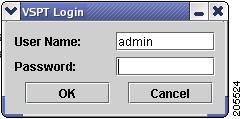
Step 2 Enter your user name and password and click OK.
The default user name is admin, and the password is also admin.
Note Cisco VSPT checks the license and provides the expiry date for that license after you provide the login information.
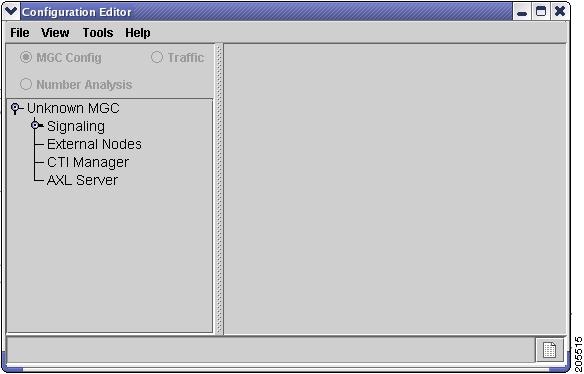
The Welcome screen is displayed briefly during the login process, and the Main VSPT window appears (see Figure 1-2).
Figure 1-2 Main Cisco VSPT Window
Using the Cisco VSPT
This section describes the Cisco VSPT menus and Configuration Editor views and gives instructions for using the tool functions.
Menus
The Cisco VSPT menu bar contains these menus:
•File
•View
•Tools
•Help
These menus are described in the following sections.
File Menu
Table 1-5 describes File menu commands.
View Menu
Table 1-6 describes View menu commands.
Tools Menu
Table 1-7 describes Tools menu commands.
Help Menu
Table 1-8 describes Help menu commands.
Configuration Editor Views
You create, view, and modify configurations using the Cisco VSPT Configuration Editor, which has three different views.
To select a view, click one of the radio buttons at the top of the Configuration Editor window:
•MGC Config—MGC Configuration view. Use to add components and provision component properties.
•Traffic—Traffic view. Use to create customer-specific files, including trunk groups, trunks, and routing.
•Number Analysis—Number Analysis view. Use to provision dial plans.
In each view, the left pane displays selectable components in an Explorer-type tree view.
The right pane displays data entry fields for the selected component.
Click a component to select it. To see all of the subcomponents for the component you select, click the icon next to the component name to expand the component list.
For instructions for using the Cisco VSPT to provision components, component properties, trunk groups, trunks, and routing, see the Cisco PGW 2200 Softswitch Release 9.8 Provisioning Guide.
For instructions for using the Cisco VSPT to provision a dial plan, see the Cisco PGW 2200 Softswitch Release 9.8 Dial Plan Guide.
Defining Users and Permissions
After you install the Cisco VSPT, you define users and their respective permissions using the following procedure:
Step 1 Log in to the server as root.
Step 2 Start Cisco VSPT, either by first starting Cisco MGC Node Manager and then starting Cisco VSPT, or by starting the Cisco VSPT standalone.
Step 3 Click Tools > User Admin.
The User Administration screen in Figure 1-3 appears.
Figure 1-3 Cisco VSPT User Administration
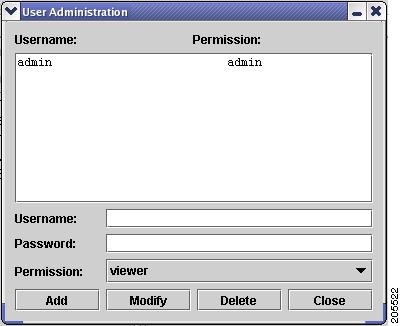
Step 4 To add a user, do the following:
a. Enter a user name and a password.
b. From the Permission dropdown list, choose the desired permission level, viewer, user, or admin.
Note Admin—Can create, modify, and delete users. This type of user has full read and write accesses to all of the configurations on the Cisco BAMS, and the Cisco PGW 2200 Softswitch.
User—Cannot create, modify, or delete users. This type of user has full read and write accesses to all of the configurations on the Cisco BAMS, and the Cisco PGW 2200 Softswitch.
Viewer—Cannot create, modify, or delete users. This type of user has the read-only access to the Cisco PGW 2200 Softswitch configurations saved on Cisco VSPT but it has no access to the Cisco BAMS configurations saved on Cisco VSPT. It cannot access the configurations on the remote Cisco BAMS, or the Cisco PGW 2200 Softswitch.
c. Click Add.
To modify a user, select the user name, change the password or the permission level, and click Modify.
To delete a user, select the user name, and click Delete.
Exiting the Cisco VSPT
You can exit the Cisco VSPT by choosing File > Exit or clicking the X button in the upper right of the main window.
 Feedback