Installing VTS 2.6.6 Components in OpenStack using Red Hat Enterprise Linux OpenStack Director

The following sections provide details about installing VTS 2.6.6 components in OpenStack using Red Hat Enterprise Linux OpenStack Director.

Installing Cisco VTS Components in OpenStack using Red Hat Enterprise Linux OpenStack Director

The Red Hat OpenStack Platform director (RHOSPD) is a toolset for installing and managing a complete OpenStack environment. It is based primarily on the OpenStack project TripleO, which is the abbreviation for OpenStack-On-OpenStack. Redhat also has a program for partners to integrate their solution into OpenStack deployment using the framework provided by Red Hat OpenStack Platform director.

Cisco VTS follows the Red Hat Partner Integration document to introduce VTS specific content into the OpenStack installation. See Red Hat OpenStack Platform 10 Partner Integration document for details. As of this release VTS 2.6.6, the integration has been qualified with Red Hat OpenStack 10 platform (corresponding to OpenStack Newton and OpenStack Queens Release).

Installation and setup of the director node and the necessary networking needed to manage the hardware (that would take roles of Controller, Compute, or Storage) is documented in the Red Hat documentation referenced above. Note that these procedure are dependent on the type of hardware used and the specific configuration of each deployment. If the deployment involves hosting NFV workloads, additional configuration is needed for reserving CPU capacity, huge-pages, and libvirt settings. This needs to be taken into consideration. Red Hat documentation on NFV provides an overview of these configuration options. See the Red Hat OpenStack Platform 10 Network Functions Virtualization Configuration Guide for details.

Prerequisites

Ensure that:

  • The director node is equipped with the right set of software for undercloud installation. See Installing the Undercloud chapter of the Red Hat OpenStack Platform 10 Director Installation and Usage document, for details.

  • You perform the node introspection procedures. See Configuring Basic Overcloud Requirements with the CLI Tools chapter of the Red Hat OpenStack Platform Director Installation and Usage document, for details.

  • The OSPD deployment, undercloud, and overcloud nodes have access to the yum repositories and RHEL registration, including any proxy setup. See the Overcloud Registration chapter of the Red Hat OpenStack Platform 10 Advanced Overcloud Customization document, for details.

In order to integrate Cisco VTS components, the following steps are required:

  • Install the Cisco VTS Heat template and tools RPM packages on the director node.

  • Configure the Heat templates and environmental files in the director, for VTS services

  • Proceed with overcloud deployment including the Cisco VTS environmental files.

Usage of HTTP/HTTPS Proxies—In deployments where HTTP/HTTPS proxy is in use, ensure that the director node's http_proxy, https_proxy, and no_proxy environment variables are set. Additionally, ensure that the overcloud nodes have their proxy settings set correctly. This is needed for performing overcloud package updates during steady-state operation. The latter is usually accomplished by following Red Hat’s recommendation for RHEL registration See the Overcloud Registration chapter of the Red Hat OpenStack Platform 10 Advanced Overcloud Customization document, for details.

Obtaining access to Cisco VTS YUM Packages


Note

This document is written assuming the OpenStack Overcloud nodes can retrieve VTS-specific packages from Cisco’s YUM repository at devhub.cisco.com. The exact procedure may vary depending on the customer deployment preferences. Some deployments may have an intermediary satellite repository, which can host RPMs from multiple external YUM repositories. The satellite repository may host RPMs that have been thoroughly validated in a lab environment, prior to using them in production deployment.

Procedure


Note 
To access the Cisco VTS YUM repositories, you need a cisco.com account that needs to be authorized to access the repository. Contact your Cisco Account team to request access, mentioning your cisco.com ID.
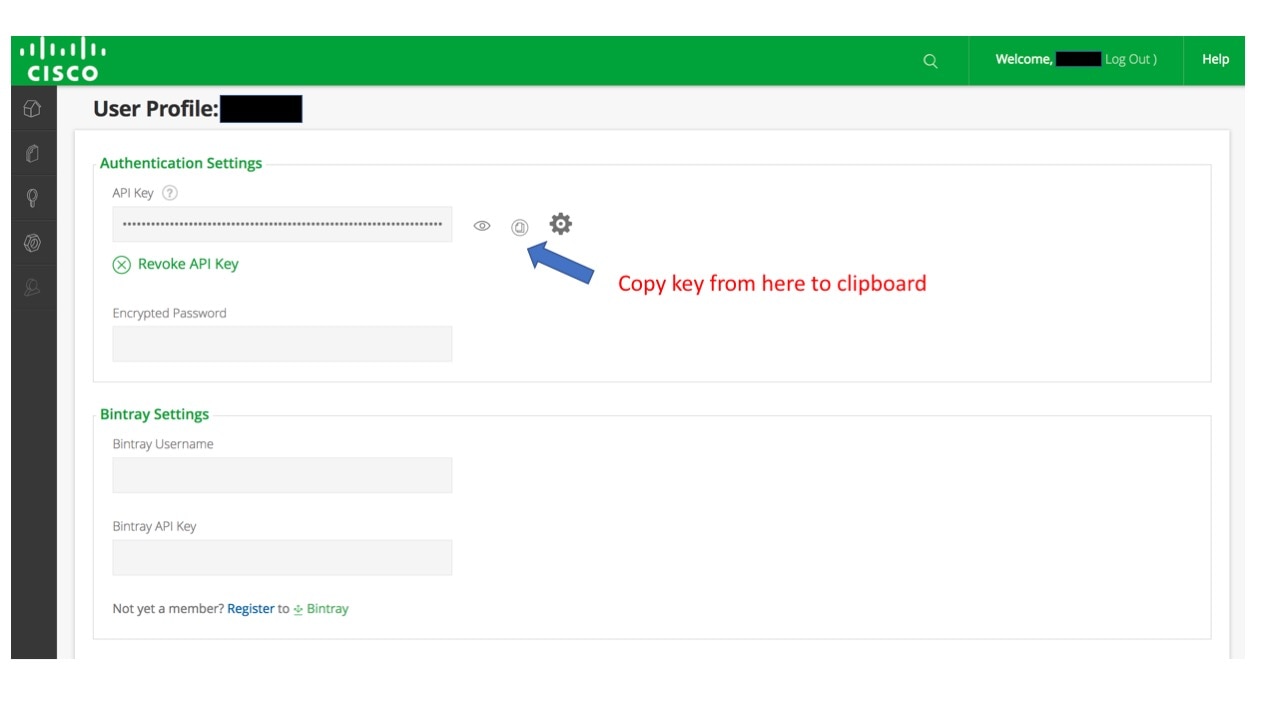
  1. Obtain the VTS Repo credentials by logging in to https://devhub.cisco.com/.

  2. Click the login name in the upper right corner and log in with CEC/SSO credentials.

  3. Collect the access token generating an API key for use as the password. Click on the eye icon to view the API key.


Cisco Repo Configuration

Username= <== the username that user configured to access cisco antifactory from https://devhub.cisco.com/artifactory/webapp/

Password= <== this is the API key that you have obtained while setting up your username from https://devhub.cisco.com/artifactory/webapp/

sudo cat > /etc/yum.repos.d/265.repo <<EOL
[cisco2.6.6.vts266-os-newton]
name=cisco2.6.5.vts266-os-newton
baseurl=https://devhub.cisco.com/artifactory/vts-yum/2.6.6.vts266-os-newton
username=<username>
password=<apikey>
enabled = 1
gpgcheck = 0
metadata_expire = 86400

Populating the fields in neutron-ml2-cisco-vts.yaml

VTSUsername:

User can get the AdministrativeUser that is mentioned in config.txt while creating the ISO file or from OVA deployment.

VTSPassword:

Get this from VTS deployment ISO or from OVA deployment and encrypt this password with the help of /opt/vts/bin/encpwd


Note

If you install OSPD13 components using the native OSPD procedure, then change the VTS password in the OSPD manifests to update the deployment.

VTSServer:

This is the management IP address of VTS.

VTSVMMID:

For OSPD queens, generate the uuid with the help of Linux command uuidgen. Copy the same ID to VMMID in the VTS GUI Virtual Machine Manager >> Add new VMM.

For OSPD newton, generate the uuid with the help of Linux command uuidgen.

Copy the same ID to the VTS Virtual Machine Manager >> Add new VMM. Select "yes" for Was this VMM installed by Red Hat OpenStack Director? Paste it to VMMID.

VTSSiteId:

The site id can be generated with the help of Linux command uuidgen. User has an option to configure same uuid for both VMMID and siteid.

OSPD 10 Integration

With VTS263 a new enhanced and significantly simpler method of installing the VTS components has been introduced, effective obsoleting the VTS260 procedure. The procedure is also available in VTS266.

This document provides the main install and configuration steps, including the configuration of the multi site feature (introduced in 263).

Brief Overview:

In contrast to the overcloud package install procedure in VTS260, the new overcloud package install procedure does not rely on the modification of the overcloud image. It operates by using the native package manager on the overcloud nodes to access the package repository and install the packages via the "NodeExtraConfig" hook. The install happens thus transparently, and can be also initiated on already deployed overcloud nodes. The overclud nodes require thus access to the yum package repository, and also RH package registration.

The configuration of the components follows on - this operation is unchanged from VTS260, with the exception of new features.

Install Packages on the undercloud director:

Procedure


Step 1

On the undercloud director node Install the cisco266 newton repo (Edit the credentials accordingly)

sudo cat > /etc/yum.repos.d/266.repo <<EOL
[cisco2.6.6.vts266-os-newton]
name=cisco2.6.5.vts266-os-newton
baseurl=https://devhub.cisco.com/artifactory/vts-yum/2.6.6.vts266-os-newton
username=<username>
password=<apikey>
enabled = 1
gpgcheck = 0
metadata_expire = 86400

EOL
Step 2

Install the THT extra RPM:

sudo yum install cisco-vts-tripleo-heat-templates-extra --enablerepo cisco2.6.6.vts266-os-newton
Step 3

(optional) Install the VTS tools

sudo yum install cisco-vts-os-util --enablerepo cisco2.6.6.vts266-os-newton

Edit the Cisco VTS Environment Template

Procedure

Step 1

Copy the vts environment template:

cp /usr/share/openstack-tripleo-heat-templates/environments/neutron-cisco-vts.yaml ~/templates
Step 2

Edit the neutron-cisco-vts.yaml template.

See the Node Depolyment Resources and Parameters section of the Appedix A for configuration parameters.

cat /home/stack/templates/neutron-cisco-vts.yaml
## A Heat environment file which can be used to enable Cisco VTS extensions, configured via puppet
# vts 2.6.6

# By default the configuration has items required to deploy VPP/VPFA on all nodes + the cisco ML2 VTS driver

resource_registry:

  ## Base Neutron ML2 definitions for VTS
  OS::TripleO::Services::NeutronCorePluginVTS: /usr/share/openstack-tripleo-heat-templates/puppet/services/neutron-plugin-ml2-cisco-vts.yaml
  OS::TripleO::Services::NeutronCorePlugin: OS::TripleO::Services::NeutronCorePluginVTS

  ## Comment out below line when deploying VTS Agent on compute nodes instead of VPP/VPFA
  OS::TripleO::Services::ComputeNeutronCorePlugin: OS::TripleO::Services::NeutronCorePluginVTS

  ## Disable Neutron L3 agent that conflict with VPFA
  OS::TripleO::Services::NeutronL3Agent: OS::Heat::None

  ## OVS and VTS Agent sub-section ##

  ## Disable/enable the default OVS Agent for compute and controller
  OS::TripleO::Services::ComputeNeutronOvsAgent: OS::Heat::None
  OS::TripleO::Services::NeutronOvsAgent: OS::Heat::None

  ## Disable/enable VTS agent service. VTS agent and OVS agent are mutually exclusive
  ## NOTE: The OS::TripleO::Services::VTSAgent needs to be added to the deployment role file
  OS::TripleO::Services::VTSAgent: /usr/share/openstack-tripleo-heat-templates/puppet/services/neutron-cisco-vts-agent.yaml
## Package install and VPFA Configuration Hook scripts with RH registration wrapper
  OS::TripleO::NodeExtraConfig: /usr/share/openstack-tripleo-heat-templates/puppet/extraconfig/pre_deploy/cisco_vts_rh_reg_wrapper.yaml
## Rsyslog client
 OS::TripleO::Services::RSyslogClient: /usr/share/openstack-tripleo-heat-templates/puppet/services/rsyslog-client.yaml

 ## VPP Service(s)
 OS::TripleO::Services::Vpp: OS::Heat::None
 OS::TripleO::Services::VppCompute: /usr/share/openstack-tripleo-heat-templates/puppet/services/vpp-compute.yaml
 OS::TripleO::Services::VppController: /usr/share/openstack-tripleo-heat-templates/puppet/services/vpp-controller.yaml
 OS::TripleO::Services::CiscoVpfaCompute: /usr/share/openstack-tripleo-heat-templates/puppet/services/cisco-vpfa-compute.yaml
 OS::TripleO::Services::CiscoVpfaController: /usr/share/openstack-tripleo-heat-templates/puppet/services/cisco-vpfa-controller.yaml

 ## Monit agent service(s)
 OS::TripleO::Services::MonitAgent: /usr/share/openstack-tripleo-heat-templates/puppet/services/monit-agent.yaml
 OS::TripleO::Services::MonitVpfaAgent: /usr/share/openstack-tripleo-heat-templates/puppet/services/monit-agent-vpfa.yaml

 ## Collectd agent service
 OS::TripleO::Services::CollectDAgent: /usr/share/openstack-tripleo-heat-templates/puppet/services/collectd-agent.yaml


parameter_defaults:

 ## Current VTS version
 VTSversion: "2.6.6"

 ###################
 ### VTS General ###
 ###################

 VTSUsername: 'admin'
 VTSPassword:
 VTSServer: ''
 VTSVMMID: ''
 VTSSiteId: ''

 ###################
 ### Neutron ML2 ###
 ###################

 NeutronCorePlugin: 'neutron.plugins.ml2.plugin.Ml2Plugin'
 NeutronMechanismDrivers: 'sriovnicswitch,cisco_vts'
 NeutronTypeDrivers: 'vxlan,vlan,flat'
 NeutronServicePlugins: 'cisco_vts_router,trunk'

 ## DHCP Agent interface driver. Uncomment ONLY if/when deploying VPP on the controller node(s).
 #NeutronInterfaceDriver: 'cisco_controller.drivers.agent.linux.interface.NamespaceDriver'

 ########################
 ### VTS Agent Config ###
 ########################

 VTSPhysicalNet: ''
 #VTSRetries: 15
 #VTSTimeout:
 #VTSPollingInterval: 6

 ###################
 ### VPFA Config ###
 ###################

 UnderlayIpNewtorksList: ''
 VTSR_u_IpAddressList: ''
 #NetworkNameServerIP: ''

 ## Set a common VTS Network Gateway address OR set/override it using the PerNodeData parameter further-on
 #VTSNetworkIPv4Gateway: '10.0.0.1'

 # VPFA Configuration requires the assignment of an underlay IP address for the VPFA per node.
 # This needs to be specified against the UUID of the target node in a JSON data blob.
 # To derive the UUID, after node introspection execute the following CLI command steps:
 #
 # 1. 'ironic node-list'. Note Openstack ID of the target node
 # 2. 'openstack baremetal introspection data save <Openstack ID from step1> | jq .extra.system.product.uuid
 # 3. Note the Node UUID and use it in the json configuration blob below. Multiple nodes can be specified.
 #
 # The per-node data can be used to set/override any of the cisco_vpfa:: module configuration parameters
 #

 PerNodeData: |
 {
 "< Node1 UUID >": {
 "cisco_vpfa::vtf_underlay_ip_v4": "10.0.0.2",
 "cisco_vpfa::vtf_underlay_mask_v4": "24",
 "cisco_vpfa::network_ipv4_gateway": "10.0.0.1"},
 "< Node2 UUID >": {
 "cisco_vpfa::vtf_underlay_ip_v4": "10.0.0.3",
 "cisco_vpfa::vtf_underlay_mask_v4": "24",
 "cisco_vpfa::network_ipv4_gateway": "10.0.0.1"}
 }

 ## Enable/Disable VPFA collection of VPP Stats (defaults to true when not set)
 #VppStats: True

 #####################################
 ### VPP Configuration Parameters ###
 #####################################

 ## MTU for Tun/tap interfaces
 #VppTunTapMtu: '9000'

 ## The CPUs listed below need to be part of the grub isol CPU list (configured elsewhere)
 #VppCpuMainCoreController: '0'
 #VppCpuMainCoreCompute: '0'

 ## Comma delimited workers list
 #VppCpuCorelistWorkersCompute: ''
 #VppCpuCorelistWorkersController: ''

 ## Avoid dumping vhost-user shared memory segments to core files
 #VppVhostUserDontDumpMem: false

 ########################
 ### VTS Update Info ###
 ########################

 VTSUpdate: 'true'

 ## VTS Yum Repo settings
 VTSyumRepos: |
 [cisco2.6.6.vts266]
 name=cisco2.6.6.vts266
 baseurl=http://devhub.cisco.com/artifactory/vts-yum/2.6.6.vts266
 username=
 password=
 enabled = 1
 gpgcheck = 0
 metadata_expire = 86400

[cisco2.6.6.vts266-os-newton]
name=cisco2.6.6.vts266-os-newton
baseurl=http://devhub.cisco.com/artifactory/vts-yum/2.6.6.vts266-os-newton
 username=
 password=
 enabled = 1
 gpgcheck = 0
 metadata_expire = 86400

 ## Repository Proxy Settings
 RepoProxy: 'http://proxy.esl.cisco.com:8080/'

 ##########################################
 ### VPFA rSyslog Client Configuration ###
 ##########################################

 # IMPORTANT: Add OS::TripleO::Services::RSyslogClient to the role data catalogue for the service config to come into
 # effect

 # ****** EDIT the syslog server <IP ADDRESS> and <PORT> in ClientLogFilters and add/remove entries as needed! *******
 # The default template below configures UDP servers on port 514. UDP is denoted by a single @ sign. To add a TCP
 # server, add an extra stanza prefixing with @@ the server's IP address

 ClientLogFilters: |
 [
 {
  "expression": "$syslogfacility-text == 'local3' and $syslogseverity-text == 'crit'",
 "action": "@[<IP ADDRESS>]:<PORT>;forwardFormat"
 },
 {
 "expression": "$syslogfacility-text == 'local3' and $syslogseverity-text == 'err'",
 "action": "@[<IP ADDRESS>]:<PORT>;forwardFormat"
 },
 {
 "expression": "$syslogfacility-text == 'local3' and $syslogseverity-text == 'warning'",
 "action": "@[<IP ADDRESS>]:<PORT>;forwardFormat"
 },
 {
 "expression": "$syslogfacility-text == 'local3' and $syslogseverity-text == 'info'",
 "action": "@[<IP ADDRESS>]:<PORT>;forwardFormat"
 }
 ]

 # Cisco VPFA default log and priority settings
 ImFiles: |
 {
 "10-vpfa_error_log": {
 "file_name": "/var/log/vpfa/vpfa_server_errors.log",
 "file_tag": "vpfa",
 "file_severity": "err",
 "file_facility": "local3"
 },
 "10-vpfa_warning_log": {
 "file_name": "/var/log/vpfa/vpfa_server_warning.log",
 "file_tag": "vpfa",
 "file_severity": "warning",
 "file_facility": "local3"
 },
 "10-vpfa_critical_log": {
 "file_name": "/var/log/vpfa/vpfa_server_critical.log",
 "file_tag": "vpfa",
 "file_severity": "critical",
 "file_facility": "local3"
 },
 "10-vpfa_info_log": {
 "file_name": "/var/log/vpfa/vpfa_server.log",
 "file_tag": "vpfa",
 "file_severity": "info",
 "file_facility": "local3"
 }
 }

 ClientLogTemplates: |
 [
 {
 "name": "forwardFormat",
 "template": "<%PRI%>%TIMESTAMP:::date-rfc3339% %HOSTNAME% %syslogtag:1:32%%msg:::sp-if-no-1st-sp%%msg%"
 }
 ]


 ##################################
 ### Monit Agent Configuration ###
 ##################################

 # IMPORTANT: To enable the Monit Agent config, add the VPFA specific "OS::TripleO::Services::MonitVpfaAgent"
 # or generic "OS::TripleO::Services::MonitAgent" to the corresponding nodes role data configuration.


 ## General settings. Applied to all Monit Agents
 ## Credentials
 MonitUser: ''
 MonitPassword:
 MonitSSLPemFile: '/etc/ssl/certs/monit.pem'

 ## VPFA Monit node bind IP address - when unset, defaults to use underlay IP of the VPFA
 #MonitVpfaBindAddress:
 ## Generic node's monit server bind IP address - when unset, defaults to the management IP of the node.
 #MonitBindAddress:

 ## Monit server port
 #MonitHttpServerPort: 2812

 ## Monit check interval
 # MonitCheckInterval: 30

 ## Monit Check config applied on nodes enabled with the OS::TripleO::Services::MonitVpfaAgent role.
 MonitVpfaChecks: |
 {
 "vpp":
 {
 "type": "process",
 "config":
 {
 "matching": "vpp",
 "program_start": "/sbin/service vpp start",
 "program_stop": "/sbin/service vpp stop"
 }
 },
 "vpfa":
 {
 "type": "process",
 "config":
 {
 "matching": "vpfa_restconf_server",
 "program_start": "/sbin/service vpfa start",
 "program_stop": "/sbin/service vpfa stop"
 }
 }
 }

 ## Raw config added to nodes enabled with the OS::TripleO::Services::MonitVpfaAgent role.
 ## Used in to add configuration not supported by the puppet module types.
 MonitVpfaRawConfig: |
 'check network underlay interface vnet'

 ## Check config applied on nodes enabled with the OS::TripleO::Services::MonitAgent role.
 MonitChecks: |
 {
 }

 ## Used in to add configuration not supported by the puppet module types.
 MonitRawConfig: |
 ''

 #####################################
 ### Collectd Agent Configuration ###
 #####################################

 # IMPORTANT: To enable the Collectd Agent config, add the "OS::TripleO::Services::CollectDAgent"


 ##Enable or disable collectd (default is true)
 # CollectDEnable: true

 ## Purge default/previous configurations
 CollectDPurge: true

 ## CollectD Plugin configurations
 ## Each named plugin should have its own named dict entry, followed by a "content" element containing the
 ## plugin's XML configuration stanza, in JSON list format.
 ## The configuration content is the native collectd configuration for the plugin
 CollectDPluginConfigs: |
 {
 "memory":
 {
 "content":
 [
 "<Plugin memory>",
 "ValuesAbsolute true",
 "ValuesPercentage false",
 "</Plugin>"
 ]
 },
 "cpu":
 {
 "content":
 [
 "<Plugin cpu>",
 "ReportByCpu true",
 "ReportByState true",
 "ValuesPercentage false",
 "ReportNumCpu false",
 "ReportGuestState false",
 "SubtractGuestState true",
 "</Plugin>"
 ]
 },
 "python":
 {
 "content":
 [
 "<Plugin python>",
 "ModulePath \"/opt/cisco/vpe/collectd/\"",
 "LogTraces true",
 "Import \"cisco-vpfa-collectd-plugin\"",
 "</Plugin>"
 ]
 },
 "write_log":
 {
 "content":
 [
 "<Plugin write_log>",
 "Format JSON",
 "</Plugin>"
 ]
 },
 "interface":
 {
 "content":
 [
 "<Plugin interface>",
 "Interface \"br-ctlplane\"",
 "Interface \"br-ex\"",
 "Interface \"br-tenant\"",
 "Interface \"lo\"",
 "IgnoreSelected false",
 "ReportInactive true",
 "UniqueName false",
 "</Plugin>"
 ]
 },
 "disk":
 {
 "content":
 []
 },
 "load":
 {
 "content":
 [
 "<Plugin load>",
 "ReportRelative true",
 "</Plugin>"
 ]
 }
 }
Step 3

Edit the RH Registration template.

cat /home/stack/templates/rhel-registration/environment-rhel-registration.yaml
# Note this can be specified either in the call
# to heat stack-create via an additional -e option
# or via the global environment on the seed in
# /etc/heat/environment.d/default.yaml
parameter_defaults:
  rhel_reg_activation_key: ""
  rhel_reg_auto_attach: "auto"
  rhel_reg_base_url: ""
  rhel_reg_environment: ""
  rhel_reg_force: "true"
  rhel_reg_machine_name: ""
  rhel_reg_org: ""
  rhel_reg_password: ""
  rhel_reg_pool_id: ""
  rhel_reg_release: ""
  rhel_reg_repos: "rhel-7-server-rpms,rhel-7-server-extras-rpms,rhel-7-server-rh-common-rpms,rhel-ha-for-rhel-7-server-rpms,rhel-7-server-openstack-10-rpms"
  rhel_reg_sat_url: ""
  rhel_reg_server_url: ""
  rhel_reg_service_level: ""
  rhel_reg_user: ""
  rhel_reg_type: ""
  rhel_reg_method: "portal"
  rhel_reg_sat_repo: ""
  rhel_reg_http_proxy_host: ""
  rhel_reg_http_proxy_port: ""
  rhel_reg_http_proxy_username: ""
  rhel_reg_http_proxy_password: ""
Step 4

When deploying VPP: Edit the NIC templates

snipped output of cat ~/templates/nic-configs/compute.yaml
....
config:

  os_net_config:

    network_config:

         …existing settings…..

            -

              type: vpp_bond

              name: net_bonding0

              bonding_options: "mode=2,xmit_policy=l34"

              members:

                -

                  type: vpp_interface

                  name: enp4s0f2

                  uio_driver: uio_pci_generic

                  options: vlan-strip-offload off

                -

                  type: vpp_interface

                  name: enp4s0f1

                  uio_driver: uio_pci_generic

                  options: vlan-strip-offload off

#For a single interface, the list item would be:

            -

              type: vpp_interface

              name: enp4s0f3

              uio_driver: uio_pci_generic

Configure the Service Roles

Procedure

Step 1

Add the necessary services to the defined node roles.

sudo vi /usr/share/openstack-tripleo-heat-templates/roles_data.yaml
Step 2

Then add the following roles to the compute(s) or controllers where the VPFA and VPP are to run:

For compute nodes add either VTSAgent or the combination of Vpp and Vpfa:

OS::TripleO::Services::VTSAgent

    - OS::TripleO::Services::VppCompute

    - OS::TripleO::Services::CiscoVpfaCompute

    - OS::TripleO::Services::RSyslogClient
    - OS::TripleO::Services::MonitVpfaAgent
    - OS::TripleO::Services::CollectDAgent

If running VTS agent or VPP/VPFA on controller nodes add either VTSAgent or the combination of Vpp and Vpfa:

OS::TripleO::Services::VTSAgent

    - OS::TripleO::Services::VppController

    - OS::TripleO::Services::CiscoVpfaController 

    - OS::TripleO::Services::RSyslogClient
    - OS::TripleO::Services::MonitVpfaAgent
    - OS::TripleO::Services::CollectDAgent

IMPORTANT: Whenever running VTS-agent or VPP/VPFA either remove the OS::TripleO::Services::NeutronOvsAgent and OS::TripleO::Services::OvsAgent services from the node role definitions or include the following in your environment file:

OS::TripleO::Services::ComputeNeutronOvsAgent: OS::Heat::None
OS::TripleO::Services::NeutronOvsAgent: OS::Heat::None

Deploy the Overcloud

Include the edited environment files with the deploy command

openstack overcloud deploy \
--templates \
-e /usr/share/openstack-tripleo-heat-templates/environments/network-isolation.yaml \
-e /home/stack/templates/network-environment.yaml \
-e /home/stack/templates/rhel-registration/environment-rhel-registration.yaml \
-e /home/stack/templates/neutron-cisco-vts.yaml \
--control-scale 1 \
--compute-scale 1 \
--control-flavor control \
--compute-flavor compute \
--log-file oclogs/overcloudDeploy_$(date +%m_%d_%y__%H_%M_%S).log \
--ntp-server ntp.esl.cisco.com \
--verbose --timeout 100

OSPD 13 and VTS266 ML2 Integration

The VTS integration with OSPD13 relies on a VTS Tripleo Heat Templates package and VTS specific (For example, ML2) containers. This section documents the installation and configuration of the system for ML2 integration.

Before you begin

Procedure


Step 1

Set up your HTTP proxy configuration by configuring the HTTP_PROXY and HTTPS_PROXY environment variables. This step is optional.

Step 2

Install the cisco266 queens repo.

Note 
You must edit the credentials accordingly.
sudo cat > /etc/yum.repos.d/266.repo <<EOL
[cisco2.6.6.vts265]
name=cisco2.6.6.vts266
baseurl=https://devhub.cisco.com/artifactory/vts-yum/2.6.6.vts266
username=<username>
password=<apikey>
enabled = 0
gpgcheck = 0
metadata_expire = 86400
[cisco2.6.6.vts266-os-queens]
name=cisco2.6.5.vts266-os-queens
baseurl=https://devhub.cisco.com/artifactory/vts-yum/2.6.6.vts266-os-queens
username=<username>
password=<apikey>
enabled = 0
gpgcheck = 0
metadata_expire = 86400
EOL
sudo yum install cisco-vts-tripleo-heat-templates-extra --enablerepo cisco2.6.6.vts266-os-queens
Step 3

Perform these steps to download the Neutron ML2 container:

  1. Log in to the RH repository using the RH SSO credentials.

    sudo docker login -u <username> registry.connect.redhat.com
    Password: <password>
    
  2. Pull the ML2 container.

    docker pull registry.connect.redhat.com/cisco/cisco-vts266
  3. Tag the container.

    docker tag registry.connect.redhat.com/cisco/cisco-vts266 192.168.126.1:8787/rhosp13/neutron-cisco-vts-ml2
  4. Push the container into the repository.
    docker push 192.168.126.1:8787/rhosp13/neutron-cisco-vts-ml2
Step 4

Perform these steps to set up the neutron-cisco-vts.yaml environment file.

  1. Copy the environment file template from its default location to your templates directory.
    /usr/share/openstack-tripleo-heat-templates/environments/services-docker/neutron-ml2-cisco-vts-266.yaml
  2. Complete the highlighted configuration items in the template.

    In the ~/templates/neutron-ml2-cisco-vts-266.yaml environment file, complete the highlighted configuration items:

    # A docker enabled Heat environment file which can be used to enable Cisco VTS , configured via puppet

    # By default the configuration has items required to deploy the cisco ML2 VTS driver + LLDP on all nodes

    resource_registry:
      OS::TripleO::Services::NeutronCorePluginVTS: ../../docker/services/neutron-plugin-ml2-cisco-vts-266.yaml
      OS::TripleO::Services::NeutronCorePlugin: OS::TripleO::Services::NeutronCorePluginVTS
      OS::TripleO::Services::ComputeNeutronCorePlugin: OS::TripleO::Services::NeutronCorePluginVTS
      OS::TripleO::NodeExtraConfig: /usr/share/openstack-tripleo-heat-templates/puppet/extraconfig/pre_deploy/cisco_vts_rh_reg_wrapper.yaml
    resource_registry:
      OS::TripleO::Services::NeutronCorePluginVTS: ../../docker/services/neutron-plugin-ml2-cisco-vts-266.yaml
      OS::TripleO::Services::NeutronCorePlugin: OS::TripleO::Services::NeutronCorePluginVTS
      OS::TripleO::Services::ComputeNeutronCorePlugin: OS::TripleO::Services::NeutronCorePluginVTS
      OS::TripleO::NodeExtraConfig: /usr/share/openstack-tripleo-heat-templates/puppet/extraconfig/pre_deploy/cisco_vts_rh_reg_wrapper.yaml
    
      ########################################
      ### Docker Cisco VTS Neutron images  ###
      ########################################
      DockerNeutronApiImage: 'repo/neutron-cisco-vts-ml2:latest'
      DockerNeutronConfigImage: 'repo/neutron-cisco-vts-ml2:latest'
      ###################
      ### VTS General ###
      ###################
      VTSUsername: 'admin'
      VTSPassword:
      VTSServer:
      VTSVMMID:
      VTSSiteId:
      ###################
      ### Neutron ML2 ###
      ###################
      NeutronCorePlugin: 'neutron.plugins.ml2.plugin.Ml2Plugin'
      NeutronMechanismDrivers: 'sriovnicswitch,cisco_vts'
      NeutronTypeDrivers: 'vxlan,vlan,flat'
      NeutronServicePlugins: 'cisco_vts_router,trunk'
    
    ############################
      ### Install VTS packages ###
      ############################
      VTSUpdate: 'true'
      VTSyumRepos: |
        [cisco2.6.6.vts266]
        name=cisco2.6.6.vts266
        baseurl=https://devhub.cisco.com/artifactory/vts-yum/2.6.6.vts266
        username=<user>
        password=<apikey>
        enabled = 1
        gpgcheck = 0
        metadata_expire = 86400
        proxy =
        [cisco2.6.6.vts266-os-queens]
        name=cisco2.6.6.vts266-os-queens
        baseurl=https://devhub.cisco.com/artifactory/vts-yum/2.6.6.vts266-os-queens
        username=<user>
        password=<apikey>
        enabled = 1
        gpgcheck = 0
        metadata_expire = 86400
        proxy =
      VTSUpgradeNewPackages: '
          "cisco-vts-puppet-tripleo",
          "lldpd", "vts-lldpd-configure", "cisco-vts-puppet-neutron"
Step 5

Deploy the overcloud by including the following items to the deploy command line:

The environment file that is shown in Step 4.

The relevant RH registration environment file.

For example:

cat deploy-overcloud-vts-ml2.sh 
#!/bin/bash
openstack overcloud deploy \
--templates \
-e /home/stack/templates/node-info.yaml \
-e /home/stack/templates/overcloud_images.yaml \
-e /usr/share/openstack-tripleo-heat-templates/environments/network-isolation.yaml \
-e /usr/share/openstack-tripleo-heat-templates/environments/host-config-and-reboot.yaml \
-e /usr/share/openstack-tripleo-heat-templates/environments/docker.yaml \
-e /usr/share/openstack-tripleo-heat-templates/environments/docker-ha.yaml \
-e /home/stack/templates/rhel-registration/environment-rhel-registration.yaml \
-e /home/stack/templates/rhel-registration/rhel-registration-resource-registry.yaml \
-e /home/stack/templates/network-environment.yaml \
-e /home/stack/templates/neutron-ml2-cisco-vts-266.yaml \
--stack vts \
--debug \
--log-file oclogs/overcloudDeploy_$(date +%m_%d_%y__%H_%M_%S).log \
--ntp-server ntp.esl.cisco.com \
--verbose --timeout 100

OSPD 13 and VTS266 VTF Integration

The deployment of VTF, alongside all of its ancillary components (monit, collectd, etc) requires either the install of packages into the overcloud image, or running an update to an existing deployment passing one of the dedicated package update/install script. Containers are not used for any of these services in VTS266. The latter method is described here, which involves a two run deployment process; Install; Configure.*

IMPORTANT: Due to the fact that the VPP package is missing in the RH overcloud images it is imperative that no VPP interface data is passed via the nic-configuration settings until after the update/install script run. The deployment will fail if the data is passed without the package present.

*The two run deployment could be reduced to one should the use install the vpp package into the overcloud image.

The cisco_vts_packages script found in puppet/extraconfig/pre_deploy/cisco_vts_packages.yaml provides the base for an idempotent upgrade/install method of all VTF packages. Given that the packages have external RHEL repository dependencies, two convenience wrapper scripts are provided that can be passed to the NodeExtraConfigure hook which only accepts a single script.

puppet/extraconfig/pre_deploy/cisco_vts_no_rh_reg_wrapper.yaml : Wrapper Script without RHEL registration, but with VTF install and VTF extra-config**

puppet/extraconfig/pre_deploy/cisco_vts_rh_reg_wrapper.yaml : Wrapper script with RHEL registration, VTF install and VTF extra-config.

**VTF-Extra config is required to inject per node data necessary to complete the VTF configuration

Stage - 1: This stage installs all the necessary packages

Procedure

Step 1

Enable Hugepages by enabling the appropriate KernelArgs, as per Step 6 of Network Functions Virtualization Planning and Configuration Guide - Red Hat Customer Portal .

Step 2

In the neutron-cisco-vts.yaml environment file configure the chosen wrapper script to the NodeExtraConfig hook.

OS::TripleO::NodeExtraConfig: /usr/share/openstack-tripleo-heat-templates/puppet/extraconfig/pre_deploy/cisco_vts_rh_reg_wrapper.yaml
Step 3

In the neutron-cisco-vts.yaml environment file VTSUpdate setting is set to 'true' and the package list set to:

VTSUpdate: 'true'
VTSUpgradeNewPackages: |
         "cisco-vts-puppet-tripleo", "cisco-vts-puppet-neutron",
         "monit", "cisco-vpfa-collectd-plugin", "cisco-vts-os-net-config",
         "vpp", "vpp-plugins", "vpfa", "lldpd", "vts-lldpd-configure", "cisco-vts-puppet-vpfa", "cisco-vts-puppet-fdio",
         "cisco-vts-os-util"
VTSUpgradeNewForgePackages: |
"wdec-monit --version 1.1.2", "puppetlabs-limits --version 0.1.0", "saz-rsyslog --version 5.0.0"
Step 4

Edit the rhel-registration/environment-rhel-registration.yaml settings with the details of your RHEL license/satellite repo.

Step 5

Run the deployment.


Stage - 2: Enable and Configure the Components

Procedure

Step 1

You can edit the settings of VTF, monit, collectd, and so on, in the neutron-cisco-vts.yaml environment file. If this data are already inputted at or prior to Stage1 you mst edit the PerNodeData element. For example, by adding a dummy entry as shown below in the "foo": "bar" data. This is necessary because Heat mechanism does not trigger the PreConfig VTF Extra configuration script unless a data change has occurred.

To derive the UUID for perNodeData element :
 # 1. 'ironic node-list' 
            Note Openstack ID of the target node
           # 2. 'openstack baremetal introspection data save <Openstack ID from step1> | jq .extra.system.product.uuid
           # 3. Note the Node UUID and use it in the json configuration blob below. Multiple nodes can be specified.
PerNodeData: |
      {
          "E52315A1-64F5-4E47-8909-AD87511809E9": {
             "cisco_vpfa::vtf_underlay_ip_v4": "10.0.0.2",
             "cisco_vpfa::vtf_underlay_mask_v4": "24",
             "cisco_vpfa::network_ipv4_gateway": "10.0.0.1"}, 
          "foo": "bar"
      }
Step 2

Add the desired roles to the node role data definition file /usr/share/openstack-tripleo-heat-templates/roles_data.yaml

For example, to compute:

- OS::TripleO::Services::VppCompute
    - OS::TripleO::Services::CiscoVpfaCompute
    - OS::TripleO::Services::RSyslogClient
    - OS::TripleO::Services::MonitVpfaAgent
    - OS::TripleO::Services::CollectDAgent
Step 3

Add the following role registry definitions to the /usr/share/openstack-tripleo-heat-templates/environments/docker.yaml file:

Note 
Required untill fix to Gerrit Code Review is available.
OS::TripleO::Services::MonitAgent: ../puppet/services/monit-agent.yaml
  OS::TripleO::Services::CollectDAgent: ../puppet/services/collectd-agent.yaml

  OS::TripleO::Services::MonitVpfaAgent: ../puppet/services/monit-agent-vpfa.yaml

  OS::TripleO::Services::Vpp: OS::Heat::None
  OS::TripleO::Services::VppCompute: ../puppet/services/vpp-compute.yaml
  OS::TripleO::Services::VppController: ../puppet/services/vpp-controller.yaml
  OS::TripleO::Services::CiscoVpfaCompute: ../puppet/services/cisco-vpfa-compute.yaml
  OS::TripleO::Services::CiscoVpfaController: ../puppet/services/cisco-vpfa-controller.yaml
  OS::TripleO::Services::RSyslogClient: ../puppet/services/rsyslog-client.yaml
Step 4

Add to the compute and/or controller nic-data definitions the vpp interface data.

 E.g.
    - type: vpp_interface
      name: enp129s0f0
      uio_driver: uio_pci_generic
Step 5

Edit the network environment file to allow the above interface configuration updates to be propagated to the deployment. To do that, add the following setting to the network-environment.yaml file, or any other environment file that is passed to the deployment command.

NetworkDeploymentActions: ['CREATE','UPDATE']

Step 6

Re-run the overcloud deployment.


Cisco VTS with VTF on Controller/Compute

VPFA Configuration Parameters

This section provides details about VPFA configuration parameters. These are mandatory to be configured

###################
### VPFA Config ###
###################
UnderlayIpNewtorksList: '21.0.0.0/8,10.10.10.0/24,50.50.0.0/16,40.40.0.0/16,42.42.42.0/24' 
VTSR_u_IpAddressList: '10.10.10.133,10.10.10.134'
VPFAHostname: '<some_name>'
NetworkConfigMethod: 'static'
NetworkNameServerIP: '' 
VifTypeCompute: 'vhostuser'
VifTypeController: 'tap'
  • UnderlayIpNetworksList—List of underlay IP networks for VTF reachability. To specify multiple values, use a comma-separated string.

  • VTSR_u_IpAddressList—List of underlay IP address assigned to VTS.

  • VPFAHostname—Hostname assigned to VPFA.

  • NetworkConfigMethod—VPFA network configuration method. Default value is “static”.

  • NetworkNameServerIP—DNS IP assigned to VPFA.

  • VifTypeCompute—VPFA VIF type for compute is “vhostuser”.

  • VifTypeController—VPFA VIF type for Controller node is “tap”.

VPP Configuration Parameters

This section provides details about VPP configuration parameters.

#####################################
### VPP Configuration Parameters ###
#####################################
## MTU for Tun/tap interfaces 
VppTunTapMtu: '9000'
##The CPUs listed below need to be part of the grub isol CPU list (configured elsewhere) 
VppCpuMainCoreController: '6'
VppCpuMainCoreCompute: '6'
## Comma delimited workers list 
VppCpuCorelistWorkersCompute: '7,8,9'
VppCpuCorelistWorkersController: '7,8,9'
## Avoid dumping vhost-user shared memory segments to core files
VppVhostUserDontDumpMem: True

Note

All CPU values given above are examples and need to be adapted to the actual deployment, or left commented out (that is, these are optional).


  • VppTunTapMtu—MTU for VPP tap interface.

  • VppCpuMainCoreController—Pin VPP to a CPU core on controller.

  • VppCpuMainCoreCompute—Pin VPP to a CPU core on compute.

  • VppCpuCorelistWorkersCompute—Pin VPP worker threads to a CPU core on compute.

  • VppCpuCorelistWorkersController—Pin VPP worker threads to a CPU core on controller

  • VppVhostUserDontDumpMem—Do not dump vhost-user memory segments in core files.

PerNodeData Parameters

Collecting Node-specific UUID

Procedure

Step 1

Gather baremetal (ironic) UUID for overcloud nodes where VTF needs to be deployed.

“openstack baremetal node list”
Step 2

The node-specific hieradata is provisioned based on the node UUID, which is hardware dependent and immutable across reboots/reinstalls. Value returned will be unique and immutable machine UUID not related to the baremetal node UUID. Extract the machine unique UUID from the command below by substituting <baremetal-UUID> from the previous step. Run:

“openstack baremetal introspection data save <baremetal-UUID> | jq .extra.system.product.uuid”
Step 3

Populate “PerNodeData” parameters for each node where VTF is intended to be deployed in the neutron-cisco-vts.yaml. For example:

PerNodeData: |
    {
      "< Node1 UUID >": {
          "cisco_vpfa::vtf_underlay_ip_v4": "10.0.0.2",
          "cisco_vpfa::vtf_underlay_mask_v4": "24",
          "cisco_vpfa::network_ipv4_gateway": "10.0.0.1"},
      "< Node2 UUID >": {
          "cisco_vpfa::vtf_underlay_ip_v4": "10.0.0.3",
          "cisco_vpfa::vtf_underlay_mask_v4": "24",
          "cisco_vpfa::network_ipv4_gateway": "10.0.0.1"}
    }
  • UUID—Immutable machine UUID derived from Step 2 for the overcloud node.

  • “cisco_vpfa::vtf_underlay_ip_v4”—Underlay IPv4 address assigned to VTF.

  • "cisco_vpfa::vtf_underlay_mask_v4"—Underlay IPv4 netmask assigned to VTF.

  • "cisco_vpfa::network_ipv4_gateway"—Underlay IPv4 network gateway assigned to VTF.

Monit Agent Configuration

This section provides details about Monit agent configuration parameters.

##################################
### Monit Agent Configuration  ###
##################################

# IMPORTANT: To enable the Monit Agent config, add the VPFA specific "OS::TripleO::Services::MonitVpfaAgent"
# or generic "OS::TripleO::Services::MonitAgent" to the corresponding nodes role data configuration.


## General settings. Applied to all Monit Agents
## Credentials
MonitUser: ''
MonitPassword:
  
  • MonitUser—The Monit username.

  • MonitPassword—The Monit password.

collectd Agent Configuration

This section provides details about collectd Agent Configuration

#####################################
### Collectd Agent Configuration  ###
#####################################

# IMPORTANT: To enable the Collectd Agent config, add the  "OS::TripleO::Services::CollectDAgent"


##Enable or disable collectd (default is true)
# CollectDEnable: true

## Purge default/previous configurations
CollectDPurge: true

## CollectD Plugin configurations
## Each named plugin should have its own named dictionary entry, followed by a "content" element containing the
## plugin's XML configuration stanza, in JSON list format.
## The configuration content is the native collectd configuration for the plugin
CollectDPluginConfigs: |
  {
    "memory":
    {
     "content":
      [
      "<Plugin memory>",
        "ValuesAbsolute true",
        "ValuesPercentage false",
      "</Plugin>"
      ]
    },
    "cpu":
    {
      "content":
      [
        "<Plugin cpu>",
           "ReportByCpu true",
           "ReportByState true",
           "ValuesPercentage false",
           "ReportNumCpu false",
           "ReportGuestState false",
           "SubtractGuestState true",
         "</Plugin>"
      ]
    },
    "python":
    {
      "content":
      [
        "<Plugin python>",
        "ModulePath \"/opt/cisco/vpe/collectd/\"",
        "LogTraces true",
        "Import \"cisco-vpfa-collectd-plugin\"",
        "</Plugin>"
      ]
    },
    "write_log":
    {
      "content":
      [
        "<Plugin write_log>",
        "Format JSON",
        "</Plugin>"
      ]
    },
    "interface":
    {
      "content":
      [
        "<Plugin interface>",
        "Interface \"br-ctlplane\"",
        "Interface \"br-ex\"",
        "Interface \"br-tenant\"",
        "Interface \"lo\"",
        "IgnoreSelected false",
        "ReportInactive true",
        "UniqueName false",
        "</Plugin>"
      ]
    },
    "disk":
    {
      "content":
      []
    },
    "load":
    {
      "content":
      [
        "<Plugin load>",
        "ReportRelative true",
        "</Plugin>"
      ]
    }
  }
  • CollectDEnable—Enable or disable collectd, By default, this is set to true.

  • CollectDPurge— Purge default or previous configurations. By default, this is set to true.

  • CollectD Plugin configurations—Modify this for changing the VTF collectd plugin configuration. See Monitoring Cisco VTS chapter in the Cisco VTS 2.6.6 User Guide for details about collectd plugins.


Configuring the neutron-cisco-vts.yaml File

All of the configuration sections below apply to the neutron-cisco-vts environment file.

Neutron ML2 Parameters

This section provides details about the Neutron ML2 parameters.

###################
### Neutron ML2 ###
###################
NeutronCorePlugin: 'neutron.plugins.ml2.plugin.Ml2Plugin' 
NeutronMechanismDrivers: 'sriovnicswitch,cisco_vts' 
NeutronTypeDrivers: 'vxlan,vlan,flat' 
NeutronServicePlugins: 'cisco_vts_router,trunk'

#NeutronInterfaceDriver: ‘cisco_controller.drivers.agent.linux.interface.NamespaceDriver'
  • NeutronCorePlugin—This is the Core neutron plugin for neutron tenant network. Default value is “neutron.plugins.ml2.plugin.Ml2Plugin”.

  • NeutronMechanismDrivers—These are the mechanism drivers for neutron tenant network. To specify multiple values, use a comma-separated string. To enable VTS-specific mechanism driver, add cisco_vts to this list. For enabling SR-IoV interfaces on the compute, add sriovnicswitch.

  • NeutronTypeDrivers—These are the tenant network types for neutron tenant network. To specify multiple values, use a comma-separated string.

  • NeutronServicePlugins—This is the neutron service plugin for neutron tenant network. To enable L3 networking, add cisco_vts_router. To enable trunk mode operation (VLAN aware VMs) add trunk to the list of type drivers.

  • NeutronInterfaceDriver—Specifies the interface driver used by the Neutron DHCP Agent. When deploying the VTF on nodes running the Neutron DHCP Agent this setting needs to be passed (uncommented). Valid values are (default) ‘neutron.agent.linux.interface.OVSInterfaceDriver’ and ‘cisco_controller.drivers.agent.linux.interface.NamespaceDriver'.

VTS Agent Configuration Parameters

This section provides details about the VTS Agent parameters.

########################
### VTS Agent Config ###
########################
VTSPhysicalNet: 'physnet101'
VTSRetries: 15
VTSTimeout:
VTSPollingInterval: 6
  • VTSPhysicalNet—VTSPhysicalNet should be set to the ‘physnet’ used for the tenant networks for OVS on the compute. The environment file in the Heat templates should have the mapping of the tenant OVS bridge to the physnet name.

  • VTSRetries—Number of times VTS agent retries a neutron request. Default is 15.

  • VTSTimeout—Cisco VTS agent times out a request. Default value is 120 seconds.

  • VTSPollingInterval—Cisco VTS agent polling interval for a request. Default value is 6 seconds.

Multiple Updates on Ports

When the VTS mechanism driver uses RESTCONF to communicate with VTS/NSO, VTS/NSO can send multiple updates in a single transaction and update the physical switches through ‘Sync thread”. This process reduces the overall processing time of port updates and thus displays the following results:

  • If the transaction is successful, the next iteration will be started and the events of the successful transaction will be removed from the journal table.

  • If the transaction is failed, the events will be reprocessed on one-by-one basis. The bulk update method will be continued for the consecutive transaction.


Note

It is recommended to use the existing failure handling methodology for the events failed during one-by-one basis (Revert the operation, if possible). To reduce the overall updates of the bulk updates, a single query for all the events with same UUID is processed by gathering the first to last update and removing all the intermediate updates.
Table 1. Frequently Asked Questions

FAQs

Solution

FAQ on “Sync” Thread

What is the expected number of events to be accumulated between two iterations of the “Sync” thread?

It depends on the time taken by NSO to answer the current request as well as the speed at which the new ports are being added to the Openstack.

How to improve the NSO response time?

The NSO response time can be improved only for the bulk operation. The NSO is capable of pushing several configuration simultaneously.

Will “Sync” thread wait for the previous transaction to end, before querying the journal table?

Yes, the “Sync” thread waits for the NSO REST response (with either success or failure) and then queries the journal table again. Irrespective of the controllers enabled, only a single thread runs in the cluster.

In the instance of failed transaction, how the “Sync” thread knows where to do one-by-one basis and when to start the next iteration?

A bool variable “multiple_rows” is used in the thread. The bool “multiple_rows” is set to true, if it is dealing with multiple rows.

FAQ on Additional Speed-up

Does query performed in the current journal table or only in “window” of the current bulk?

The code uses the configuration variable “cfg.CONF.ml2_cc.max_batch” with default value 9 if not specified explicitly in the config file to query up to that number of distinct UUIDs. .

For example, if the “max_batch” is 10 and the journal table has 30 rows deal with 9 distinct UUIDs, the query will return the whole 30 rows. However, the journal table has 30 rows and the 16th row deals with 11th UUID, the query will return only 15 first rows.

If the query is performed in the current journal table, will it cause the events to arrive out-of-order and disrupt the configuration?

No, the querying is done only for ports and thus all the port events will be sent altogether.

What does “removing all the intermediate updates” means?

For example, with 9 unique UUIDs covered by 30 rows. These 30 rows are reduced to 9 rows covering all operations per unique UUID from the first one to the last one. Thus NSO processes compressed/compacted requests much faster.

Does the unit test cover the bulk operations?

Yes. You can view details in cisco_controller/tests/unit/ml2/base_driver_test_ class.py

Rsyslog settings for computes with VTF

Logs from VTF compute nodes can directed to a remote syslog server using rSyslog.

Procedure


To do this, certain parameters need to be configured the neutron-cisco-vts.yaml file. For example:

# IMPORTANT: Add OS::TripleO::Services::RSyslogClient to the role data catalogue for the service to come into effect

# ****** EDIT THE SYSLOG SERVER IP ADDRESS AND PORT IN ClientLogFilters and add/remove entries as needed! *******
#The default template below uses UDP (@) servers on port 514. To add a TCP server, add an extra stanza prefixing
# with @@ the server's IP address

ClientLogFilters: | [
{
"expression": "$syslogfacility-text == 'local3' and $syslogseverity-text == 'crit'", "action": "@[192.168.128.2]:514;forwardFormat"
},
{
"expression": "$syslogfacility-text == 'local3' and $syslogseverity-text == 'err'", "action": "@[192.168.128.2]:514;forwardFormat"
},
{
"expression": "$syslogfacility-text == 'local3' and $syslogseverity-text == 'warning'",

"action": "@[192.168.128.2]:514;forwardFormat"
},

{
"expression": "$syslogfacility-text == 'local3' and $syslogseverity-text == 'info'", "action": "@[192.168.128.2]:514;forwardFormat"
}

]
Note 

In this example, 192.168.128.2 is the IP address of the Syslog server, and 514 is the UDP port.

Additionally, the rsyslog client service on the computes and controller may need to be enabled in the roles_data.yaml file.

##Add rsyslog client under Controller role:
-	OS::TripleO::Services::RSyslogClient

#Add rsyslog client under Compute role:
-	OS::TripleO::Services::RSyslogClient

Updating VTS RPMs in Overcloud

Ensure that the YUM repositories referred to by the Overcloud nodes contain the latest relevant set of RPMs. In case of deployments where Satellites are in use, the Satellite should contain the latest set of RPMs. To update packages, Red Hat recommends the use of activation keys. To do this, the overcloud nodes need to be registered using environment files. See Registering the Overcloud with an Environment File section of the Red Hat OpenStack Platform 10 Advanced Overcloud Customization document, for details.

After these are setup, you can update overcloud nodes with the latest set of RPMs initiated from the OpenStack director node, by following the procedures documented in the Updating the Overcloud Packages section of the Red Hat OpenStack Platform 10 Upgrading Red Hat OpenStack Platform document.

Running the Password Encryption Script

Ensure that the system has the cisco-vts-overcloud-installer package installed. See Step 1, Obtaining access to Cisco VTS YUM Packages.
sudo yum install cisco-vts-overcloud-installer

Procedure


Run the following command:

$ encpwd <clearTextPassword>
Note 
Any special characters in the password need to be preceded with \. For example, <password123!> should be entered as <password123\!>. For security reasons, we recommend that you clear the history from the command line to avoid the clear text password from getting displayed at a later point in time, by running the following command:
history -cw

If you install OSPD13 components using the native OSPD procedure, then change the VTS password in the OSPD manifests to update the deployment.