Cisco Open SDN Controller 1.1 Administrator Guide
Bias-Free Language
The documentation set for this product strives to use bias-free language. For the purposes of this documentation set, bias-free is defined as language that does not imply discrimination based on age, disability, gender, racial identity, ethnic identity, sexual orientation, socioeconomic status, and intersectionality. Exceptions may be present in the documentation due to language that is hardcoded in the user interfaces of the product software, language used based on RFP documentation, or language that is used by a referenced third-party product. Learn more about how Cisco is using Inclusive Language.
- Updated:
- July 8, 2015
Chapter: Managing Your System
Managing Your System
Open SDN Controller allows you to manage both the features that are available to the controller (via the Features Management page) and the users that will make use of those features (via the User Management page). The following topics describe how to do so:
Managing Users
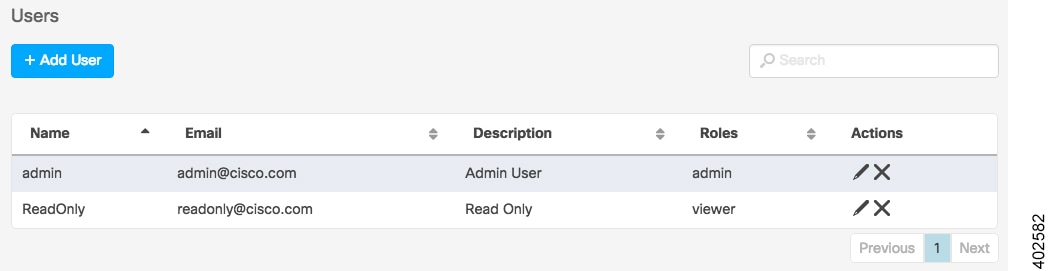
From the Users page, you can add new Open SDN Controller users, edit the settings for existing users, and delete users from the system. To open this page, select Users from the main toolbar's Management menu.
Adding a User
Editing a User
Deleting a User
Managing Features
From the Features page, you can view a listing of every Open SDN Controller feature that is currently installed on the system. You can also determine which of these features are active, install new features, update existing features, and activate features as needed. To open the Features page, select Features from the main toolbar's Management menu.
Identifying Active Features
To determine whether a feature is currently active, simply locate its entry in the Features table and look at the Active column. If the feature is active, a check mark is displayed here.
Installing New Features
Updating Existing Features
Activating Features
| Step 1 | In the Features table, locate the entry for the feature you want to activate. | ||
| Step 2 | In the Actions
column, click the Activate icon and then verify that a check mark is displayed
in the Active column.
|
Managing Open SDN Controller Licenses
From the License Information page, you can view a listing of every license that is installed on the controller, view the settings configured for those licenses, and specify the settings for new licenses. Open SDN Controller provides the following information for each license:
 Feedback