- Cisco Unified Communications Manager and Cisco IOS Interoperability Features Roadmap
- Overview of Cisco Unified Communications Manager and Cisco IOS Interoperability
- Configuring MGCP Gateway Support for Cisco Unified Communications Manager
- Configuring Enhanced Conferencing and Transcoding for Voice Gateway Routers
- Configuring MGCP PRI Backhaul and T1 CAS Support for Cisco Unified Communications Manager
- Configuring MGCP-Controlled Backhaul of BRI Signaling in Conjunction with Cisco Unified Communications Manager
- Configuring Tone Download to MGCP Gateways
- Configuring MCID for Cisco IOS Voice Gateways
- Configuring RSVP Agent
- Contents
- Prerequisites for MCID for Cisco IOS Voice Gateways
- Restrictions for MCID for Cisco IOS Voice Gateways
- Information About MCID for Cisco IOS Voice Gateways
- How to Configure MCID for Cisco IOS Voice Gateways
- Configuration Examples for MCID for Cisco IOS Voice Gateways
- Where to Go Next
- Additional References
Configuring MCID for Cisco IOS Voice Gateways
The MCID for Cisco IOS Voice Gateways feature supports the Malicious Call Identification (MCID) supplementary service that enables Cisco Unified Communications Manager to identify the source of malicious calls.
Feature History for MCID for Cisco IOS Voice Gateways
Finding Support Information for Platforms and Cisco IOS Software Images
Use Cisco Feature Navigator to find information about platform support and Cisco IOS software image support. Access Cisco Feature Navigator at http://www.cisco.com/go/fn. You must have an account on Cisco.com. If you do not have an account or have forgotten your username or password, click Cancel at the login dialog box and follow the instructions that appear.

Note  For more information about this and related Cisco IOS voice features, see the following:
•"Overview of Cisco Unified Communications Manager and Cisco IOS Interoperability" on page 13.
•Entire Cisco IOS Voice Configuration Library—including library preface and glossary, other feature documents, and troubleshooting documentation—at http://www.cisco.com/univercd/cc/td/doc/product/software/ios123/123cgcr/voice_c/vcl.htm.
Contents
•"Prerequisites for MCID for Cisco IOS Voice Gateways"
•"Restrictions for MCID for Cisco IOS Voice Gateways"
•"Information About MCID for Cisco IOS Voice Gateways"
•"How to Configure MCID for Cisco IOS Voice Gateways"
•"Configuration Examples for MCID for Cisco IOS Voice Gateways"
Prerequisites for MCID for Cisco IOS Voice Gateways
•MCID must be configured in Cisco Unified Communications Manager 4.0 (formerly known as Cisco CallManager 4.0) or later. For information, see the "Malicious Call Identification" chapter in the Cisco Unified CallManager Features and Services Guide, Release 4.0(1).
•Your platform must support MCID and TCL IVR 2.0.
•You must either use the script app_mcid.2.0.0.40.tcl or a later version, or write your own TCL IVR 2.0 script that implements MCID. To download the script, go to the Software Download site at http://www.cisco.com/cgi-bin/tablebuild.pl/tclware. To write your own script, see the TCL IVR API Version 2.0 Programming Guide.
•If you require an MCID service log in RADIUS, you can write a script that supports the RADIUS service and uses the aaa accounting update command to generate an accounting record.
•Cisco Catalyst 6500 series and Cisco 7600 series Communication Media Module (CMM) requires WS-SVC-CMM-6T1, WS-SVC-CMM-6E1, or WS-SVC-CMM-24 FXS port adapter in H.323 environment.
Restrictions for MCID for Cisco IOS Voice Gateways
•Supported only for NET5 switches that have MCID functionality enabled. Other switch types are not supported.
•Supported only for incoming calls from the ISDN network.
•MCID requests from the central office are ignored by Cisco Unified Communications Manager and are not supported by the Cisco voice gateway.
•Service provider on the time-division multiplexing (TDM) side of the PSTN must have MCID functionality enabled.
•ISDN interface on the voice gateway must have the ISDN switch type set to primary-net5 with the isdn switch-type command and operate in user-side mode (default).
•Voice gateways with PRI interfaces should provide the following capabilities:
–Receive MCID requests relating to the call from upper layers and relay them to the connected network using the PRI protocol specified for the MCID service.
–Receive MCID related response signals and information from the connected network using the PRI protocol specified for the MCID service. Cisco Unified Communications Manager ignores the signals and information.
•Not supported on the Access Gateway Module (AGM).
Information About MCID for Cisco IOS Voice Gateways
To configure a voice gateway for MCID, you should understand the following concept:
•MCID
MCID
Malicious Call Identification (MCID) is a supplementary service that enables Cisco Unified Communications Manager to identify the source of malicious calls. A user who receives a malicious call from another network, typically the PSTN, can select a softkey on the IP phone which immediately notifies the system administrator, flags the call detail record (CDR) for the Cisco Unified Communications Manager cluster, and notifies the PSTN of the malicious nature of the call, allowing the offnet system to take action, such as notifying legal authorities.
Figure 12 shows an example of the MCID call flow. After receiving an MCID request from an endpoint device (victim), Cisco Unified Communications Manager sends an H.225 Facility message with the MCID information element (IE) to the voice gateway. The gateway sends a Q.931 Facility message with the MCID IE to the ISDN network (central office).
Figure 12 MCID Functionality
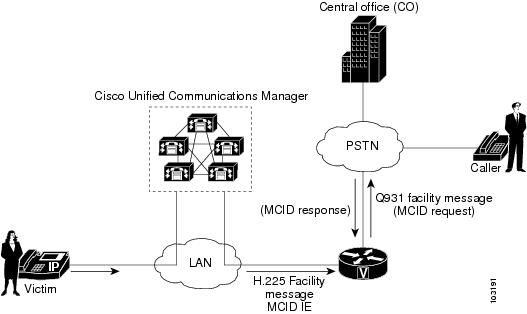
A called party invokes MCID by pressing the appropriate softkey on the IP phone. A configurable timer is available when awaiting a response after sending a Facility message to the PSTN. If a response is not received within the specified time, the TCL IVR script is notified. Depending on how the script is written, it could try to reinvoke MCID or perform some other action, for example, playing a message to the user that the MCID attempt did not work.
How to Configure MCID for Cisco IOS Voice Gateways
Perform these tasks to support MCID on your MGCP gateway:
•Enabling the ISDN Interface to Send MCID Requests (required)
•Configuring MCID on the Voice Gateway (Cisco IOS Release 12.3(14)T) (required)
•Configuring MCID on the Voice Gateway (Cisco IOS Release 12.3(11)T) (required)
Enabling the ISDN Interface to Send MCID Requests
Perform this task to enable an ISDN interface to send MCID requests and to set the timer.
SUMMARY STEPS
1. enable
2. configure terminal
3. interface serial slot/port:timeslot
4. isdn switch type {primary-net5 | primary-ni}
5. isdn incoming-voice {data | modem | voice}
6. isdn supp-service mcid
7. isdn t-activate msec
8. end
DETAILED STEPS
Configuring MCID on the Voice Gateway (Cisco IOS Release 12.3(14)T)
Use this procedure to define the MCID application on a voice gateway that is running Cisco IOS Release 12.3(14)T or later. To verify your release, use the show version command.
SUMMARY STEPS
1. enable
2. configure terminal
3. application
4. service mcid flash:app_mcid.2.0.0.40.tcl
5. param mcid-release-timer seconds
6. param retry-count number
7. exit
8. dial-peer voice tag pots
9. service mcid
10. incoming called-number string
11. direct-inward-dial
12. port slot/port:timeslot
13. exit
DETAILED STEPS
|
|
|
|
|---|---|---|
Step 1 |
enable Router> enable |
Enables privileged EXEC mode. • |
Step 2 |
configure terminal Router# configure terminal |
Enters global configuration mode. |
Step 3 |
application Router(config)# application |
Enters application configuration mode. |
Step 4 |
service mcid flash:app_mcid.2.0.0.40.tcl Router(config-app)# service mcid flash:app_mcid.2.0.0.40.tcl |
Specifies the name and location of the MCID script. |
Step 5 |
param mcid-release-timer seconds Router(config-app-param)# param mcid-release-timer 30 |
(Optional) Number of seconds the script waits before releasing both call legs after it receives a disconnect message. Default is 60 seconds. |
Step 6 |
param retry-count number Router(config-app-param)# param retry-count 3 |
(Optional) Maximum number of times the called party can trigger MCID if all previous attempts failed. Default is 0, which means the user can invoke MCID as many times as needed. |
Step 7 |
exit Router(config-app-param)# exit |
Exits to global configuration mode. |
Step 8 |
dial-peer voice tag pots Router(config)# dial-peer voice 250 pots |
Configures incoming dial peer and enters dial-peer configuration mode. |
Step 9 |
service mcid Router(config-dial-peer)# service mcid |
Configures the incoming dial peer to use the MCID application. |
Step 10 |
incoming called-number string Router(config-dial-peer)# incoming called-number 222.... |
Configures the incoming called number for the MCID application. |
Step 11 |
direct-inward-dial Router(config-dial-peer)# direct-inward-dial |
Configures direct-inward-dial (DID) for the MCID application. |
Step 12 |
port slot/port:timeslot Router(config-dial-peer)# port 3/0:23 |
Configures the port for the MCID application. Note |
Step 13 |
exit Router(config-dial-peer)# exit |
Exits to global configuration mode. |
Configuring MCID on the Voice Gateway (Cisco IOS Release 12.3(11)T)
Use this procedure to define the MCID application on a voice gateway that is running Cisco IOS Release 12.3(11)T. To verify your release, use the show version command.
SUMMARY STEPS
1. enable
2. configure terminal
3. call application voice mcid location
4. call application voice mcid mcid-release-timer seconds
5. dial-peer voice tag pots
6. application mcid
7. incoming called-number string
8. direct-inward-dial
9. port slot/port:timeslot
10. exit
DETAILED STEPS
|
|
|
|
|---|---|---|
Step 1 |
enable Router> enable |
Enables privileged EXEC mode. • |
Step 2 |
configure terminal Router# configure terminal |
Enters global configuration mode. |
Step 3 |
call application voice mcid location Router(config)# call application voice mcid flash:app_mcid.2.0.0.40.tcl |
Specifies the name and location of the MCID script. |
Step 4 |
call application voice mcid mcid-release-timer seconds Router(config)# call application voice mcid mcid-release-timer 30 |
(Optional) Number of seconds the script waits to release both call legs after it receives a disconnect message. Default is 60 seconds. |
Step 5 |
dial-peer voice tag pots Router(config)# dial-peer voice 250 pots |
Configures incoming dial peer and enters dial-peer configuration mode. |
Step 6 |
application mcid Router(config-dial-peer)# application mcid |
Configures the incoming dial peer to use the MCID application. |
Step 7 |
incoming called-number string Router(config-dial-peer)# incoming called-number 222.... |
Configures the incoming called number for the MCID application. |
Step 8 |
direct-inward-dial Router(config-dial-peer)# direct-inward-dial |
Configures direct-inward-dial (DID) for the MCID application. |
Step 9 |
port slot/port:timeslot Router(config-dial-peer)# port 3/0:23 |
Configures the port for the MCID application. Note |
Step 10 |
exit Router(config-dial-peer)# exit |
Exits to global configuration mode. |
Configuration Examples for MCID for Cisco IOS Voice Gateways
This section provides the following configuration examples:
•Configuring MCID in Cisco IOS Release 12.3(14)T (Cisco 2801): Example
•Configuring MCID in Cisco IOS Release 12.3(11)T (Cisco 3745): Example9
Configuring MCID in Cisco IOS Release 12.3(14)T (Cisco 2801): Example
Current configuration : 1695 bytes
!
version 12.3
no service timestamps debug uptime
no service timestamps log uptime
no service password-encryption
!
hostname router_2801
!
boot-start-marker
boot-end-marker
!
logging buffered 40960 debugging
no logging console
!
no aaa new-model
!
resource manager
!
network-clock-participate wic 2
mmi polling-interval 60
no mmi auto-configure
no mmi pvc
mmi snmp-timeout 180
ip subnet-zero
ip cef
!
!
no ip dhcp use vrf connected
!
!
no ip domain lookup
no ftp-server write-enable
isdn switch-type primary-net5
!
voice-card 0
!
!
!
application
service mcid flash:app_mcid.2.0.0.40.tcl
param mcid-release-timer 10
param retry-count 3
!
!
controller T1 0/2/0
framing esf
clock source internal
linecode b8zs
pri-group timeslots 1-24
!
controller T1 0/2/1
framing esf
linecode b8zs
!
!
interface FastEthernet0/0
ip address 9.1.0.102 255.255.0.0
duplex auto
speed auto
no keepalive
!
interface FastEthernet0/1
no ip address
shutdown
duplex auto
speed auto
!
interface Serial0/2/0:23
no ip address
isdn switch-type primary-net5
isdn incoming-voice voice
isdn supp-service mcid
isdn T-Activate 5000
no cdp enable
!
ip classless
!
ip http server
!
disable-eadi
!
!
control-plane
!
!
voice-port 0/2/0:23
!
ccm-manager music-on-hold
!
!
dial-peer voice 500 pots
service mcid
destination-pattern 111111....
incoming called-number 555555....
direct-inward-dial
port 0/2/0:23
prefix 111111
!
dial-peer voice 600 voip
destination-pattern 555555....
session target ipv4:9.1.0.2
incoming called-number 111111....
playout-delay minimum low
codec g711ulaw
no vad
!
!
line con 0
exec-timeout 0 0
line aux 0
line vty 0 4
login
!
end
Configuring MCID in Cisco IOS Release 12.3(11)T (Cisco 3745): Example
Current configuration : 1492 bytes
!
version 12.3
service timestamps debug uptime
service timestamps log uptime
no service password-encryption
!
hostname router_3745
!
!
voice-card 3
dspfarm
!
no aaa new-model
ip subnet-zero
!
!
ip domain name cisco.com
mpls ldp logging neighbor-changes
no ftp-server write-enable
isdn switch-type primary-4ess
no scripting tcl init
no scripting tcl encdir
!
!
no voice hpi capture buffer
no voice hpi capture destination
!
!
controller T1 3/0
framing esf
linecode b8zs
pri-group timeslots 1-24
!
controller T1 3/1
framing sf
linecode ami
!
!
interface FastEthernet0/0
ip address 10.4.175.116 255.255.0.0
duplex auto
speed auto
!
interface FastEthernet0/1
shutdown
duplex auto
speed auto
!
interface Serial3/0:23
no logging event link-status
isdn switch-type primary-net5
isdn incoming-voice voice
isdn supp-service mcid
no cdp enable
!
ip default-gateway 10.4.0.1
ip classless
ip route 0.0.0.0 0.0.0.0 FastEthernet0/0
!
ip http server
!
!
control-plane
!
!
call application voice mcid flash:app_mcid.2.0.0.40.tcl
call application voice mcid mcid-release-timer 10
!
voice-port 3/0:23
!
mgcp call-agent 10.4.175.2 service-type mgcp version 0.1
!
mgcp profile default
!
!
dial-peer voice 1 pots
application mcid
destination-pattern 2010
incoming called-number 2000
direct-inward-dial
port 3/0:23
forward-digits all
!
dial-peer voice 2 voip
destination-pattern 2000
session target ipv4:10.4.175.2
!
!
line con 0
line aux 0
line vty 0 4
login
!
end
Where to Go Next
•To configure conferencing, transcoding, and MTP support on a Cisco IOS gateway, see "Configuring Enhanced Conferencing and Transcoding for Voice Gateway Routers" on page 67.
•To enable MGCP PRI backhaul support, see "Configuring MGCP PRI Backhaul and T1 CAS Support for Cisco Unified Communications Manager" on page 113.
•To enable MGCP BRI backhaul support, see "Configuring MGCP-Controlled Backhaul of BRI Signaling in Conjunction with Cisco Unified Communications Manager" on page 129.
Additional References
•"Cisco Unified Communications Manager and Cisco IOS Interoperability Features Roadmap" on page 9—Describes how to access Cisco Feature Navigator; also lists and describes, by Cisco IOS release, Cisco Unified Communications Manager and Cisco IOS interoperability features.
•"Malicious Call Identification" chapter in the Cisco Unified Communications Manager Features and Services Guide—Describes how to configure MCID in Cisco Unified Communications Manager 4.0 (formerly known as Cisco CallManager 4.0).
 Feedback